No SignupUnlimited UsageReal Data100% FreePrivacy FirstFast ResultsExport ReportsMobile Friendly
Free SEO Tools
80+ professional SEO tools — no signup, no limits, on real live data.
Short answer: SeoMods offers 80+ free professional SEO tools — site audits, backlink checking, keyword research and technical lookups (WHOIS, DNS, SSL) — with no signup, no card and no usage limits, all on real live data.
Written and reviewed by Yusuf DİNÇER, Technical SEO & Web Performance LeadFigures verified against the live tool registry · last updated
Most professional SEO data sits behind tools that cost $100–$500 a month. SeoMods gives those everyday checks away for free. Below are all the free tools, organized by category — pick one, enter a URL, domain or keyword, and get real results in seconds.
This page is the full directory of every free SEO tool on SeoMods, plus a working guide to using them. Below you will find what each group of tools does, a 30-minute audit you can run on your own site today, how to find long-tail keywords that are actually winnable, and an honest account of where free tools stop and paid platforms begin. No account, no credit card and no usage cap at any point.
Free SEO tools by the numbers
The figures worth quoting, in one place: what this page actually gives you, and the published thresholds the tools measure your site against.
81 free tools across 7 categories — 21 analysis, 17 AI and GEO, 13 keyword, 10 technical, 9 generator, 8 competitive and 3 local. Every one of them runs to completion: 0 trial clocks, 0 credit meters, 0 blurred rows.
100% of the tools work signed out. No tool has a registration wall, and the optional free account changes nothing about the output — it only remembers your history.
Google rates Core Web Vitals "good" at 2.5 seconds for LCP, 200 milliseconds for INP and 0.1 for CLS, and only when a URL meets them for 75% of real visits, measured at the 75th percentile of page loads (web.dev, Web Vitals). The performance tools here grade against exactly those numbers.
INP replaced FID as the responsiveness Core Web Vital in March 2024 (web.dev, Interaction to Next Paint), so any audit checklist still reporting First Input Delay is measuring a metric Google has retired.
Page experience, Core Web Vitals included, entered Google's ranking systems with a rollout that reached mobile in 2021 and desktop in 2022 (Google Search Central); HTTPS has been a lightweight ranking signal since 2014.
The All-in-One SEO Audit runs more than 40 individual checks on one URL in a single pass — status codes, canonicals, headings, meta tags, Open Graph, structured data, mobile viewport and links — which is the ground you would otherwise cover across half a dozen separate tools.
Every number above is either read from the tool registry when this page renders or linked to its primary source. Where a metric genuinely cannot be obtained for free — monthly search volume, total backlinks — the tools label it an estimate instead of presenting it as measured data.
What free SEO tools are — and what "free" usually hides
Free SEO tools are web applications that analyse a page, a domain or a keyword and return search-optimisation data without charging you. They cover the same everyday jobs a paid platform does — auditing a page, checking a backlink, researching a keyword, reading DNS or WHOIS records — but they run one check at a time instead of maintaining a permanent index of the whole web. That difference is the entire reason they can be given away.
The word "free" is doing a lot of work across this industry, though, and it usually means one of five very different things:
Free trial. Full access for 7 or 14 days, card required up front, auto-renewing into a paid plan.
Freemium with credits. A real free tier, but metered — ten rows of a report, three lookups a day, one project.
Free with an account. No money changes hands; you pay with an email address that gets marketed to.
Free but sampled. The tool runs, but the numbers are a teaser: the top three results, with the rest blurred.
Actually free. The tool runs completely, every time, and nothing is withheld.
Everything on this page is the last kind. There is no trial clock, no credit meter, no row limit, no blurred column and no registration wall. You can open a tool, paste a URL and read the whole report, and you can do that again a hundred times in the same afternoon. An optional free account exists, but its only job is to remember your history — every tool works identically when you are signed out.
That is possible because of what these tools do not do. They do not maintain a proprietary crawl of billions of pages, and they do not resell licensed clickstream data. Instead they fetch the live page, query the public registries, parse the real HTML and read the real headers at the moment you press the button. For the majority of SEO work — "is this page set up correctly", "did that link go live", "what else do people search for around this topic", "why is this domain not resolving" — live inspection is not a downgrade on an index. It is the more accurate answer, because it reflects the page as it exists right now rather than whenever a crawler last visited.
Free SEO tools with no signup, no card and no limits
Every tool here runs without an account: no email, no password, no credit card and no daily quota. Open the tool, enter a URL, domain or keyword, and the report appears. Nothing is held back until you register, and there is no point at which the page asks for payment details.
This is a deliberate design choice rather than a growth-hack oversight. A registration wall in front of a diagnostic tool costs the user far more than it looks: it turns a twenty-second check into a five-minute onboarding, it makes the tool useless on a colleague's laptop or a client's machine, and it means you cannot answer a quick question during a call. Most SEO work is a long series of small, urgent checks, and anything that adds friction to a small check simply means the check does not get done.
Three practical consequences follow, and they are worth knowing before you build any of this into a routine:
Nothing is stored against you by default. Signed out, a lookup is a request and a response. There is no profile accumulating your competitors' domains.
Every tool is shareable as a plain link. You can send a colleague or a client the tool URL and they will be able to reproduce your result immediately, with no invitation, seat or licence involved.
You can run the same check repeatedly. Fixing a technical issue usually means audit → change → re-audit, sometimes five or six times in an hour. On a credit-metered tool that loop is the fastest way to burn a month's allowance.
The trade you are making is that there is no saved project, no scheduled crawl and no email alert when something changes. If you want history, the optional free account keeps a record of what you have run. If you want change monitoring, pair these tools with Google Search Console, which is also free and is the only source of your own real impression, click and position data.
The 80+ free SEO tools, grouped by the job they do
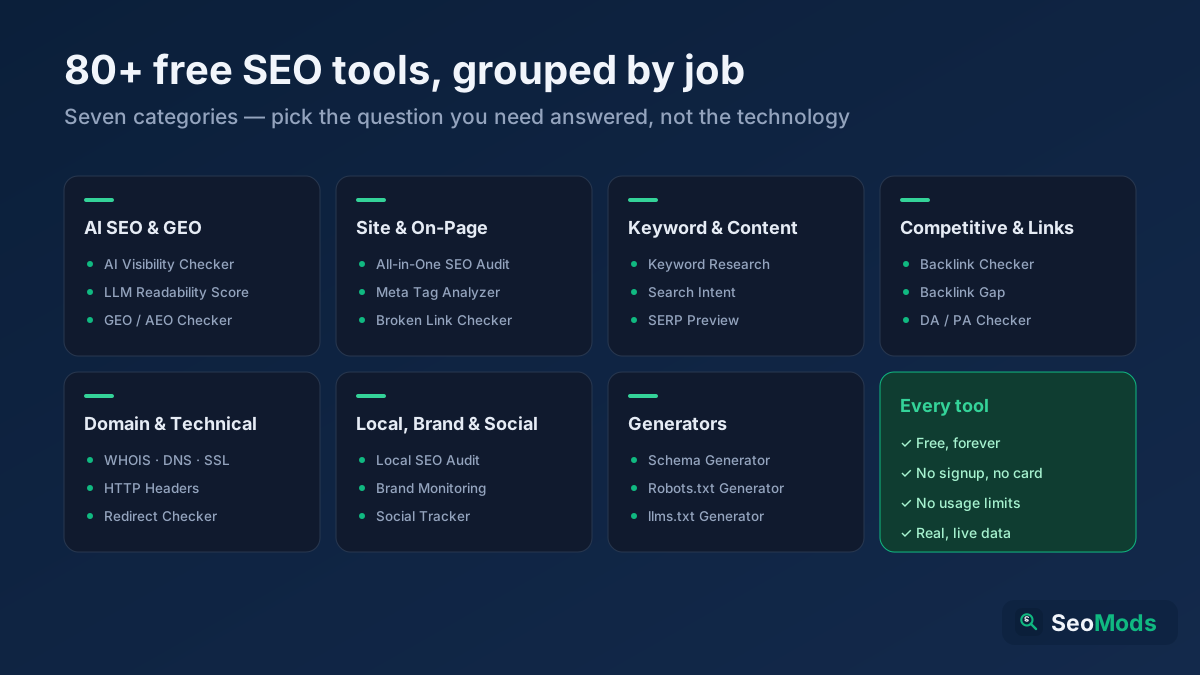
Seven categories, chosen by the question you are trying to answer rather than by the technology behind the tool. If you know what you want to find out, this is the fastest way in.
The free toolkit at a glance: seven categories covering everything from an on-page audit to a WHOIS lookup to an AI-citation check.
Site & on-page analysis — is this page set up correctly?
How to do a free SEO audit in 30 minutes, step by step
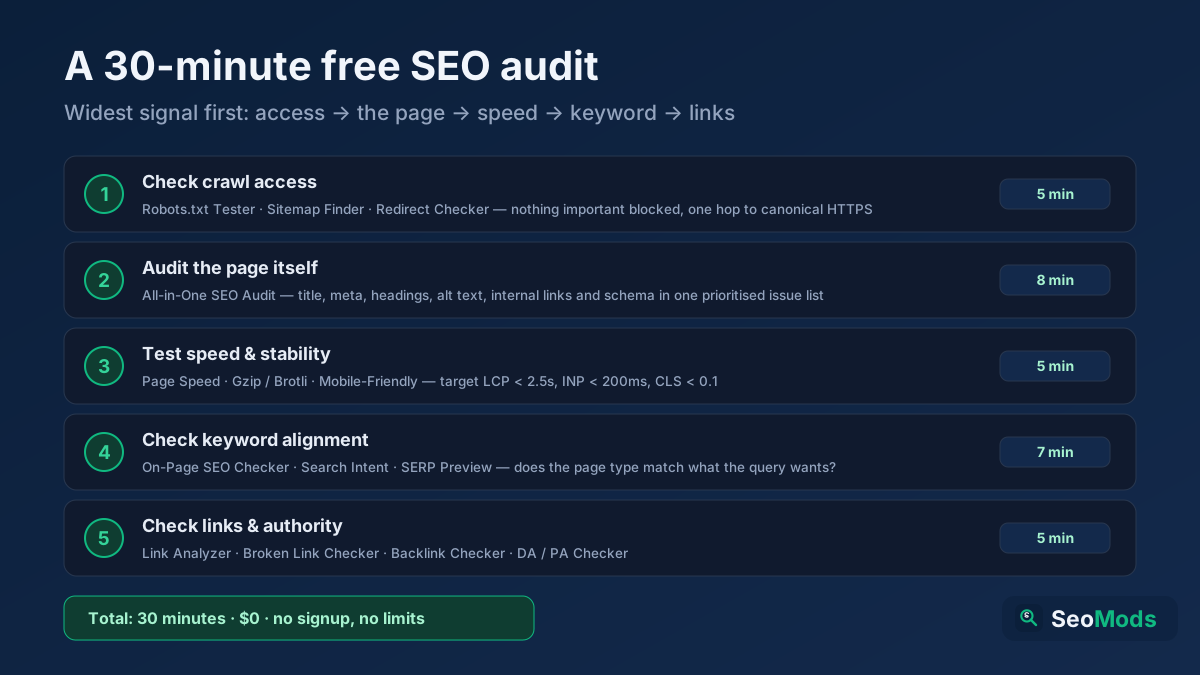
You can audit a small site properly in about thirty minutes using free tools alone, by working from the widest signal to the narrowest: can Google reach the site, can it index the site, is the page itself correct, and is anyone linking to it. Doing it in that order matters — there is no point optimising a title tag on a page that is blocked in robots.txt.
The order matters: access first, then indexing, then the page itself, then keywords, then links.
Check access (5 min). Run Robots.txt Tester to confirm nothing important is disallowed, then Sitemap Finder & Validator to make sure your XML sitemap exists, is valid and lists the URLs you actually care about. Follow with Redirect & HTTP Status Checker on your home page: you are looking for one hop to the canonical HTTPS version, not a chain of three.
Check the page itself (8 min). Run All-in-One SEO Audit on your most important URL. It returns a prioritised issue list covering title, meta description, heading structure, image alt text, internal links, structured data and the technical basics in one pass. Fix anything marked high impact before you look at anything else.
Check keyword alignment (7 min). Run On-Page SEO Checker (Keyword) with the keyword you actually want the page to rank for. Then run Search Intent Analysis on that keyword: if it wants a comparison table and you have written an essay, no amount of on-page tuning will fix the mismatch. Finish with Google SERP Snippet Preview to see the snippet Google will show.
Write every issue you find into a single list as you go and sort it by impact, not by the order you discovered it. A blocked page, a broken canonical or a missing H1 outranks a slightly-too-long meta description every time. For a longer version of this process with more detail on each check, see our guide to doing a free SEO audit step by step and the 12-point technical SEO checklist.
Free alternatives to Ahrefs, Semrush and Moz: what you get and what you lose
Almost all of the day-to-day work of SEO — diagnostics, technical lookups, keyword research, content and AI visibility — is done in full with free tools. Paid platforms are only genuinely required for two things: a web-wide archive and automation at scale. Those two needs apply to very few of the people growing one site or a handful, and for everyone else a subscription is rent paid on data that is already available for nothing.
Ahrefs, Semrush, Moz and their peers are built around something genuinely expensive: a continuously refreshed index of the web and years of stored history. Subscriptions typically start near $100 a month and rise quickly with seats and projects. What that money buys is not better logic: the checks that read your title, canonical, H1, schema, speed, internal links and citability look at the same standards everywhere, and the tools below return the same verdict. The money buys scale and memory.
What you need
Free tools here
Do you need a paid subscription?
Audit one page correctly
Yes — live fetch, full prioritized report
No — same checks, same fix list
WHOIS, DNS, SSL, headers, redirects
Yes — real registry and live responses
No — this data is public to begin with
Keyword ideas and search intent
Yes — live autocomplete and question mining
No — the ideas come from the same place: Google's own suggestions
Verify a specific backlink
Yes — real-time, exact anchor and rel
No — and the free answer is fresher; paid indexes can lag by weeks
Whether AI engines can read and cite your page
Yes — 17 tools dedicated to it
No — most paid platforms are only now entering this category
Your own real clicks, impressions and positions
Yes — with free Search Console
No — no paid platform has this data; they can only estimate it
Where you rank for a keyword today
Yes — spot check
No
Discover every backlink you have
Partly — verification and sampling
Useful here, because it needs a web-wide index
Exact monthly search volume
Estimated, and labelled as such
Partly — the paid figure is also an estimate, just from a larger sample
Rank history stored over months
Spot checks; log them yourself and you have a trend
Useful if you must prove a trend to a client
Crawling 100,000 URLs
No
Yes — a real need at enterprise scale
Scheduled alerts and automated reports
No
Useful if you run dozens of sites
Cost
$0, unlimited, no account, no card
Roughly $1,200–$6,000 a year
The first seven rows of that table are the entire week of work on a normal site, and in every one of them the free answer lands in the same place as the paid one. The rows where paid genuinely pulls ahead all cluster at the bottom, and they all reduce to one word: scale. If you are growing one site or a handful, and your questions are "what is wrong with this page", "what should I write next" and "can AI engines see me", the tools here plus Search Console cover the whole job — and Search Console gives you something no paid platform can: your own true click and impression data. A subscription starts to earn its place only when you are monitoring fifty client sites at once, auditing a link profile you did not build, or automating report production.
The common mistake is treating a subscription as a shortcut. A paid dashboard will not fix an unfixed H1, will not write the content you have not written, and will not unblock a robots.txt line — it shows you the same problems in a more expensive interface. What moves a site is fixing what you found, not which tool found it. So the sensible order is: diagnose and fix with free tools first, and pay only when you regularly need the one thing free tools genuinely cannot do — archive and scale.
Where a free metric genuinely cannot be sourced — search volume being the obvious case — it is labelled as an estimate rather than dressed up as a measurement. See how to check backlinks for free and how to check keyword rankings for free for what each approach can and cannot tell you.
How to find low-competition long-tail keywords with free tools
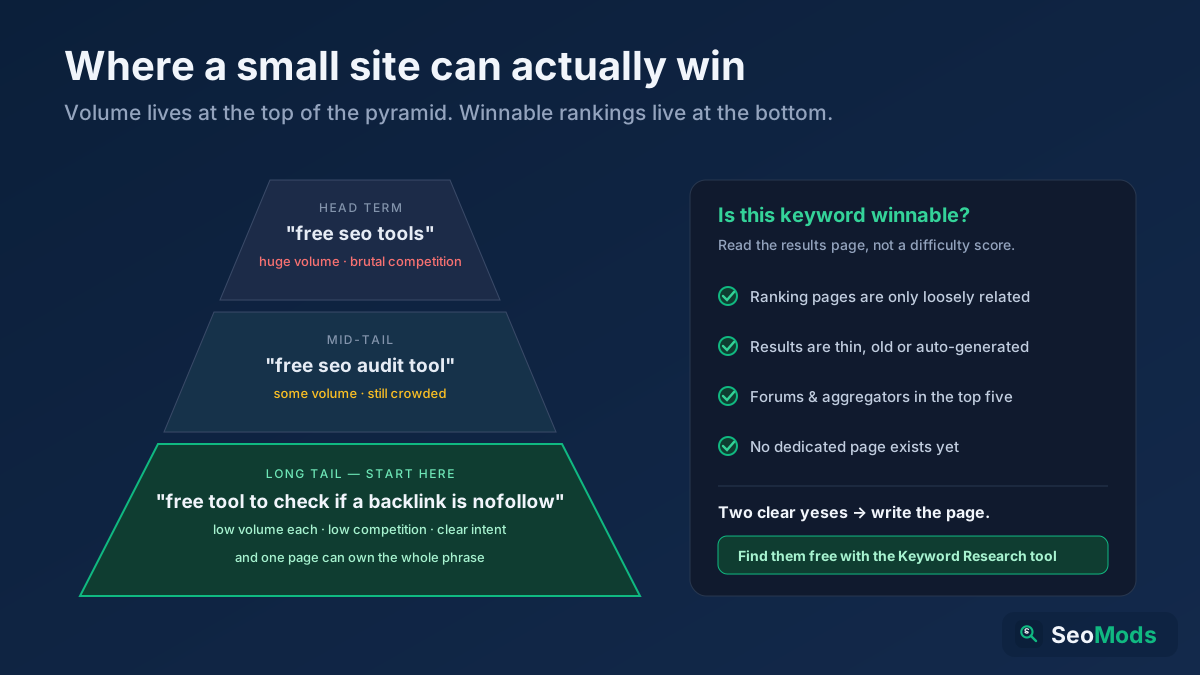
The reliable free method for finding low-competition long-tail keywords is to mine live autocomplete for questions and modifiers, then keep only the phrases whose search results are weak, off-topic or older than your page could be. Difficulty is not a number you look up; it is something you read off the results page.
A long-tail keyword is simply a longer, more specific query — three, five, sometimes nine words. Fewer people search it, but the ones who do know exactly what they want, and far fewer sites have written a page aimed squarely at it. That is the whole trade, and for a new or small site it is the only trade that works: you cannot outrank an established domain for "seo tools", but nobody at all has written the definitive page on "how to check if a backlink is nofollow without signing up".
Head terms carry the volume; the long tail carries the intent — and it is the only part a small site can win quickly.
Here is the workflow, using only tools on this page:
Start broad and let autocomplete do the work. Put your topic into Keyword Research. It pulls live suggestions from real autocomplete sources and returns hundreds of variations along with demand, difficulty and opportunity indexes, so you can sort by opportunity instead of scrolling.
Harvest the questions. Question phrasings — how, why, what, can I, is it worth — are the least contested part of any topic and map perfectly onto a single H2. FAQ Gap Finder shows which questions your existing page fails to answer, and Topic Research & Content Ideas turns a theme into an article list.
Sort by intent before you sort by volume. Run the shortlist through Keyword Intent Classifier. A commercial phrase with 40 searches a month is usually worth more than an informational one with 800, and a keyword whose intent your page cannot satisfy is worth nothing at any volume.
Read the actual results page. This is the step people skip. Look at what currently ranks and ask three questions: are these pages actually about my phrase, or just loosely related? Are they thin, old or auto-generated? Are the top results forums and aggregators rather than dedicated pages? Two yeses out of three, and the keyword is winnable. SERP Features Analyzer tells you which SERP elements are in play, and Keyword Rank Checker shows where you currently sit.
Group before you write. Run the survivors through Semantic Keyword Cluster. Ten long-tail phrases that share an intent belong in one strong article with ten well-named subheadings, not ten thin posts — that is how you avoid competing with yourself. Keyword Cannibalization Checker catches it when you already have.
Then write the page so each long-tail phrase owns a subheading and gets a direct answer in the first sentence beneath it. That structure is what earns featured snippets, and it is the same structure AI answer engines lift from. More on the strategy in why long-tail keywords convert better and our full keyword research walkthrough.
Free AI SEO tools: getting cited by ChatGPT, AI Overviews and Perplexity
Free AI SEO tools check whether generative answer engines can reach your pages, understand them and quote them as a source — a discipline usually called GEO, Generative Engine Optimization. It is a different question from ranking, and a page can do well at one while failing completely at the other.
Classic search sends a visitor to your page. An answer engine reads your page and gives the visitor the answer directly, crediting you with a citation if you are lucky. Whether you are the cited source depends on three things you can test today:
Access. AI crawlers use their own user agents — GPTBot, ClaudeBot, PerplexityBot, Google-Extended among them — and plenty of sites block them by accident while trying to block scrapers. AI Visibility Checker and Robots.txt Tester show you exactly who is allowed in. Our guide to controlling AI crawlers in robots.txt covers the directives.
Trust and topical depth. Models prefer sources that look authoritative on the subject: named authors, dates, citations, and coverage of the surrounding entities rather than one isolated post. E-E-A-T Analyzer grades the trust signals, while Entity Coverage Analyzer, Semantic Coverage Analyzer and Topical Authority Map show where your topical coverage is thin.
Two more tools are worth running once per site rather than per page. llms.txt Generator (AI / GEO) produces an llms.txt file — a plain-text map of your most useful pages aimed at language models, explained in our llms.txt guide — and GEO & AEO Readiness Checker gives you a combined readiness score across both generative and answer-engine criteria.
That is a lot of tools to face on a Monday morning. These are the short stacks — five or six tools each — that cover most of what a given kind of site actually needs.
You need a defensible answer fast, often on a call, often about a site you saw ten minutes ago. All-in-One SEO Audit produces the first pass, Site Explorer and Organic Research / Top Pages profile the competitor the client keeps mentioning, Link Intersect / Backlink Gap finds the domains linking to two rivals but not to your client, Toxic Backlink Audit assesses an inherited link profile for risk, and DA / PA Checker — Domain & Page Authority gives you a comparable number for a slide. Because nothing requires a login, you can hand a client the tool URL and let them reproduce your finding themselves — which is a more persuasive deliverable than a PDF.
The technical lookups are the tools most people arrive for and keep coming back to, because they answer a factual question with a factual answer: who owns this domain, where does it point, is the certificate valid, what is the server actually sending. There is no scoring or interpretation involved — the tool queries the real registry or makes the real request and shows you the response.
WHOIS Lookup — registrar, registration and expiry dates, name servers and, where the registry publishes it, the registrant. Useful for verifying a domain before you buy it, checking whether an expiry is about to bite, or confirming who you are dealing with. More in our WHOIS lookup guide.
DNS Records Lookup — A, AAAA, CNAME, MX, TXT and NS records as they resolve right now. This is where you confirm a migration propagated, an SPF record is present, or mail is pointed at the right host.
SSL Certificate Checker — certificate validity, expiry date, issuer and chain. An expired certificate is one of the very few SEO problems that costs you all of your traffic at once.
HTTP Header Checker — the raw response headers, including status code, caching directives, compression and security headers. A surprising share of "Google is not indexing my page" mysteries turn out to be an X-Robots-Tag nobody knew was there.
Redirect & HTTP Status Checker — the full hop chain with a status code for each step, so you can see a 302 that should be a 301, or a four-hop chain that should be one.
All of these run against the live target, so the answer is current by definition. None of them require you to identify yourself, and none of them cap how many domains you can check.
Are free SEO tools accurate? Where the data comes from
Free SEO tools are fully accurate for anything that can be measured directly on the live page or in a public registry, and approximate for anything that requires a proprietary web index — which is why every estimated figure on this site is labelled as an estimate rather than presented as a measurement.
It is worth separating the two, because they fail in completely different ways:
Directly measured, and exact. HTTP status codes, response headers, redirect chains, HTML structure, title and meta content, heading hierarchy, image alt attributes, internal and outbound links, structured-data blocks, page weight, compression, DNS records, WHOIS fields, SSL chains. The tool fetches the resource and reads it. There is nothing to estimate and no cache to go stale — if the report says the H1 is missing, the H1 is missing.
Derived or estimated, and labelled. Monthly search volume, keyword difficulty, domain and page authority, total backlink counts, traffic figures. These require either a licensed data set or a crawl of the entire web, and any tool that hands you a precise-looking number for them — free or paid — is showing you a model output, not a measurement. Two paid platforms will happily disagree by a factor of three on the same keyword. Where we surface such a metric it carries an estimate badge, and where we can source it from a real third-party API, such as authority scores, we say which one.
The practical takeaway: use estimated metrics for ranking things against each other — this keyword looks easier than that keyword, this domain looks stronger than that one — and never as an absolute you report to someone as fact. For absolutes about your own site, Google Search Console is the only source of truth for impressions, clicks and average position, and it is free. See measuring SEO with Search Console.
Six mistakes people make with free SEO tools
Chasing the score instead of the issue. A score out of 100 is a summary, not a target. Moving from 78 to 94 by fixing eleven cosmetic warnings is worth less than fixing the one canonical tag pointing at the wrong URL. Work the prioritised issue list from the top, and stop when the remaining items stop mattering.
Auditing one page and assuming it represents the site. Templates differ. Your home page can be immaculate while every product page ships the same missing H1. Audit one URL per template — home, category, product or article, contact — rather than one URL per site.
Treating estimated volume as a measurement. Publishing a content plan built on the assumption that a keyword gets exactly 1,900 searches a month is building on sand. Use the ordering, not the digits.
Optimising a page for a keyword whose intent it cannot satisfy. If the results for a query are all comparison tables and you have written a narrative essay, you are not competing. Check with Search Intent Analysis before you write, not after you fail to rank. See the four types of search intent.
Fixing everything at once and learning nothing. If you change the title, the internal links, the content and the schema in one deploy, you will never know which one moved the needle. Change in batches with a theme, and note the date so you can line it up against Search Console later.
Expecting the result this week. Indexing takes days, ranking movement takes weeks, and compounding takes months. That is not a limitation of free tools; it is how search works. Here is a realistic timeline.
A free SEO routine you can actually keep
Tools only compound if you run them on a schedule. This one is deliberately small enough to survive a busy month.
Weekly, about fifteen minutes. Open Search Console and look at the last seven days against the previous seven. Run Keyword Rank Checker on your three or four money keywords. Run All-in-One SEO Audit on anything you published or edited that week, before you forget what you changed.
That is the whole system: a short weekly check, a monthly clean-up, a quarterly look outward. It costs nothing but the time, and it is more than most sites in most niches are doing. If you want a longer walkthrough of doing this yourself without hiring anyone, read DIY SEO with free tools and how to rank higher on Google.
All the free SEO tools, by category
Pick a tool, enter a URL, domain or keyword — no signup, real results in seconds.
Next-Gen AI SEO & GEO
The 17 free tools in the Next-Gen AI SEO & GEO category break one question into measurable parts: can generative answer engines — ChatGPT, Google AI Overviews, Perplexity, Copilot — reach your page, parse it into something they understand, and judge it worth citing when they answer? Classic SEO tools ask where Google ranks you. This category asks whether an AI system will put you inside its sentence. They are not the same question, and a page can be strong on one and invisible on the other.
Why this became its own category
The results page quietly changed hands over the last two years. Someone types a question, gets a generated paragraph at the top of the page, and often never touches the ten blue links underneath. The same behaviour moved into chat interfaces: people no longer search "best accounting software", they ask, and the model returns an answer stitched from two or three sources. In that arrangement the thing that drives traffic is not only your rank but your citability. If a model never quotes you and your brand never appears in the answer, ranking first buys you nothing in that session.
The tools here measure that new surface in three layers — access, format and trust — because a page that fails any one of them cannot enter an AI answer. The concepts are covered in full in the free AI SEO tools section above; the list below is the practical map of which tool answers which question.
Which tool answers which question
Overall visibility and readiness.AI Visibility Checker rolls every signal — AI crawler access, brand-entity strength, structured data, citable content, llms.txt — into one score out of 100. GEO Checker grades the same fundamentals from a generative-engine angle, and AEO Checker grades the answer-engine format: question headings, self-contained short answers, lists, tables, FAQ schema. If you do not know where to start, run these three in that order.
Citability.AI Citation Checker measures how quote-worthy a page looks: does it answer directly, does it carry numbers, does it cite sources, is there a named author and a date. AI Snippet Optimizer finds the most quotable 40–60 word block on the page and rewrites a tighter version of it.
Machine readability.LLM Readability Score scores how cleanly a language model can parse your text, using sentence length, passage size, jargon and ambiguity. Passage Optimization Checker does the same paragraph by paragraph — Google and AI engines both judge pages passage by passage, not as one block. AI Prompt-Friendly Content Checker compares your content against the way people actually phrase things in a chat box.
Question coverage.FAQ Gap Finder pulls the questions people really ask about your topic and lists the ones your page does not answer; AI FAQ Optimizer grades the answers you already have for snippet-readiness and generates copy-paste FAQPage JSON-LD.
Meaning and entities. Models match concepts, not strings. Entity Extractor lists the people, organizations, places and concepts on your page; Entity Coverage Analyzer tells you which of the entities the topic expects are missing; Semantic Coverage Analyzer does the same at the level of subtopics and related terms; and NLP Content Analyzer shows your text the way a natural-language engine sees it — salient terms, sentiment, sentence structure.
Authority and trust.Topical Authority Map works out how completely your whole site covers a topic and returns the missing subtopics — cluster level, not single-article level. E-E-A-T Analyzer audits experience, expertise, authoritativeness and trust signals one by one. AI Content Score compresses all of it into a single 0–100 grade, which is the most practical one to track over time.
A twenty-minute AI visibility pass
Run AI Visibility Checker on your homepage and fix any "crawler blocked" warning immediately. If GPTBot or PerplexityBot is shut out, everything else is theoretical.
Run AI Citation Checker and AEO Checker on the article that actually brings you traffic; the "no source, no date, no author" items are the fastest wins on the list.
Once a month, run Topical Authority Map and build next month's content plan out of the gaps it returns.
The four mistakes this category catches most often
Blocking answer engines while trying to block scrapers. A blanket disallow in robots.txt shuts out GPTBot and PerplexityBot along with everything else. Deciding that deliberately is one thing; going invisible without noticing is another. Robots.txt Tester shows exactly who is let in.
Burying the answer. A long intro, three paragraphs of context and the actual answer somewhere in the middle is the standard blog shape, and it is the worst possible one for an answer engine. Give the answer in two or three sentences directly under the heading; the detail still follows.
Writing in one enormous block. Models quote passages, not pages. An unbroken 900-word block is not citable even when a perfect answer is buried inside it, because there is no clean boundary for the model to lift.
Never naming the brand. A page written entirely in "we" and "our team" leaves the model no entity to attach anything to. Say the brand name, what it does and where it operates in the copy, and repeat the same facts in structured data for the machine side.
Those four are what the tools in this category flag most often, and none of them costs money to fix — they are a change of publishing habit. For a small blog, AI Citation Checker and AEO Checker alone are enough to start with; on e-commerce and corporate sites Entity Coverage Analyzer and E-E-A-T Analyzer matter most; and for a publication trying to own a subject long-term, Topical Authority Map returns the most.
What these tools do not do
The honest limit: they do not query ChatGPT on your behalf and count how many times it named you. What they do is measure, on your own page, the signals answer engines weigh when they choose a source, and hand the shortfalls back as fixable items. If you want to track brand mentions themselves, that is a job for Brand Monitoring plus referral traffic in Search Console and analytics. The two halves work together: you fix the signals here and measure the outcome there.
There is also a timing argument. AI answer surfaces are still new enough that the pages explaining and targeting them are thin in most niches, and the competition for "cited by AI" is nothing like the competition for a head term. Making your pages quotable now is far cheaper than doing the same work in a crowded field two years from now. Start with what GEO is, GEO vs AEO vs LLMO, how to get cited by ChatGPT and managing AI crawlers in robots.txt.
The 21 free tools in the Site & On-Page Analysis category do one job: they open a page the way Google first sees it — as the HTML the server returns — and measure the on-page elements that decide how it ranks: title tag, meta description, H1–H6 structure, keyword alignment, internal and external links, image ALT text, mobile setup, speed, structured data and content depth. If you are asking which category to run first, this is it. On-page is the only part of SEO you can fix for free, today, and see move within weeks. Earning links takes months and building authority takes years; fixing a missing title tag takes five minutes.
What on-page analysis actually measures
A search engine judges a page with three questions: can I reach it, can I tell what it is about, is it worth showing. On-page analysis is the part of all three that sits under your control. You cannot change how many links a competitor has, but you can change which query your page answers, where that answer sits, how the headings are ordered and how many seconds the page takes to render.
In practice, what holds most sites back is not an exotic technical fault but three or four ordinary gaps from this list: a meta description inherited from the theme and repeated on every page, images with no ALT text, three H1s instead of one, a product page that takes four seconds on mobile, two category pages written around the same phrase. These tools find those gaps by measuring rather than guessing. For the conceptual background see the tool categories section above, and for the running order see the 30-minute free audit steps.
Which tool answers which question
Everything in one pass.All-in-One SEO Audit runs every check in this category against one URL in a single crawl and returns an overall score, a prioritized fix list and an exportable report. If you do not know where to start, start here. On-Page SEO Audit does the same job in a narrower frame — one page's on-page health — while Technical Site Audit (Crawler) walks the site instead of a single page and collects broken links, missing titles, thin pages, redirects and noindex.
Target keyword alignment.On-Page SEO Checker (Keyword) grades how well a page is optimized for one specific term: is it in the title, the H1, the URL, the opening paragraph. Keyword Density Checker shows how often you repeat it — the fastest way to see whether you have drifted into stuffing.
Titles, meta and SERP appearance.Meta Tag Analyzer pulls the title, description, robots, canonical and social tags from the live page and scores them with their lengths. Heading Structure Analyzer visualizes the H1–H6 hierarchy and surfaces missing H1s, skipped levels and duplicate H1s. Open Graph & Twitter Card Checker previews how the page looks when someone shares it on LinkedIn, X or a messaging app.
Links.Link Analyzer counts internal and external links and the nofollow ratio; Broken Link Checker calls each one and reports the dead ones (4xx/5xx) and the redirects. Anchor Text Optimizer classifies your anchors and flags the "click here" kind, and Internal Link Opportunity Finder surfaces related pages that do not link to each other yet — one of the highest-return free jobs on any site.
Images, mobile and speed.Image ALT Text Checker lists every image missing descriptive ALT text. Mobile-Friendly Checker verifies the viewport and responsive signals, and Page Speed & Size Test measures real server response time (TTFB), total page weight and compression.
Content quality and trust.Thin Content Checker tells you whether a page reads as empty to a search engine, using word count, text-to-HTML ratio and vocabulary variety. Content Freshness Score grades how current it looks. Keyword Cannibalization Checker puts your own competing pages side by side. Author Page Audit audits author pages for the E-E-A-T signals Google and AI systems look for.
The machine side.Structured Data (Schema) Checker detects the JSON-LD and Microdata types on the page — the reason a page never earns rich results usually shows up here. GEO & AEO Readiness Checker grades the same page for AI search readiness, and is the bridge between this category and the AI category above.
A twenty-minute on-page pass
Run All-in-One SEO Audit on the page that actually brings you traffic and keep the prioritized fix list it returns. Every step below deepens one part of it.
Put that page's target keyword into On-Page SEO Checker (Keyword). If the term is missing from the title or the H1, that is the fastest win you will find all day.
The five mistakes this category catches most often
One template description on every page. Most CMS themes fill the description field with a single site-wide sentence, so hundreds of pages share it and Google uses none of them. Technical Site Audit (Crawler) catches it site-wide; writing meta descriptions covers what to replace it with.
A title that describes the site, not the page. "Home | Company Name" tells a searcher nothing and wastes the single strongest on-page signal you have. See title tag optimization.
Heading tags used for size. H2 chosen because it looked right, H1 skipped entirely, three H1s on one page. Headings are an outline, not a font control — Heading Structure Analyzer shows the real shape, and the H1–H6 guide explains the order.
Two pages chasing the same query. A category page and a "best X" list built around the same phrase leave both stuck mid-page. Keyword Cannibalization Checker shows the pair; the call — merge, differentiate or canonicalize — is yours.
A heavyweight hero image. Uploading a 3000px product photo costs nothing on desktop and seconds on a mobile connection. Page Speed & Size Test gives you the real weight; the Core Web Vitals guide explains which metric it hurts.
The honest limit: these tools read the HTML your server returns. Content that only appears after JavaScript runs is invisible to them — which is close to what a crawler sees on its first pass, so "the tool could not see it" is usually a real warning rather than a false negative. None of them gives you a ranking either: an on-page score is a list of fixable gaps, not a rank prediction. For position, use Keyword Rank Checker; for real clicks and impressions, use Search Console.
And a single run is a snapshot. The value of on-page work comes from repetition — running the same audit monthly and watching the direction of the score beats one perfect audit. For the theory, read the on-page SEO guide; for a checklist, how to run an on-page SEO audit; and for links between your own pages, internal linking strategy.
The 13 free tools in the Keyword & Content Research category answer the question that comes before you write anything: what are people actually searching for on this topic, what do they want when they search it, and which page should exist to satisfy that? On-page analysis improves the page you already have. This category decides which page to write. The most expensive mistake in SEO is not a badly optimized article — it is a technically flawless article written for a phrase nobody searches, or one you were never going to win.
How to do keyword research without search volume
What paid platforms really sell is one number: monthly search volume. That number is itself an estimate — modelled from clickstream data, rounded to a month, and frequently different in two different tools. The tools here skip buying that number and go to a more direct source: the search engines' own autocomplete. Every phrase that appears in a suggestion list is there because real people typed it often enough to earn a slot. So without a volume figure you still get an answer to the question that matters when planning content: does this query exist, and in these words?
That is also why this approach travels well outside English. Global volume databases return "0" or "no data" for a large share of long-tail queries in smaller-language markets even when those queries run into the hundreds a month; live autocomplete never has that blind spot, because it is fed by what users type. The method is covered in full in the low-competition long-tail section above; the list below maps tool to question.
Which tool answers which question
Finding and expanding ideas.Keyword Research is the flagship: it expands one seed into hundreds of live queries from Google, YouTube, Bing and DuckDuckGo autocomplete, scores each phrase for demand, difficulty and opportunity, labels intent and funnel stage, and groups the result into topic clusters. For a faster, narrower list, Keyword Suggestion Tool returns the same source plainly with A–Z and question modifiers. Topic Research & Content Ideas returns the output as headlines you can drop straight into a content calendar — questions, comparisons, preposition variants — rather than as a keyword list.
Intent: what should I write for this phrase? Writing without knowing whether a query wants a guide, a product page or a comparison is the single most common reason a good page fails to rank. Search Intent Analysis classifies one keyword as Informational, Navigational, Commercial or Transactional. Search Intent Analyzer goes deeper: primary and secondary intent, funnel stage, recommended content type, and the SERP features the query is likely to trigger. Keyword Intent Classifier does the whole list in one pass — the biggest time-saver when you are prioritizing hundreds of phrases.
Structure: how many pages is this? A list of fifty keywords is not fifty articles. Most of them belong to the same page, and splitting them produces keyword cannibalization. Semantic Keyword Cluster groups the expanded list by shared terms, labels each cluster's intent and lays out a pillar-and-spoke architecture. If you intend to own a topic rather than publish one post about it, your plan comes from here.
Competition and gaps.Content / Keyword Gap puts your page next to a competitor's and lists the terms they cover and you never mention — the fastest way to strengthen an existing article without rewriting it. SERP Features Analyzer predicts whether a query triggers a featured snippet, People Also Ask, video or a local pack, which decides the format of the page. PPC & Keyword Value Research estimates commercial value and competition — useful on the organic side too, because a keyword advertisers pay for is a keyword with buying intent behind it.
Pre-publish checks.Google SERP Snippet Preview shows pixel-accurately how your title and description will render in results. Word & Character Counter gives word, sentence, paragraph and reading-time counts plus your most frequent terms. Text Similarity / Duplicate Checker compares two texts and returns a real similarity percentage — essential for product pages reusing supplier copy and for category descriptions that drift into near-duplicates.
A twenty-minute keyword pass
Put the broadest version of your topic into Keyword Research as the seed, set language and market, and sort the result by opportunity score.
Paste the list into Keyword Intent Classifier and split it into two buckets: informational phrases for articles, commercial and transactional ones for service or product pages.
Run Semantic Keyword Cluster to get the clusters. Each cluster is one page: its broadest phrase is the target keyword, the rest are subheadings.
Discarding anything that shows zero volume. A large share of long-tail queries read as zero in global databases. A phrase that appears in autocomplete should not be dismissed because its volume is unmeasurable — very often it is your best-converting page. See long-tail keywords for the full argument.
Treating variants as separate keywords. "running shoes for flat feet", "best running shoes flat feet" and "flat feet running shoe reviews" look like three rows but represent one intent and belong on one page. Semantic Keyword Cluster merges them; if you do not merge them, you publish three weak pages instead of one strong one.
Translating research between markets. Phrasing does not survive translation — people in different markets ask for the same product in structurally different words. Always seed in the target language, in the way people actually speak it.
Choosing a keyword without looking at the SERP. A phrase can look attractive while its first page is wall-to-wall marketplaces, aggregators or forums, in which case a new site is not getting in. SERP Features Analyzer shows which format is rewarded; look at the actual results before you commit.
Misreading intent and building the wrong page type. Writing a guide for queries containing "price", "pricing" or "reviews"; serving a product page to a "how to" query. However good the content is, the wrong page type does not rank. Search intent explained walks through the distinctions.
The honest limit: this category does not give you exact monthly search volume from Google Ads. The demand, difficulty and opportunity scores are relative measures computed from suggestion rank, query length, competition signals and SERP structure — enough to say "A is searched more than B", not enough to say "this gets exactly 2,400 searches a month". Tools whose numbers are modelled are labelled as estimates on their own cards. Exact volume has one source: Keyword Planner inside a Google Ads account that is actually spending.
Second limit: there is no historical ranking index here showing which keywords a competitor gets traffic from — Content / Keyword Gap reads a competitor's page live, not their archive. For position itself use Keyword Rank Checker, and for real clicks and impressions use Search Console — which is, in the end, the single best keyword source you have: the queries your site is already being shown for. For the theory, read the keyword research guide; for architecture, topic clusters and pillar pages; for growing pages you already have, content refresh strategy and winning featured snippets.
The 8 free tools in the Competitor & Backlink Analysis category do not look at your site — they look at everything around it: what a rival is built on, which pages carry their traffic, who they link to, who links to you, and where a domain sits in the link graph. On-page analysis answers "is my page built correctly". This category answers "can I realistically compete for this query, and if not, what am I missing". When two technically flawless pages target the same keyword and one ranks first while the other sits on page four, the difference is almost always something measured here.
How far can free backlink analysis actually go?
Start with the honest answer, because this is the category where marketing language is thickest. What makes a paid platform's backlink report possible is not a clever tool but an infrastructure: their own crawlers running continuously across the web, and a link index built up over years. Paying for that index is the real reason those subscriptions cost what they cost. A free tool cannot replicate it, and any free tool claiming it can is not telling you the truth.
What it can do is take a different route, and in practice that route is more useful than it sounds: verify live instead of reading from an index. The most certain way to know whether a link exists is to open that page right now and look for it in the HTML — not to consult a snapshot taken a month ago. The same logic applies on the competitor side: a site's sitemap already is the list of pages it cares about, its HTML already says which keyword each page targets, and its outbound links already show who it associates with. As for your own backlink index, Google gives it to you free: export the Links report from Search Console, paste it into the tools here, and you are working with better data than a paid index could sell you, because that list is the one Google itself sees. The longer version of this argument is in the free alternative to Ahrefs and Semrush section above.
Which tool answers which question
Who is this competitor and what are they running?Site Explorer profiles a domain end to end: CMS and theme, plugins, JavaScript libraries, CDN, hosting, analytics and ad tags, security headers, SSL, DNS, IP, country and on-page SEO signals. It is the fastest way to understand how a rival site is put together — useful when scoping a pitch, and just as useful when choosing your own stack. More: the free site explorer guide.
Which pages are winning for them?Organic Research / Top Pages pulls a competitor's most important pages from their sitemap and analyses the topics and keywords those pages target. This is where you read their content strategy instead of guessing at it: how many pages they gave each topic, which title pattern they repeat, where they went deep. See also how to find what keywords a site ranks for.
How much authority do they have?DA / PA Checker returns Domain and Page Authority from real link-graph data and compares up to twenty domains side by side. The point is not to look up one site — it is to rank the list: paste the ten domains on page one along with your own and see where you stand in a single view.
Does this link actually exist?Backlink Checker / Verifier opens every URL on your list and reports whether it really links to you, plus the anchor text, the rel value (nofollow/sponsored/ugc) and the page's status code. Anyone who buys links, commissions sponsored posts or runs press releases should run this first: a surprising share of links reported as "published" were never placed, are nofollow, or quietly disappeared a few months later. Walkthrough: how to check backlinks for free.
Are these links hurting me?Toxic Backlink Audit takes the list you exported from Search Console and scores each link against toxicity signals: suspect TLDs, link farms, mismatched language and topic, over-optimised exact-match anchors. Read the output as a review queue, not an execution list — a disavow file is never something to rush: toxic backlinks and disavow.
Who links to them but not to me?Link Intersect / Backlink Gap compares the outbound link profiles of two competitor pages and returns the domains that link to both — which makes them realistic targets for you too. Starting an outreach list here rather than from guesswork is one of the highest-return things you can do for free: backlink analysis and link building.
Where do I currently stand?Keyword Rank Checker estimates a domain's position for a keyword from on-page relevance signals. Its card says estimate for a reason; read it alongside the average-position data in Search Console: free rank tracking guide.
Is this market worth entering?Market / Niche Explorer maps a niche: it aggregates demand signals, surfaces competitor angles and shows how crowded the topic already is. Run it before launching a new site, a new category or a new service line.
A twenty-minute competitor pass
Search your target keyword and copy the domains on page one. Paste them all into DA / PA Checker with your own domain in the list. The gap is your first estimate of how much content and link work stands between you and that page.
Pick the two rivals closest to your size and run Site Explorer on each. Note the differences in stack and technical signals.
Run Organic Research / Top Pages on the same two and list the topics you have never covered. That list is the skeleton of your next quarter's content plan.
Compare their two strongest pages in Link Intersect / Backlink Gap and pull the domains linking to both. That is your outreach shortlist.
Search Console → Links → export. Paste it into Toxic Backlink Audit and review anything flagged high-risk; historic paid links show up here.
Check every link you were told you received but never verified with Backlink Checker / Verifier in one batch.
The five mistakes this category catches most often
Treating marketplaces and giants as your competitors. If page one is Amazon, Etsy, Reddit and Wikipedia, those are not your rivals — matching them takes years. Your real competitor is the independent site at your own scale that also appears there. Strip the giants out of the DA / PA Checker list and look at what remains; that is your realistic target.
Buying links in bulk. Cheap packages of hundreds of links come from near-identical weak sites and most vanish within months. The benefit is short-lived and the risk is permanent. The same budget spent earning one genuine industry mention is measurably worth more — and methods like broken link building do it for nothing but time.
Leaving paid placements unmarked. Sponsored posts without rel="sponsored" put both sides at risk. Backlink Checker / Verifier shows the rel value on every link; knowing how the content you paid for was marked up is your responsibility, not the publisher's.
Reading DA as a Google metric. Domain Authority is a third-party estimate, not a value Google uses. It is excellent for comparison and meaningless as a target. A strategy built around "let's reach DA 40" optimises a tool's score rather than your rankings.
Earning links once and never checking again. Links rot: pages get deleted, sites shut down, redesigns drop the link, an editor adds nofollow. Refreshing the list with Backlink Checker / Verifier twice a year is cheaper than chasing new links, and often more effective.
The honest limit: there is no box here where you type a domain and get "list all of its backlinks", because that list can only come from owning a web-scale crawl index. The tools here verify the list you supply, read live pages, or use public authority data. The consequence cuts both ways: you cannot see a competitor's full link profile, but you can see your own more accurately than a paid tool would show it, because Search Console data comes straight from Google with no modelling in between.
The 10 free tools in the Domain & Technical category do not interpret anything — they read records: who a domain is registered to, where it resolves, whether the certificate is valid, what the server actually sends back, which bot is allowed where, and whether the sitemap really works. No scores, no estimates, no "could be improved" — just a live query and a raw response. When you need to know why something is not happening, this is the first place to look.
Why technical lookups come first
Before a search engine can rank a page it does three things in order: resolve the domain, fetch the page, index the content. Break any link in that chain and everything downstream is wasted work. A perfect title tag does not compensate for a wrong DNS record; flawless content does not get past a header that says noindex. Content and link work take months and compound slowly; fixing a fault in this category usually takes five minutes and shows up on the next crawl.
In practice these tools get used at two different moments. The first is the routine check: taking over a new site, finishing a migration, or confirming everything is in place after a launch. The second is diagnosis — finding the cause behind "my page will not index", "the site is intermittently down", "email is not arriving", "Google is showing an old version". In the second case order matters, and the pass below follows exactly that order. For the conceptual introduction, see the free WHOIS, DNS, SSL and header lookups section above.
Which tool answers which question
Who owns the domain, and until when?WHOIS Lookup returns the registrar, creation and expiry dates, name servers and status. Domain Age Checker derives the age from the same record — history is the signal people weigh most when buying an aged domain. A domain that lapses because nobody watched the expiry date is the most expensive accident a site can have; that alone is reason to put the date in a calendar. More: the WHOIS lookup guide.
Where does it resolve?DNS Records Lookup shows A, AAAA, CNAME, MX, TXT, NS and SOA records as they stand right now. It is how you confirm a migration has propagated, that SPF and DKIM are in place, and that a verification TXT record is still there. IP & Geolocation Lookup opens up the server behind the address: country, ISP, ASN and hosting company. Background: DNS records explained.
Is the certificate sound?SSL Certificate Checker lists the issuer, validity dates, days remaining and the domains the certificate covers. The two most common findings are a certificate that does not cover the www variant and a Let's Encrypt setup whose auto-renewal quietly broke. For the full move to HTTPS: the HTTPS migration guide.
What is the server really sending?HTTP Header Checker shows raw response headers: status code, server software, cache directives, content type, security headers and — critically — X-Robots-Tag. A meaningful share of "there is no noindex on my page but Google will not index it" cases are solved not in the HTML but exactly here: noindex vs nofollow vs disallow.
How many hops?Redirect & HTTP Status Checker traces the full chain step by step. You are looking for three things: 302s that should have been permanent, chains stretched over three or four hops when one would do, and loops. It is the single most useful tool after a migration: 301 vs 302 redirects.
Where can bots go?Robots.txt Tester fetches the file, lists the rules per user-agent and finds the sitemap declarations. Not only for Googlebot: this is also where you see the status of AI crawlers such as GPTBot and PerplexityBot. Guides: the robots.txt guide and managing AI crawlers.
Does the sitemap work?Sitemap Finder & Validator locates a domain's XML sitemaps, validates the format and counts the URLs inside. The two failures plugin-generated sitemaps hit most often are URLs left on an old domain after a migration and a lastmod value that never updates: the XML sitemap guide.
Is the response compressed?Gzip / Brotli Compression Test measures whether text responses are actually compressed and how many bytes that saves. When it is off, the saving is usually above seventy percent and the fix is one line of server config — the cheapest mobile speed win there is: page speed optimization.
A ten-minute technical health pass
Check the expiry date with WHOIS Lookup and put it in a calendar. Once a year, and the most expensive step to skip.
Confirm with DNS Records Lookup that A and MX point at the servers you expect, and clear out stale verification TXT records while you are there.
Look at days remaining in SSL Certificate Checker. Under thirty, verify that auto-renewal is actually running.
Put both the http and www variants of your homepage through Redirect & HTTP Status Checker. All four should land on one canonical address in a single permanent hop.
Read the headers of the homepage and one inner page with HTTP Header Checker, watching for X-Robots-Tag and cache directives in particular.
Verify compression with Gzip / Brotli Compression Test. If it is off, that is the highest-return technical fix available to you today.
Five findings that come up again and again
Redacted WHOIS is normal, missing WHOIS is not. Since GDPR, most registrars hide registrant details, so an empty owner field means privacy, not a broken lookup. What should still be there are the dates, the status codes and the name servers — if those are missing too, the domain itself is in an unusual state.
Both the www and non-www versions left live. Two addresses serving the same content read as two sites. Pick one, redirect the other permanently, and confirm the chain in Redirect & HTTP Status Checker. The tag-level counterpart is in the canonical tag guide.
Hosting on the wrong side of the world. If your visitors are all in one country and the server is on another continent, every request carries a noticeable delay. IP & Geolocation Lookup tells you where the hosting really is; without a CDN this is the first thing you will notice on the Core Web Vitals side.
A sitemap nobody has looked at since launch. Deleted URLs, old-domain URLs, noindexed URLs, parameter duplicates — all of them keep being submitted for crawling. Sitemap Finder & Validator catches the invalid entries, and crawl budget explains why it matters at scale.
Silent 5xx responses on shared hosting. A server refusing some requests at peak hours is usually invisible in a browser, but it consumes crawl budget and delays indexing. A few checks with HTTP Header Checker at different times of day is the first evidence of it.
The honest limit: each of these sends one request to one address. They do not crawl your whole site, they do not watch your server continuously, and they will not tell you when something breaks. They answer "is it sound right now" definitively, and cannot answer "was it sound last night". For continuous monitoring use an uptime service, and for the indexing side use the Pages report in Search Console — both are free, and both sit alongside these tools rather than replacing them.
The second limit: the result is whatever the server returned to us. A CDN or firewall can respond differently to requests from other countries or other user agents, in which case the tool is telling the truth while Googlebot sees something else. The only definitive way to know what Googlebot sees is the URL Inspection tool in Search Console. Use the two together: measure the raw facts here, read Google's interpretation there. To go further, see the technical SEO audit checklist, how to fix "crawled – currently not indexed" and log file analysis for SEO.
The 3 free tools in the Local, Brand & Social category look outward rather than inward: can a customer near you find you, where does your name appear across the web and the news, and are your social profiles actually connected to your brand? Every other category measures a page. This one measures a business. What ranks in the map pack is not a URL but an entity — and for that entity to hold together, your name, address, phone number and profiles have to corroborate each other everywhere they appear.
Why these three tools belong together
A local audit, a brand mention feed and a social profile scan look like three unrelated jobs. They are three vantage points on one question: does the web agree on who you are? Search engines do not build a business from a single source. They assemble it out of repeated, non-contradictory signals — the contact block on your site, your Business Profile, directory listings, your name in news coverage, your social accounts. When those line up there is one business and the engine shows it with confidence. When they do not, the system hedges: you slip down the map pack, no knowledge panel appears, the phone number is not surfaced.
This is also the cheapest category to win in if you are a small business. There is no content to produce and no links to wait for; the work is mostly consistency edits plus one structured-data block — a few hours that pay off faster than months of publishing. For a fuller starter kit see the tools by site type section above.
Where is my name coming up?Brand Mention Monitoring queries live news and RSS feeds for a brand or keyword. It earns its place twice over: on the reputation side you see coverage while it is still fresh, and on the SEO side you catch unlinked mentions — pages that name you without linking, which are the easiest links to ask for because the interest already exists. Run the same query on a competitor and you get the publications they are showing up in: backlink analysis and link building.
Is my social presence tied to my brand?Social Media Presence Tracker crawls your site for the profiles it actually links to and checks whether pages are ready to be shared at all (Open Graph tags, a share image). The metric that matters here is not follower count but connection: a profile that is neither linked from your site nor named in your sameAs array gives a search engine no reason to attach it to your brand. Preview the share card with Open Graph & Twitter Card Checker and fill the gaps with Meta Tag Generator.
How many places should the same details live?
A local audit usually reports the same thing: the information exists, but not where it counts. The working rule is four placements and one version. Name, address and phone belong in the footer of every page as real text; the contact page carries those plus opening hours, a map and directions; the same details are written once more for machines in LocalBusiness structured data; and social profiles are both linked in the footer and named in the sameAs array.
Multi-location businesses change the rule. Each location wants its own page carrying only that location's address, phone and hours. Stacking five addresses on a single "Our locations" page does not give a search engine five businesses — it gives one page that is ambiguous about all of them. The location pages also have to differ from each other beyond the address block: service area, directions, staff and local detail at minimum, or they get flagged as near-duplicates by Thin Content Checker.
A twenty-minute local visibility pass
Run Local SEO Audit on your homepage and your main service page. Sort what comes back into two piles: information missing from the page (address, hours, phone) and information present but never written for machines (schema).
Compare the name, address and phone on your site with your Business Profile character by character — abbreviations, punctuation and district included.
Query your brand name in Brand Mention Monitoring, keep a list of unlinked mentions, and repeat monthly. That list becomes the most realistic link prospect file you have.
Five findings that come up again and again
Three versions of the same address. One on the Business Profile, a slightly different one in the site footer, a third in a directory with the suite number dropped. To a person they are the same place; to a search engine they are candidates for different businesses. Pick one canonical version and use it verbatim everywhere.
A call-tracking number that appears nowhere else. Swapping the number on your site for a tracking line breaks the strongest matching signal you have. If you need call tracking, keep the primary number visible and in schema, and use dynamic insertion that falls back to it.
Contact details that only exist inside an image. A designed footer graphic with the address and phone in it is invisible to every parser. The text has to be text; the graphic can stay as decoration.
Schema that contradicts the page. Old opening hours in LocalBusiness markup while the page shows new ones is worse than no markup, because the two sources disagree and neither can be trusted. Regenerate the block whenever the visible details change.
A service-area business publishing a storefront address. If customers do not come to you, listing a home address or a virtual office as a walk-in location is a common way to lose a Business Profile. Model the service area instead and keep the site consistent with it: E-E-A-T and trust signals.
What these tools do not do
The honest limit: none of these tools reads your Google Business Profile. They cannot see your categories, photos, reviews or posts, because that data is only exposed to the owner inside their own dashboard. What they measure is the half you control — your site and your general visibility across the web. The two are complements, not substitutes: you do the profile work in the dashboard, and you confirm here that the profile and the site are not telling different stories.
The second limit: they do not tell you your position in the map pack. Local ranking shifts with where the searcher is standing — the same query can put you third from one neighbourhood and seventh two kilometres away, so a single "local rank" number does not exist. Brand monitoring has a stated boundary too: it queries live news and RSS feeds, not the entire web and not closed social accounts, which makes it an early-warning system rather than a complete mention archive. Next reading: the NAP and citations guide, the Business Profile guide and, for the markup side, structured data and schema.
The 9 free tools in the Generators & Utilities category do not measure anything — they produce something: a syntactically valid version of the file or snippet you are about to paste into your site. robots.txt, meta tags, JSON-LD structured data, .htaccess redirect rules, llms.txt, a tagged campaign URL and a clean URL slug. Every other category diagnoses; this one turns the diagnosis into text you can ship. That is why it is usually opened after an audit rather than before one.
Why generate these instead of hand-writing them
Because the reader is a machine and the tolerance is zero. Writing Disallow: / when you meant Disallow: /admin/ is a one-character difference that closes the whole site to crawling. A missing comma in JSON-LD makes the rich result disappear with no warning at all — it simply stops working. A wrong rule in .htaccess produces a redirect loop and the site fails to open in a browser. These are not "could be better" files; they are on/off switches.
They are also written rarely — once at setup, once at a migration — so nobody keeps the syntax in their head, and trying to recall it two years later is how mistakes get made. The workflow in this category is always the same: generate, publish, verify. Every generator has a checker counterpart, and the job is not finished when you paste the file but when you confirm it on the live URL.
Which tool answers which question
Where should crawlers be allowed?Robots.txt Generator builds a valid robots.txt with allow/disallow rules, crawl-delay and the sitemap line. Once it is live, confirm the rule behaves as intended with Robots.txt Tester: the robots.txt guide.
How should AI models summarise your site?llms.txt Generator (AI / GEO) turns a site name, a short summary and a list of key pages into a valid llms.txt (plus an optional llms-full.txt scaffold) — effectively a table of contents written for models. It is a new convention, so almost nobody has published one; it takes ten minutes: the llms.txt guide and managing AI crawlers in robots.txt.
Where did that campaign traffic come from?UTM Campaign URL Builder builds trackable URLs with utm_source, medium, campaign, term and content — the free way to see newsletter, social and QR-code clicks separately in analytics: measuring SEO results.
How should the URL be written?SEO URL Slug Generator converts any title into a lowercase, hyphenated, ASCII slug, transliterating accented and non-Latin characters instead of leaving them to be percent-encoded by the browser: URL structure best practices.
Everyday utilities.Encoder / Decoder & Hash puts Base64 and URL encoding/decoding alongside MD5, SHA-1 and SHA-256 hashing in one place — for decoding a mangled parameter or checking a signature. Strong Password Generator produces random passwords with a configurable length and character set, which is the quickest route when you are opening a new panel or FTP account.
Where each generated file actually goes
The thing that costs the most time in this category is not the content of the file but its location. robots.txt and llms.txt have to sit at the root of the domain — site.com/robots.txt counts, site.com/folder/robots.txt means nothing at all. robots.txt is also per host: blog.site.com needs its own file. WordPress adds a trap on top of that, because with no real file at the root it serves a virtual robots.txt, and a plugin edit can end up competing with a physical file you uploaded yourself. Robots.txt Tester tells you which one is actually live.
.htaccess goes in the web root of an Apache install and takes effect immediately — there is no restart, so a bad line can take the site down that second. Keep a copy of the current file before you touch it. Meta tags are only valid inside <head>, and because many themes also inject their own title you can end up with two; Meta Tag Analyzer catches that. A JSON-LD block, by contrast, can sit anywhere in the document. Finally, if a CDN or caching plugin is in front of the site, purge after you publish — otherwise the checker keeps reading the old version and you go looking for a fix that is already in place.
A ten-minute setup pass
When you launch a new site or finish a migration, work through this order — it fits in one sitting.
Apply the HTTPS and www decision with .htaccess Redirect Generator, then test all four versions of your homepage in Redirect Checker — every one should reach a single address in a single hop.
The five mistakes this category catches most often
Confusing robots.txt with noindex. Blocking a page with Disallow does not remove it from the index — it does the opposite, hiding the noindex tag on the page so it can never be acted on. To deindex, the page must stay crawlable and send noindex: noindex vs nofollow vs disallow.
Marking up content that is not on the page. Structured data describes the page; a review rating, a price or an FAQ block that no visitor can see does not win a rich result, it invites a manual action. The JSON-LD you generate has to match what is on screen.
Stacking redirects into a chain. When http→https, non-www→www and old→new fire one after another, the visitor takes three hops. Combine the rules so each request lands in one; Redirect Checker shows the difference immediately.
Putting UTM parameters on internal links. Tagging links between your own pages breaks the session in analytics and makes your traffic look like it referred itself. UTM is only for links arriving from outside.
Generating a file and never checking it live. The most common failure in this category is not a bad generator output — it is a good one that was pasted into the wrong place, saved with the wrong name, or cached by a CDN. Every generator here has a checker; the pass is not done until the checker agrees.
What these tools do not do
The honest limit: these tools produce text, they do not change your site. You still have to put the file on the server, paste the tag into the template and confirm the result on the live URL — until then nothing has happened. And .htaccess is Apache-only; nginx and IIS support the same rules with different syntax, so what you take from that generator is the logic rather than the file itself.
Coverage is bounded too: Schema Generator builds the four most-used types, so Product, Offer or HowTo markup still has to be written by hand — and whatever you write, validate it with Structured Data Checker. One frequent misunderstanding on the utility side: Base64 is encoding, not encryption, and MD5 and SHA are one-way digests — neither hides data from anyone. Generated passwords are created server-side with a cryptographic random source and are not stored anywhere, but for critical accounts use a password manager. Next reading: the technical SEO audit checklist and the XML sitemaps guide.
Yes. All 80+ tools are completely free with no trials, paywalls or usage limits. No card and no account are required, and no part of any report is withheld until you register.
Do I need to sign up to use them?
No. Every tool runs instantly without an account. An optional free account only saves your history — the tools themselves behave identically signed out.
Is there a limit on how many times I can run a tool?
No. There is no daily quota, credit meter or row limit. You can run the same audit repeatedly while you fix issues, which is exactly the workflow that credit-metered free tiers make impossible.
What are the best free SEO tools to start with?
Start with the All-in-One SEO Audit for a complete picture of a single page, then Keyword Research for what to write next, and the technical lookups — WHOIS, DNS, SSL, HTTP headers — when something is behaving strangely. Those three cover most day-to-day SEO work.
Can free SEO tools replace Ahrefs or Semrush?
For diagnostics, technical lookups, keyword ideas and verifying individual backlinks, yes. For discovering every backlink you have, exact search volume, daily rank tracking over months or crawling tens of thousands of URLs, no — those need a proprietary web index that costs real money to maintain.
Do the tools use real, live data?
Yes. They fetch the actual page, query real DNS and WHOIS registries and inspect the real SSL chain at the moment you run them. Nothing is served from a stale cache. Where a metric genuinely cannot be measured for free — search volume being the clearest example — it is labelled as an estimate.
How do I do a free SEO audit of my website?
Check crawl access first with the Robots.txt Tester and Sitemap Finder, then run the All-in-One SEO Audit on your most important URL, test speed and mobile usability, confirm the page matches its keyword's search intent, and finish with a link check. On a small site the whole sequence takes about thirty minutes.
How do I find low-competition keywords for free?
Expand a seed topic in the Keyword Research tool, keep the question phrasings and longer variations, classify them by intent, then look at the actual results page for each survivor. If the ranking pages are only loosely related, thin, old, or mostly forums and aggregators, the keyword is winnable.
Which free tools help with ChatGPT and AI Overviews visibility?
The AI Visibility Checker and AI Citation Checker test whether answer engines can reach and quote your page, the LLM Readability Score and Passage Optimization Checker measure how easily a model can extract a passage, and the GEO and AEO checkers grade overall readiness. The llms.txt Generator produces a model-facing map of your site.
Are free SEO tools accurate?
For anything measured directly — status codes, headers, HTML structure, meta tags, DNS, WHOIS, SSL — they are exact, because the tool reads the live resource. For anything requiring a web-wide index, such as search volume or total backlinks, every tool including the paid ones is estimating, and ours say so explicitly.
Can I use these tools for client work?
Yes. There is no licence, seat limit or attribution requirement, and because nothing needs a login you can send a client the tool URL so they can reproduce a finding themselves.
Do the tools work on any website, or only my own?
Any publicly reachable website. You do not need to verify ownership, install a script or add a DNS record, which is what makes them useful for competitor research as well as your own site.
Everything above exists because most of the SEO work a small or mid-sized site needs is a series of short, specific checks — and there is no good reason for a short, specific check to cost a hundred dollars a month or an email address. Pick the tool that answers the question in front of you, run it on the page that matters most, fix the first thing it finds, and come back next week.