Organic Research / Top Pages

Pull a domain’s most important pages from its sitemap and analyze the topics & keywords they target.

Fetching live data…

Quick answer

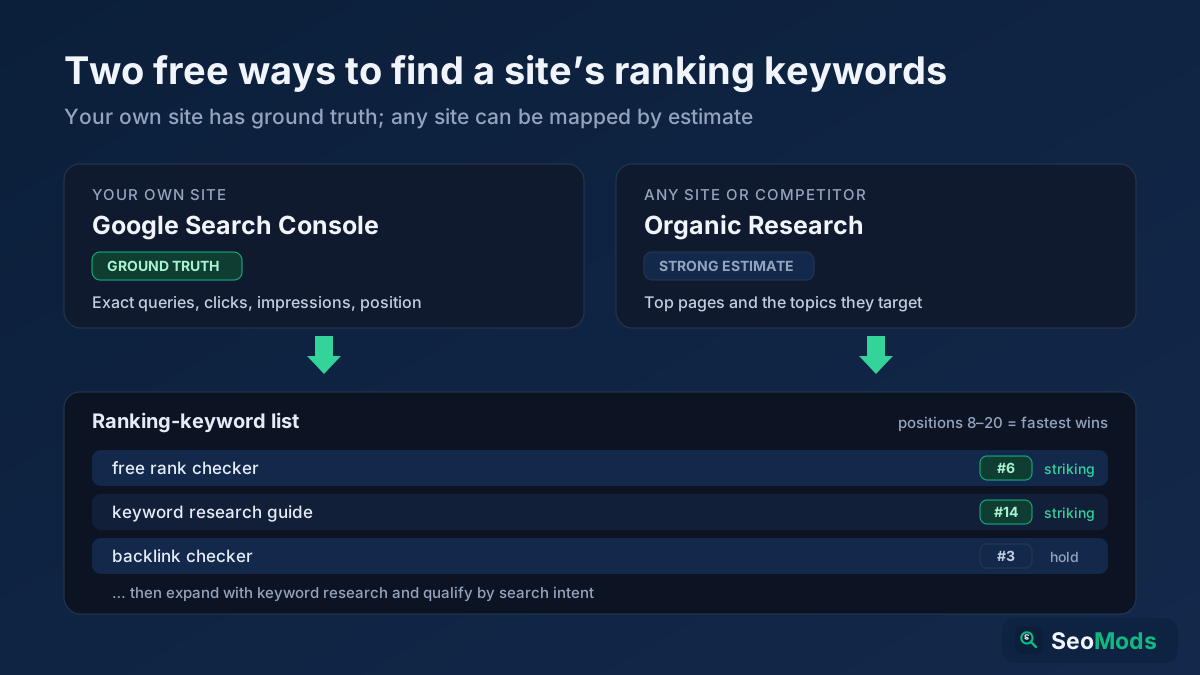
Organic Research is a free tool that discovers a domain's most important pages straight from its own XML sitemap and analyzes the topics and keywords each one targets. Instead of guessing what a site ranks for, you get a real, structured list of its published URLs — pulled live — grouped by topic so you can see what a competitor (or your own site) is actually publishing and where its content focus lies. There is no signup and no rank-tracking subscription required.

How it works

  1. Enter a domain (for example example.com).
  2. The tool locates the site's sitemap from robots.txt and common paths, then fetches the listed URLs.
  3. It samples the top pages, reads each page's title, headings and on-page text, and extracts the keywords and themes they target.
  4. You get a topic-grouped view of the domain's key pages with the terms each one is built to rank for.

What it shows

  • Top pages — the most prominent URLs found in the sitemap, with their titles.
  • Target keywords — the primary terms each page is optimized around, read from real on-page signals.
  • Topic clusters — pages grouped by theme so the site's content pillars stand out.
  • Content type — whether a URL looks like a blog post, product, category or landing page.
  • Title & heading focus — how each page frames its main subject.
  • Coverage breadth — how many distinct topics the domain publishes around.
  • Page count signal — an indication of how large and active the content footprint is.
This view is built from the site's public sitemap and live on-page data, not from a paid rankings database. It reveals which pages a domain considers important and what they target — exact ranking positions and traffic are not shown, since that requires licensed clickstream data.

Common use cases

  • Competitor teardown — see a rival's strongest pages and the topics driving their organic strategy.
  • Content planning — find proven themes worth covering on your own site.
  • Site inventory — get a fast map of your own published pages and their focus.
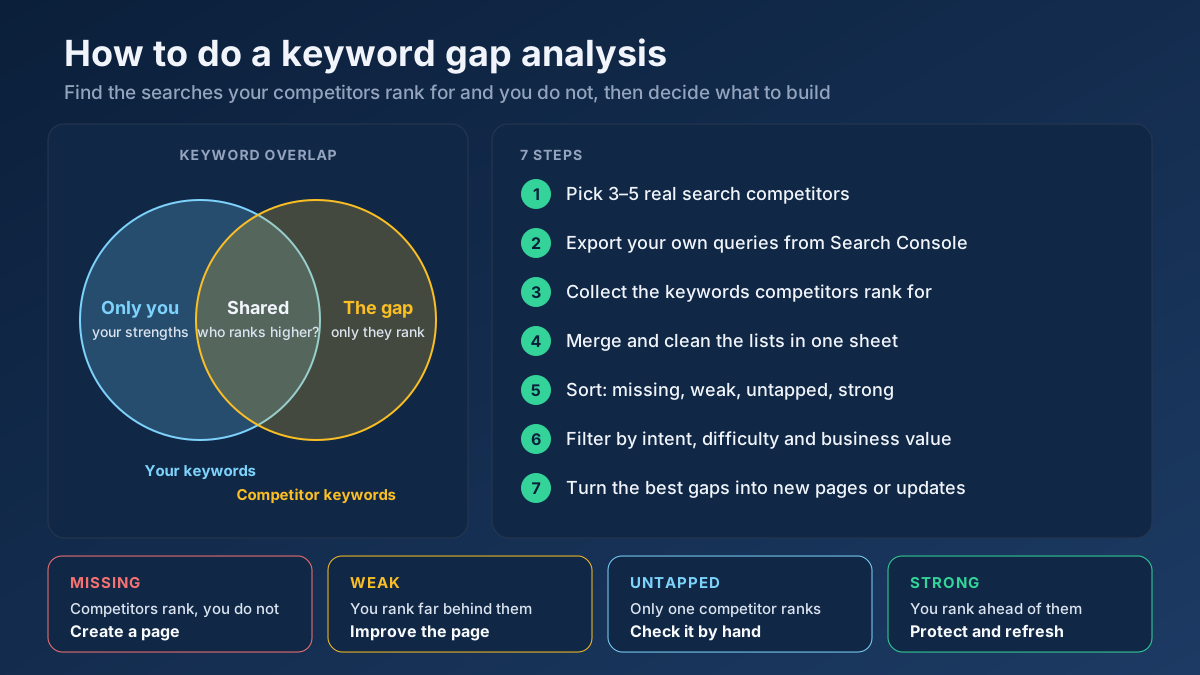
  • Gap spotting — notice topics a competitor covers that you have not addressed yet.

Example

Run it on a SaaS blog and you might see 40 sampled URLs grouped into clusters like email marketing, automation and analytics, each with the page titles and primary keywords behind them — instantly showing which pillars the site has built and which angle dominates its content.

Frequently asked questions

Does it show exact keyword rankings?

No. It maps the pages a domain publishes and the keywords they target, read from live sitemap and on-page data. Exact positions and traffic estimates require a licensed rankings database, so we do not invent those numbers.

What if the site has no sitemap?

Then fewer pages can be discovered automatically. You can still analyze individual URLs with the On-Page SEO Checker (Keyword) or compare against a rival using the Content / Keyword Gap.

How do I turn this into a content plan?

Pair the topic clusters here with the Keyword Research to expand each theme, then organize them using the approach in our topic clusters & pillar pages guide.