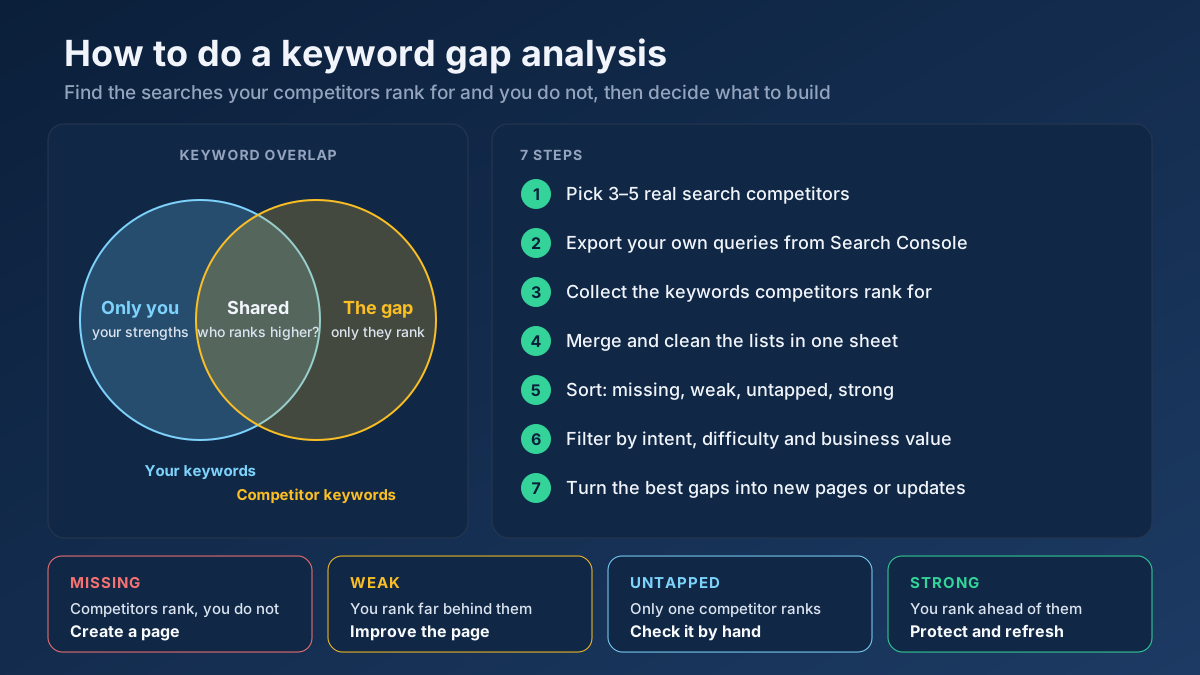
Short answer: To do a keyword gap analysis, pick three to five sites that rank for the searches you want, export the keywords each of them ranks for, and compare those lists with your own Search Console queries. Sort every keyword into missing, weak, untapped or strong, filter by intent and business value, then turn the best gaps into new pages or updates.
Most sites do not lose traffic to competitors because their pages are worse. They lose it because the competitor has a page and they do not. A keyword gap analysis is the quickest way to see those absences in black and white: the questions your customers type into Google, the pages your rivals built to answer them, and the empty space on your own site where an answer should be. This guide walks through the full process in seven steps, shows a free method for people who do not pay for an SEO suite, and explains how to decide which gaps deserve your next month of writing and which ones you can safely ignore.
What is a keyword gap analysis?
A keyword gap analysis compares the search terms your website ranks for with the terms your competitors rank for. The “gap” is the set of keywords where they are visible and you are not, or where they are clearly ahead of you. It is sometimes called a competitor keyword gap, a keyword overlap analysis or simply a keyword comparison, and the idea behind all three names is the same: let the search results show you what demand already exists in your market, and check how much of it you are capturing.
The output is not a report to file away. A good keyword gap analysis ends with a short, ranked list of pages to create or improve, each one tied to a specific group of searches. Everything in the process exists to produce that list.
Keyword gap vs content gap vs backlink gap
The three terms are used loosely, and tools label them differently, so it helps to separate them before you start.
| Analysis | Question it answers | Level | Typical output |
|---|---|---|---|
| Keyword gap | Which searches do competitors rank for that we do not? | Whole site or section | A list of missing and weak keywords |
| Content gap | Which topics, terms and questions does a competing page cover that ours leaves out? | Single page | Subtopics and terms to add to an existing page |
| Backlink gap | Which sites link to competitors but not to us? | Domain | A list of link prospects |
The keyword gap tells you which pages are missing. The content gap tells you what is missing inside a page that already exists. The two work best together: run the keyword gap first to choose targets, then use a page-level comparison such as the content gap tool when you write or update each page. Link gaps are a separate job, covered in backlink analysis and link building.
The four kinds of keyword gap
Not every gap means the same thing, and lumping them together is the main reason gap reports end up ignored. Most SEO suites sort results into four buckets, and the labels are worth adopting even if you work in a spreadsheet.
| Bucket | What it means | Usual action |
|---|---|---|
| Missing | All or most competitors rank; you do not rank at all | Create a new page, if the intent fits your business |
| Weak | You rank, but well below every competitor | Improve the existing page that ranks |
| Untapped | Only one competitor ranks; you and the others do not | Check it by hand; often a niche opportunity |
| Strong | You rank above the competitors | Protect and refresh; no new page needed |
Missing keywords that several competitors share are the most reliable signal, because three independent sites rarely invest in the same topic by accident. Untapped keywords are more speculative, but they are also where small sites find terms the big players have not noticed yet.
Why a keyword gap analysis is worth an afternoon
Classic keyword research starts from a seed term and expands outward, which produces long lists of plausible ideas with no proof that anyone in your market can rank for them. A gap analysis starts from the other end. Every keyword it surfaces is already bringing traffic to a site like yours, so the demand is real and the type of page that wins is visible in the results.
- It finds proven topics. If three competitors with different writers and budgets all rank for “how to price freelance design work”, the topic attracts searches and Google is willing to rank a page about it from a site in your category.
- It reveals the content format that works. Looking at which competitor page ranks tells you whether Google wants a guide, a tool, a comparison or a category page for that query.
- It surfaces low-difficulty terms. Long, specific searches with four or more words rarely show up in a seed-based keyword tool, but they appear in competitor rankings all the time. Our guide to long-tail keywords explains why they convert so well.
- It protects existing pages. Weak keywords point to pages you already have that are losing to a competitor, and updating an existing page is usually faster than ranking a new one.
- It gives your plan a reason. “Three competitors rank for this cluster and we do not” is an easier case to make to a manager or a client than “I think we should write about this”.
In the audits we run on small and mid-sized sites, the first gap analysis usually produces somewhere between 20 and 60 genuinely useful targets once the noise is removed. That is typically several months of content work, chosen on evidence instead of guesswork.
What you need before you start
You do not need an expensive subscription to do this well, but you do need three kinds of data: your own rankings, your competitors’ rankings, and some way to judge intent and difficulty.
| Data | Free source | Paid source | Notes |
|---|---|---|---|
| Your own keywords | Google Search Console | Any rank tracker | Search Console is the most accurate source for your own site; use it even if you pay for a suite |
| Competitor keywords | Sitemaps, page titles, manual SERP checks, the organic research tool | Keyword gap reports in the large SEO suites | Third-party keyword databases are estimates and miss many long-tail terms |
| Search volume | Google Keyword Planner ranges, autocomplete signals | Suite volume estimates | Treat every volume number as an order of magnitude, not a count |
| Intent and difficulty | Looking at the results yourself, the search intent checker | Keyword difficulty scores | Difficulty scores differ between tools; compare within one tool only |
A spreadsheet ties it together. Google Sheets or Excel is enough; the analysis is mostly sorting, deduplicating and counting.
How to do a keyword gap analysis in 7 steps
The steps below are the process we use, in the order we use it. On a site with a few hundred pages the first pass takes about half a day. Later passes are faster because the spreadsheet and the competitor list already exist.
Step 1: Choose three to five real search competitors
Your business competitors and your search competitors are often different companies. A local bakery competes with other bakeries for customers, but in search it may compete with recipe blogs, delivery platforms and a national supermarket chain. For a gap analysis, the search competitors are the ones that matter.
To find them, take ten keywords that describe your core products or services and search for each one in a private browser window. Write down every domain that appears on page one. The domains that show up for four or more of your ten terms are your real search competitors. Leave out sites that rank for everything, such as Wikipedia, Amazon or large news outlets: they compete on authority you cannot match, and their keyword lists will bury the useful signal.
Aim for three to five competitors that are roughly your size or a step ahead of you. Comparing a ten-page site with a publisher that has forty thousand articles produces a gap of thousands of keywords and no clear next move. The competitor analysis guide has a fuller method for profiling each rival once you have chosen them.
Step 2: Export your own keyword baseline from Search Console
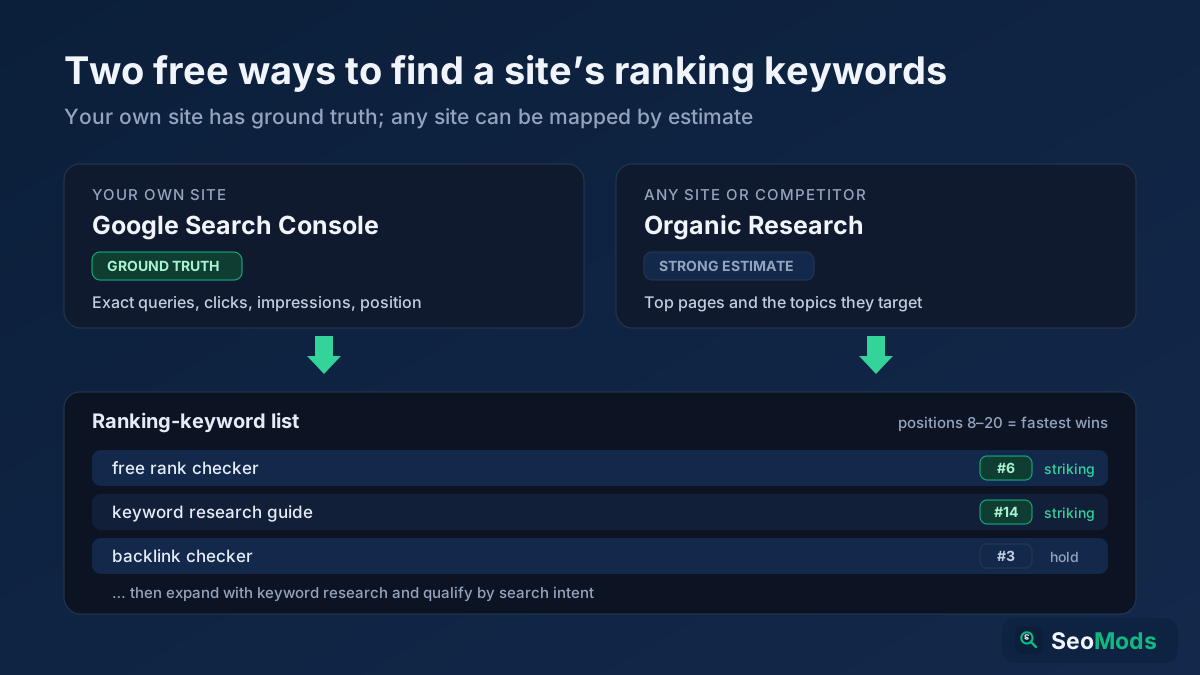
Open the Performance report in Search Console, set the date range to the last three months, and export the Queries table. Google’s Performance report documentation explains each column. You need four: query, clicks, impressions and average position.
Three months is a sensible window. A shorter range misses seasonal terms, and a longer one mixes in rankings you no longer hold. Keep queries with an average position worse than 20 as well; they are not traffic, but they tell you Google already associates your site with the topic, which makes them much easier to win than terms you have never appeared for.
The interface export is capped at 1,000 rows. If your site has more queries than that, the Search Console API or the Looker Studio connector will give you the full list. For a first analysis, 1,000 rows is usually enough. If the export itself raises questions, our guide to measuring SEO with Search Console explains how the numbers are calculated.
Step 3: Collect the keywords your competitors rank for
This is the step where paid and free methods split.
With an SEO suite, enter your domain and the competitor domains into the suite’s keyword gap report and export the combined table. Filter it to your target country first. Most suites will show the competitor’s ranking position for each keyword, an estimated volume and a difficulty score.
Without a suite, you build the list from what competitors publish. Pull each competitor’s sitemap with the sitemap finder, or run the domain through the organic research tool to see its most important pages and the topics they target. Every page title and H1 is a statement of the keyword the page was built for. The free method is covered in more detail in its own section below.
Whichever route you take, collect the ranking URL alongside each keyword. You will need it later to see what kind of page is winning.
Step 4: Merge and clean the lists in one sheet
Paste your keywords and every competitor’s keywords into a single tab, one row per keyword per site. Then clean the data before you compare anything, because raw keyword lists are full of duplicates that differ only in spelling or word order.
- Convert everything to lower case and trim extra spaces.
- Remove branded searches, both yours and your competitors’. Nobody will rank for a rival’s brand name, and it is not a real gap.
- Merge close variants such as singular and plural forms, or “seo audit tool free” and “free seo audit tool”. Google usually ranks the same page for both.
- Delete keywords that are irrelevant to your business, however large their volume.
Then build a summary tab with one row per unique keyword and one column per site showing its best position. A layout like the one below makes the rest of the work easy:
| Keyword | You | Competitor A | Competitor B | Competitor C | Competitors ranking |
|---|---|---|---|---|---|
| how to price freelance design work | – | 4 | 7 | 12 | 3 |
| invoice template for freelancers uk | 38 | 3 | 5 | – | 2 |
| late payment interest calculator uk | – | – | – | 6 | 1 |
| freelance tax return deadline | 2 | 9 | 14 | – | 2 |
In Google Sheets, the “competitors ranking” column is a simple count of filled cells, for example =COUNT(C2:E2). Treat a ranking beyond position 50 as no ranking at all; at that depth it means almost nothing.
Step 5: Sort every keyword into missing, weak, untapped or strong
With the summary tab in place, the four buckets from earlier become simple rules:
- Missing: your column is empty and at least two competitors rank in the top 20.
- Weak: you rank, but at least ten positions below the best competitor.
- Untapped: your column is empty and exactly one competitor ranks.
- Strong: you rank ahead of every competitor.
In the example table, the first row is missing, the second is weak, the third is untapped and the fourth is strong. Write the bucket into its own column with an IF formula or by hand, and filter on it. Strong keywords leave the analysis at this point; note them as pages to protect when you plan your content refresh schedule, and move on.
Step 6: Filter by intent, difficulty and business value
A gap list of 800 keywords is not a plan. This step is where it shrinks to the few dozen that deserve work, and it is the step most people rush.
Check search intent first. Search each candidate and look at what ranks. If the top results are product pages and you publish guides, or they are guides and you sell software, the keyword is a poor fit no matter how many competitors rank for it. The keyword intent classifier can label a long list quickly, but confirm the important ones by looking at the results yourself. Our article on search intent covers the four intent types and how to recognise each one.
Then judge difficulty honestly. If every result on page one comes from a site far stronger than yours, park the keyword for later. If at least two results come from sites of similar size, or from forums and thin pages, you have a realistic chance. Long, specific queries are where small sites win most often.
Finally, score business value. Ask one question: if this page ranked first tomorrow, would the visitors be people who could become customers? A simple 1 to 3 scale is enough. Then combine the three judgements into a priority score:
priority = (competitors ranking + business value) x (4 - difficulty)With difficulty on a scale from 1 (easy) to 3 (hard), the formula rewards keywords that several rivals share, that matter to your business and that you can actually win. It is deliberately crude. The point is to sort the list consistently, not to predict traffic.
Step 7: Turn the gaps into a content plan
Before you open a document, group the surviving keywords by topic. Ten missing keywords about freelance invoicing are rarely ten pages; they are usually one strong guide and perhaps a template. The keyword clustering tool groups terms that belong on the same page, and our guide to topic clusters and pillar pages shows how those pages fit together.
Each cluster then needs one of three decisions:
| Situation | Decision | Watch out for |
|---|---|---|
| Missing cluster, no related page on your site | Create a new page | Matching the format of the pages that rank |
| Weak cluster, or missing terms closely related to an existing page | Update the existing page | Adding sections without diluting its main topic |
| Two of your pages share the same cluster | Merge them into one stronger page | Redirecting the weaker URL with a 301 |
The third row matters more than it looks. When a gap analysis shows you ranking weakly with two different URLs, the problem is often keyword cannibalization and not a missing page. The cannibalization checker will confirm it.
For every new page or update, open the competitor page that ranks best and compare it with yours using the content gap tool. It lists the terms and subtopics the competitor covers and you do not, which is the page-level version of everything you have just done for the whole site. Use those terms to inform the outline, not as a list to paste in. Finally, add the target keywords to a rank tracker so you can see whether the work moved anything.
How to do a keyword gap analysis for free
Paid suites make step 3 faster, but they are not the only way to see what a competitor ranks for. These five free methods, used together, catch most of the important gaps on small and medium sites. They also tend to find long-tail terms that the large keyword databases miss.
Read the competitor’s sitemap and page titles
A sitemap is a complete list of the pages a competitor wants indexed. Open it, copy the URLs into your sheet, and add each page’s title tag. Titles are written for search, so they name the main keyword in almost every case. The organic research tool does this automatically for a domain and groups the pages by topic. Compare those topics with your own page list and the missing subjects stand out within minutes.
Check the results for your core topics by hand
For each of your main topics, search the head term and note the competitor URLs that rank. Then scroll to the “People also ask” box and the related searches at the bottom of the page. Each question that a competitor answers and you do not is a gap. The SERP features analyzer estimates which features a query triggers, which helps you decide between a short answer, a list or a full guide.
Use autocomplete to fill in the long tail
Type each competitor topic into the search box and record the suggestions. Autocomplete reflects what people actually search, and it is especially good at surfacing longer, specific phrases. The keyword research tool and the keyword suggestion tool collect these suggestions in bulk, so you do not have to type each variation yourself.
Mine your own near-miss queries
Your Search Console export contains a gap list of its own. Filter for queries with more than 50 impressions and an average position between 11 and 30. These are searches where Google already considers you relevant but no page on your site answers them well enough to reach page one. In our experience, this filter alone produces a third or more of the useful targets in a typical gap analysis, and they move faster than anything else because the site already has some standing on the topic. The article on high impressions and low clicks covers the related case where you rank but are not chosen.
Compare pages, not just domains
When you already have a page on a topic and a competitor outranks it, a domain-level gap analysis will not tell you why. A page-to-page comparison will. Put both URLs into the content gap tool and look at the terms that appear only on the competitor’s page. For question-led content, the FAQ gap finder does the same for the questions a page answers.
Free method vs paid tools
| Free method | Paid SEO suite | |
|---|---|---|
| Cost | Nothing but time | A monthly subscription |
| Time for a first pass | Half a day to a full day | One to three hours |
| Competitor positions | Spot checks only | Estimated for thousands of keywords |
| Long-tail coverage | Good, through autocomplete and questions | Patchy for low-volume terms |
| Accuracy for your own site | Exact, from Search Console | Estimated, unless connected to Search Console |
| Best for | Small sites, local businesses, narrow niches | Large sites, agencies, many competitors |
The two are not mutually exclusive. Many teams use a suite to build the first list quickly and then the free checks to confirm intent and catch the long-tail terms the suite missed.
A realistic example: a freelance accounting blog
The scenario below is assembled from patterns we see repeatedly; the business and the numbers are illustrative. A small UK firm sells bookkeeping software for freelancers and runs a blog with about 90 articles. Organic traffic has been flat for a year, and the team wants to know what to write next.
They choose three search competitors: a larger accounting app, an independent freelancer community and a tax adviser’s blog. All three appeared on page one for at least five of the ten core terms the team checked. The paid suite they trial lists about 2,300 keywords where at least one competitor ranks and they do not. After removing brand terms, merging variants and deleting topics that have nothing to do with freelancing, about 640 remain.
The intent and value filters cut that to 52 keywords, which cluster into 14 topics:
| Cluster | Bucket | Competitors ranking | Decision |
|---|---|---|---|
| Pricing freelance work (day rates, project quotes) | Missing | 3 | New guide with a rate calculator |
| Late payment and chasing invoices | Missing | 2 | New guide and email templates |
| Invoice templates | Weak | 3 | Update the existing template page, add downloadable formats |
| Expenses freelancers can claim | Weak | 2 | Merge two overlapping posts into one |
| Late payment interest calculator | Untapped | 1 | Small tool page, tested first |
The team works through the five clusters above over eight weeks. Three months after the last page goes live, the two new guides rank on page one for their main terms, the merged expenses article has replaced both old posts in the results, and the updated template page has climbed from page four to the middle of page one. The untapped calculator brings modest traffic but converts better than anything else on the blog, which is common for small tools that answer a precise need.
The lesson is in what they did not do. Nearly 2,250 of the original 2,300 gaps were never touched, and the analysis was a success precisely because of that.
Common keyword gap analysis mistakes
- Comparing yourself with giants. A gap against a national publisher is mostly noise. Choose competitors whose results you could realistically match.
- Trusting volume figures too much. Third-party volumes are estimates and often wrong by a wide margin for low-volume terms. Use them to compare keywords, not to forecast traffic.
- Ignoring intent. A keyword where the top results are all product pages will not be won by a blog post, however good it is.
- Creating one page per keyword. Close variants belong on one page. Splitting them creates thin pages that compete with each other.
- Copying the competitor’s page. The gap tells you which topic to cover, not what to say. Google’s guidance on helpful, people-first content asks whether a page adds original information or analysis beyond what is already out there. Write the version that only you could write.
- Mass-producing pages from the list. Generating hundreds of near-identical pages to cover every gap is exactly what Google’s scaled content abuse policy describes. Quality over coverage.
- Forgetting the weak bucket. Improving pages that already rank on page two or three often returns results faster than writing new ones.
- Treating it as a one-off. Competitors publish every month and rankings shift. A gap list from last year is a history document.
How often should you repeat a keyword gap analysis?
For most sites, a full analysis once or twice a year is enough, with a lighter check every quarter. The quarterly check takes an hour: export your Search Console queries, re-run the near-miss filter, and look at the newest pages in each competitor’s sitemap. Run a full analysis again whenever something changes the picture, such as a new competitor appearing on page one for your core terms, a product launch, a move into a new market, or a sharp drop in traffic. If traffic has fallen, start with why website traffic drops to rule out technical causes first.
Keep the spreadsheet. Each new analysis is quicker when you can compare it with the previous one, and the history shows which gaps you closed and what each new page achieved. That record is also the best evidence you have when someone asks whether content work is paying off.
Frequently asked questions
What is a keyword gap analysis in SEO?
It is a comparison between the keywords your website ranks for and the keywords your competitors rank for. The gap is the set of searches where competitors are visible and you are absent or far behind. The result is a prioritised list of pages to create or improve.
How do I find keywords my competitors rank for but I don’t?
Use the keyword gap report in an SEO suite, or build the list for free from competitor sitemaps, page titles, manual searches, “People also ask” questions and autocomplete. Then compare it with your own queries from Search Console and keep the terms where competitors rank and you do not.
Can I do a keyword gap analysis for free?
Yes. Search Console gives you exact data for your own site, and competitor sitemaps, page titles, autocomplete and manual result checks show what they target. It takes longer than a paid tool and gives fewer competitor positions, but it often catches more long-tail terms.
How many competitors should I include?
Three to five is the practical range. Fewer than three makes it hard to tell a real trend from one competitor’s quirks, and more than five usually adds noise faster than insight. Choose sites of a similar size that rank for your core terms.
What is the difference between a keyword gap and a content gap?
A keyword gap compares whole sites and shows which searches you have no page for. A content gap compares individual pages and shows which subtopics, terms or questions a competing page covers that yours leaves out. Use the first to choose pages and the second to write them.
Which keyword gaps should I target first?
Start with missing keywords that several competitors share, that match the intent of the pages you can create and that bring visitors who could become customers. Weak keywords where you already rank on page two or three are a close second, because improving an existing page is often quicker.
How often should I run a keyword gap analysis?
A full analysis once or twice a year suits most sites, with a short quarterly check of Search Console near-miss queries and new competitor pages. Repeat the full analysis after a new competitor appears, a product launch or a large traffic change.
Start with one competitor and one afternoon
A keyword gap analysis is not complicated. It is a comparison between what your market searches for, what your competitors have built and what you have built, followed by the discipline to act on only the best of what you find. Choose real search competitors, start from your own Search Console data, sort the gaps into missing, weak, untapped and strong, and filter hard on intent and business value. What remains is a content plan you can defend.
You can make a start today. Run your closest competitor through the organic research tool to see the topics it targets, then put its best-ranking page and your equivalent page into the content gap tool to find what yours is missing. When the new pages go live, track them with the free rank checker and link them from your existing articles, following the internal linking strategy guide, so that the work you put into closing each gap has every chance to show up in the results.