
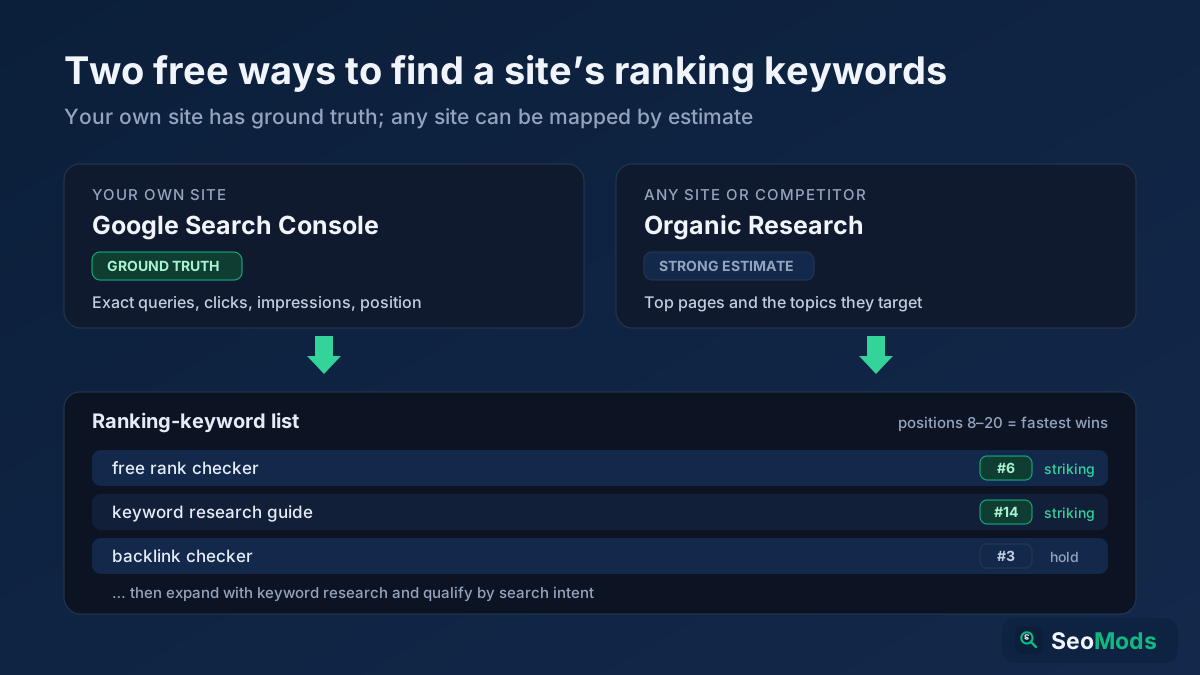
One of the most useful things you can learn in SEO is exactly which keywords a website already ranks for. Do it for your own site and you see what is working, which pages are close to page one, and where a small push could win real traffic. Do it for a competitor and you get a ready-made map of the terms driving their visitors — a shortcut to a content plan that is proven to have demand. This guide shows the honest, free way to find a site's ranking keywords and turn that list into action.
Quick answer: To see what keywords a site ranks for, use two free sources. For your own site, Google Search Console's Performance report is the ground truth — it lists every query that showed your pages, with clicks, impressions and average position. For any site (yours or a competitor's), pull its most important pages and the topics they target with Organic Research / Top Pages then infer the keywords each page is built to win. From there, confirm a specific position with Keyword Rank Checker expand the list with Keyword Research and check demand and intent before you act.
What "keywords a site ranks for" actually means
When people ask how to check what keywords a website ranks for, they usually mean one of two different things — and the right tool depends on which. The first is discovery: the full set of search terms that already send a site impressions or clicks, most of which you never deliberately targeted. The second is position tracking: where a site sits for one specific keyword you already care about. Discovery gives you the map; tracking watches a single road on it. This guide covers both, but it starts with discovery because that is what reveals opportunities you didn't know existed.
It also helps to be honest about accuracy. The only source that knows exactly which queries a site ranks for is Google itself, and Google only shares that data with the verified owner of a property through Search Console. For any site you don't own, every tool — free or paid — is estimating from what it can crawl and observe. That is still incredibly useful, but treat competitor keyword lists as strong signals, not gospel.
Your own site: Google Search Console is the ground truth
If the site is yours and verified, stop looking anywhere else first — Search Console shows the real queries Google recorded for your pages. Open the Performance on Search results report and you get every search term that produced an impression, along with clicks, click-through rate, average position and the exact page that showed. This is the single most accurate keyword list you will ever have for your own site, and it is completely free.
Read it with a plan. Sort by impressions to find terms where Google already shows you a lot but you earn few clicks — often a title or meta problem. Filter to positions 8–20 to find the "striking distance" queries where a small on-page improvement can move you onto page one. Group similar queries to see which single page is doing the heavy lifting. Our guide to measuring SEO with Search Console walks through this report in depth, and once you spot a page worth improving you can audit it directly.
Any site: discover the pages and topics it targets
For a competitor — or any site where you don't have Search Console access — you can't read Google's private data, but you can do the next best thing: pull the site's most important pages and analyze the topics and keywords each one is built to rank for. Organic Research / Top Pages reads a domain's sitemap, surfaces its top pages, and analyzes the terms those pages target. That gives you a practical picture of a site's keyword footprint: which topics it invests in, which pages are its pillars, and where its content is concentrated.
Work through the output page by page. A page's title, headings and body make its target keyword obvious, and the set of pages together reveals the site's content strategy. When you find a page built around a term you also want, you have two facts at once — the keyword has proven commercial value to a real competitor, and you now know the exact page you'd need to beat.
Confirm a specific ranking position
Discovery tells you which keywords a site targets; sometimes you also want to know where it ranks for one of them today. Rather than scrolling Google yourself (where personalization and location skew what you see), estimate the position from on-page relevance signals with Keyword Rank Checker. Enter a domain and a keyword and it scores how strongly that page targets the term, giving you a fast, repeatable read you can compare across pages and competitors. For the full workflow — including how to track a keyword over time — see our free keyword rank checker guide
Expand the list with keyword research
Both Search Console and a competitor's page list are anchored to keywords that already exist. To grow beyond them, feed the best terms you found into Keyword Research to surface related keywords, variations and long-tail phrasings you haven't targeted yet. This is how a short list of "keywords a site ranks for" becomes a genuine content pipeline: you start from what is proven, then branch into the adjacent terms with real demand.
Long-tail variations matter most here. A single head term like "running shoes" is nearly impossible to win, but the dozens of specific phrases around it are exactly where new sites earn their first rankings. Our guide to long-tail keywords explains why these lower-volume terms so often convert better and rank faster.
Check demand and intent before you commit
A keyword being on someone's ranking list doesn't automatically make it worth chasing. Two checks separate a good target from a distraction. First, demand: is anyone actually searching for it, or is it a term the site ranks for by accident? Second, and more important, intent: does the page type you can realistically build match what searchers want? Run any keyword through Search Intent Analysis to classify it as informational, commercial, transactional or navigational, so you don't write a blog post for a query that only wants a product page. Our explainer on search intent covers how to read those signals.
Find the gaps a competitor is winning and you are not
The highest-value keywords are the ones your competitors rank for and you don't. Once you've mapped a competitor's pages with Organic Research / Top Pages you can pinpoint the specific topics where they have coverage and you have none, then prioritize those for new content. For the link side of the same comparison — the domains linking to them but not to you — combine this with Content / Keyword Gap and our competitor analysis guide which ties the whole competitive picture together.
Step-by-step: build your ranking-keyword list
Combine the pieces into a repeatable routine you can run monthly:
- Start with the ground truth (your site). Open Search Console's Performance report, export every query, and flag positions 8–20 as your fastest wins.
- Map any site's footprint. Run the domain — yours or a competitor's — through Organic Research / Top Pages to list its top pages and the topics they target.
- Confirm the positions that matter. For key terms, estimate where a page ranks with Keyword Rank Checker and note the gap to page one.
- Expand the list. Feed your best keywords into Keyword Research to pull related and long-tail variations with real demand.
- Qualify by intent. Run candidates through Search Intent Analysis and drop any where the intent doesn't match a page you can build.
- Prioritize the gaps. Pick the terms competitors rank for and you don't, and turn them into your next content briefs.
Common mistakes when checking ranking keywords
- Trusting a competitor list as exact. For any site you don't own, every figure is an estimate. Use it to prioritize, not to report precise numbers.
- Ignoring Search Console for your own site. No third-party tool can beat Google's own data for a property you've verified — start there.
- Chasing volume over intent. A high-traffic keyword you can't satisfy with your page type will never convert. Check intent first.
- Overlooking striking-distance terms. Positions 8–20 are where the fastest wins hide — a small on-page fix often moves them onto page one.
- Stopping at discovery. A list of keywords is only useful once each one becomes a page to build or improve.
Frequently asked questions
Can I really find what keywords a website ranks for free?
Yes. For your own verified site, Google Search Console gives you the exact list free. For any other site, Organic Research / Top Pages lets you map its top pages and the topics they target, which reveals its keyword footprint without a paid subscription.
How do I see what keywords a competitor ranks for?
You can't read Google's private data for a site you don't own, but you can analyze the competitor's most important pages with Organic Research / Top Pages to infer the keywords each page targets, then confirm specific positions with Keyword Rank Checker Treat the result as a strong estimate rather than an exact export.
Why does a free tool show fewer keywords than a paid one?
Paid platforms run enormous continuous crawls to build huge keyword databases, and free tools can't match that scale for competitor sites. For your own site, though, Search Console's free data is the most complete and accurate source there is — no paid tool improves on it.
What is the difference between finding keywords and rank tracking?
Finding keywords is discovery — the full set of terms a site ranks for. Rank tracking watches where a site sits for one specific keyword over time. Use Organic Research / Top Pages for discovery and Keyword Rank Checker to check individual positions.
Conclusion
Finding what keywords a website ranks for is the foundation of every good SEO plan, and you can do it for free. Start with the ground truth for your own site in Search Console, map any site's footprint with Organic Research / Top Pages confirm the positions that matter with Keyword Rank Checker then expand and qualify with Keyword Research and Search Intent Analysis Turn the strongest terms — especially the gaps competitors are winning — into your next pages, and a raw keyword list becomes a traffic plan.