Topic Clusters & Pillar Pages: Build Topical Authority
Modern SEO is won with topical authority, not single pages. Learn the pillar-and-cluster model.
Read article →Turn one seed into clustered content ideas: questions, comparisons, prepositions — perfect for content calendars.
Fetching live data…
The Topic Research & Content Ideas tool turns a single seed into a structured map of content ideas. Instead of one flat keyword list, it groups suggestions into clusters — questions, comparisons, prepositions and related sub-topics — so you can see the whole shape of a subject at a glance. It is built for planning content calendars and topic clusters, using real autocomplete data, and it is free with no signup.
home composting).Enter indoor plants and you might get a question cluster (how often to water indoor plants), a comparison cluster (indoor plants vs outdoor) and a preposition cluster (indoor plants for low light) — three article themes from a single seed.
Yes — completely free with no signup and no limits. Research as many seeds as you want.
Keyword research returns a list of phrases; this tool organizes ideas into clusters built for planning content. Use the Keyword Research tool when you need raw volume and intent labels.
Confirm each angle with the Search Intent Analysis tool, then structure clusters around a pillar page following our topic clusters guide.
Guides, tips and tutorials hand-picked for this tool — go from running a check to actually fixing it.
Modern SEO is won with topical authority, not single pages. Learn the pillar-and-cluster model.
Read article →A practical, no-budget keyword research workflow: find ideas, understand intent, and group keywords into clusters that rank.
Read article →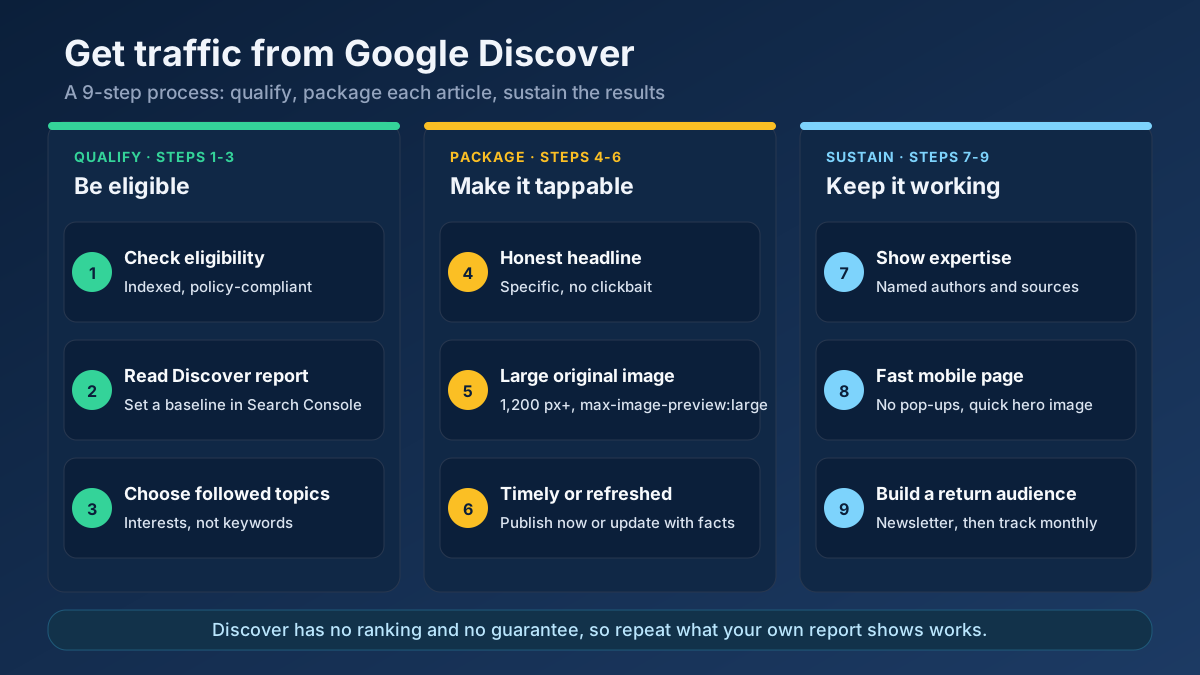 Content
Learn how to get traffic from Google Discover: check eligibility, fix images and headlines, choose topics and read the report to repeat what works.
Read article →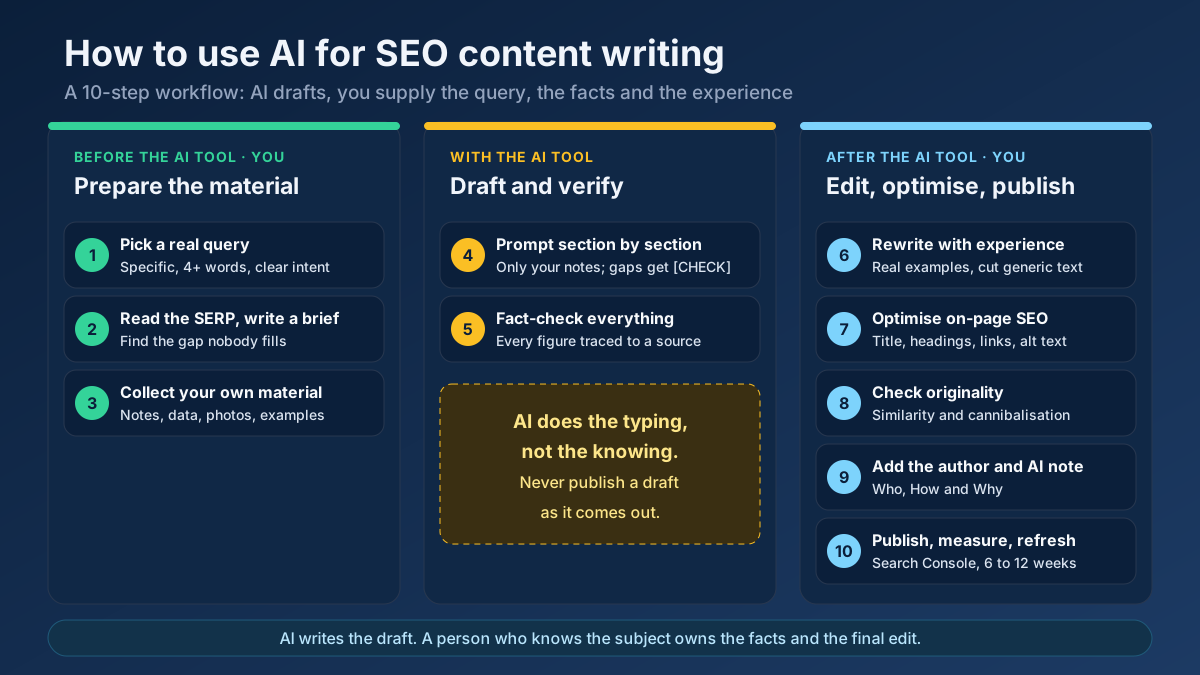 Content
Learn how to use AI for SEO content writing without risking a penalty: a 10-step workflow for briefs, drafts, fact-checks, editing and E-E-A-T signals.
Read article →When multiple pages target the same keyword, they compete with each other and dilute rankings. Here is the fix.
Read article →Updating old content is often the highest-ROI SEO task. Here is a simple refresh workflow.
Read article →Turn one seed into hundreds of scored keyword ideas. Pulls live Google, YouTube, Bing and DuckDuckGo autocomplete, scores every phrase for demand, difficulty and opportunity, labels intent and funnel stage, groups everything into pillar-and-spoke topic clusters and adds a real 13-month interest trend from Wikipedia.
Open tool →Get instant keyword ideas straight from Google Autocomplete with A-Z & question modifiers.
Open tool →Classify any keyword as Informational, Navigational, Commercial or Transactional using real signal patterns.
Open tool →Turn one seed keyword into semantic clusters ready for content planning. Expands your seed with real Google Autocomplete queries, groups them into topic clusters by shared terms, labels each cluster’s search intent and charts the distribution — so you can build a hub-and-spoke content architecture.
Open tool →Classify a whole keyword list by search intent in one pass. Labels each keyword Informational, Commercial, Transactional or Navigational, maps it to a funnel stage (ToFu/MoFu/BoFu) and the best content type, and charts the intent distribution — perfect for prioritizing a content calendar.
Open tool →Understand what a searcher really wants. Analyzes a query’s primary and secondary intent, maps it to a funnel stage, recommends the content type and the SERP features it’s likely to trigger, and shows real related queries with their own intent — so your page matches what Google rewards.
Open tool →Your site may have a critical PHP vulnerability
PHP2Shell (CVE-2026-109618 and CVE-2026-109619) lets attackers run code on servers running PHP older than 8.2.35, 8.3.36, 8.4.27 or 8.5.12, without logging in. Attacks have been seen since 17 October. Check whether your site is affected.