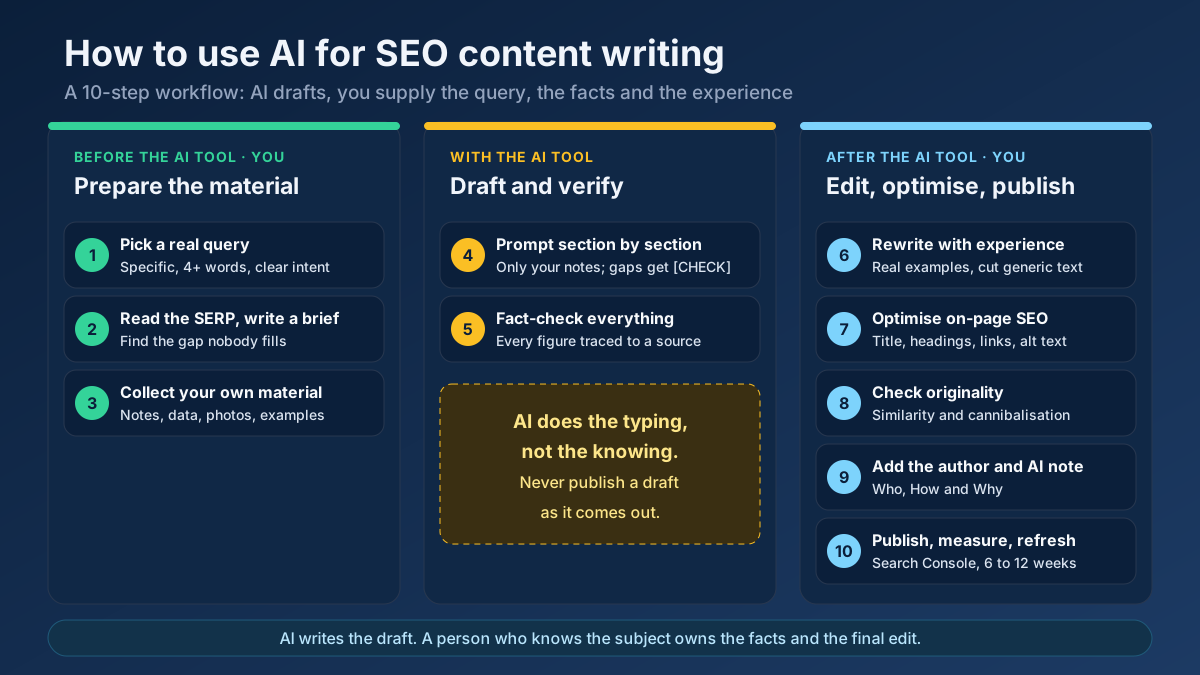
Short answer: To use AI for SEO content writing safely, let it speed up the mechanical parts — outlines, first drafts, rewrites and metadata — while a person who knows the subject owns everything else: the search intent, the brief, the facts, the first-hand experience and the final edit. Google does not penalise text for being AI-written. It demotes pages that add nothing new.
Most people who try AI writing for SEO end up in one of two camps. The first group publishes fifty AI articles in a month, watches them get indexed, and then watches them slowly sink out of sight. The second group is so worried about an “AI penalty” that they will not touch the tools at all and lose weeks on drafts a model could have produced in minutes. Both are working from the same misunderstanding about what Google actually rewards. This guide clears that up, then walks through the ten-step workflow we use to turn an AI draft into a page that deserves to rank: what to hand to the model, what to keep for yourself, and how to check the result before it goes live.
Does Google penalise AI-generated content?
No, not for being AI-generated. That is the single most important fact in this whole topic, and it is worth reading Google’s own wording instead of a summary of a summary.
What Google has actually said
In February 2023 Google published Google Search guidance about AI-generated content. The core of it is simple: Google rewards high-quality content however it is produced, and its focus is on the quality of the content rather than on how it was made. The same post draws the line that matters. Using automation, including AI, to generate content with the primary purpose of manipulating search rankings is a violation of its spam policies.
So the question Google asks is not “was a model involved?” It is “who is this page for?” A page written to help a reader can use as much AI as you like. A page produced only to occupy a keyword, with nothing behind it, is spam whether a person or a model typed it.
What counts as scaled content abuse
In March 2024 Google rolled out a core update together with new spam policies. One of them, scaled content abuse, describes the exact pattern that gets AI-heavy sites into trouble: producing many pages mainly to manipulate rankings and not to help users. Google is explicit that the method does not matter. Scaled content abuse can be done with generative AI, with cheap human writers, by scraping and stitching other pages together, or by any mix of these.
Typical warning signs include hundreds of near-identical pages that only swap a city or product name, articles that summarise the top results without adding anything, and whole sites spun up in days around keyword lists. When Google announced the March 2024 update, it expected the changes to cut low-quality, unoriginal content in results by around 40%. After the rollout finished, it reported the reduction as 45%. That is the scale of what was cleaned out, and a large share of it was mass-produced text.
What the data shows
The best large-scale look at this so far comes from Ahrefs, which ran 600,000 top-ranking pages through its AI detector in 2025. Only 13.5% of the pages came back as purely human-written, 4.6% as purely AI, and the rest, roughly 82%, as a mix of the two. Ahrefs found no meaningful link between how much AI a page contained and where it ranked. Treat the exact percentages with care, because AI detectors work in probabilities and make mistakes. The direction is clear, though: AI-assisted pages rank all the time, and AI involvement on its own is neither a penalty nor a ranking boost.
The quality raters who help Google evaluate its results see the same picture from the other side. The Search Quality Rater Guidelines tell raters to give the lowest rating when the main content is copied, paraphrased or auto-generated with little effort, originality or added value. Raters do not change rankings directly, but their guidelines describe what Google’s systems are built to recognise. Low effort is the problem. AI is only one way to produce it.
What AI does well in SEO writing, and where it fails
Before building a workflow, it helps to be honest about the tool. Large language models are excellent at producing fluent, well-organised text quickly. They are poor at knowing whether that text is true, current or useful to a specific reader. The table below is the split we work with.
| Task | AI on its own | Where a person is essential | Best split |
|---|---|---|---|
| Keyword and topic ideas | Good at brainstorming variations and related questions | Has no search volume or ranking data and often invents both | AI suggests, real data decides |
| Search intent | Guesses from the wording of the query | Only the live results page shows what Google rewards | Check the SERP yourself |
| Outline | Fast and usually logical | Tends to copy the obvious structure every competitor already uses | AI drafts, you add the missing angle |
| First draft | Very fast, readable, generic | Cannot add first-hand experience, original data or opinion | AI writes section by section from your notes |
| Facts, figures and sources | Unreliable; may cite studies that do not exist | Every claim needs a checked source | Human only |
| Examples and case studies | Plausible but invented | Real examples are what make a page worth citing | Human supplies, AI can tidy the wording |
| Editing for clarity | Good at shortening and simplifying | Decides what to cut and what tone fits the brand | Both, with the final pass by a person |
| Titles, meta descriptions, alt text | Good at producing several options quickly | Picks the version that matches intent and character limits | AI drafts, you choose |
Notice the pattern. AI is strongest where the job is turning known material into text, and weakest where the job is knowing something. A ranking page needs both, which is why the workflow below hands the model the material first instead of asking it to know things.
How to use AI for SEO content writing: the 10-step workflow
The workflow is split into three phases: what happens before you open the AI tool, what you use it for, and what happens after. Most failed AI content skips the first and last phases entirely. That is where the ranking value lives.
Step 1: Start from a real query and its intent, not from a prompt
The worst way to start is “write me an article about running shoes”. The model will happily produce one, and it will match no search anyone actually makes. Start instead from a query that real people type and that your site has a realistic chance of ranking for. For most small and medium sites, that means longer, specific queries of four words or more with a clear intent, such as “how to clean white running shoes” and not “running shoes”.
Use real data for this, not the model. Pull ideas from your own Search Console queries, from autocomplete and from a keyword research tool that shows demand and difficulty. Then label the intent: is the searcher trying to learn, compare, buy or find a specific site? A search intent checker helps with borderline cases. If you are new to this, our guide to long-tail keywords explains why the specific queries are where new sites win.
Step 2: Study the results page and write the brief yourself
Search the query and read the top five to ten results. You are looking for three things: the format Google rewards (a step-by-step guide, a list, a comparison, a tool), the questions every result answers, and the gap that none of them fills well. That gap is your reason to exist. If you cannot name one, the page probably should not be written yet.
Now write a short brief. It does not need to be long. Ours fit on half a page:
- Primary query and three to six related queries.
- Reader: who they are and what they already know.
- Promise: the one thing the reader should be able to do after reading.
- Angle: what this page offers that the current results do not.
- Must-cover points and sections to skip.
- Sources you will cite and examples you will use.
The brief is the most valuable thing you will hand the model. A vague brief produces the average of the internet. A sharp one produces a draft that already points in a direction nobody else has taken.
Step 3: Collect your own material before you open the AI tool
This is the step that separates content that ranks from content that gets filtered out. Before generating a single paragraph, gather what only you or your business can contribute:
- Notes from doing the task yourself: what went wrong, what took longer than expected, what the instructions never mention.
- Questions customers actually ask, taken from support tickets, sales calls, reviews or comments.
- Your own numbers: prices, test results, timings, before-and-after measurements, survey answers.
- Photos, screenshots or diagrams that you made.
- Opinions you are willing to stand behind, including where you disagree with common advice.
Google’s guidance on creating helpful, people-first content asks whether a page clearly demonstrates first-hand expertise and depth of knowledge, for example from having actually used a product or visited a place. A model cannot supply that. You can, and once it is in the prompt, the model can help you present it well.
Step 4: Prompt section by section, from the brief
“Write a 3,000-word SEO article on X” is the prompt behind most forgettable AI content. Long single-shot outputs drift, repeat themselves and pad. You get far better results by working in sections. First ask for an outline based on your brief, edit that outline by hand, then generate one section at a time, feeding in the notes that belong to that section.
A section prompt that works well looks like this:
You are helping me write one section of a guide.
Reader: owners of small online shops who have never edited a robots.txt file.
Section: "How to test the file before you publish it".
Use ONLY the facts in my notes below. If something is missing, write [CHECK]
instead of guessing. Plain British English, short paragraphs, no hype words,
no conclusion paragraph.
My notes:
- ...
Three details in that prompt do most of the work. Naming the reader sets the level. “Use only my notes” reduces invented facts. And the [CHECK] placeholder gives the model a way to admit a gap instead of filling it with something that sounds right. Banning filler phrases and ready-made conclusions also removes much of the tone that makes AI text instantly recognisable.
Step 5: Fact-check every claim, number and source
Language models produce plausible sentences, not verified ones. They invent statistics, attach real names to fake quotes, misremember dates and occasionally cite studies that were never published. One wrong number on a page about money, health or law can cost you far more trust than the draft saved you in time.
Our rule is short: every figure, date, name, quote and “studies show” must be traced to a primary source you have opened yourself. If you cannot find the source, delete the claim. Do not ask the same model to confirm its own facts; it will usually agree with itself. Then link to the strongest sources in the text. Outbound citations to official documentation or original research help readers check you, and they are one of the clearest trust signals a page can show.
Step 6: Rewrite for experience and voice
This is the editing pass most people rush, and the one that makes the biggest difference. Read the draft as a sceptical expert would and ask of every paragraph: would this be true and useful on any site, or only on mine? Generic paragraphs are not wrong; they are simply not worth a click when ten other pages already say the same thing.
Practical things to do in this pass:
- Replace generic examples with real ones from Step 3.
- Add the mistakes, edge cases and “it depends” answers that only practice teaches.
- Cut the intro paragraph that restates the title and the conclusion that restates the intro.
- Remove stock phrases that readers now associate with AI text, such as “in today’s fast-paced digital landscape”, “delve into” and “it’s important to note”.
- Vary sentence length and take clear positions where you have earned them.
The goal is not to fool an AI detector. Detectors are unreliable, and Google has never said it uses them to rank pages. The goal is to make the page clearly better than what a reader would get by asking a chatbot the same question. If your page is no better than that, the reader has no reason to visit it, and increasingly, neither does Google.
Step 7: Optimise the on-page elements
AI is genuinely useful here, because on-page work is mostly about choosing between options. Ask it for five title tags and five meta descriptions, then pick and adjust by hand. Keep the title under about 60 characters with the main query near the front, and the meta description around 150 to 160 characters with a clear reason to click. Our guides on title tag optimisation and writing meta descriptions go into the details.
Then work through the rest of the page:
- One H1 that contains the main query naturally, and H2s and H3s that follow a logical order. The heading analyzer shows the structure at a glance.
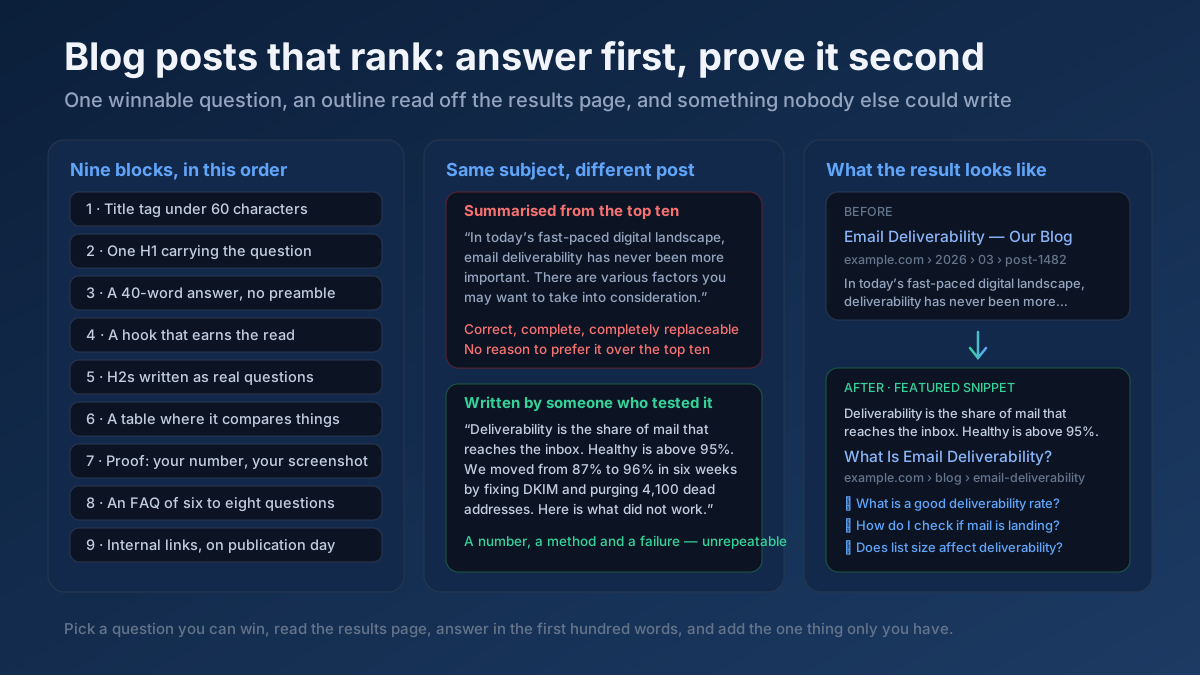
- A direct answer near the top. Answer the main question in the first 40 to 60 words. This is what featured snippets and AI Overviews tend to lift.
- Internal links to and from related pages on your site, with descriptive anchor text. A new article that nothing links to is an orphan, however good it is.
- Images with useful alt text, ideally your own diagrams or photos rather than stock images.
- Structured data where it fits, such as Article and BreadcrumbList.
When the page is ready, run it through the on-page SEO checker to catch anything you missed, from a missing meta description to a keyword that never appears in the headings.
Step 8: Check originality and overlap
AI drafts have two originality problems that are easy to miss. The first is that they sometimes reproduce phrasing from well-known sources very closely. The second, more common on sites that publish a lot, is that they overlap with your own pages. Ask a model for ten articles on related topics and you will often get ten pages that share half their paragraphs and compete for the same queries.
Before publishing, compare the new draft against your closest existing page with a text similarity checker. If the overlap is high, merge the two or give each a clearly different job. Check that the new page does not target a query an existing page already ranks for; our guide to keyword cannibalisation explains how to spot and fix that. Finally, run the thin content checker to make sure the page has real substance beyond its word count.
Step 9: Add authorship and be transparent about AI use
Readers and search engines both want to know who stands behind a page. Publish under a real author with a short bio, a profile page and genuine experience in the subject. That is the backbone of E-E-A-T and something an anonymous AI page cannot fake.
Google’s helpful content guidance frames this as Who, How and Why. Who created the content should be obvious. How it was created should be explained where readers would reasonably want to know, for example when automation played a substantial role. And why it was created should be to help people, not mainly to attract search visits. You do not need a disclaimer on every page that used AI to tidy a paragraph. A short editorial policy page describing how your team uses AI, and that every article is fact-checked and edited by a named person, is honest and sufficient for most sites.
The E-E-A-T analyzer and author page audit check whether these signals are visible on the page itself, where they actually count.
Step 10: Publish, measure and refresh
Publishing is the middle of the process, not the end. Request indexing in Search Console, then watch the page for the next six to twelve weeks. You are looking for impressions on the queries in your brief, the average position trend and the click-through rate. If impressions are high but clicks are low, the title and description need work. If the page is not indexed after a few weeks, our guide on fixing crawled but not indexed pages is the next stop.
AI is useful again at the refresh stage. Paste in the queries a page already ranks for and ask which questions the page does not answer yet; then answer them yourself. Plan a review every six to twelve months, or sooner on fast-moving topics, and update facts, screenshots and dates. A content freshness check helps you decide which pages need attention first.
A realistic example: one article from query to published page
To make the workflow concrete, here is how it plays out for a typical case. Picture a small bike repair shop in Bristol with a blog that gets a few hundred visits a month. The owner wants to rank for how to fix a slipping bike chain, a specific query with clear how-to intent.
The brief (20 minutes). The top results are all step-by-step guides with photos. Most of them treat “slipping” as one problem. In the shop, the owner sees four different causes every week: a worn chain, a worn cassette, a cable that needs adjusting and a stiff link. None of the top pages helps the reader work out which one they have. That becomes the angle: diagnose first, then fix.
Own material (30 minutes). The mechanic takes photos of a stretched chain on a wear gauge, writes down the quick test they use at the counter, notes typical prices for a chain and a cassette, and lists the three mistakes customers make before bringing the bike in.
AI draft (40 minutes). The outline is generated from the brief and rearranged by hand so that diagnosis comes first. Each section is drafted from the mechanic’s notes, with [CHECK] left wherever a torque value or part compatibility detail was missing.
Edit and check (60 minutes). Every [CHECK] is resolved from the manufacturers’ manuals. Two generic paragraphs about “the importance of bike maintenance” are deleted. The mechanic adds a short paragraph explaining when a repair is not worth it and a new drivetrain makes more sense. Title, description, headings and alt text are finalised, and the article is linked from the shop’s existing chain cleaning guide.
The total is about two and a half hours, against the full day the owner used to spend on an article. More importantly, the finished page contains things no other result has: a diagnosis flow, real photos and an honest cost comparison. That is what gives it a chance to rank, not the fact that it was written faster.
Fully AI, AI-assisted or human-written: which one should you use?
The useful question is not “AI or no AI” but how much of the work you hand over. Here is how the three approaches compare in practice.
| Fully AI, published as generated | AI-assisted with expert editing | Fully human-written | |
|---|---|---|---|
| Time per article | Minutes | A few hours | Most of a day or more |
| Cost at scale | Lowest | Moderate | Highest |
| Factual accuracy | Unpredictable | High, if Step 5 is done properly | High, depending on the writer |
| First-hand experience | None | Present, supplied by the expert | Present |
| Risk under spam policies | High when published in volume | Low | Low, unless mass-produced |
| Realistic ranking potential | Weak and short-lived on competitive queries | Strong | Strong |
| Best suited to | Internal drafts, never public pages as-is | Most blog posts, guides and service pages | Opinion pieces, original research, sensitive topics |
For most sites, the middle column is the right default. Keep fully human writing for pieces where the author’s own judgement is the product, and for topics where a mistake could harm someone’s health, money or safety.
Prompts that save time without lowering quality
Beyond drafting, these are the prompts we come back to most often. Each one works on material you supply, which is what keeps the output honest.
- Gap finder: “Here are the headings of the top five results for [query] and my outline. List the questions a reader might still have that none of them answers.”
- Plain-language pass: “Rewrite this paragraph for someone with no technical background. Keep every fact, change nothing that is a number, and keep it under 80 words.”
- Snippet answer: “Using only this section, write a 45-word direct answer to the question [question] that would make sense on its own.”
- FAQ draft: “From these customer emails, list the eight most common questions in the words customers use.” Then you write the answers.
- Critic: “Act as a sceptical expert in [field]. Point out claims in this draft that are vague, unsupported or likely to be wrong.”
- Metadata options: “Give me five title tags under 60 characters and five meta descriptions of 150 to 158 characters for this page. Put the main query near the start.”
The critic prompt is underrated. Models are better at finding weaknesses in a text than at avoiding them while writing, so a second pass with a different instruction catches a surprising number of problems.
Mistakes that make AI content disappear from search
These are the patterns we see most often when an AI-heavy site loses visibility. Almost none of them is about AI as such. They are about skipping work.
- Publishing volume instead of value. Fifty thin pages in a month do more harm than five strong ones. Weak pages can drag down how Google sees the whole site.
- Templated pages at scale. “Best plumber in [city]” across 300 towns, with only the city name changed, is the textbook example of scaled content abuse.
- Unverified facts. One invented statistic, quoted by a reader or spotted by a competitor, can damage trust far beyond that single page.
- No author and no experience. Faceless pages with no evidence of real use or expertise compete badly against pages that show both.
- Restating the top results. If the page is a polished average of what already ranks, Google has no reason to rank another copy of it.
- Using a chatbot as a keyword tool. Models invent search volumes and difficulty scores with complete confidence. Use real data.
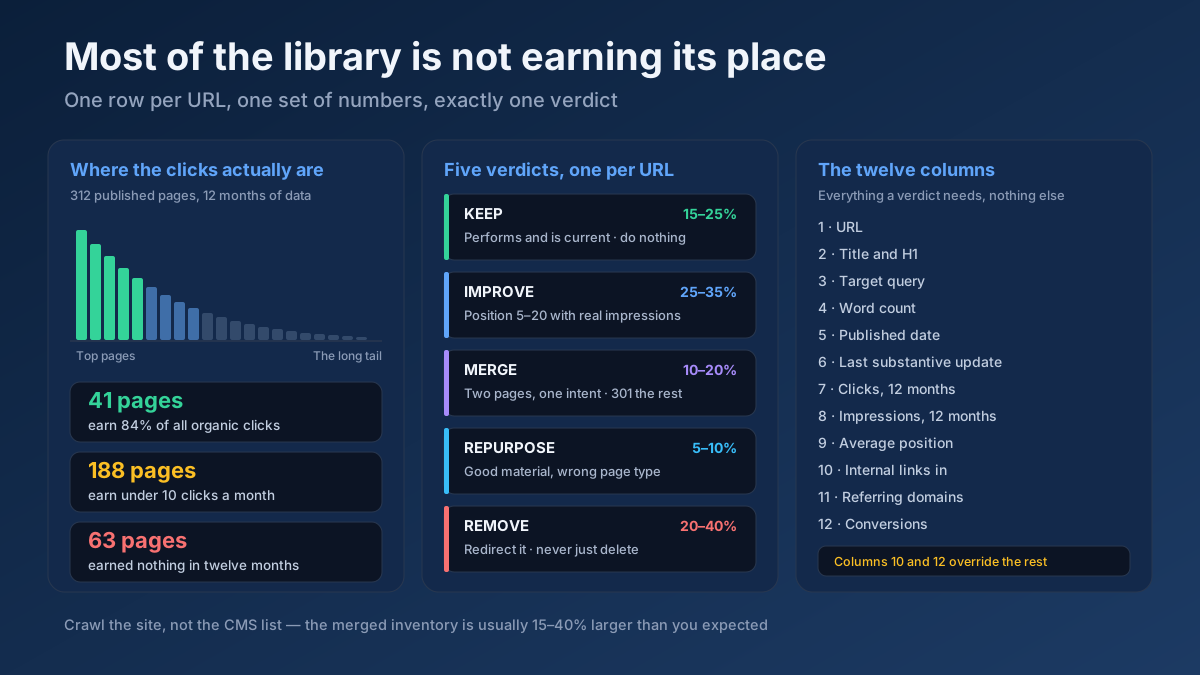
- Publish and forget. AI makes creating pages cheap, so sites end up with hundreds that nobody maintains. Outdated pages slowly lose rankings and trust. A regular content audit keeps the library healthy.
Frequently asked questions
Does Google penalise AI-generated content?
No. Google has said it rewards high-quality content however it is produced. What it acts against is content made mainly to manipulate rankings, especially in large volumes with little original value. A helpful, accurate page that used AI in its drafting is treated like any other page.
Can AI-written articles rank on the first page of Google?
Yes. Large studies of top-ranking pages find that most of them contain at least some AI-assisted text. The pages that rank, however, almost always add something the model could not: real experience, original data, checked facts and a clear answer to the searcher’s question.
Can Google detect AI-generated content?
Google has not said that it uses AI detectors to rank pages, and independent detectors are known to be unreliable. In practice the question matters less than it seems. Google’s systems look for signs of low effort and low value, and those signs show up in unedited AI text whether or not anyone labels it as AI.
Should I disclose that I used AI to write my content?
Google suggests explaining how content was created where readers would reasonably expect it, for example when automation produced a large part of a page. For most sites, a short editorial policy explaining how AI is used, together with a named author who checks and edits every article, is the honest and practical approach.
How much should I edit an AI draft before publishing?
Enough that every fact is verified and the page contains something specific to you: your examples, your data, your judgement. As a rough guide, if you could publish the same draft on a competitor’s site without changing a word, it is not ready yet.
Which AI tool is best for SEO content writing?
The model matters less than the process. Any of the major assistants can produce a usable draft from a good brief and solid notes. Choose one whose writing style you find easy to edit, and pair it with real keyword data and on-page checking tools, which AI chatbots cannot replace.
Is it safe to publish many AI articles quickly?
It is the riskiest way to use AI. Publishing large numbers of pages mainly to target keywords is exactly what Google’s scaled content abuse policy describes. Grow at the pace you can research, edit and maintain properly, even if that means a few strong articles a month.
Does AI content work for AI Overviews and chatbot answers?
The same rules apply. AI search features tend to cite pages that give clear, direct answers backed by specific facts and a recognisable source. Generic text gives them nothing to quote. Our guide on optimising for AI search covers the structure that gets passages cited.
Let AI write the draft, and keep the expertise for yourself
Using AI for SEO content writing comes down to a clear division of labour. Hand the model the parts that are about turning material into text: outlines, drafts, rewrites and metadata options. Keep the parts that are about knowing things: the query and its intent, the brief, the first-hand material, the facts and the final edit. Follow the ten steps above and you get pages that are faster to produce and still worth ranking, which is the only combination that lasts.
Put it into practice on your next article. Choose a specific query with the free keyword research tool, build the draft with the workflow above, and before you publish, run the page through the AI content score checker and the on-page SEO checker to see what still needs work. If you are planning a whole content programme, start with our guide on how to write blog posts that rank and build the AI workflow into it.