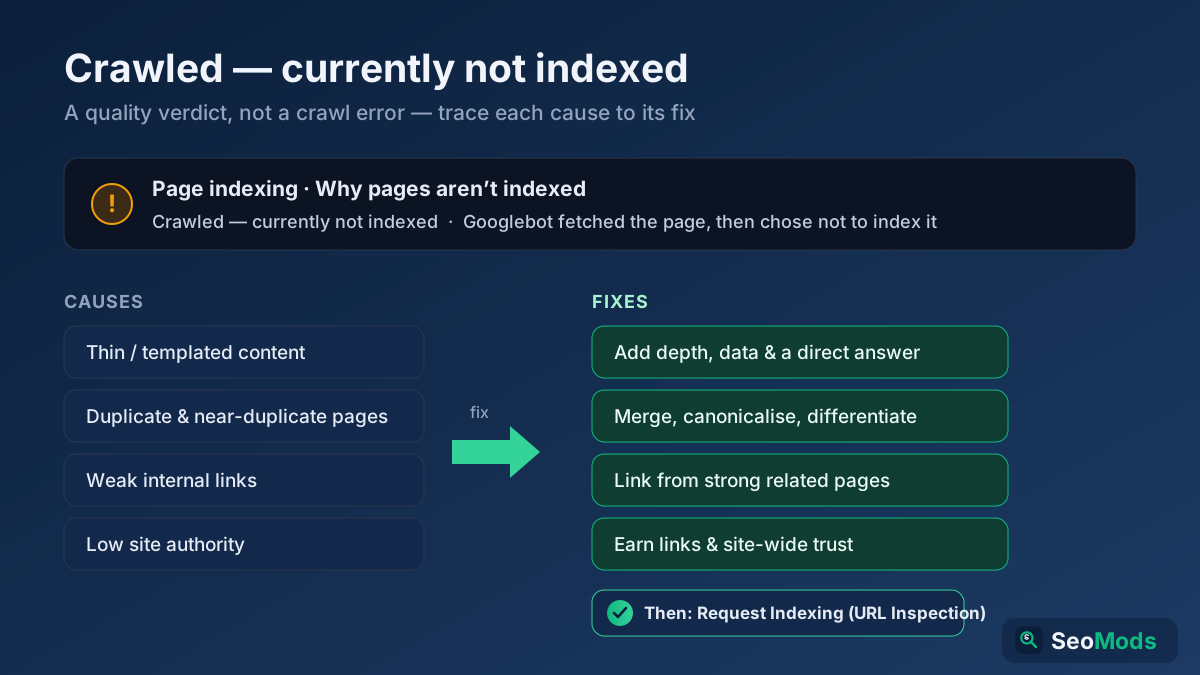
Short answer: "Crawled — currently not indexed" means Google fetched your page but decided it was not worth adding to the index — a quality and priority judgement, not a crawl-access error. Fix it by raising the page’s value: strengthen thin or duplicated content, add strong internal links from related pages, consolidate near-duplicate variants, and build overall site trust, then request reindexing through URL Inspection.
What "Crawled — currently not indexed" really means
This status appears in the Google Search Console Pages (formerly Coverage) report, and it is one of the most misread messages in the whole tool. It does not mean Google was blocked, that your robots.txt is wrong, or that something is technically broken. It means the opposite: Googlebot reached the page, downloaded it, read it — and then chose not to index it. The crawl succeeded; the indexing decision came back negative.
Indexing is not automatic. Google indexes a finite fraction of the pages it crawls, and for every URL it makes a cost-versus-value calculation: is this page distinct, useful and trustworthy enough to earn a slot in the index and, potentially, a place in search results? When the answer is "not right now", you get this status. The word currently is the important one — it signals a provisional verdict that can flip in your favour once the page earns it, without you touching a single crawl setting.
How it differs from "Discovered — currently not indexed"
These two statuses look almost identical in the report, but they describe different stages of the pipeline, and confusing them sends you chasing the wrong fix.
- Discovered — currently not indexed: Google knows the URL exists (it found the link, usually in your sitemap or via internal links) but has not yet crawled it. This is often a crawl-budget or priority-of-fetching problem: Google is queueing the URL but has not judged it worth the crawl yet. Large sites, slow servers and weak internal linking make this worse.
- Crawled — currently not indexed: Google has already fetched and read the page, then declined to index it. This is a quality and demand problem, not a fetch problem. The page competed for a place in the index and lost.
The tell is simple: "Discovered" means Google has not looked yet, so you work on crawlability, server speed and internal links to earn the fetch. "Crawled" means Google has looked and was unimpressed, so you work on the content, uniqueness and authority of the page itself. If you are seeing a lot of "Discovered" on a big site, our guide to crawl budget explains how to free up Google’s attention for the URLs that matter.
Why Google crawls a page and then refuses to index it
There is rarely a single cause. In practice this status is the sum of several weak signals that together tell Google the page is not worth a slot. The most common real reasons, roughly in order of how often they bite:
- Thin or low-value content. The page is short, generic, or says nothing that dozens of existing pages do not already say better. There is no reason for Google to add a redundant copy to its index.
- Templated or near-duplicate pages. Programmatically generated pages, tag archives, filtered category URLs, and boilerplate location pages that differ by only a word or two look like duplicates. Google keeps one and drops the rest.
- Weak internal linking. A page that almost nothing on your site links to reads as unimportant. If you do not treat it as worth linking, Google will not treat it as worth indexing.
- Low overall site authority. New sites, and sites with few quality backlinks, have a small "index budget" of trust. Google is choosier about which of their pages it keeps.
- Low crawl and search demand. If nobody searches for what the page covers and nothing links to it, Google sees little upside in indexing it and may drop it to save resources.
- Brand-new pages with no history. Fresh URLs on a young site often sit in this status for weeks simply because Google has not yet built enough trust to commit index space to them.
- Quality problems elsewhere on the site. If large parts of your site are thin or spammy, Google grows reluctant to index even your decent pages. Index decisions are made partly at the site level, not just page by page.
Notice what is not on this list: robots.txt blocks, noindex tags, canonical conflicts and server errors. Those produce their own, different statuses ("Blocked by robots.txt", "Excluded by noindex tag", and so on). If you see one of those instead, you are dealing with a technical exclusion, not a quality verdict — a full On-Page SEO Audit will separate the two quickly.
Confirm it is a quality issue, not a hidden technical block
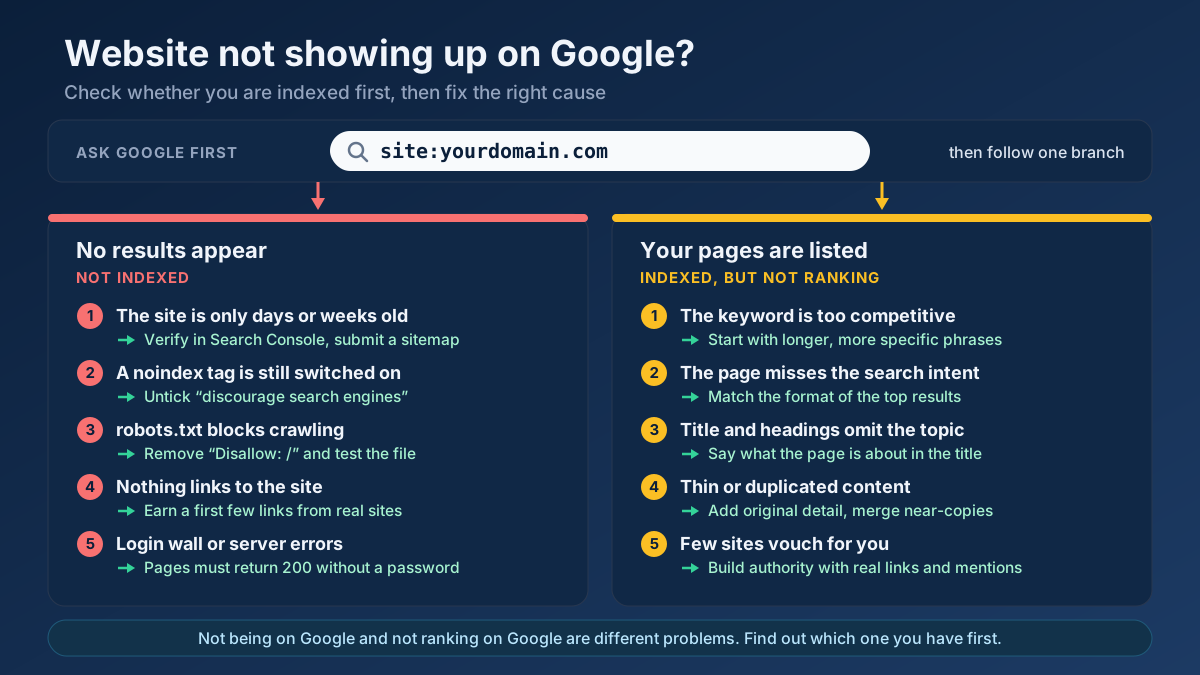
Before you rewrite anything, rule out the technical impostors. Occasionally a page reports as "Crawled — currently not indexed" while something subtle is still discouraging Google. If none of your pages are indexed at all, start with the broader guide to a website not showing up on Google instead. Run these checks first:
- Open the URL in URL Inspection and read the "Page indexing" details. Confirm the page is crawlable, the user-declared canonical matches the Google-selected canonical, and there is no stray
noindex. - View the rendered HTML. If your main content only appears after JavaScript runs, Google may have crawled an almost-empty shell and judged it thin. Make the substance visible in the server-rendered HTML.
- Check that the page is not accidentally canonicalised to another URL. A wrong canonical tells Google to index the other page instead of this one.
- Confirm the URL is in your XML sitemap and returns a clean
200. Use the Sitemap Finder & Validator to verify it is actually listed and reachable. - Scan the page’s tags with the Meta Tag Analyzer to make sure a robots meta directive is not quietly telling Google to stay away.
If all of these come back clean, you have confirmed it: this is a value judgement, and the fixes below are the ones that will move the needle.
Fix 1: Kill thin content — make the page genuinely worth indexing
This is the highest-leverage fix, because thin content is the single most common trigger. The goal is not to hit a word count; it is to make the page the most useful answer to the query it targets. Add depth that a searcher actually wants: original detail, examples, data, images, a clear structure, and a direct answer near the top.
- Lead with a concise, specific answer to the page’s core question, then expand beneath it.
- Add sections that competing pages skip — edge cases, worked examples, comparisons, a short FAQ.
- Replace generic filler with concrete specifics: numbers, names, dates, screenshots and steps.
- Give the page a single, clear search intent. A page that tries to cover five topics badly loses to five focused pages.
Run the page through the Thin Content Checker to gauge whether its depth and uniqueness clear the bar, and use the On-Page SEO Checker (Keyword) to confirm the on-page basics — a descriptive title, a real H1, well-structured headings — are all in place. If a page cannot be made genuinely valuable, the honest answer may be to merge it into a stronger page or remove it entirely.
Fix 2: Consolidate duplicate and near-duplicate pages
Templated and near-duplicate URLs are the classic cause on larger sites. Ten thin location pages that differ only by city name, dozens of tag archives, or filter and sort parameters that spin up endless variants all look like the same page wearing different hats. Google indexes one representative and leaves the rest in this status.
The fix is consolidation, not duplication:
- Merge overlapping thin pages into one comprehensive page and
301redirect the old URLs to it. - Canonicalise parameter and filter variants to the clean master URL so Google understands they are the same content.
- Differentiate pages you want to keep — give each one unique copy, unique data and a distinct purpose, not a find-and-replace of one template.
- Prune pages that exist only because a CMS created them. Fewer, stronger pages index better than many weak ones.
This is also index-bloat control: every thin duplicate you remove concentrates authority and crawl attention on the pages you actually care about, which is exactly what a technical SEO audit is designed to surface.
Fix 3: Strengthen internal links to the orphaned page
Internal links are how you tell Google which of your pages matter. A page buried several clicks deep, linked only from a sitemap, reads as an afterthought. Pull it into your site’s structure and its indexing odds rise sharply.
- Add contextual links to the page from several relevant, already-indexed pages — not a footer dump, but in-content links where the topic genuinely fits.
- Use descriptive anchor text that reflects the target page’s topic, so Google understands what it is about.
- Link from your stronger pages — the ones with traffic and links of their own — so authority flows to the struggling URL.
- Make sure the page sits no more than two or three clicks from the homepage, and that its section hub links to it.
Internal linking is the cheapest, fastest lever you control, and it often flips a "Crawled — currently not indexed" page on its own, because it changes the importance signal Google reads without waiting for external links to arrive.
Fix 4: Build site-level authority and trust
Sometimes the page is fine and the site is the bottleneck. A young domain with few backlinks has a small reservoir of trust, so Google rations index space and is quick to leave marginal pages out. You cannot force authority, but you can build it deliberately.
- Earn a handful of genuine, relevant backlinks — even a few quality links lift the whole domain’s indexing generosity.
- Publish consistently on a focused topic so Google recognises real subject-matter depth rather than a scattering of unrelated posts.
- Fix the thin and duplicate content elsewhere on the site; site-wide quality feeds the index decision for every individual page.
- Give it time. Trust compounds, and pages that sit unindexed on a new site often get picked up once the domain matures.
This is the slowest fix and the one with the biggest ceiling. A site that Google trusts gets the benefit of the doubt on borderline pages; a site it does not trust has to earn every single slot.
How to request reindexing through URL Inspection
Once you have genuinely improved the page — and only then — ask Google to take another look. Requesting reindexing on an unchanged page does nothing; the same signals produce the same verdict. After you have made real changes:
- Open URL Inspection in Search Console and paste the full URL of the improved page.
- Wait for the live data to load, then click Request Indexing. Google runs a live test and adds the URL to a priority crawl queue.
- Do this once. Repeatedly hammering the button does not speed anything up and can look like abuse.
- Make sure the improved page is in your XML sitemap with an updated
lastmoddate, which is a second, passive signal that the content has changed.
Requesting indexing is a nudge, not a guarantee. It tells Google to reassess sooner, but the decision still rests on whether your changes made the page worth indexing. If the underlying quality gap is real, the request alone will not save it — the content work has to come first.
How long does it take to get indexed?
There is no fixed timetable, and anyone promising one is guessing. Realistically, expect a range:
- A few days to two weeks after a genuine content improvement plus a reindex request, on a site Google already trusts.
- Several weeks to a couple of months on a newer or lower-authority site, where Google recrawls less often and is slower to commit index space.
- Longer, or never, if the page stays thin or duplicated. No amount of waiting fixes a value problem — the status will simply persist.
The most reliable accelerant is not patience but improvement: the clearer the jump in quality, uniqueness and internal support, the faster Google reassesses. Track the outcome in the Pages report over the following weeks, and if you want a repeatable way to monitor indexation trends, our guide to measuring SEO in Search Console shows which reports to watch. For a full pre-flight sweep of a struggling site, run a Technical Site Audit (Crawler) to catch the quality and structure issues that keep pages out of the index.
Applying this to your own site? See the tools picked by audience: SEO Tools for SEO Beginners and SEO Tools for Freelance SEOs.
Frequently asked questions
Is "Crawled — currently not indexed" a penalty?
No. It is not a manual action or an algorithmic penalty. It is a routine indexing decision: Google read the page and judged it not valuable, distinct or important enough to index right now. The word "currently" signals it can be reversed by improving the page, without any penalty ever having been applied.
How is it different from "Discovered — currently not indexed"?
"Discovered" means Google knows the URL exists but has not crawled it yet — usually a crawl-budget or priority issue. "Crawled" means Google has already fetched and read the page and then declined to index it — a quality and demand issue. Discovered is fixed with crawlability and internal links; crawled is fixed with content and authority.
Will requesting indexing force the page in?
No. Requesting indexing only asks Google to reassess sooner. If you request it on a page you have not changed, the same signals produce the same "not indexed" verdict. Improve the content, internal links and uniqueness first, then request reindexing so Google evaluates the better version.
Can too many of these URLs hurt the rest of my site?
Yes, indirectly. A pile of thin, unindexed pages signals low overall quality, and Google makes some index decisions at the site level. Pruning or consolidating weak URLs concentrates authority and crawl attention on your strong pages, which can improve indexing across the board.
Should I just delete pages stuck in this status?
Delete or merge them only if they cannot be made genuinely useful. If a page targets a real query and can be improved, invest in it. If it exists only because a CMS or template created it and serves no searcher, removing it or redirecting it to a stronger page is the right call.
How long before an improved page gets indexed?
On a trusted site, often a few days to two weeks after real improvements plus a reindex request. On a newer or lower-authority site, several weeks to a couple of months. If the page stays thin or duplicated it may never index — the speed depends far more on the quality jump than on time.