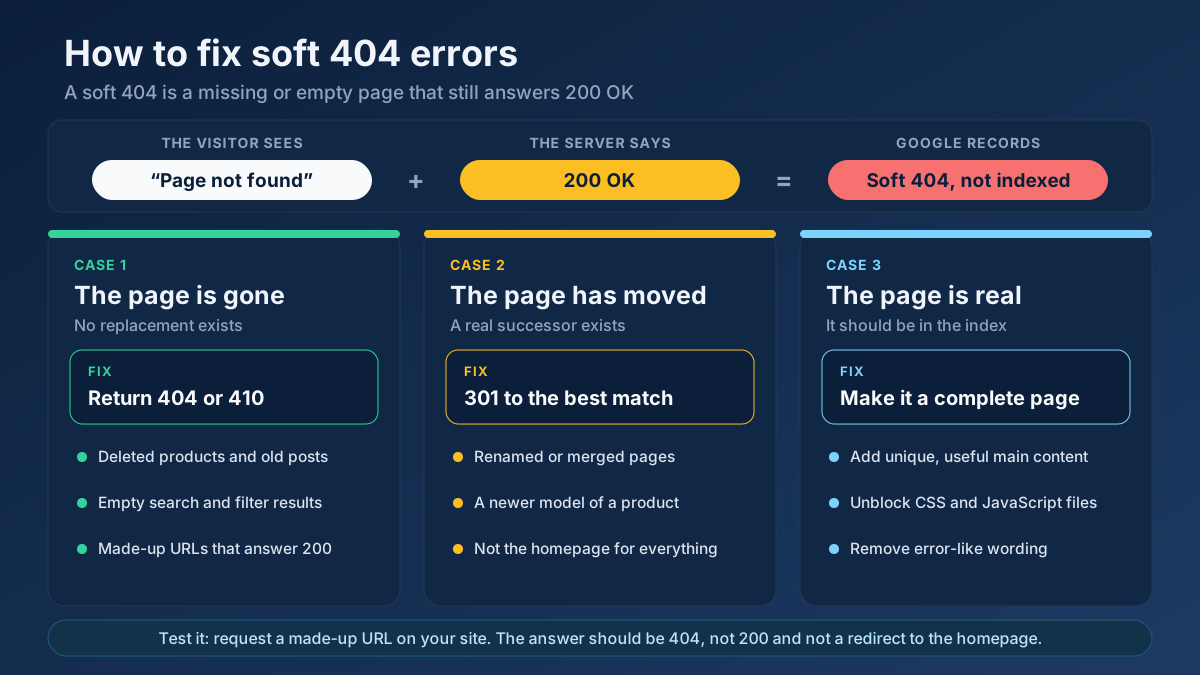
Short answer: To fix soft 404 errors, open the Soft 404 list in the Page indexing report of Google Search Console and decide what each URL should be. If the page is gone, make the server return a real 404 or 410. If it moved, 301-redirect it to the closest equivalent. If it is a real page, add substantial content, make sure Google can render it, and then validate the fix.
Soft 404 is one of the more confusing lines in Search Console, because nothing looks broken. The pages load, the server reports success, and yet Google has quietly decided that they are error pages and left them out of its index. Sometimes Google is right and you have hundreds of empty URLs pretending to be content. Sometimes it is wrong and a product page that pays the bills has been filed next to the rubbish. The repair is different in each case, and applying the wrong one makes things worse. This guide explains what a soft 404 is, how to find every one of them, the nine causes we meet most often, and the exact fix for each.
What is a soft 404 error?
Every response from a web server starts with a status code. 200 OK means “here is the page you asked for”. 404 Not Found means “there is no page at this address”. A soft 404 is a mismatch between the two: the server answers 200, but the page it delivers says, or strongly implies, that there is nothing there.
Google’s documentation on HTTP status codes and network errors defines it as a URL that returns a page telling the user that the page does not exist together with a 200 success code, and adds that in some cases it may be a page with no main content or an empty page. That second half matters. No server ever sends a “soft 404” status, because it is not a status code at all. It is a label that Google applies after reading the page and concluding that it behaves like an error.
Because it is a judgement and not a fact, a soft 404 comes in two forms:
- A true soft 404. The page really is missing or empty, and the server is hiding it behind a success code. A deleted product that shows “Sorry, this item is no longer available” with status 200 is the textbook example.
- A false soft 404. The page is real and useful, but something about it made Google think otherwise: very little text, a prominent “out of stock” notice, or content that failed to load when Google rendered it.
The first job with any soft 404 is to work out which of the two you are looking at. Everything else follows from that.
Soft 404 vs 404 vs 410: what is the difference?
These three are often discussed as if they were grades of the same problem. They are not. Two of them are honest answers, and one is a contradiction.
| Response | What the server says | What the visitor sees | How Google treats it |
|---|---|---|---|
| 404 Not Found | No page at this address | An error page | Drops the URL from the index and crawls it less over time |
| 410 Gone | The page was removed on purpose | An error page | Handled in the same way as a 404 |
| Soft 404 | 200 OK, everything is fine | An error message, an empty page or almost no content | Guesses that it is an error, leaves it out of the index, and keeps checking it |
| 503 Service Unavailable | Temporarily unable to answer | A maintenance notice | Keeps the URL for now and returns later |
A plain 404 is not something to be ashamed of. Pages are deleted on every healthy website, and a correct status is how the web is supposed to say so. The soft 404 is the one that needs attention, because it forces a search engine to guess.
Are soft 404 errors bad for SEO?
A soft 404 is not a penalty and it does not lower the standing of your other pages. In many audits the Soft 404 list contains nothing but URLs that deserve to be excluded, and the only cost is untidiness. There are, however, three situations in which it costs you something real.
- A page you need is not indexed. When the label lands on a product, category or service page, that page cannot appear in search results. This is the expensive kind, and it is the reason the report should be read line by line and not dismissed.
- Crawling is wasted on large sites. Google’s guide to managing crawl budget on large sites lists eliminating soft 404 errors among its recommendations, because such pages continue to be crawled. A real 404 is visited less and less; a page that answers 200 keeps earning visits it does not deserve. On a site with a few hundred pages this is irrelevant. On a catalogue with hundreds of thousands of URLs it delays the discovery of new pages. Our guide to crawl budget explains when this starts to matter.
- Visitors hit dead ends that look like pages. An empty page with a success status is also invisible to your own monitoring. Broken-link reports and uptime checks trust the status code, so they will tell you that everything is fine.
There is also a quieter effect. A site that answers 200 for any address at all gives Google no reliable way to tell which of its URLs exist. In our experience, cleaning that up makes every other indexing report easier to read, because the remaining exclusions start to mean something.
How to find soft 404 errors on your site
Search Console shows the soft 404s Google has already found. A status check and a crawl show the ones it has not found yet. Use all three; together they take about half an hour on a small site.
1. Read the Page indexing report in Search Console
Open Search Console and go to Indexing › Pages. Scroll to the table headed “Why pages aren’t indexed” and click the row named Soft 404. You will see a chart of affected pages over time and a list of example URLs, which can be exported with the button in the top right corner. Google’s Page indexing report help page describes the reason in the same terms as above: the page request returns what Google believes is a soft 404 response.
Older articles and screenshots mention the message “Submitted URL seems to be a Soft 404”. That wording came from the previous version of the report and meant a soft 404 on a URL listed in your sitemap. The current report shows a single Soft 404 row; use the filter at the top of the page to switch between all known pages and submitted pages only. If you are new to these screens, measuring SEO with Search Console shows where each report lives.
2. Inspect a few URLs to see what Google saw
Pick three or four URLs from the list that represent different templates and run each one through the URL Inspection tool. Press Test live URL, then View tested page, and look at two tabs. The screenshot shows the page as Google rendered it. The “More info” tab lists page resources that could not be loaded.
This is the fastest way to separate true from false soft 404s. If the screenshot shows an error message or an empty layout, Google is right. If it shows a blank area where your content should be, you have a rendering problem. If it shows the page exactly as you see it, the content itself is what looks thin.
3. Check the real status code
A browser hides status codes from you, so check them directly. Paste a URL into the HTTP status checker to see every hop and the final code. Then run the single most useful test in this whole guide: request an address that cannot possibly exist, such as https://example.com/this-page-does-not-exist-73914. A correctly configured site answers 404. If yours answers 200, or redirects to the homepage, every mistyped link and every deleted page on the site is a soft 404 waiting to be discovered.
If you prefer the command line, one request shows the same thing:
curl -I https://example.com/this-page-does-not-exist-73914The first line of the reply should read HTTP/2 404 or HTTP/1.1 404 Not Found.
4. Crawl the site for empty and near-empty pages
Search Console lists examples, not necessarily every affected URL. To find the rest, crawl the site with the technical site audit and sort the pages that return 200 by word count. Pages with a few dozen words, identical titles or text such as “no results found” are your candidates. The thin content checker gives a closer reading of a single URL, including how much of the page is template and how much is main content.
On larger sites, server logs add one more view: URLs that Googlebot requests again and again although they have no value. The guide to log file analysis for SEO covers how to read them.
Before you fix anything: should the page exist?
Every soft 404 is repaired by making the status code and the content agree. There are only three ways to do that, and one question chooses between them: does this URL deserve to be a page?
| What the URL really is | Correct fix | What to avoid |
|---|---|---|
| Deleted or never existed, with nothing to replace it | Return 404 or 410 | Redirecting to the homepage |
| Moved, renamed or merged into another page | 301 redirect to the closest equivalent | A 302, or a redirect to an unrelated page |
| Empty by nature: internal search with no results, an empty filter | Return 404, or keep it out of the index with noindex | Padding it with filler text |
| A real page with too little on it | Add unique main content, or merge it into a stronger page | Requesting indexing again without changing anything |
| A real page that Google could not render | Unblock resources and fix the rendering | Rewriting content that Google never saw |
| Temporarily unavailable | Return 503 for a short outage, or keep the full page up | An empty page that answers 200 |
Notice what is absent from the middle column: there is no fix that keeps an empty page at status 200 and merely asks Google to reconsider. The page has to change, or the status has to change.
9 causes of soft 404 errors and how to fix each one
The causes below are ordered roughly by how often we find them. Most sites with a long Soft 404 list have two or three of them at once, usually one per template.
1. The “not found” page returns 200
This is the classic case. The site has a friendly error page, but the server delivers it with a success code. It usually happens for one of three reasons: the error page was set up as a redirect to /404.html, a catch-all route in the application answers every unknown address with a template, or a hand-written script prints “not found” without setting the status.
Fix: make the server send 404 on the original URL while it shows the error page. The address in the browser should not change. The platform section below has the exact configuration for Apache, Nginx, IIS and PHP. Afterwards, repeat the made-up URL test from the previous section.
2. Deleted pages redirect to the homepage
Plugins and well-meaning developers often redirect every missing URL to the homepage “to save the link value”. It does not work. Google’s search team has said for years that a redirect from a removed page to an unrelated one, the homepage above all, is treated as a soft 404. The visitor, meanwhile, clicked a result about a specific blender and landed on a page about everything.
Fix: switch the blanket rule off. Redirect only where a real equivalent exists, such as the newer model, the merged article or the parent category that still lists similar items, and let everything else return 404. Google’s page on redirects and Google Search explains how permanent redirects are read, and 301 vs 302 redirects helps you choose the right type.
3. Thin or empty pages
A page can be flagged without containing a single error message. If the main area holds one sentence, a lone image or nothing but a heading, the template around it (header, menu, footer) makes up nearly all of the page, and Google sees the same shell it has seen on every other URL of the site. Author archives with no posts, tag pages with one entry, location pages that differ only in the city name and placeholder pages published “for later” all fall into this group.
Fix: decide whether the page has a job. If it does, give it enough original content to do it: a real description, specifications, answers to the questions people ask before buying. If it does not, remove it or fold it into a stronger page. A content audit is the orderly way to make that decision for a whole section instead of one URL at a time.
4. Internal search, filter and tag pages with no results
Any page that is built from a query can come up empty. A site search for a misspelt word, a filter for red shoes in size 49, a tag that lost its last article: each produces a URL that returns 200 and a line saying nothing was found. Because such addresses can be generated without limit, they often make up the largest share of a Soft 404 list.
Fix: return a 404 status when a listing has zero results. If your platform cannot do that, add a noindex directive to empty result pages. Better still, stop the URLs from being produced in the first place: do not link to filter combinations with no items, and keep internal search results out of the crawl. The guides to faceted navigation and noindex, nofollow and Disallow go through the options and their side effects.
5. Out-of-stock and discontinued products
Online shops produce the false soft 404 more than any other kind of site. When a product sells out, many themes replace the price and the buy button with a large “Currently unavailable” notice, and some hide the description as well. To an algorithm trained to recognise error pages, the result is hard to tell apart from one.
Fix: treat the two situations differently.
- Temporarily out of stock. Keep the page whole: title, images, description, specifications and reviews. State the availability calmly, offer a back-in-stock notification, show alternatives, and mark the item as out of stock in the product structured data. The page stays useful, so it stays indexed.
- Permanently discontinued. If there is a successor, redirect to it with a 301. If there is none, return 404 or 410 and remove the URL from the sitemap and from internal links.
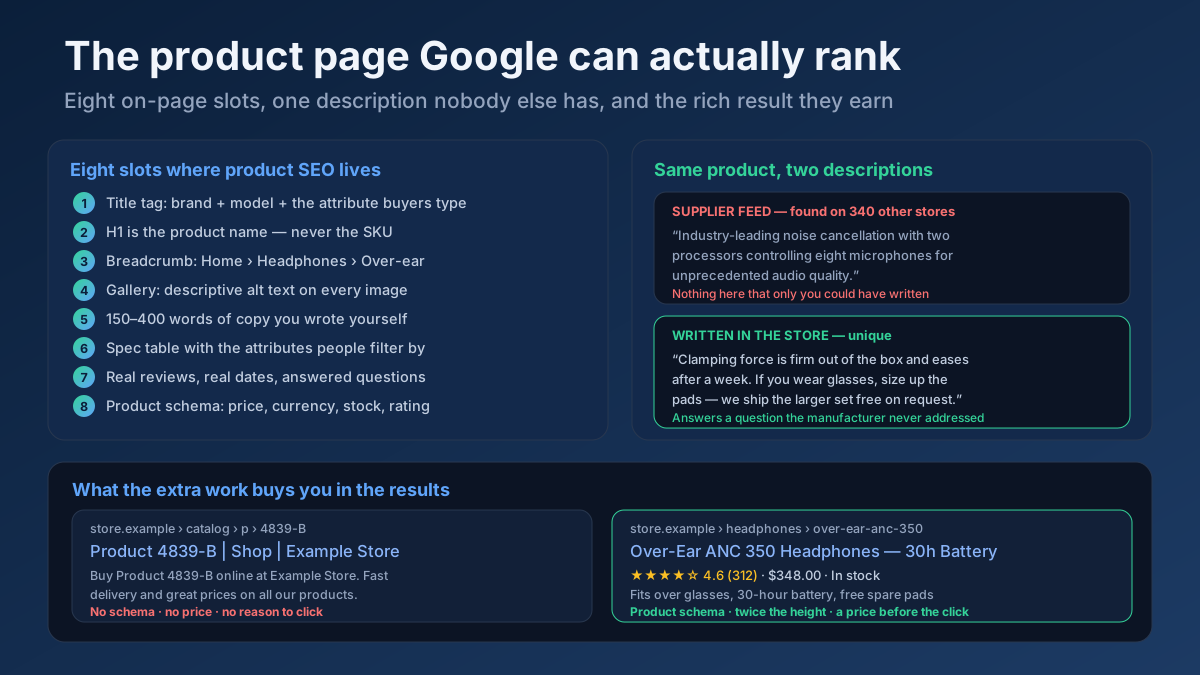
The article on e-commerce product page SEO covers how to build product pages that hold up when stock changes.
6. Google cannot render the content
On sites that build pages with JavaScript, the HTML that the server sends may be almost empty until the scripts run. If those scripts are blocked in robots.txt, fail with an error, or depend on an API call that times out, Google renders an empty shell and classifies it accordingly. Google’s own guidance on soft 404s lists blocked or failed resources and slow-loading pages among the things to check when a good page is flagged.
Fix: compare the URL Inspection screenshot with what you see in your browser. Make sure CSS, JavaScript and API paths are crawlable with the robots.txt tester, and look at the list of resources that could not be loaded. Wherever possible, deliver the main content in the initial HTML through server-side rendering or pre-rendering. The JavaScript SEO guide explains the rendering pipeline step by step.
7. Single-page apps that answer 200 for every route
A single-page application is typically served by one file. The server sends the same index.html for every address and the router inside the browser decides what to show, including its own “page not found” view. From the outside, every imaginable URL exists and returns 200.
Fix: Google’s JavaScript SEO basics give two accepted approaches. Either redirect with JavaScript to an address for which the server responds with a real 404, or add <meta name="robots" content="noindex"> to the error view with JavaScript. If the application is rendered on the server, use the framework’s own mechanism to set the status, which is the cleanest answer of the three.
8. Error and maintenance pages served with 200
When a database connection fails or a deployment is in progress, some applications show a tidy apology page and send it with a success code. If Googlebot visits during that window, it reads “We’ll be right back” as the content of every URL it requests, and real pages collect soft 404 labels or, worse, are indexed with the apology as their text.
Fix: planned maintenance and temporary failures should answer 503 Service Unavailable, ideally with a Retry-After header. Google then keeps its existing copy and returns later. Keep such periods short: a 503 that lasts for many days is eventually treated as a permanent error. You can confirm what the server sends with the HTTP header checker.
9. Expired listings, login walls and pages past the end
The last group collects several smaller patterns with the same root. A job advert or property listing that has closed but still shows a shell with “This listing has expired”. A members-only page that sends logged-out visitors, and therefore Googlebot, a login form at status 200. A paginated archive that answers ?page=250 with an empty list although only twelve pages exist.
Fix: expired listings follow the same rule as discontinued products: redirect to a real successor or return 404 or 410. Pages that require a login should either answer 401 or 403 or redirect to the login page, and should not be in the sitemap. Page numbers beyond the last one should return 404; pagination SEO covers the details.
How to fix soft 404 errors on your platform
The principle is identical everywhere: the error page is shown at the requested address and the response carries a 404 status. Only the syntax changes.
Apache
Point ErrorDocument at a local path:
ErrorDocument 404 /404.htmlThe common mistake is to write a full address such as ErrorDocument 404 https://example.com/404.html. The Apache documentation for ErrorDocument warns that with a remote URL the server sends a redirect, so the visitor never receives the original error status. That one line is enough to turn every missing page on the site into a soft 404. If you manage rules by hand, the .htaccess file must not contain a rewrite that sends unknown paths to the homepage either; the .htaccess generator produces clean redirect rules to start from.
Nginx
The correct directive keeps the original status:
error_page 404 /404.html;Two variants cause soft 404s. error_page 404 =200 /404.html; explicitly rewrites the code to 200, as the Nginx documentation for error_page describes. And the fallback used for single-page apps, try_files $uri $uri/ /index.html;, returns the application shell with status 200 for any address, which brings you back to cause 7.
IIS and ASP.NET
In web.config, serve the error page by executing it and not by redirecting to it:
<httpErrors errorMode="Custom" existingResponse="Replace">
  <remove statusCode="404" />
  <error statusCode="404" path="/404.html" responseMode="ExecuteURL" />
</httpErrors>
With responseMode="Redirect", or with the older ASP.NET customErrors setting left on its default redirect mode, the visitor is sent with a 302 to an error page that answers 200. It is one of the most frequent sources of soft 404s we see on Windows hosting.
PHP and custom applications
Set the status before any output is sent, then include the error template:
http_response_code(404);
include __DIR__ . '/404.php';
exit;
The typical bug is a product or article script that looks up an ID, finds nothing, and prints “not found” inside the normal layout. Every lookup that can fail needs a branch that sets the status.
WordPress
WordPress sends a correct 404 for unknown addresses by itself, so soft 404s here usually come from somewhere else:
- A redirect plugin with an option such as “redirect all 404s to the homepage”. Turn it off.
- Internal search pages with no results, which answer 200. Set search result pages to noindex in your SEO plugin.
- Tag, category and author archives with no posts or a single post. Delete unused terms, and noindex the archive types you do not maintain.
- Attachment pages, which hold one image and no text. Redirect them to the file or the parent post; most SEO plugins have a switch for it.
- A page builder or cache that stored an error page and keeps serving it as a normal one. Purge the cache after fixing the cause.
Hosted shop platforms and JavaScript frameworks
On hosted platforms you cannot edit the server configuration, and the platform already returns 404 for deleted products. The soft 404s there are almost always the false kind: out-of-stock items, empty collections and thin pages. Work on the content and the theme, as described under causes 3 to 5.
In server-rendered JavaScript frameworks, use the built-in way of signalling a missing record (in Next.js, for example, the notFound() function) in place of rendering an “item not found” component inside a successful response. For data-driven routes, make the check on the server, before the response starts.
Make the 404 page itself useful
Returning the correct status does not mean abandoning the visitor. A good error page admits the problem and offers a way forward, and it does both while answering 404. It should have:
- a plain statement that the page could not be found, in the site’s own voice;
- the normal header and navigation, so that the visitor is still clearly on your site;
- a search box and links to the most popular sections or products;
- no automatic redirect after a few seconds, which only recreates the problem with a delay.
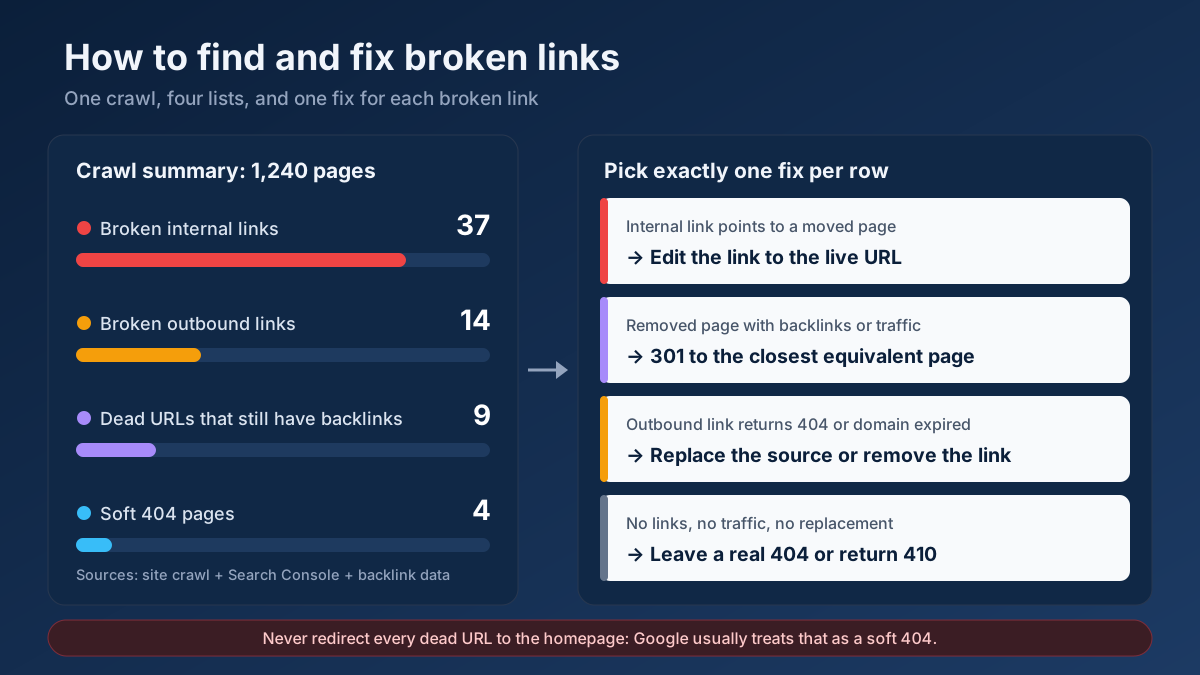
Then reduce how often people see it. Internal links that point to removed addresses are entirely within your control, and the broken link checker lists them page by page. The full clean-up routine is in how to find and fix broken links.
Validate the fix and know how long it takes
Once a template is repaired, tell Google and then verify the result. Skipping the verification is how a fix that worked on five URLs is assumed to have worked on five thousand.
- Re-test the status. Run a sample of the affected URLs through the HTTP status checker. Each should now show the code you intended: 404, 410, a single 301 to the right target, or 200 for a page that has gained real content.
- Run a live test. In URL Inspection, press Test live URL for a repaired page and look at the screenshot again. For pages that should be indexed, request indexing.
- Clean the sitemap. Only indexable URLs that answer 200 belong in it. Remove everything you turned into a 404 or a redirect, and confirm the result with the sitemap validator. The XML sitemaps guide explains why this matters for the report.
- Press Validate Fix. Open the Soft 404 row in the Page indexing report and start a validation. Google rechecks the known URLs and reports its progress.
- Read the outcome correctly. URLs that now return 404 move to “Not found (404)”, and redirected ones move to “Page with redirect”. They remain excluded, which is exactly what you wanted. Pages you improved should move to the indexed group.
How long does it take? Google’s help page says that validation typically takes up to about two weeks and can take longer. The figures below are what we usually observe on small and medium sites; they are not published by Google, and rarely crawled URLs sit at the slow end.
| Change you made | Typical time until the report reflects it |
|---|---|
| Status changed to 404 or 410 | A few days to three weeks |
| 301 redirect to an equivalent page | One to three weeks |
| Content added to a real page | Two to six weeks, since Google must recrawl and reassess it |
| Rendering or blocked-resource fix | One to four weeks |
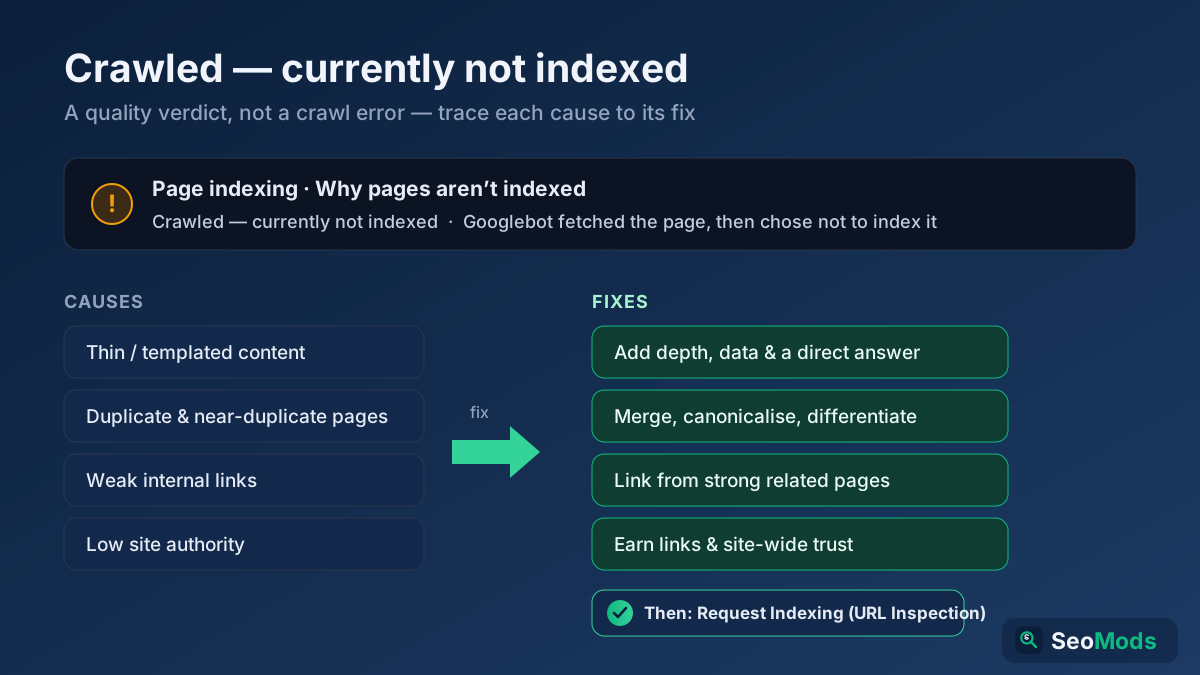
If improved pages leave the Soft 404 group only to appear under another exclusion, the next stop is how to fix “Crawled – currently not indexed”, which deals with pages that Google can read but has chosen not to keep.
A realistic example: 1,840 soft 404s on an online shop
The scenario below is assembled from patterns we see repeatedly; the business and the numbers are illustrative. A UK retailer of camping equipment with about 6,000 products notices that organic visits to product pages have been slipping for three months. The Page indexing report shows 1,840 URLs under Soft 404, up from a few dozen before a theme update in the spring.
The exported list falls into four groups once it is sorted by URL pattern:
| Group | URLs | What was wrong | Fix |
|---|---|---|---|
| Internal search results | 1,120 | Empty result pages answering 200, linked from an old “popular searches” block | 404 for zero results, noindex on all search pages, block removed |
| Discontinued products | 410 | A plugin redirected every deleted product to the homepage | Plugin rule disabled; 96 redirected to successors, the rest return 410 |
| Out-of-stock products | 260 | The new theme hid the description and showed only “Unavailable” | Full content restored, alternatives and stock alert added |
| Empty filter pages | 50 | Filter combinations with no products were linked from category pages | Links to empty combinations removed; empty pages return 404 |
Only the third group was costing the shop sales, and it was the second smallest. Those 260 pages were seasonal products that would be back in stock, and they had lost their rankings just before the season began. The other 1,580 URLs were correctly excluded; they simply needed to be excluded honestly.
Four weeks after validation started, the Soft 404 count had fallen below a hundred. The search and filter URLs were listed under Not found, the redirected products under Page with redirect, and most of the out-of-stock pages had returned to the index. The made-up URL test, which had answered with a redirect to the homepage on day one, now answered 404. Nothing in this clean-up was technically difficult. The work was in refusing to apply one fix to four different problems.
Common mistakes when fixing soft 404 errors
- Redirecting everything to the homepage. It clears the 404 report and fills the Soft 404 report.
- Adding filler text to pages that should not exist. Two hundred words of padding on an empty search page do not make it a page. Return the right status.
- Blocking the URLs in robots.txt. Google can no longer crawl them, so it never sees the corrected status, and the addresses can linger for months. Let them be crawled until they have dropped out; the robots.txt guide explains what the file is and is not for.
- Pressing Validate Fix before anything has changed. The validation fails on the first URL Google rechecks, and you have lost a couple of weeks.
- Treating every soft 404 as an error to eliminate. A row that moves from Soft 404 to Not found (404) is a success, not a new problem.
- Deleting pages that still have links or traffic. Check the Performance report and the backlinks of a URL before you return 404 for it. Valuable addresses deserve a redirect to a real equivalent.
- Fixing URLs and not templates. If the list has a thousand entries, there are probably three or four causes. Repair the template and the thousand entries follow.
- Using a 302 for a permanent move. A temporary redirect tells Google to keep the old address, which is the one you wanted gone.
- Forgetting to retest after a redesign or migration. New themes and new servers reset error handling. Put the made-up URL test in your launch routine, alongside the website migration checklist.
Frequently asked questions
What does soft 404 mean in Google Search Console?
It means Google requested the URL, received a 200 success status, and concluded from the content that the page is effectively an error: it says something is missing, or it is empty or nearly empty. Google leaves such pages out of the index. The label is Google’s assessment, not a status code sent by your server.
What is the difference between a 404 and a soft 404?
A 404 is an honest answer: the server states that no page exists at the address. A soft 404 is a contradiction: the server says the request succeeded while the page shows an error or has no real content. Google handles a 404 without difficulty; a soft 404 forces it to guess, and it keeps rechecking the URL.
Do soft 404 errors hurt my rankings?
They do not penalise the site as a whole. The harm is local: a real page that is labelled soft 404 is not indexed and cannot rank. On very large sites, thousands of them also use up crawling that would be better spent on new and updated pages.
How long does it take for a soft 404 to disappear from Search Console?
After the fix, Google has to crawl the URL again. Google says validation typically takes up to about two weeks and sometimes longer. In our experience, status changes show up within a few days to three weeks, and pages with improved content take two to six weeks to be reassessed.
Should I redirect soft 404 pages to my homepage?
No. Google treats a redirect from a removed page to an unrelated page, especially the homepage, as a soft 404, so nothing is gained. Redirect only to a page that serves the same need, such as a newer product or a merged article, and return 404 or 410 for the rest.
Why is a page with real content marked as a soft 404?
The usual reasons are very little main content, wording that resembles an error such as “not available” or “no results”, or content that did not load when Google rendered the page because scripts were blocked or failed. Check the screenshot in URL Inspection to see which applies.
Is an out-of-stock product page a soft 404?
It can be flagged as one if the page shows little more than an “unavailable” message. Keep the full description, images and reviews, state the stock status clearly, and offer alternatives. If the product is permanently discontinued, redirect to its successor or return 404 or 410.
How do I test whether my site returns soft 404s?
Request an address that cannot exist, for example your domain followed by a random string, and check the status code with an HTTP status checker or curl -I. A correctly configured site answers 404. If you receive 200 or a redirect to the homepage, the site produces soft 404s for every missing page.
Fix the template, not the URL
Soft 404 errors come down to one rule: the status code and the content must tell the same story. A page that is gone should say so with a 404 or 410. A page that has moved should point to its real successor with a 301. A page that deserves to rank should carry enough content to look like one, and Google should be able to render it. Sort the list from Search Console by URL pattern, find the three or four causes behind it, repair each at the template level, and then let the validation run.
You can start in the next five minutes. Put a made-up address on your own domain into the HTTP status checker and see whether the answer is 404. Then run the technical site audit to list pages that return 200 with almost nothing on them, and use the all-in-one SEO audit on any single URL to see its status, indexability and content checks in one report. When the Soft 404 row is under control, work through the rest of the technical SEO audit checklist so that the pages you kept have every chance to rank.