Short answer: Pagination is how you split one long list — a blog archive, a product category, search results, forum threads — across a numbered series of pages (?page=2, /page/3/, and so on). Handled well, it lets Google discover and index every item in the set without wasting crawl budget or creating duplicate, thin pages. Handled badly, it buries products and articles that never get crawled, splits ranking signals, or drowns your site in near-identical URLs. This guide explains exactly how search engines treat paginated pages in 2026, the canonical and crawlability rules that actually matter, how to handle infinite scroll and “load more”, and a step-by-step way to audit and fix it.
What pagination actually is
Pagination is the practice of breaking a single large collection of content into a sequence of smaller pages, each showing a slice of the whole and linking on to the next. You see it everywhere: a category page that lists 24 products per page across 40 pages, a blog that shows ten posts per archive page, a search-results page that spills across dozens of numbered results, a forum thread that runs to page 15. The defining feature is that every page in the series is part of one logical set — “page 2 of Running Shoes” only makes sense as a continuation of “page 1 of Running Shoes.”
That distinction — a series of pages that together form one collection — is what makes pagination a distinct SEO problem. It is not the same as a set of unrelated pages, and it is not the same as a single page with all its content. It sits in between, and search engines have a specific way of dealing with it. Get the signals right and Google treats the series as a doorway into deep content it would otherwise struggle to reach. Get them wrong and you either hide half your catalogue or split the authority of your best pages across a dozen thin duplicates. Pagination is a recurring line item in any serious technical SEO audit for exactly that reason.
Pagination is not infinite scroll, “load more” or faceted navigation
Before fixing anything, it helps to separate pagination from three patterns it is constantly confused with, because each behaves differently for crawlers:
- Classic pagination — discrete, numbered pages, each with its own crawlable URL (
/blog/page/2/). This is the pattern search engines handle best, because every slice of the collection lives at an address a crawler can request directly. - Infinite scroll — more items load automatically as the user scrolls, usually with no visible page boundaries and often no URL change. Left to itself this is hostile to crawlers: a bot does not scroll, so anything below the first load may never be seen unless you back it with real paginated URLs.
- “Load more” buttons — a middle ground where the user clicks to fetch the next batch. If the button is a JavaScript action with no underlying link or URL, a crawler that does not click gets stuck on the first batch, just like infinite scroll.
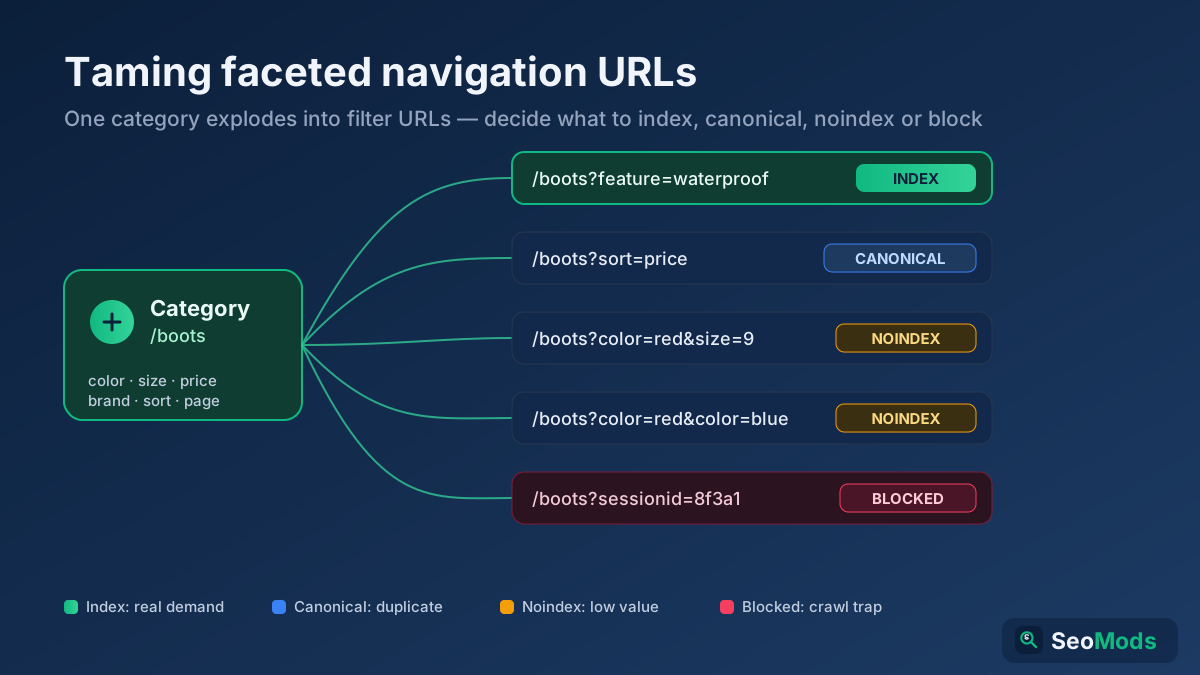
- Faceted navigation — filters and sort options (
?color=blue&sort=price) that generate new URL combinations. This is a different problem entirely, one of URL explosion and duplication, covered in faceted navigation SEO. Pagination and faceting often appear together on the same category page, and that combination is where the worst crawl-budget messes come from.
The practical takeaway: whatever the interface looks like to a human, search engines need a series of plain, crawlable URLs underneath. Whether you present that series as numbered links, a “load more” button or infinite scroll is a UX choice — but the crawlable URLs have to exist regardless.
Why pagination matters for SEO
Pagination touches several ranking-adjacent systems at once, which is why a small template decision can have an outsized effect on how much of your site actually ranks:
- Crawlability and discovery. Paginated links are often the only path a crawler has to deep items. If a product sits on page 30 of a category and nothing links to it except that pagination series, breaking the series breaks discovery of that product.
- Indexing of the whole set. Google needs to reach every page in the series to index every item. Blocked, non-canonical or JavaScript-only pagination means the tail of your catalogue quietly falls out of the index.
- Crawl budget. On large sites, an inefficient pagination pattern — especially when tangled with filters and sort parameters — can burn a huge share of Googlebot’s time on low-value component pages, starving your important URLs. This is the core of the crawl budget problem.
- Link equity. Every paginated URL is an internal link target. How you link the series decides how authority flows to deep pages and back up to the category, which is really a question of internal linking strategy.
- Duplication and thin content. Component pages share the same title, meta description, intro copy and filters, differing only in the list of items. Handled carelessly, they read as near-duplicate or thin pages.
- User experience. A user who lands on page 4 from search needs to know where they are and reach page 1, the next page and the category. Clear pagination controls reduce the friction that sends people back to the search results.
The rel=“next” / rel=“prev” story — and what changed
For years, the standard SEO advice was to add rel="next" and rel="prev" link tags in the head of each paginated page to tell Google the pages formed a series. If you learned pagination SEO before 2019, this was the centrepiece of the whole technique, and plenty of old tutorials and plugins still push it.
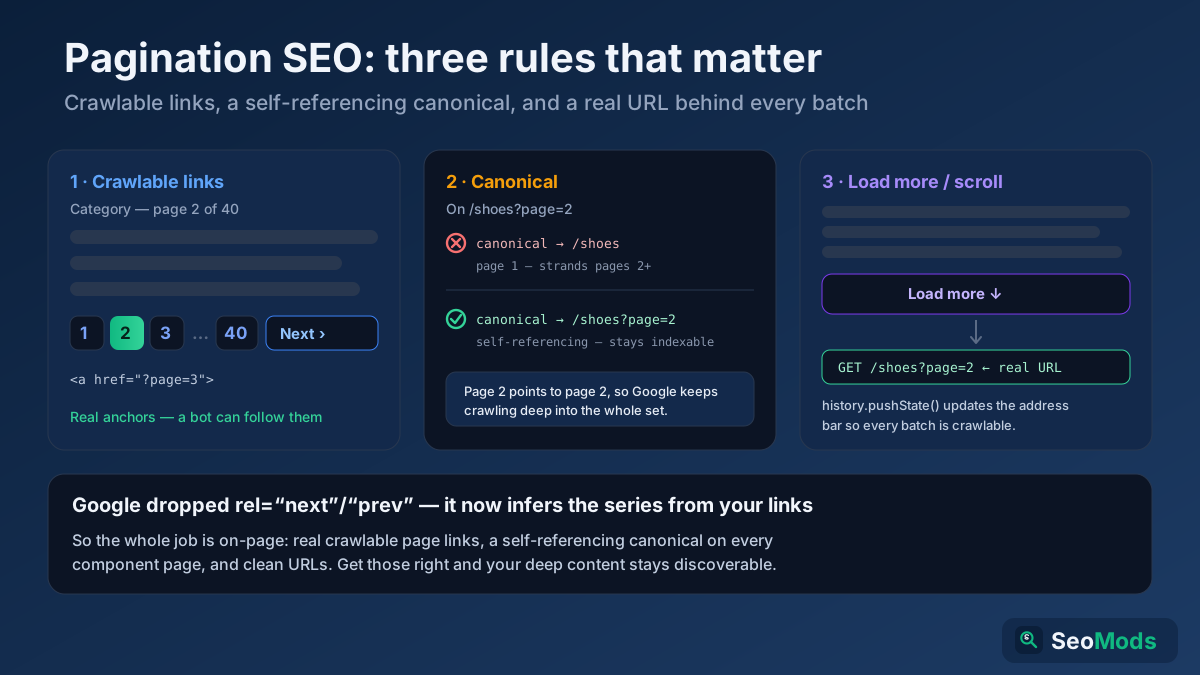
In 2019 Google confirmed that it had not used rel="next"/rel="prev" as an indexing signal for some years, and that it treats paginated pages as individual pages instead. In other words, the tag that a decade of guides told you was essential had quietly stopped doing anything for Google. That is the single most important thing to understand about modern pagination: Google no longer relies on a special “this is a series” markup — it works the relationship out from the ordinary links between your pages.
Two clarifications keep people from over-reacting to this. First, adding rel="next"/rel="prev" is not harmful — Bing and some other tools still use it, and it remains valid HTML, so you can keep it if your platform emits it. Second, and far more important, its retirement means the burden shifts entirely to your on-page pagination: real, crawlable links between pages, sensible canonicals, and clean URLs. Those are what Google reads now, and they are what the rest of this guide focuses on. Google’s current position is laid out in its pagination and incremental page loading documentation
How Google treats paginated pages today
Since the rel tags are gone, it is worth being precise about the model Google actually uses now. Each page in a paginated series is treated as its own page — page 2 is a distinct URL that can be crawled, indexed and, in principle, ranked on its own. Google discovers the relationship between the pages the same way it discovers any relationship: by following the links between them. If page 1 links to page 2, and page 2 links to page 3, Googlebot walks the chain and reaches the whole set.
This has three direct consequences. First, the links between component pages must be genuine, crawlable <a href> links — if the “next” control is a button with no URL, the chain is broken and the deep pages may never be found. Second, each component page should stand on its own as an indexable URL with its own self-referencing canonical, not be told it is a copy of page 1 (more on that next). Third, because Google sees each page individually, deep component pages will rarely rank for competitive head terms — and that is fine. Their job is discovery: to be the crawlable conduit that gets the individual products and articles indexed, where those items then rank on their own merits. You verify that the chain is intact by crawling it with a Technical Site Audit (Crawler) and confirming every page links to the next.
Canonicalization: the single biggest pagination mistake
If you fix only one thing after reading this, make it your canonical tags. The most common and most damaging pagination error is pointing the canonical tag of every component page back at page 1:
<!-- On /category/shoes?page=2, this is WRONG -->
<link rel="canonical" href="https://example.com/category/shoes" />
It feels intuitive — “page 1 is the real page, the rest are just extensions” — but it actively hurts you. A canonical is a strong hint that this page is a duplicate of that one. When you canonicalize page 2 to page 1, you are telling Google that page 2 does not deserve separate indexing. Google may then stop crawling deep into the series, and every product or article that only appears on pages 2 and beyond loses its discovery path. On a large catalogue, this quietly de-indexes your long tail.
The correct pattern is a self-referencing canonical on every page in the series — page 2 points to page 2, page 3 to page 3:
<!-- On /category/shoes?page=2, this is RIGHT -->
<link rel="canonical" href="https://example.com/category/shoes?page=2" />
This keeps every component page eligible for crawling and indexing, so Google can reach the whole set. There is one legitimate exception: a view-all page (covered below). If you offer a single page that lists the entire collection and it loads acceptably fast, you may canonicalize the paginated component pages to that view-all URL — because in that case the component pages genuinely are partial views of one complete page. Absent a view-all, self-referencing canonicals are the rule. Confirm what each page declares with a Meta Tag Analyzer before you trust the template.
Crawlable pagination links, not JavaScript-only controls
Because Google now infers the series from the links, the links have to be things a crawler can actually follow. This is where a surprising number of modern, JavaScript-driven sites fall down. The rule is simple: pagination controls must be, or contain, real anchor elements with real href attributes pointing at real URLs.
- Good:
<a href="/blog/page/2/">Next</a>— a plain link a crawler follows without running any script. - Risky:
<button onclick="loadPage(2)">Next</button>— a button with nohref. If the next batch only appears after a click that fires a script, a crawler that does not click never sees it. - Bad: a
<div>or<span>styled to look like a link but carrying nohrefat all — invisible to crawlers as a navigation path.
Google can render JavaScript, but rendering is deferred, resource-limited and unreliable compared with following a static link, so you should never depend on it for something as fundamental as reaching your deep content. This is a specific case of the broader JavaScript SEO principle: if a link matters for crawling, ship it as a real <a href> in the HTML, not as a script-only interaction. The safest and most robust pattern is progressive enhancement — render genuine paginated links server-side, then layer any fancy AJAX or infinite-scroll behaviour on top for users who have JavaScript. Run a Link Analyzer on a category page to confirm the pagination links are present as crawlable anchors, and a Broken Link Checker to make sure none of them 404.
Infinite scroll and “load more” done right
Infinite scroll and “load more” buttons are popular because they feel smooth on mobile, but on their own they are among the most effective ways to hide content from Google. A crawler does not scroll and does not click, so by default it only ever sees the first batch of items. Everything below the fold — potentially most of your catalogue — becomes invisible.
The fix is not to abandon the pattern but to back it with real pagination. The technique Google itself recommends is to pair the scroll or button experience with genuine, crawlable paginated URLs underneath:
- Give every batch a real URL. The content that loads as the user reaches batch 2 must also exist at a directly requestable address such as
?page=2. That URL is what Googlebot crawls; the scroll is just the human-facing sugar on top. - Update the address bar with the History API. As the user scrolls into a new section, use
history.pushState()to change the URL to that section’s paginated address. This keeps the experience seamless while ensuring each chunk has a shareable, crawlable URL — the approach described in Google’s incremental page loading guidance - Include static “next” links as a fallback. A plain paginated link (even one hidden from sighted users but present in the HTML) gives crawlers an unambiguous path through the series regardless of scroll behaviour.
- Test what a bot sees. Load a category page with JavaScript disabled, or inspect the raw server-rendered HTML. If you cannot find links to page 2 and beyond in that HTML, neither can Google reliably.
Done this way, infinite scroll is perfectly SEO-safe: users get the smooth experience, and crawlers get the same set of plain paginated URLs they would have had with old-fashioned numbered links.
URL structure for paginated pages
The URLs you use for the series matter for cleanliness, consistency and crawl efficiency. Two conventions dominate, and both are acceptable to Google:
- Path-style:
/blog/page/2/— readable and common on blogs and CMS platforms. - Parameter-style:
/blog?page=2— equally valid, and often easier to generate on dynamic and e-commerce systems.
Whichever you choose, apply the same URL structure rules you use everywhere: pick one pattern and stay consistent, keep the page number the only thing that changes between component URLs, and do not let filters, sort orders and tracking parameters pile on top of the page number to spawn dozens of variants of the same list. A few specific rules keep pagination URLs tidy:
- Do not index “page 1” as a separate URL. The first page of a series should be the clean category URL (
/blog/), not/blog/page/1/. If your system generates apage/1URL, redirect it to the bare category URL so you do not create a duplicate of the landing page. - Keep the parameter order and casing consistent so
?page=2is always literally the same string — inconsistent parameters manufacture duplicate URLs for identical content. - Avoid combining pagination with session IDs or tracking parameters in crawlable links; those multiply the series into endless near-duplicates and drain crawl budget.
The view-all page: when one page beats many
One option that often gets overlooked is the view-all page — a single URL that lists the entire collection with no pagination at all. Google has long said it tends to prefer showing users a view-all page when one exists and loads quickly, because searchers generally like seeing everything in one place without clicking through a series.
If you offer a view-all page, the SEO pattern is clean: let users page through the component pages for convenience, but canonicalize each component page to the view-all URL, concentrating the ranking signals on that one comprehensive page. The catch is performance. A view-all page that lists thousands of products can become enormous and slow, and a page that hurts your Core Web Vitals is a poor trade even if it simplifies indexing. So the decision is a balance:
- Use a view-all page when the full collection is modest enough to load quickly — a few dozen to a couple of hundred items — and consolidate signals there.
- Stick with self-canonicalizing paginated pages when the collection is large enough that a single page would be heavy and slow.
There is no universal right answer; it depends on the size of your set and how fast you can serve it. What you must not do is offer a view-all page and also canonicalize the component pages to page 1 — pick one consolidation target and be consistent.
Pagination, internal linking and link equity
Beyond crawling, pagination shapes how authority moves around your site. Each component page is both a recipient and a source of internal links, and the way you build the pagination controls decides the flow. A few principles keep that flow healthy:
- Always link back to page 1 and the category. Deep component pages should link up to the top of the series and to the parent category, so authority is not stranded at the bottom of a long chain.
- Show more than just “next” and “previous”. A control that exposes a few numbered pages plus first and last (
1 … 4 5 6 … 40) shortens the click-and-crawl distance to deep pages compared with a chain that only ever offers the very next page. That shorter path means Googlebot reaches page 30 in a couple of hops instead of thirty. - Do not orphan deep items. The most important products and articles should not rely solely on being on page 25 of a category. Support them with contextual internal links, related-item modules and hub pages so their discovery does not hinge entirely on the pagination chain. Buried items with no other links in are a classic source of orphan pages.
- Keep component pages out of your primary link-equity story. They exist to distribute crawlers, not to rank. Point your external links, navigation and cross-links at the category and the individual items, not at
?page=7.
When you map your link graph with a Link Analyzer or a full Technical Site Audit (Crawler), healthy pagination shows up as short, consistent crawl paths into deep content and clear links back up to the category; long, single-step “next only” chains and dead-ended deep pages are the warning signs.
Pagination and XML sitemaps
A common question is whether paginated URLs belong in your XML sitemap. The general answer is no. Your XML sitemap should list the URLs you actually want indexed and ranked — your category pages and, above all, the individual product and article pages — not the ?page=2 component URLs, which exist mainly as crawl conduits.
The reasoning follows from how Google treats the series. Component pages are discovered fine through the on-page pagination links, and they are not the pages you want appearing in search results, so cluttering the sitemap with them dilutes the signal about which URLs matter. Instead, make sure every item that lives inside the paginated set has its own URL in the sitemap. That way, even if Google is slow to crawl deep into a long series, it still has a direct list of every product and article to index. Cross-check the sitemap against your live pages with a Sitemap Finder & Validator and confirm it points at items, not pagination component URLs.
When pagination and faceted navigation collide
The single messiest pagination scenario is an e-commerce category that is both paginated and filterable. Now every filter combination has its own paginated series: /shoes?color=blue&page=2, /shoes?color=blue&size=10&page=3, and on and on. The multiplication is brutal — a handful of filters across dozens of pages can generate tens of thousands of crawlable URLs for what is really one category of products.
This is where pagination stops being a standalone problem and becomes part of the faceted navigation strategy. The guiding decisions are:
- Decide which filtered views deserve indexing at all. A high-demand combination (say, a colour that people actually search for) might warrant an indexable, self-canonicalizing paginated series. The vast majority of filter combinations do not and should be kept out of the index.
- Control how deep crawlers go into filtered pagination. For filter combinations you do not want indexed, use the tools of faceted-nav control —
robots.txtdisallow rules, careful canonicalization to the unfiltered category, or not exposing those parameter links as crawlable at all — so Googlebot does not spend its budget paging through combinations that will never rank. - Never let filtered pagination cannibalize the clean category. The unfiltered, paginated category is usually your ranking asset; the filtered variants should support it, not compete with it or bury it under duplicates.
Validate your directives with a Robots.txt Tester and check where filtered URLs redirect or canonicalize with a Redirect & HTTP Status Checker, because it is easy to accidentally block or duplicate the wrong thing when pagination and faceting overlap.
Common pagination mistakes that hurt SEO
Most pagination damage comes from a short list of repeat offenders. Watch for these on your own templates:
- Canonicalizing all component pages to page 1. The number-one mistake — it tells Google not to index pages 2+ and strands your deep content. Use self-referencing canonicals instead.
- JavaScript-only pagination. “Next” buttons and infinite scroll with no real
<a href>URLs behind them hide everything past the first batch from crawlers. - noindexing component pages. Adding
noindexto pages 2+ seems tidy, but Google eventually treats a long-termnoindexpage asnofollowtoo — and once it stops following the links on those pages, it stops discovering the items on them. Let component pages stay indexable. - Blocking pagination in robots.txt. Disallowing
?page=stops Googlebot from crawling the series at all, cutting off every deep item that relies on it for discovery. Blocking pagination and consolidating with canonicals are two different strategies — do not confuse them, and don’t do both. The distinctions between them are covered in noindex vs nofollow vs Disallow. - Indexing a separate
page/1URL. This duplicates your clean category landing page. Redirectpage/1to the bare category URL. - Identical titles and metas with no differentiation. Component pages sharing the exact same title and description read as duplicates; appending the page number (“… – Page 2”) is a light, honest way to differentiate them.
- Pagination that only offers “next”. A chain with a single next-link per page makes deep pages many hops from the top, slowing discovery. Expose numbered links and a “last” link to shorten the path.
- Repeating the full intro copy on every page. A long keyword-rich category description at the top of every component page multiplies near-identical text across the series. Show it on page 1 and trim it on the rest.
How to audit and fix your pagination, step by step
Turning the theory above into fixes is a short, repeatable process. Work through it on one paginated template at a time:
- Find a paginated series. Pick a real category, archive or listing that spans several pages, and note the URL pattern (
?page=or/page/). - Check the canonical on page 2+. Load a component page and inspect its canonical with a Meta Tag Analyzer. It should point at itself (or at a genuine view-all page) — never at page 1.
- Confirm the links are crawlable. View the raw HTML or run a Link Analyzer and verify that “next” and the numbered links are real
<a href>anchors, not scripted buttons. - Test with JavaScript off. Disable JS and reload. If you can still reach page 2 and beyond, so can a crawler. If the pagination disappears, you have a JavaScript-only problem to fix with server-rendered links.
- Crawl the whole series. Run a Technical Site Audit (Crawler) and confirm the crawler reaches the last page of the set and every item on the way, and a Broken Link Checker to catch any pagination links that 404.
- Kill the
page/1duplicate. Check whether apage/1URL exists and, if so, that it redirects to the clean category — verify with a Redirect & HTTP Status Checker. - Review titles and metas. Make sure component pages are differentiated (page-number suffix) rather than exact duplicates, using an On-Page SEO Checker (Keyword) across a few pages of the series.
- Sort out infinite scroll or “load more”. If the template uses either, confirm each batch has a real URL and that
history.pushState()updates the address bar as the user advances. - Trim the sitemap and internal links. Ensure your sitemap lists items, not component URLs, and that deep items have contextual links in beyond the pagination chain.
- Re-crawl to confirm. After changes, run the Technical Site Audit (Crawler) again and check in Search Console that pages deep in the series are being crawled and that the items are indexed.
Turn it into a checklist
Analysis only matters if it changes the template. Use this as your before-you-ship pagination checklist:
- Self-referencing canonical on every component page (or canonical to a fast view-all) — never to page 1.
- Real, crawlable
<a href>links between pages, present in the server-rendered HTML. - Component pages left indexable — no blanket
noindex, norobots.txtdisallow on the series. - Numbered links plus first/last, not just “next”, to shorten crawl paths to deep pages.
- Clean, consistent URLs;
page/1redirected to the bare category. - Differentiated titles/metas (page-number suffix), intro copy not repeated in full on every page.
- Infinite scroll and “load more” backed by real paginated URLs and History API updates.
- Sitemap lists individual items, not
?page=URLs; deep items have contextual links in. - Filtered pagination controlled so it does not multiply into crawl-budget waste.
- Whole series crawled and verified — the last page and every item reachable.
Pagination is one of those quiet technical foundations that rarely gets credit when it works and quietly caps your traffic when it doesn’t. Build the template correctly once — self-canonicalizing, crawlable, indexable, cleanly linked — and every listing on your site inherits reliable discovery of its deep content. Fold these checks into your regular crawl budget and technical SEO audit routines, and revisit them whenever you change a listing template or add a new filterable category.
Frequently asked questions
Should I still use rel=“next” and rel=“prev” for pagination?
Google stopped using rel="next"/rel="prev" as an indexing signal and now infers the series from ordinary links, so it is no longer required for Google. It is not harmful and other engines like Bing still use it, so you can keep it if your platform emits it — but do not rely on it. Your crawlable on-page links and canonicals are what matter now.
What canonical should page 2 of a category have?
A self-referencing one: page 2 should canonicalize to page 2. The exception is if you have a fast view-all page listing the whole collection, in which case you may canonicalize the component pages to that view-all URL. Never canonicalize page 2+ back to page 1 — that tells Google not to index the deeper pages and strands the items on them.
Is infinite scroll bad for SEO?
Only if it has no crawlable URLs behind it. On its own, infinite scroll hides everything past the first batch from Google because crawlers do not scroll. Back it with real paginated URLs (?page=2…) and update the address bar with history.pushState() as the user scrolls, and it becomes perfectly SEO-safe.
Should paginated URLs go in my XML sitemap?
Generally no. List the URLs you want indexed — category pages and, most importantly, the individual product and article pages — not the ?page=2 component URLs. Component pages are discovered through the on-page links; the sitemap should point at the items you actually want ranking.
Do paginated pages cause duplicate content?
They can if handled carelessly — identical titles, metas and intro copy across the series read as near-duplicates. But they are not inherently duplicate content: each component page shows a different slice of items. Differentiate titles with a page-number suffix, avoid repeating the full category description on every page, and keep self-referencing canonicals, and duplication is not a problem.