Short answer: Orphan pages are live URLs that no other page on your site links to internally. Because crawlers discover pages by following internal links and authority flows along those same links, orphans get almost no crawling, near-zero PageRank and no visibility. Find them by crawling your site to build the link graph, comparing it against every URL you know exists, and flagging the ones with zero internal inlinks — then keep, redirect, or delete each one.
What an orphan page actually is
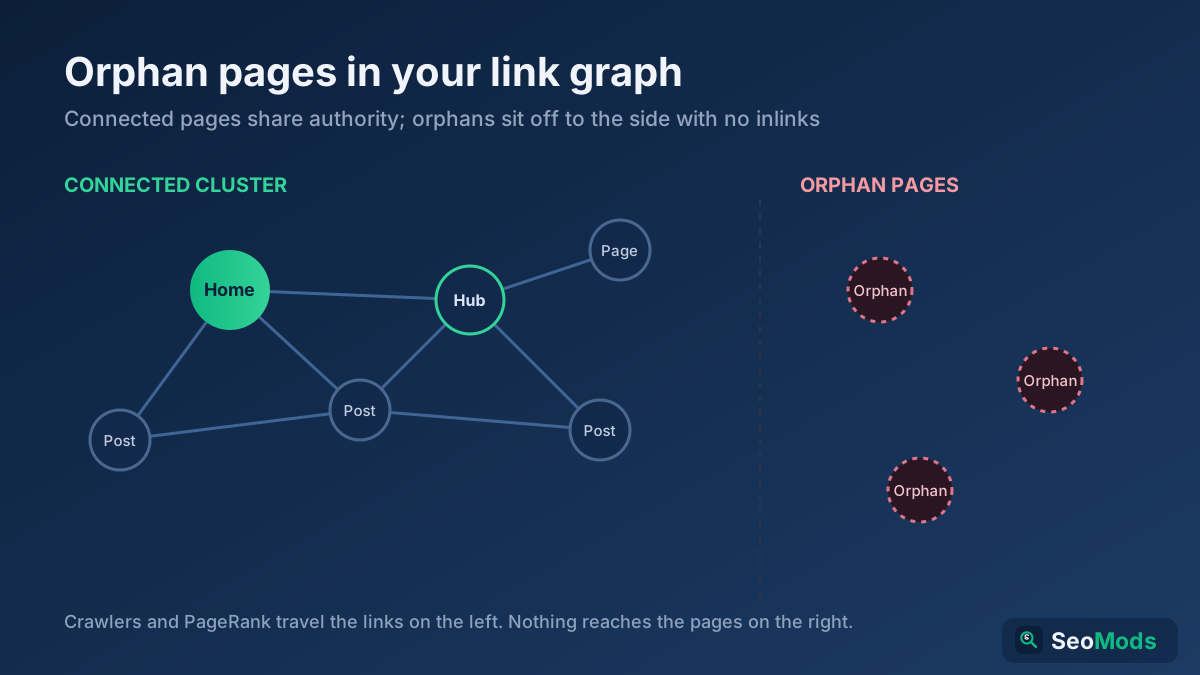
An orphan page is a URL that exists and returns a normal 200 response but has no internal links pointing at it from anywhere else on your site. You can open it directly if you know the address, and it may even sit in your XML sitemap, yet no navigation menu, no article body, no footer and no related-links block sends a user or a crawler toward it. It is stranded — reachable in theory, invisible in practice.
The word matters because search engines model your site as a graph of nodes connected by links. Every internal link is an edge that lets a crawler travel from one page to the next and lets ranking signals flow between them. A page with no inbound edges is disconnected from that graph. It is not a broken page and not a redirect; it is a healthy page that nothing points to. That distinction is why orphans are so easy to miss: nothing errors, nothing looks wrong in a browser, and the problem only shows up when you map how your pages actually connect.
Why orphan pages hurt your SEO
Internal links do two jobs at once, and orphans are cut off from both. First, they are the roads crawlers travel: Googlebot finds most of your content by following links from pages it already knows. Second, they are the pipes that carry authority — the PageRank-style signal that flows from strong pages to the pages they link. Strip a URL of internal links and you starve it of discovery and of ranking power in a single stroke.
- Poor discovery and slow indexing. With no links to follow, a crawler may reach the page late, rarely, or never. Even if a sitemap hints the URL exists, Google treats a page nothing links to as low priority and often leaves it uncrawled or unindexed.
- Near-zero internal PageRank. Authority accrues through links. An orphan receives none, so even excellent content struggles to rank for anything competitive because search engines read the isolation as a signal that the page does not matter.
- Invisible to real users. If no page links to it, visitors cannot navigate to it either. Traffic depends entirely on someone landing from an external source, which for most orphans means no traffic at all.
- Wasted crawl budget elsewhere. Large sites full of stranded, thin or duplicate orphans spread a fixed crawl budget across pages that add no value, leaving less attention for the pages you actually care about. Our guide to crawl budget explains how that trade-off plays out at scale.
How orphan pages get created
Orphans are almost never made on purpose. They accumulate as a side effect of ordinary site changes, and understanding the common sources tells you where to look first.
- Removed navigation items. You delete a menu link, a category tile or a footer entry, but the destination page stays live. The only thing that linked to it is gone, so it is instantly orphaned.
- Old campaign and landing pages. Pages built for a seasonal promotion, an email blast or a paid ad often had no place in the main navigation to begin with. When the campaign ends, they linger with zero internal links.
- Paginated and filtered leftovers. Faceted navigation, sort orders and pagination can spawn URLs that were only ever linked from a state that no longer exists, leaving stranded variants behind.
- CMS drafts published without links. An author publishes a post directly by URL but never adds it to a category, a hub or another article, so it goes live with no internal path to it.
- Site migrations and redesigns. Replatforming or restructuring frequently drops internal links, changes URL patterns, or rebuilds navigation without re-linking every legacy page — a classic mass-orphaning event.
- Deleted linking pages. When you remove an article that was the sole source of a link, its target quietly loses its only connection to the rest of the site.
How to find orphan pages: build the link graph
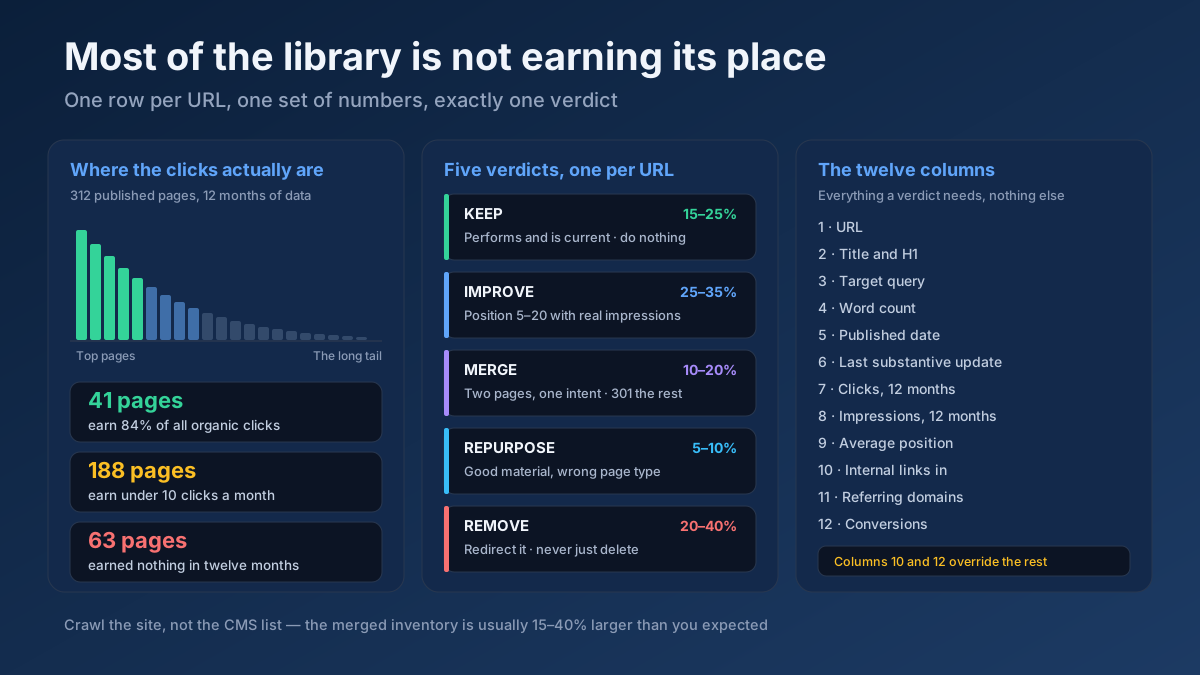
You cannot spot an orphan by looking at one page; you have to compare two lists. The first is every URL that is internally linked — your live link graph. The second is every URL that actually exists. The orphans are whatever appears on the second list but not the first.
Start by crawling your site the way a search engine does: begin at the homepage and follow internal links outward, recording which pages link to which. A crawl reveals the connected portion of your site — every URL a bot can reach by following links from the home page. The pages a crawl never reaches are your prime orphan suspects, because if a crawler starting at the homepage cannot arrive at a page, neither can Googlebot relying on the same links. Run this discovery with the Technical Site Audit (Crawler) to map internal structure and see which URLs have zero inbound internal links.
Gather every URL you know exists
A crawl only sees what is linked, so by definition it will miss the orphans themselves. To surface them you need independent lists of URLs that do not depend on internal links, then compare those against the crawl. Pull your known-URL inventory from several sources so nothing hides:
- Your XML sitemap. Sitemaps are meant to list every indexable URL, so they routinely contain pages that no longer have internal links. Locate and pull yours with the Sitemap Finder & Validator, and read our XML sitemaps guide if you need to build a complete one first.
- Analytics data. Export the full list of landing pages that received any visits or impressions. A URL that earned traffic but never appears in your crawl is almost certainly an orphan still getting external or search visits.
- Server access logs. Your logs record every URL that was ever requested, by users and by bots. Extracting distinct paths from the logs surfaces live pages that no internal link references.
- Search Console and your CMS. The list of indexed pages and your CMS database of published content both catch URLs the other sources miss.
Merge these into one master inventory of every URL that exists, then diff it against the set of internally linked URLs from your crawl. Every address that exists but has zero internal inlinks is an orphan. The Link Analyzer helps here by breaking down the internal-link counts per page so you can confirm which candidates truly have nothing pointing at them.
Triage each orphan before you fix it
Not every orphan deserves to be reconnected. Some are valuable pages that lost their links by accident; others are dead weight you should never have kept. Sort each one into a bucket before touching anything, because the right action ranges from adding a link to deleting the URL entirely.
- Keep & link. The page is useful, unique and still relevant, but simply lost its internal links. This is the good outcome — you will reconnect it with contextual links, described below.
- Consolidate & redirect. The page overlaps heavily with a stronger page. Merge the worthwhile content into the better URL and
301redirect the orphan so its residual signals and any external links transfer instead of being lost. - Noindex. The page needs to stay live for users — a thank-you page, a login screen, an internal utility — but has no business ranking. Add a
noindextag so search engines drop it cleanly without you deleting it. - Delete and return 410. The page is obsolete, thin or duplicated with nothing worth saving and no external links. Remove it and serve a
410Gone status so search engines retire it quickly and permanently.
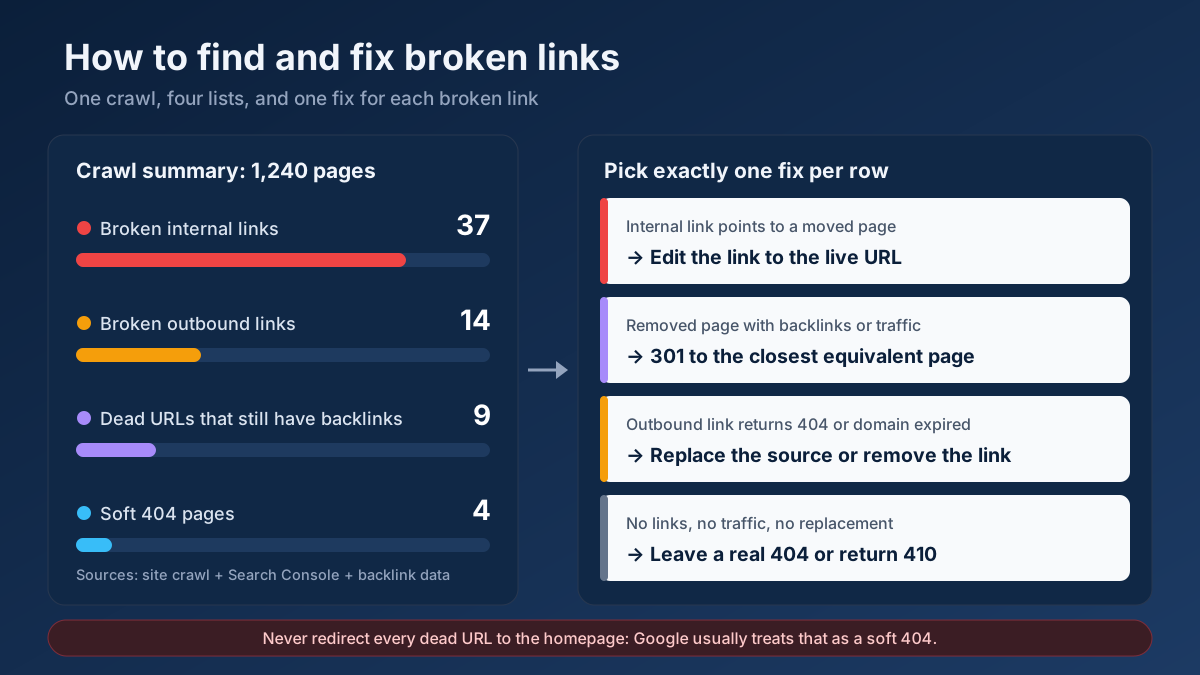
Work through the list deliberately. A page with existing backlinks or lingering traffic almost always deserves keeping or redirecting rather than deletion, because throwing it away also throws away the equity pointing at it.
Reconnect the keepers with contextual links
For every orphan you decided to keep, the fix is to give it inbound internal links from pages that already have authority and topical relevance. The goal is not one token link but a genuine place in your site’s structure, so that both crawlers and readers arrive naturally.
- Contextual links from related content. The strongest links are in-body links from established, topically related articles that already rank and get crawled often. A link from a strong parent page passes real authority and a clear relevance signal.
- Navigation and hub pages. If the page belongs to a category or topic cluster, add it to the relevant hub or menu so it inherits a permanent structural link rather than a one-off mention.
- Breadcrumbs. A breadcrumb trail links every page back up to its parent and category, guaranteeing at least one reliable internal path and reinforcing your hierarchy for crawlers.
- Descriptive anchor text. Link with anchors that describe the destination in the reader’s own words, not
click here, so the anchor doubles as a relevance signal.
To find the best donor pages fast, run the Internal Link Opportunity Finder — it surfaces authoritative, topically matched pages that could link to your reconnected orphan. For the wider playbook on structuring these links across a whole site, our internal linking strategy guide walks through hubs, silos and anchor choices in depth.
Confirm the fix and keep orphans from returning
After you relink, redirect or remove each page, verify the result rather than assuming it worked. Re-crawl the site and confirm the reconnected pages now show inbound internal links and that the crawler reaches them without needing the sitemap. Check that your redirects resolve in one hop and that deleted URLs return the status you intended.
Orphans are a recurring problem, not a one-time cleanup, because every content change can create new ones. Bake prevention into your workflow: never publish a page without linking to it from at least one relevant existing page, add fresh content to its hub and breadcrumb path at launch, and re-check for broken internal paths whenever you delete or move pages with the Broken Link Checker. Schedule a crawl-versus-inventory diff every quarter so new orphans surface within weeks instead of quietly accumulating for years.
Orphan pages versus dead-end and broken pages
It is worth separating three problems that get confused. An orphan page has no internal links pointing in — nothing links to it. A dead-end page has no links pointing out — a crawler arrives but cannot continue. A broken page returns an error such as 404 and does not resolve at all. Each needs a different fix, and mislabeling them wastes effort.
Orphans are the hardest of the three to detect precisely because everything about the page looks healthy in isolation: it loads, it renders, it returns a clean status. The only symptom is structural, and it only appears when you compare your link graph against your full URL inventory. That is why a periodic diff, rather than a page-by-page review, is the reliable way to catch them. Our website link analyzer guide shows how to read those internal-link reports so orphans stand out at a glance.
Applying this to your own site? See the tools picked by audience: SEO Tools for Freelance SEOs and SEO Tools for WordPress Site Owners.
Frequently asked questions
Are orphan pages always bad for SEO?
Not automatically, but they are almost always a missed opportunity. A page you deliberately keep out of the crawl — a private thank-you page or a paid landing page you do not want indexed — can be a legitimate orphan if it is set to noindex. The problem is the unintentional orphan: valuable content that lost its links by accident and now gets no discovery, no authority and no traffic despite deserving all three.
Does adding a URL to my XML sitemap fix an orphan?
No. A sitemap can help a crawler discover the URL, but it does not pass internal PageRank and does not replace internal links. Google itself treats internal links as a far stronger signal of importance than sitemap inclusion. A page listed only in the sitemap with zero internal links is still an orphan and will still struggle to rank. Fix it with real contextual links, and use the sitemap as a supporting hint, not the cure.
How many internal links does a page need to stop being an orphan?
Technically one inbound internal link removes the orphan status, but one is rarely enough to make a page competitive. Aim for a handful of relevant links from pages that actually carry authority and get crawled — a contextual link from a strong related article, a place in the right hub or menu, and a breadcrumb path. Quality and relevance of the linking pages matter far more than raw link count.
Should I delete orphan pages or redirect them?
It depends on the page. Delete and return 410 only when the content is obsolete, thin or duplicated and has no external links or traffic worth preserving. If the page overlaps a stronger page, consolidate the content and 301 redirect so its equity transfers. If it is genuinely useful, keep it and add internal links instead of removing it. Never bulk-delete orphans without triaging each one first.
How often should I check for orphan pages?
At least quarterly for most sites, and after every significant change — a migration, a redesign, a navigation overhaul or a batch of deletions — because those events create orphans in bulk. Large or fast-changing sites benefit from monthly checks. The routine is the same each time: crawl to build the link graph, gather every known URL, and diff the two to surface anything with zero internal inlinks.
Can Google still find an orphan page without internal links?
Sometimes, through your XML sitemap, an external backlink, or a URL it discovered previously, but discovery is unreliable and slow, and even when Google indexes an orphan it usually ranks poorly because the page carries almost no internal authority. Relying on those fallback paths is a losing strategy. If a page is worth having live, it is worth linking to internally so both crawlers and users can reach it dependably.