Short answer: A content audit is a full inventory of every page you have published, scored against the traffic it earns and the intent it targets, so you can decide which pages to keep, improve, merge, repurpose or remove. On most sites a small minority of pages earns nearly all the organic traffic, and the rest quietly holds the site back.
That last part is the uncomfortable bit. The 400 posts nobody reads are not neutral. They dilute your topical focus, spend crawl budget, compete with your good pages for the same queries, and give search engines a large sample of mediocre work to judge you on. This guide walks through the ten steps of a real content audit in the order that produces results fastest, with the exact columns to record, the decision rule behind each verdict, and what actually happens to traffic afterwards.
What a content audit actually is
A content audit is not reading your blog. It is building a single table where every URL you own sits in one row next to its numbers, then applying one consistent decision rule to every row. The output is not a report. The output is a task list with a verdict on every page.
Audit, refresh and pruning are three different jobs
These three words get used interchangeably, and they are not the same thing — which is why so many audits stall halfway.
- The audit is site-level and diagnostic. You inventory everything, attach data, and sort every URL into a verdict. It takes days, not months, and it produces decisions rather than changes.
- The refresh is page-level and surgical. You take one page that already has standing and make it better. The content refresh guide covers that work in detail — it is what you do to the pages the audit marks “improve”.
- Pruning is what you do with the pages the audit marks “remove”. It is the smallest part of the job and the part people worry about most, usually in inverse proportion to how much it matters.
Run them in that order. Refreshing pages before you have audited is how teams spend six weeks upgrading an article that should have been merged into another one.
Six signs you are overdue for one
You do not need an audit because a calendar says so. You need one when the symptoms show up:
- You publish consistently and organic traffic has been flat or falling for two quarters.
- Search Console reports far more indexed pages than you believe you have published.
- The page ranking for your most important query keeps changing from month to month.
- Your oldest posts still mention prices, versions or interfaces that no longer exist.
- Traffic is concentrated on a handful of URLs and everything else sits near zero.
- You are about to redesign, migrate or rebrand — in which case audit first, because migrating content you were going to delete is wasted work. The migration checklist assumes you have already made these decisions.
Why low performers cost you rather than sitting neutral
The instinct is that an old post earning three visits a month is harmless. It is only three visits, but it is not costing anything either. That is wrong in four specific ways.
They spend crawl. Every low-value URL is a request that could have gone to a page that matters, which becomes a real constraint above a few thousand URLs and is unpacked in the crawl budget guide. They split intent: two mediocre posts aiming at one query stop each other ranking, the pattern covered in the keyword cannibalisation guide. They dilute topical focus, because a site that covers one subject completely reads as an authority and a site that covers forty subjects thinly does not — the mechanism behind website authority. And they form part of how your site is assessed as a whole; Google’s guidance on creating helpful, reliable content is explicit that removing unhelpful content can improve how the rest of a site performs.
Step 1 — Decide what the audit is for before you open a spreadsheet
An audit without a stated goal turns into a 900-row spreadsheet that nobody acts on. The goal determines which columns you bother collecting and which rule you apply, so write it down in one sentence first.
In practice there are four common ones. Recover lost traffic after a decline — you will weight recent position and click changes heavily, and the traffic drop guide should run alongside this. Prepare for a migration or redesign — you need a complete URL inventory and a keep-or-redirect decision on every row, and nothing else. Increase conversions — you need conversion data per URL, and you will happily keep a page with 40 visits that produces enquiries. Consolidate a sprawling library — you are mostly looking for overlap and cannibalisation, so similarity and query-overlap columns matter more than traffic does.
Set the scope in the same sentence. “All blog posts published before January” is a scope. “The whole site” on a 4,000-page catalogue is a wish. If the site is large, audit one section at a time and finish it — a completed audit of 200 blog posts beats a half-finished audit of everything.
Step 2 — Build the inventory: every URL, one row
The inventory is the whole foundation, and the most common failure is building it from your CMS page list. Your CMS knows what you published. It does not know about the tag archives, the old landing pages, the PDF that ranks, the orphaned draft that went live in 2021, or the pages a plugin generates on its own. Crawl the site instead.
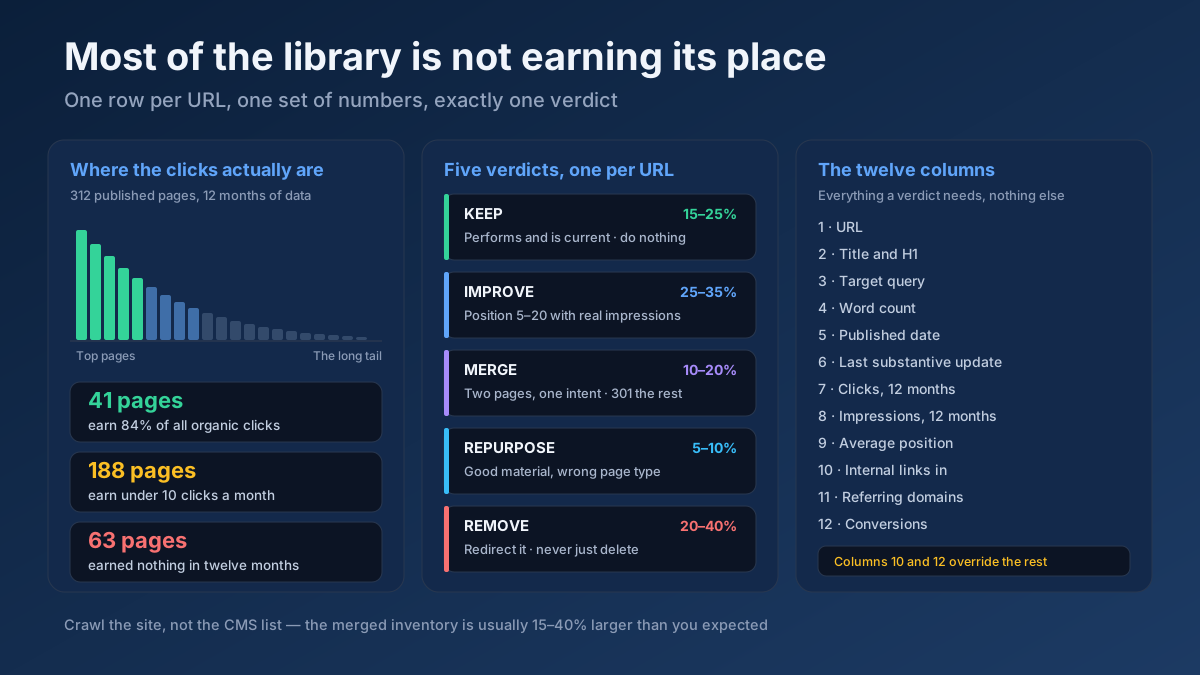
Run a Technical Site Audit (Crawler) across the domain and export the URL list, then cross-check it against three other sources so nothing hides: the XML sitemap, the Pages report in Search Console (which shows what Google has actually indexed, including URLs you forgot existed), and your analytics landing-page report for the last twelve months. Merge the four lists and de-duplicate. The gap between the CMS list and the merged list is usually somewhere between 15% and 40% of the total, and it is where the worst pages live.
The twelve columns worth collecting
Resist the urge to record thirty metrics. These twelve carry every decision you are going to make:
| Column | Where it comes from | What it decides |
|---|---|---|
| URL | Crawl | The row identity |
| Title and H1 | Crawl | Spotting duplicate and near-duplicate pages fast |
| Target query | You, or Search Console’s top query for that URL | Whether two pages are competing |
| Word count | Crawl | The thin-content shortlist |
| Published date | CMS | Age-adjusted expectations |
| Last substantive update | CMS, not the displayed date | Decay risk |
| Clicks, last 12 months | Search Console | The core performance signal |
| Impressions, last 12 months | Search Console | Separates “invisible” from “visible but unclicked” |
| Average position | Search Console | How far the page is from a win |
| Internal links in | Crawl, or the Search Console Links report | Whether the page ever had a fair chance |
| Referring domains | Backlink tool | Whether deleting it would throw away equity |
| Conversions or enquiries | Analytics | Overrides everything else |
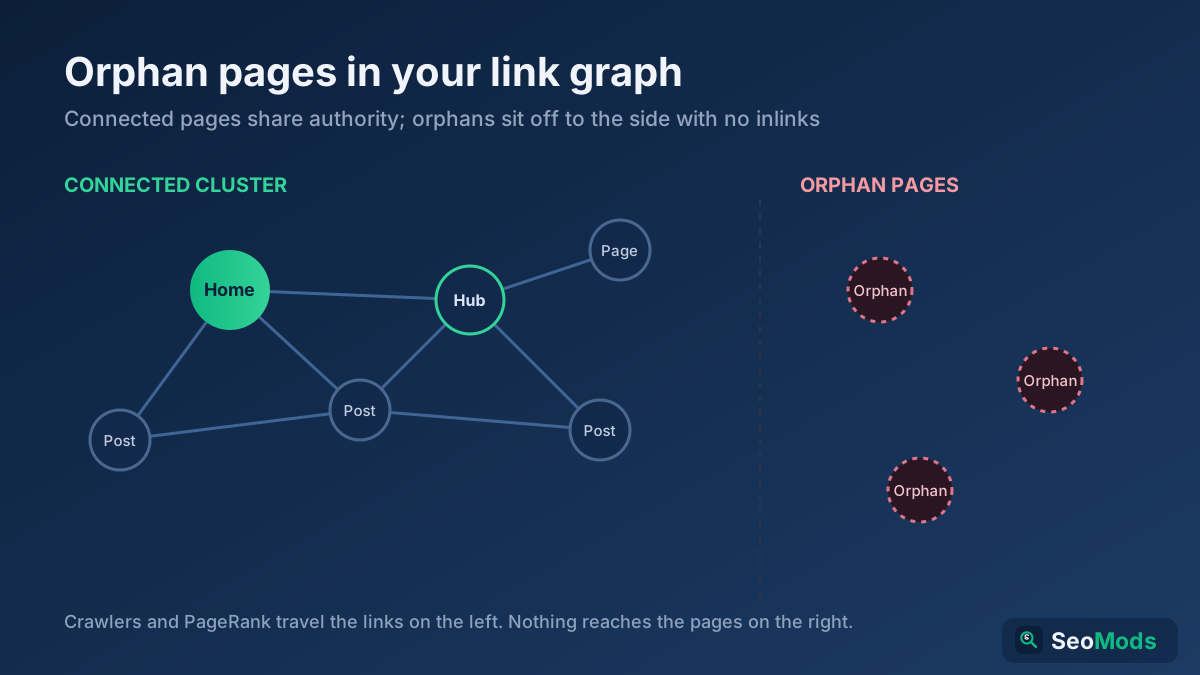
Two columns deserve a sentence each, because they are the two people skip. Last substantive update is not the date shown on the page; plenty of sites bump that automatically while the article underneath has not changed since 2022. Record when the body text actually changed, and if you cannot tell, a Content Freshness Score run gives you a read on how stale the page looks from the outside. Internal links in decides more verdicts than anything except clicks — a page with zero internal links has never been given a fair test, and it belongs in a different bucket from a well-linked page that failed anyway. Pull those with a Link Analyzer pass, and see the orphan pages guide for what to do with the ones that come back at zero.
Step 3 — Attach twelve months of performance data
Use twelve months, not three. A shorter window makes seasonal pages look dead and hands recently published pages a verdict before they have had a chance. Export the Pages report from Search Console over the last twelve months and match it into the inventory by URL.
Then add one derived column that does most of the sorting for you: clicks per month since publication. Raw click totals punish pages published last quarter and flatter pages published four years ago. Dividing by months live makes an eight-week-old post with 30 clicks and a four-year-old post with 200 clicks directly comparable, and the comparison is rarely the one you expect.
Three patterns jump out of the data once it is in one table, and each has a different answer:
- Impressions but almost no clicks. The page ranks and nobody chooses it. This is a snippet problem, not a content problem — rewrite the title and description, check how it looks with a Google SERP Snippet Preview and read the high impressions, low clicks guide. These are the cheapest wins in the entire audit.
- Neither impressions nor clicks. Either the page is not indexed, or it is indexed and ranking beyond page five. Find out which before you decide anything; the crawled but not indexed guide covers the first case, and it is more common than people expect.
- Position 8 to 20 with real impressions. This is the most valuable group on the sheet. These pages are close, and moving one from position 12 to position 5 typically multiplies its clicks several times over. They almost all belong in “improve”.
If a page has no Search Console data at all, confirm it is actually indexed before writing it off. A page Google never crawled is not a page that failed.
Step 4 — Score the page against the query, not against a word count
Numbers tell you which pages are underperforming. They do not tell you why, and the why decides whether “improve” is realistic or whether you are about to spend a week on a page that was never going to work.
Open each underperformer and ask four questions, in this order.
Does it match the intent of the query it targets? This is the question that kills the most pages. If the query returns comparison tables and your page is a 600-word opinion piece, no amount of editing fixes it — the page type is wrong. Look at what the results actually contain before rewriting anything, and run a Search Intent Analyzer on the target query when the results are mixed. The search intent guide covers reading those signals.
Is it complete relative to what ranks? Not longer — complete. If the top five results all answer a sub-question your page ignores, that gap is your edit list. A Content / Keyword Gap run against the ranking URLs produces that list far faster than reading them one at a time.
Is it still true? Outdated statistics, dead screenshots, discontinued products and links to sites that no longer exist all signal neglect to a reader within ten seconds. Run a Broken Link Checker over the set while you are here; it is a two-minute job that catches the most visible form of rot.
Is it genuinely thin, or just short? These are not the same. A 300-word page that answers a specific question completely is finished. A 1,400-word page that says nothing is thin. Judge by whether the main content does its job, and use a Thin Content Checker to build the shortlist rather than to make the decision for you. A Word & Character Counter tells you the length; only you can tell whether the length is the problem.
One practical note on scoring: do not invent a ten-point rubric. In a real audit you will apply it carefully to 40 pages and then start guessing. Three levels — good, fixable, not worth fixing — survive contact with a 300-row sheet.
Step 5 — Give every URL exactly one of five verdicts
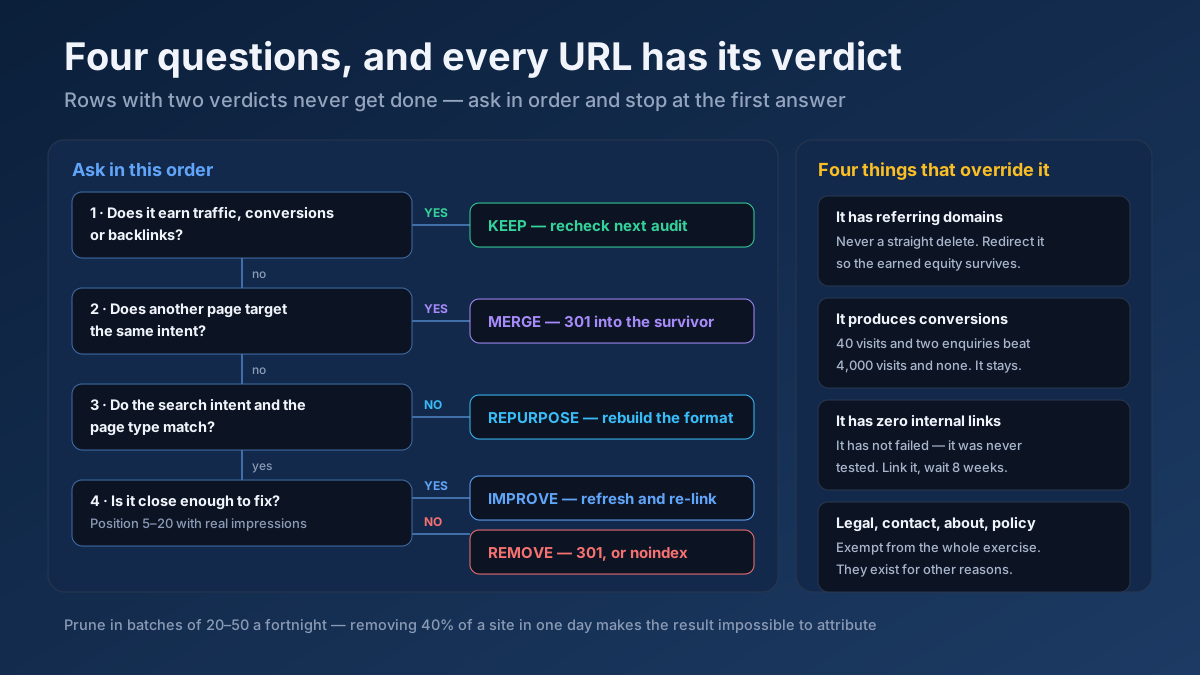
This is the step that turns a spreadsheet into a plan. Every row gets one verdict, and only one. Pages with two verdicts do not get done.
| Verdict | Apply when | What you do | Typical share |
|---|---|---|---|
| Keep | The page performs and is current | Nothing. Re-check at the next audit | 15–25% |
| Improve | Real impressions, position 5–20, intent matches, gaps are fillable | Refresh: expand, update, re-link, rewrite the snippet | 25–35% |
| Merge | Two or more pages target one intent | Combine into the strongest URL, 301 the rest | 10–20% |
| Repurpose | The material is good but the format is wrong for the query | Rebuild as the page type the results reward | 5–10% |
| Remove | No traffic, no links, no conversions, no strategic role, nothing worth merging | 301 to the closest relevant page, or noindex if it must stay live | 20–40% |
Those shares surprise people the first time. A twenty per cent removal rate on a library built over five years is normal, not a sign that something went wrong.
Four rules stop the common mistakes at this step. A page with referring domains is never a straight delete — redirect it so the equity survives. A page with conversions stays regardless of its traffic; forty visits that produce two enquiries beat four thousand that produce none. A page with zero internal links has not failed yet, so link it properly and re-measure in eight weeks before judging it. And legal, contact, about and policy pages are exempt from the whole exercise — they exist for reasons that have nothing to do with search.
Step 6 — Fix the snippet losers before you touch the content
Work the “improve” list in order of effort, and the cheapest work sits at the top: pages that already rank and simply are not being clicked.
For each one, rewrite the title so it states the specific promise rather than the topic, and rewrite the description so it answers the query in the first clause. Check both against the pixel width of a real result with a Google SERP Snippet Preview , because a title that truncates at “How to Do a Content Aud…” is costing you clicks no matter how good the page is. A Meta Tag Generator handles the mechanical part when you are doing several dozen at once.
Two details make a disproportionate difference here. Match the reader’s language, not your internal vocabulary — if people search “content audit” and your title says “editorial portfolio review”, you have lost before the click. And add the format signal the query implies: checklist, template, ten steps, example. The title tag guide and the meta description guide cover the patterns that work.
Then do the next-cheapest thing: give those pages internal links. Run an Internal Link Opportunity Finder across the site and add links from your strongest related pages, with anchor text that says what the target page is about. On most sites this single pass surfaces between 50 and 200 sensible links and takes an afternoon.
Only after those two passes should you start rewriting bodies, because the first two move rankings and clicks for a fraction of the effort.
Step 7 — Merge the pages that are competing with each other
Merging is where audits produce their most visible wins, because you are not creating anything. You are combining assets that already exist and ending a fight you were having with yourself.
Find the candidates two ways. In Search Console, filter to an important query and look at which of your pages appear for it; if the URL keeps swapping month to month, Google cannot decide, and it is hedging by ranking both of them badly. Then confirm the overlap objectively: a Keyword Cannibalization Checker across your suspect set finds the pairs, and a Text Similarity / Duplicate Checker check on two bodies tells you how much they genuinely share.
Once you have a set, run the merge in this order:
- Pick the survivor on evidence, not preference. Strongest backlink profile first, then best current position, then cleanest URL. The prettiest article does not automatically win.
- Move the unique material across. Every example, data point, screenshot and section the other pages had that the survivor does not. This is the whole point; a merge that drops half the material is a deletion with extra steps.
- 301 the losers to the survivor. Not to the homepage, not to a category page — to the page that now answers what they answered. The 301 versus 302 guide covers why the status code matters here.
- Repoint every internal link. Links pointing at the redirected URLs should now point at the survivor directly. Missing this step is the most common reason a merge underperforms.
- Update the sitemap and request indexing on the survivor, so the change is picked up rather than waiting for a natural recrawl.
Expect the merged page to wobble for two to four weeks before it settles. That is the recrawl and re-evaluation happening, not the merge failing, and reverting during that window is how people convince themselves merging does not work.
Step 8 — Prune with a redirect, not a delete key
Pruning is the step that makes people nervous, and the nervousness is mostly misplaced — provided you use the right mechanism. Deleting a page returns a 404 and throws away every link and every signal it had accumulated. That is almost never what you want.
Choose by what the page still has:
- 301 redirect when a relevant successor exists. This is the default for pruning and should cover most of the list; the redirect passes the page’s accumulated signals to its successor, and Google’s documentation on redirects and site moves sets out the handling.
noindexwhen the page must stay reachable for users but has no business in search: thank-you pages, internal search results, thin tag archives, account pages. The noindex versus disallow guide explains why you must never pair this with arobots.txtblock — a blocked page can never be crawled, so thenoindexon it is never read.- 410 Gone when the page genuinely has no successor and you want it out of the index quickly. It is a deliberate signal rather than the ambiguity of a 404.
- Consolidate into something bigger when six thin posts on adjacent topics would make one genuinely useful resource. This is a merge wearing pruning’s clothes, and it is usually the better answer.
Prune in batches, not in one sweep. Removing 40% of a site in a single day makes any subsequent movement impossible to attribute — if traffic moves, you will not know whether it was the pruning, a core update or seasonality. Batches of 20 to 50 URLs a fortnight keep cause and effect legible. Verify every redirect afterwards with a Redirect & HTTP Status Checker , because a prune that lands on a redirect chain or a 404 is worse than the page you removed.
And keep a record: URL, verdict, action, date. In six months somebody will ask what happened to a page, and “we deleted some old posts” is not an answer you want to give.
Step 9 — Rebuild the internal linking you just broke
An audit rearranges the site’s structure, and structure is what distributes authority. Skipping this step is how a technically correct audit produces a flat result.
Four passes, in order. Fix the links pointing at removed and merged URLs so they reach the live equivalent directly rather than through a redirect — a Link Analyzer run lists them. Give the surviving pages more links than they had, particularly the merged ones, since a page that has absorbed three others should be receiving the links all four used to have. Find the pages that now have no internal links at all, because pruning creates orphans, and use an Internal Link Opportunity Finder to place them back into the structure. Then confirm your important pages are still within three clicks of the homepage.
While the structure is fresh in your head, map what you actually cover now. A Topical Authority Map run shows which subjects you have finished and which you left at sixty per cent, which is the most useful input into next quarter’s content plan. The topic clusters guide and the internal linking strategy cover how to wire the result together.
Step 10 — Make it a routine so you never need a big one again
The first audit is large because it is retrospective. Every one after it should be small, and that only happens if something keeps watching in between.
Monthly, fifteen minutes. Open Search Console, sort pages by click change, and look at the biggest decliners. Two or three will be obvious fixes. Add anything else to the refresh queue. The Search Console guide covers which reports are worth the time.
Quarterly, half a day. Re-run the inventory for pages published or updated since the last check. Refresh the top decliners properly. Run a Keyword Cannibalization Checker over any new cluster you have built, because cannibalisation is created by publishing, not by time.
Annually, two to four days. The full audit described above, across the whole library.
Before every new post. Search your own site for the target query first. If a page already covers it, improve that page instead of adding a competitor to it. This single habit prevents most future cannibalisation, and it is built into the process in the blog post writing guide.
Set a maintenance owner and a maintenance budget while you are at it. A realistic split on a mature site is roughly 70% of content effort on new publishing and 30% on maintaining what already exists. Sites that run at 100% new publishing are the ones that need a 400-row audit every three years.
What the numbers usually look like
An abstract process is hard to plan around, so here is the shape of a typical first audit on a mid-sized site: a B2B services company, 312 published pages, five years of publishing, organic traffic flat for a year despite four new posts a month.
The inventory found 347 URLs, not 312. The extra 35 were tag archives, two abandoned landing pages, an old pricing page still ranking for a branded query, and a set of author archives nobody knew were indexed.
The distribution was the usual one. 41 pages produced 84% of organic clicks. 188 pages earned fewer than ten clicks a month. 63 pages earned nothing at all across twelve months.
The verdicts came out at 44 keep, 96 improve, 38 merge into 14 survivors, 11 repurpose and 123 remove — of which 96 were redirected to a relevant successor, 19 were noindexed because they still served a purpose on the site, and 8 were genuinely gone.
The work took nine weeks, not the two the plan assumed, because the improve list is always the long pole. The snippet rewrites were done in week one, internal linking in week two, merges across weeks three to five, and pruning in batches through weeks four to eight.
The result at ninety days was a 30% reduction in indexed pages, organic clicks up roughly a third, and — the part that matters more — the merged pages holding stable positions instead of trading places with each other every month. None of that came from new content. All of it came from content that already existed.
Your numbers will differ. The shape rarely does.
How long each fix takes to show
Nothing here is instant, because every change has to be recrawled before it counts. Knowing the normal pace prevents the classic error of reverting a correct decision in week three.
| Action | Effort | Time to take effect | What you should see |
|---|---|---|---|
| Title and description rewrites | 10 minutes per page | 1–4 weeks | Click-through rate rises on pages that already had impressions |
| Internal linking pass | An afternoon | 2–6 weeks | Deep pages start picking up impressions |
| Substantive page refresh | 2–4 hours per page | 2–8 weeks | Position improves on pages that sat at 5–20 |
| Merging a cluster | 1 day per set | 3–8 weeks | One URL stabilises instead of several rotating |
| Pruning in batches | 2–3 hours per batch | 4–12 weeks | Indexed count falls; average page quality rises |
| Whole-audit effect | — | 3–6 months | Site-level lift on pages you never touched |
The last row is the one people miss. The lift on pages you did not edit is real, and it is usually the largest single effect — which is exactly why removing weak content works at all.
Eight mistakes that ruin a content audit
- Auditing by traffic alone. A page with 40 visits and two enquiries a month outperforms one with 4,000 visits and none. Pull conversions before you judge anything.
- Deleting pages that hold backlinks. A 404 throws away authority you already earned. Redirect to the closest live equivalent instead — always.
- Judging pages that never had internal links. That page has not failed; it has never been tested. Link it, wait eight weeks, then decide.
- Using a three-month window. It kills seasonal pages and condemns anything published recently. Twelve months, every time.
- Pruning everything in one day. You lose all ability to attribute what happens next. Batches of 20 to 50, a fortnight apart.
- Confusing short with thin. A 300-word answer to a specific question is complete. Length is a symptom, never the diagnosis.
- Updating the date instead of the content. Changing a displayed year without changing the article is a signal search engines learned to discount long ago, and readers notice faster than algorithms do.
- Running the audit and not scheduling the next one. A library drifts back within eighteen months. Without a routine you will be doing this from scratch again.
A 30-day content audit plan
If the ten steps look like a quarter of work, most of the value lands in the first month. Here is the order that front-loads it.
Days 1–3 — inventory. Crawl the site with a Technical Site Audit (Crawler) , then merge the crawl with the sitemap, the Search Console Pages report and twelve months of analytics landing pages. De-duplicate. Record today’s indexed page count; it is your baseline.
Days 4–6 — data. Attach twelve months of clicks, impressions and average position. Add internal links in, referring domains and conversions. Calculate clicks per month since publication.
Days 7–10 — verdicts. Sort every row into keep, improve, merge, repurpose or remove. Apply the four exceptions. Do not start any work until every row carries exactly one verdict.
Days 11–14 — the cheap wins. Rewrite titles and descriptions for every page with impressions and a poor click-through rate. Run an Internal Link Opportunity Finder pass and add the links it finds.
Days 15–22 — merges. Take the five worst cannibalisation sets. Combine each into one page, 301 the rest, repoint the internal links, resubmit the survivors.
Days 23–30 — refresh and first prune batch. Properly update the ten highest-potential “improve” pages — the ones sitting at position 5 to 20 with real impressions. Prune your first batch of 20 to 50 URLs with redirects, and verify every one with a Redirect & HTTP Status Checker .
At day 30 the indexed count will usually still be falling. That is the audit working, not breaking. Re-measure at day 90 against the baseline you recorded on day one.
Frequently asked questions
How often should I do a content audit?
A full audit once a year, a lighter quarterly review of pages published or updated since the last one, and a fifteen-minute monthly check of your biggest decliners in Search Console. Audit sooner if you are about to migrate, redesign or rebrand, because you should not carry pages through a migration that you were going to remove anyway.
How long does a content audit take?
The analysis takes two to four days for a few hundred pages: one to three days for the inventory, two to three for the data, and three to four for the verdicts. Executing the decisions takes far longer — typically eight to twelve weeks — because the “improve” list is real editorial work rather than a spreadsheet exercise.
Should I delete old blog posts that get no traffic?
Not by default, and almost never with the delete key. Check first whether the page has backlinks, conversions or a strategic role, and whether it has ever had internal links. If none of that applies and there is nothing worth merging into a stronger page, 301 it to the closest relevant successor so its signals survive. Use noindex instead when users still need to reach the page.
Does removing low-quality content improve SEO?
It can, and the effect usually shows on pages you did not touch. Removing or consolidating unhelpful pages concentrates crawl, link equity and topical focus on the pages that work. The effect takes three to six months to appear fully, and it is far larger on sites carrying hundreds of near-dead URLs than on small, tightly maintained ones.
How do I find thin content on my website?
Shortlist by word count from a crawl, then judge each candidate on whether its main content answers the query completely. A Thin Content Checker separates pages that are genuinely thin from pages that are simply short, and a Text Similarity / Duplicate Checker check catches the other kind of thinness — pages that are long but largely duplicate.
What is the difference between a content audit and a content refresh?
The audit is site-level and decides what happens to every URL; the refresh is page-level and improves one page that already has standing. The audit produces the refresh list. Running refreshes without an audit means you will upgrade pages that should have been merged or removed.
Will my traffic drop after pruning content?
Your indexed page count will fall, which is the intended outcome, and that is often mistaken for a traffic drop. Clicks should hold or rise if you redirected rather than deleted, because pruned pages were contributing almost nothing to begin with. If clicks genuinely fall, the usual cause is redirecting to irrelevant pages, or removing something that held links you never checked.
Can I do a content audit for free?
Yes. Search Console supplies twelve months of clicks, impressions and positions per URL, analytics supplies landing pages and conversions, and a crawl supplies titles, word counts and internal links. A spreadsheet does the rest. Paid tools make the data-gathering faster; none of them make the decisions, which is the part that actually determines the outcome.
Start with the sheet, finish with the decisions
A content audit is not a judgement on your writing. It is the recognition that a library built over years accumulates pages that no longer earn their place, and that removing or combining them makes the rest work better. The sites that grow are rarely the ones publishing the most — they are the ones keeping a smaller library in better condition.
The useful next step takes an hour, not a quarter. Export the last twelve months of the Pages report from Search Console, sort by clicks ascending, and look at the bottom fifty URLs. Run a Thin Content Checker over the worst ten and a Keyword Cannibalization Checker over your most important query. Then write down today’s indexed page count. Those three things tell you how big your problem is — and in ninety days they will tell you whether you fixed it.