How it works
- Enter a hub, category or homepage URL — the tool fetches its live HTML and collects the internal links pointing out from it.
- It crawls each linked page in turn, reading the rendered content so it can compare pages, not just URLs.
- It extracts the key topic terms from every page, building a lightweight fingerprint of what each one is actually about.
- It measures topical similarity between every pair of pages, scoring how closely related their subject matter is.
- It surfaces the highly related pairs that don't already link to one another — your ranked internal link opportunities.
What you get
- Missing link pairs — related page couples that share a topic but currently have no link between them.
- Topical similarity score — a relevance rating for each pair so you can prioritize the strongest matches first.
- Shared topic terms — the overlapping keywords that connect the two pages, ready to guide your anchor text.
- Suggested link direction — a clear view of which page should link to which for the most natural placement.
- Under-linked page flags — pages with few internal connections that would benefit most from new links.
- Prioritized opportunity list — every finding ranked so you can start with the changes that move the most relevance.
Why it matters
Internal links tell search engines how your pages relate and how authority should flow between them. When two closely related pages don't link, PageRank and topical relevance can't pass along that natural path, and one or both pages can end up orphaned or buried deep in your crawl structure — harder for Google to find, understand and rank. Strong internal linking flattens crawl depth, reinforces topical clusters and lifts your most important pages. Missing links are silent losses: the ranking signal is available, but nothing is carrying it where it needs to go.
How to act on the opportunities
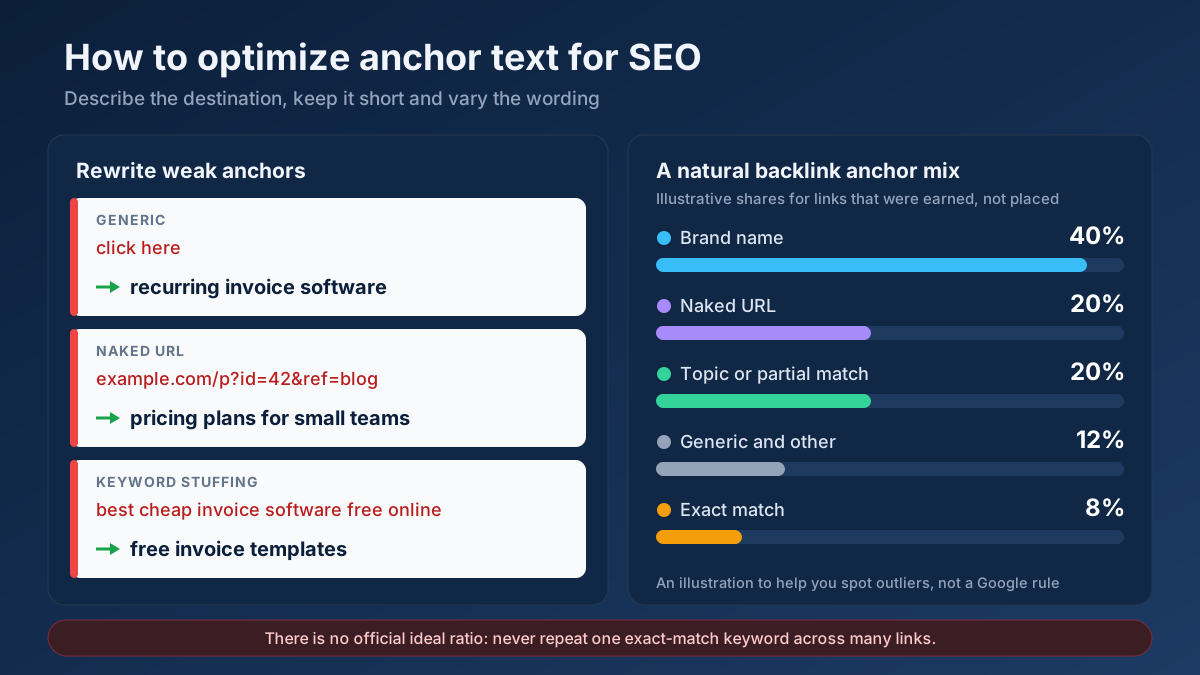
Work down the list from the highest-similarity pairs. For each one, open the page that should link out and add a contextual link inside the body copy, exactly where the shared topic comes up naturally — not a generic footer or sidebar link. Use descriptive, keyword-aware anchor text drawn from the shared terms rather than "click here," so both readers and crawlers understand the destination. Prioritize links pointing to your under-linked and money pages, keep placements genuinely relevant, then re-run the tool to confirm the gaps are closed.
Frequently asked questions
Which URL should I enter?
Enter a hub, category or homepage that links out to the group of pages you want to interconnect. The tool analyzes the pages reachable from that URL, so pick a page whose outbound internal links represent the cluster or section you're trying to strengthen.
Why measure topical similarity instead of just listing all pages?
Linking unrelated pages dilutes relevance and confuses crawlers. By scoring how closely two pages match in subject matter, the tool only surfaces links that make editorial sense — connections a reader would find useful and that reinforce a genuine topic cluster rather than random cross-links.
Will it link the pages for me automatically?
No. It identifies and ranks the opportunities and points to the shared terms, but you add the links yourself. That keeps you in control of placement and anchor text, so each link lands naturally in the body content where it genuinely helps the reader.