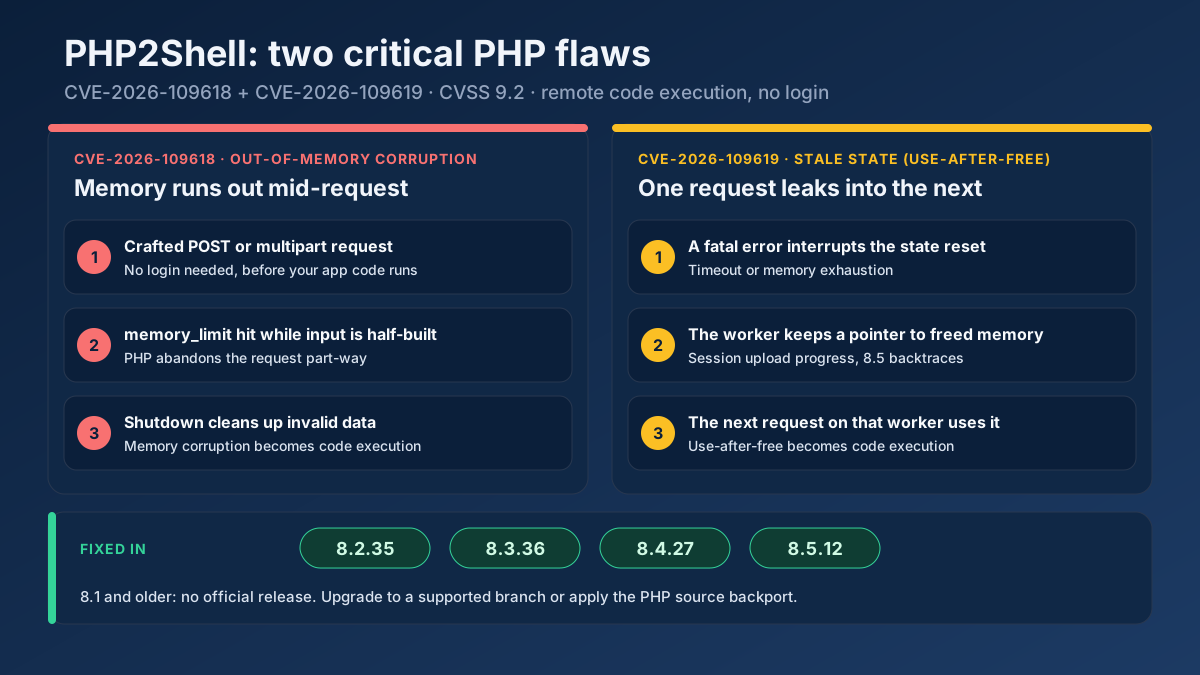
Short answer: PHP2Shell is the name for two critical PHP flaws, CVE-2026-109618 and CVE-2026-109619, that let an attacker run code on a web server without logging in. Every PHP version from 5.4 onwards is affected. Upgrade to 8.2.35, 8.3.36, 8.4.27 or 8.5.12, restart every PHP worker, then check whether the server was touched before you patched.
On 21 October 2026 the PHP project shipped emergency releases for two bugs in the PHP engine itself, not in WordPress, Laravel or any plugin. That difference matters. Your application can be fully up to date, your admin area can sit behind two-factor login, and the server can still be taken over, because the vulnerable code runs while PHP is reading the request, before your application gets a say. Details leaked a day before the patch, and the first exploitation attempts were seen four days before that. This guide covers what the two CVEs actually do, which versions fix them, how to check every server properly, what to do if you cannot upgrade today, and how to look for signs that someone got in first. We patched our own servers the morning after the release, and the checklist below is the one we used.
What is the PHP2Shell vulnerability?
PHP2Shell is the nickname researchers at Calif gave to an exploit chain built on two separate memory-safety bugs in the PHP interpreter. Both carry a CVSS v4 score of 9.2, both can be triggered by an unauthenticated visitor over plain HTTP, and both end in remote code execution with the permissions of the web server account. The PHP security team published them as two advisories on GitHub: GHSA-w8hw-w9fx-j79w (CVE-2026-109618) and GHSA-6wmf-4rv5-p3rp (CVE-2026-109619).
The code paths involved go back to PHP 5.4.0, released in 2012. That is why the exposure numbers are so large: PHP runs roughly seven in ten websites whose server-side language is known, and most of them process form posts and uploads through exactly the code that broke.
CVE-2026-109618: memory runs out halfway through a request
When PHP hits its memory_limit, it does not unwind politely. It jumps straight out of whatever it was doing. If that happens while PHP is still building the request data, for example while it inserts a form field into $_POST, the internal hash table has already counted an element whose key and value were never written. At the end of the request PHP destroys $_POST, walks every counted element and treats the unfinished one as real. With careful heap grooming, an attacker controls what that half-built element points to.
The advisory lists several ways to run PHP out of memory while staying under post_max_size: multipart bodies without a usable Content-Length, multipart parts with thousands of headers, and empty file fields with nested names that each create metadata arrays without counting towards max_file_uploads. Exploitation was demonstrated against Apache with mod_php using PHP's default input and memory limits. PHP-FPM, FrankenPHP and LiteSpeed are considered susceptible by source analysis, even though no complete exploit had been shown for FPM at release time.
CVE-2026-109619: one request poisons the next
PHP workers are reused. A single php-fpm child or Apache process serves request after request, and the engine is supposed to reset its request-owned state in between. The second bug is that some of that state, including error, session and serializer state, can survive after the memory behind it has been freed. A fatal error such as a timeout or memory exhaustion can skip the cleanup, and a warning raised during shutdown can quietly recreate the state after it was cleared. When the next request on the same worker reads that state before initialising it, PHP follows a pointer into freed memory.
Two consumers were confirmed. One is session upload progress, which is switched on by default and runs on every multipart upload even if your code never calls session_start(). The other, on PHP 8.5 only, is the new fatal_error_backtraces feature, also on by default. PHP confirmed command execution on mod_php and, for the session path, on PHP-FPM.
Why logins, WAF rules and up-to-date plugins do not protect you
Both bugs fire while PHP is parsing the request or tearing it down, which is before and after your application runs. A login form, a security plugin or a CMS update cannot see the request in time. Sansec reports confirmed pre-authentication code execution against current releases of WordPress, Drupal, Joomla, Magento, Nextcloud, phpMyAdmin, Laravel and Symfony applications, which is simply a list of PHP software that accepts form posts. Web application firewalls help a little. Cloudflare shipped rules for these attacks, including on the free plan. But very large request bodies are exactly what many WAFs truncate or stop inspecting, so treat a WAF as a speed bump, not a fix.
PHP2Shell timeline: attacks began before the patch
The order of events explains the urgency. Calif found several code execution paths at the start of August 2026 and reported the first one to PHP on 11 August. Wiz Research reported the vulnerabilities independently on 24 August. A coordinated release was planned for 22 October, but CVE identifiers and some details leaked on 20 October and the release was moved forward to 21 October at 14:00 UTC.
The uncomfortable part is what happened before that. Amazon's threat intelligence team saw a first exploitation attempt against its honeypots on 17 October, four days before any fixed release existed, and recommends starting investigations from that date. Cloudflare reported early attacks from 07:43 UTC on the 21st, more than six hours before the patch. By the evening of release day, Datadog and Tenable were reporting broad, untargeted scanning.
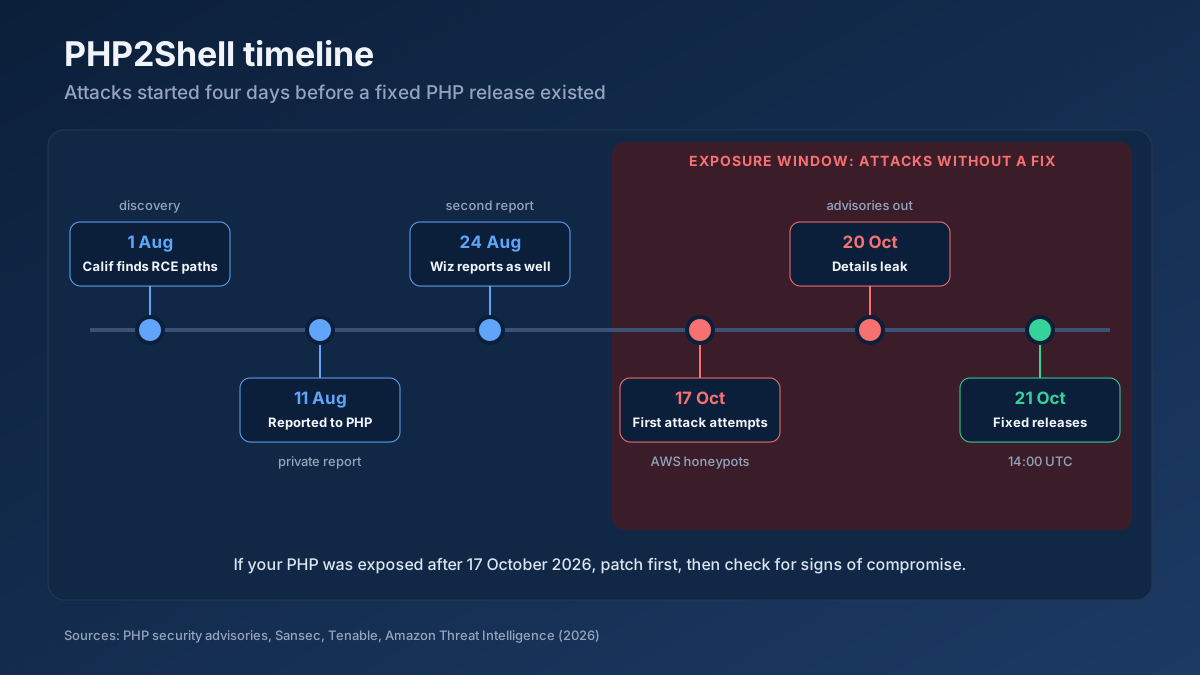
So if your server ran an affected PHP version and was reachable from the internet after 17 October, patching closes the door but does not tell you whether anyone came in. We return to that in the section on checking for compromise.
Which PHP versions fix CVE-2026-109618 and CVE-2026-109619?
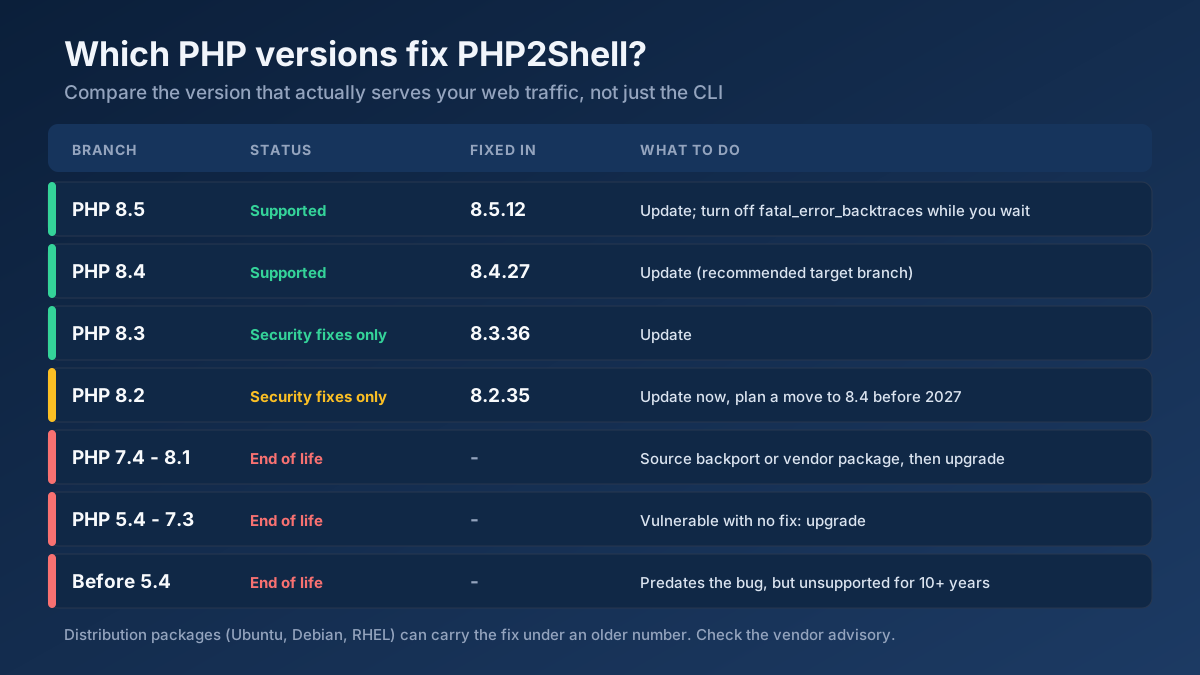
Both CVEs are fixed in the same four releases. If your branch is still supported, the answer is a minor update, not a migration:
| PHP branch | Status in October 2026 | Fixed in | What to do |
|---|---|---|---|
| 8.5 | Active support | 8.5.12 | Update. Turn off fatal_error_backtraces until you do. |
| 8.4 | Active support | 8.4.27 | Update. This is the branch we would move older sites to. |
| 8.3 | Security fixes only | 8.3.36 | Update. |
| 8.2 | Security fixes only, ends 31 December 2026 | 8.2.35 | Update now and plan the move to 8.4. |
| 7.4 to 8.1 | End of life | No release | Apply the PHP source backport or a vendor package, then upgrade. |
| 5.4 to 7.3 | End of life | No fix | Upgrade. There is no other way out. |
Support dates come from the official PHP supported versions page. Earlier releases in each branch are affected; 8.4.26 is vulnerable, 8.4.27 is not.
Distribution packages can be patched under an old version number
Ubuntu, Debian, Red Hat and other distributions often back-port security fixes into the version they shipped, so php -v can still say 8.1.2 or 8.2.7 on a fully patched machine. The version suffix gives it away, for example 8.1.2-1ubuntu2.20 or 8.2.7-1~deb12u1. For these builds the version number proves nothing either way. Check the package changelog for the CVE instead:
# Debian / Ubuntu
apt changelog php8.2-fpm | grep -E 'CVE-2026-10961(8|9)'

# RHEL, AlmaLinux, Rocky, Fedora
rpm -q --changelog php-fpm | grep -E 'CVE-2026-10961(8|9)'
No match means the installed package does not carry the fix yet. One warning from release day: the popular Remi repository for RHEL had not published updated packages on 21 October, and several researchers suggested switching to distribution packages or a source build until it did.
PHP 8.1 and older
The PHP security team took the unusual step of publishing minimal source backports for 7.4, 8.0 and 8.1, so a team that compiles its own PHP can patch an end-of-life branch. Most site owners do not, and for them the realistic options are a vendor that sells extended support, a hosting control panel that ships its own patched builds, or an upgrade. Anything from 5.4 to 7.3 is vulnerable with no fix at all. A site still on PHP 7 in late 2026 has carried known, unpatched vulnerabilities for years; PHP2Shell is the one that makes the upgrade impossible to postpone.
How to check if your site is vulnerable to PHP2Shell
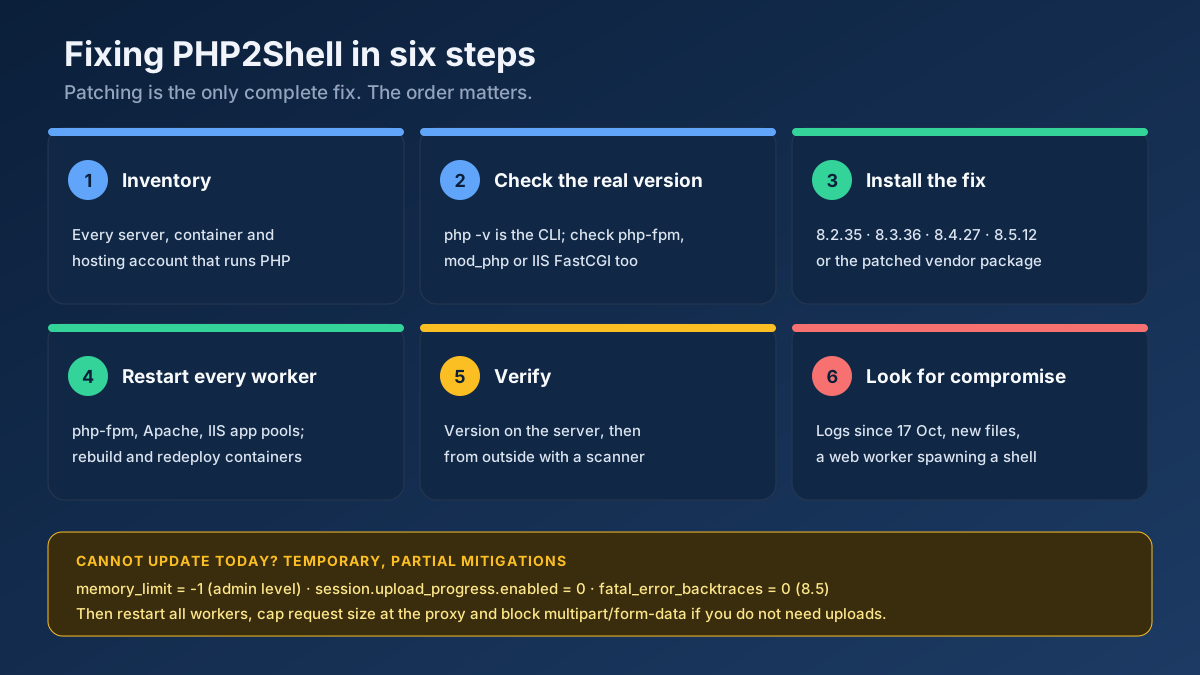
Checking sounds like one command, but the most common mistake we have seen is checking the wrong PHP. A server can have three or four PHP builds installed, and the one you get in an SSH session is often not the one serving web pages. Work through these four steps.
Step 1: List every place PHP runs
Write down every server, virtual machine, container image and hosting account that runs PHP for anything reachable from the internet. Do not forget the old marketing microsite, the staging server with a public IP, the phpMyAdmin instance and the monitoring dashboard. Bundled runtimes count too: Docker images, desktop-style apps that ship their own PHP, and appliance software with a PHP admin panel are all in scope.
Step 2: Check the version that actually serves web traffic
php -v tells you about the command-line binary. Your website may run something else entirely. Check the web runtime directly:
- PHP-FPM (nginx or Apache with FPM): run the FPM binary itself, for example
php-fpm8.3 -vor/usr/sbin/php-fpm -v, and list running pools withps aux | grep php-fpm. Several pools can run different versions. - Apache mod_php:
apache2ctl -M | grep phpshows which module is loaded; the module's version is the one that matters, and mod_php is the configuration PHP rates as highest risk. - Windows with IIS: PHP runs as
php-cgi.exethrough FastCGI. RunC:\PHP\php-cgi.exe -vagainst the exact path configured in IIS Manager under FastCGI Settings, or list it withappcmd list config /section:system.webServer/fastCgi. - Docker:
docker exec <container> php -von the running container, then check the base image tag in your Dockerfile, because the next deploy will rebuild from it. - Shared hosting and cPanel or Plesk: look at MultiPHP Manager or the PHP settings page for each domain. Each site can be on a different version.
If you are not sure which binary serves the site, put a temporary file on it that prints only the version, request it, and delete it straight away. Never leave a full phpinfo() page online; it hands attackers your exact build, loaded modules and paths.
<?php // version.php: delete immediately after use
echo PHP_VERSION, ' ', PHP_SAPI;
Step 3: Check from the outside
Next, look at the site the way a scanner does. Many servers announce their PHP version in the X-Powered-By header, and that is exactly how automated attacks pick targets after a disclosure like this one. Our free Website Security Checker reads that header, the Server header and any exposed phpinfo page, compares what it finds with the fixed releases, and tells you whether the site looks vulnerable, patched, or is hiding its version. It runs the general security checks at the same time: HTTPS, security headers, exposed .env and Git files, cookie flags and more.
Be clear about what an outside check can and cannot prove. If the version is visible and old, you have a problem. If it is hidden, which is good practice, nobody outside can prove the server is patched, so step 2 is still required. And if the site shows no sign of PHP at all, other services on the same domain might still use it.
Step 4: Ask your host the right question
On managed or shared hosting you may not be able to run any of the commands above. Do not ask your host whether you are safe. Ask a question with a checkable answer: which PHP build serves my domain, does it include the fixes for CVE-2026-109618 and CVE-2026-109619, and when were the PHP workers restarted after the update? A good host answers all three within a day.
How to fix PHP2Shell: update and restart
The PHP advisories are unusually blunt: updating to a release with the patch is the only complete mitigation. Everything in the next section only narrows the known paths. The order below matters as much as the steps themselves.
Installing the patched release
- Ubuntu and Debian:
sudo apt update && sudo apt install --only-upgrade 'php8.*', then confirm the changelog entry shown earlier. - RHEL family:
sudo dnf upgrade 'php*'from your distribution's repository or AppStream module. - Windows and IIS: download the new build from windows.php.net, unpack it into a new folder, copy your
php.iniacross, and switch the FastCGI application and handler mapping to the newphp-cgi.exe. - Docker: bump the base image so it resolves to a fixed release, rebuild, and redeploy every service that uses it. Patching a running container by hand is lost at the next deploy.
- cPanel, Plesk and managed hosting: install the updated EasyApache or vendor PHP packages, or confirm with your host that they have.
Restart every PHP worker
This is the step that leaves servers vulnerable after a "successful" update. Running workers keep the old engine in memory until they are replaced. Restart php-fpm for every installed version (systemctl restart php8.3-fpm), restart Apache if it loads mod_php, recycle IIS application pools or the FastCGI process, and replace every container. Then repeat step 2 and step 3 from the checking section to prove that the version serving traffic is the new one.
How we patched seomods.com
SeoMods runs on Windows Server with IIS, which means PHP runs as php-cgi.exe under FastCGI. When the advisories landed we were on PHP 8.2.13, which is affected. On 22 October we moved to 8.4.27 rather than 8.2.35: 8.2 loses security support at the end of 2026, so patching it would only have bought two months. We installed the new build side by side in its own folder, pointed the old install path at it with a directory junction so scheduled tasks and scripts kept working without edits, switched the IIS FastCGI application and handler mappings, and kept the old 8.2 folder as a rollback. Before switching we linted every PHP file against 8.4 and compared rendered pages byte for byte, and afterwards we confirmed from outside that the server no longer reports a version at all. The whole change, including tests, took a morning. A same-branch patch release is even simpler.
PHP2Shell mitigation if you cannot update PHP yet
Sometimes a same-day upgrade is not possible: a frozen production stack, an end-of-life branch with no package, or a host that has not shipped the update. These settings reduce exposure to the paths that were confirmed. They are temporary, they are partial, and you should still plan the update.
; php.ini, or the FPM pool file, NOT .user.ini and NOT ini_set()
memory_limit = -1                    ; removes the predictable out-of-memory path (CVE-2026-109618)
session.upload_progress.enabled = 0  ; removes the confirmed stale-session path (CVE-2026-109619)
fatal_error_backtraces = 0           ; PHP 8.5 only
post_max_size = 8M                   ; or 32M if you need uploads, with upload_max_filesize below it
max_input_nesting_level = 32         ; default 64; lower it if your forms allow

; php-fpm pool equivalents (cannot be overridden by the application)
php_admin_value[memory_limit] = -1
php_admin_flag[session.upload_progress.enabled] = off
A few rules make the difference between a mitigation that works and one that only looks like it does:
- Set them at administrator level and restart.
.user.inifiles and runtimeini_set()calls are read too late; the vulnerable parsing has already happened. Restart every worker afterwards and check that no pool, directory or application setting puts a finitememory_limitback. - Replace the memory cap at another layer. With
memory_limitat -1, one runaway request can eat the server. Set a container or cgroup memory limit and watch memory closely. Do not useulimit -v,RLIMIT_ASorRLIMIT_DATA: they make allocations fail, which is exactly the path the first bug needs. - Cap requests at the edge. Limit body size at nginx or the load balancer (
client_max_body_size 8m;), including requests without a Content-Length, and blockmultipart/form-dataentirely if the site has no uploads. Expect that block to break file uploads and some checkout forms. - Do not rely on hiding errors. Turning off
display_errorsorlog_errors, or adding@, does not stop the stale state from being read. Fixing the fatal errors and timeouts attackers can trigger does help. - Consider recycling FPM workers.
pm.max_requests = 1gives every request a fresh worker, which breaks the cross-request path, at a real cost in performance.
The PHP team also suggests keeping session upload progress switched off after patching if you do not use it. Almost nobody does.
Deep checks after patching: was the server compromised?
If an affected server faced the internet after 17 October, assume someone may have tried. These checks look for the traces the published research describes, then for the usual signs of a web shell.
Read the logs for the attack pattern
- PHP error log: fatal errors like
Allowed memory size of 16777216 bytes exhausted (tried to allocate 3500032 bytes) in Unknown on line 0. "Unknown on line 0" means the failure happened while PHP was still reading the request, before any script ran. Legitimate traffic can trigger this too, so look for bursts and repeats from the same addresses. - Web server error log: worker crashes such as
AH00052: child pid 1234 exit signal Segmentation fault (11). Failed guesses crash workers; a successful exploit may not. - Access log: POST requests with unusually large form-encoded bodies, multipart requests to pages that never accept uploads, and many near-identical requests in a short window.
Look for what an attacker leaves behind
The strongest single indicator in Datadog's analysis is a web server process starting a shell: www-data, apache or nginx spawning sh or bash. If you have endpoint monitoring, search for exactly that. Then check the file system:
# PHP files created or changed since the exposure window opened
find /var/www -type f -name '*.php' -newermt '2026-10-17' -ls

# common web shell patterns
grep -rlE 'eval\(base64_decode|gzinflate\(base64|assert\(\$_(POST|GET|REQUEST)' /var/www

# persistence
crontab -l -u www-data; ls -la /etc/cron.d /var/spool/cron
Also check for new administrator accounts in your CMS, changed .htaccess or web.config files, new SSH keys and unfamiliar outbound connections. In Google Search Console, open the Security issues report and look for hacked content or injected spam pages.
If you find something
Do not just delete the shell and carry on. Take the site offline or behind a maintenance page, rebuild from known-good code and a backup taken before 17 October, and change every secret the server could read: database passwords, API keys, the values in .env, SMTP credentials and payment gateway keys. Then patch, verify and bring the site back. Code execution as the web user usually means everything that user could read is compromised.
Hardening beyond PHP2Shell
PHP2Shell is a bug in PHP, but the attacks that follow a disclosure like this always use the same easy wins. Fixing them makes the next emergency less frightening:
- Stop advertising versions. Set
expose_php = Offand hide server tokens (ServerTokens Prodin Apache,server_tokens off;in nginx,removeServerHeaderin IIS). Scanners use these headers to pick targets automatically. - Keep secrets out of the web root. A readable
/.env,/.git/folder orwp-config.php.bakturns a minor bug into a full breach. - Send security headers. HSTS, a Content-Security-Policy, clickjacking protection and
X-Content-Type-Options: nosniffdo not stop PHP2Shell, but they limit what injected content can do to your visitors. - Set cookie flags.
session.cookie_secure,session.cookie_httponlyandsession.cookie_samesite = Laxprotect sessions if something else goes wrong. - Publish a security.txt. A file at
/.well-known/security.txt, defined in RFC 9116, gives researchers a way to warn you before attackers find the problem.
The Website Security Checker tests every item on this list in one scan. For the certificate on its own, use the SSL Certificate Checker, and to read the raw response headers, the HTTP Header Checker.
Why a hacked site is also an SEO problem
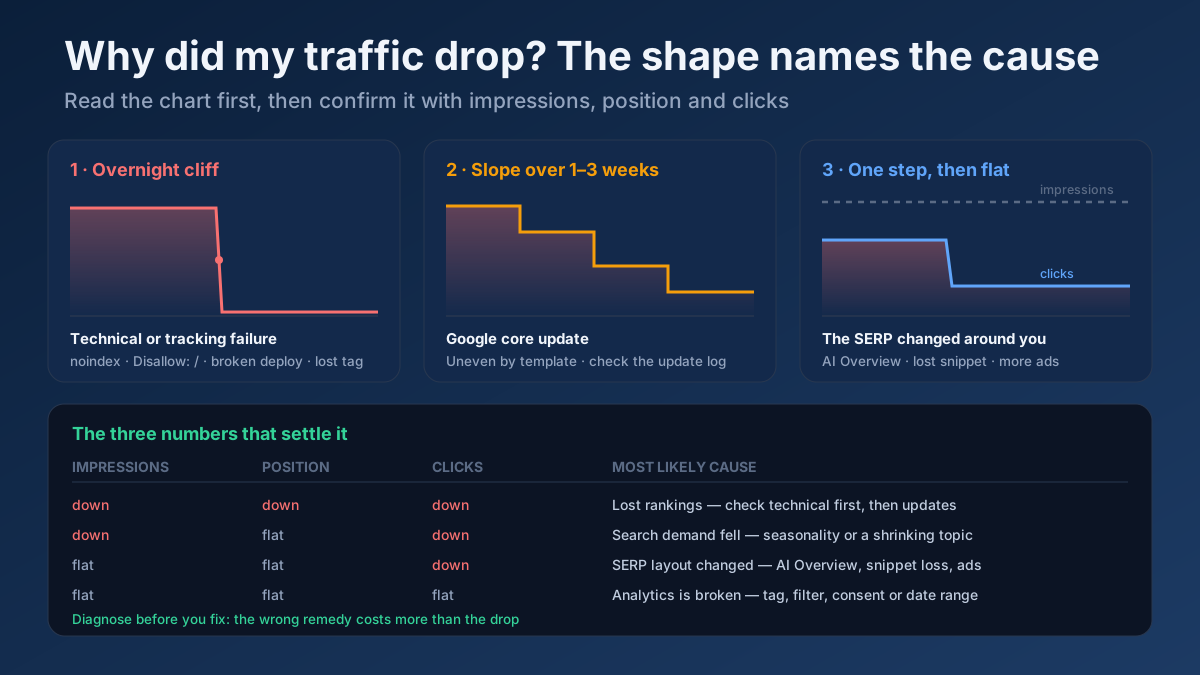
Remote code execution is rarely used to deface a homepage. Far more often, the attacker quietly injects thousands of spam pages, redirects search visitors to scams or adds hidden links, because a site with years of trust in Google is valuable. Google may then show a "This site may be hacked" warning in results, report the problem in Search Console, or drop affected pages. Recovery means cleaning the site, requesting a review and waiting for re-crawling, which can take weeks. If organic traffic fell suddenly after mid-October, rule out a compromise before anything else; our guide to diagnosing a sudden traffic drop covers the other causes, and the technical SEO audit checklist helps confirm the site is healthy again afterwards.
Common mistakes when patching PHP2Shell
- Checking the CLI instead of the web runtime.
php -vsaid 8.4.27; the site was still served by an old php-fpm pool. - Updating without restarting. The package is new, the running workers are not.
- Patching the server but not the image. The container was fixed by hand and the next deploy rolled it back.
- Trusting a version number on a distribution build. It can look old and be patched, or look current and not be. The changelog decides.
- Putting mitigations in .user.ini. They load too late to matter.
- Running a public exploit to test. Code calling itself a PHP2Shell exploit circulated within hours of the leak. PHP found none of it working at release time, and unverified exploit code is a common way to deliver malware.
- Stopping at the patch. If the server was exposed from 17 October, the compromise check is part of the fix.
Applying this to your own site? See the tools picked by audience: SEO Tools for WordPress Site Owners and SEO Tools for Freelance SEOs.
Frequently asked questions
What is PHP2Shell?
PHP2Shell is the exploit chain built on CVE-2026-109618 and CVE-2026-109619, two memory-safety bugs in the PHP engine disclosed in October 2026. They allow an unauthenticated attacker to run code on the web server with the web user's permissions. Both are rated 9.2 on CVSS v4.
Which PHP version fixes CVE-2026-109618?
PHP 8.2.35, 8.3.36, 8.4.27 and 8.5.12 fix both CVE-2026-109618 and CVE-2026-109619. Earlier releases in those branches are vulnerable. PHP 7.4 to 8.1 have only a source backport from the PHP team, and 5.4 to 7.3 have no fix.
Is WordPress affected by PHP2Shell?
Yes, if it runs on an affected PHP version. The bug is in PHP itself, so WordPress core, themes and security plugins cannot block it. Sansec confirmed pre-authentication code execution against a current WordPress release. Updating PHP is the fix.
How can I tell if my site is vulnerable without server access?
Run an outside check such as our Website Security Checker. If the site reports an old PHP version, it is very likely vulnerable. If the version is hidden, only the host can confirm the patch, so ask them which PHP build serves your domain and whether it includes both CVE fixes.
Does a WAF or Cloudflare protect me from PHP2Shell?
Partly. Cloudflare deployed rules, including on the free plan, and they block known attack patterns for traffic that goes through Cloudflare. Attackers who reach your origin IP directly bypass them, and new variants may not match. Use a WAF as extra cover while you patch, never instead of patching.
Is setting memory_limit to -1 enough?
No. It removes the predictable out-of-memory path of CVE-2026-109618, but other allocation failures can still reach the vulnerable code, and it does nothing for CVE-2026-109619. Combine it with disabling session upload progress, edge request limits and a container memory cap, and only as a short bridge to the update.
My host says the server is patched. How do I verify it?
Ask for the exact PHP build serving your domain and when the PHP workers were restarted. If you can upload files, a temporary script that prints PHP_VERSION shows the real runtime; delete it straight away. For distribution builds, the package changelog must mention both CVE numbers.
Should I upgrade to PHP 8.4 instead of patching 8.2?
If you can, yes. PHP 8.2 stops receiving security fixes on 31 December 2026, so 8.2.35 only buys about two months. Patch 8.2 today if an upgrade needs testing, then schedule the move to 8.4 before the end of the year.