Short answer: Organic traffic drops for one of seven reasons — a tracking or reporting error, a technical problem that removed pages from the index, a Google algorithm update, a change to the search results page itself (AI Overviews, more ads, new SERP features), a competitor overtaking you, content that has quietly decayed, or plain seasonality. You cannot fix the drop until you know which one it is, and the diagnosis is almost always decided by three numbers in Search Console: impressions, average position and clicks. If impressions fell, you lost visibility. If impressions held but clicks fell, you lost the click. If both held but sessions fell, your analytics is broken. This guide walks the full diagnostic in order, then gives the recovery playbook for each cause.
Before anything else: confirm the drop is real
A surprising share of “traffic disasters” never happened. Before you rewrite a single page, spend twenty minutes proving that the traffic actually left, because chasing a measurement artefact will burn a week and change nothing on the site.
Check the tracking first
Analytics breaks silently and constantly. Work through this list before you accept the numbers:
- Is the tag still on the page? A deploy, a theme update, a consent-banner change or a new caching layer can strip the analytics snippet from some templates. Open a few key pages, view source, and confirm the measurement ID is present on each template, not just the homepage.
- Did the property, filter or data stream change? A new internal-IP filter, a changed default channel grouping, or someone switching the report from “organic search” to “organic google” will show a cliff that never existed.
- Did consent settings change? If you added or tightened a cookie banner, a slice of real visitors simply stopped being recorded. Traffic is flat; measurement shrank. Compare Search Console clicks (which are consent-independent) against analytics sessions — if clicks are steady and sessions dropped, it is a measurement change.
- Is the date range honest? Comparing a 30-day window against a period that contained a promotion, a viral post or a public holiday produces a scary percentage and no insight. Compare like with like: same weekdays, same length, and check the same window last year.
- Is the current period complete? Search Console data lags by two to three days; analytics can lag by hours. A “drop” whose last three days are still filling in is a reporting artefact.
- Did bot or referral spam disappear? If you previously had inflated numbers from a bot wave or a spam referrer, cleaning it up looks exactly like a traffic loss. Check whether the “lost” sessions had a 100% bounce rate and zero engagement time.
The cross-check that settles it: Search Console clicks versus analytics sessions from organic search, over the same dates. If Search Console shows the same drop, the traffic really left and you continue down this guide. If Search Console is flat, your problem is in the measurement layer, and the Search Console measurement guide explains how to read the two data sets against each other.
Read the shape of the drop — it names the cause
Once the drop is confirmed, the single most diagnostic thing you have is its shape on a daily chart. Different causes leave visibly different fingerprints, and recognising the pattern removes most of the guesswork before you have looked at a single page.
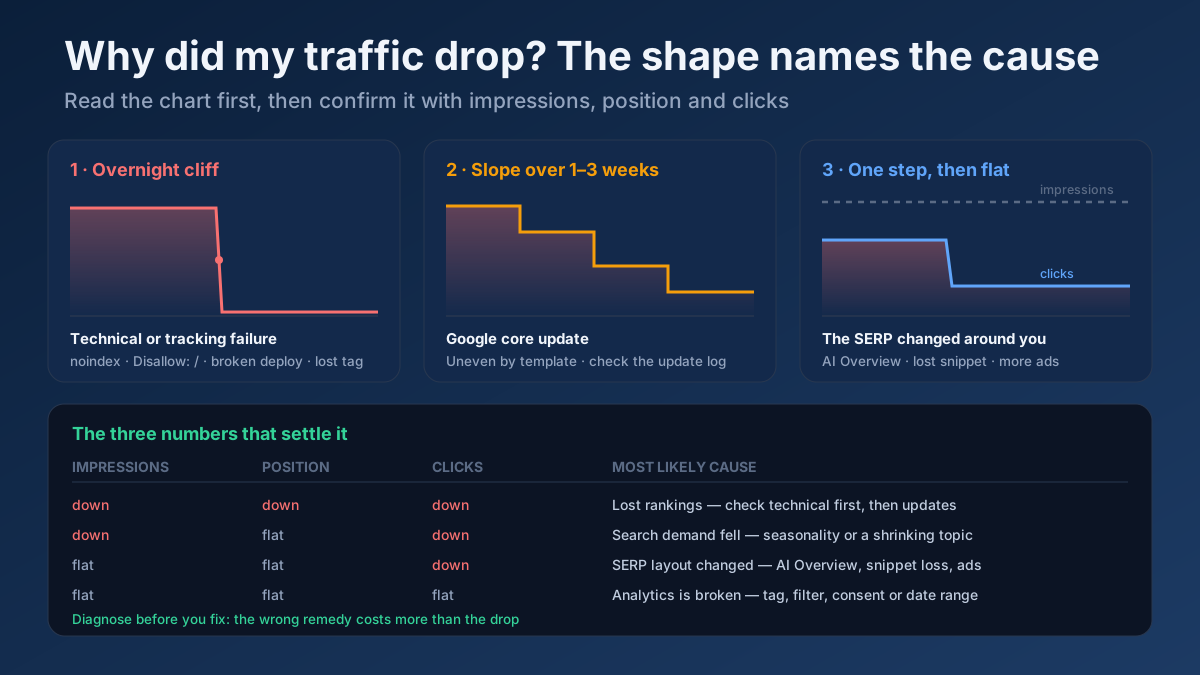
- A vertical cliff in one day, near-total. Traffic went from normal to almost nothing overnight. This is nearly always technical or measurement: a
noindextag shipped to production,Disallow: /inrobots.txt, a broken deploy, an expired certificate, a DNS change or a removed tracking tag. Algorithm updates almost never do this to an entire site. - A steep decline over three to fourteen days. The classic algorithm-update signature. Google rolls core updates out over one to three weeks, so the loss arrives as a slope rather than a wall, and it usually hits some page types harder than others.
- A single-day step down of 20–40% that then holds flat. Something changed on the search results page: an AI Overview appeared above your result, you lost a featured snippet, a competitor took position one, or Google added more ads to that query. Impressions stay roughly level while clicks fall.
- A slow bleed over months. Content decay and competitive erosion. No single day looks bad; the trend line is unmistakable over six months. This is the most common and the most ignored pattern.
- A smooth, repeating seasonal curve. Compare year over year before you panic. Plenty of “drops” are August, Ramadan, the post-Christmas lull or the end of a buying season, and the same dip exists in last year’s chart.
- A drop confined to one section, template or country. Points straight at a change to that template, that category’s rankings, or a regional SERP shift — not at a site-wide problem.
Step 1 — Segment the loss in Search Console
Site-wide totals hide the answer. Almost every real drop is concentrated somewhere specific, and finding that concentration is the whole job. In the Search Console Performance report, set a comparison of the four weeks after the drop against the four weeks before it, then break the loss down along each dimension in turn.
By page
Sort by click difference and look at where the loss sits. If ten URLs account for 80% of it, you have a page-level problem — those specific pages lost rankings, got de-indexed, or were changed. If the loss is spread thinly across hundreds of URLs, it is site-wide: an algorithm update, a technical regression on a shared template, or a lost brand signal.
By query
Separate branded from non-branded terms. A fall in branded searches is a demand or reputation problem, not an SEO problem — check whether you stopped running ads, ended a campaign or got less press. A fall in non-branded terms is where SEO diagnosis belongs. Also look for queries that vanished entirely versus queries that merely slipped a couple of positions; the two need different responses.
By country and device
A drop in one country only usually means a local SERP change, a new local competitor, or a hreflang or geo-targeting mistake — see the hreflang guide if you serve several markets. A drop confined to mobile points at a mobile rendering, layout or speed regression, which matters more than desktop because of mobile-first indexing.
By search appearance
If you previously earned rich results, videos or FAQ appearances and that appearance type has disappeared from the report, your structured data broke or Google retired that feature. Re-validate the markup with a Structured Data (Schema) Checker before assuming a ranking loss.
Then read impressions against clicks
This is the fork in the road that determines everything you do next:
- Impressions down, position down — you lost rankings. Go to steps 2 and 3 (technical, then algorithmic).
- Impressions down, position flat — search demand fell, or a query stopped triggering your page type. Go to step 6 (seasonality and demand).
- Impressions flat, clicks down, position flat — the SERP changed around you. Go to step 4.
- Everything flat in Search Console, sessions down in analytics — measurement problem. Back to the top of this guide.
Step 2 — Rule out the technical causes
Technical failures cause the fastest, deepest and — fortunately — the most fixable drops. Check every item on this list before you consider anything more exotic, because a site cannot rank on pages Google can no longer see.
Indexation
Open the Search Console Pages report and compare indexed page count against the prior month. A collapse in indexed pages explains the traffic loss on its own. The usual culprits, in order of frequency:
- A stray
noindex. Staging settings shipped to production, a CMS checkbox toggled, a plugin update changing defaults. Check the live HTML of several templates with a Meta Tag Analyzer — do not trust the CMS setting screen, trust what the server sends. - A robots.txt block. A single
Disallow: /or a blocked assets folder that stops rendering. Test the live file with a Robots.txt Tester, and read noindex vs nofollow vs disallow if you are unsure which directive does what. - Canonical tags pointing elsewhere. A template bug can canonicalise every page to the homepage, which removes the whole site from the index in slow motion. See the canonical tags guide.
- Pages returning the wrong status code. Soft 404s, unintended 301s, or a section returning 500 under load. Crawl with a Technical Site Audit (Crawler) and check individual URLs with an HTTP Header Checker lookup.
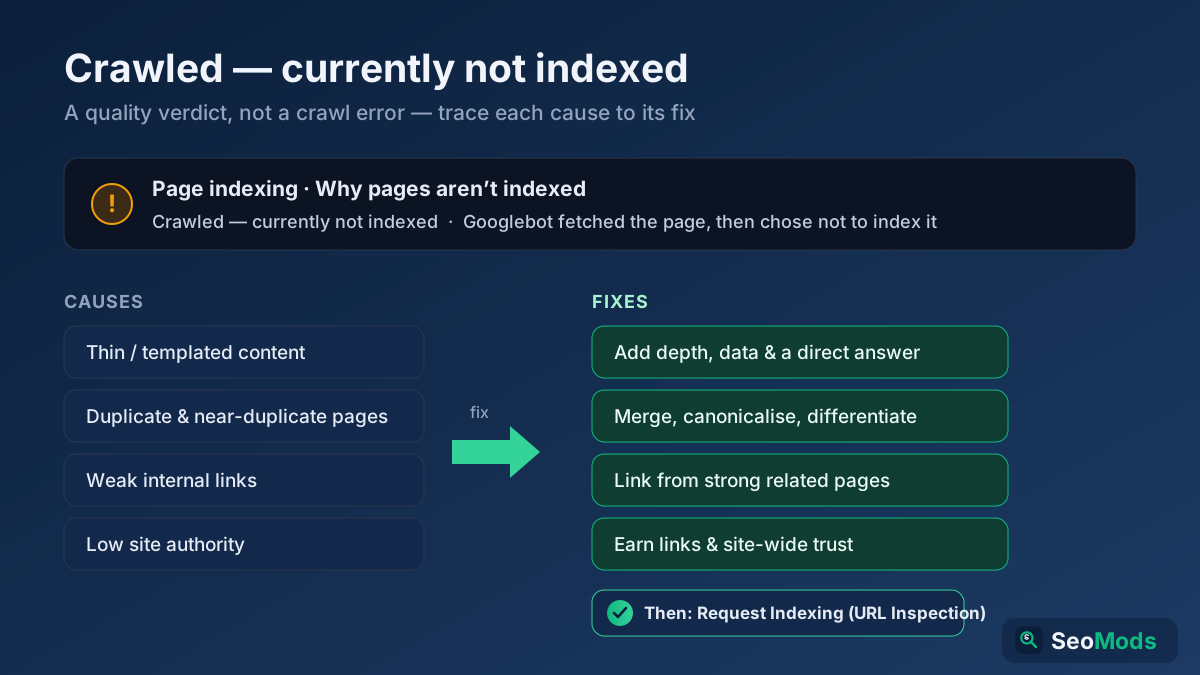
- Pages crawled but not indexed. A different problem with a different fix, covered in how to fix crawled — currently not indexed.
Availability and security
Some drops are infrastructure, not SEO. Confirm the certificate has not expired with an SSL Certificate Checker, that DNS still resolves as expected with a DNS Records Lookup, and that the server is not throwing intermittent 5xx errors under crawl load — Search Console’s Crawl Stats report shows exactly this. A site that was unreachable for six hours during a crawl spike can lose visibility for days afterwards.
Redirects and recent releases
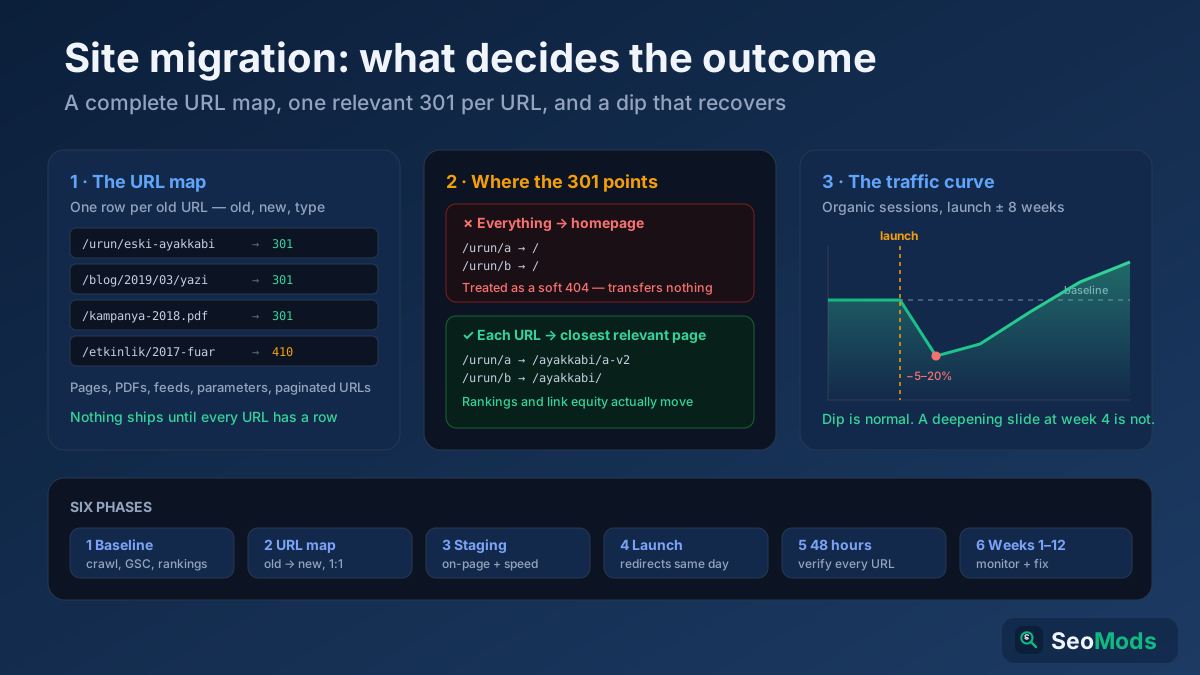
Ask a blunt question: what shipped in the two weeks before the drop? A redesign, a plugin update, a CDN change, a new consent layer, a URL change, a hosting move. Every one of those is a migration in disguise and deserves the migration checklist. Verify that old URLs still resolve in one hop with a Redirect & HTTP Status Checker; chains and loops leak both crawl budget and rankings.
Rendering and speed
If content is injected by JavaScript and a release changed the bundle, Google may now be indexing an empty shell — the JavaScript SEO guide covers how to check what the rendered DOM actually contains. Separately, a serious performance regression hurts both rankings and conversion: measure with a Page Speed & Size Test test against the numbers in the Core Web Vitals guide.
Hacking and spam injection
A sudden drop paired with strange new pages in the index, Japanese or pharmaceutical keywords in your Search Console query list, or a Security Issues notice means you have been compromised. Clean it before doing anything else — no amount of content work outranks an active spam injection.
Step 3 — Check whether an algorithm update hit you
If nothing technical explains the loss and the decline arrived as a slope over one to three weeks, compare your drop dates against Google’s published update timeline. Google confirms core updates, spam updates and reviews updates on its Search ranking updates page, with start and finish dates. If your decline starts within a day or two of a confirmed rollout and no deploy of yours coincides, an update is the likeliest explanation.
How to confirm it beyond the dates
- Was the loss uneven across page types? Core updates typically re-rate content quality, so one template — thin category pages, aggregated listings, older blog posts — falls hard while others hold. A uniform loss across everything is more often technical.
- Did competitors move too? Track a handful of your priority terms with a Keyword Rank Checker and see who took your positions. If the same three sites gained across the board, the update re-scored the whole result set, not just you.
- Did the SERP composition change? Sometimes an update swaps the page type Google rewards — from blog posts to forums, or from listicles to product pages. That is an intent change, and no amount of on-page tweaking fixes it; see search intent.
What to do about it
Google’s own advice on core updates is blunt: there is nothing to “fix,” because a core update is not a penalty. The system re-evaluated which pages best serve the query, and yours were judged less useful relative to others. Practical response, in order:
- Wait for the rollout to finish before judging anything. Positions oscillate mid-update and people routinely panic-edit pages during a rollout, then cannot tell whether the recovery came from their change or from the update settling.
- Compare your losing pages against the pages that replaced you, one query at a time. Depth, first-hand experience, specificity, freshness, author expertise, ease of answering the question. Be honest about the gap. A Content / Keyword Gap analysis makes it concrete.
- Strengthen the experience and expertise signals that core updates weigh — real authorship, sources, original data, updated facts. The E-E-A-T guide covers what is actually verifiable versus what is folklore.
- Fix, merge or remove genuinely weak pages. A large volume of thin, near-duplicate or outdated pages drags site-level assessment down. Find them with a Thin Content Checker and a Keyword Cannibalization Checker.
- Expect the recovery to arrive with a later update, not the week after your edits. Core-update recoveries typically land on the next core update, which is one to four months out.
Manual actions are different
Check the Manual Actions report in Search Console. If there is a notice there, you have a human penalty, not an algorithmic re-rating — the cause is named, the fix is specified, and you file a reconsideration request once it is resolved. Unnatural links are the most common trigger; the toxic backlinks and disavow guide explains when disavowing is warranted and when it does more harm than good. An empty Manual Actions report means you were not penalised, whatever the drop looks like.
Step 4 — The rankings held but the clicks left
This is now one of the most common patterns in SEO and one of the most misdiagnosed. Your average position is unchanged, impressions are steady or up, and clicks fell 20–40%. Nothing is wrong with your page — the search results page around it changed, and fewer people need to click through to get their answer.
AI Overviews and AI Mode
When Google places an AI-generated summary above the organic results, the classic result set moves down the page and click-through rate falls for informational queries even at position one. The response is not to fight the summary but to be inside it: structure content so it can be quoted and cited, answer questions directly in the first two sentences of a section, and keep facts verifiable. The AI Overviews guide and answer-engine optimization guide cover the specifics, and a GEO Checker (Generative Engine Optimization) scores how quotable a page currently is.
Lost featured snippet or rich result
Losing a snippet you used to own can cut clicks on that query in half while your reported position barely moves. Check which SERP features the query now shows with a SERP Features Analyzer lookup, and re-read how featured snippets are won. If a rich result disappeared instead, validate your markup — broken JSON-LD is a frequent cause.
More ads, or a new SERP block
Commercial queries have progressively more paid slots, shopping carousels, and local packs above the organic results. Where that has happened, organic click-through simply compresses, and the honest answer is to diversify: target adjacent long-tail queries that are not monetised the same way, and lean on long-tail terms where the SERP is still clean.
Your snippet became less attractive
Sometimes the SERP is unchanged and your own listing got worse: Google rewrote your title, your date now reads as two years old, or your description is truncated mid-sentence. Preview how the result actually renders with a Google SERP Snippet Preview, and revisit title tags and meta descriptions. A stale visible date on an otherwise current article costs clicks on its own.
Step 5 — Competitors and content decay
If the drop is a slow bleed rather than a cliff, nothing broke. You were simply overtaken, one query at a time, by pages that are newer, deeper or better matched to intent.
Find out exactly who replaced you
Take the ten queries that lost the most clicks, search each one, and record who now occupies the positions you held. Profile those pages with a Site Explorer and compare their content against yours with a On-Page SEO Checker (Keyword). You are looking for concrete differences: word count and depth, publication and update dates, number and quality of referring domains, media, schema, page speed, and how directly the page answers the query in its opening lines.
Recognise content decay
Every page ages. Statistics go stale, screenshots show an old interface, the year in the title is wrong, the recommendations reference a product that no longer exists. Google does not need to demote you for this — users do it by bouncing, and fresher competitors do it by being more accurate. Score your library with a Content Freshness Score and rebuild the pages that used to earn traffic and no longer do. The content refresh strategy is a systematic way to run this every quarter instead of reactively.
Check your link profile for losses
A page that dropped after holding steady for years may have lost the links that were holding it up: a linking site was redesigned, went offline, or removed the reference. Compare your current referring domains against an older export with a Backlink Checker / Verifier and a Toxic Backlink Audit. Lost links are worth pursuing precisely because the relationship already existed.
Look for self-inflicted cannibalisation
If you published new content that targets the same query as an existing ranking page, the two can split signals and both slip. This is one of the few causes with an unambiguous fix — consolidate, differentiate, or point one at the other with an internal link. The cannibalisation guide covers how to tell which page Google actually prefers.
Step 6 — Seasonality and falling demand
Before you spend a month on a recovery plan, confirm that people are still searching. If impressions fell while your average position stayed flat, the queries themselves shrank — and no on-page work brings back demand that does not exist.
- Compare year over year, not month over month. If the same dip appears at the same point last year and the year before, it is seasonal and it will return on schedule.
- Check the demand curve for your head terms in Google Trends. A category in structural decline needs a content strategy change, not a technical fix.
- Watch for topic obsolescence. Software versions, tax years, device models, discontinued platforms: a page tied to something that no longer exists loses traffic permanently, and the right response is to pivot the page to its successor topic.
- Account for your own marketing. Ending a campaign, pausing ads or losing a press cycle reduces branded search, which shows up in the same chart as organic decline but is a different problem entirely.
The diagnosis table
Match your symptoms to the most likely cause, then jump to the relevant section above:
| What you observe | Most likely cause | First action |
|---|---|---|
| Overnight cliff, near-total loss | Technical or tracking failure | Check noindex, robots.txt, status codes, tracking tag |
| Indexed page count collapsed | Indexation blocked | Search Console Pages report, then Meta Tag Analyzer |
| Slope over 1–3 weeks, uneven by template | Core algorithm update | Match dates to the update log; compare against the pages that replaced you |
| Impressions flat, clicks down, position flat | SERP layout change or AI Overview | Inspect the live SERP; optimise for citation and click-through |
| Slow decline over months | Content decay or competitor gains | Refresh the top losing pages; audit who overtook you |
| Same dip as last year, same weeks | Seasonality | Compare year over year; plan for the rebound |
| Branded queries down, non-branded flat | Demand or marketing change | Look outside SEO — campaigns, PR, ad spend |
| One country or one device only | Geo-targeting or mobile regression | Check hreflang, local competitors, mobile rendering |
| Message in Manual Actions | Manual penalty | Fix the named issue, then file reconsideration |
| Search Console flat, analytics down | Measurement, not traffic | Audit tags, filters, consent and date ranges |
The recovery playbook
Once you have a diagnosis, the work is specific. These are the realistic paths and timelines for each cause.
Technical drop
Fix the blocking issue, then request indexing for your most important URLs and resubmit your sitemap — find and validate it with a Sitemap Finder & Validator. Recovery is usually days to two weeks, and it is often close to complete: Google re-crawls, sees the pages again, and restores them roughly where they were. This is the best possible diagnosis to receive.
Algorithm update
Improve the pages that lost the most, focusing on genuine quality gaps rather than cosmetic edits, and give the site time. Expect months, not weeks, and expect the recovery to coincide with a subsequent update. Do not rewrite everything at once — change a defined batch, wait, measure, then repeat, or you will never know what worked.
SERP change
Full recovery of the old click volume may not be available, because those clicks no longer exist for anyone. The realistic goals are to be the cited source inside AI answers, to reclaim the snippet, to sharpen your title and description for the clicks that remain, and to expand into queries where the SERP is less crowded. Track this with a AI Visibility Checker alongside your ranking reports; visibility in AI answers is now a metric in its own right, as covered in tracking AI search traffic.
Content decay
Rebuild rather than tweak. Update the facts, add what the winning pages have that you lack, improve the opening answer, refresh the media, and change the modification date honestly. Refreshed pages often recover within four to eight weeks, faster than new pages rank from scratch, because the URL already has history and links.
Competitive loss
This is a content and authority project, not a fix. Close the depth gap, earn links to the specific losing URLs, strengthen the internal links pointing at them, and accept a three-to-six-month horizon — the same timeline described in how long SEO takes.
Seasonality
Do nothing reactive. Use the quiet period to build the pages you will need when demand returns, and set expectations internally with the year-over-year chart so the next dip does not trigger another emergency.
Mistakes that turn a dip into a disaster
The response to a traffic drop causes more permanent damage than the drop itself more often than anyone admits. Avoid these:
- Changing ten things at once. You will recover or decline and have no idea which change was responsible. Batch changes, and leave enough time between them to read the result.
- Deleting pages that dropped. A page at position 15 still has history, links and recovery potential. Deleting it converts a temporary loss into a permanent one. Improve or consolidate instead.
- Mass-disavowing links in a panic. Disavowing is for a documented unnatural-link problem, not a general-purpose remedy. Removing links Google was counting in your favour is difficult to undo.
- Rewriting during a rollout. Wait for the update to finish. Mid-rollout volatility is not signal.
- Assuming it is Google. More drops come from your own deploys than from algorithm updates. Check the release log before the update log.
- Ignoring a small drop. A 10% decline that persists for three months is a bigger cumulative loss than a 40% dip that recovers in two weeks. The slow ones are the expensive ones.
How to catch the next one in hours instead of weeks
Most traffic drops are discovered far too late, once the loss is large enough to notice by accident. A small amount of monitoring converts a month-long mystery into a same-day fix:
- Run a full crawl on a schedule with a Technical Site Audit (Crawler) or an All-in-One SEO Audit so indexation and status-code changes surface immediately.
- Track your priority keywords weekly with a Keyword Rank Checker — ranking movement precedes traffic movement, which buys you time.
- Set a Search Console alert habit: check the Pages, Manual Actions and Security Issues reports on a fixed day each week, not only when something feels wrong.
- Baseline before every release. Record indexed pages, rankings and Core Web Vitals before any deploy, so “what changed” has a factual answer.
- Keep monthly exports. Search Console retains 16 months; export it monthly and you can always compare against a period Google no longer shows you.
- Watch server health. Uptime and response-time monitoring catches the 5xx spikes that cause drops nobody can otherwise explain.
A monthly pass through the technical SEO audit checklist catches most of this before it becomes a chart shape you have to explain to somebody.
Frequently asked questions
How long does it take to recover from a traffic drop?
It depends entirely on the cause. A technical block fixed today usually recovers within a few days to two weeks. A content refresh takes four to eight weeks. A core-update loss typically takes one to four months and often needs a subsequent update to land. A competitive loss is a three-to-six-month project. A seasonal dip recovers on its own schedule.
Is a 20% drop normal?
Week-to-week fluctuation of 10–20% is ordinary noise on most sites, especially smaller ones. What matters is persistence and shape: a 20% dip that recovers within two weeks needs no action; a 20% dip that holds for a month is a real loss and deserves this full diagnostic.
Can I tell if it was a Google update or something I did?
Compare two logs. If your drop starts on the same day as a confirmed update and you deployed nothing, it is probably the update. If it starts on the day of your release, it is your release — regardless of what the SEO news is talking about that week. When both coincide, roll back or test the release change first, because it is the variable you control.
Should I disavow links after a traffic drop?
Almost never. Disavow only when you have a manual action for unnatural links, or a documented history of paid or spam links you built yourself. Google ignores most low-quality links automatically, and disavowing good links you misread as toxic makes things worse.
My rankings are the same but traffic fell. What is going on?
The results page changed around you: an AI Overview, a lost featured snippet, extra ads, or a new SERP feature above the fold. Confirm it by checking whether impressions and average position held while clicks fell, then optimise for citation and click-through rather than for position you already have.
Where do I start if I only have an hour?
Fifteen minutes verifying the tracking, fifteen minutes in the Search Console Pages report checking indexation, fifteen minutes segmenting the loss by page and query, and fifteen minutes running a On-Page SEO Audit on your most important URL. That hour identifies the cause of the large majority of drops.
The bottom line
A traffic drop is a diagnosis problem before it is a fixing problem, and the order matters: confirm the data, read the shape, segment the loss, eliminate technical causes, then consider algorithms, SERP changes, competitors and demand — in that sequence, because that is roughly the order of both likelihood and fixability. The teams that recover fastest are not the ones that react hardest; they are the ones that know within a day which of the seven causes they are dealing with, and then do only the work that cause requires.