Short answer: To recover from a Google core update, wait until the rollout has finished, confirm the drop lines up with the update, rule out technical problems and manual actions, then find which pages lost and why. Improve those pages so they serve the searcher better than whatever replaced them, and expect recovery over months, not days.
A core update hit usually feels like a punishment. One morning the traffic graph in Search Console bends downwards, nothing on the site has changed, and every forum thread offers a different theory. The instinct is to do something big and fast: delete pages, rewrite titles, buy links, change the theme. That instinct is the most common reason a temporary dip turns into a long one. This guide walks through what a core update actually is, how to tell it apart from the problems that look like it, and the ten-step plan we use to work out what Google now prefers and close the gap. It is written for site owners and in-house SEOs who need a calm, ordered process, not another list of rumours.
What a Google core update actually is
Google runs ranking systems that change all the time, in small ways, almost daily. A few times a year it makes broader changes to those systems and announces them as core updates. According to Google Search Central documentation on core updates, these updates are designed to improve how the systems assess content overall. They are not aimed at specific sites or specific types of page.
That last point shapes the whole recovery process. A core update does not flag your site for a fault. It re-weighs a very large number of signals about relevance, quality and usefulness, and then re-orders the results. If your pages fell, it means that, by the new weighting, other pages now look like a better answer for those queries. Some of that will be about your content. Some of it will be about theirs.
Core update, spam update or manual action?
These three are often lumped together, but they behave very differently and need different responses. A core update is a broad re-ranking with no message in Search Console and nothing specific to fix. A spam update targets practices named in Google’s spam policies, such as link schemes, scaled content abuse or site reputation abuse, and it also arrives without a message. A manual action is a penalty applied by a person at Google; it appears in the Manual actions report in Search Console and can be lifted through a reconsideration request once the problem is fixed. If you have a manual action, this guide is not your first step: fix what the report names, then return here.
How long a core update takes to roll out
Google says core updates usually take up to two weeks to roll out completely, and it posts the start and end dates on the Google Search Status Dashboard. Some run longer. The March 2024 core update, which folded the helpful content system into the core ranking systems, took about 45 days to finish. During a rollout, rankings often swing up and down several times before they settle, which is why any judgement made in the middle of one is unreliable.
Why “there is nothing to fix” is only half true
Google’s standard line is that a drop after a core update does not necessarily mean something is wrong with your pages. That is accurate, and it is also easy to misread as “do nothing”. The more useful reading is this: there is no single broken thing to repair, so a quick technical fix will not bring the traffic back. What can bring it back is making the content genuinely more helpful than the alternatives. Google’s own advice points site owners to its guidance on creating helpful, reliable, people-first content and the self-assessment questions it contains. That is a content and trust project, and it takes time.
Before you change anything: let the rollout finish
The first rule of core update recovery is patience at the start, not at the end. Do not change titles, delete pages or restructure navigation while the update is still rolling out. You will be reacting to noise, and you will lose the clean before-and-after comparison you need later. Google’s documentation suggests waiting until the rollout is complete and then giving it at least another full week before comparing performance with the week before the update began.
Use that waiting time well. Export Search Console performance data for the last 16 months, write down the exact dates of the update, and note any changes you made to the site in the previous two months: migrations, template changes, plugin updates, content cleanups. Those notes will save you hours when you start separating causes in the steps below.
The 10-step plan to recover from a Google core update
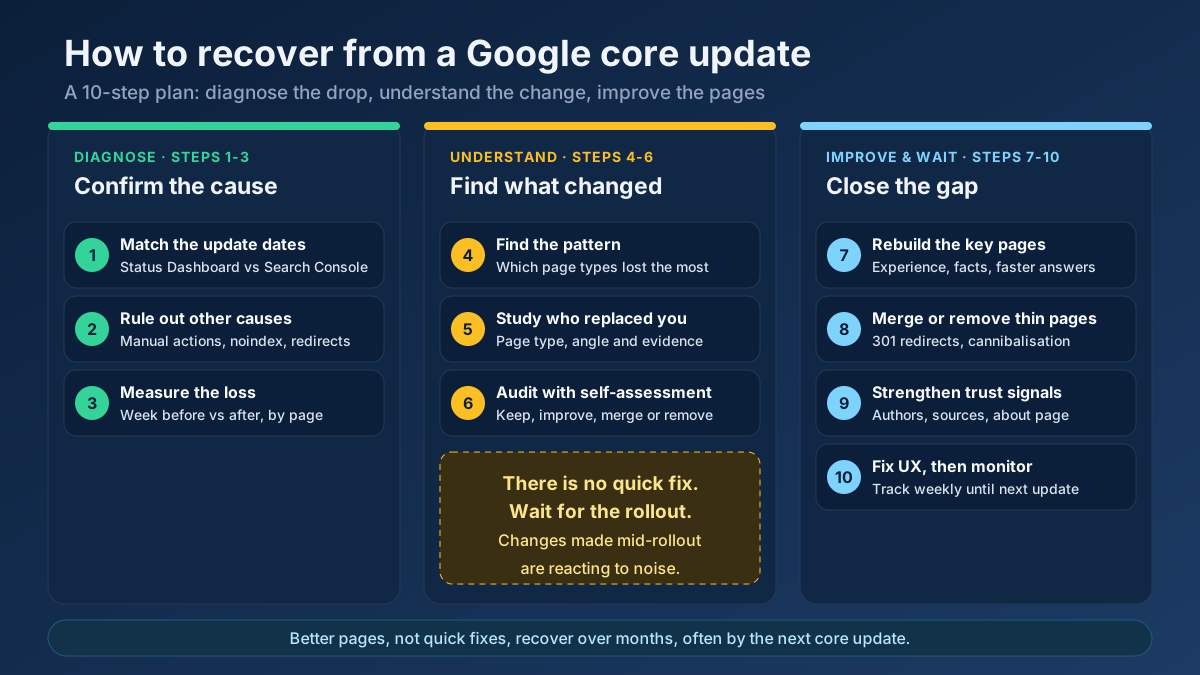
The steps are grouped into three phases. Steps 1 to 3 make sure you are dealing with a core update at all. Steps 4 to 6 work out what changed. Steps 7 to 10 are the actual work. Skipping straight to phase three is tempting, but it is how sites end up rewriting pages that were never the problem.
Step 1: Confirm the drop lines up with the update
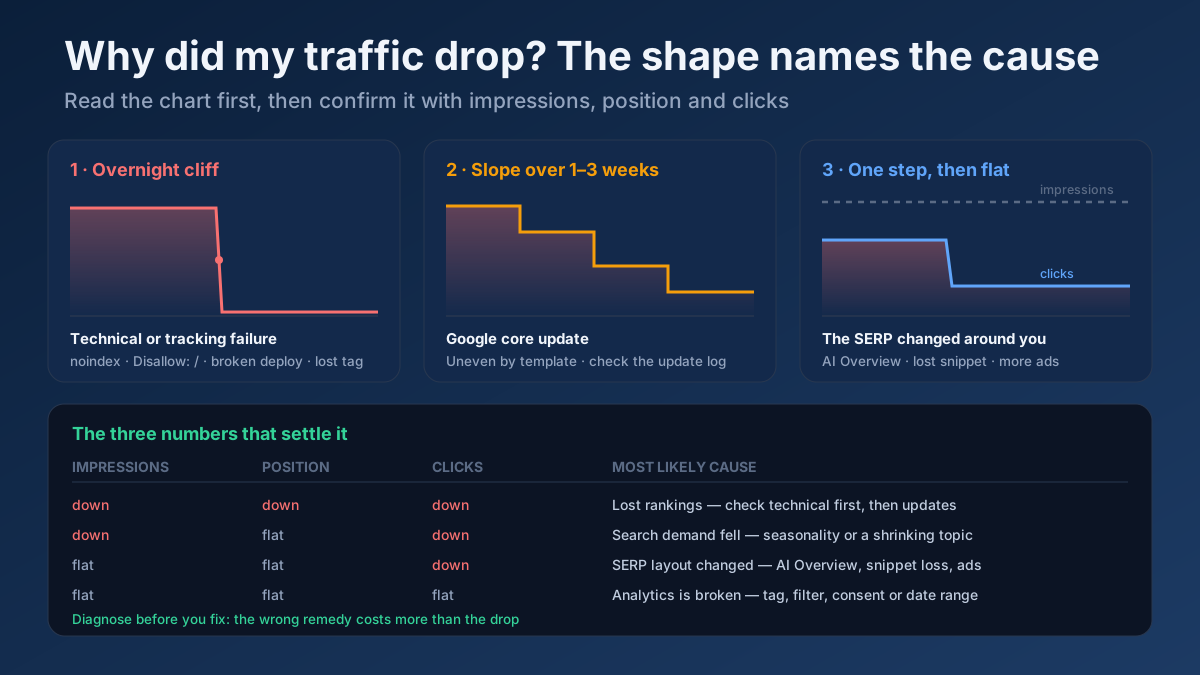
Open the Performance report in Search Console, set the date range to the last three months and look at clicks and impressions by day. Compare the point where the line bends with the update window on the Search Status Dashboard. A genuine core update effect usually starts within the rollout window, often in two or three steps rather than a single cliff, and settles after it ends.
If the drop started a week before the update was announced, the update is probably not your cause. If it happened overnight on the same day you shipped a redesign, look at the redesign first. Our guide to diagnosing a website traffic drop explains how the shape of the graph points to the cause, and it is worth reading before you go further.
Step 2: Rule out technical causes and manual actions
Core updates get blamed for a lot of drops they did not cause. Before you assume a quality problem, spend an hour ruling out the boring explanations:
- Manual actions and security issues. Check both reports in Search Console. If either has an entry, deal with that first.
- Indexing. In the Pages report, look for a jump in “Crawled – currently not indexed” or “Excluded by noindex tag”. A stray noindex on a template can look exactly like an algorithm hit.
- Robots and redirects. Confirm that robots.txt still allows the important sections and that no redirect chain or loop appeared after a recent deployment.
- Tracking. If the drop shows in your analytics but not in Search Console, the problem is measurement, not rankings.
A quick crawl with our free site audit tool will surface broken templates, accidental noindex tags and redirect problems across the site in one pass. If the crawl is clean and the timing matches the update, you can move on with confidence.
Step 3: Measure the loss by page and by query
A sitewide percentage hides almost everything that matters. Compare the week after the rollout finished with the week before it started, then switch to the Pages tab and sort by the difference in clicks. In most cases a small group of URLs accounts for the bulk of the loss. On a typical content site, it is common for 10 to 20 percent of pages to account for 70 to 80 percent of the lost clicks.
Then look at position, not just clicks. Google’s guidance draws a useful distinction here: slipping a few places, for example from second to fourth, is a different situation from falling off the first page altogether. Small slips may not need drastic changes. Large drops on important queries are where a closer look is worth the effort. Export the list, note each page’s old and new average position, and flag every page that lost more than five positions on a query that used to bring real traffic. Our guide on measuring SEO with Search Console covers the comparison filters if you have not used them before.
Step 4: Find the pattern across page types
Now group the losing pages. Sort them by folder, template or content type: blog posts, product pages, category pages, comparison articles, location pages, tools. Core updates rarely hit a site evenly. More often one type of page loses heavily while the rest hold steady or even gain.
The pattern is the most valuable clue you will get. If only your “best X” listicles fell, the issue is probably how those pages are built, not the whole domain. If short news-style posts fell while long guides held, depth and originality are likely factors. If pages written by guest contributors fell while staff-written pages held, look at authorship and expertise. Write the pattern down in one sentence before you continue. Every decision in steps 7 to 9 should come back to it.
Step 5: Study the pages that replaced yours
For your ten most important lost queries, search each one in a private window and read the pages that now rank where you used to. Do not skim; read them as a searcher would. Ask what they do better and, just as importantly, what kind of page they are. After recent updates, many site owners found that the winners were not competitors with “better SEO” but different types of result: forum threads, manufacturer pages, government sources, or pages from people who had clearly used the product.
Note three things for each query: the type of page that wins, the angle it takes, and the evidence it offers (photos, data, test results, credentials). If the search intent itself has shifted, for example from an informational guide to product pages, no amount of editing will win it back with the same format. The SERP features checker helps you see which result types now dominate a query, and our explainer on search intent covers how to read those signals.
Step 6: Audit the content with Google’s self-assessment questions
With the pattern and the competitor notes in hand, audit the losing pages honestly. Google’s helpful content guidance lists questions such as: Does the content provide original information, reporting, research or analysis? Does it provide a substantial, complete description of the topic? Would someone reading it leave feeling they have learned enough to achieve their goal? Is it written or reviewed by someone who clearly knows the subject?
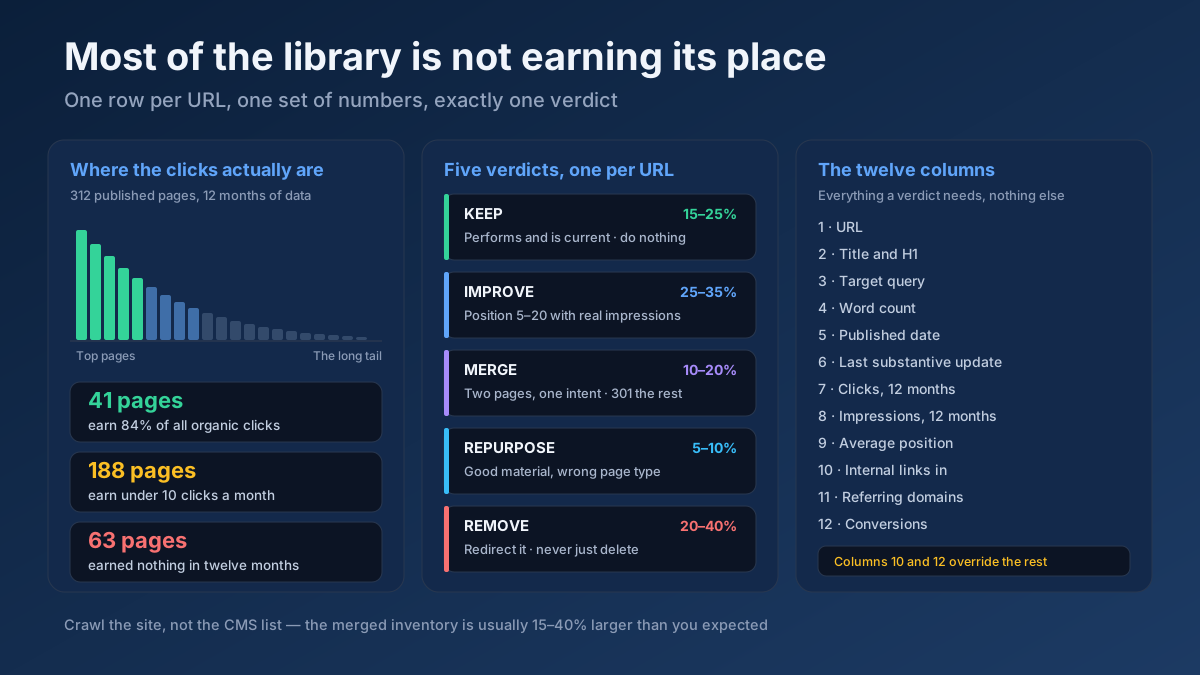
Score each losing page against those questions on a simple scale, then give it one of four labels:
- Keep: the page is strong and probably lost to a format or intent shift you cannot match.
- Improve: the topic is right but the page is thin, dated or generic.
- Merge: two or more pages cover the same question and split the signals between them.
- Remove: the page has no search value, no backlinks and no reason to exist.
The thin content checker and the E-E-A-T analyzer give you a consistent first pass, so you are not relying on gut feeling alone. For the full process, including the spreadsheet columns we use, see our step-by-step content audit guide.
Step 7: Rebuild the pages that matter most
Start with the pages labelled “Improve” that lost the most clicks. This is where recovery is won or lost, and it is also where most sites under-deliver. Changing a title, adding 300 words and updating the date is not an improvement Google is likely to reward. What tends to work is adding something the winning pages do not have:
- First-hand experience. Real photos, test results, screenshots, measurements, costs you actually paid, mistakes you actually made.
- A faster answer. Put the direct answer in the first paragraph and move background material lower down.
- Current facts. Replace old statistics, broken examples and outdated screenshots, and cite primary sources.
- Less padding. Cut generic introductions, repeated points and sections that exist only to hold keywords.
The content freshness score tool flags pages where dates, years and references have gone stale. If AI tools are part of your writing process, our guide on using AI for SEO content writing explains where a draft needs human input to stay on the right side of Google’s quality bar.
Step 8: Merge or remove thin and overlapping pages
Large amounts of weak content can drag down how a site is assessed as a whole. Google has said that its systems evaluate content at the page level but also use site-wide signals, and that removing unhelpful content can help the rest of the site perform better. That does not mean deleting half the site. It means dealing with the pages that genuinely add nothing.
For pages labelled “Merge”, combine the best material into the strongest URL and add a 301 redirect from the others. For pages labelled “Remove”, either return a 410 or 404, or keep them out of the index with noindex if users still need them. Run the keyword cannibalization checker to find pages competing for the same query, and the text similarity checker to catch near-duplicates. Our guides on keyword cannibalization and fixing duplicate content walk through the redirect and canonical decisions.
Step 9: Strengthen authorship and trust signals
Trust is the part of E-E-A-T that Google’s quality rater guidelines call the most important. On a practical level, it is about making it easy for a reader, and for Google’s systems, to see who is behind the content and why they should believe it. That means:
- A named author on every article, with a profile page that shows real experience in the subject.
- An about page that explains who runs the site, how content is produced and how to get in touch.
- Clear sourcing: links to primary research, data and official documentation, not to other blogs that summarise them.
- An editorial or review policy for topics where mistakes can hurt people, such as health, money and legal questions.
Also look at sections of the site you do not fully control. Google’s site reputation abuse policy covers third-party content published mainly to benefit from a host site’s ranking signals. If your site hosts sponsored coupon pages or outsourced “partner” sections, they can affect how the whole domain is judged. Our E-E-A-T guide covers the signals in more detail.
Step 10: Fix page experience, then monitor and wait
Page experience is not a large ranking factor on its own, but heavy ads, pop-ups that cover the content and slow, jumpy layouts make a page less helpful, and they often show up on the same sites that lose in core updates. Check the losing templates on a phone. If the main content starts below two ad blocks and a newsletter pop-up, fix that before anything else. Run the losing URLs through the SEO audit tool to catch slow loading and layout problems.
Then set up monitoring. Track the key queries weekly with the rank checker and add an annotation in your reporting each time you ship a batch of changes. Google has said that its systems update continuously, so improvements can show between core updates, but the clearest movement usually comes when the next core update rolls out. Keep improving while you wait. A site that keeps getting better is in a far stronger position at the next update than one that made a burst of changes and stopped.
How long does it take to recover from a core update?
This is the question every site owner asks, and the honest answer is that it varies more than most guides admit. Google has said that recovery can take several months and that some sites may not return to their earlier level, even after real improvements, because the results now contain pages that are a better match. The table below summarises the realistic scenarios.
| Situation | Typical timeline | What usually happens |
|---|---|---|
| Small slips of one to three positions | Days to weeks | Rankings often settle back partly on their own after the rollout as other systems adjust |
| Clear quality gap, fixed thoroughly | Weeks to the next core update | Gradual gains between updates, with the clearest jump during the next core update |
| Site-wide quality issues across many pages | Two core update cycles or more, often 6 to 12 months | Partial recovery after the first cycle and further gains if the work continues |
| Search intent shifted to a different type of page | May not recover with the same page | Traffic returns only if you build the type of page Google now prefers |
| Surface-level changes only (titles, dates, word count) | Rarely recovers | Minor movement that fades; the underlying gap remains |
The useful lesson from that table is that the timeline is mostly decided by the depth of the changes, not by how quickly you make them. Two months spent rebuilding thirty important pages properly beats two weeks spent tweaking three hundred.
Core update or something else? A quick comparison
Many drops that get blamed on a core update have a different cause. Use this table to check your diagnosis before committing to months of content work.
| Cause | How it looks | Where to confirm | Right response |
|---|---|---|---|
| Core update | Gradual or stepped drop within the rollout window, uneven across page types | Search Status Dashboard dates, Search Console by page | Content and trust improvements, then patience |
| Spam update | Sharp drop, often on pages tied to link schemes or mass-produced content | Spam update dates on the dashboard | Remove the violating practice; wait for systems to reassess |
| Manual action | Sudden drop, sometimes sitewide | Manual actions report | Fix the issue, file a reconsideration request |
| Technical problem | Overnight cliff, often after a release | Pages report, crawl, server logs | Fix the bug; recovery is usually fast |
| Seasonality or falling demand | Impressions down, positions stable | Year-over-year comparison, Google Trends | No fix needed; plan content around the season |
| SERP changes | Positions stable, clicks down | Click-through rate trend, AI Overviews and features on the results page | Improve titles and snippets, target features |
A realistic example: a home improvement blog
The case below is a composite of a pattern we see often, with the numbers rounded. It shows how the steps fit together in practice.
A UK home improvement blog with around 420 articles lost 38 percent of its organic clicks during a core update. The owner’s first idea was to rewrite every post. Instead, they waited a week after the rollout ended and ran the comparison by page. Sixty-one URLs accounted for 81 percent of the loss, and almost all of them were “best tools for X” roundups. The project guides, written from the owner’s own renovation work, had barely moved.
Reading the results that had replaced them made the pattern clear. The winners were reviews from people who had visibly used the products, a large DIY forum, and two retailer buying guides with specification tables. The blog’s roundups, by contrast, were built from product descriptions and other reviews. None of them showed the tools in use.
The owner made four decisions. Eighteen roundups covering tools they had actually used were rebuilt with their own photos, test notes and a clear “who should buy this” section. Twenty-three roundups on tools they had never touched were merged into nine broader buying guides or removed. Every article gained an author box linking to a profile page with photos of finished projects. The intrusive pop-up on mobile was replaced with an inline signup box.
Traffic barely moved for the first seven weeks. Between updates, the rebuilt roundups started to climb a few positions each. When the next core update rolled out about four months later, the site recovered to roughly 85 percent of its earlier clicks, with the rebuilt pages doing better than before. The merged and removed roundups did not come back, and the owner decided that was the right outcome.
Mistakes that make a core update drop worse
Some reactions to a core update do more damage than the update itself. Avoid these:
- Making changes during the rollout. You lose the before-and-after comparison and react to rankings that have not settled.
- Mass-deleting content. Removing hundreds of pages at once also removes the ones that were still earning links and long-tail traffic. Prune with data, page by page.
- Updating dates without updating content. Changing the published date on an unchanged page is a signal of low effort, not freshness.
- Rewriting everything with AI. Replacing generic text with different generic text does not close a quality gap and can create a scaled-content problem.
- Disavowing links in a panic. Core updates are not about your backlink profile. Our guide to toxic backlinks and the disavow tool explains when a disavow file is actually justified.
- Chasing correlation studies. Lists of “winners and losers” describe other sites. Your own page-level data is a far better guide.
- Changing everything at once. If you redesign, migrate and rewrite in the same month, you will never know what worked.
Core update recovery checklist
Use this as a working list for the next few months:
- Record the update start and end dates from the Search Status Dashboard.
- Wait for the rollout to finish, then one more week.
- Check the Manual actions, Security issues and Pages reports.
- Crawl the site for noindex, robots and redirect problems.
- Compare one week after the update with one week before, by page and by query.
- Group losing pages by type and write the pattern in one sentence.
- Read the pages that now rank for your ten biggest lost queries.
- Label every losing page: keep, improve, merge or remove.
- Rebuild the highest-value pages with first-hand material and current facts.
- Merge overlapping pages with 301 redirects; remove pages with no value.
- Add named authors, profile pages and clear sourcing.
- Fix intrusive ads, pop-ups and slow templates on mobile.
- Track key queries weekly and annotate every batch of changes.
Frequently asked questions
How do I know if a Google core update affected my site?
Compare the dates of your traffic change in Search Console with the rollout dates on the Google Search Status Dashboard. If the drop starts inside the rollout window, is uneven across page types and you can rule out technical issues and manual actions, a core update is the likely cause.
How long does it take to recover from a Google core update?
Usually several months. Some improvement can appear between updates because Google’s systems run continuously, but the clearest recovery often comes with the next core update. Sites with widespread quality issues may need two or more update cycles, and some never fully return to their old level.
Is a core update a penalty?
No. A core update is a broad change to how Google ranks content, not a penalty against particular sites. Penalties are manual actions, and they appear in the Manual actions report in Search Console. A core update produces no message at all.
Should I delete content after a core update?
Only content that has no search value, no links and no purpose for users. Pages that cover a valuable topic poorly should be improved or merged, not deleted. Mass deletion often removes pages that were still bringing in traffic and links.
Can backlinks help me recover from a core update?
Earning genuine links to strong pages always helps, but buying links or running link campaigns will not fix a content quality gap, and manipulative links can trigger a spam problem on top of the original drop. Focus on the pages first.
Will updating the publish date help my rankings recover?
Not on its own. Google can see whether the content changed. Update the date only when you have made meaningful changes, and say what changed if the topic is time-sensitive.
Why did my site gain traffic in one core update and lose it in the next?
Each core update re-weighs many signals at once, so a page that benefited from one weighting can lose under the next, especially if competitors improved in the meantime. Sites that keep improving content steadily tend to swing less between updates.
Applying this to your own site? See the tools picked by audience: SEO Tools for E-commerce Managers and SEO Tools for WordPress Site Owners.
Recovering from a core update is a content project, not a quick fix
To recover from a Google core update, slow down at the start and keep going at the end. Wait for the rollout to finish, prove the drop is really the update, and find the specific pages and page types that lost. Study what replaced them, then rebuild the pages that matter with first-hand experience, current facts and clear authorship, while merging or removing the ones that add nothing. Recovery is measured in months, and the sites that recover best are the ones that keep improving after the first round of changes.
Start today with the diagnosis. Run your site through the free site audit tool to rule out technical problems, check your losing pages with the thin content checker and then work through the content audit guide with the list of pages from step 3. If you are not yet sure the drop came from an update at all, begin with our guide to why website traffic drops.