Short answer: Fix duplicate content by finding every URL that serves the same page, choosing one version as the canonical, and pointing the rest at it with a 301 redirect or a canonical tag. Google rarely penalises duplication; it simply picks one URL and ignores the others, and the one it picks is often not the one you wanted.
That last sentence is the whole problem. Duplicate content does not usually announce itself with a warning in Search Console. It shows up as a page that used to rank and now does not, a product URL with a tracking parameter outranking the clean one, or two thousand pages indexed on a site that only has four hundred. This guide walks through the nine fixes in the order that removes the most damage per hour of work, with the checks to find each problem and the trade-offs between the four tools you have to fix it.
What duplicate content actually is
Duplicate content is substantially similar text reachable at more than one address, either on your own site or across different sites. That definition is broader than most people assume, and the version that quietly costs sites traffic is almost never the version they are worried about.
Internal duplication is the version that costs you
Ask ten site owners about duplicate content and nine will describe somebody stealing their articles. That happens, and it is mostly harmless. The expensive kind is the duplication your own site generates without anyone deciding to create it:
- URL variations. The same homepage available at
http://,https://,www, non-www, with and without a trailing slash, and at/index.php. That is up to eight addresses for one page before anybody has published anything. - Parameters. Session IDs, tracking tags, sort orders and filters that append
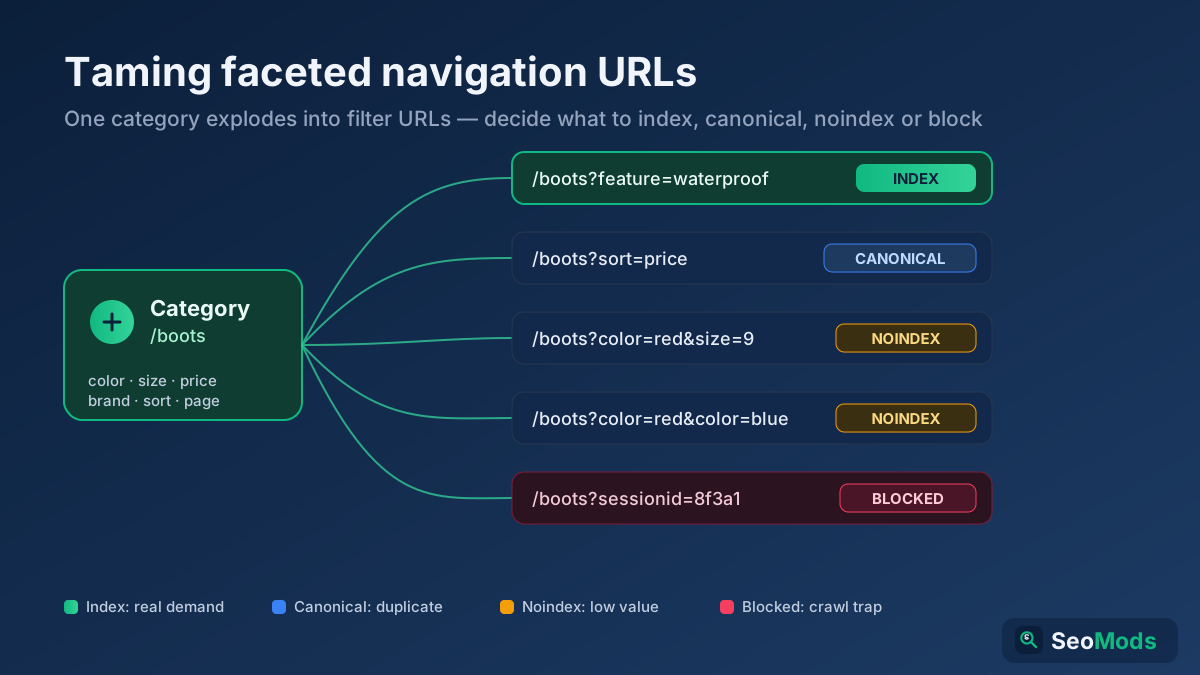
?utm_source=,?sort=priceor?sessionid=to an otherwise identical page. - Faceted navigation. A category with five filters and four options each can generate several hundred crawlable URLs, all serving overlapping subsets of the same products.
- Printer-friendly and AMP-style alternates. A second copy of every article at a second address, usually created years ago by a plugin nobody remembers installing.
- Tag, author and date archives. A blog post that also appears in full on six archive pages.
- Staging and development environments. The entire site, indexed, at
staging.example.combecause somebody forgot a password.
None of these were anybody’s decision. They are defaults, and defaults are where duplication lives.
There is no duplicate content penalty — there is something worse
Google has been consistent for well over a decade: duplication on its own does not trigger a manual action or an algorithmic demotion. Penalties are reserved for content that is scraped or spun at scale with no added value. Publishing the same product description that your supplier gives every other retailer is not a violation. It is simply not competitive.
What actually happens is quieter and harder to notice. Google groups the duplicates into a cluster, picks one URL to represent it, and indexes that one. Google’s own documentation on consolidating duplicate URLs describes this as canonicalisation, and it is worth understanding that your rel="canonical" tag is a hint in that decision, not a command.
Three costs follow. Link signals split across the copies instead of accumulating on one page. Crawl budget goes to variants rather than to new pages, which matters on any site above a few thousand URLs and is covered in the crawl budget guide. And Google may choose the wrong URL — the one with the tracking parameter, the print version, the HTTP variant — which is how a well-optimised page ends up invisible while a stripped copy of it ranks.
How similar is too similar?
There is no published threshold, and any tool that reports one is describing its own arithmetic rather than Google’s. The practical test is simpler and more useful: if a person landing on both pages would ask why they exist separately, they should not exist separately.
Some overlap is normal and expected. Navigation, footers, legal text, product specification tables and disclaimers repeat across every page of every site on the web, and search engines have handled boilerplate since the early 2000s. The question is whether the main content — the part the page exists to deliver — is meaningfully different. Two service pages that differ only in the city name are duplicates. Two product pages for genuinely different products that share a 200-word shipping policy are not.
To put numbers on a specific pair rather than guessing, run both through a Text Similarity / Duplicate Checker and read the score alongside your own judgement about intent.
Step 1 — Find every duplicate before you fix anything
Fixing duplication you have not mapped is how sites end up canonicalising the wrong direction and losing pages that were ranking. Spend an hour finding everything first.
Five checks that surface almost everything
- Compare indexed pages against published pages. Open the Pages report in Search Console and compare the indexed count with the number of URLs you believe you have. If you publish 400 and Google reports 3,100, parameters or facets are generating the difference. The “Duplicate without user-selected canonical” and “Alternate page with proper canonical tag” rows in that report are duplication reported directly by Google, and most people never scroll to them.
- Request every URL variation by hand. Take your homepage and request all eight variants: with and without
www, over HTTP and HTTPS, with and without the trailing slash. Each should end in a single 301 to one address. A Redirect & HTTP Status Checker shows the full chain and the final status code for each, and the 301 versus 302 guide explains why the code matters here. - Crawl the site and sort by title. Duplicate title tags are the fastest proxy for duplicate pages. A Technical Site Audit (Crawler) run lists them together, and a block of nine pages sharing one title is nine pages to look at.
- Search Google for your own distinctive sentences. Take an unusual sentence from a page, put it in quotation marks, and search. Add
site:yourdomain.comto find internal copies, or leave it off to find external ones. This finds scraped content and syndication partners who did not credit you. - Check the canonical tag on the pages that matter. A Meta Tag Analyzer pulls the canonical, robots directives and Open Graph data from a live URL. Self-referencing canonicals on your primary pages are the baseline; anything pointing somewhere unexpected is a finding.
Read the pattern, not the list
A crawler will hand you a spreadsheet with hundreds of rows and no priorities. Group them instead. Almost every duplication problem falls into one of four buckets, and each bucket has one fix that resolves the whole group: URL variants, parameters and facets, template duplication, and genuine content overlap between separately written pages.
Fix them in that order. The first two are configuration changes that take a day and often account for eighty per cent of the duplicate URLs on a site. The last one is editorial work that takes weeks. Doing the editorial work first is a common and expensive mistake, because rewriting two pages that are both reachable at four addresses each solves nothing.
Step 2 — Close the URL variations first
This is the highest-return hour in the entire guide, and on most sites it is already half done and half broken.
Pick one canonical form and enforce it everywhere: HTTPS or HTTP, www or bare domain, trailing slash or no trailing slash, lowercase always. Which one you pick does not matter. Picking one and never deviating does. Then redirect everything else to it with a single 301 — a single hop, not a chain. A request for http://example.com/page/ that lands on https://www.example.com/page through three intermediate redirects works for users and wastes crawl on every request.
Four rules make the enforcement stick:
- Internal links use the canonical form only. If your redirects are correct but half your menu links to the non-canonical version, every internal link burns a redirect. Pull the link list with a Link Analyzer and fix the templates.
- The XML sitemap contains canonical URLs and nothing else. No redirected URLs, no parameter versions, no noindexed pages. Validate with a Sitemap Finder & Validator and see the XML sitemaps guide for the rest.
- Every page carries a self-referencing canonical tag in the canonical form, with the full absolute URL.
- URLs are case-insensitive in practice. On Linux servers
/Productand/productare two different pages. Redirect uppercase to lowercase at the server, as covered in the URL structure guide.
Two related items belong in the same hour. Block staging environments with HTTP authentication rather than robots.txt — a disallowed staging site can still be indexed if anybody links to it, because robots.txt prevents crawling, not indexing, a distinction the noindex versus disallow guide unpacks. And if you have migrated to HTTPS at any point, verify the old scheme still redirects properly using the HTTPS migration guide as a checklist.
Step 3 — Bring parameters and filters under control
Parameters are where duplication scales from an annoyance into a crawl problem. A single category page with colour, size, brand, price and sort filters can generate thousands of unique URLs that serve rearranged versions of the same twelve products.
The useful distinction is whether a parameter changes what the page is about. Tracking parameters (utm_source, fbclid, gclid), session IDs and sort orders do not: ?sort=price shows the same products in a different sequence, and there is no query anyone types that this page answers better than the unsorted one. These should carry a canonical tag pointing at the clean URL, and no internal links should point at them.
Filters that genuinely narrow the set are a different case. /running-shoes?brand=asics may correspond to a real search with real demand, in which case it deserves an indexable page — ideally a static, linkable URL such as /running-shoes/asics with its own title, description and introduction, rather than a parameter. Combinations of two or more filters almost never deserve one. The faceted navigation guide covers where to draw the line and how to keep crawlers out of the combinatorial explosion.
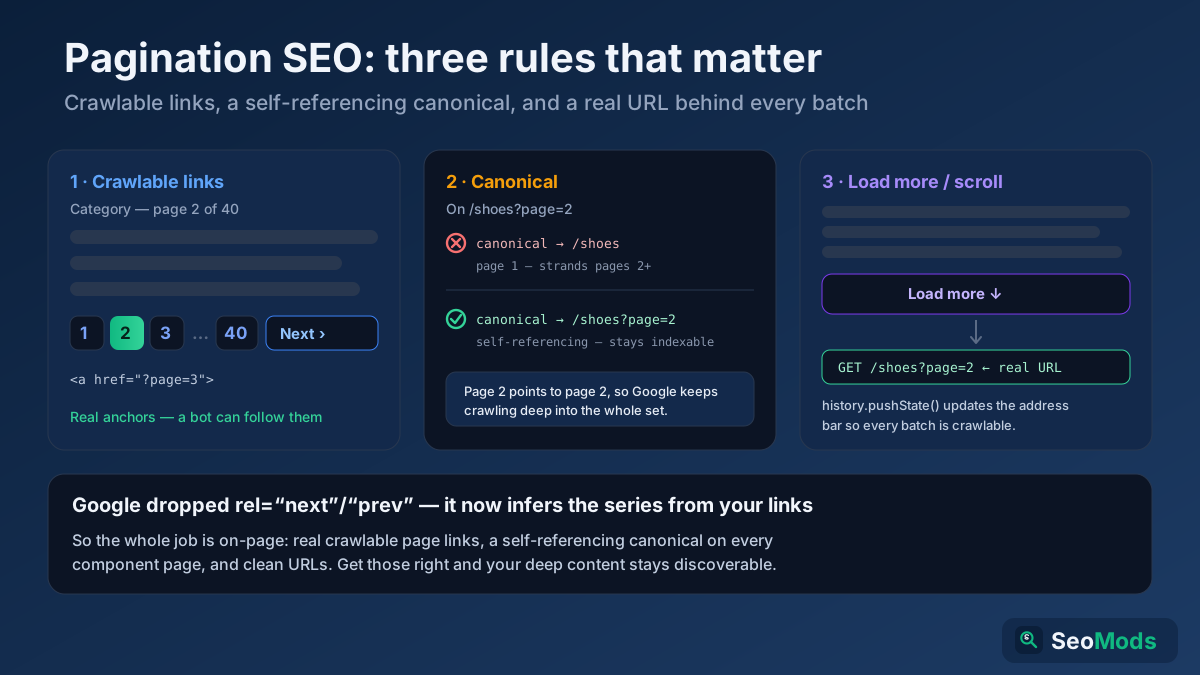
Pagination sits next to this and is regularly mishandled. Do not canonicalise page 2, 3 and 4 of a listing to page 1 — they contain different products, and doing so tells Google those products do not exist. Each paginated page should self-canonicalise. The pagination SEO guide has the current handling now that rel="next" and rel="prev" are no longer used for indexing.
Once the rules are in place, verify them rather than assuming. Request a filtered URL and check what the server returns with an HTTP Header Checker check, then confirm your Robots.txt Tester rules do not accidentally block the clean URLs alongside the parameter ones.
Step 4 — Pick the right fix for each type
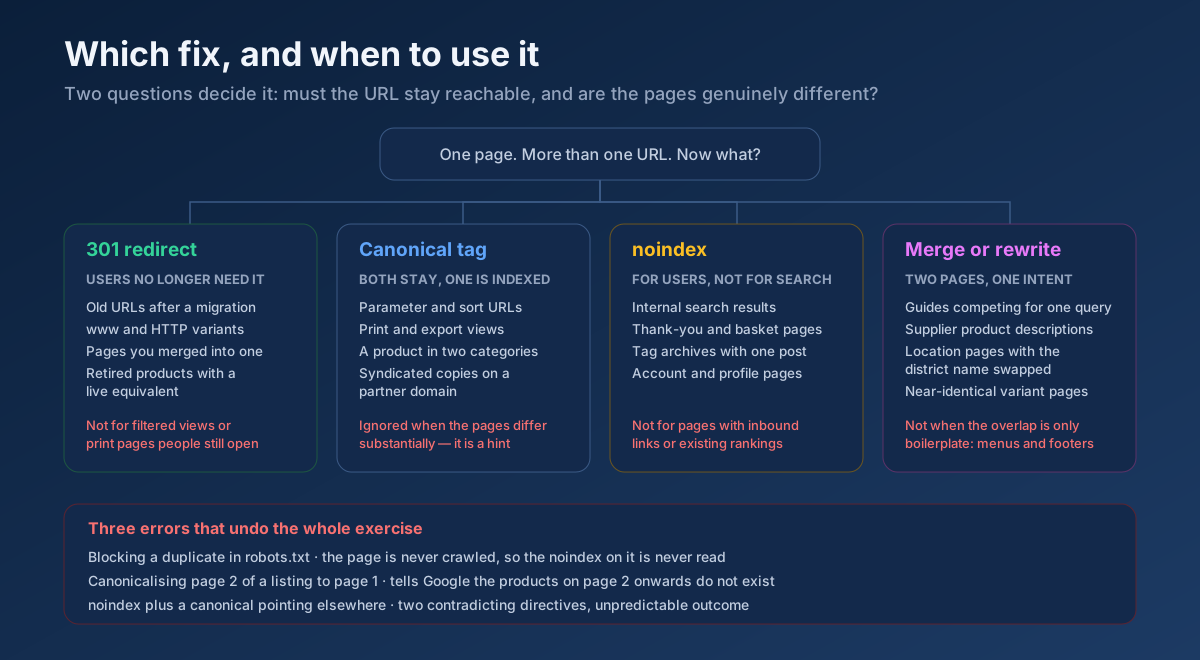
You have four instruments, and using the wrong one is worse than doing nothing, because a bad canonical or an accidental noindex removes a page that was working. This table is the decision you will make dozens of times.
| Fix | Use it when | Do not use it when |
|---|---|---|
| 301 redirect | The duplicate should not exist at all: old URLs after a migration, www and HTTP variants, merged pages, retired products with a live equivalent. | Users still need to reach the page, such as a filtered view or a print version. |
| Canonical tag | Both URLs need to stay reachable but only one should be indexed: parameter versions, print views, a product listed in two categories, syndicated copies on partner sites. | The pages are substantially different. A canonical between genuinely different pages is ignored, and while it is being ignored you are getting no benefit from it. |
| noindex | The page must exist for users but has no business in search: internal search results, thank-you pages, thin tag archives, user account pages. | The page has inbound links or existing rankings — redirect or canonicalise instead so the signals survive. |
| Rewrite or merge | Two pages were both written deliberately, both target the same intent, and neither is technically at fault. | The overlap is boilerplate rather than main content, or the duplication is a URL problem wearing a content costume. |
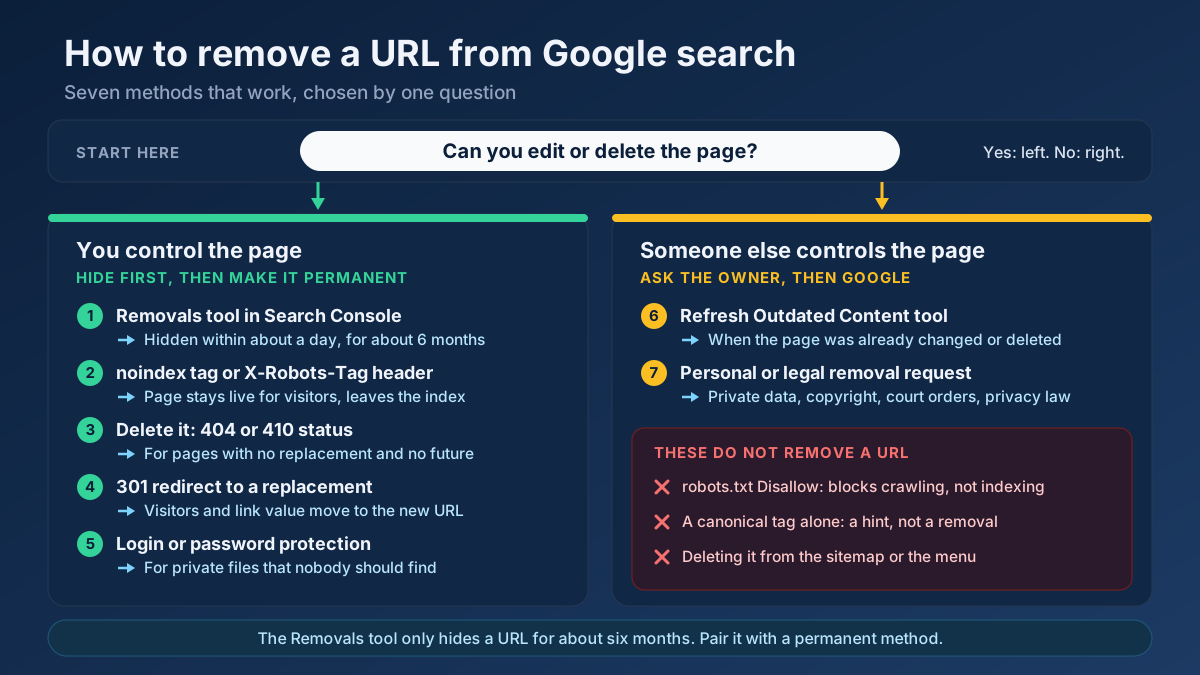
Three rules that prevent most of the damage people do at this step. A canonical is a hint, not an instruction — if the two pages differ substantially, Google will disregard it, so fix the underlying duplication rather than papering over it. Never combine noindex with a canonical pointing elsewhere on the same page, because the two directives contradict each other and the outcome is unpredictable. And never block a URL in robots.txt when you want it deindexed: a blocked page cannot be crawled, so the noindex on it can never be read. The canonical tags guide covers the implementation details, including cross-domain canonicals.
Step 5 — Rewrite the product and category pages nobody wrote
On e-commerce sites, the largest single source of external duplication is the manufacturer’s description, pasted verbatim by every retailer selling the item. Two hundred shops, one paragraph. None of them will rank on it, and the one that does will be whoever else has the authority to overcome the fact that they are saying nothing original.
Rewriting every product page is not realistic on a catalogue of thirty thousand items, and pretending otherwise is how these projects stall. Prioritise instead. Pull your revenue and impression data, take the top 20% of products, and give those pages original main content. Leave the long tail on the supplier text for now — those pages will rank on brand and model number regardless, because nobody is searching a paragraph.
What to write on the pages that matter is not more adjectives. It is the material nobody else has: who the product suits and who it does not, how it compares to the two alternatives you also stock, the question your support team answers about it every week, real customer reviews, and your own photographs rather than the manufacturer’s render. Two hundred words of that outperform six hundred words of rephrased specification sheet, and the e-commerce product page guide breaks down the full template.
Variant pages are the other half of the problem. A shirt in six colours and five sizes should not be thirty indexable URLs with near-identical text. Use one product page with variant selectors, or canonicalise each variant to the parent. Check the state of your worst offenders with a Thin Content Checker run — it separates pages that are genuinely thin from pages that only look short.
Step 6 — Handle syndication, scrapers and translated pages
External duplication is worth far less of your attention than internal duplication, but three situations do need a deliberate decision.
Syndication you agreed to
If a partner republishes your article, ask for a cross-domain canonical pointing at your original. If they will not add one — and many large publishers will not — a noindex on their copy or a clear link back to your version in the first paragraph both help. What you should not do is republish your own article in full on Medium, LinkedIn and three partner sites with no canonical and then wonder which one Google chose.
Scrapers you did not agree to
Sites that copy your content wholesale are mostly a non-event. Google is reliably good at identifying the original, particularly when the original is on an established domain, was crawled first, and is linked internally. Absolute duplication of your content on a spam domain is not a threat to your rankings in any normal case.
Act only when a scraper is genuinely outranking you for your own content, which is rare and usually indicates a crawling problem on your side rather than an attack. A Brand Mention Monitoring run finds where your content and brand are being reproduced. If it is serious, a DMCA notice through Google’s removal process is the mechanism; for everything else, ignoring it is the correct and cheapest response.
Translations and regional versions
Genuinely translated pages are not duplicate content. Google treats different languages as different content. The trap is regional variants in the same language — a UK, US and Australian page with identical English text and three prices. That is duplication, and hreflang is the correct handling: it tells Google the pages are alternates for different audiences rather than copies, so the right one is served in each market. The hreflang guide covers the annotations and the return-tag requirement that people get wrong.
One thing that is not a solution: machine-translating a site into eight languages to multiply page count. That produces low-value content in every language, and the traffic drop guide lists it among the reliable ways to lose a site’s standing over a quality update.
Step 7 — Deal with the templates that duplicate themselves
Some duplication is produced by the template rather than by any individual page, which makes it invisible when you look at pages one at a time.
Location pages are the worst offender. Nine hundred words of service description with the district name swapped in twelve places is a duplicate set, and it stops working the moment a competitor publishes anything specific. Every location page needs material that only applies to that location: the actual address if there is one, staff who work there, local projects with names and dates, the coverage area described in local terms, and reviews from customers in that area. If you cannot write three genuinely local paragraphs for a town, that town does not need a page. The local SEO and NAP guide covers the supporting signals.
Tag and category archives generate duplication when they show full posts instead of excerpts. Show excerpts, and noindex any archive that lists fewer than three or four items — a tag page with one post is a worse version of that post.
Boilerplate ratio matters more than most audits acknowledge. On a page with 150 words of main content and 800 words of shared footer, promotional block and legal text, the shared portion dominates. The fix is not deleting the footer; it is making the main content substantial enough to be the page’s defining characteristic.
Printer-friendly and mobile-subdomain variants are legacy patterns that still exist on plenty of sites. A print stylesheet does not need a separate URL. A separate m. subdomain has been the wrong architecture since responsive design and is a liability under mobile-first indexing. If either exists, canonicalise it to the main version today and plan the removal.
Step 8 — Merge the pages competing with each other
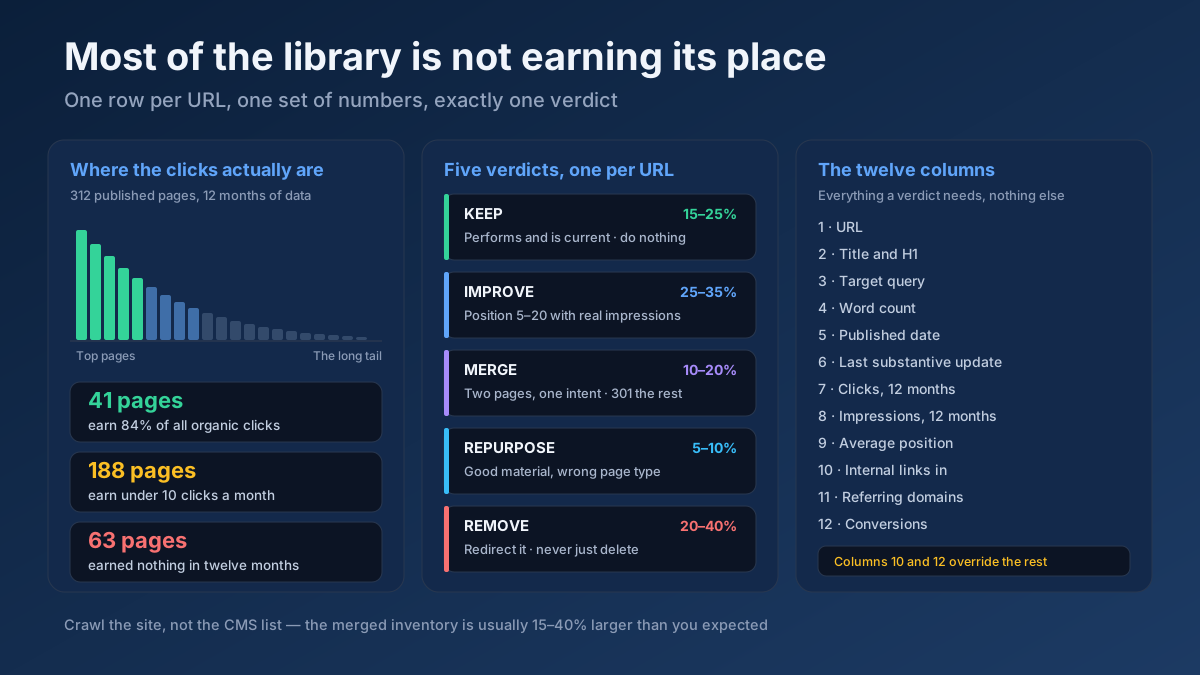
The last category is duplication nobody generated automatically: two, three or four pages written months apart by different people, all aiming at the same query. This is keyword cannibalisation, and it is duplication of intent rather than duplication of text.
The symptom is recognisable once you know it. In Search Console, filter to a query and look at the pages ranking for it. If the URL keeps changing month to month, or two of your pages trade positions in the twenties, Google cannot decide which page answers the query — so it hedges, and both rank worse than one strong page would.
Find the pairs with a Keyword Cannibalization Checker run across your suspect URLs, and confirm the overlap with a Text Similarity / Duplicate Checker check on the two bodies. Then choose one of three resolutions:
- Merge. The usual answer. Take the best material from all of them, build one comprehensive page on the strongest URL, and 301 the others to it. One page with the combined links and history outranks three fragments every time.
- Differentiate. Valid when the pages genuinely serve different intents that were badly expressed — an informational guide and a commercial service page, for example. Rewrite the titles, headings and opening paragraphs to make the difference obvious, and link them to each other.
- Canonicalise. The fallback when both must stay live for business reasons and merging is not possible.
After merging, fix the internal links. Pages that were linking to the pages you redirected should now link to the survivor directly, and an Internal Link Opportunity Finder run will show where the new page should be receiving links it is not. The cannibalisation guide has the full diagnosis process and the internal linking strategy guide covers rebuilding the structure afterwards.
Step 9 — Make sure it does not come back
Duplication is not a project you finish. It is a byproduct of publishing, plugins and platform updates, and it returns unless something is watching.
Before publishing anything new, search your own site for the target query. If a page already covers it, improve that page instead of adding a competitor to it. This single habit prevents most future cannibalisation, and it is covered as a step in the blog post writing guide.
Monthly, check the Pages report in Search Console for growth in the duplicate and excluded categories. A sudden jump usually means a plugin update or a new template started generating URLs. The crawled but not indexed guide explains how to read the neighbouring statuses.
Quarterly, crawl the whole site with a Technical Site Audit (Crawler) and sort by duplicate titles and duplicate descriptions. This catches template regressions before they compound.
After every release, re-request the eight homepage variants and a sample product URL through a Redirect & HTTP Status Checker. Redirect rules are among the first things a deployment breaks, and nobody notices for months. Add it to the technical SEO audit checklist you already run.
How long the fixes take to show
Nothing here is instant, because every fix has to be recrawled before it counts. The pattern below is what sites typically see, and knowing it prevents the classic mistake of reverting a correct fix in week three because nothing has happened yet.
| Fix | Effort | Time to take effect | What you should see |
|---|---|---|---|
| URL variants consolidated with 301s | 1–2 hours | 2–6 weeks | Indexed count drops, one homepage version remains, link signals consolidate |
| Parameters canonicalised | Half a day | 4–12 weeks | Duplicate rows in Search Console shrink, crawl shifts to real pages |
| Cannibalising pages merged | 1–2 days per set | 3–8 weeks | Position stabilises on one URL and usually improves |
| Product descriptions rewritten | Ongoing | 1–3 months | Long-tail impressions on the rewritten pages |
| Thin archives noindexed | 2 hours | 3–8 weeks | Indexed count falls, average page quality rises |
Large sites take longer than small ones because recrawling 200,000 URLs takes longer than recrawling 500. If you need a specific fix picked up faster, request indexing for a handful of representative URLs in Search Console and make sure the changed pages are linked from somewhere crawled frequently.
Seven mistakes that make duplication worse
- Canonicalising paginated pages to page one. It tells Google that everything on pages two onwards does not exist, which on a large catalogue removes most of the products from the index.
- Blocking duplicates in
robots.txt. A blocked URL cannot be crawled, so anynoindexon it is never read, and a blocked URL with inbound links can still appear in results with no description at all. - Redirecting pages that users still need. A 301 removes the page. Filtered views, print versions and account pages have to stay reachable, which makes canonical or
noindexthe correct instrument. - Deleting duplicates that carry inbound links. Returning 404 on a page with links throws away authority you already earned. Redirect it to the closest live equivalent instead.
- Treating scrapers as an emergency. Hours spent chasing copies on spam domains are hours not spent on the parameter problem generating four thousand internal duplicates.
- Spinning text to make it “unique”. Rewriting a supplier description with a thesaurus produces a page that is technically different and just as worthless. Uniqueness is not the goal; usefulness is.
- Relative canonical URLs. A canonical tag should be an absolute URL including the protocol and domain. Relative ones break in exactly the situations where you needed them most.
A 14-day cleanup plan
If the nine steps look like a quarter of work, most of the value is in the first two weeks. Here is the order that front-loads it.
Days 1–2 — measure. Record the indexed page count, the published page count and the duplicate rows in the Search Console Pages report. Run a Technical Site Audit (Crawler) and export the duplicate titles. This is your baseline and your proof later.
Days 3–4 — the eight variants. Test every homepage variation with a Redirect & HTTP Status Checker , fix the redirects to single hops, force lowercase, and update the internal links and sitemap to the canonical form. Password-protect staging.
Days 5–7 — parameters. List every parameter your site generates. Canonicalise the ones that do not change the content, decide which filters deserve static indexable URLs, and confirm pagination self-canonicalises.
Days 8–10 — cannibalisation. Run a Keyword Cannibalization Checker over your top pages, pick the three worst sets, merge each into one page and 301 the rest. Repoint the internal links.
Days 11–14 — templates and content. Fix archives to excerpts, noindex the thin ones, and rewrite the main content on the twenty product or location pages that carry the most revenue.
At day 14 the indexed count will usually still be falling — that is the fix working, not breaking. Re-measure at day 60 against the baseline you recorded on day one.
Frequently asked questions
Does duplicate content hurt SEO rankings?
Not through a penalty. It hurts by splitting link signals across several URLs, wasting crawl budget on variants, and letting Google choose which version to index — and its choice is often the parameter version or the print view rather than your optimised page.
How do I check my website for duplicate content for free?
Compare the indexed page count in Search Console with the number of pages you actually publish, read the “Duplicate” rows in the Pages report, crawl the site with a Technical Site Audit (Crawler) and sort by title, and search distinctive sentences from your pages in quotation marks. For a specific pair of pages, a Text Similarity / Duplicate Checker check gives you a number.
What percentage of duplicate content is acceptable?
Google publishes no threshold, and tool percentages measure their own algorithm rather than Google’s. Judge by main content instead of by whole-page similarity: shared navigation, footers and specification tables are normal, while two pages whose central text is interchangeable are duplicates whatever a percentage says.
Should I use a canonical tag or a 301 redirect?
Use a 301 when the duplicate URL should stop existing for everyone, such as an old address after a migration or a merged page. Use a canonical when users still need to reach both URLs but only one belongs in the index, such as a filtered listing or a print view.
Is the same product description on many sites duplicate content?
Yes, and it is not a violation — it is simply uncompetitive. Nobody ranks on a paragraph two hundred other retailers also publish. Rewrite the main content on your highest-revenue products first and leave the long tail, which ranks on brand and model number anyway.
Can I be penalised for someone copying my content?
In normal cases, no. Google is reliably good at identifying the original, especially when yours was crawled first, sits on an established domain and is well linked internally. Act only if a copy is genuinely outranking you, which usually points to a crawling problem on your own site.
Are translated pages considered duplicate content?
Different languages are treated as different content, so genuine translations are fine. The risk is regional variants in the same language, such as UK and US pages with identical English — those need hreflang annotations so Google understands they are alternates for different audiences rather than copies.
How long does it take to recover after fixing duplicate content?
Two to six weeks for redirect consolidation, four to twelve for parameter changes, and three to eight for merged pages, because every fix has to be recrawled before it counts. Large sites sit at the slow end. Expect the indexed count to fall first — that is the fix working.
Start with the URLs, finish with the words
Almost every duplicate content problem is a configuration problem in disguise. Consolidate the URL variants, get parameters under control, choose deliberately between a redirect, a canonical and a noindex, and only then start rewriting anything. Sites that do it in the other order spend months on content while the technical duplication quietly cancels the work.
The useful next step takes fifteen minutes: run your homepage variants through a Redirect & HTTP Status Checker , crawl your site with a Technical Site Audit (Crawler) and sort the results by title, and write down today’s indexed page count. Those three numbers tell you how big your duplication problem is — and in sixty days they will tell you whether you fixed it.