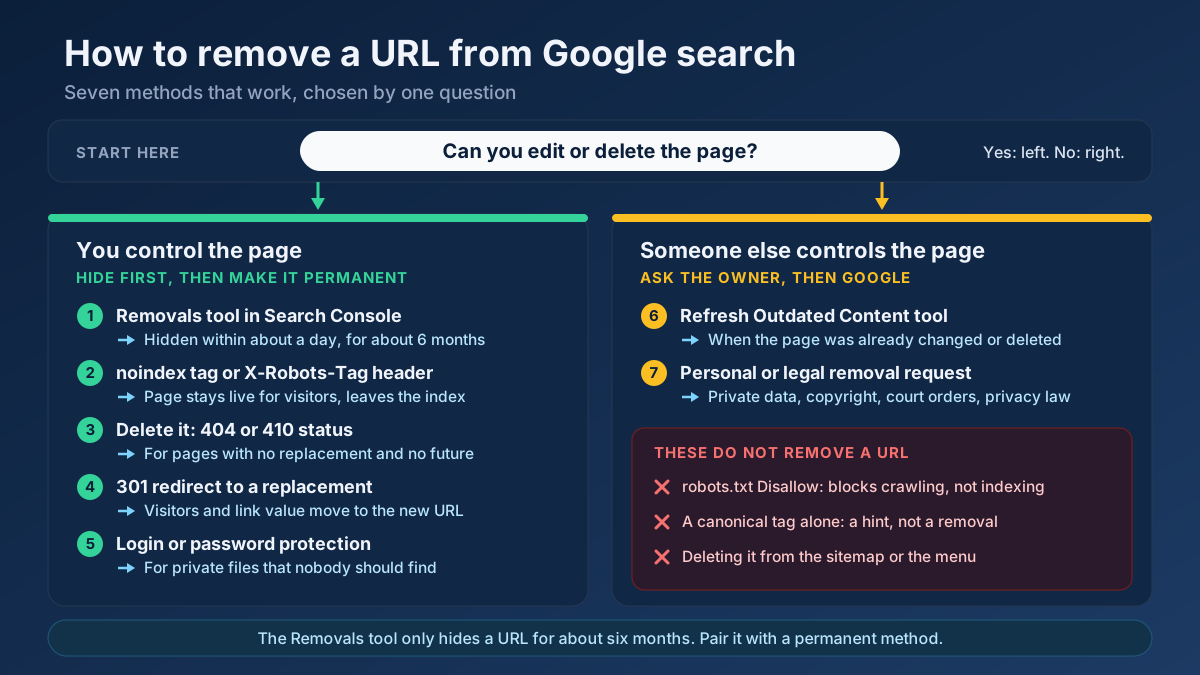
Short answer: To remove a URL from Google search, first work out whether you control the page. If you do, hide it within about a day using the Removals tool in Search Console, then make the removal permanent with a noindex tag, a 404 or 410 status, a redirect or a login. If you do not, use Google’s Refresh Outdated Content tool or a personal or legal removal request.
Most people arrive at this question in a hurry. A staging site has turned up in the results, a price list that was meant for the sales team is one search away from every customer, or an old page about a service you stopped offering still outranks the new one. The instinct is to block the address in robots.txt and move on, and that is exactly the step that keeps the URL visible for months. Removing a page from Google is not difficult, but it has an order: stop the bleeding first, then remove the cause, then check that Google agrees. This guide covers the seven methods that work, the handful that only look as if they work, and how to choose between them in under a minute.
What “removing a URL from Google” really means
A page exists in three places at once, and each of them is switched off separately. Confusing them is the root of almost every failed removal we are asked to untangle.
| Layer | What it is | Who controls it |
|---|---|---|
| The live page | The file or record on the web server that answers when the address is requested | The site owner |
| Google’s index | Google’s stored copy of the page and what it understood from it | Google, following the signals the site sends |
| The visible result | The title, address and snippet shown to a searcher | Google, with a temporary override available to verified owners |
Three consequences follow. Deleting the live page does not clear the result at once, because Google keeps showing its stored copy until it crawls the address again. Hiding the result does not delete anything, so the page can come back. And nothing you do in Google affects the page itself: anyone with the link can still open it, and other search engines keep their own copies.
It also helps to keep three words apart. A URL can be hidden (suppressed in results for a limited time), deindexed (dropped from Google’s index because the page told Google to drop it or no longer exists) or deleted (gone from the server). A sound removal normally uses two of the three: hide now, then deindex or delete for good. Google’s own overview of removing information hosted on your site is built around the same split between a quick block and a permanent one.
Start here: which situation are you in?
The right method depends on two questions. Can you edit or delete the page? And should the page keep existing for human visitors? Find your row, then read the matching method below.
| Your situation | Use | Why |
|---|---|---|
| The page is yours and it must disappear today | Method 1, followed by 2, 3 or 5 | The Removals tool hides it fast; the second step keeps it out |
| The page is yours, visitors still need it, searchers do not | Method 2: noindex | The page stays live and leaves the index |
| The page is yours and it is obsolete, with nothing to replace it | Method 3: 404 or 410 | The clearest signal that the content no longer exists |
| The page is yours and a newer page covers the same need | Method 4: 301 redirect | Visitors and link value move to the replacement |
| The page is yours and it is confidential | Method 5: login, plus Method 1 | Only authentication stops people as well as crawlers |
| The page belongs to someone else and has already been changed or deleted | Method 6: Refresh Outdated Content | Google updates a result that no longer matches the page |
| The page belongs to someone else and still shows your private or protected information | Method 7: personal or legal request | Google removes results only under specific policies and laws |
| The same content is reachable at several addresses | Canonical tag, not removal | This is duplication, and removal tools are the wrong fix |
7 ways to remove a URL from Google search results
The first five methods are for pages on a site you manage. The last two are for results you cannot edit. They are not alternatives so much as building blocks: an urgent removal usually combines the first method with one of the next four.
1. Hide the URL quickly with the Search Console Removals tool
The Removals tool is the only way to take a result out of Google within hours instead of weeks. It is also the most misunderstood. According to Google’s Removals tool documentation, a successful request blocks the URL from results for about six months and clears the stored snippet. It does not delete the page, it does not remove it from the index for good, and it does not stop Google from crawling it. Think of it as a curtain, not a demolition.
You need to be a verified owner of the property in Search Console. Then:
- Open Search Console and choose the property that contains the URL.
- Go to Indexing › Removals and stay on the Temporary Removals tab.
- Press New Request and keep Temporarily remove URL selected.
- Paste the full address. Choose Remove this URL only for a single page, or Remove all URLs with this prefix for a folder such as
https://example.com/old-shop/. - Submit, then watch the status change from “Processing request” to “Temporarily removed”.
In our experience requests are usually handled within a day, often in a few hours. A request covers the http, https, www and non-www versions of the same path, so you do not need four of them. The second option in the dialog clears only the snippet and keeps the result in place; it is useful when a page has been edited and the old description still shows a detail you have removed.
When to use it: any time waiting is not acceptable, such as leaked data, a live staging site, or a page published by mistake. What to do next: apply one of the permanent methods below before the six months are up. If you do nothing, the URL is free to return, and it usually does on a day when nobody is watching.
2. Add a noindex tag and keep the page live
When a page is still useful to people who already have the link but has no business in search results, noindex is the right tool. Typical candidates are thank-you pages, internal search results, login screens, campaign landing pages built only for ads, and thin tag archives. The directive goes in the HTML head:
<meta name="robots" content="noindex">Google removes the page from its index the next time it crawls the address and sees the tag. That sentence contains the catch. Google has to be able to crawl the page to read the instruction, so the URL must not be blocked in robots.txt. Google’s guide to blocking indexing with noindex states this directly: if the page is disallowed, the crawler never sees the rule and the page can remain in results.
Most content management systems expose noindex as a switch, so you rarely need to edit a template. In WordPress it is a per-page option in the SEO plugin; store builders have a similar setting under each page’s search engine options. After you set it, confirm that the tag is really in the delivered HTML with the meta tag analyzer; caching layers sometimes go on serving the old version for hours.
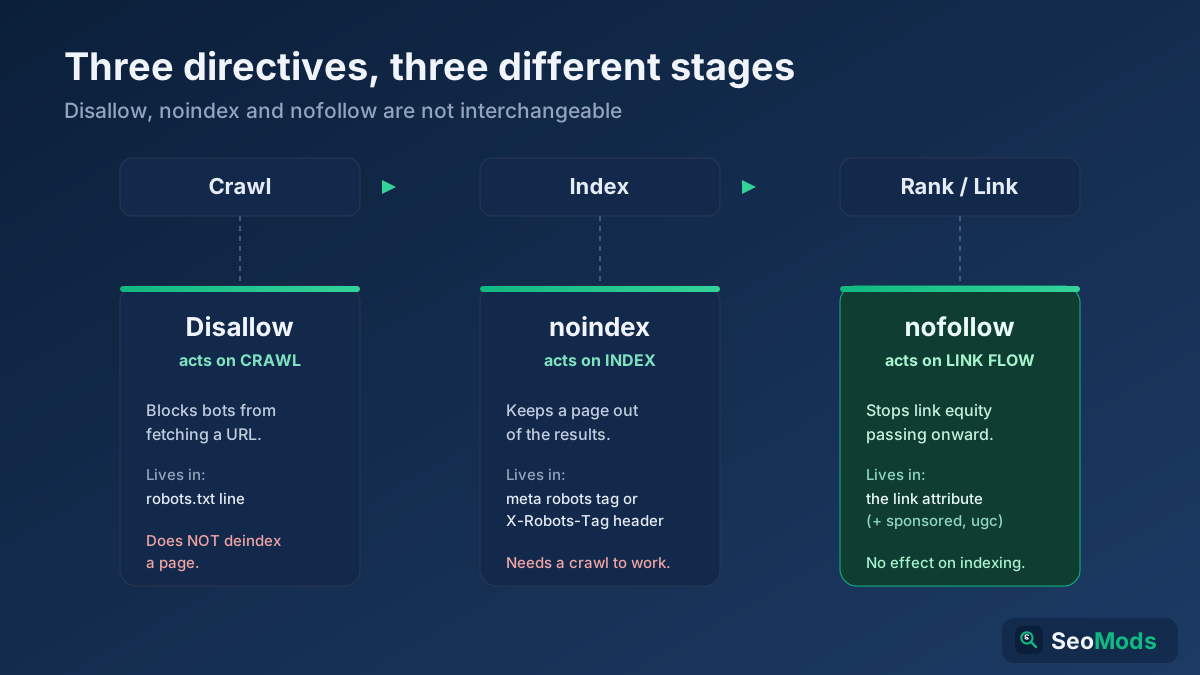
When to use it: the page must stay reachable, and only its presence in search is the problem. For the differences between this directive and its lookalikes, see noindex vs nofollow vs Disallow.
3. Delete the page and return a 404 or 410 status
If the content is obsolete and nothing replaces it, delete it and let the server say so. A 404 Not Found or 410 Gone response is the most durable removal signal there is. Google’s documentation on how HTTP status codes affect its crawlers says that URLs already in the index that start returning a 4xx status are removed from it, and that crawling of those addresses gradually slows down.
The 404 versus 410 question takes up more forum space than it deserves. A 410 says the page is gone on purpose and a 404 says it was not found; Google’s documentation handles both the same way, and any difference in speed is small. Use 410 if your platform makes it easy and you want to be explicit. Use 404 otherwise. Neither will hurt the rest of the site, because a missing page that returns the correct status is normal behaviour on the web.
What does cause trouble is a deleted page that does not admit it. Two versions are common:
- The soft 404. The server shows a “page not found” message but answers with
200 OK. Google has to guess that the page is gone, and may keep it. - The blanket redirect. Every deleted address is sent to the homepage. Google tends to treat an irrelevant redirect as a soft 404, and visitors land somewhere that does not answer their search.
Check what the server really sends with the HTTP status checker before you consider the job done. Then clean up after the deletion: remove the address from the XML sitemap and repair internal links that still point to it, which the broken link checker finds in one pass. The guide to finding and fixing broken links explains the clean-up in detail.
4. Redirect the URL with a 301 when a better page exists
Deleting is the wrong move when the old page has a successor. A discontinued product with a newer model, two articles merged into one, a service page that moved to a new address: in each case a permanent redirect takes the old URL out of the results and puts the new one in its place, while passing along the links the old page had earned. Google’s page on redirects and Google Search describes a permanent server-side redirect as a strong signal that the target should be the address shown in results.
Two conditions make this work. The target has to be a real equivalent, since a redirect to something unrelated is treated much like a missing page. And the redirect has to stay in place: Google needs to recrawl the old address to notice it, and people will keep following old links for years. Keep redirects for at least a year, and indefinitely if the old URL has backlinks. To choose the right status code, read 301 vs 302 redirects.
When to use it: you are removing an address, not the subject. If the aim is that nobody should find this information at all, a redirect is not a removal method.
5. Put private content behind a login
Search engines are not the only way to reach a URL. If a document is confidential, such as a customer export, an internal handbook or a set of invoices, taking it out of Google leaves it readable by anyone who has, guesses or is sent the address. The fix for that is access control, and it happens to be a complete removal method as well: Googlebot cannot sign in, the server answers 401 or 403, and the URL drops out of the index like any other 4xx response.
Google’s guidance on controlling what you share with Search puts it plainly: for private content, password protection is the reliable option, because it also keeps out crawlers that ignore noindex. In practice this means HTTP authentication on a staging host, a members-only area for client documents, or moving files out of the public web root and serving them through a script that checks the session.
When to use it: the content should exist, but only for specific people. Combine it with the Removals tool, since the stored snippet may display part of the document until Google recrawls.
6. Use Refresh Outdated Content for pages you do not control
Sometimes the page is not yours, the site owner has already fixed the problem, and Google still shows the old version. A forum deleted your post, a directory corrected your phone number, a news site updated a sentence. Search results lag behind because Google has not revisited the page. The Refresh Outdated Content tool exists for this gap. Anyone with a Google account can submit a URL; no ownership is required.
It handles two cases. If the page no longer exists, Google confirms it and removes the result. If the page exists but the text has changed, you tell Google which words from the old snippet are no longer on the page, and it refreshes the result. The tool will not help when the page is still online with the same content. In that situation the request is denied, and the only route is the person who runs the site.
When to use it: after the source has been changed. If it has not, write to the site owner first. A short, polite message that names the exact URL and the exact line you want changed gets results more often than people expect, and it is the only fix that removes the information from the web as well as from Google.
7. Request removal for personal or legal reasons
When a third-party site refuses to change a page, Google will still remove the result in a limited set of circumstances. These are policy and legal routes, not SEO techniques, and each has its own form.
- Personal information. Google’s policy on removing private information from Search covers items such as government ID numbers, bank and card numbers, images of signatures, medical records, login credentials, and contact details published in a way that exposes you to harm. Intimate images shared without consent and images of minors have their own request paths.
- Results about you. In countries where it is available, the Results about you feature lets you find results that contain your phone number, email or home address and request their removal from one screen.
- Legal grounds. Copyright infringement, court orders, defamation rulings and, in the EU and UK, the right to erasure under data protection law are handled through Google’s legal removal request forms. These are assessed case by case, and Google may decline.
Two realistic expectations. First, an approved request removes the result from Google, and for some request types only for searches that include your name; the page itself stays online and can be found in other ways. Second, these processes take longer than the tools above and require evidence. For anything that involves defamation or a dispute, speak to a lawyer who works in your jurisdiction. This article describes the options and is not legal advice.
What does not remove a URL from Google
Several widely recommended steps feel like removal and are not. Each of them shows up regularly in the audits we run, usually on a site where someone is puzzled that a URL is “still there after months”.
Blocking the page in robots.txt
A Disallow rule stops Google from crawling a page. It does not remove a page that is already indexed, and it does not prevent a new one from being indexed if other pages link to it. Google’s introduction to robots.txt says that the file is not a mechanism for keeping a web page out of Google. The typical result is a bare URL in the listings with a note that no information is available for the page. Worse, the block prevents Google from seeing the noindex tag or the 404 that would have removed it. If you have already added a Disallow rule, lift it until the page has dropped out, and confirm with the robots.txt tester that the path is crawlable. The robots.txt guide covers what the file is good for.
Pointing a canonical tag at another page
A canonical tag tells Google which of several similar pages you prefer. Google’s documentation on consolidating duplicate URLs treats it as a signal that feeds a decision, not as a command. If the two pages are not near-duplicates, Google may ignore it and keep both. Canonical tags are the correct answer to duplication, which is a different problem; see the canonical tags guide for that.
Deleting the URL from the sitemap or the menu
A sitemap is a list of suggestions for crawling. Removing an address from it, or removing every internal link to the page, makes Google visit less often. It does not make Google forget. A page with no links and no sitemap entry can stay indexed for a very long time, precisely because Google rarely returns to learn that anything changed.
Other things that do not work
- Adding nofollow to links that point to the page. It affects how link signals are passed, not whether the target is indexed.
- Relying on the Removals tool alone. The block expires, and the URL can return.
- Requesting indexing again and again. A recrawl only helps after the page sends a removal signal.
- Changing the visible text but not the status. A page that says “this content has been removed” and returns 200 is, to Google, a short page worth keeping.
- Paying a “guaranteed removal” service that has no access to the site. There is no back door. They can only file the same forms you can.
Special cases: files, images, folders and whole sites
PDFs, spreadsheets and other files
A PDF has no HTML head, so there is nowhere to put a meta tag. The equivalent is the X-Robots-Tag HTTP header, which Google’s robots meta tag specifications describe as valid for any file type. On an Apache server, three lines apply it to every PDF:
<FilesMatch "\.pdf$">
  Header set X-Robots-Tag "noindex"
</FilesMatch>
Confirm that the header is being sent with the HTTP header checker. If the file is sensitive, do not stop at noindex: delete it, or move it behind a login, and file a removal request for the address.
Images in Google Images
Images are the one area where robots.txt is an accepted removal method. Google’s instructions for removing your own site’s images from Search give two options: a Disallow rule for the image path aimed at Googlebot-Image, or a noindex X-Robots-Tag header on the image files. For an urgent case, submit the image URL itself in the Removals tool, not just the page it sits on. The image address is the one you get by opening the picture in its own tab.
A whole folder or section
Use the prefix option in the Removals tool to hide everything under a path in a single request. Then make the removal permanent at the same level: a noindex header for the directory, a 410 rule for the retired section, or authentication on the folder. A common example is an old blog directory left behind after a redesign, or a set of filter pages that should never have been crawlable; our guide to faceted navigation covers the second case.
A staging or test site
An indexed staging copy is the removal request we see most often, and it is the easiest to prevent. Verify the staging host in Search Console (a Domain property already covers every subdomain), submit a prefix removal for the whole host, and put HTTP authentication in front of it. Authentication is better than noindex here because it also protects unfinished work from people. Add it to your launch routine with the website migration checklist.
Duplicate and parameter URLs
If the address you want gone is a variant of a page you want to keep, such as a tracking parameter, a session ID or a print version, do not use the Removals tool. Google’s documentation warns that a removal request can hide every version of the page, including the good one. Consolidate with a canonical tag or a redirect; fixing duplicate content issues walks through the patterns.
Spam pages created by a hack
A hacked site can gain thousands of indexed spam URLs overnight. Clean the site first, make the spam addresses return 404 or 410, and use prefix removals if the spam lives in recognisable folders. Leave the URLs crawlable so Google can see they are gone. If traffic fell at the same time, the guide to diagnosing a traffic drop helps separate the hack from other causes.
How long does it take to remove a URL from Google?
Only the Removals tool works on a clock you can predict. Everything else depends on when Google next crawls the address, which varies with how important and how frequently updated it considers the page. The ranges below are what we typically observe on small and medium sites, not figures published by Google.
| Method | Typical time until the result disappears | How long it lasts |
|---|---|---|
| Removals tool | A few hours to about a day | About six months, unless made permanent |
| noindex tag or header | A few days to a few weeks, after the next crawl | As long as the directive stays |
| 404 or 410 | A few days to a few weeks; rarely crawled pages take longer | Permanent while the status is returned |
| 301 redirect | Days to weeks for the old address to be replaced | As long as the redirect stays |
| Login or password | A few days to a few weeks | Permanent while access is restricted |
| Refresh Outdated Content | Often within a few days of approval | Until the page changes again |
| Personal or legal request | Days to several weeks, depending on review | Depends on the decision and the request type |
You can shorten the wait for the crawl-dependent methods. Inspect the URL in Search Console and press Request indexing; despite the name, this asks for a recrawl, and Google will then notice the noindex or the 404. For a large batch, Google’s advice on asking for a recrawl is to submit a sitemap. A temporary sitemap that lists the removed URLs with a fresh lastmod date prompts Google to revisit them; delete that sitemap once the pages have dropped out. On large sites, recrawl speed is tied to crawl budget, which is worth understanding before you remove thousands of pages at once.
How to confirm the URL is really gone
A removal is finished when Google says so, not when the page looks deleted in your browser. Run these checks in order.
- Check the response. Request the address with the HTTP status checker. You should see the status you intended: 404, 410, a single 301 to the right target, 401 or 403, or 200 with a noindex directive.
- Check that crawling is allowed. Make sure robots.txt does not block the path, otherwise Google cannot see step one.
- Inspect the URL in Search Console. The URL Inspection tool should move from “URL is on Google” to “URL is not on Google”, with a reason such as “Excluded by ‘noindex’ tag” or “Not found (404)”.
- Search for the exact address. A
site:search for the full URL should return nothing. Use a private window so that personalised results do not mislead you. - Read the Page indexing report after two weeks. The removed URLs should appear under the reason that matches your method. In this context those rows are confirmations, not errors to fix.
- Set a reminder for five months. If you used the Removals tool, check before the block expires that the permanent signal is still in place.
For a broader check after a large clean-up, the technical site audit crawls the site and lists pages that are still linked but now return an error, and the sitemap validator confirms that the sitemap no longer advertises addresses you removed. If you are new to these reports, measuring SEO in Search Console shows where each one lives.
A realistic example: three unwanted results, three different fixes
The following scenario is assembled from patterns we meet repeatedly; the business is illustrative. An online furniture retailer in Manchester relaunches its shop. Six weeks later the marketing manager searches the brand name and finds three things that should not be there: product pages on staging. with test prices, a trade price list in PDF form, and roughly sixty pages for ranges that were discontinued at the relaunch.
The developer’s first response is to add all three to robots.txt. Two weeks later nothing has changed, except that the staging results now show without a description. The clean-up that works treats each problem on its own terms:
- Day 1, staging site. The Disallow rule is lifted. A prefix removal is filed for the whole staging host, and HTTP authentication is switched on. The results are hidden by the next morning, and the 401 responses remove them from the index over the following weeks.
- Day 1, price list. The PDF is moved into the trade customers’ login area, the old address returns 404, and a single-URL removal is filed because the snippet quotes prices. The file is gone from results within a day.
- Day 2, discontinued products. These are not confidential, so no removal request is needed. Forty-one have a direct successor and are redirected with a 301. The other nineteen have none and return 410. They leave the sitemap, and internal links are updated.
- Week 3. URL Inspection shows the staging URLs and the PDF as not on Google. Most of the redirected products have been replaced by their successors in the results.
- Month 5. A calendar reminder prompts a check that authentication is still active on staging before the temporary block lapses.
The lesson is the order of operations. The two urgent items were hidden first and fixed permanently on the same day. The sixty product pages needed no urgency at all, only the correct status codes. And the one step everyone reached for at the start, robots.txt, was the step that had to be undone.
Removing a URL from Bing and other search engines
Everything you change on your own server, whether noindex, a 404 or 410, a redirect or a login, works for every search engine, because they all read the same signals. Only the quick-hide tools are specific to each one. Bing Webmaster Tools has a Block URLs tool that suppresses a page or directory for up to 90 days, which is a shorter window than Google’s. Bing’s index also feeds several other search and AI products, so it is worth the two minutes. If your site supports IndexNow, submitting a deleted URL through it tells participating engines to revisit the address sooner.
Remember, too, that copies of a page may exist outside search engines altogether, in web archives and in datasets collected by AI crawlers. A search engine removal does not reach those. If the content is sensitive, treat removal from Google as one step in a longer list; the guide to AI crawlers and robots.txt explains what you can and cannot control there.
Common mistakes when removing pages from Google
- Blocking the page in robots.txt first. It freezes the result in place and hides your removal signal from Google.
- Stopping after the Removals tool. Six months later the page returns, and nobody remembers why it was hidden.
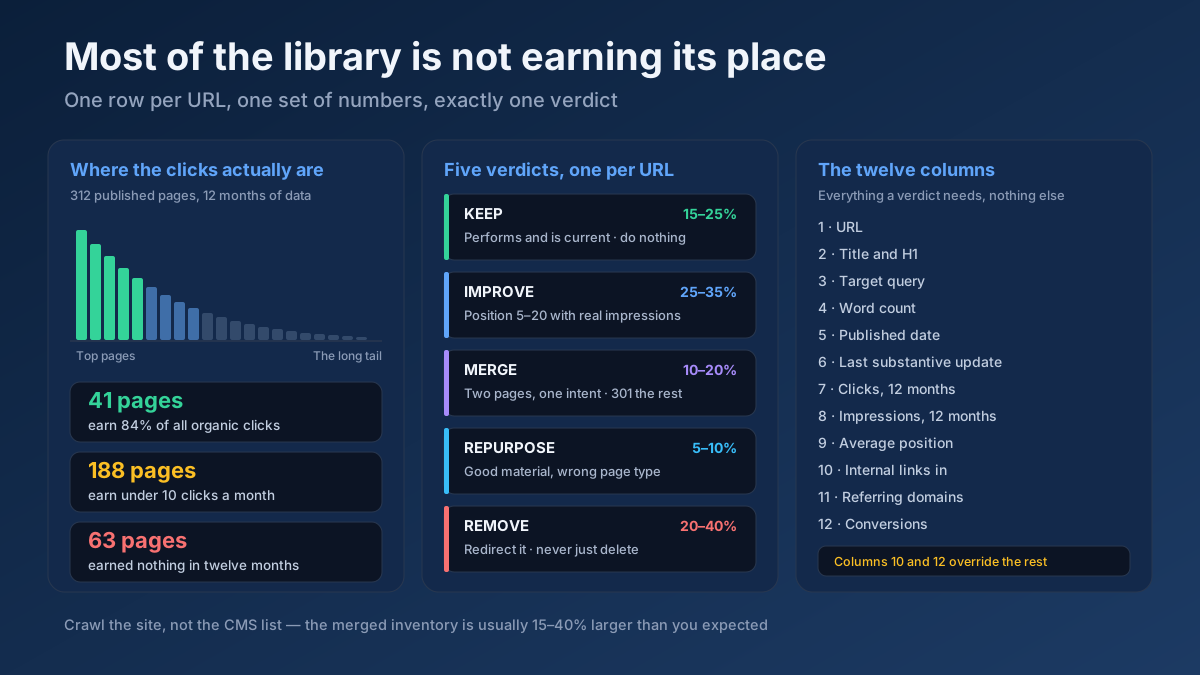
- Deleting pages that still earn traffic or links. Check the Performance report before you remove anything in bulk. A page with visitors or backlinks usually deserves a redirect or an update, not a deletion. A content audit is the safe way to decide.
- Redirecting everything to the homepage. It reads as a soft 404 and frustrates visitors.
- Using a removal request for a duplicate. You risk hiding the version you wanted to keep.
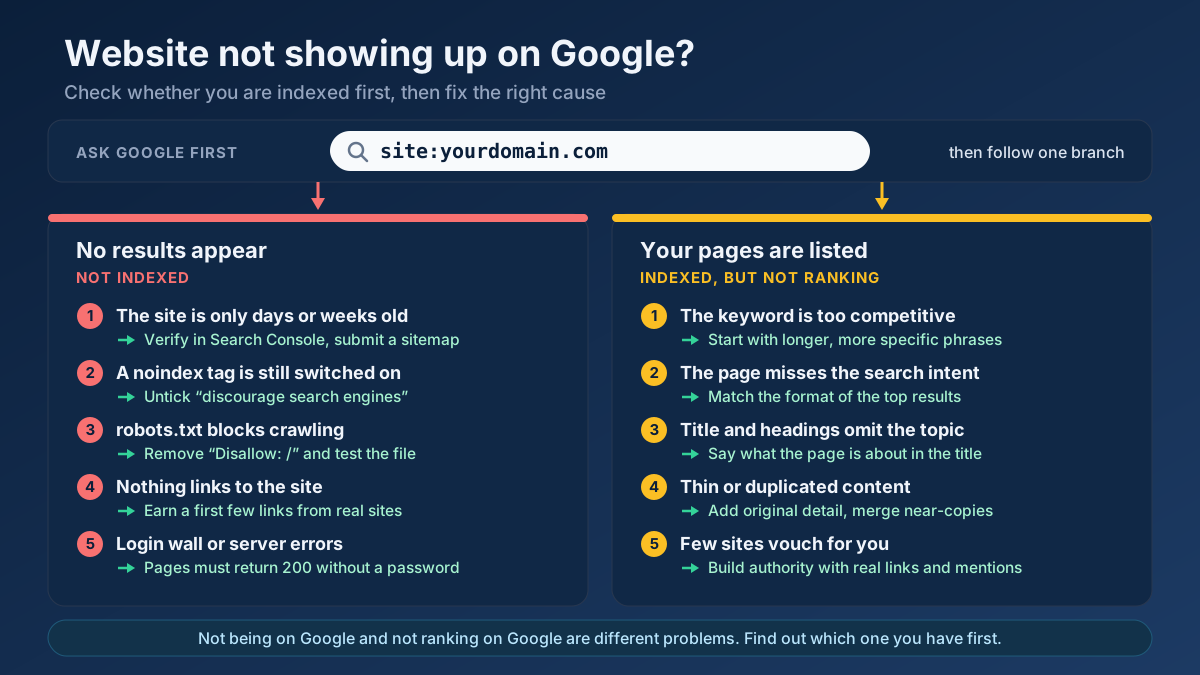
- Leaving noindex on a page you later want back. Pages removed this way do not return until the tag is gone and Google recrawls. If a page vanished unexpectedly, start with the guide to a website not showing up on Google.
- Forgetting the file behind the page. Removing a page while the PDF or image it embedded stays public leaves the sensitive part indexed.
- Treating removal from Google as deletion from the internet. Until the source is changed or protected, the information is one shared link away.
- Removing thin pages without asking why they exist. If the template keeps generating them, they will be back next month. Find them with the thin content checker and fix the source.
Frequently asked questions
How do I remove a URL from Google search results quickly?
If you own the site, open Search Console, go to Indexing › Removals, press New Request and submit the address. The URL is usually hidden within about a day. The block lasts about six months, so follow it with a permanent step: a noindex tag, a 404 or 410 status, a redirect or a login.
Does blocking a page in robots.txt remove it from Google?
No. A Disallow rule stops crawling, not indexing. A page that is already indexed can stay in results, often as a bare URL without a description, and Google can no longer see a noindex tag or a 404 on it. Allow crawling until the page has dropped out. The exception is image files, where a robots.txt rule is an accepted method.
How long does it take for Google to remove a deleted page?
It depends on when Google next crawls the address. A page that returns 404 or 410 usually drops out within a few days to a few weeks; rarely visited pages take longer. To speed it up, inspect the URL in Search Console and request a recrawl, or file a temporary removal if you cannot wait.
Is a 410 better than a 404 for removing pages?
Only marginally. A 410 states that the page was removed on purpose, and a 404 says it was not found. Google’s documentation treats both as a reason to drop the URL from the index. Use whichever your platform supports cleanly, and make sure the page does not answer 200 with an error message.
Can I remove a page from Google that is on someone else’s website?
Not directly. Ask the site owner to change or delete it, then submit the address to the Refresh Outdated Content tool so Google updates the result. If the owner refuses, Google removes results only in specific cases, such as exposed personal data, copyright infringement or a valid legal request.
Will a removed URL come back to Google?
It can. A temporary removal expires after about six months, and a page reappears if its noindex tag is deleted, its redirect is dropped, or it starts returning 200 again after a redesign or a restored backup. A permanent removal lasts only as long as the signal behind it stays in place.
Does removing pages hurt my SEO?
Removing pages that are thin, duplicated or obsolete does not harm a site and often makes it easier for Google to focus on the pages that matter. Removing pages that earn traffic or backlinks does cost you. Check each URL’s clicks and links first, and redirect the valuable ones to a relevant page.
How do I remove a PDF or an image from Google search?
Delete the file so that its address returns 404, or send an X-Robots-Tag: noindex header for it, since files cannot carry a meta tag. For images you can also disallow the image path in robots.txt. For urgent cases, submit the file’s own URL in the Removals tool.
Hide it today, remove it properly this week
Removing a URL from Google search comes down to matching the method to the situation. If the page is yours and it is urgent, hide it with the Removals tool, then make the change permanent: noindex for pages visitors still need, 404 or 410 for pages with no future, a 301 where there is a successor, and a login for anything private. If the page belongs to someone else, get the source changed and refresh the result, or use the personal and legal request routes when they apply. Keep the page out of robots.txt until it has gone, and check the outcome in URL Inspection instead of assuming.
Before you file anything, spend two minutes confirming what your server is telling Google. Run the address through the HTTP status checker to see its real status, check the robots directive with the meta tag analyzer, and make sure the path is not blocked in the robots.txt tester. If you are cleaning up a whole section, the all-in-one SEO audit shows indexability, canonical and status issues for a URL in a single run. Once the unwanted pages are out, the next job is to keep the pages you do want indexed in good shape, and how to fix “Crawled – currently not indexed” is the place to continue.