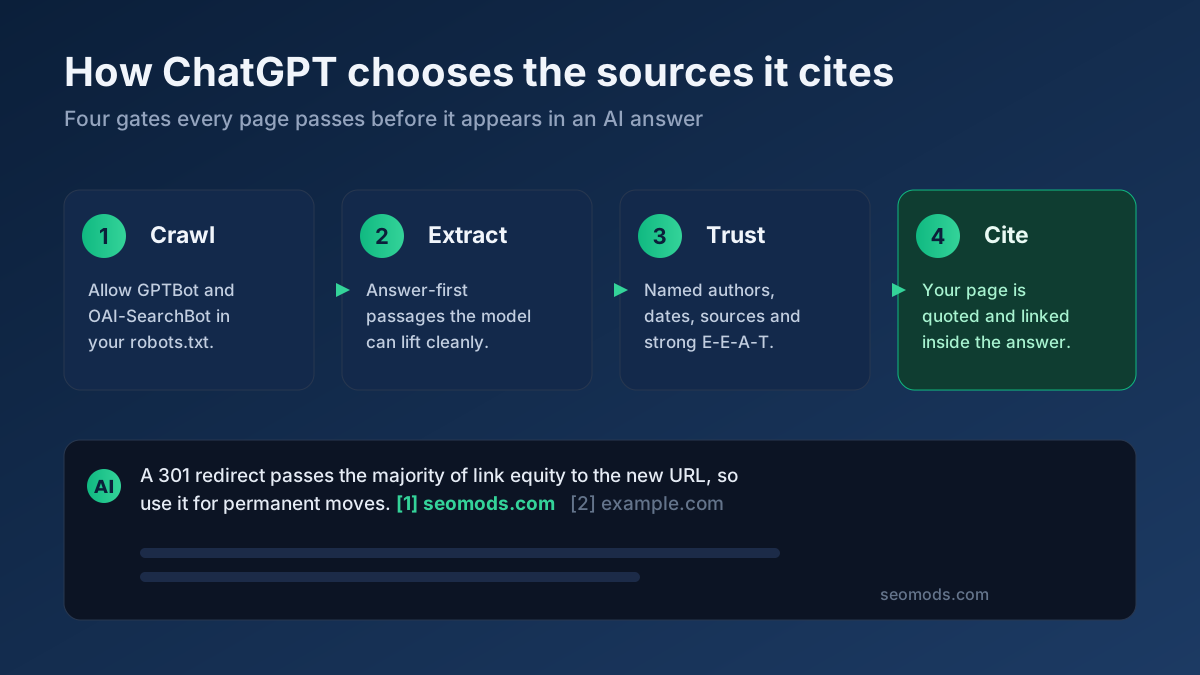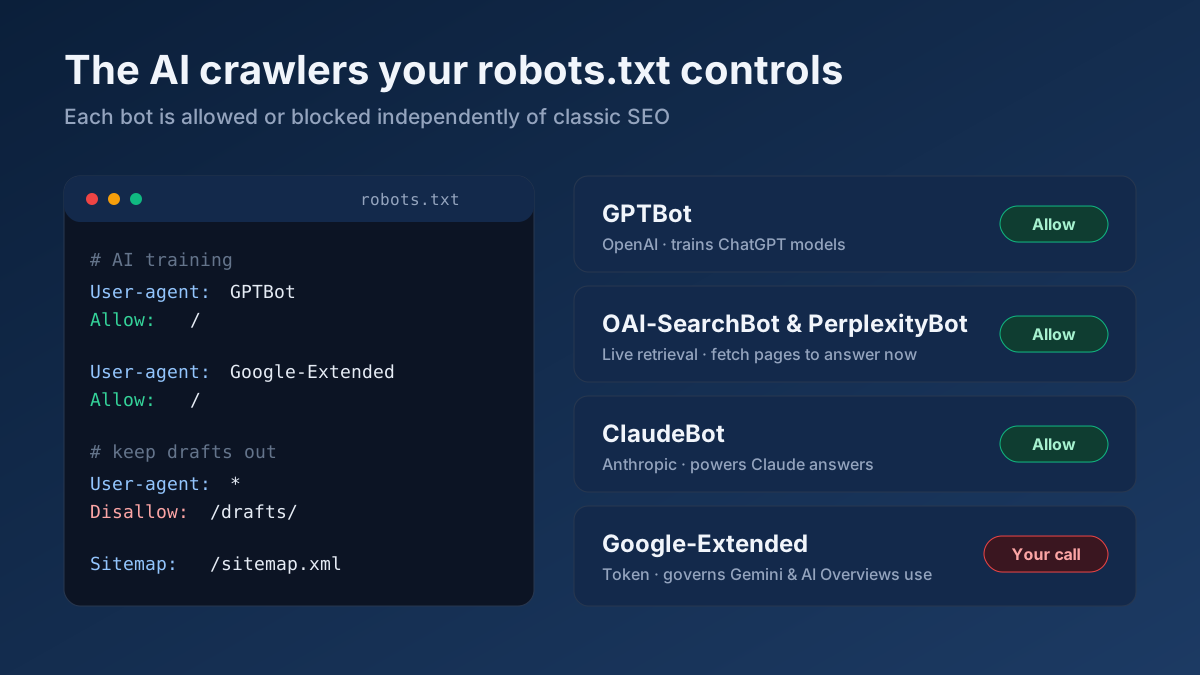
Short answer: AI crawlers come in two very different flavours, and you must treat them differently. Training bots like GPTBot, ClaudeBot and Google-Extended collect text to teach future models; blocking them only affects tomorrow’s training data. Retrieval bots like OAI-SearchBot, PerplexityBot and ChatGPT-User fetch your page live to build an answer right now; blocking those removes you from AI answers today. Decide which visibility you want, then write the matching User-agent rules in your robots.txt and verify them with a live tester.
What an AI crawler actually is
An AI crawler is an automated agent that fetches web pages on behalf of a large language model company — OpenAI, Anthropic, Perplexity, Google, Apple, Amazon, Meta and others. On the wire it looks almost identical to a traditional search crawler: it issues an HTTP request, reads your HTML, and moves on. The difference is purpose. Googlebot fetches your page to build a search index that ranks blue links. An AI crawler fetches your page either to add it to a giant training corpus or to feed a live model that is composing a conversational answer for a user this very second.
That distinction is the single most important idea in this guide, because it changes what "blocking a bot" means. If you block a training crawler, your existing search rankings do not move at all and users can still find you in Google — you have simply opted out of contributing to a future model. If you block a retrieval crawler, you can vanish from ChatGPT’s and Perplexity’s answers even though your Google rankings are untouched. Same file, same syntax, completely different consequence. Get the two mixed up and you will either leak training data you wanted to protect, or delete yourself from the fast-growing world of AI answers without meaning to.
Training bots vs retrieval bots: the core split
Every AI crawler you will meet falls into one of two buckets. Learning the buckets is more useful than memorising individual names, because new bots appear constantly and they almost always behave like one type or the other.
Training crawlers harvest text at scale to build or refine the datasets that models learn from. They are not answering anyone in real time; they are stocking a warehouse. Blocking them affects only future model versions — nothing you can see today changes. This bucket includes GPTBot, ClaudeBot, CCBot, Google-Extended, Applebot-Extended, Bytespider, Amazonbot and Meta-ExternalAgent.
Retrieval crawlers (also called live-fetch, on-demand, or answer bots) request your page at the moment a user asks a question, so the model can quote or summarise a fresh, current version of your content. This is the traffic that turns into a citation, a link, and sometimes a real click. This bucket includes OAI-SearchBot, ChatGPT-User, PerplexityBot, Perplexity-User and Claude-User.
Here is the sentence to tape to your monitor: blocking training bots protects your content from future models; blocking retrieval bots deletes you from AI answers today. Publishers who block everything with a broad rule often do not realise they have done the second thing while only intending the first. If your goal is generative engine optimisation — being the source an AI cites — retrieval bots are the ones you must keep open. Blocking them is the GEO equivalent of adding noindex to every page and wondering why Google traffic dried up.
A bot-by-bot reference
Below is a practical reference for the crawlers you are most likely to see in your logs, grouped by owner. For each, note the exact User-agent token you put in robots.txt — these are case-sensitive in practice, so copy them precisely.
OpenAI
- GPTBot — training. Collects public web text for future GPT models. User-agent token:
GPTBot. - OAI-SearchBot — retrieval / discovery. Powers ChatGPT’s search feature and surfaces sources in answers. User-agent token:
OAI-SearchBot. - ChatGPT-User — live user action. Fetches a page when a ChatGPT user (or a GPT/agent) explicitly requests it. User-agent token:
ChatGPT-User.
Anthropic (Claude)
- ClaudeBot — training. Gathers public content for Claude model training. User-agent token:
ClaudeBot. - Claude-User — live user action. Fetches a page when a Claude user asks about a specific URL or topic. User-agent token:
Claude-User.
Perplexity
- PerplexityBot — retrieval / indexing. Indexes pages so Perplexity can cite them in answers. User-agent token:
PerplexityBot. - Perplexity-User — live user action. Fetches a page to answer a specific user query in real time. User-agent token:
Perplexity-User.
- Google-Extended — training / AI use control. This is not a separate crawler; it is a permission token. Allowing it lets Google use your already-crawled content for Gemini and AI training; disallowing it opts you out of that AI use without affecting normal Google Search indexing done by
Googlebot. User-agent token:Google-Extended.
Apple, Amazon, Meta and Common Crawl
- Applebot-Extended — training. Controls whether Apple may use content (already crawled by
Applebot) for its AI models. Token:Applebot-Extended. - Amazonbot — crawl / AI. Amazon’s crawler, used partly to improve Alexa and AI answers. Token:
Amazonbot. - Meta-ExternalAgent — training. Meta’s crawler for AI training data. Token:
Meta-ExternalAgent. - Bytespider — training. ByteDance’s (TikTok) crawler, widely associated with AI training. Token:
Bytespider. - CCBot — training / dataset. Common Crawl’s crawler; its public archive feeds many AI training pipelines. Token:
CCBot.
New agents appear regularly, so treat this as a living list rather than gospel. When an unfamiliar user-agent shows up in your access logs, look up its owner and purpose before you decide to allow or block it. If you are not sure whether something is a real crawler or a spoof, a quick DNS Records Lookup on the source and a check of the request’s HTTP Header Checker will help you separate a legitimate bot from an impostor.
A robots.txt syntax refresher
Everything above is controlled by the same humble file: robots.txt, served as plain text at the root of your domain, for example https://example.com/robots.txt. If you want the full grounding, our complete robots.txt guide covers it end to end, but here is the short version you need for AI crawlers.
A robots.txt file is a series of groups. Each group starts with one or more User-agent lines naming the bot, followed by Allow and Disallow rules that apply to that bot. The paths are matched against the URL path, and * is a wildcard.
User-agent: GPTBot— names the crawler the following rules apply to. Use the exact token from the reference above.Disallow: /— blocks the entire site for that user-agent.Disallow:(empty) orAllow: /— permits crawling of everything.Disallow: /private/— blocks one folder while leaving the rest open.User-agent: *— a catch-all group that applies to any bot without its own named group.
Two rules of precedence matter. First, a crawler obeys the most specific group that names it: if GPTBot has its own group, it follows that and ignores the User-agent: * block entirely. Second, when multiple path rules match, the most specific (longest) rule wins, and a well-behaved crawler resolves ties in favour of Allow. That is why a broad User-agent: * / Disallow: / can silently swallow AI bots you meant to keep — only bots with their own explicit group escape it.
Crucially, robots.txt is voluntary. It is a request, not a wall. Reputable operators — OpenAI, Anthropic, Google, Perplexity — honour it, but robots.txt does not enforce anything. It is a signage system, not a lock. Anything you truly must keep private belongs behind authentication or a server-level block, never behind a polite Disallow.
Copy-paste recipes
Here are three ready-made policies. Pick the one that matches your goal, paste it into your robots.txt, adapt the paths, and then confirm it with the Robots.txt Tester against your live file. If you would rather assemble rules from a form, the Robots.txt Generator builds a valid file for you.
Recipe A — allow everything (recommended for most publishers)
This is the right default if you want maximum visibility across search and AI. You let training and retrieval bots in, which keeps you eligible to be cited and recommended by AI engines. Each line below is one directive:
User-agent: *Allow: /Sitemap: https://example.com/sitemap.xml
That is genuinely all most sites need. You do not have to name every AI bot to allow them — a permissive catch-all already lets them in. Naming them individually only matters when you want to treat them differently.
Recipe B — allow answer engines but block training
This is the popular middle ground for publishers who want the traffic and citations from AI answers, but do not want their archive feeding future model training. You allow the retrieval bots and disallow the training bots. Write one group per training bot:
User-agent: GPTBotthenDisallow: /User-agent: ClaudeBotthenDisallow: /User-agent: CCBotthenDisallow: /User-agent: Google-ExtendedthenDisallow: /User-agent: Applebot-ExtendedthenDisallow: /User-agent: BytespiderthenDisallow: /User-agent: Meta-ExternalAgentthenDisallow: /User-agent: *thenAllow: /
Because OAI-SearchBot, ChatGPT-User, PerplexityBot, Perplexity-User and Claude-User are not named with a Disallow, they fall through to the permissive User-agent: * group and keep fetching you for live answers. That is the whole trick: block training by name, leave retrieval to the catch-all.
Recipe C — block AI entirely
Use this only if you have a deliberate reason — a paywall, licensing negotiations, or a strict content policy. It removes you from both AI training and AI answers. You must name both the training and retrieval bots, because the catch-all alone will not stop the ones you have not named:
User-agent: GPTBot—Disallow: /User-agent: OAI-SearchBot—Disallow: /User-agent: ChatGPT-User—Disallow: /User-agent: ClaudeBot—Disallow: /User-agent: Claude-User—Disallow: /User-agent: PerplexityBot—Disallow: /User-agent: Perplexity-User—Disallow: /User-agent: Google-Extended—Disallow: /User-agent: CCBot—Disallow: /User-agent: Bytespider—Disallow: /
Remember the voluntary nature of robots.txt: this stops compliant bots, not determined scrapers. If your content is behind a subscription, enforce that at the server, not just here.
Why blocking hurts GEO — and the trade-offs
It is tempting to block everything AI-related out of caution. Before you do, weigh what you give up. AI answer engines are becoming a genuine discovery channel: people ask ChatGPT, Perplexity and Google’s AI Overviews for recommendations and read the cited sources. If you block the retrieval bots, you are simply not in that conversation — a competitor who left them open gets cited instead. This is the heart of generative engine optimisation, and it is worth reading our guide on how to optimize for AI search alongside this one.
The training question is a real values decision with reasonable answers on both sides. Some publishers block training to protect original work from being absorbed into models for free; others allow it, reasoning that presence in training data increases the odds their brand is "known" to the model even without a live fetch. Neither is wrong. What matters is that you make the choice deliberately rather than by accident. The mistake is not blocking training — it is blocking retrieval when you meant to block training, and quietly disappearing from AI answers as a result. If getting cited is your aim, our guide on how to get cited by ChatGPT pairs well with a permissive retrieval policy.
Verifying bots can actually reach you
Editing robots.txt is only half the job. You then need to confirm that (a) your rules parse the way you think, and (b) bots that should reach you are not blocked by something else entirely — a firewall, a bot-management rule, a bad response header or a DNS problem. Work through these checks:
- Parse your live rules. Run your domain through the Robots.txt Tester to see exactly how each named user-agent is treated. This catches typos, misordered groups, and an accidental site-wide
Disallowbefore they cost you visibility. - Read your server access logs. Look for the real user-agent strings —
GPTBot,PerplexityBot,OAI-SearchBotand friends. Their presence proves the bots are reaching your origin; their sudden absence after an edit is your early warning that a rule went wrong. - Check your response headers. Use the HTTP Header Checker to confirm the page returns
200 OKand is not secretly serving anoindexheader, a403, or a redirect loop to bots. A page that blocks at the header level cannot be cited no matter how friendly your robots.txt is. - Confirm DNS resolves cleanly. A DNS Records Lookup verifies your domain and any subdomains point where they should, so a crawler is not turned away by a stale or missing record before it ever reads your robots.txt.
- Run a broader health pass. Finish with a quick On-Page SEO Audit to make sure nothing else — canonical tags, meta robots, blocked assets — is undermining crawlability for AI and search alike.
Do these after every meaningful change. A robots.txt edit is a one-line action with site-wide consequences, so a two-minute verification loop is cheap insurance.
How this relates to llms.txt
People often conflate robots.txt with the newer llms.txt convention, but they do opposite jobs. robots.txt controls access — which AI crawlers may fetch which URLs. llms.txt controls understanding — it is a plain-language summary that helps a model describe you accurately once it has reached you. Blocking a bot in robots.txt makes llms.txt irrelevant to that bot, because it will never read anything; conversely, allowing bots without an llms.txt means they read your cluttered HTML and may summarise you poorly. The two work together: open the gate with robots.txt, then hand over a clean briefing with llms.txt. For the full picture, see our llms.txt guide.
Common mistakes
- Blocking retrieval by accident. The number-one error: a broad
Disallow: /or an over-eager block list that scoops upOAI-SearchBotorPerplexityBot, deleting you from AI answers while you only meant to stop training. Always separate the two buckets. - Assuming
User-agent: *covers named bots. It does not. A bot with its own group ignores the catch-all completely, so a rule you put under*will not reachGPTBotifGPTBothas a dedicated group elsewhere. - Trusting robots.txt as security. It is voluntary guidance, not enforcement. Never rely on
Disallowto protect private data — use authentication or server-side blocking. - Wildcard and path slips. A stray
Disallow: /*or a missing trailing slash can block far more than intended. Test every change rather than trusting it by eye. - Typos in user-agent tokens.
Gptbotis notGPTBot. A misspelt token creates a group no bot ever matches, so your rule silently does nothing. - Blocking CSS and JS. If you disallow the assets a page needs to render, both search and AI crawlers may misread your content. Keep resource folders crawlable.
- Forgetting to re-verify. Rules drift as sites grow. Re-run the Robots.txt Tester after every deploy so an old block does not linger.
Applying this to your own site? See the tools picked by audience: SEO Tools for Freelance SEOs and SEO Tools for WordPress Site Owners.
Frequently asked questions
Does blocking GPTBot remove me from ChatGPT answers?
No — and this is the most common confusion. GPTBot is a training crawler, so blocking it only keeps your content out of future model training. The bots that build live ChatGPT answers are OAI-SearchBot and ChatGPT-User. If you want to appear in ChatGPT’s answers, leave those two allowed even if you block GPTBot.
What is the difference between Google-Extended and Googlebot?
Googlebot crawls for normal Google Search indexing. Google-Extended is a separate permission token that governs whether Google may use your already-crawled content for Gemini and AI training. Disallowing Google-Extended opts you out of that AI use without harming your ordinary Search rankings, which Googlebot continues to handle.
Is robots.txt legally binding on AI companies?
No. robots.txt is a voluntary standard. Reputable operators honour it, but it does not enforce anything and offers no legal guarantee. For content you must truly protect, use authentication or server-level access controls rather than relying on a Disallow line.
Should a small business or blog block AI crawlers?
Usually not. For most publishers, being cited and recommended in AI answers is an opportunity, not a threat, so Recipe A (allow everything) is the sensible default. Consider blocking only training bots (Recipe B) if you have a specific reason to keep your archive out of model training, but keep retrieval bots open to stay visible.
How do I know which AI bots are actually visiting me?
Read your server access logs and look for user-agent strings like GPTBot, ClaudeBot, PerplexityBot and OAI-SearchBot. To confirm a request is genuine rather than a spoof, cross-check the source with a DNS Records Lookup and inspect the HTTP Header Checker your server returns to it.
Does allowing AI crawlers slow down my site?
For the vast majority of sites, no — AI crawler volume is modest compared with normal search crawling and human traffic. If a specific aggressive bot ever does cause load, you can throttle it with a Crawl-delay directive or block that single user-agent rather than shutting out all AI crawlers. Verify any change with the Robots.txt Tester and a quick On-Page SEO Audit afterwards.