Short answer: To get cited by ChatGPT, let its search and live-fetch crawlers (OAI-SearchBot and ChatGPT-User) reach your page, serve the real content in server-rendered HTML, and write answer-first passages that a model can lift and attribute in one clean sentence. Then reinforce trust with named authors, dates, original data and mentions on other reputable sites, because ChatGPT leans hardest on sources that are corroborated across the wider web.
What ChatGPT search actually does when it answers
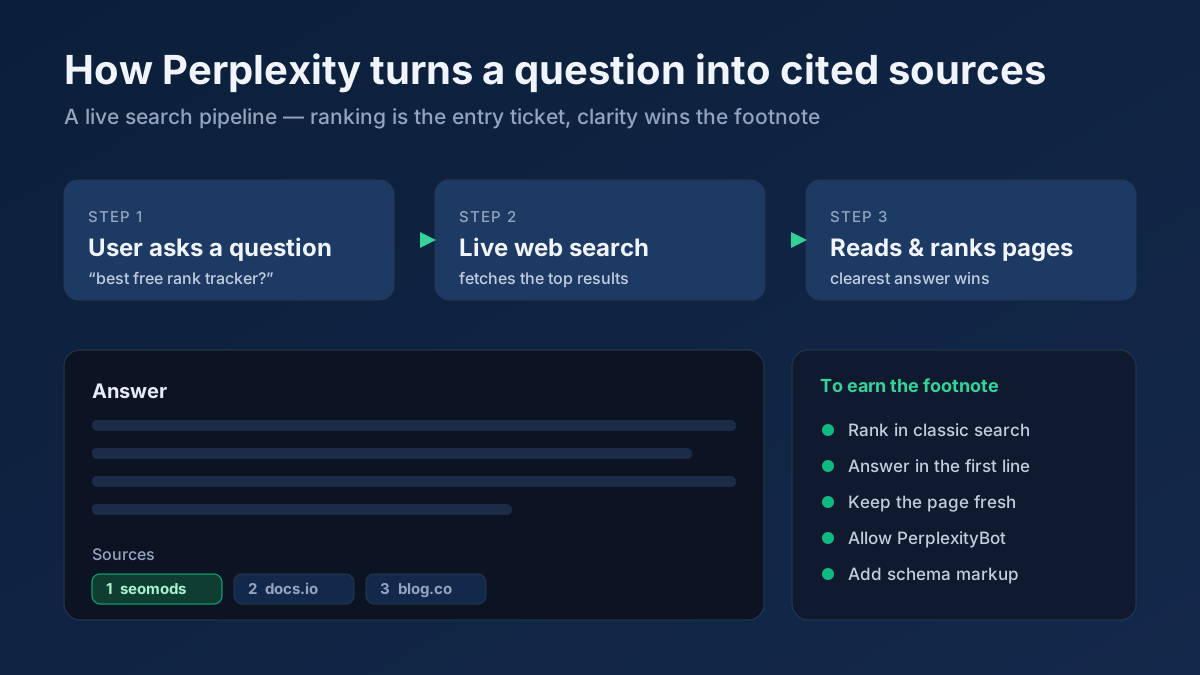
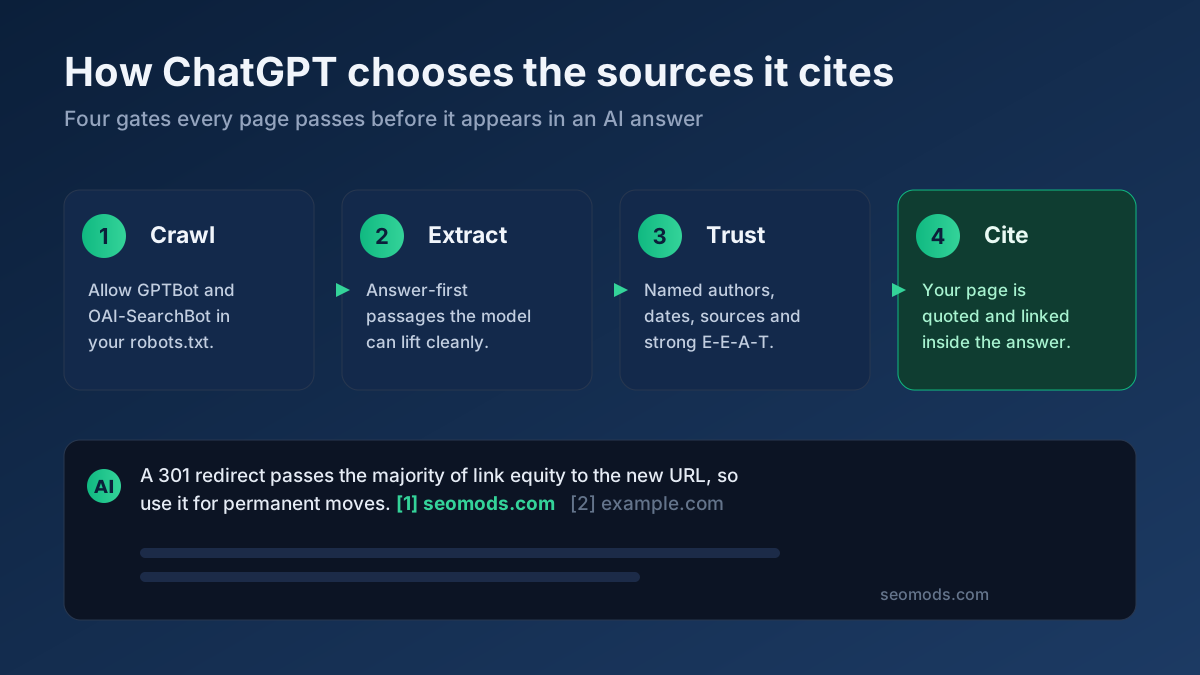
When you ask ChatGPT a question that needs current information, it no longer answers from memory alone. It runs a live web search, pulls a small set of candidate URLs, fetches the readable text from each, and feeds the most relevant passages back into the model as context. The model then writes a synthesized answer and attaches inline citations to the two, three or four pages it leaned on most. Being one of those cited pages is the entire game — it puts your brand in front of the user at the exact moment they are looking for an answer, without you ever ranking in the classic top ten.
Two things make this different from ranking on Google. First, ChatGPT surfaces only a handful of sources per answer, so the competition is far tighter than page one of a search results page. Second, the answer is assembled out of your own words: if your page states a fact clearly and unambiguously, the model is far more likely to quote it and credit you. This is why Generative Engine Optimization — the practice of getting picked up by AI answer engines — rewards clarity and extractability even more than raw ranking power. If you want the wider strategy across every assistant, our guide to optimizing for AI search is the companion piece to this one.
The three ChatGPT crawlers you need to know
OpenAI does not use one bot for everything. It runs three distinct user-agents, and confusing them is the most common reason a site accidentally locks itself out of citations. Each one has a different job, and you can allow or block them independently in your robots.txt file.
- GPTBot — the training crawler. It gathers pages that may be used to train future OpenAI models. Allowing it does not put you in ChatGPT search results; blocking it does not remove you from them. This is the one people argue about for copyright reasons, and it is entirely separate from citation.
- OAI-SearchBot — the search index crawler. This bot builds the index that ChatGPT search draws candidate URLs from. If you block it, you make yourself ineligible to appear as a cited source. This is the crawler that matters most for visibility.
- ChatGPT-User — the live user-triggered fetcher. When a specific prompt requires fresh information, ChatGPT fetches a page in real time on the user’s behalf. Allowing it means your latest content can be read the moment someone asks about it, even before the search index has recrawled you.
The practical takeaway is simple: to be citable you must allow at least OAI-SearchBot and ChatGPT-User. GPTBot is a separate, optional decision you can make on training grounds without any effect on whether ChatGPT can cite you.
Allow the ChatGPT crawlers without hurting normal SEO
Letting AI crawlers in does not cost you anything in classic Google rankings. OAI-SearchBot and ChatGPT-User are completely separate user-agents from Googlebot, so allowing them changes nothing about how Google indexes or ranks your pages. The only real risk is doing the opposite by accident: a blanket bot-blocking rule, an aggressive firewall, or a copy-pasted robots.txt that disallows everything it does not recognize.
A minimal, citation-friendly configuration looks like this in robots.txt:
User-agent: OAI-SearchBotthenAllow: /User-agent: ChatGPT-UserthenAllow: /User-agent: GPTBotthenAllow: /orDisallow: /depending on your stance on training
After you edit the file, do not trust it by eye. A single misplaced wildcard or an inherited Disallow: / under a broad User-agent: * block can silently override your intent. Confirm each ChatGPT agent is actually allowed on the URLs that matter with the Robots.txt Tester, and while you are there run a full On-Page SEO Audit to catch any firewall, noindex or redirect issue that would keep the fetcher from reaching your content. For the exact directives across every AI engine, our llms.txt and AI crawler guide lists them side by side.
Serve real, server-rendered HTML that a fetcher can read
This is the single most common technical reason good content never gets cited. ChatGPT’s fetchers do not reliably run JavaScript. If your headings and body copy only appear after a client-side React, Vue or Angular render, the fetcher sees an almost empty shell and extracts nothing usable. Everything you write is invisible to the model even though a human browser displays it perfectly.
The fix is to make sure the substance of the page — headings, paragraphs, lists, key facts — is present in the raw HTML the server sends before any script runs. Use server-side rendering, static generation or prerendering. To check, view the page source or fetch the URL with a plain request and confirm the actual words are there without scripts executing. If the content only materializes in the rendered DOM, the fetcher will treat your page as blank. Keep the page fast and lightweight too: fetchers work under time budgets, and a page buried under megabytes of trackers may be read only partially or skipped.
Write answer-first passages ChatGPT can lift
Language models extract best from passages that answer the question directly, in one or two sentences, near the top of the relevant section. Lead with the conclusion, then expand underneath. Instead of three paragraphs of context before you define a term, state the definition in a single clean sentence a model could quote with zero surrounding context, and add the nuance afterward.
A reliable pattern is a self-contained forty-to-sixty word summary immediately after each heading. Write it so that if a model copied just those words into an answer, they would still make sense and still be correct. This is the same discipline that wins featured snippets on Google, and it pays double in ChatGPT because the extracted passage often becomes the exact sentence that gets cited. Here is a practical way to structure any answer-first section:
- Restate the question as a heading in the words a person would actually use.
- Answer it in one or two direct sentences, with a concrete number, name or date where possible.
- Expand with the reasoning, caveats and examples for the human reader who wants depth.
- Close with a specific fact, figure or source that makes the passage quotable and verifiable.
Use question-style headings and clean structure
ChatGPT maps a user’s natural-language question onto the headings in your document, so headings that mirror how people ask are far easier to match. Phrase your H2s and H3s as real questions or precise noun phrases — How much does ChatGPT search cost? beats Pricing — and write descriptive, specific wording rather than clever labels. Keep one H1 per page, never skip heading levels, and make sure every heading genuinely describes the passage beneath it.
Structure has to be machine-clean as well as human-readable. Use real <h2> tags, real <ul> and <ol> lists, and real tables — not bold text pretending to be a heading or a run of paragraphs faking a list. Extractors rely on those tags to chunk your page into passages. Visualize your outline and catch missing, duplicated or out-of-order headings with the Heading Structure Analyzer before you publish, so the document a fetcher sees matches the logical structure you intended.
Build E-E-A-T and trust signals ChatGPT can verify
ChatGPT is cautious about which sources it names, because a citation is an implicit endorsement. It favors pages that carry the hallmarks of experience, expertise, authoritativeness and trust — the E-E-A-T signals Google popularized — because those reduce the risk of quoting something wrong. Make those signals explicit and machine-readable rather than assuming they are obvious.
- Named authors with credentials. Attribute articles to a real person, with a bio that states why they are qualified. Anonymous content is harder to trust and easier to skip.
- Clear publish and update dates. Show when the page was written and last revised, in visible text and in your Article schema, so the engine can weigh freshness.
- Outbound citations to primary sources. Link to the original data, studies or documentation behind your claims. Content that itself cites trustworthy sources reads as more trustworthy.
- Corroboration across the web. When multiple reputable sites say the same thing you do, the model gains confidence that your claim is safe to repeat.
None of these work in isolation, but together they move you from a source the model is nervous about to one it reaches for by default.
Add structured data and make your entity unambiguous
Schema.org structured data gives ChatGPT an unambiguous, machine-readable version of what your page is and who stands behind it. It will not single-handedly earn a citation, but it removes guesswork about authorship, dates and identity — exactly the signals that feed trust. Prioritize a few types and keep them accurate:
- Article or BlogPosting — declare the headline, author,
datePublishedanddateModified. - FAQPage — pair each question with its answer in JSON-LD, mirroring the question-and-answer shape assistants are built to consume.
- Organization — define your brand entity once, with name, logo and
sameAslinks to your social, Wikipedia and Wikidata profiles, so the engine can resolve who is making the claims.
Generate valid JSON-LD without hand-writing a single brace using the Schema (JSON-LD) Generator, then keep your entity consistent across the whole site: the same company name, the same one-sentence definitions, the same product spellings on every page. Contradictions between pages lower the model’s confidence in everything you publish, so canonicalize your key facts and repeat them verbatim. While you are tightening on-page signals, confirm your title and description are aligned and not truncated with the Meta Tag Analyzer, because a mismatched or missing title makes it harder for any engine to understand the page at a glance.
Keep content fresh and update it deliberately
ChatGPT strongly favors current information, especially for anything that changes — tools, prices, best practices, statistics. A page last touched three years ago will lose to a comparable page updated this quarter, because the model treats recency as a proxy for accuracy on fast-moving topics. Establish a refresh cadence for your important pages: revisit the facts, update figures and dates, add new developments, and bump the dateModified in your Article schema so the change is machine-visible.
Freshness is about substance, not cosmetics. Superficially re-saving a page without changing anything real does little; genuinely correcting figures, adding a new section, and stamping a visible "Updated" line does a lot. When ChatGPT-User fetches your page live during a prompt, an accurate, recently revised page is the version it will happily quote. Our deep dive on the differences between GEO and traditional SEO explains why this freshness weighting is heavier for AI engines than for classic search.
Publish original data and statistics models love to quote
The most reliably cited content on the web is original data. Models gravitate toward specific, verifiable numbers with a clear source, because a concrete statistic is low-risk to repeat and adds authority to their answer. If you run a survey, analyze your own dataset, benchmark a process, or compile figures nobody else has published, you create something ChatGPT has a strong reason to cite by name — and something other sites will link to, which compounds the effect.
Present that data so it is easy to lift: state each key figure in a single sentence, give it a unit and a date, and say where it came from. Replace vague copy like speed improved significantly with median load time fell from 4.1s to 1.8s across 500 tested pages in June 2026. Never invent numbers to sound authoritative; a fabricated statistic that gets checked against its supposed source destroys the trust you are trying to build. Real, sourced, specific data is the single highest-leverage asset for earning citations.
Earn off-page brand mentions across the web
ChatGPT does not decide who to cite from your site alone. It leans heavily on sources that are corroborated widely — brands and pages that other reputable sites mention, quote and link. When your data, definitions or tools appear across independent domains, the model reads that as evidence you are a safe, authoritative source, and it becomes more likely to name you even for queries where several sites compete.
Pursue this the honest way. Publish original research others want to reference, build genuinely useful free tools, write quotable statements, and earn coverage through outreach, guest contributions, digital PR and community participation. Get your brand consistently described the same way across your About page, your social profiles, industry directories and third-party write-ups, so the entity ChatGPT assembles about you is coherent. For the platform-specific angle on how these corroboration signals play out on another major assistant, see our walkthrough on how to rank on Perplexity, which shares much of the same logic.
How to measure and track ChatGPT citations
AI citations are harder to track than organic clicks, but they are not invisible. No single dashboard captures everything yet, so combine three methods and watch the direction of travel rather than one perfect number.
- Prompt ChatGPT directly. Ask it the questions your pages target, with search enabled, and note whether you are cited, which competitors are, and which exact passages get quoted. Repeat the same prompts monthly so you can see movement over time.
- Check referral traffic. Filter your analytics for referrers like
chatgpt.com. Clicks from cited links show up there, and a rising trend is direct evidence your visibility is growing. - Read your server logs. Grep access logs for
OAI-SearchBotandChatGPT-User. Seeing them fetch a page confirms the engine can reach it; their absence on an important page is a red flag that something is blocking access.
Together these tell you three separate things: whether you are being cited, whether those citations drive clicks, and whether the crawlers can even reach you in the first place. If prompt testing shows no citations and your logs show no fetches, start with access and rendering — that is almost always the bottleneck.
Common mistakes that keep you out of ChatGPT answers
Most failures trace back to a short list of avoidable errors:
- Blocking the search crawler by accident. A blanket robots.txt disallow or a bot wall that catches OAI-SearchBot makes you ineligible. Verify with the Robots.txt Tester.
- JavaScript-only content. If the text is not in the raw HTML, the fetcher sees nothing. Server-render the substance.
- Burying the answer. Long intros before the point make extraction harder. Lead with the answer.
- Vague, undated claims. Unspecific copy is unquotable. Add numbers, units and dates.
- Inconsistent facts across pages. Contradictions lower confidence in your whole site. Canonicalize your key facts.
- Anonymous, authorless content. No named author and no credentials weakens trust. Attribute and qualify your writers.
- Fabricated statistics. Invented numbers get checked against their source and destroy trust. Cite real data only.
- Set-and-forget pages. Stale content loses to fresher rivals. Schedule real updates.
Applying this to your own site? See the tools picked by audience: SEO Tools for SEO Beginners and SEO Tools for WordPress Site Owners.
Frequently asked questions
Does allowing ChatGPT crawlers hurt my Google rankings?
No. OAI-SearchBot and ChatGPT-User are separate user-agents from Googlebot, so allowing them has no effect on how Google crawls, indexes or ranks your pages. The only way to hurt yourself is to accidentally block the ChatGPT agents through a broad rule, which removes you from ChatGPT answers without helping Google at all.
What is the difference between GPTBot, OAI-SearchBot and ChatGPT-User?
GPTBot gathers pages that may train future models and has no effect on citation. OAI-SearchBot builds the index ChatGPT search draws sources from — block it and you cannot be cited. ChatGPT-User fetches a page live when a specific prompt needs fresh information. To be citable, allow at least OAI-SearchBot and ChatGPT-User.
How long until ChatGPT starts citing my page?
It varies. Because ChatGPT-User can fetch pages live, a well-structured page that answers a specific question can be picked up soon after it is reachable, while the search index takes longer to recrawl. Fixing access and server-rendering usually shows results fastest, because those were the barriers blocking citation outright.
Do I need an llms.txt file to be cited?
No, it is not required. A correct robots.txt, readable HTML and strong content are what matter most. An llms.txt file is a low-cost, forward-looking addition that gives AI systems a curated map of your best pages, but its absence will not stop ChatGPT from citing you today.
Why does ChatGPT cite my competitor and not me?
Usually because their page is easier to extract, more specific, or more widely corroborated. Check that your answer is stated up front in one clean sentence, that your facts carry numbers and dates, and that other reputable sites mention your brand. Weak corroboration across the web is the most overlooked reason a technically fine page gets passed over.
What is the single fastest first step?
Confirm ChatGPT can actually fetch and read your page: check that OAI-SearchBot and ChatGPT-User are allowed with the Robots.txt Tester, confirm your content is present in the raw HTML, and run a full On-Page SEO Audit to surface any access or rendering blocker. Fixing crawl and render unlocks everything else.