Short answer: To find and fix broken links, crawl your whole site with a broken link checker, cross-check the 404 and soft 404 lists in Google Search Console, and look up which dead URLs still have backlinks. Then update internal links to the live URL, 301-redirect removed pages that still have value, and replace or delete broken outbound links.
Every site collects broken links. Pages get renamed during a redesign, a product is discontinued, a partner closes their blog, someone types a URL by hand in the CMS and misses a letter. None of this is dramatic on its own, and Google says plainly that a 404 on a URL that should not exist is not a problem. The trouble is what broken links quietly cost you: visitors who hit a dead end and leave, backlinks that point at nothing, and crawl time spent on pages that are gone. This guide walks through the eight steps we use when cleaning up a site, from the first crawl to the monitoring routine that stops the problem from coming back.
What counts as a broken link?
A broken link is any link whose destination does not return the page the visitor expected. Most of the time that means an HTTP status of 404 (Not Found) or 410 (Gone), but a link can also be broken while technically returning a 200, and that second group is the one most checklists miss. Google’s own documentation on HTTP status codes explains how its crawler treats each response; the practical categories below are the ones you will actually meet in an audit.
Broken internal links
Links from one page of your site to another page of your site that no longer exists or has moved without a redirect. These are the most important to fix because they are entirely under your control and they sit in the paths both visitors and Googlebot use to move through your content. A single broken link in a header, footer or sidebar template can multiply into thousands of broken links across the site.
Broken outbound links
Links from your pages to other websites that now return an error, time out or point to a domain that has expired. You cannot fix the destination, but you can change your link. A 2024 Pew Research Center study on disappearing web content found that 38% of web pages that existed in 2013 were no longer accessible a decade later, and that 23% of news pages contained at least one broken link. If your content cites sources, some of them are already dead.
Broken backlinks
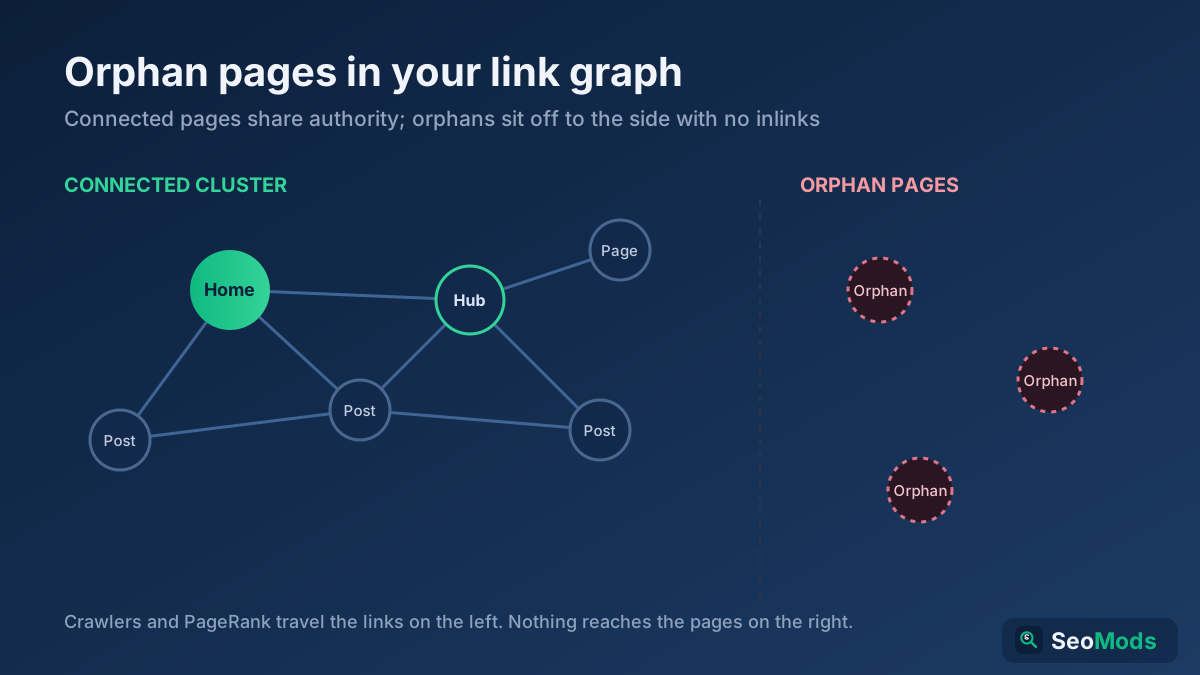
Links from other websites to a URL on your site that now returns 404. These are the costliest kind, because each one represents authority another site gave you that is currently being thrown away. They do not show up in a normal crawl of your own site, since nothing on your site links to the dead URL any more.
Broken images, scripts and files
An <img>, stylesheet, script or downloadable PDF that returns an error. Visitors see a missing picture or a layout that falls apart; Google may not be able to render the page properly. These often appear after a media library clean-up or a CDN change.
Soft 404s
Pages that return a 200 status but show an error message, an empty category, or a “product not found” template. Google detects many of them and reports them separately in Search Console, as described in its crawling troubleshooting guide; an ordinary status-code checker will mark them as fine.
Redirect chains and loops
Not broken in the strict sense, but close. A link that passes through three redirects before reaching the final page is slower for users and wastes crawl requests, and a loop that sends a URL back to itself never resolves at all. Most broken-link clean-ups turn up a few of these as a by-product.
Do broken links hurt SEO?
The honest answer is: not in the way most people fear, but more than Google’s reassurance suggests. Google has repeatedly said that 404 errors are a normal part of the web and that having them does not lower the rankings of the rest of your site. There is no penalty for a broken link. So why bother?
Lost link equity. When a page that earned backlinks is deleted without a redirect, the authority those links carried stops flowing into your site. On an older site this is often the single largest SEO gain available from a clean-up: redirecting a handful of dead URLs can recover links you spent years earning. The website authority guide explains why those links matter.
Weaker internal linking. Internal links tell Google which pages are important and how they relate. A broken link in a category menu cuts a path that should lead to your most valuable pages, which can leave them under-crawled and under-valued. This is the same mechanism described in the internal linking strategy guide, just working against you.
Wasted crawling. On a small site this barely matters. On a site with tens of thousands of URLs, thousands of dead internal links mean Googlebot keeps requesting pages that return errors instead of discovering and refreshing the ones that exist. The crawl budget guide covers when this becomes a real constraint.
User experience and conversions. This is the part you can measure most directly. A visitor who clicks “View pricing” and lands on an error page does not usually go looking for the right URL. On the e-commerce sites we have audited, the 404 page is routinely among the top 50 most viewed pages in analytics, which means a noticeable slice of traffic is ending in a dead end every month.
Trust signals. Content full of dead references reads as neglected, both to people and to quality reviewers. For topics where accuracy matters, outbound links to sources are part of how you demonstrate care, a point covered in the E-E-A-T guide.
How to find and fix broken links: 8 steps
The order matters. Steps 1 to 3 build a complete list from three different sources, because no single source sees everything. Step 4 decides what to fix first. Steps 5 to 8 are the repairs, starting with the ones that give the biggest return for the least effort.
Step 1: Crawl your whole site with a broken link checker
A crawler follows every link on your site the way Googlebot does and records the status code of each destination. It is the only method that tells you both which URL is broken and where the link to it sits, which is the information you need to fix it.
For a quick check of a single page or a section, run it through the Broken Link Checker, which lists every internal and outbound link on the page with its status. For the whole site, start a Technical Site Audit (Crawler) crawl and export the list of links returning 4xx or 5xx codes. Whatever tool you use, make sure the export includes three columns: the broken URL, the status code, and the source page containing the link. Without the source page, you know something is broken but not where to go to fix it.
A few settings are worth checking before you start:
- Crawl outbound links too. Many crawlers only check internal URLs by default. Turn on external link checking, or you will miss half the problem.
- Include images and resources. A missing hero image is as visible to users as a dead text link.
- Respect your own robots rules, but know what they hide. If a section is blocked in
robots.txt, the crawler will not see broken links inside it, even though users will. - Render JavaScript if your navigation needs it. Links injected by scripts do not exist in the raw HTML. The JavaScript SEO guide explains the difference.
Step 2: Check the 404 and soft 404 lists in Google Search Console
A crawl shows the broken links that exist on your site today. Search Console shows the broken URLs Google has actually tried to fetch, including ones linked from other sites, old sitemaps, or pages you deleted long ago. The two lists overlap but are never identical.
Open Indexing → Pages and look at the reasons under “Why pages aren’t indexed”. Three are relevant here: Not found (404), Soft 404, and Page with redirect (useful later for spotting chains). Google’s Page indexing report help page explains each reason. Export each list. For any URL, the URL Inspection tool shows where Google found the link, although that referring information is often incomplete.
Do not panic at the numbers. A site that has existed for a few years will often show hundreds of 404s in this report, most of them URLs that were deleted on purpose or never existed at all, such as malformed links from scrapers. You are looking for the URLs that matter, which is what the next two steps are about. If this report is new to you, the Search Console guide walks through the rest of it.
Step 3: Find dead URLs that still have backlinks or traffic
This is the step that turns a housekeeping task into an SEO win. Take the combined list of dead URLs from steps 1 and 2 and ask two questions of each: does anything external link to it, and did it ever get traffic?
- Backlinks. Run your domain through the Backlink Checker / Verifier and filter the target URLs by status code, or check the dead URLs individually. Search Console’s Links report also lists your most linked pages; any of them returning 404 goes straight to the top of your list. The guide to checking backlinks for free covers the sources in more detail.
- Past traffic. In your analytics, look at landing pages over the last 12 to 16 months and filter for the dead URLs. A page that brought 300 organic visits a month before it was removed deserves a redirect even if nobody links to it.
- Server logs. If you have access, your logs show every request for a missing URL, from people and bots alike. A dead URL that still gets daily hits from real browsers is being linked from somewhere. The log file analysis guide shows how to pull this out.
Step 4: Prioritise before you fix anything
On a large site, the raw list can run to thousands of rows. Fixing them in alphabetical order is the slowest way to get results. Group them instead, and work from the top of this table down:
| Priority | What it looks like | Why it comes first |
|---|---|---|
| 1 | Dead URLs with external backlinks | Every day without a redirect wastes earned authority |
| 2 | Broken links inside site-wide templates (menu, footer, sidebar) | One fix removes hundreds or thousands of broken links at once |
| 3 | Broken links on your top 20 landing pages | These pages get the most visitors and the most crawling |
| 4 | Broken links on conversion paths (pricing, checkout, contact) | Direct revenue impact |
| 5 | Soft 404s on pages you want indexed | They silently drop out of search |
| 6 | Broken outbound links in content | Trust and user experience, lower SEO impact |
| 7 | Old 404s with no links and no traffic | Usually no action needed at all |
Sort the internal broken links by broken URL rather than by source page. You will often find that 500 broken links are really the same six dead URLs linked from many places, which tells you the fix belongs in a template or a redirect rather than in 500 separate edits.
Step 5: Fix broken internal links at the source
For internal links, the right fix is almost always to edit the link itself so it points directly at the live URL. A redirect would also make the link “work”, but it adds a hop for every visitor and every crawl, and it leaves you with a site full of links you are relying on redirects to patch.
- Templates first. Fix navigation, footer and sidebar links, and any related-post or breadcrumb component that builds links automatically.
- Then find-and-replace in content. Most CMSs, including WordPress with a search-and-replace plugin, can replace an old URL across all posts at once. Take a database backup first, and replace the full URL including the trailing slash to avoid partial matches.
- Update links that already redirect. While you are there, update internal links that point at a redirected URL so they point at the final destination. The Redirect & HTTP Status Checker shows the full chain for any URL.
- Remove links to pages that are gone for good. If there is no sensible replacement, remove the link or rewrite the sentence rather than pointing it somewhere irrelevant.
If a removed page had many internal links pointing to it and you do not want to redirect it, check that the pages which linked to it are not now left without a path to related content. The Internal Link Opportunity Finder suggests new internal links based on topic overlap, which is useful for filling those gaps.
Step 6: Redirect or restore dead URLs that still have value
For the URLs you identified in step 3, you have three options, and choosing between them is simpler than it looks.
- Restore the page if it was deleted by mistake or the content is still relevant. This is the best option for a page with strong backlinks and no good substitute.
- 301-redirect it to the closest equivalent if the content has moved or has been replaced. A discontinued product goes to its successor or its category; an outdated guide goes to the updated one.
- Return 404 or 410 if the page has no value and no replacement. A 410 tells Google the removal is deliberate and tends to get the URL dropped slightly faster; a 404 is perfectly acceptable too.
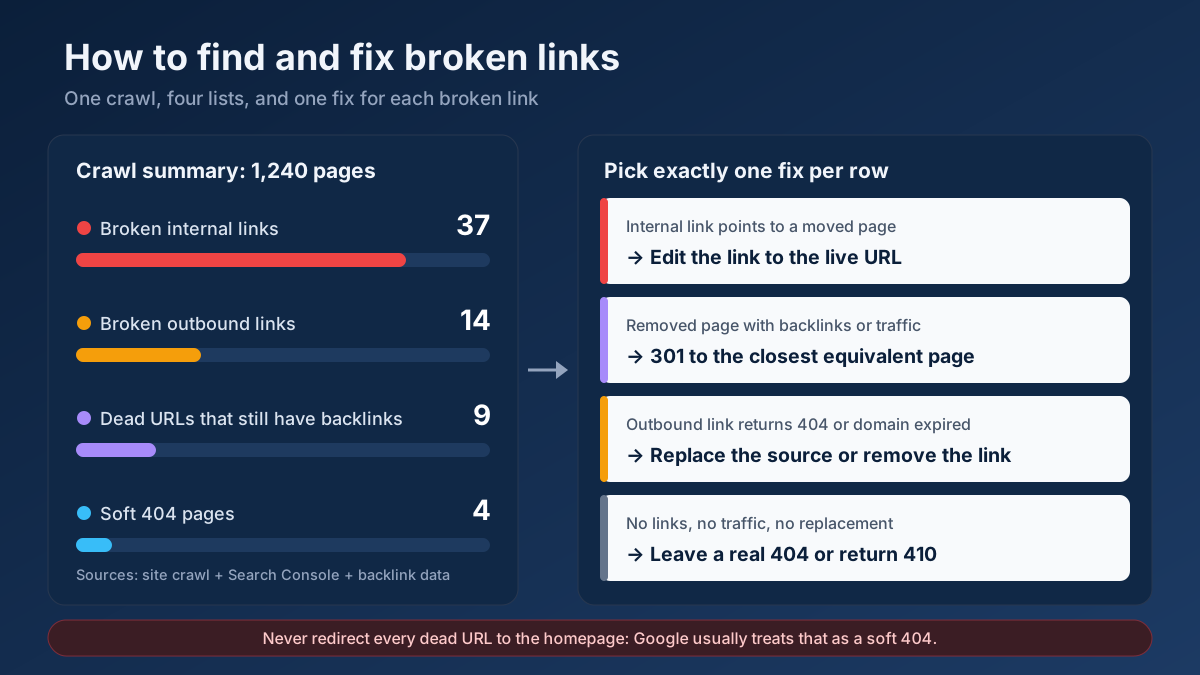
What you should not do is redirect every dead URL to the homepage. Google generally treats a redirect to an unrelated page as a soft 404, so the link equity you hoped to save is not passed, and visitors land somewhere that does not answer their click. The 301 vs 302 redirects guide covers why the redirect type matters too: a 302 signals a temporary move and is the wrong choice for a page that is not coming back.
On Apache, a single permanent redirect in .htaccess looks like this:
Redirect 301 /blog/old-guide/ https://www.example.com/blog/new-guide/On Nginx, inside the server block:
location = /blog/old-guide/ {
    return 301 https://www.example.com/blog/new-guide/;
}
If you have many rules to write, the .htaccess Redirect Generator produces them in the right format, and WordPress users can manage them with a redirection plugin instead of editing server files. After deploying, check a sample of old URLs with the Redirect & HTTP Status Checker to confirm each one reaches its target in a single hop with a 301 status.
Step 7: Replace or remove broken outbound links
For links to other sites, work through the list and decide one of four things for each:
- The page moved. Search the site for the same title. If it exists at a new address, update your link.
- The page is gone, but the source matters. Look for an equivalent: an updated report from the same organisation, the original study behind a news article, or an official documentation page instead of a third-party summary.
- Only an archive exists. The Wayback Machine often has a copy. Linking to an archived version is acceptable for historical references, but a live, current source is better for anything readers may act on.
- The link no longer adds anything. Remove it and adjust the sentence so it still reads naturally.
Pay extra attention to outbound links whose domain has expired. Expired domains are sometimes bought and filled with spam or gambling content, which means an innocent citation from 2018 can now send your readers somewhere you would never link to deliberately. If a linked domain returns a parked page or content that has nothing to do with the original, remove the link immediately.
A dead page on someone else’s site can also be an opportunity: if other sites linked to it, they may welcome a working replacement. That outreach tactic is covered in the broken link building guide.
Step 8: Fix soft 404s and make your real 404 page useful
Go back to the Soft 404 list from step 2 and sort each URL into one of two groups. If the page genuinely has nothing on it — an empty search result, a category with no products, a deleted item still returning 200 — make it return a real 404 or 410, or redirect it to a relevant parent page. If the page has real content that Google misjudged, add substance: a thin product page with one line of text and an “out of stock” label can look like an error page to an algorithm. The Thin Content Checker helps identify pages with too little content to stand on their own.
Then look at your actual 404 page. It should return a genuine 404 status (check it with the HTTP Header Checker tool, because many CMS themes accidentally send 200), keep your normal navigation, include a search box, and link to your main sections or most popular pages. A good 404 page does not fix broken links, but it turns a dead end into a detour.
Which fix for which broken link?
Keep this table next to your spreadsheet while you work. Each row in your export should end up with exactly one action.
| Situation | Best fix | Avoid |
|---|---|---|
| Internal link to a page that moved | Edit the link to the new URL | Relying on a redirect forever |
| Internal link to a page deleted on purpose | Remove the link or point it to a relevant page | Linking to the homepage by default |
| Dead URL with backlinks, content replaced | 301 to the replacement | 302, or a redirect to the homepage |
| Dead URL with backlinks, deleted by mistake | Restore the page | Leaving it as 404 |
| Dead URL, no links, no traffic, no replacement | Leave as 404 or return 410 | Creating a redirect just to clear the report |
| Outbound link to a moved page | Update to the new address | Removing a useful citation |
| Outbound link to an expired domain | Remove or replace immediately | Waiting for the next audit |
| Soft 404 on an empty page | Return 404/410 or redirect to the parent | Adding filler text |
| Redirect chain of three or more hops | Point every rule straight to the final URL | Adding another redirect on top |
Free and paid broken link checkers compared
You do not need an expensive subscription to keep a site clean. What you need is a combination of tools that together cover your pages, Google’s view and your backlinks.
| Tool | What it finds | Limits | Best for |
|---|---|---|---|
| SeoMods Broken Link Checker | Internal and outbound links on a page, with status codes | Page-level check | Spot checks, new content, key templates |
| SeoMods Site Audit | Broken links, redirects and other issues across a crawl | Crawl size depends on the site | Regular site-wide health checks |
| Google Search Console | 404s and soft 404s Google has encountered | Delayed data, incomplete referrers, only your verified sites | Google’s own view, soft 404 detection |
| Desktop crawlers (e.g. Screaming Frog) | Full crawl with source pages and anchors | Free version stops at 500 URLs | Deep audits of larger sites |
| Backlink tools and Ahrefs Webmaster Tools | Backlinks pointing to your dead URLs | Free tiers limited to verified sites or partial data | Recovering lost link equity |
| Browser extensions | Broken links on the page you are viewing | One page at a time, manual | Editors checking their own articles |
For most small and medium sites, a monthly crawl plus a weekly glance at Search Console is enough. Add a backlink check once a quarter, or immediately after any redesign or migration.
A realistic example: cleaning up after a store redesign
Consider a typical case: an online kitchenware shop with about 1,240 indexable pages moves to a new e-commerce platform. The new platform uses a different URL pattern for products (/product/cast-iron-skillet-28cm instead of /shop/skillets/cast-iron-28), and the redirect map covered categories but only part of the product catalogue.
Six weeks later, organic sessions are down about 18%. The first crawl finds 37 unique broken internal URLs, but they generate more than 2,100 broken links, because two of them sit in the footer and one in a “Customer favourites” widget on every product page. It also finds 14 dead outbound links in the recipe blog, two of them pointing to an expired domain that now hosts a casino landing page.
Search Console lists 312 URLs as Not found. Cross-checking them against the backlink data narrows the list to nine old product URLs that still have external links, including one skillet page linked from a popular cooking site. It also shows four soft 404s: empty category pages for discontinued ranges.
The work takes about two days. The footer and widget links are fixed in the templates, which removes most of the 2,100 broken links in one release. The nine linked product URLs are 301-redirected to their direct replacements. The remaining 300 or so old URLs are left as 404s, since they have no links and no traffic. The two casino-bound citations are removed the same day, the other outbound links are updated or replaced, and the empty categories are redirected to their parent category. Within the following two months, the redirected URLs are replaced in Google’s index by their targets and organic traffic returns to its pre-launch level. The key saving was not fixing 312 URLs, but recognising that only a dozen of them mattered.
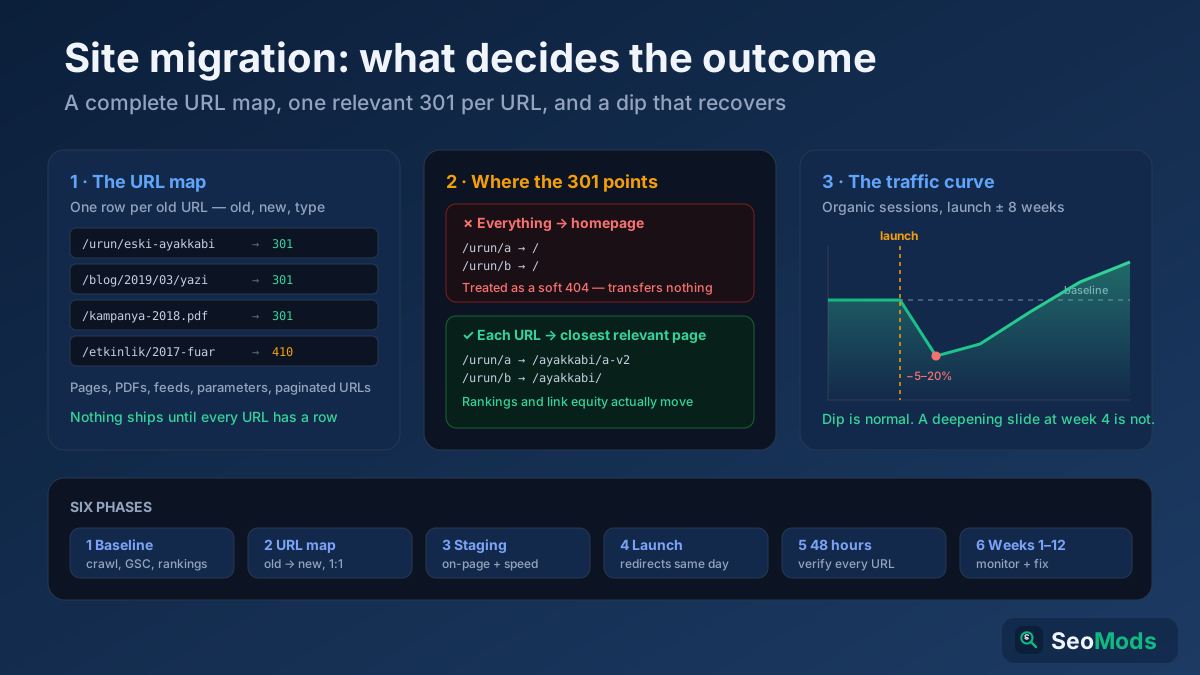
If you are planning a move like this, the website migration checklist shows how to build the redirect map so the clean-up is not needed in the first place.
How to stop broken links from coming back
A one-off clean-up fixes today’s list. These habits keep the next one small.
- Never change a URL without a redirect. Make it a rule in your publishing process: whoever renames a slug or deletes a page adds the redirect at the same time. The URL structure guide helps you choose URLs that will not need changing.
- Link to final URLs. When adding internal links, copy the address from the live page rather than typing it, and include the correct trailing slash and protocol.
- Schedule a monthly crawl. Put it in the calendar. The first crawl is slow; later ones take a few minutes to review because you are only looking at what is new.
- Check new articles before publishing. Run each new post through the Broken Link Checker. Typos in hand-written links are one of the most common causes of broken links.
- Prefer stable sources. Official documentation, government statistics and established publications move their pages less often than small blogs and campaign microsites.
- Review outbound links during content refreshes. When you update an article, check every external link in it. The content refresh guide fits this naturally into your update routine.
- Keep your sitemap clean. An XML sitemap that lists deleted URLs keeps inviting Google to crawl them. Regenerate it automatically, as the XML sitemaps guide recommends.
Common mistakes when fixing broken links
- Redirecting everything to the homepage. It clears the 404 report but Google usually treats these as soft 404s, and users are confused. Redirect only to genuinely equivalent pages.
- Fixing internal links with redirects only. The links work, but every click now takes an extra hop, and each future URL change adds another link to the chain.
- Using 302 for permanent moves. Many CMS plugins default to 302. Check the setting and use 301 for anything that is not coming back.
- Adding
nofollowto broken links. It does not repair anything. The link is still broken for visitors. - Trying to clear every 404 in Search Console. Old URLs with no links or traffic can stay as 404s indefinitely. Chasing a zero count wastes time.
- Deleting pages without checking backlinks first. A quick look at the Backlink Checker / Verifier before removing a page tells you whether it needs a redirect.
- Relying on one tool. A crawler misses broken backlinks; Search Console misses outbound links. Use both.
Frequently asked questions
How do I find broken links on my website for free?
Run a free broken link checker on your key pages, then crawl the whole site with a free site audit tool that reports 4xx and 5xx status codes. Add the Not found (404) and Soft 404 lists from Google Search Console, which is free for any site you verify. Together these cover internal, outbound and Google-detected broken links.
Do broken links hurt SEO rankings?
There is no direct penalty for having broken links, and Google treats 404s as a normal part of the web. The damage is indirect: backlinks pointing at dead pages lose their value, broken internal links weaken the paths to important pages, crawling is wasted on large sites, and visitors leave. Fixing the broken links that matter is worth the effort.
Should I redirect all 404 pages?
No. Redirect a dead URL only when it has backlinks, past traffic, or a genuinely equivalent replacement page. URLs with no links, no traffic and no replacement can safely remain 404 or return 410. Redirecting everything to the homepage is counterproductive, because Google usually treats those redirects as soft 404s.
What is the difference between a 404 and a soft 404?
A 404 is an honest response: the server says the page does not exist. A soft 404 is a page that returns a 200 success status but shows an error, an empty result or almost no content. Google reports soft 404s separately in Search Console and usually excludes them from the index. Fix them by returning a real 404 or adding real content.
How do I fix a 404 error in WordPress?
First decide whether the page should exist. If it moved, add a 301 redirect with a redirection plugin or your SEO plugin’s redirect manager, and update internal links to the new URL. If many posts suddenly return 404, re-save your permalink settings, which rebuilds the rewrite rules. If the page was deleted on purpose and has no links, leave it as 404.
How often should I check for broken links?
For most sites, a full crawl once a month and a check of the Search Console Pages report every week or two is enough. Check immediately after a redesign, platform change, URL restructure or large content deletion, because that is when broken links appear in bulk. Busy news and e-commerce sites benefit from weekly crawls.
Is it better to use a 301 or a 410 for deleted pages?
Use a 301 when a relevant replacement exists, because it sends visitors and link value to the new page. Use a 410 when the page is gone permanently with no replacement; it tells Google the removal is intentional. A plain 404 is also fine in that case, the difference in how quickly the URL drops out is small.
Can broken outbound links affect my site?
They do not trigger a penalty, but they make your content less useful and less trustworthy, especially for readers who rely on your sources. Links to expired domains are a real risk, because those domains are sometimes taken over by spam sites. Check outbound links during every content update and remove any that now lead somewhere unrelated.
Start with one crawl this week
Broken links are not a crisis, and you do not need to reach zero. What you need is to fix the handful that cost you something: dead pages that still carry backlinks, broken links in templates that repeat across the site, and dead ends on the pages that bring you customers. On most sites that is a day or two of work, and the gains in recovered authority and fewer lost visitors show up within weeks.
Here is the short version. Run your most important pages through the Broken Link Checker and start a full Technical Site Audit (Crawler) crawl. Export the 404 and soft 404 lists from Search Console. Check your dead URLs with the Backlink Checker / Verifier, redirect the ones that matter, and confirm each redirect with the Redirect & HTTP Status Checker. Then put a monthly crawl in your calendar so the next list stays short. For a wider look at the rest of your site’s health, the technical SEO audit checklist is the natural next step.