Short answer: Log file analysis reads your server’s raw access logs to see exactly which URLs search-engine crawlers requested, when, and with what status code. Unlike crawl simulators or Search Console estimates, logs are the only ground-truth record of real bot behavior. You use them to find wasted crawl budget, orphan pages Google still hits, redirect chains and error spikes — then turn each finding into a concrete technical fix.
What log file analysis for SEO actually means
Every time a browser or a bot requests something from your server, the web server writes a line to an access log. Log file analysis is the practice of collecting those lines, filtering them down to verified search-engine crawlers, and reading them as a factual diary of what Googlebot and other bots did on your site. No sampling, no modeling, no "estimated" anything — if it is in the log, it happened; if it is not, it did not.
That distinction matters because most of the tools SEOs rely on are educated guesses. A crawl simulator shows what a bot could discover from your links. Search Console’s crawl stats report is a helpful but aggregated summary. Your access log is the primary source both of those are trying to approximate. When they disagree, the log wins, because it is a direct recording rather than an interpretation. That is why log analysis sits at the technical core of any serious technical SEO audit — it answers questions no other data source can.
Anatomy of a log line, field by field
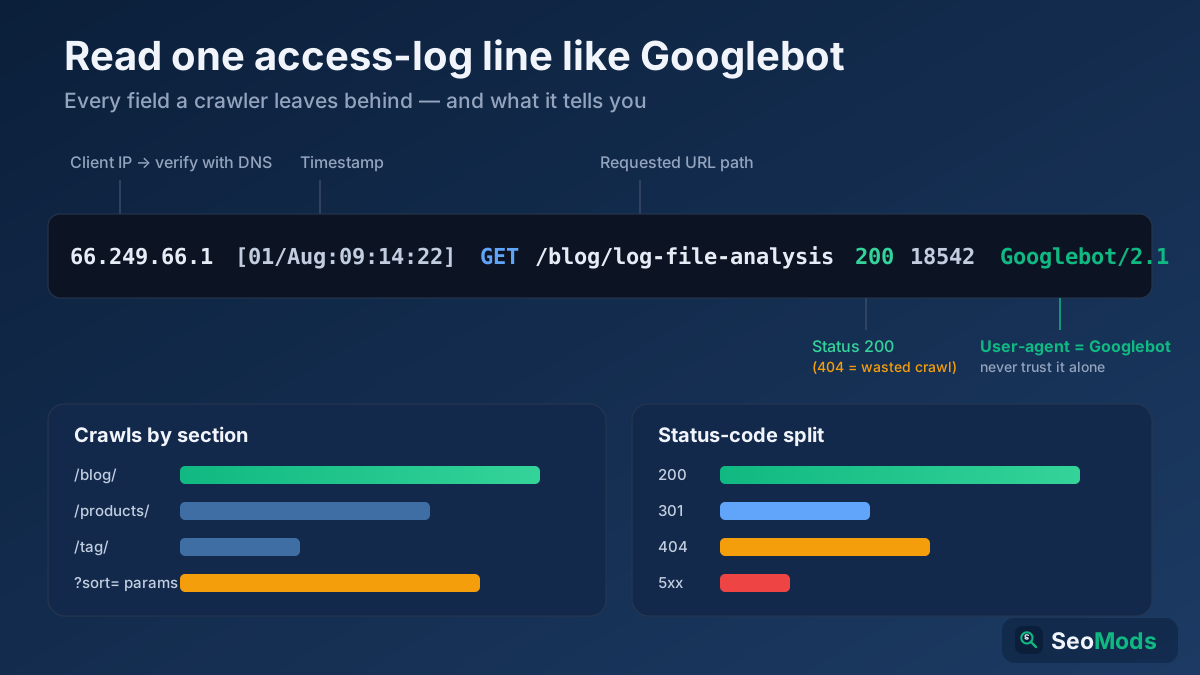
Access logs look intimidating until you break one line into its parts. Here is a typical Apache combined-format line, wrapped so you can see every field:
66.249.66.1 - - [01/Aug/2026:09:14:22 +0000] "GET /blog/log-file-analysis-seo HTTP/1.1" 200 18542 "-" "Mozilla/5.0 (compatible; Googlebot/2.1; +http://www.google.com/bot.html)"
Read left to right, each field tells you one thing:
- Client IP (
66.249.66.1) — who made the request. This is what you verify against DNS to confirm a real crawler. - Timestamp (
[01/Aug/2026:09:14:22 +0000]) — when the hit happened, with timezone. This drives every frequency and trend analysis. - Request method and path (
GET /blog/log-file-analysis-seo) — the HTTP verb and the exact URL requested, without the domain. - Status code (
200) — how the server responded:200OK,301redirect,404not found,5xxserver error. - Bytes sent (
18542) — response size, useful for spotting bloated pages the crawler has to download. - Referrer (
"-") — the page that linked to this request, if any. Bots usually send none. - User-agent (the long
Mozilla/5.0 ... Googlebot/2.1string) — the self-declared identity of the client. Useful, but never trust it on its own.
How to get your access logs
You cannot analyze logs you do not have, so the first job is retrieval. Where they live depends on your stack, but they almost always exist somewhere:
- Apache — usually
/var/log/apache2/access.logor a per-vhost file. The default "combined" format includes referrer and user-agent, which you need. - Nginx — typically
/var/log/nginx/access.log. Confirm thelog_formatcaptures the user-agent; the bundledcombinedformat does. - CDN and reverse proxies — if Cloudflare, Fastly or Akamai sits in front of your origin, many crawler hits are answered at the edge and never reach your server. Pull logs from the CDN itself, or you will undercount crawling badly.
- Hosting control panels — cPanel, Plesk and managed hosts expose "Raw Access Logs" you can download without shell access. Enable log archiving so history is retained.
- Load-balanced setups — with multiple app servers, collect and merge logs from every node, or you only see a slice of the traffic.
Aim for at least a few weeks of continuous logs, ideally a month or more. Crawling is bursty, and a single day tells you very little about patterns, budget or trends.
Verify it is really Googlebot — never trust the user-agent
This is the step amateurs skip and it invalidates everything downstream. The user-agent string is self-reported plain text: anyone can send a request that claims to be Googlebot. Scrapers, spam bots and competitors routinely spoof it. If you count spoofed hits as real crawl activity, your entire analysis is fiction.
The reliable check is a reverse-then-forward DNS lookup on the client IP, which Google itself documents:
- Take the IP from the log line and run a reverse DNS (PTR) lookup on it.
- Confirm the hostname ends in an official Google domain —
googlebot.comorgoogle.com. - Run a forward DNS lookup on that hostname and confirm it resolves back to the exact same IP.
- Only if both directions match is the hit a genuine Googlebot request; otherwise discard it as an impostor.
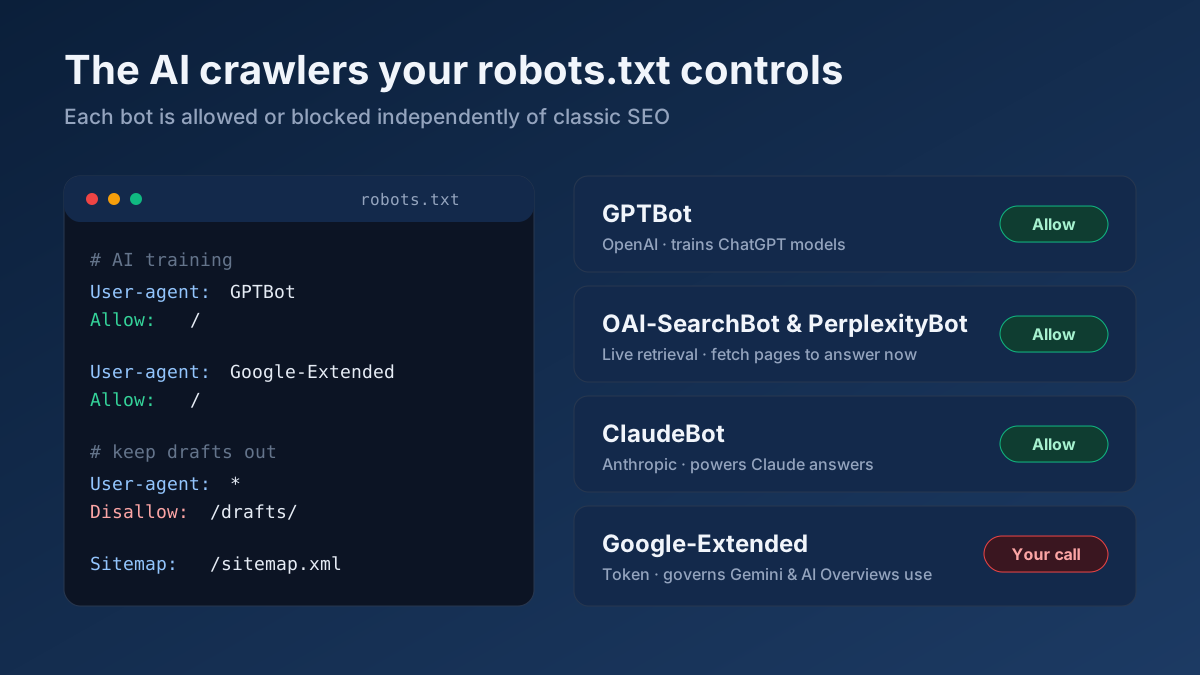
Bing, DuckDuckGo and most reputable engines support the same reverse-forward verification. For crawlers that publish IP ranges instead, match the address against the official list. The clean, verified subset is the only data you should feed into the analysis below — and the same discipline underpins how you should read your logs when auditing AI crawlers and your robots.txt too.
Crawl frequency by page and section
Once you have verified crawler hits, group them by URL and by directory to see where attention actually flows. Sort your most-crawled URLs descending and a story appears: often a huge share of crawl activity lands on a handful of pages — your home page, top categories, faceted filters — while pages you care about get visited rarely. Grouping by section (for example /blog/ versus /products/ versus /tag/) shows which parts of the site Google considers worth its time.
The least-crawled list is just as revealing. Important, revenue-driving pages that Google touches once a month will be slow to reflect any change you make. If a section you consider strategic barely registers, that is a signal your internal linking or sitemap is not surfacing it. Cross-check the pages Google ignores against a fresh Technical Site Audit (Crawler) to see whether they are also weakly linked internally — the two problems usually travel together.
Find crawl budget wasted on junk
Crawl budget is finite, and every request Google spends on a useless URL is one it did not spend on a page that matters. Logs expose exactly where that budget leaks, and the leaks are usually concentrated:
- Parameter and faceted URLs — endless
?sort=,?filter=and session-ID variants that are functionally duplicates. If Googlebot is hammering thousands of these, you are burning budget on noise. - Soft and hard 404s — repeated
404hits on the same dead URLs mean stale links are still being followed. Fix the links or return the right status. - Redirect chains — a
301that points to another301that points to a third URL wastes a request at every hop. Collapse chains to a single redirect. - Low-value paths — internal search results, calendar archives, print versions and infinite pagination that add nothing to the index.
The fixes are the standard toolkit: block truly useless paths in robots.txt, canonicalize duplicates, prune redirect chains, and repair or remove broken links. Validate your robots directives against real crawler behaviour with the Robots.txt Tester, and run the Broken Link Checker to catch the dead links generating those 404 hits. If crawl budget is your central concern, our deep dive on crawl budget optimization pairs directly with what your logs reveal here.
Orphan pages Google still hits
An orphan page is one with no internal links pointing to it — a crawler cannot discover it by following your navigation. Yet logs frequently show Googlebot requesting URLs that appear nowhere in your internal link graph. How? Google remembers URLs from old sitemaps, external backlinks, historical links and its own long memory, and it keeps checking them long after you forgot they existed.
These orphans matter in both directions. A valuable page that is orphaned wastes the crawl it receives because it passes no internal authority and users cannot navigate to it — the fix is to link it properly. A junk page that is orphaned but still crawled is quietly draining budget and may be an outdated URL you should redirect or retire. To find them, take the full set of URLs that appear in your logs and subtract the set your Technical Site Audit (Crawler) discovered through crawling; whatever is left is being hit without being linked, and each one deserves a decision.
Status codes and response times over time
Plot the distribution of status codes returned to verified crawlers day by day and you get an early-warning system. A healthy site is dominated by 200 responses with a thin, stable band of intentional 301s. Watch for the danger signs:
- A rising share of
404s — something started generating broken links, perhaps a bad migration or a deleted section. - Any sustained
5xxerrors — server failures served to Googlebot are the most urgent problem in the log, because repeated errors can cause Google to slow crawling and drop pages. - Growing
301/302volume — redirect sprawl that indicates chains or a mishandled URL change.
Response size and, where your log format records it, response time tell a parallel story. If Googlebot’s average fetch time is climbing, the server is getting slower under crawl load, and Google may throttle how much it requests. A page suddenly ballooning in bytes is worth investigating before it hurts both crawling and users. Confirm the status codes and headers a specific URL returns to a bot with the HTTP Header Checker when a log entry surprises you.
Mobile versus desktop Googlebot
Google crawls the web primarily with its smartphone user-agent, and the ratio of mobile to desktop Googlebot hits in your logs confirms whether mobile-first indexing is in full effect for your site. For nearly every site today the overwhelming majority of verified Google hits should carry the mobile Googlebot Smartphone user-agent. If your logs still show a heavy desktop skew, or the mobile bot is receiving different status codes than the desktop one, you have a mobile-parity problem worth chasing down.
Segment the analysis by device where it matters: compare which URLs each user-agent requests, and whether the mobile crawler hits errors that the desktop crawler does not. Divergent behaviour between the two often points to a responsive-rendering bug, a device-specific redirect, or content served to one form factor and not the other.
Turn findings into fixes
Analysis is worthless until it changes something. Every pattern in the log maps to a concrete action, so work through them in priority order:
- High crawl on junk URLs → block in robots.txt, add canonicals, tidy parameters.
- Recurring
404s → fix or remove the source links, or restore the URL. - Redirect chains → rewrite every hop to point straight at the final destination.
- Valuable pages rarely crawled → strengthen internal links and include them in your sitemap.
- Orphan pages → link the good ones, redirect or retire the bad ones.
- Any
5xxto Googlebot → treat as an incident and fix server stability first.
Then close the loop: after you ship a fix, keep watching the logs to confirm crawl behaviour actually shifts — fewer 404s, more hits on the pages you promoted, a flatter status-code chart. Log analysis is not a one-off audit but a continuous feedback signal, and folding it into a repeatable On-Page SEO Audit keeps your crawl budget pointed at the pages that earn you traffic.
Applying this to your own site? See the tools picked by audience: SEO Tools for Freelance SEOs and SEO Tools for WordPress Site Owners.
Frequently asked questions
How is log analysis different from Google Search Console?
Search Console’s crawl stats report is an aggregated, sampled summary supplied by Google. Your access log is the raw, complete recording written by your own server. Search Console tells you roughly how much Google crawled; the log tells you every exact URL, status code and timestamp. Use Search Console for direction and the log for ground truth, especially when the two disagree.
Why can’t I just trust the user-agent string?
Because it is self-declared text that anyone can forge. Scrapers and spam bots routinely claim to be Googlebot to bypass blocks. If you count spoofed requests as real crawling, your budget and frequency numbers are meaningless. Always confirm each IP with a reverse-then-forward DNS lookup before treating a hit as genuine Googlebot.
How much log history do I need?
At least two to four weeks of continuous logs, and a month or more is better. Crawling is bursty and uneven, so a single day cannot reveal patterns, wasted budget or trends. Enable log retention or ship logs to storage so you always have a rolling window to analyze rather than starting from scratch each time.
Does a CDN change how I read my logs?
Yes, significantly. When a CDN like Cloudflare answers crawler requests at the edge, those hits may never reach your origin server, so origin logs undercount crawling. Pull logs from the CDN layer as well, and make sure the real client IP is preserved so your DNS verification still works.
What is the single most urgent thing to look for?
Sustained 5xx server errors served to verified Googlebot. Repeated server failures can make Google slow its crawl rate and eventually drop affected pages from the index. Any pattern of 500-class responses to a real crawler is the highest-priority finding in your logs and should be fixed before anything else.