Short answer: To optimize anchor text for SEO, describe the destination page in two to five natural words, vary the wording instead of repeating one exact-match keyword, and replace generic “click here” links. Use precise, keyword-relevant anchors on internal links, and let backlink anchors stay mostly branded, so the profile looks earned rather than engineered.
Anchor text is the smallest thing on a page that Google has openly said it reads. It is also the one most sites get wrong in two opposite directions. Open almost any blog and half of the internal links say “read more” or “here”, which tells a search engine nothing about the page on the other side. Open the backlink profile of a site that once paid for link building and you often find the reverse: the same money keyword repeated in dozens of links, a pattern Google has been discounting since 2012. This guide covers both problems. It explains what anchor text is, which types exist, and the nine steps we follow when we clean up the links on a site, with examples you can copy.
What is anchor text?
Anchor text is the visible, clickable text of a hyperlink. You will also see it called link text or a link label. In the HTML of a page it is whatever sits between the opening and closing <a> tags:
<a href="https://www.example.com/pricing/">pricing plans for small teams</a>In this example the anchor text is pricing plans for small teams. A visitor reads those words and decides whether to click. A search engine reads the same words and treats them as a short description of the page at the other end of the link, written by someone other than that page’s author.
Two details are easy to miss. When a link wraps an image instead of text, Google uses the image’s alt attribute as the anchor text. And when a link has no text at all, for example an icon with no label, there is nothing to read, although Google says it may fall back on the title attribute. Both cases are covered in step 7.
Why anchor text matters for SEO
Anchor text has been part of how Google ranks pages since before the company existed. In their 1998 paper describing the original search engine, Sergey Brin and Larry Page wrote that “anchors often provide more accurate descriptions of web pages than the pages themselves”, and explained that the text of a link was associated with the page it pointed to. You can still read that reasoning in The Anatomy of a Large-Scale Hypertextual Web Search Engine. The systems have changed enormously since then, but the principle has not been retired.
Google’s current guidance says the same thing in plainer language. Its documentation on link best practices states that good anchor text is “descriptive, reasonably concise, and relevant to the page that it’s on and to the page it links to”, and that better anchor text makes it easier for Google to understand what the linked page is about. In practice, anchor text does four jobs.
It tells search engines what the target page is about. A link that says recurring invoice software gives the destination a relevance hint that a link saying learn more does not. This matters most for pages whose own content is thin on text, such as category pages, tools and product listings.
It sets expectations for people. A reader scanning a paragraph looks at the links first, because they are a different colour. A descriptive anchor answers “what do I get if I click?” before the click, which is why specific anchors tend to earn more clicks than vague ones.
It is an accessibility requirement. Screen reader users often navigate by pulling up a list of every link on the page, stripped of the surrounding sentence. Ten links that all say “read more” are useless in that list. This is the reason the W3C’s accessibility guidelines include a success criterion called Link Purpose (In Context), and it is a good test for SEO too.
It can also count against you. Because anchor text works, it was heavily abused. Google’s Penguin update in April 2012 targeted link profiles stuffed with keyword-rich anchors, and many sites lost most of their traffic overnight. Since 2016 Penguin has run in real time as part of the core algorithm, and it now tends to devalue the suspicious links rather than demote the whole site. Even so, Google’s spam policies still list “links with optimized anchor text in articles, guest posts, or press releases” as an example of link spam.
There is useful independent data as well. In a study of 23 million internal links across 1,800 websites, Cyrus Shepard found that pages receiving internal links with a wider variety of anchor texts were strongly associated with more Google search clicks, and that pages with at least one exact-match internal anchor received several times more traffic than pages without one. It is a correlation study, and the author says so, but it points in the same direction as Google’s own advice: be descriptive, and do not repeat yourself.
The 8 types of anchor text, with examples
Before you can judge a link profile, you need names for what you are looking at. The table uses one imaginary destination, a product page for recurring invoice software sold by a company called Ledgerly, so that you can compare the types side by side.
| Type | Example anchor | What it signals |
|---|---|---|
| Exact match | recurring invoice software | The precise keyword the page targets. Strong, and risky when repeated |
| Partial match | software that sends invoices on a schedule | The keyword inside a natural phrase. The safest descriptive option |
| Related or semantic | automatic billing for subscriptions | A close topic without the keyword itself. Adds context and variety |
| Branded | Ledgerly | The company or site name. The most common anchor in natural backlinks |
| Brand plus keyword | Ledgerly’s recurring invoices | Brand and topic together. Natural in reviews and comparisons |
| Naked URL | https://www.ledgerly.example/recurring-invoices | The address itself. Common in forums, citations and source lists |
| Generic | click here, read more, this page | Nothing about the destination. Normal in small numbers, wasteful in bulk |
| Image | (the image’s alt text) | Whatever the alt attribute says. Empty alt means an empty anchor |
None of these types is good or bad by itself. A healthy site uses most of them. Problems start when one type crowds out the others: generic anchors on your own pages, or exact-match anchors in the links that point to you from elsewhere.
How to optimize anchor text for SEO: 9 steps
Steps 1 to 7 deal with the links on your own site, where you control every word. Step 8 deals with backlinks, where you control very little and should not try to control more. Step 9 turns the work into a routine.
Step 1: Audit the anchors you already have
Start with what exists, because the fastest gains come from rewriting links that are already in place. For a single page, run its URL through the Anchor Text Optimizer. It classifies every link on the page as descriptive, generic, branded, naked URL, empty or image, charts the mix, and lists the anchors that need rewriting. The Link Analyzer gives you the same links as a plain list with their destinations and follow status, which is handy when you want to copy them into a spreadsheet.
For a whole site, export the internal links from a crawl. A Technical Site Audit (Crawler) crawl or any desktop crawler will do, as long as the export has three columns: source page, target URL and anchor text. Then group the rows by target URL. This view is the one that matters, because it shows each important page together with every phrase your site uses to describe it. Two things usually jump out within minutes:
- Important pages described by nothing. A key product or category page with 60 internal links, 45 of which say “learn more”, “view” or “here”.
- One phrase pointing at several pages. The anchor “invoice templates” linking to a gallery page in some articles and to a blog post in others.
For backlinks, open Google Search Console and go to Links → Top linking text. This is the only free list of the anchors Google has actually recorded for your site, and the Links report help page explains what it includes. If you have not used this report before, the guide to checking your backlinks for free walks through it.
Step 2: Describe the destination, not the action
The most common weak anchor describes what the reader should do (“click here”, “read this”, “check it out”) instead of what they will find. Move the link to the words that name the destination.
- Weak: To see how the schedule works, click here.
- Better: See how recurring invoice schedules work.
Google suggests a simple test in its documentation: read only the anchor text, out of context, and ask whether it is specific enough to make sense by itself. If you cannot tell what the next page is about, the anchor needs more description. We use the same test in every content review, and it catches the great majority of weak links.
Often you do not need to rewrite the sentence at all. The descriptive words are already there, a few words to the left of the link. “Our guide to keyword research is here” becomes “Our guide to keyword research is here”, and you can then delete the last two words.
Step 3: Keep anchors short: two to five words
Google asks for anchors that are “reasonably concise”. In practice that means long enough to name the topic and short enough to read as a link rather than as a highlighted paragraph. Two to five words covers most cases.
- Too short: invoices. One word rarely says which page about invoices this is.
- About right: recurring invoice software, how to send recurring invoices.
- Too long: our recurring invoice software helps freelancers and agencies get paid on time every month. When a whole sentence is the link, no single phrase stands out for the reader or for Google.
Headlines are the one common exception. Linking the full title of an article or a study is normal, even at ten words, because the title is the name of the thing you are linking to.
Step 4: Vary the wording across links to the same page
If thirty links on your site point to one page and all thirty use identical words, you have described that page once. If they use eight different natural phrases, you have described it eight times and covered the different ways people search for it. Variety also happens automatically when different authors write about a topic over several years, which is exactly why a uniform set of anchors looks manufactured.
For each important page, write down one primary phrase and four or five alternatives before you start editing. For the invoicing example, the list might look like this:
- recurring invoice software (primary)
- automatic recurring invoices
- send invoices on a schedule
- subscription billing for small businesses
- how recurring invoicing works
- Ledgerly’s recurring invoices
The alternatives should come from real search behaviour, not from a thesaurus. Long-tail variations and question phrasing are the easiest source, and the long-tail keywords guide explains how to find them. Choose the variant that fits the sentence you are writing; do not rotate through the list mechanically.
Step 5: Use precise anchors on internal links, and one meaning per anchor
Internal links are where you can be most direct. Google does not treat a site describing its own pages accurately as manipulation, and the study cited above found that pages with at least one exact-match internal anchor performed far better than pages with none. So if your category page targets cast iron skillets, some of the internal links to it should say exactly that.
What you must avoid is using the same anchor for two different destinations. When “invoice templates” links to the template gallery in one article and to a blog post in another, you are telling Google that both pages are the best answer for the same phrase. That is one of the quieter causes of keyword cannibalization, and the Keyword Cannibalization Checker will show you which of your pages overlap. The fix is an anchor map: a simple two-column sheet listing each key page and the phrases reserved for it. Writers consult it before adding a link.
While you are in the spreadsheet, look for the opposite gap too: pages that deserve links and do not have them. The Internal Link Opportunity Finder suggests related pages that are not yet connected, and the internal linking strategy guide explains which pages to link from first.
Step 6: Mind the sentence around the link and where the link sits
Google does not read the anchor in isolation. Its documentation says that the words before and after a link matter and advises paying attention to the sentence as a whole. A short anchor inside a specific sentence is therefore better than a long anchor inside a vague one.
- Give each link its own sentence or clause. Three links in a row, separated only by commas, are hard to tell apart and leave no surrounding text for any of them.
- Prefer links inside body content. A link in a paragraph that discusses the topic carries more context than the same link in a footer or a sidebar list. Sitewide menu links still matter for navigation, but each one can only ever contribute a single anchor, however many pages it appears on.
- Put the descriptive link first. If a page links to the same URL twice, once from a “Read more” button and once from a descriptive phrase, do not assume both anchors are weighted equally. Make sure the descriptive one exists, and place it in the main content.
- Keep anchors honest. The anchor must match what the reader finds after the click. An anchor that promises “free invoice templates” and lands on a pricing page fails the user and sends a signal the destination cannot back up.
The same care with wording is what earns a site a clean set of sitelinks, because Google draws those labels partly from how you link to your own sections. The guide to getting sitelinks in Google covers that connection.
Step 7: Fix image links, buttons and empty anchors
Text links are only part of the picture. A typical template contains a logo link, product thumbnails, icon buttons and card layouts, and these often account for more links than the content does.
- Image links. Give every linked image an
altattribute that describes the destination, because that text is the anchor. A product thumbnail should have the product name as its alt text, notIMG_4471and not an empty string. The Image ALT Text Checker lists every image on a page that is missing alt text, and the image SEO guide explains how to write it. - Icon-only links. A magnifying glass, a shopping basket or a social media icon with no text is an empty anchor. Add visible text where the design allows, or at least an accessible label, so that the link has a name.
- “Read more” buttons on cards. Blog listings and category grids often repeat the same button on every card. Keep the button if the design needs it, but make the card’s title a link as well. The title then supplies a unique, descriptive anchor for each article.
- Links inserted by JavaScript. If your anchors are added by a script, check the rendered HTML with the URL Inspection tool in Search Console to confirm the text is really there. The JavaScript SEO guide covers how rendering affects what Google sees.
Step 8: Keep your backlink anchors natural
Everything so far has been about links you write yourself. Backlinks are different. The people who link to you choose the words, and the result, across hundreds of independent authors, is messy: mostly your brand name and your URL, some article titles, some generic phrases, and a small number of keyword phrases. That messiness is what a natural profile looks like, and it is what Google expects to see.
You still influence a minority of your backlinks directly: author bios, directory listings, partner pages, supplier pages, press material and guest articles. For these, follow three rules.
- Default to your brand name or the title of the page. If a journalist or partner asks how to link to you, give them the brand or the full title of the resource. Do not send a preferred keyword.
- Never use the same commercial phrase twice in a campaign. Twenty guest posts that all link with “best invoicing software” are precisely the pattern the spam policies describe.
- Mark paid placements correctly. Sponsored articles and advertorials should carry
rel="sponsored"orrel="nofollow". The anchor then stops mattering for ranking, which is the point.
Then look at the profile you already have. Paste your exported backlinks into the Toxic Backlink Audit to flag over-optimized or off-topic anchor patterns, and use the Backlink Checker / Verifier to confirm how an individual link is written on the live page. If you find a cluster of spammy keyword anchors that you did not build, you can usually leave it alone, because Google’s systems are designed to ignore links like that. If the cluster comes from link building that you or a previous agency paid for, read the guide to toxic backlinks and the disavow tool before deciding what to do.
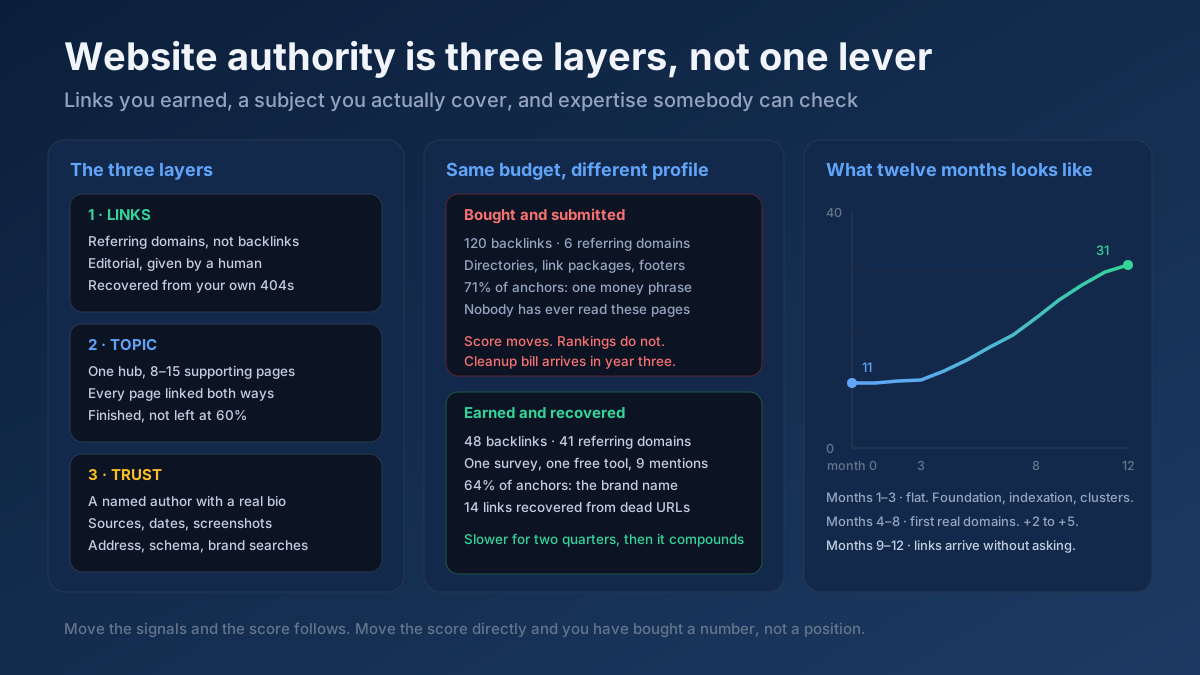
The durable way to improve your anchors from other sites is to earn links for content that people describe in their own words. The link building guide and the website authority guide both cover how to do that without scripting anyone’s anchor.
Step 9: Re-check, measure and make it a habit
After you have edited a batch of links, run the affected pages through the Anchor Text Optimizer again and confirm that the share of generic and empty anchors has fallen. Then give Google time. Internal link changes are picked up as the linking pages are recrawled, which on most sites takes anything from a few days to a few weeks.
Measure the result where it shows: in the Performance report in Search Console, filtered to the target page. Compare the four weeks before the change with a four-week period that starts two weeks after it, and look at average position and impressions for the queries your new anchors describe. The Search Console guide shows how to set up that comparison.
Finally, stop the problem from returning:
- Add one line to your publishing checklist: “No link says click here, here or read more.”
- Keep the anchor map from step 5 where every writer can find it.
- Check the Top linking text report once a quarter, and after any PR or outreach campaign.
- Re-audit templates whenever the design changes, since a new theme can reintroduce empty icon links in a single release.
Internal links vs. backlinks: the rules are not the same
Most confusion about anchor text comes from applying backlink caution to internal links, or internal link freedom to backlinks. Keep the two apart.
| Question | Internal links | Backlinks |
|---|---|---|
| Who chooses the words? | You do, every time | Mostly other people |
| Is exact match acceptable? | Yes, in moderation and mixed with variants | Only as a small, naturally occurring share |
| What should dominate? | Descriptive and partial-match phrases | Brand names, URLs and titles |
| Main risk | Generic anchors, and one anchor pointing at several pages | Repeated commercial keywords from low-quality sites |
| Is a branded anchor useful? | Rarely, except for links to the homepage | Yes, it is the healthiest anchor you can receive |
| How do you fix problems? | Edit the link | Ask the site owner, or leave it and build better links |
What does a natural anchor text distribution look like?
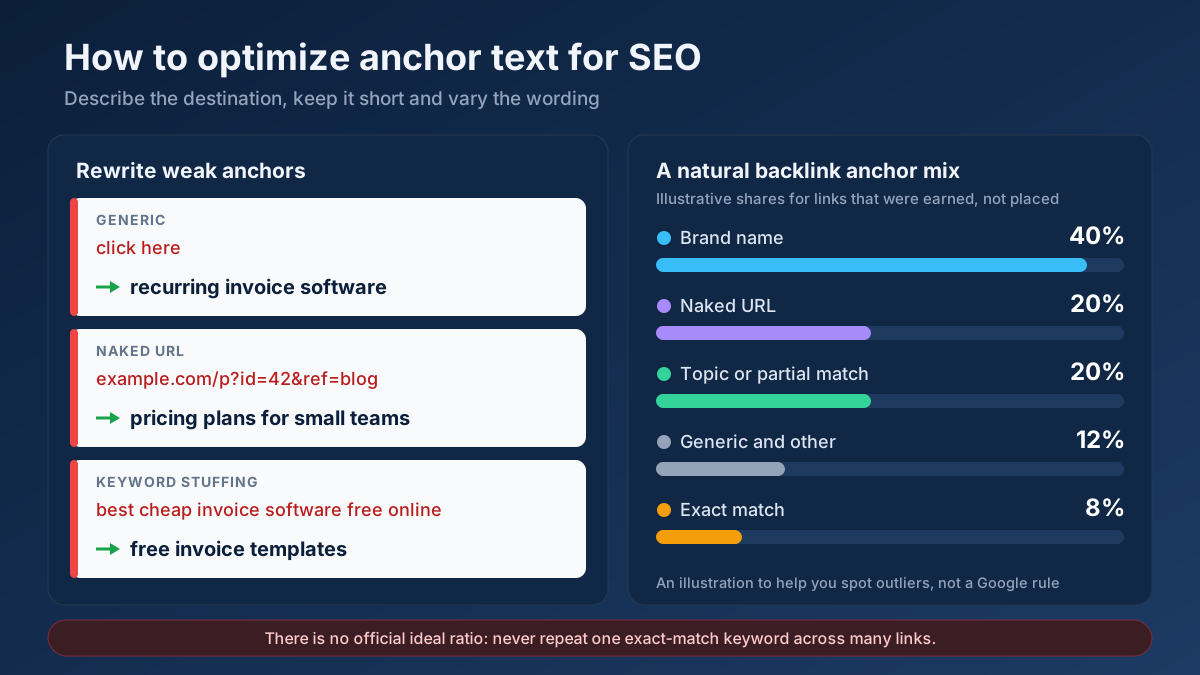
This is the question everyone asks, and it deserves a straight answer: Google has never published an ideal anchor text ratio, and anyone who quotes exact percentages as a rule is guessing. What we can describe is the shape that profiles tend to have when links are earned rather than placed. The ranges below are rules of thumb drawn from that shape. Treat them as a way to spot outliers, not as targets to hit.
| Anchor type | Typical share of backlinks | Worth a closer look when |
|---|---|---|
| Branded and brand plus keyword | About 30–50% | It is close to zero on a site that claims to be a known brand |
| Naked URL | About 15–25% | Almost never a concern |
| Partial match, related phrases and titles | About 15–25% | The phrases are all commercial and none are titles |
| Generic and miscellaneous | About 10–15% | Almost never a concern |
| Exact match | Under 10% | One commercial phrase is the single most common anchor |
Three caveats keep this table honest. First, the mix differs by page: a homepage attracts almost entirely branded anchors, while a well-known guide attracts its own title. Second, if your brand name contains your keyword, as it does for a company called Istanbul Plumbing, your branded and exact-match anchors are the same thing, and a high share is normal. Third, a young site with thirty backlinks has no meaningful distribution yet; one new link moves every percentage.
For internal links the picture is reversed. Aim for generic and empty anchors as close to zero as your design allows, with descriptive and partial-match phrases making up the bulk, and a modest number of exact-match anchors on each important page.
Before and after: rewriting weak anchors
These are the rewrites that come up most often in an audit. In each case the destination stays the same; only the linked words change.
| Before | Problem | After |
|---|---|---|
| For details, click here. | Generic | See the pricing plans for small teams. |
| We wrote about this in this post. | Generic | We covered this in our guide to writing late payment reminders. |
| Source: https://example.org/r?id=8841 | Unreadable URL | Source: 2025 small business payments survey |
| best cheap invoice software free online | Keyword stuffing | free invoice software for freelancers |
| Our recurring billing feature lets you set a schedule once and get paid automatically | Whole sentence linked | Our recurring billing feature lets you set a schedule once. |
Linked thumbnail with alt="" | Empty anchor | Linked thumbnail with alt="Monthly invoice template" |
A realistic example: one product page, 61 internal links
Here is a scenario built from the patterns we meet most often. An invoicing software company has about 420 indexable pages, including 260 blog posts. Its most important commercial page, the recurring invoices feature page, has sat between positions 11 and 14 for “recurring invoice software” for months. The page itself is solid: fast, well written, with a clear title. The backlink profile is modest but clean.
The internal link export tells a different story. Sixty-one internal links point to the page. Forty-four of them use “learn more”, “click here” or “see how”, because the blog template adds a call-to-action box with a fixed label. Nine use the bare word “invoices”. Only eight describe the feature. Worse, the phrase “recurring invoices” appears as an anchor fourteen times across the blog, and in six of those cases it links to an old blog post instead of the feature page.
The clean-up takes an afternoon:
- The call-to-action box is changed in the template so that its heading, which names the feature, becomes the link. That one edit replaces 31 generic anchors.
- The remaining 13 generic links and the nine one-word links are rewritten by hand using the six phrases from the anchor map.
- The six “recurring invoices” anchors that pointed to the old post are repointed to the feature page, and the old post gets its own phrase, “recurring invoice examples”.
- Twelve relevant blog posts that mentioned the topic without linking are given a contextual link.
The page now has 79 internal links, every one of them descriptive, spread across six phrasings. Over the following eight weeks the page settles between positions 6 and 8 for its main query, and it begins to appear for longer variations such as “send invoices automatically every month” that it had no impressions for before. Nothing else on the page changed. Results like this are not guaranteed, and a page with weak content will not be rescued by anchors alone, but when a good page is stuck just off the first page, its internal anchors are one of the first places to look.
Common anchor text mistakes
- Treating a ratio as a target. Editing links until a tool shows a particular percentage produces exactly the artificial pattern you were trying to avoid.
- Repeating one exact-match phrase everywhere. It is the oldest over-optimization signal there is, on your own site and off it.
- Stuffing several keywords into one anchor. Google’s own advice is that if it feels like you are forcing keywords into the anchor, it is probably too much.
- Using the same anchor for different pages. It splits the signal and invites cannibalization.
- Misleading anchors. An anchor that does not match the destination raises bounce rates and erodes trust.
- Forgetting image and icon links. Empty alt text means an empty anchor, repeated on every page that uses the template.
- Linking the whole sentence. Readers cannot tell what the link is about, and neither can a crawler.
- Asking other sites for keyword anchors. Ask for the link; let them choose the words.
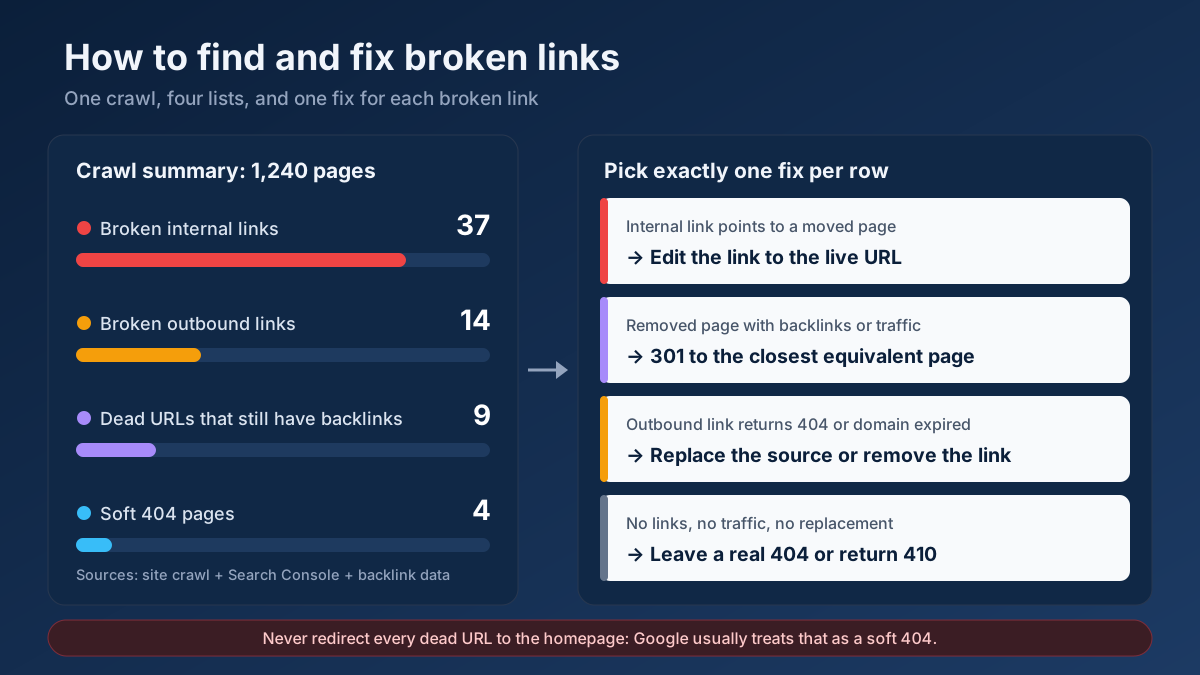
- Changing anchors on links that then break. Editing is a good moment to confirm the destination still exists. The guide on how to find and fix broken links covers that check.
Frequently asked questions
What is anchor text in SEO?
Anchor text is the visible, clickable text of a link. Search engines use it as a short description of the page being linked to, so it works as a relevance signal for the destination. Readers and screen reader users rely on it to decide whether to click. For linked images, the alt attribute serves as the anchor text.
How long should anchor text be?
Two to five words is right for most links: long enough to name the topic, short enough to stand out as a link. Google describes good anchor text as “reasonably concise”. Single words are usually too vague, and linking a full sentence hides which phrase matters. Linking a complete article title is a normal exception.
Is exact match anchor text bad for SEO?
No, not in itself. On internal links, some exact-match anchors are useful, because you are accurately describing your own page. The risk is in backlinks: when the same commercial keyword is repeated across many links from other sites, it looks like manipulation, and Google’s systems tend to discount those links. Use exact match sparingly and mix it with variations.
What is the ideal anchor text ratio?
There is no official ratio, and Google has never published one. Naturally earned backlink profiles are usually dominated by brand names and URLs, with exact-match keywords forming a small share, often under ten percent. Use those proportions to spot outliers in your own profile rather than as numbers to engineer.
Should I use the same anchor text for every internal link to a page?
No. Use a primary phrase for some links and four or five natural variations for the rest. Different phrasings describe the page more fully and match more search queries. The one thing to keep consistent is the destination: a given phrase should always point to the same page, never to two competing ones.
Does “click here” hurt SEO?
It does not trigger a penalty, but it wastes an opportunity. A generic anchor gives the linked page no relevance signal and gives screen reader users no information. A few generic links are normal. When most links to an important page are generic, rewriting them is one of the cheapest on-page improvements available.
Can I change the anchor text of backlinks I already have?
Only by asking the site that links to you, and it is rarely worth doing for a natural link. It is reasonable to request a change when your brand name is misspelled or when the anchor is misleading. Do not ask for a branded link to be swapped for a keyword; that turns a healthy link into a risky one.
How do I check the anchor text on my website?
For one page, use an anchor text checker that lists and classifies every link on it. For the whole site, export internal links from a crawl and group them by target URL. For backlinks, open the Links report in Google Search Console and review the Top linking text list, which shows the anchors Google has recorded.
Start with your ten most important pages
Anchor text optimization does not need a budget, a developer or anyone’s permission. It needs an hour with a spreadsheet and a willingness to rewrite a few dozen links. The method fits in one sentence: describe the destination in a few natural words, say it differently each time, reserve each phrase for one page, and leave the wording of other people’s links to them.
Do not try to fix the whole site at once. Pick the ten pages that matter most to your business, run each one through the Anchor Text Optimizer, and list the internal links that point to it with the Link Analyzer. Rewrite the generic ones, add links from related articles using the Internal Link Opportunity Finder, and check your backlink anchors with the Toxic Backlink Audit. When those ten pages are done, you will have an anchor map and a habit, and the rest of the site becomes routine. For the wider picture of how links fit into a page, continue with the on-page SEO guide.