⚡
Quick answer
The Anchor Text Optimizer analyzes every link on a page and grades how well its anchor text is written. Anchor text is the clickable words inside a link, and it doubles as a relevance signal for search engines and an accessibility cue for screen readers. The tool classifies each anchor as descriptive, generic, branded, naked URL, empty or image, charts the whole distribution, flags over-generic and textless links, and lists the exact anchors to rewrite. In short, it shows whether your links describe where they lead.
How it works
- Enter a page URL — the tool fetches the live HTML and reads the rendered markup.
- It collects every link on the page, capturing the anchor text, image alt attributes and destination for each one.
- Each anchor is classified into a type — descriptive, generic ("click here", "read more"), branded, naked URL, empty or image-only.
- The tool charts the distribution so you can see the mix at a glance and spot an over-reliance on any single type.
- It flags every generic and textless link, then lists the exact anchors to rewrite for better relevance and accessibility.
What it checks
- Descriptive anchors — links whose text clearly names the destination, the strongest relevance signal you can send.
- Generic anchors — vague phrases like "click here", "read more" or "this page" that carry no context.
- Branded and naked URLs — anchors that are your brand name or a raw pasted address rather than a real description.
- Empty and textless links — links with no visible text at all, which are invisible to search engines and screen readers.
- Image links — links wrapped around an image, where the alt attribute becomes the anchor and must be meaningful.
- Anchor distribution — the overall mix of types, charted so over-generic or over-optimized patterns stand out.
Why it matters
Anchor text tells both search engines and readers what sits on the other side of a link. Descriptive anchors pass topical relevance to the target page and set clear expectations before the click. Generic text like "click here" wastes that signal and, worse, strands screen-reader users who navigate by a list of links — a page of identical "read more" anchors is meaningless out of context. Empty or image links with no alt text are invisible entirely. Fixing anchors improves internal linking, accessibility and the relevance cues that help each page rank for the right terms.
How to improve your anchor text
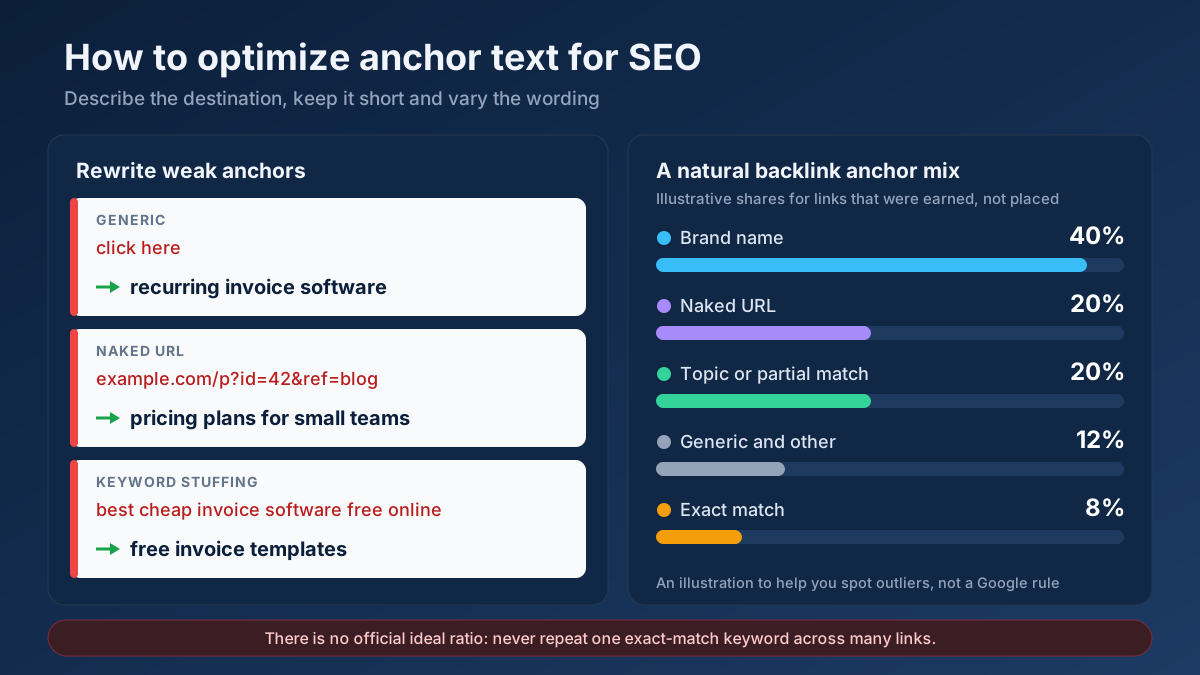
Rewrite every "click here" and "read more" into a short phrase that names the destination — "our pricing plans" beats "learn more" every time. Give textless and image links meaningful alt text or visible labels so they describe where they lead. Keep anchors concise and natural, and vary the exact wording rather than repeating one keyword across every link, which can look manipulative. Reserve naked URLs for citations, not navigation. Re-run the optimizer after editing to confirm your distribution now leans descriptive.
Frequently asked questions
What is the ideal anchor text mix?
Most internal links should be descriptive, naming the target page in a few natural words. A small share of branded or naked-URL anchors is fine, but generic and empty anchors should be near zero. The tool charts your actual distribution so you can see how far it drifts from a healthy, descriptive-led balance.
Why are "click here" links a problem?
Generic anchors pass no relevance signal to the linked page and confuse users who scan a page by its links, especially screen-reader users who hear anchors out of context. "Click here" tells neither a search engine nor a person what to expect, so the click becomes a gamble instead of an informed choice.
Does the tool check image and empty links?
Yes. It flags links that wrap an image and reads their alt attribute as the anchor, and it catches links with no visible text at all. Both are invisible to search engines and assistive technology, so the tool lists them among the exact anchors you should rewrite or label.