Why Ghost Users need this
Ghost does not create a redirect when you rename a slug or import posts from another platform. Every old address has to be written into redirects.yaml, uploaded under Settings → Labs, and the more complex moves need regex rules. A typo in a slug or a pattern that matches one character too little fails silently: the old link just ends on your 404 page, and you hear about it from a reader or from Search Console weeks later.
Ghost's own tutorial says to test redirects by visiting the URLs you redirected. A browser hides the details, though. It shows where you landed, not how many hops it took or whether a rule sat under the 302 key by mistake.
This checker sends the request for you and lists every hop with its status code and type: 301 permanent, 302 temporary, 307 or 308. It ends with the final status and three checks. It tests one URL per run and does not read your redirects.yaml file, so the job is to pick one or two real old URLs for each rule and run them.
Ghost Users specific guidance
Pick the URLs to test, not the rules
A regex rule cannot be tested as a rule here. Test the addresses it is meant to catch. For each line in redirects.yaml, take one real old URL from your previous sitemap, an old newsletter or a backlink report, and paste it as it is linked, including the host and the slash or the missing slash. For a pattern such as the WordPress /yyyy/mm/slug/ rule in Ghost's tutorial, test two posts from different years. Add one variant that people really use: the http:// form, the bare domain if your site runs on www, or the address without its final slash.
Tell your rule apart from Ghost's own hops
Read the Redirect Path from top to bottom and name each hop. A hop that only changes http to https or adds www comes from your host or DNS setup; Ghost's tutorial says those rules belong with your DNS provider, not in redirects.yaml. A hop that only adds a slash at the end is Ghost: it forces trailing slashes on its own. The hop that changes the path itself, /p/old-post to /old-post, is your rule. If that hop is missing and the chain ends on a 404, the rule did not match this address.
What a clean result looks like
Under Chain Checks you want Final status is 200 OK, Short redirect chain (≤2 hops) and Final URL uses HTTPS all passing, and the Final URL should be the post you meant: the tool cannot tell a right destination from a wrong one. Every hop should say 301 permanent unless you placed the rule under 302 on purpose, for a sale page or a short campaign. A Redirect hops count of 3 or 4 is usually the domain hops plus Ghost's slash hop. Write rule targets with the trailing slash and link to the https://www form you really use, then run the old URL again.
What this tool does not tell you
- One URL per run, no bulk list, and it does not read or validate your redirects.yaml. Testing every rule means one run per sample URL.
- It does not judge the destination. A rule that sends an old post to the wrong new one still ends on a clean 200; compare the Final URL yourself.
- It sees only what the server answers to HEAD requests, one hop at a time up to 10 hops. Meta-refresh and JavaScript redirects in a theme do not appear.
- It does not show which line of redirects.yaml fired, or whether Google has updated its index for the old URL. Search Console's URL Inspection covers that part.
Real examples
1. A Substack-style /p/ link that arrives in four hops
- Situation
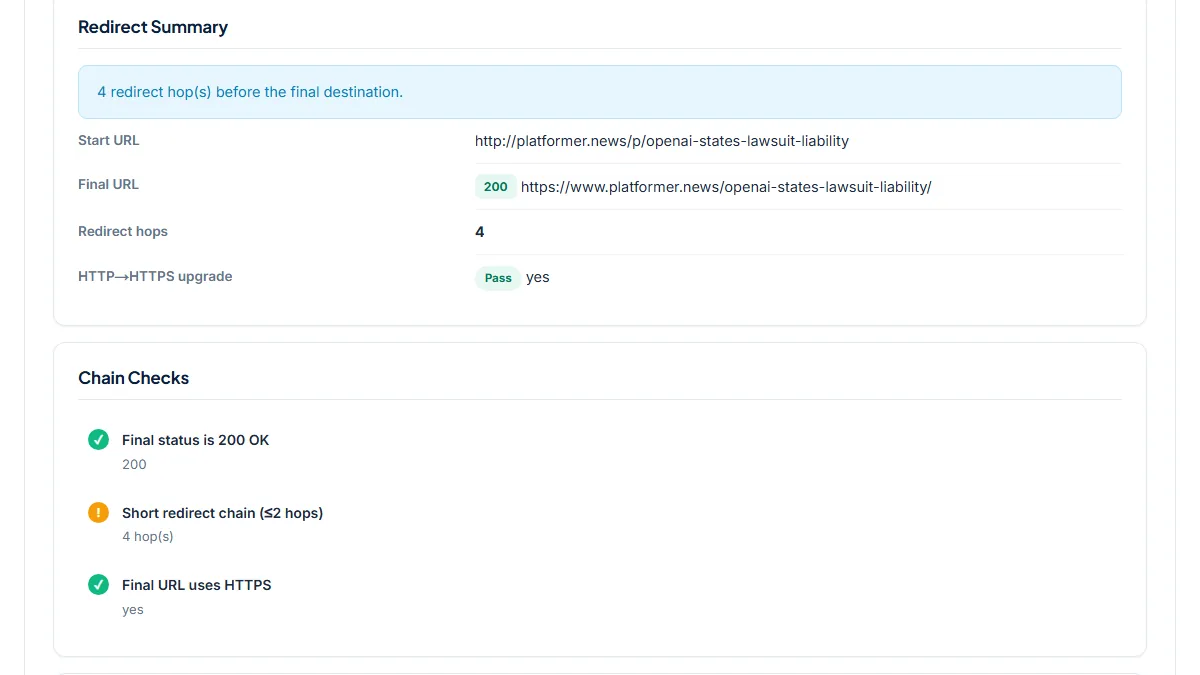
- A tech newsletter that runs on Ghost removes the /p/ that Substack-era links carry, the case Ghost's tutorial covers with a regex rule. We tested an old-style link to one of its posts, typed as http:// on the bare domain, on 8 November 2026.
- Input
http://platformer.news/p/openai-states-lawsuit-liability- Reading the result
- Final URL 200 on https://www.platformer.news/openai-states-lawsuit-liability/, after 4 hops, all 301 permanent: http to https, bare domain to www, /p/ removed (the rule), then Ghost adds the closing slash. Final status is 200 OK and Final URL uses HTTPS pass, Short redirect chain (≤2 hops) warns with 4 hop(s). The same path typed as https://www.platformer.news/p/... takes 2 hops and passes. Only one hop is the redirects.yaml rule; a target that already ends in a slash would remove the last one.
2. A 301 that is not your rule: one hop, then 404
- Situation
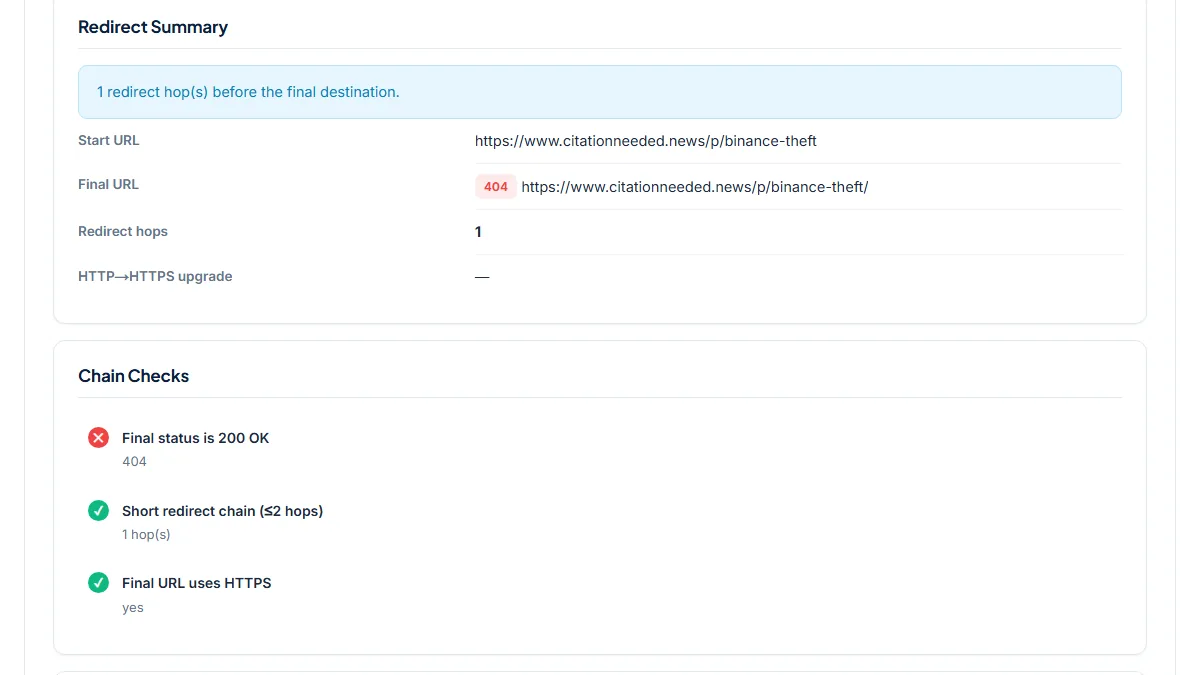
- To show what an unmatched old URL looks like, we tested a /p/ path on another Ghost publication that has no reason to keep a /p/ rule. Same day.
- Input
https://www.citationneeded.news/p/binance-theft- Reading the result
- Redirect hops 1: a 301 permanent to the same address with a slash added, then 404. Final status is 200 OK fails with 404; the other two checks pass. The live post sits at /binance-theft/, so the trap is the 301 in the Redirect Path: it is Ghost's trailing-slash redirect, not a rule. On your own site, "301 then 404" means the path never matched any line in redirects.yaml. Check the slug spelling and, in a regex rule, the slashes.
3. Capitals and a missing slash: two hops without any rule
- Situation
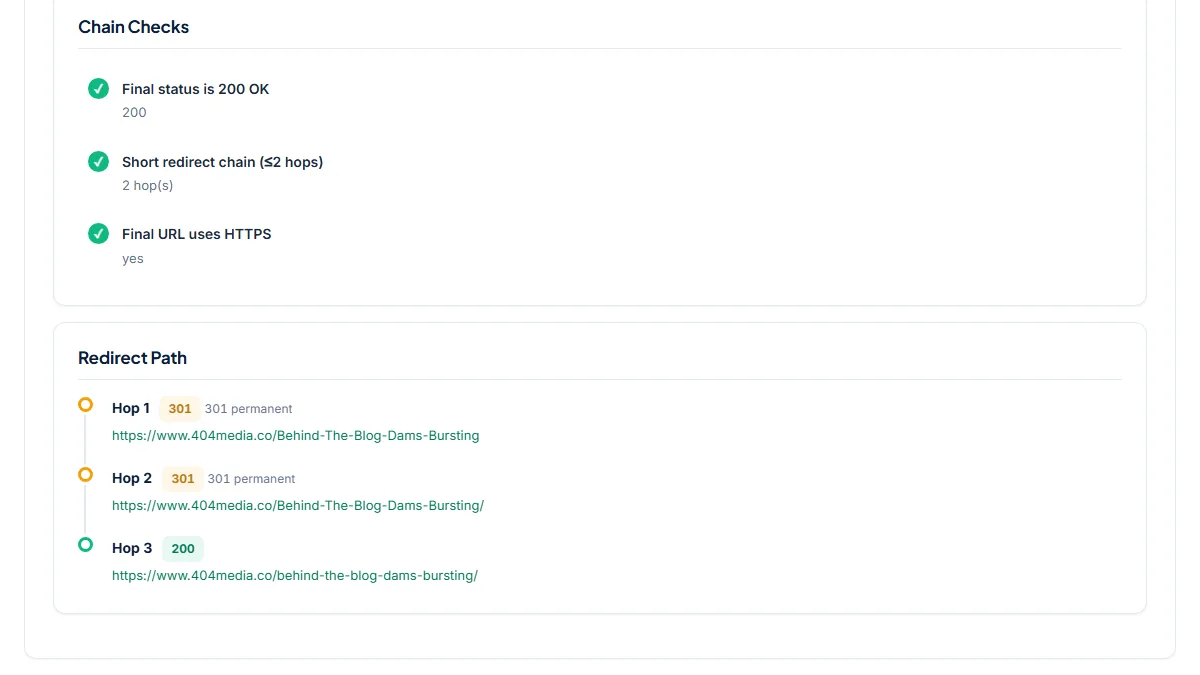
- Old links often keep the capitals a previous platform or an author typed. We tested a mixed-case post address on a third Ghost publication. Same day.
- Input
https://www.404media.co/Behind-The-Blog-Dams-Bursting- Reading the result
- 2 hops, both 301 permanent: first the slash is added, then the path is lowercased, ending on 200 at /behind-the-blog-dams-bursting/. All three Chain Checks pass. No redirects.yaml line was involved; the site fixes case and slash itself. Run variants like this before writing a rule for them: if they already end on a 200 within two hops, a new rule would only add risk.
Common mistakes
- Reading a 301 in the path as proof that your rule works. On Ghost the first hop is often the trailing-slash redirect; look for the hop that changes the path itself.
- Testing only the address with the slash. Old links from Substack, Medium or social posts often have none, and the two forms can take different paths through your rules and Ghost's slash redirect.
- Leaving a moved post under the 302 key. The hop then reads 302 temporary; Ghost's tutorial keeps permanent moves under 301.
- Uploading a redirects.yaml with only the new lines. Ghost keeps all redirects in that one file, and its tutorial notes that an empty file removes every redirect, so download the current file from Settings → Labs and add to it.
- Writing rules for www or https. Ghost's tutorial says those belong with your DNS provider; in redirects.yaml they only add hops.
Frequently asked questions
Can I upload my redirects.yaml file and test every rule at once?
No. The checker takes one URL per run and never sees the file. That is less of a limit than it sounds, because a regex rule can only be tested through the addresses it should catch. Pick one or two real old URLs per rule, run them, and keep a short list of the URLs and results. After the next upload you can run the same list again in a few minutes.
Does Ghost's 301 key give a permanent redirect and 302 a temporary one?
Yes. Ghost's tutorial describes redirects.yaml with two keys: rules under 301 are permanent redirects and rules under 302 are temporary. The checker labels each hop with what the server actually sent, 301 permanent or 302 temporary, so a rule filed under the wrong key shows up at once. For a renamed slug or a migrated post, the hop that changes the path should read 301 permanent.
The tool sends HEAD requests. Does Ghost answer them the same way as a browser?
On the three Ghost publications we tested on 8 November 2026, yes. For every URL we compared a HEAD request with a normal GET: the status code and the Location header were identical at each hop, including the 404 and the lowercase redirect. If your site sits behind a proxy or CDN with its own rules, a quick check in your browser of one result is still worthwhile.
Why does a URL with no redirect rule still show one or two 301 hops?
Because Ghost and your domain setup redirect on their own. Ghost forces trailing slashes, so /old-post becomes /old-post/ with a 301, and the site in our third example also lowercased capitals. An http:// or bare-domain address picks up hops from your host or DNS. None of these come from redirects.yaml, which is why the hop that changes the path is the one to look for.
Reference: Ghost's tutorial Implementing redirects in Ghost explains the redirects.yaml format, the 301 and 302 keys, the regex patterns for WordPress, Substack and Medium migrations, and which redirects not to put in the file.