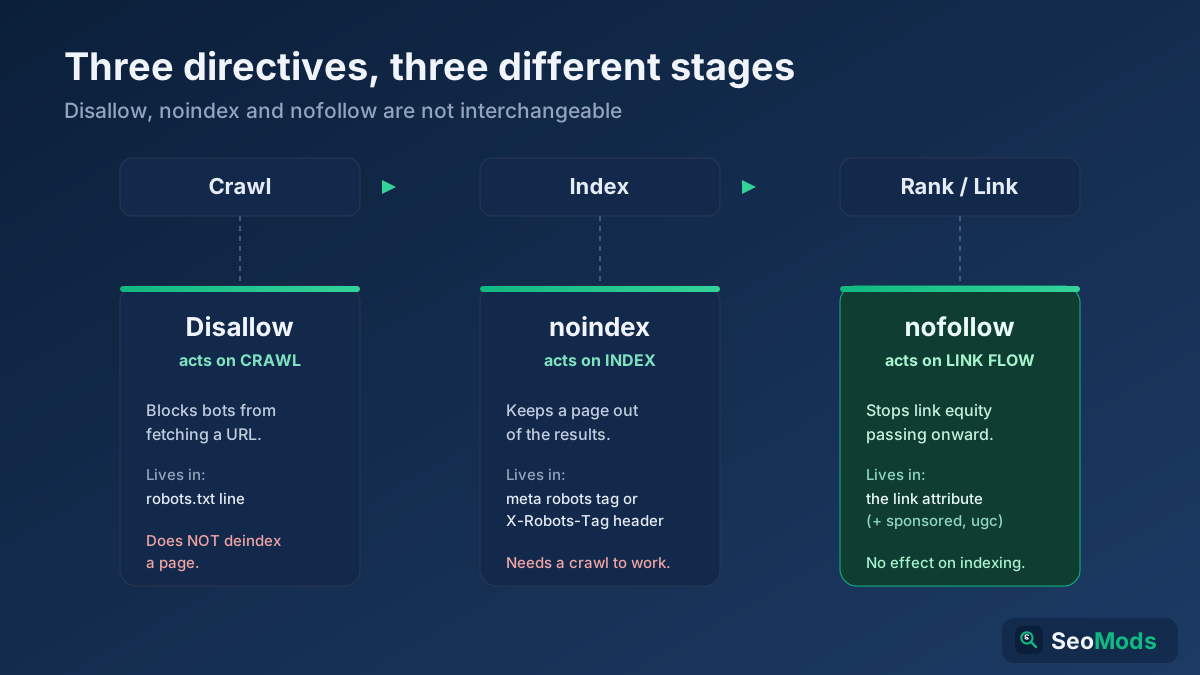
Short answer: Disallow in robots.txt controls crawling, noindex (a meta robots tag or X-Robots-Tag header) controls indexing, and rel="nofollow" controls whether link equity flows through a link. They act on three different stages, so they are not interchangeable — blocking a crawl is not the same as removing a page from Google, and neither one manages the PageRank a link passes.
Three stages, three different directives
Almost every mistake with these directives comes from treating them as synonyms. They are not. A search engine handles a URL in three separate stages, and each directive intervenes at exactly one of them:
- Crawling — can the bot fetch the page at all? Governed by robots.txt
Disallow. - Indexing — once fetched, may the page be stored and shown in results? Governed by
noindexin a<meta name="robots">tag or anX-Robots-TagHTTP header. - Link-equity flow — should the ranking signal (PageRank) pass along a specific link? Governed by the link attribute
rel="nofollow", plus its cousinssponsoredandugc.
Keep that pipeline in mind — crawl, then index, then rank — and the rest of this guide falls into place. The single most damaging error, covered below, is aiming a crawl-stage tool at an index-stage problem. If you want the full mechanics of the first file in that chain, our robots.txt guide is the companion to this piece.
Disallow: stops crawling, not indexing
Disallow lives on a line inside your robots.txt file, scoped to a User-agent block, for example Disallow: /cart/. It tells a compliant bot not to fetch the matching URLs. That is the whole of its job. Crucially, it does not tell Google to drop the page from its index. A URL that is blocked from crawling can still appear in search results if Google discovered it through external or internal links — it simply shows up with no snippet and often the label "No information is available for this page."
The correct use case for Disallow is controlling crawler access and budget: keeping bots out of infinite faceted-navigation spaces, search-results pages, admin paths, or endpoints you never want fetched. It is a bouncer at the door, not an eraser. On large sites this is a real crawl budget lever, but it is the wrong tool the moment your goal is "get this out of Google." Validate any rule you write with the Robots.txt Tester, because one stray wildcard can block far more than you intended, and generate clean rules from scratch with the Robots.txt Generator.
noindex: removes a page from the index
noindex is the directive that actually keeps a page out of search results. It says: you may crawl this page, but do not store it or show it. It lives in one of two places — a meta tag in the HTML <head> as <meta name="robots" content="noindex">, or an HTTP response header as X-Robots-Tag: noindex. The header version is the right choice for non-HTML files like PDFs, images or spreadsheets, where you cannot add a <head>.
The non-negotiable requirement is that Google must be able to crawl the page to see the noindex. The directive lives inside the response, so the bot has to fetch the response to read it. That single fact is the root of the classic trap in the next section. Use noindex for thank-you pages, internal search results, thin tag or archive pages, and staging content you want fully invisible. Confirm the tag is actually present and readable with the Meta Tag Analyzer, and sweep your whole site for pages that are noindexed by accident with the Technical Site Audit (Crawler).
nofollow, sponsored and ugc: link-equity control
The rel link attributes operate on an entirely different axis: they say nothing about crawling or indexing the current page. They describe your relationship to the page you are linking to. rel="nofollow" tells Google not to pass ranking credit through that link and not to treat it as an editorial endorsement. Since 2019 Google reads it as a hint rather than a strict command, and added two more specific values:
rel="sponsored"— for paid or advertising links, including affiliate URLs. This is the correct label for anything you were compensated for.rel="ugc"— for user-generated content such as blog comments and forum posts, where you cannot vouch for every link.rel="nofollow"— the general-purpose "I do not endorse this" value, still fine when the others do not fit.
None of these remove the target page from Google, and none stop your own page from being crawled or indexed. They only shape how trust and PageRank flow outward. Use them on paid placements, affiliate links, untrusted user submissions and low-confidence references — and remember that internal "nofollow sculpting" to hoard PageRank has not worked for well over a decade.
The classic trap: Disallow when you meant noindex
This is the mistake that fills Search Console with "Indexed, though blocked by robots.txt" warnings. Someone wants a page gone from Google, so they add Disallow: /that-page/ to robots.txt. It feels decisive, but it backfires. Here is the chain of events:
- You put a
noindextag on the page and block it withDisallow— or you skip the tag entirely and rely on the block. - Because the URL is disallowed, Google never fetches it, so it never sees any
noindexinstruction inside. - External or internal links still point at the URL, so Google knows it exists.
- Google indexes the bare URL from those links — a snippetless result that stubbornly stays in search.
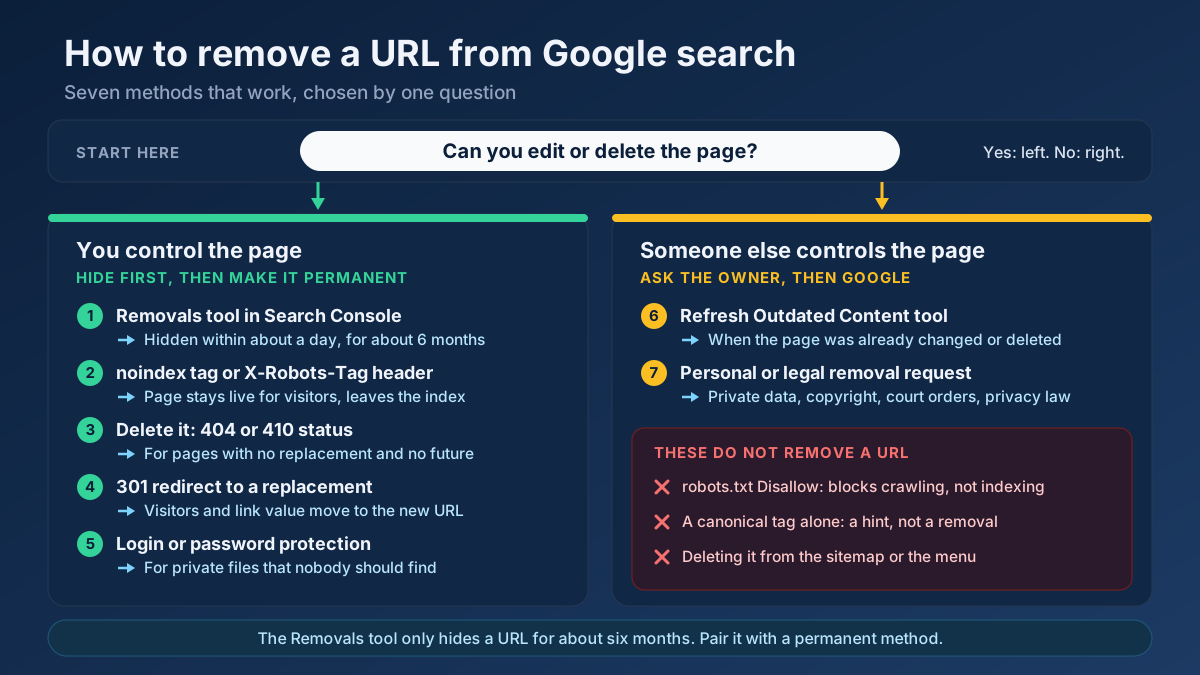
The fix is to invert your instinct. To remove a page, allow crawling and add noindex. Let Google fetch the page, read the tag, and drop it. Only after it has fallen out of the index — weeks later — is it safe to add a Disallow if you also want to save crawl budget. Reach for Disallow when the goal is "never fetch this," and noindex when the goal is "never show this." They are not backups for each other; used together on the same URL they actively cancel out. If the page has to disappear today, not in a few weeks, the step-by-step guide on how to remove a URL from Google search covers the temporary Removals tool and the other permanent methods.
Decision table: goal to directive
When you are unsure which lever to pull, start from the outcome you want and work back to the directive:
| Your goal | Use this | Where it lives |
|---|---|---|
| Keep a page out of Google’s results | noindex | <meta name="robots"> or X-Robots-Tag |
| Stop bots fetching a section (save crawl budget) | Disallow | robots.txt line |
| Hide a non-HTML file (PDF) from search | noindex | X-Robots-Tag HTTP header |
| Not pass ranking credit through a link | rel="nofollow" | the <a> link attribute |
| Mark a paid or affiliate link | rel="sponsored" | the <a> link attribute |
| Mark a user-submitted link | rel="ugc" | the <a> link attribute |
| Point search engines to the preferred version of duplicate URLs | canonical tag | <link rel="canonical"> |
Notice the last row: when the real problem is duplicate or parameter-laden URLs rather than unwanted pages, the right answer is often a canonical, not any of these three. Our canonical tags guide covers exactly when to reach for it instead.
Combining directives correctly
The directives compose cleanly as long as you respect the pipeline. Safe, common combinations include:
noindex+follow— keep a page out of results but let its outbound links still pass equity. Good for paginated pages you do not want indexed but whose links matter.noindexwith crawling allowed — the standard, correct way to deindex any page. Never pair it with aDisallowon the same URL.Disallowalone, on a section that is already deindexed — fine once the pages have dropped out, purely to conserve crawl budget.
The one combination to avoid is noindex plus Disallow on the same live URL, because the block hides the tag. If a page is already indexed and you want it gone, crawl-allow first, deindex, then block later if needed. Run an On-Page SEO Checker (Keyword) on important templates to confirm the meta robots and canonical directives you think are set are the ones actually shipping.
Real scenarios and the right call
Here is how the theory maps onto the situations you actually meet:
- Staging or dev site. Use HTTP authentication or a site-wide
X-Robots-Tag: noindex— never rely onDisallowalone, because a linked staging URL can still get indexed as a bare link. - Thank-you and checkout-confirmation pages.
noindexthem. They are useless in search and can leak conversion paths; you still want them crawlable so the tag is seen. - Tag, author and thin archive pages. If they add no unique value,
noindex, followso they leave the index while still passing internal links through to your posts. - PDFs and downloads. You cannot add a meta tag, so use the
X-Robots-Tag: noindexHTTP header when a document should not rank. - Faceted or filtered URLs. If they create endless crawl traps,
Disallowthe parameter patterns to protect crawl budget; if a few specific facets are indexable duplicates, prefer a canonical instead. - Paid and affiliate links. Tag them
rel="sponsored"(ornofollow). Failing to do so on monetized links is a link-scheme risk, not just an oversight.
Notice that the same word — "hide this" — resolves to different directives depending on whether the real goal is fetch control, index control or link control. That is the whole discipline in one sentence, and it pairs naturally with a well-structured XML sitemap that only advertises the URLs you genuinely want indexed.
Applying this to your own site? See the tools picked by audience: SEO Tools for Affiliate Marketers and SEO Tools for E-commerce Managers.
Frequently asked questions
Does Disallow remove a page from Google?
No. Disallow only stops the page from being crawled. If Google already knows the URL from links, it can keep it indexed as a snippetless result. To remove a page you must allow crawling and serve a noindex tag or X-Robots-Tag header, so the bot can actually read the removal instruction.
Can I use noindex and Disallow together?
Not on the same URL, and not at the same time. The Disallow blocks the crawl, which means Google never fetches the page and never sees the noindex. Allow crawling until the page has dropped out of the index; only then, if you still want to save crawl budget, add a Disallow.
Does nofollow stop a page from being indexed?
No. rel="nofollow" is a link attribute that governs whether ranking credit passes through a specific link. It has no effect on whether the linking page or the linked page is crawled or indexed. To control indexing you need noindex; to control crawling you need Disallow.
What is the difference between nofollow, sponsored and ugc?
All three tell Google not to pass full ranking credit through a link, but they add context. sponsored marks paid or affiliate links, ugc marks user-generated links like comments, and nofollow is the general "no endorsement" value. Use the most specific one that fits; Google treats them all as hints.
How do I noindex a PDF or image?
Non-HTML files have no <head> for a meta tag, so use the X-Robots-Tag: noindex HTTP response header, configured in your server or CDN for those file types. Make sure the file is still crawlable so the header can be read, then verify it is dropping out with the Technical Site Audit (Crawler).
Which directive should I use for a staging site?
Protect it with HTTP authentication, or apply a site-wide X-Robots-Tag: noindex. Do not rely on Disallow alone: a single external link to a staging URL can get it indexed as a bare, snippetless result precisely because the block prevents Google from seeing any noindex instruction.