A canonical tag (rel="canonical") is a small piece of HTML that tells search engines which version of a page is the original, or 'master', when several similar or duplicate URLs exist. It is one of the most important tools for managing duplicate content — and one of the most commonly misconfigured. Getting canonicals right consolidates your ranking signals onto a single strong page instead of splitting them across copies.
Why duplicate content is a problem
Duplicate or near-duplicate URLs are surprisingly common. Tracking parameters (?utm_source=...), print versions, session IDs, pagination, HTTP and HTTPS variants, and www versus non-www can all produce multiple URLs that serve essentially the same content. When that happens, Google has to guess which one to rank, and your links and authority get diluted across the duplicates. A canonical tag removes the guesswork.
How the canonical tag works
You place a canonical tag in the <head> of a page pointing to the preferred URL. Every page should normally include a self-referencing canonical pointing to its own clean URL, while duplicate variants point to the master version. This tells Google: 'index this one, and consolidate any signals from the variants here'. It is a strong hint rather than an absolute directive, but Google follows correctly-implemented canonicals the vast majority of the time.
Common ways to use canonicals
- Self-referencing canonicals — the default best practice; every page points to itself.
- Parameter URLs — point filtered, sorted or tracked URLs back to the clean version.
- Cross-domain canonicals — if you syndicate content, the republishing site can canonicalize to your original.
- Similar product pages — consolidate near-identical variants where appropriate.
Canonical mistakes to avoid
Canonicals are powerful, which makes errors costly:
- Canonicalizing everything to the homepage. A classic bug that tells Google to ignore all your other pages.
- Mixing canonical and noindex. Sending conflicting signals confuses crawlers — pick one intent per page.
- Canonicalizing across languages. Each language version should canonicalize to itself; use hreflang for the relationships. See our international SEO guide.
- Pointing to a redirected or broken URL. Always canonicalize to a live, indexable page.
How to check your canonicals
Verify the canonical tag on any page with the Meta Tag Analyzer, which shows the declared canonical alongside the other head tags. Review related markup with the Structured Data (Schema) Checker and crawl your whole site with the Technical Site Audit (Crawler) to catch pages that canonicalize incorrectly or inconsistently. Google Search Console also reports the canonical it actually selected, which can differ from your declared one if signals conflict.
Frequently asked questions
Is a canonical tag the same as a 301 redirect?
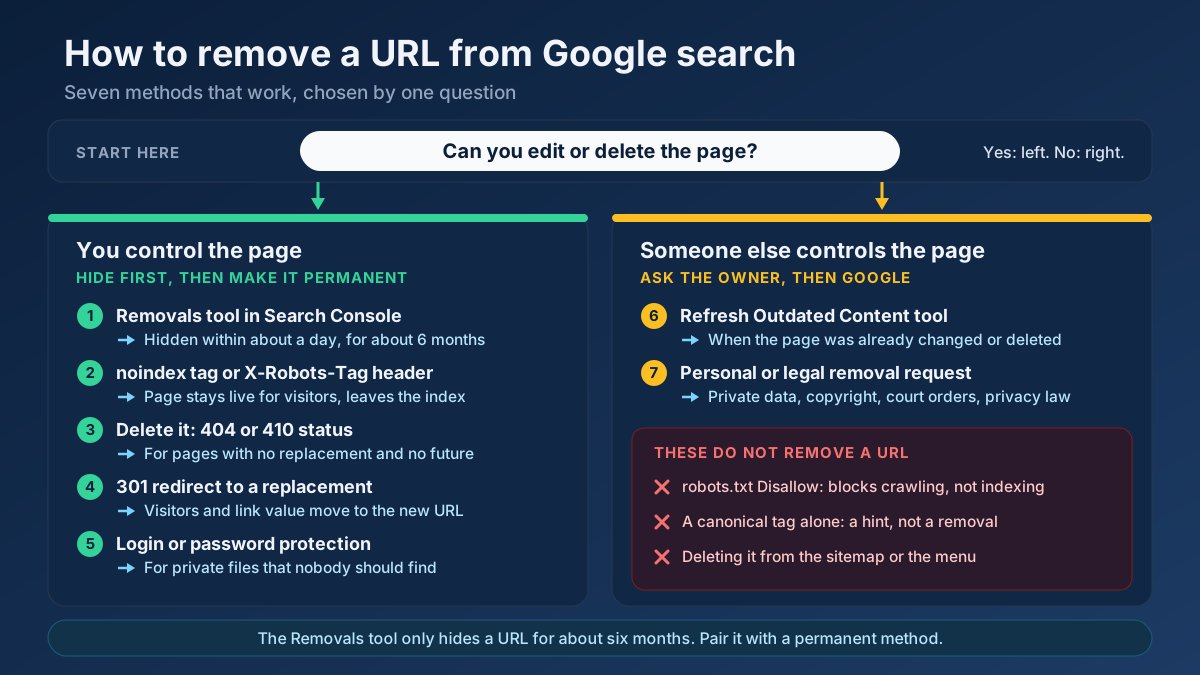
No. A 301 redirect sends users and crawlers to a different URL, so the original is no longer accessible. A canonical keeps both URLs live but tells Google which to index. Use a redirect when a page has genuinely moved; use a canonical when duplicates must coexist.
Does Google always obey the canonical?
It is a strong hint, not a command. Google usually respects a clear, consistent canonical, but if your internal links, sitemaps and signals point elsewhere, it may choose a different canonical. Keep all your signals aligned for best results.
Should every page have a canonical tag?
Yes — a self-referencing canonical on every page is a safe best practice. It prevents accidental duplication from parameters and makes your intent explicit.
Applying this to your own site? See the tools picked by audience: SEO Tools for E-commerce Managers and SEO Tools for WordPress Site Owners.
Conclusion
Canonical tags keep duplicate content from diluting your rankings by pointing Google to the master version of each page. Use self-referencing canonicals everywhere, point variants to the original, never canonicalize across languages or to the homepage, and verify with the Meta Tag Analyzer. Make canonicals a standard part of your technical SEO audit.