How to Write Blog Posts That Rank on Google
How to write blog posts that rank: pick a winnable question, build the outline from the SERP, answer in the first 100 words, and update before it decays.
Read article →Classify a whole keyword list by search intent in one pass. Labels each keyword Informational, Commercial, Transactional or Navigational, maps it to a funnel stage (ToFu/MoFu/BoFu) and the best content type, and charts the intent distribution — perfect for prioritizing a content calendar.
Fetching live data…
The Keyword Intent Classifier reads a whole keyword list and labels every term by search intent in one pass. It tags each keyword as Informational, Commercial, Transactional or Navigational, maps it to a funnel stage — ToFu, MoFu or BoFu — and suggests the content type that best serves that intent. It then charts the overall intent distribution so you can see the shape of your list at a glance. In short, it turns a raw keyword dump into a prioritized, intent-aware content plan.
Search intent is the single strongest signal Google uses to decide which page ranks. If a keyword is transactional but you publish a long explainer, the content type mismatches the query and the page struggles no matter how good it is. Classifying intent first tells you whether each term wants a guide, a comparison, or a buy-now page, and where it sits in the funnel. Skip this step and you burn budget writing the wrong format for terms that will never convert — or never rank in the first place.
Start by sorting the list by intent and funnel stage. Use Transactional and BoFu terms to prioritize product, pricing and service pages that capture ready-to-buy demand first. Route Commercial and MoFu keywords into comparisons, reviews and case studies, and cover Informational, ToFu terms with guides and explainers that build topical authority. Point Navigational queries at the right brand or landing pages. Then read the distribution chart to spot missing funnel stages and balance your content calendar around real demand instead of guesswork.
The four types are Informational (seeking knowledge or answers), Commercial (researching and comparing options before buying), Transactional (ready to buy or take an action) and Navigational (looking for a specific brand, site or page). Each type maps to a different content format and a different stage of the buyer journey.
Informational keywords usually sit at the top of the funnel (ToFu) where people are learning. Commercial keywords fall in the middle (MoFu) as they compare options. Transactional keywords are bottom of the funnel (BoFu) where a purchase happens. Navigational terms can appear anywhere but often signal existing brand awareness.
You can paste a full list and classify it in a single pass rather than checking terms one by one. Add one keyword per line — from a short seed list to a large export — and the tool labels every term, maps its funnel stage and charts the distribution together.
Guides, tips and tutorials hand-picked for this tool — go from running a check to actually fixing it.
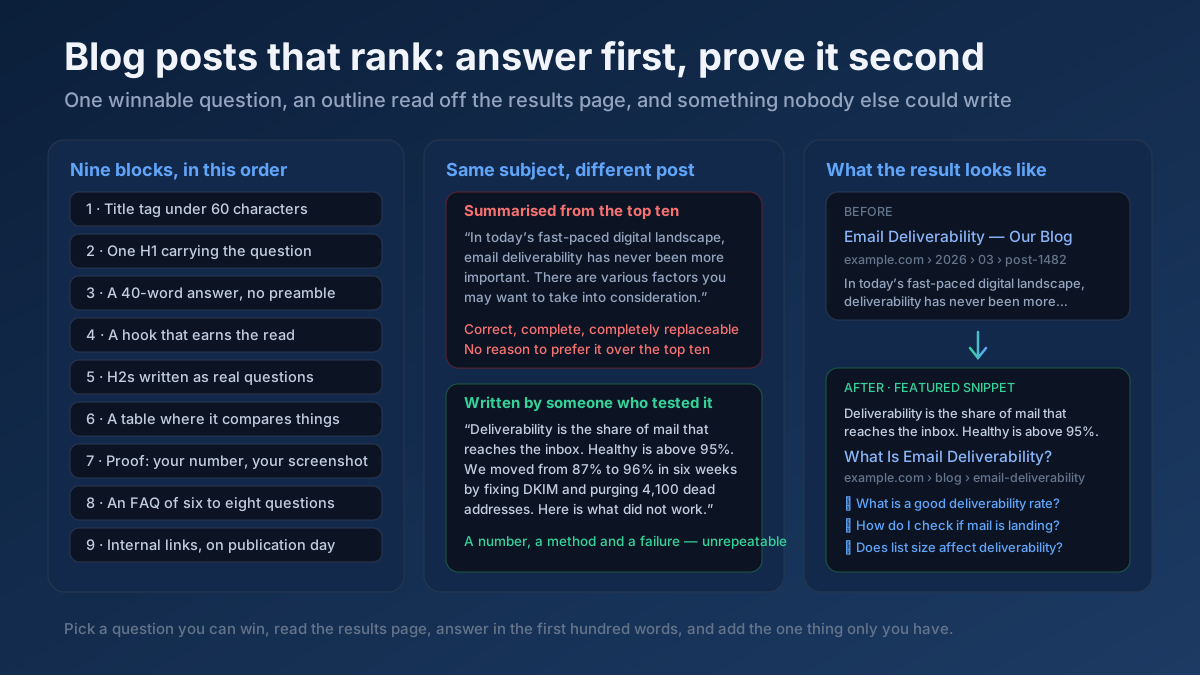 Content
How to write blog posts that rank: pick a winnable question, build the outline from the SERP, answer in the first 100 words, and update before it decays.
Read article →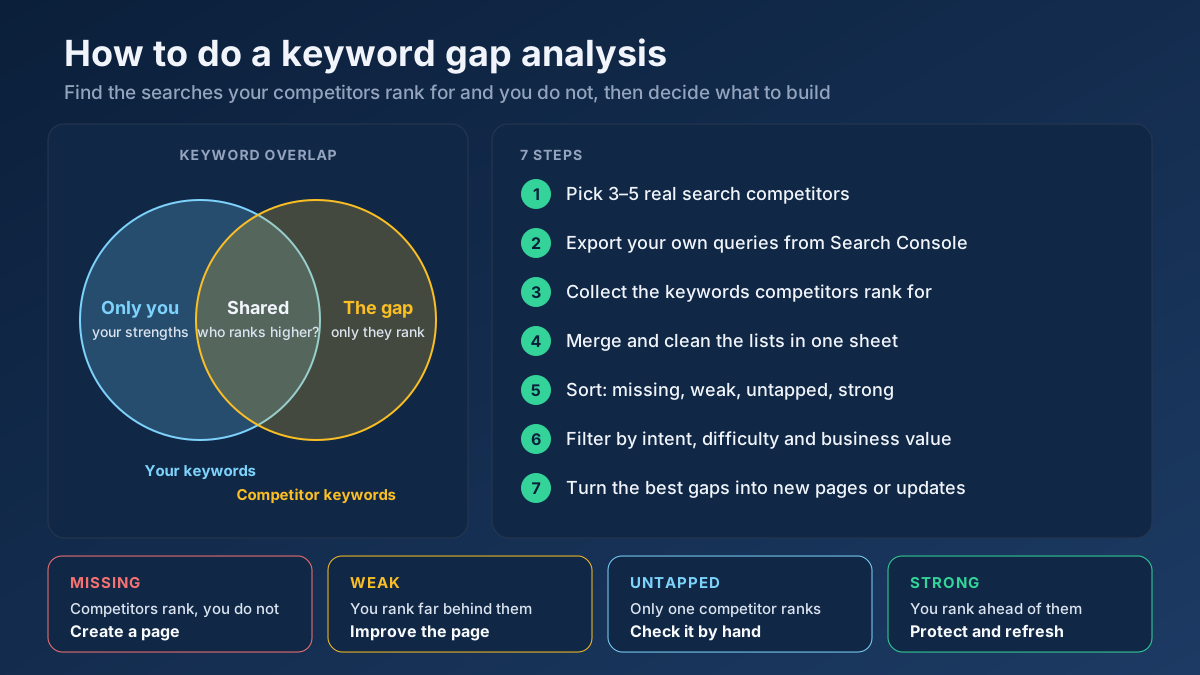 Keyword Research
Learn how to do a keyword gap analysis in 7 steps: find the keywords competitors rank for and you don’t, sort the gaps, then turn them into a content plan.
Read article →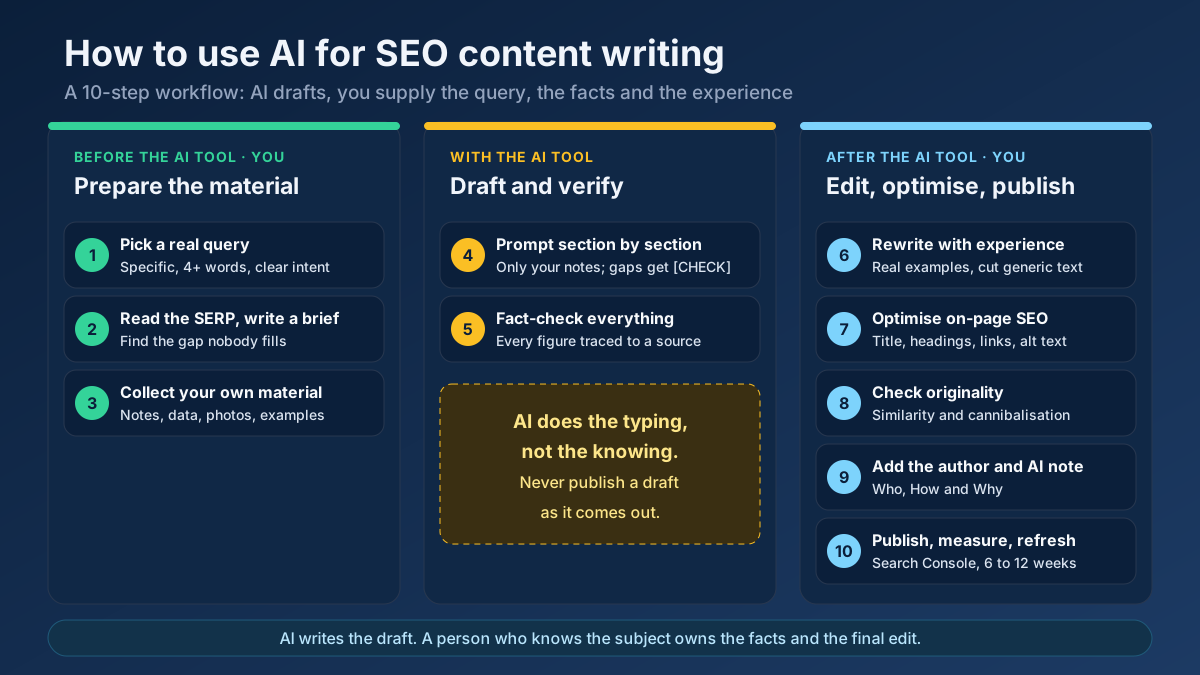 Content
Learn how to use AI for SEO content writing without risking a penalty: a 10-step workflow for briefs, drafts, fact-checks, editing and E-E-A-T signals.
Read article →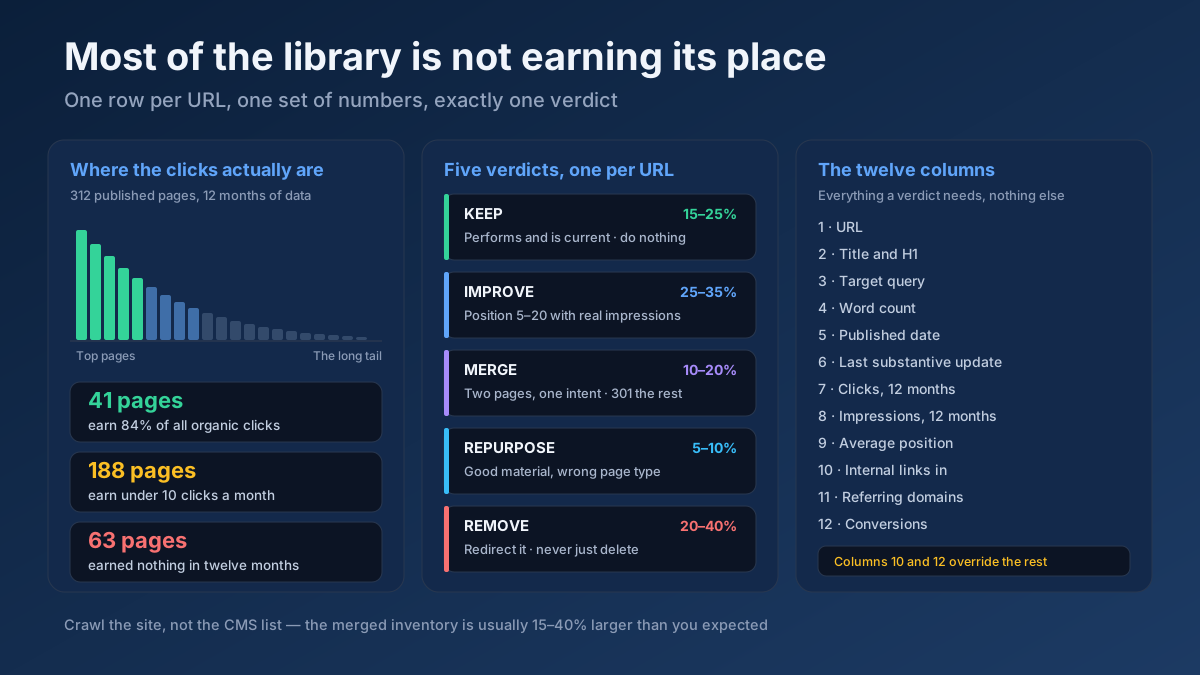 Content
How to do a content audit for SEO in 10 steps: inventory every URL, attach 12 months of data, then decide what to keep, improve, merge, repurpose or remove.
Read article →When multiple pages target the same keyword, they compete with each other and dilute rankings. Here is the fix.
Read article →Updating old content is often the highest-ROI SEO task. Here is a simple refresh workflow.
Read article →Turn one seed into hundreds of scored keyword ideas. Pulls live Google, YouTube, Bing and DuckDuckGo autocomplete, scores every phrase for demand, difficulty and opportunity, labels intent and funnel stage, groups everything into pillar-and-spoke topic clusters and adds a real 13-month interest trend from Wikipedia.
Open tool →Get instant keyword ideas straight from Google Autocomplete with A-Z & question modifiers.
Open tool →Turn one seed into clustered content ideas: questions, comparisons, prepositions — perfect for content calendars.
Open tool →Classify any keyword as Informational, Navigational, Commercial or Transactional using real signal patterns.
Open tool →Turn one seed keyword into semantic clusters ready for content planning. Expands your seed with real Google Autocomplete queries, groups them into topic clusters by shared terms, labels each cluster’s search intent and charts the distribution — so you can build a hub-and-spoke content architecture.
Open tool →Understand what a searcher really wants. Analyzes a query’s primary and secondary intent, maps it to a funnel stage, recommends the content type and the SERP features it’s likely to trigger, and shows real related queries with their own intent — so your page matches what Google rewards.
Open tool →Your site may have a critical PHP vulnerability
PHP2Shell (CVE-2026-109618 and CVE-2026-109619) lets attackers run code on servers running PHP older than 8.2.35, 8.3.36, 8.4.27 or 8.5.12, without logging in. Attacks have been seen since 17 October. Check whether your site is affected.