Long-Tail Keywords: Why They Convert Better
Long, specific phrases are easier to rank for and bring higher-intent traffic. Here is how to find and use them.
Read article →Classify any keyword as Informational, Navigational, Commercial or Transactional using real signal patterns.
Fetching live data…
The Search Intent Analysis tool classifies any keyword by the goal behind the search — informational, navigational, commercial or transactional. It reads real signal patterns in the phrase, such as question words, brand names, comparison terms and buying language, then tells you which intent dominates and why. Knowing intent before you write means you build the right page type, every time. It is free, instant and needs no signup.
buy running shoes online).Analyze best wireless headphones under 100 and the tool flags it as commercial — driven by best and under 100 — signaling a comparison or buying-guide page rather than a definition article.
Yes — completely free with no signup and no limits. Classify as many keywords as you like.
It is based on proven linguistic signal patterns, which match real intent for the large majority of queries. For ambiguous terms, confirm by checking what currently ranks in a real search.
Generate ideas with the Keyword Research tool, classify them here, then group the rest with the Topic Research & Content Ideas tool. Learn the categories in our search intent guide.
Guides, tips and tutorials hand-picked for this tool — go from running a check to actually fixing it.
Long, specific phrases are easier to rank for and bring higher-intent traffic. Here is how to find and use them.
Read article →Ranking starts with matching what the searcher actually wants. Here are the four intent types and how to satisfy each.
Read article →A practical, no-budget keyword research workflow: find ideas, understand intent, and group keywords into clusters that rank.
Read article →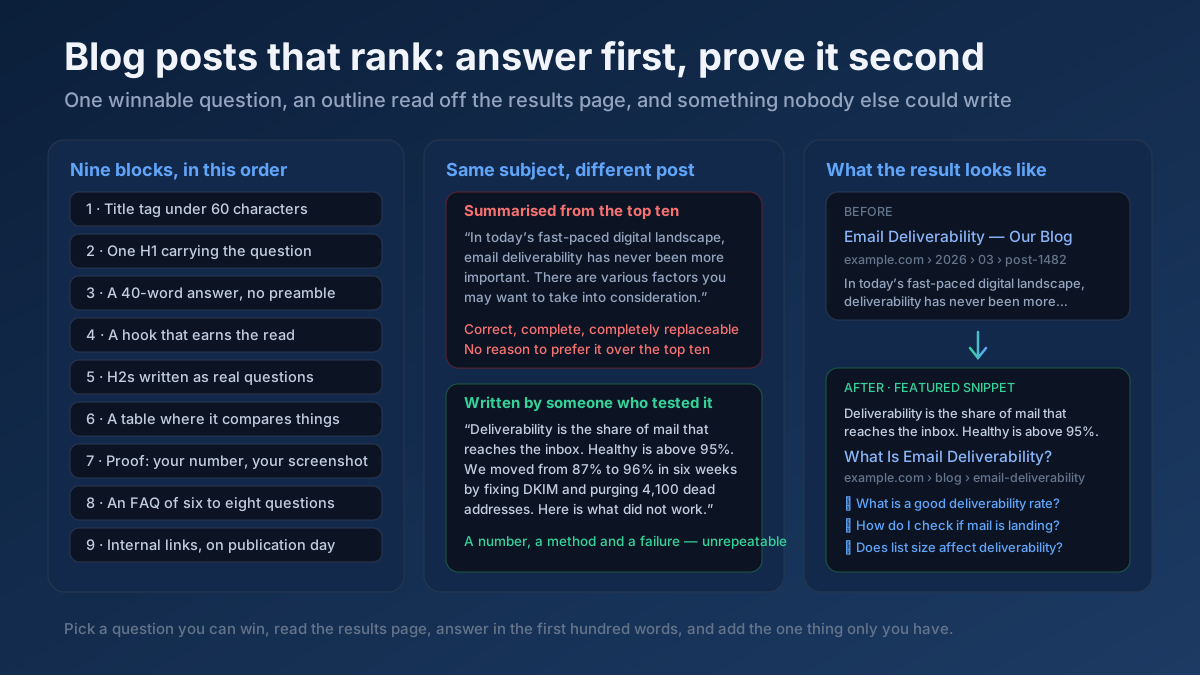 Content
How to write blog posts that rank: pick a winnable question, build the outline from the SERP, answer in the first 100 words, and update before it decays.
Read article →When multiple pages target the same keyword, they compete with each other and dilute rankings. Here is the fix.
Read article →Updating old content is often the highest-ROI SEO task. Here is a simple refresh workflow.
Read article →Turn one seed into hundreds of scored keyword ideas. Pulls live Google, YouTube, Bing and DuckDuckGo autocomplete, scores every phrase for demand, difficulty and opportunity, labels intent and funnel stage, groups everything into pillar-and-spoke topic clusters and adds a real 13-month interest trend from Wikipedia.
Open tool →Get instant keyword ideas straight from Google Autocomplete with A-Z & question modifiers.
Open tool →Turn one seed into clustered content ideas: questions, comparisons, prepositions — perfect for content calendars.
Open tool →Turn one seed keyword into semantic clusters ready for content planning. Expands your seed with real Google Autocomplete queries, groups them into topic clusters by shared terms, labels each cluster’s search intent and charts the distribution — so you can build a hub-and-spoke content architecture.
Open tool →Classify a whole keyword list by search intent in one pass. Labels each keyword Informational, Commercial, Transactional or Navigational, maps it to a funnel stage (ToFu/MoFu/BoFu) and the best content type, and charts the intent distribution — perfect for prioritizing a content calendar.
Open tool →Understand what a searcher really wants. Analyzes a query’s primary and secondary intent, maps it to a funnel stage, recommends the content type and the SERP features it’s likely to trigger, and shows real related queries with their own intent — so your page matches what Google rewards.
Open tool →Your site may have a critical PHP vulnerability
PHP2Shell (CVE-2026-109618 and CVE-2026-109619) lets attackers run code on servers running PHP older than 8.2.35, 8.3.36, 8.4.27 or 8.5.12, without logging in. Attacks have been seen since 17 October. Check whether your site is affected.