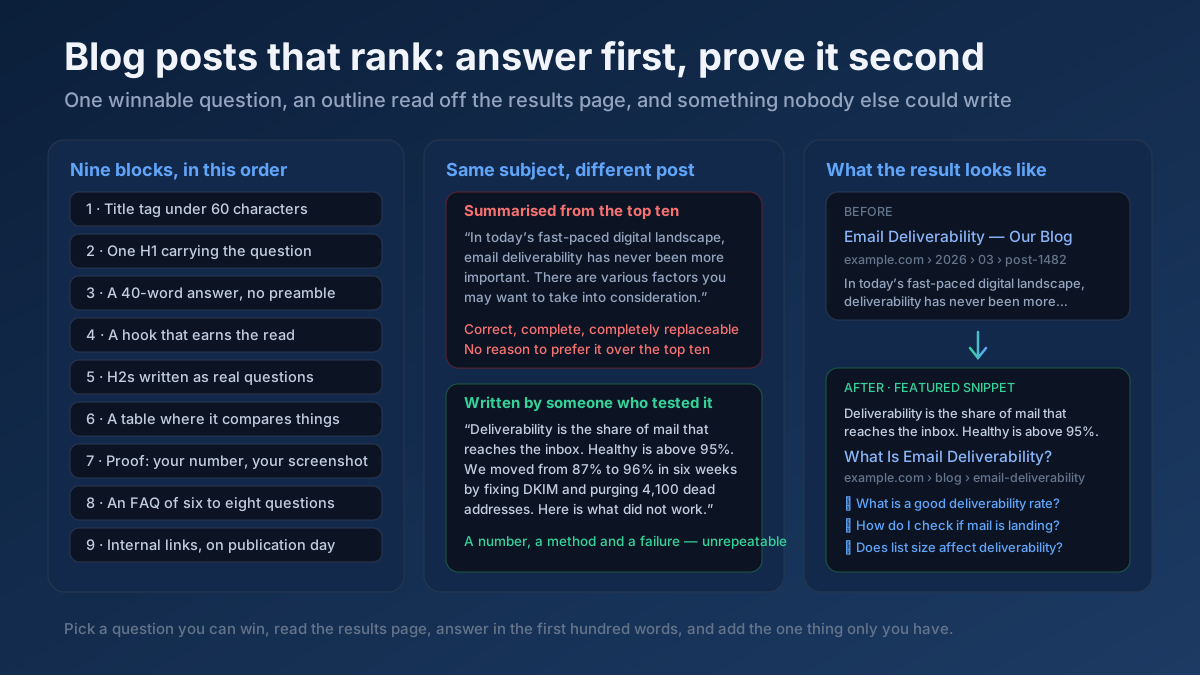
Short answer: A blog post ranks when it answers one specific question better than the pages already answering it — a question you picked because you could realistically win it, an outline built from the live search results rather than from your own head, a direct answer inside the first hundred words, and at least one thing on the page that only you could have written.
Everything else — word count, keyword density, publishing frequency, the plugin that scores your post green — is downstream of those four decisions. This guide walks through the whole process in the order you actually do it: choosing the topic, reading the results page, building the outline, writing the opening, structuring the body, adding proof, handling the on-page mechanics, linking it in, and updating it before it decays.
Why most blog posts never rank
Ahrefs’ frequently cited analysis of roughly a billion pages put the share receiving no organic traffic from Google at around 96%. That number gets quoted as if search were a lottery. It is not. Posts fail for a small number of repeatable reasons, and all of them are decisions made before the first sentence was written.
The topic was never winnable. A new blog with forty referring domains publishes “digital marketing” and waits. The first page for that query is occupied by domains with six-figure link profiles and a decade of topical history. The post was not badly written; it was aimed at a target the site could not reach. Nothing about the writing could have fixed that.
The post answers a different question from the one being asked. Somebody searches “how much protein in an egg” and lands on a 2,000-word essay about the history of poultry farming that eventually mentions six grams in paragraph nineteen. The information is there. The answer is not, because an answer is information placed where the reader can find it in four seconds.
It is the same post as the other nine. The writer read the top results, summarised them, reordered the headings and published. That produces a page that is technically about the right subject and gives a search engine no reason whatever to prefer it. If a competitor could have published your post word for word without lying, it will not outrank them.
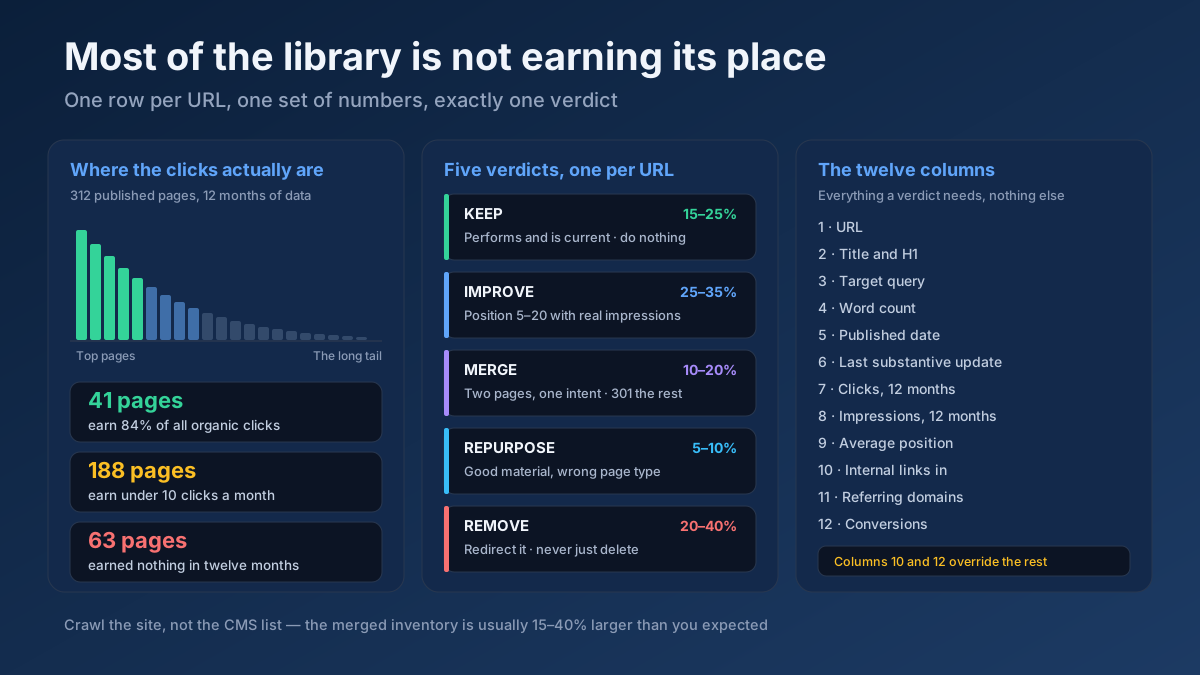
It was published and abandoned. No internal links pointing at it, no promotion, no update. It sits in the archive as an orphan, gets crawled rarely, and slowly loses whatever position it briefly held. Find these on your own site with an Internal Link Opportunity Finder — on most blogs the newest and the oldest posts are both orphaned, for different reasons.
Step 1 — Pick a question you can actually win
Topic selection decides more of the outcome than writing quality does, and it is the step most blogs spend the least time on. The goal is not the biggest keyword. It is the biggest keyword you can reach from where your site currently stands.
The four-word rule
Until a site has genuine authority in its subject, aim at queries of roughly four words or more. “Email marketing” is a category. “How to write a welcome email sequence” is a question with one correct kind of answer, a fraction of the competition, and a reader who knows exactly what they want. Longer queries carry less volume individually and far more of it in aggregate — the long-tail keyword guide works through the arithmetic, and it is not close.
There is a second advantage that gets overlooked. A four-word query tells you what the post must contain. “Email marketing” could be anything. “How to write a welcome email sequence” needs a sequence, timings, subject lines and an example. The keyword has written half the brief for you.
Three tests before you commit
- Can I rank for it? Look at who currently occupies positions one to ten. If eight of them are national publishers and two are Wikipedia, walk away. If three of them are forum threads, two are thin listicles and one is a page last updated in 2019, that is an opening. Weak results are a better signal than any difficulty score, because they are the actual competition.
- Does anyone search it? Not necessarily thousands of people. A phrase with 90 searches a month and unambiguous intent can be worth more than one with 9,000 and none. Pull the raw list with a Keyword Research and widen it with a Keyword Suggestion Tool run on the same seed.
- Does it lead anywhere? If the reader gets their answer and leaves forever, the post has to earn its place some other way — links, brand, or a path into a page that does convert. Ideally every informational post has a commercial page it can hand the reader to.
Where the good questions come from
The best topic research is not a tool. It is a list of the questions you already get asked, in the words the person asking used. Support tickets, sales calls, the replies to your newsletter, the comments under your last post. Those phrases are pre-validated demand and almost nobody else has access to them.
After that, look at what your competitors rank for that you do not — a Content / Keyword Gap against two rivals produces more usable ideas in ten minutes than a week of brainstorming. Group everything into clusters rather than treating each post as a standalone: a Semantic Keyword Cluster and a Topical Authority Map will show you which groups you are close to owning. The topic clusters and pillar pages guide explains why ten connected posts on one subject outperform ten unconnected posts on ten subjects, and the keyword research guide covers the full process.
Step 2 — Read the results page before you write a word
The search results for your target query are the marking scheme. Google has already decided, empirically, what a good answer to that question looks like. Opening a blank document before reading it is guessing.
What the top ten actually tells you
Open the query in a private window and read the first page properly — not to copy it, but to extract four things.
- Page type. Are the results blog posts, product pages, tools, videos, forum threads? If nine of ten are tools and you write an essay, you have lost before you start. This mismatch is the single most common reason a genuinely good post never ranks — the search intent guide covers how to read it, and a Keyword Intent Classifier classifies a whole list in bulk.
- Depth. If every result is 600 words and direct, a 4,000-word treatise is the wrong shape. If every result is a 3,000-word guide, a 600-word post will not compete. Match the format, then beat it on substance.
- Features. A featured snippet, a People Also Ask block, a video carousel, an image pack, a set of shopping results. Each one tells you what to include and how much organic space is actually left. Check what is present with a SERP Features Analyzer run.
- Sub-questions. Expand every People Also Ask entry. Those are the questions readers of this query genuinely have next, handed to you as an outline.
Find the gap, then write to it
Read the top three results end to end and write down what annoyed you. Something always does. The prices are from three years ago. Nobody shows a real example. Every post says “it depends” and then never says what it depends on. There is no step for what happens when it goes wrong. That list of irritations is your angle, and it is the only part of the process a competitor cannot replicate, because they did not have the same reaction.
Then check the reverse: how similar is your draft going to be to what already exists? A Text Similarity / Duplicate Checker comparison between your draft and the current number one is uncomfortable and useful. A high score means you have written their post again.
Step 3 — Build the outline from questions, not headings
Most outlines are a list of topics. A better outline is a list of questions in the order a reader thinks of them, because that is what a heading is for: it promises an answer and then delivers it.
Harvest the questions first
Collect every question a reader of this query might have, from People Also Ask, from autocomplete, from forums and communities where your audience actually talks, and from your own inbox. Twenty to thirty is normal. Then cut it down: the ones central to the query become H2 sections, the ones adjacent become H3s inside them, and the small factual ones go in the FAQ at the end. A FAQ Gap Finder shows which questions the ranking pages are leaving unanswered — those are worth the most.
Order them the way a reader thinks
Not alphabetically, not by keyword volume. In sequence: what is this, do I need it, how do I do it, what goes wrong, how do I know it worked. A reader who has to scroll past three sections of background to reach the instruction will not scroll. Put the answer first and the context after it — the reverse of how most people were taught to write essays, and the single biggest habit to unlearn.
How long should the post be?
Long enough to answer the questions in the outline and not one paragraph longer. There is no word count Google rewards; the correlation between length and rankings that gets quoted in blog posts is a symptom, not a cause — thorough answers tend to be longer, not the other way around.
In practice: a factual question (“what temperature to cook salmon”) is 400–800 words and anything more is padding. A how-to with real steps is 1,200–2,000. A comprehensive guide meant to hold a competitive query for years is 2,500–4,000. If you are writing filler to hit a number, the post is now worse, because every unnecessary paragraph is a paragraph between the reader and the answer. Check the actual figure with a Word & Character Counter and find your thin pages with a Thin Content Checker — but treat both as diagnostics, not targets.
Step 4 — The first hundred words decide everything
Two audiences read your opening: a person deciding within seconds whether to press back, and a machine deciding whether this passage is quotable. The same construction serves both.
The 40-word direct answer
Answer the question of the title immediately, in one self-contained paragraph, in plain language, with no preamble. Forty to sixty words. It should make sense lifted out of the page entirely, because that is exactly what a featured snippet and an AI assistant will do to it.
Compare. “In today’s fast-paced digital landscape, understanding email deliverability has never been more important. Many businesses struggle with…” against “Email deliverability is the percentage of your emails that reach the inbox rather than spam. A healthy rate is above 95%. The three things that decide it are your sender authentication, your list hygiene and your complaint rate.” The first is throat-clearing. The second is the answer, and it is quotable as it stands.
This one habit does more for featured snippet capture than any other change — see the featured snippets guide for the specific formats Google lifts, and score how extractable your opening is with an AI Snippet Optimizer or a Passage Optimization Checker .
Then earn the rest of the read
Having answered the question, give the reader a reason to keep going: the complication, the exception, the thing the answer does not cover. “That is the rule. It breaks in three situations, and the third one is expensive.” Answering immediately does not lose you the reader — it buys their trust, and the hook after it buys their time.
Step 5 — Structure the body so it can be scanned and lifted
Nobody reads a blog post linearly. They scan headings, stop where their question is, read that section, and leave. Structure for that behaviour rather than resenting it.
Heading rules that matter
- One H1 per page, containing the primary phrase naturally. In almost every CMS the post title is already the H1 — do not add a second one in the body.
- H2 for main sections, H3 for subsections, and never skip a level for styling reasons. Check what your template actually outputs with a Heading Structure Analyzer ; themes routinely wrap widget titles in H2s and quietly wreck the hierarchy. The heading hierarchy guide covers the rules.
- Write headings as questions or specific statements. “How much does it cost?” beats “Pricing”. “What to do when the import fails” beats “Troubleshooting”. Vague headings help nobody navigate.
Make each section liftable
Under each heading, answer that heading in the first two sentences before elaborating. This makes the post scannable for humans and gives every section an independently extractable passage — which matters more every year, because AI answers cite passages rather than pages.
Keep paragraphs to two or three sentences. Most of your readers are on a phone, where a six-line paragraph is a grey wall. Use a numbered list for anything sequential, a bulleted list for anything unordered, and a table for anything comparative. If the results page is showing a table in a snippet, a table is what it wants.
Keyword usage, honestly
Use the primary phrase in the title, the H1, the first hundred words, one or two H2s where it fits naturally, and the meta description. That is the whole practice. Beyond that, write about the subject properly and the related vocabulary appears on its own — if you are writing seriously about email deliverability you will mention SPF, DKIM, bounce rates and spam complaints without trying, and those co-occurring terms are what a search engine reads as topical depth.
Density targets are a relic. Run a Keyword Density Checker check only to catch accidental over-use, and a Semantic Coverage Analyzer or NLP Content Analyzer to see which related concepts the ranking pages cover that you have skipped. Repeating a phrase to hit a percentage makes the writing worse and has not helped rankings for a decade.
Step 6 — Write the part nobody else could have written
This is the difference between a post that ranks and a post that is merely competent, and it has become sharper now that a plausible summary of the top ten results can be generated in seconds. Google’s helpful content documentation is explicit that it is trying to reward content that demonstrates first-hand expertise, and its guidance on AI-generated content makes the same point differently: the question is not how the text was produced, it is whether it is original, useful and demonstrably from someone who knows.
The experience test
Read your draft and ask: could a competent writer with no experience of this subject have produced this from the top ten results alone? If yes, the post has nothing that would make anyone prefer it. Fix it by adding at least one of:
- A number you produced. A test you ran, a result you measured, a before and after from your own work. Specific numbers with the conditions attached are the strongest possible signal, because they cannot be paraphrased from elsewhere.
- A screenshot of the thing. Not a stock photo of a laptop. The actual dashboard, the actual error message, the actual settings screen. It proves you opened it.
- The failure. What you tried that did not work, and what it cost you. Nobody summarising the top ten results has this, because nobody publishes it.
- The exception. When the standard advice is wrong, and for whom. This is the paragraph readers screenshot.
- A named author. A real byline with a real photograph, credentials and a link to more of their work. Google’s search quality rater guidelines lean heavily on who is responsible for a page and whether they are demonstrably qualified to write it.
Score what your page currently signals with an E-E-A-T Analyzer and check that your author pages support it with an Author Page Audit . The E-E-A-T guide covers the framework in full.
Cite properly, and outbound
When you use a statistic, link to the source that produced it — not to a blog post that quoted it. Outbound links to authoritative sources are not a leak; they are a trust signal, and they let a reader verify you. Undated statistics with no source are the fastest way to look like every other content farm in your niche, and a wrong one that gets caught costs more credibility than the stat was worth.
Step 7 — On-page mechanics, in ten minutes
None of this rescues a weak post. All of it costs a fraction of the writing time and routinely gets skipped anyway.
- Title tag, under 60 characters. Primary phrase near the front, then the reason to click: a number, a year, a promise, a qualifier. Draft options with a Meta Tag Generator and see how they truncate at real pixel widths in a Google SERP Snippet Preview . The title tag guide covers the craft; if you already have impressions but few clicks, the low click-through diagnosis is the faster read.
- Meta description, 140–158 characters. It is not a ranking factor and it is a click-through factor. Say what the reader gets, specifically. The meta description guide has the patterns.
- URL: short, readable, permanent.
/blog/welcome-email-sequence, not/2026/08/20/how-to-write-a-welcome-email-sequence-that-converts-in-2026. No dates, no year you will have to change, no stop words. A SEO URL Slug Generator handles it; the URL structure guide explains why you do not want to be redirecting these later. - Images with real alt text. Describe what the image shows, for someone who cannot see it. Compress before upload, set explicit dimensions so the layout does not jump, and lazy-load everything except the one image above the fold. Audit with an Image ALT Text Checker and the image SEO guide .
- Article and FAQPage schema. Article markup on the post, FAQPage on the FAQ block if the questions are genuinely visible on the page. Generate it with a Schema (JSON-LD) Generator , validate every template with a Structured Data (Schema) Checker , and see the structured data guide for what else is worth adding.
- A visible publish and update date. Readers use it to judge relevance and so does everything else. Changing the date without changing the content is a habit that gets noticed.
An On-Page SEO Checker (Keyword) covers most of this in one pass, and an All-in-One SEO Audit adds the technical layer underneath it.
Step 8 — Link it in, which is the step everyone skips
A post nobody links to is a post Google reaches slowly and values little. Internal linking is free, entirely within your control, and it is the highest-return ten minutes in the whole process.
- Link into the new post from three to five existing ones. Do this on publication day, not eventually. Pick the older posts that are genuinely about the same subject, and put the link in the body where it makes sense, not in a related-posts widget at the bottom.
- Link out of the new post to your relevant existing posts and to whichever page you actually want people to reach. This is how informational traffic becomes something worth having.
- Use descriptive anchor text. The words in the link should describe the destination. “Click here” and “read more” describe nothing. Keep the distribution natural rather than exact-match on every link — an Anchor Text Optimizer shows the pattern you are currently producing.
- Check for cannibalisation. If you already have a post targeting a near-identical query, you are about to split your own signals. A Keyword Cannibalization Checker finds the overlap, and the keyword cannibalisation guide explains whether to merge, narrow or redirect.
The internal linking strategy guide covers the wider architecture, and the orphan pages guide covers what happens to posts that never get linked.
Step 9 — The first 48 hours after publishing
Publishing is not distribution. A post with no early signals can sit unindexed for weeks on a small site.
- Confirm it is in your sitemap and request indexing in Search Console. If it stays out, the crawled – currently not indexed guide works through the causes in order.
- Send it to the people who already opted in. Your newsletter list is the only distribution channel that is genuinely yours.
- Post it where the question actually gets asked — the community, subreddit or forum where you saw it. Answer the question in the post itself and link as the source, rather than dropping a bare URL.
- Tell anyone you cited or quoted. A short, specific message with no ask attached. This is where a meaningful share of early links come from.
- Then leave it alone for a month. Checking rankings daily on a week-old post tells you nothing except that new pages fluctuate.
Step 10 — Blog posts in AI answers
A growing share of informational queries now get answered above the results, or inside an assistant, without a click. The response is not to stop publishing; it is to be the thing that gets cited, and to accept that the traffic mix shifts towards fewer, better-qualified visits.
- Self-contained passages win citations. An assistant quotes a paragraph, not a page. A paragraph that depends on the three above it for context cannot be lifted.
- State facts as facts. “A welcome sequence usually runs to five emails over ten days” is extractable. “There are various approaches you might consider” is not.
- Attribution beats adjectives. Original data, a named author and a dated source make a passage safer to cite, and models increasingly behave accordingly.
- Cover the question and its neighbours. Topical coverage across a cluster is what makes a site the one an assistant keeps returning to. An Entity Coverage Analyzer shows what your coverage is missing.
Measure how quotable your pages are with a GEO Checker (Generative Engine Optimization) , an AEO Checker (Answer Engine Optimization) or an LLM Readability Score , and read the AI Overviews guide and answer engine optimisation guide for the mechanics.
Step 11 — Update it, or watch it decay
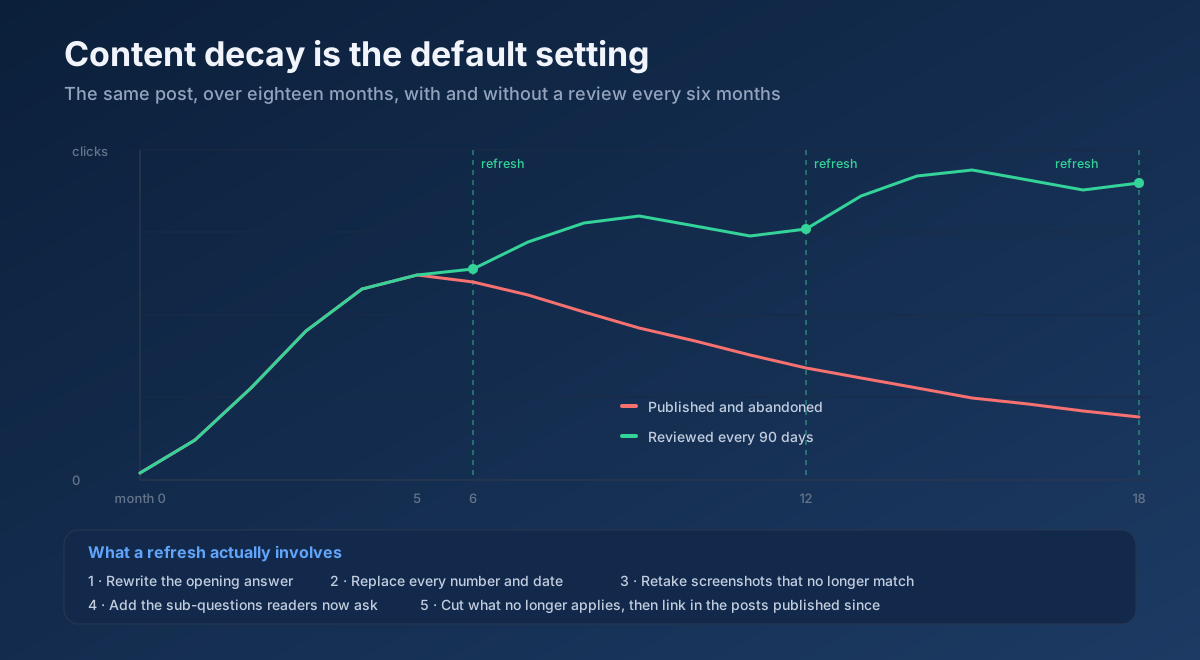
Every post has a half-life. Rankings slip as competitors publish, facts age, screenshots stop matching the interface and the reasons a reader trusted the page quietly expire. Content decay is not a failure of the post; it is the default state of one that is never touched.
The 90-day review
Once a quarter, open Search Console and sort by the pages losing impressions. Those are your update candidates — not your worst posts, but your formerly good ones. A Content Freshness Score ranks your library by how stale it looks, and the Search Console measurement guide covers how to read the trend properly.
What an update actually involves
Rewrite the opening answer if the answer has changed. Replace every number, price and date. Retake screenshots that no longer match the product. Add the sections readers now ask for — the People Also Ask block for that query will have moved. Cut what no longer applies rather than leaving it in for length. Add internal links from and to posts you have published since. Then update the modified date, honestly.
Updating an existing post that already has some authority is consistently cheaper than publishing a new one, and it is the reason a library of ninety maintained posts outperforms one of three hundred abandoned ones. The content refresh strategy covers the prioritisation, and if a post falls off a cliff rather than drifting, the traffic drop diagnosis works through the causes in order.
The 18-point blog post checklist
Run this before you press publish. Anything you cannot tick is a task, not an opinion.
- 1. The target query is four words or longer and the current top ten is beatable.
- 2. The page type matches what is ranking for that query.
- 3. The outline came from People Also Ask, autocomplete and real reader questions.
- 4. Title tag under 60 characters with the primary phrase near the front.
- 5. Meta description 140–158 characters, specific about what the reader gets.
- 6. One H1, containing the primary phrase naturally.
- 7. A 40–60 word direct answer inside the first hundred words.
- 8. A hook immediately after it that earns the rest of the read.
- 9. Headings written as questions or specific statements, hierarchy unbroken.
- 10. Each section answers its own heading in the first two sentences.
- 11. At least one thing on the page only you could have written.
- 12. A named author with real credentials.
- 13. Every statistic linked to the source that produced it.
- 14. Images compressed, dimensioned, and carrying descriptive alt text.
- 15. A clean, dateless, permanent URL.
- 16. Three to five internal links in, and links out to relevant posts.
- 17. Article schema, plus FAQPage if the FAQ is visible on the page.
- 18. A calendar reminder to review it in 90 days.
A Technical Site Audit (Crawler) will show you where one of these is failing across every post at once — which is usually a template problem, and therefore the cheapest thing to fix.
Mistakes that keep good writing invisible
- Choosing the topic by what you feel like writing. Enthusiasm is not demand. Check that somebody is asking first.
- Writing before looking at the results page. You are guessing at a marking scheme that is published.
- Burying the answer. Three hundred words of context before the thing the title promised loses both the reader and the snippet.
- Padding to a word count. Every unnecessary paragraph sits between a reader and their answer.
- Publishing a competent summary of the top ten. Correct, complete and completely replaceable.
- Unattributed statistics. A number with no source and no date is a liability, not evidence.
- No internal links on publication day. The cheapest step, skipped the most often.
- Publishing ten posts on ten unrelated subjects. Ten on one subject, connected, build authority; ten scattered ones build nothing.
- Never revisiting anything. A library of abandoned posts decays as a whole.
- Judging a post after two weeks. Informational posts commonly take months to settle — the SEO timeline guide sets realistic expectations.
A publishing plan that survives contact with a real week
Most blogs fail on cadence rather than quality. Consistency compounds; heroic bursts followed by silence do not.
- Weeks 1–2 — Build the map. Cluster your subject into three to five groups, list ten questions per group, and rank them by winnability rather than volume. That is a quarter of work planned in an afternoon.
- Weeks 3–8 — Publish one cluster properly. One pillar and five to seven supporting posts, fully interlinked. A finished cluster outperforms fifteen scattered posts, because the internal links make each one stronger.
- Week 9 — Measure, do not guess. Which posts got impressions, at what average position, on which queries you did not target. That last column is usually the most valuable thing in the report.
- Weeks 10–12 — Act on it. Expand the sections earning unexpected impressions, fix the ones stuck at position 12–20 — those are the cheapest wins on the whole site — and start the second cluster.
- Ongoing. One new post a week beats five one week and none for a month. Every 90 days, refresh before you publish anything new.
Track it with a Keyword Rank Checker and an Organic Research / Top Pages run against your own domain rather than by searching for yourself in incognito, which tells you almost nothing.
Frequently asked questions
How long should a blog post be to rank on Google?
There is no length Google rewards. Match the depth of what is currently ranking, then answer the question more completely. In practice a factual query takes 400–800 words, a how-to takes 1,200–2,000 and a competitive guide takes 2,500–4,000. Padding a post to reach a number makes it worse, because every filler paragraph delays the answer the reader came for.
How many times should I use my keyword in a post?
Enough that the subject is unambiguous, which is usually the title, the H1, the first hundred words, one or two headings and the meta description. There is no target density. If you write about the subject properly, the related vocabulary appears on its own, and that co-occurrence is what a search engine reads as depth. Repeating a phrase to hit a percentage is a 2010 tactic that now only hurts readability.
How long does a new blog post take to rank?
Indexing usually happens within days on an established site and can take weeks on a new one. Meaningful position movement on a low-competition long-tail query commonly takes one to three months; competitive terms take six months or more, and longer again on a new domain. A post that has not moved after two weeks has not failed — it has not been evaluated yet.
Is it better to publish new posts or update old ones?
Update first, in most cases. A post that already has some authority, some links and some history moves faster from a rewrite than a brand-new page does from nothing. The practical rule: refresh anything that is losing impressions or sitting at positions 8–20 before you publish anything new, then spend the remaining time on new posts inside a cluster you are already building.
Can I use AI to write blog posts?
Google’s stated position is that it rewards helpful, original content regardless of how it was produced, and penalises content produced primarily to manipulate rankings. In practice, AI is useful for outlines, first drafts, summarising research and rewriting clumsy passages, and useless for the thing that makes a post rank — the tested number, the screenshot, the failure, the exception. Text that could have been generated from the top ten results has no reason to outrank the top ten results.
How often should I publish?
Consistently, at a rate you can hold for a year. One good post a week beats five in a burst and then nothing. Frequency is not itself a ranking factor; what compounds is the accumulating library, the internal links between posts and the topical coverage that builds up. Publishing weekly and maintaining what exists beats publishing daily and abandoning it.
Why does my post rank on page two and never move?
Positions 8–20 usually mean the page is relevant but not the best answer: it is thinner than the results above it, it misses sub-questions they cover, or it is slightly the wrong page type. It can also mean it is competing with another of your own posts. Check for cannibalisation, compare your coverage against the top three, and expand where you are genuinely missing something. Page-two posts are the cheapest improvements on any site.
Do I need a blog if I already have service or product pages?
Yes, for two reasons. Commercial pages can only target commercial queries, which are a small fraction of what people actually search. And the blog is what earns links, coverage and citations, which then strengthen the commercial pages you link to. The connection matters: a blog post that answers a question and then hands the reader to the relevant service page or product page is doing both jobs at once.
The bottom line
Writing a blog post that ranks is mostly a sequence of decisions made before the writing starts: a question you can win, a results page read honestly, an outline built from what readers actually ask, and an answer placed in the first hundred words. The writing itself only has to do one additional thing — contain something a competent stranger summarising the top ten results could not have produced.
Start with one post. Pick a four-word question from your own inbox, read the current top ten and write down what irritated you about them, build the outline from the People Also Ask block, and answer the question in the first paragraph. Run the draft through an On-Page SEO Checker (Keyword) , preview the title in a Google SERP Snippet Preview , add three internal links from older posts, and set a reminder to review it in 90 days. That single post, done in that order, will teach you more than another year of publishing on instinct.