How to Write Meta Descriptions That Get Clicks
Meta descriptions do not rank you directly, but they drive clicks. Here is how to write ones that win the SERP.
Read article →Pixel-accurate preview of how your title and description will appear in Google search results.
Fetching live data…
The Google SERP Snippet Preview is a free tool that shows a pixel-accurate preview of how your title tag and meta description will appear in Google search results. Because Google truncates by pixel width rather than character count, this preview tells you the moment your title or description will be cut off with an ellipsis. Edit your copy live and watch the snippet update instantly, all rendered from the actual text you type — no signup, no limits.
Paste a 71-character title and the preview shows it cut after …best running on desktop. Trim it to a punchy 58 characters and the full title displays, while a 165-character description is shortened to a tidy 155 — a snippet that reads cleanly and earns more clicks.
Yes — completely free, with no signup and no usage limits. Preview as many snippets as you like.
Google may rewrite titles or pull a description from page content to better match a query. This tool previews your intended snippet, which is still the best starting point you control.
Check character counts with the Word & Character Counter and generate clean tags with the Meta Tag Generator, then follow our title tag optimization guide and meta description writing guide to maximize clicks.
Guides, tips and tutorials hand-picked for this tool — go from running a check to actually fixing it.
Meta descriptions do not rank you directly, but they drive clicks. Here is how to write ones that win the SERP.
Read article →Track where your pages rank without paying for a rank tracker. Here is how to check keyword rankings for free and what the numbers really mean.
Read article →Title tags, headings, internal links and content depth — everything that signals relevance to Google on a single page.
Read article →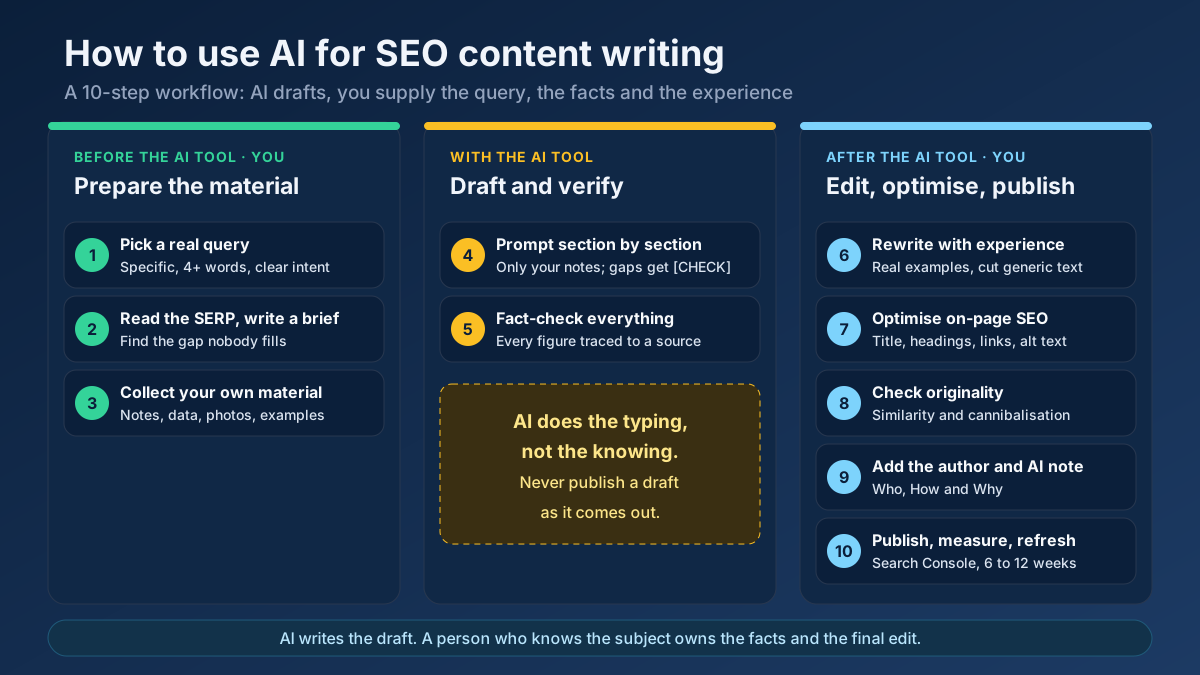 Content
Learn how to use AI for SEO content writing without risking a penalty: a 10-step workflow for briefs, drafts, fact-checks, editing and E-E-A-T signals.
Read article →When multiple pages target the same keyword, they compete with each other and dilute rankings. Here is the fix.
Read article →The title tag is the single most important on-page element. Here is how to write titles that rank and get clicked.
Read article →Turn one seed into hundreds of scored keyword ideas. Pulls live Google, YouTube, Bing and DuckDuckGo autocomplete, scores every phrase for demand, difficulty and opportunity, labels intent and funnel stage, groups everything into pillar-and-spoke topic clusters and adds a real 13-month interest trend from Wikipedia.
Open tool →Get instant keyword ideas straight from Google Autocomplete with A-Z & question modifiers.
Open tool →Turn one seed into clustered content ideas: questions, comparisons, prepositions — perfect for content calendars.
Open tool →Classify any keyword as Informational, Navigational, Commercial or Transactional using real signal patterns.
Open tool →Turn one seed keyword into semantic clusters ready for content planning. Expands your seed with real Google Autocomplete queries, groups them into topic clusters by shared terms, labels each cluster’s search intent and charts the distribution — so you can build a hub-and-spoke content architecture.
Open tool →Classify a whole keyword list by search intent in one pass. Labels each keyword Informational, Commercial, Transactional or Navigational, maps it to a funnel stage (ToFu/MoFu/BoFu) and the best content type, and charts the intent distribution — perfect for prioritizing a content calendar.
Open tool →Your site may have a critical PHP vulnerability
PHP2Shell (CVE-2026-109618 and CVE-2026-109619) lets attackers run code on servers running PHP older than 8.2.35, 8.3.36, 8.4.27 or 8.5.12, without logging in. Attacks have been seen since 17 October. Check whether your site is affected.