How to Write Blog Posts That Rank on Google
How to write blog posts that rank: pick a winnable question, build the outline from the SERP, answer in the first 100 words, and update before it decays.
Read article →Turn one seed keyword into semantic clusters ready for content planning. Expands your seed with real Google Autocomplete queries, groups them into topic clusters by shared terms, labels each cluster’s search intent and charts the distribution — so you can build a hub-and-spoke content architecture.
Fetching live data…
The Semantic Keyword Cluster tool turns one seed keyword into ready-to-use topic clusters for content planning. It expands your seed with real Google Autocomplete queries, groups those queries into clusters by the terms they share, labels each cluster's search intent — informational, commercial, transactional or navigational — and charts how demand is distributed across them. In short, it hands you a hub-and-spoke content map from a single keyword, so you know which pillar and supporting pages to build.
Search engines rank topics, not isolated keywords. When you cover a subject in depth across a connected set of pages, you build topical authority — the signal that you are a comprehensive source on that theme. Clustering shows you the shape of a topic before you write a word, so you stop guessing at article ideas and start planning coverage that maps to real demand. It also prevents keyword cannibalization, where two thin pages compete for the same query, by grouping intent so each cluster earns one dedicated page.
Treat the largest, most informational cluster as your pillar page — a broad guide covering the whole topic. Turn each remaining cluster into a supporting spoke page that answers its specific intent in depth. Then link every spoke back up to the pillar and across to closely related spokes, so authority flows through the hub. Match each cluster's intent to a page type: informational to guides, commercial to comparisons, transactional to product or landing pages. Build the pillar first, then publish spokes on a schedule.
They come from Google Autocomplete, the same suggestions you see when typing in the search box. That means every expanded query is a phrase real people actually search, rather than a guess or an invented variation, giving you demand-backed ideas straight from Google's own data.
It is a broad pillar page (the hub) surrounded by focused supporting pages (the spokes), all interlinked. The hub covers the topic widely, each spoke goes deep on one subtopic, and the internal links tie them together — signalling depth and authority to search engines.
A volume tool tells you how often single keywords are searched; this tool shows you how a topic is organised. It groups related queries by shared meaning and intent, so you get an architecture for content planning rather than a flat list of numbers to sort through.
Guides, tips and tutorials hand-picked for this tool — go from running a check to actually fixing it.
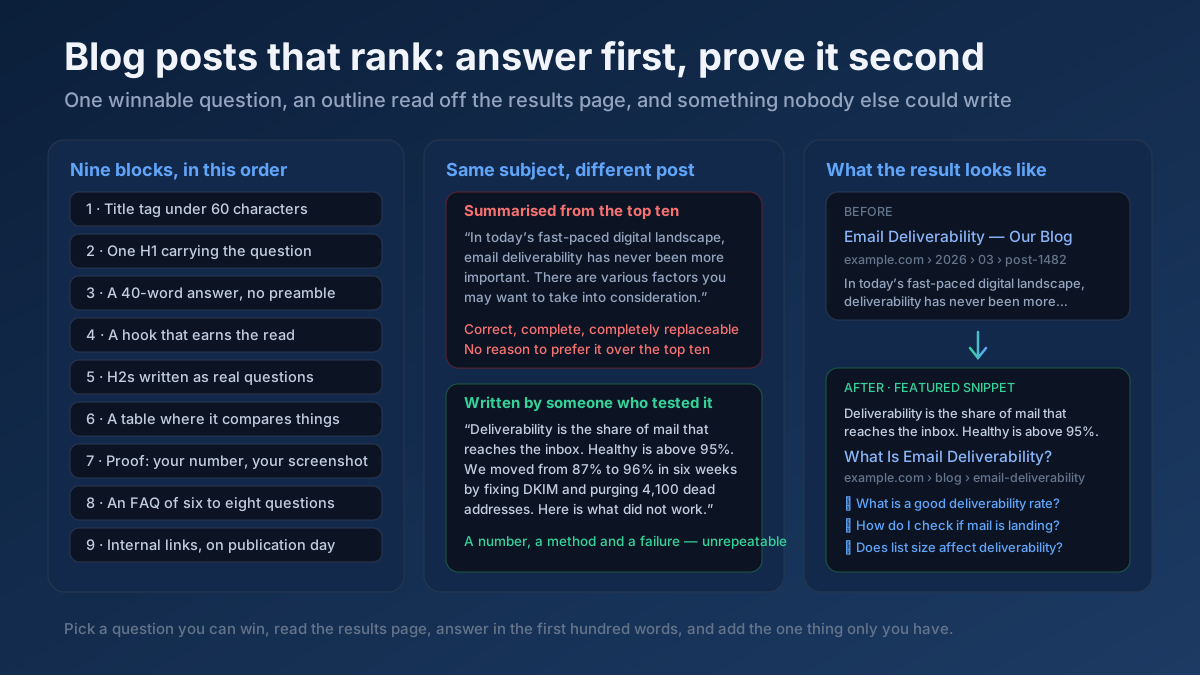 Content
How to write blog posts that rank: pick a winnable question, build the outline from the SERP, answer in the first 100 words, and update before it decays.
Read article →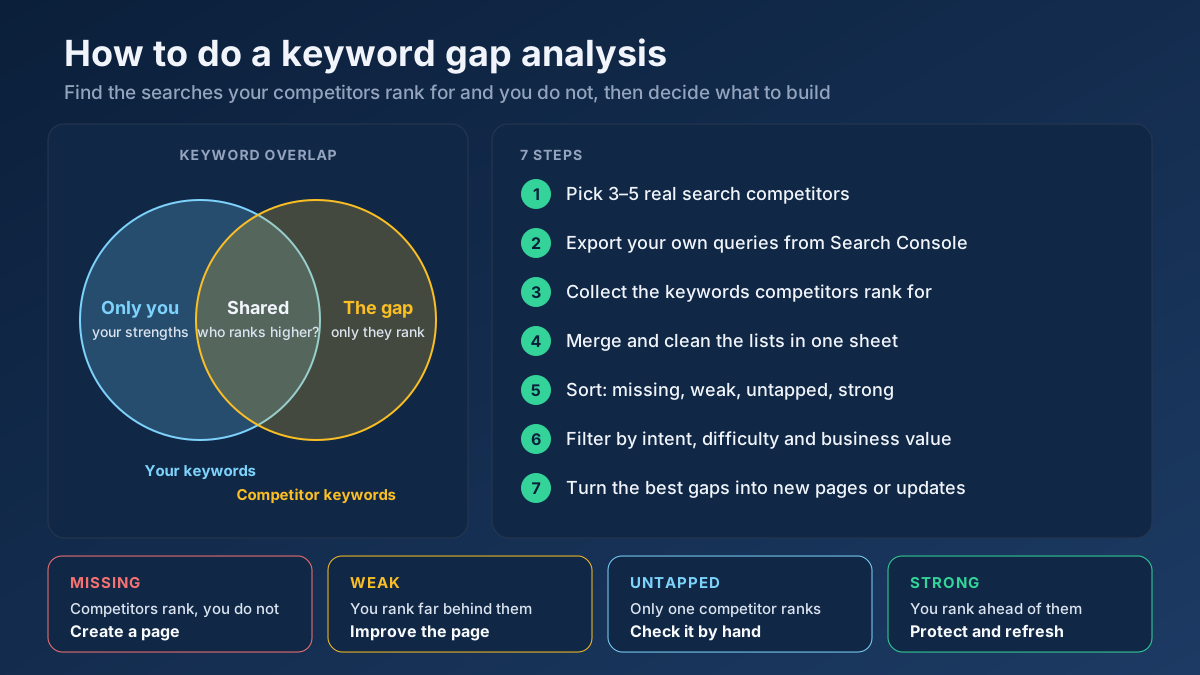 Keyword Research
Learn how to do a keyword gap analysis in 7 steps: find the keywords competitors rank for and you don’t, sort the gaps, then turn them into a content plan.
Read article →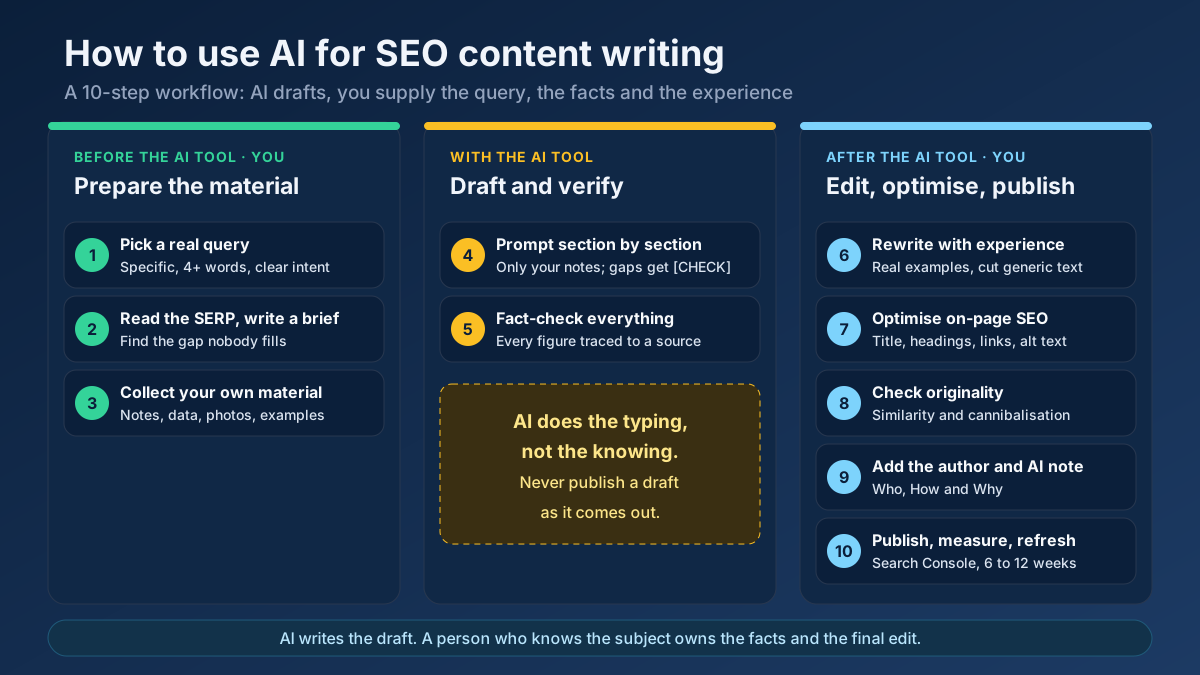 Content
Learn how to use AI for SEO content writing without risking a penalty: a 10-step workflow for briefs, drafts, fact-checks, editing and E-E-A-T signals.
Read article →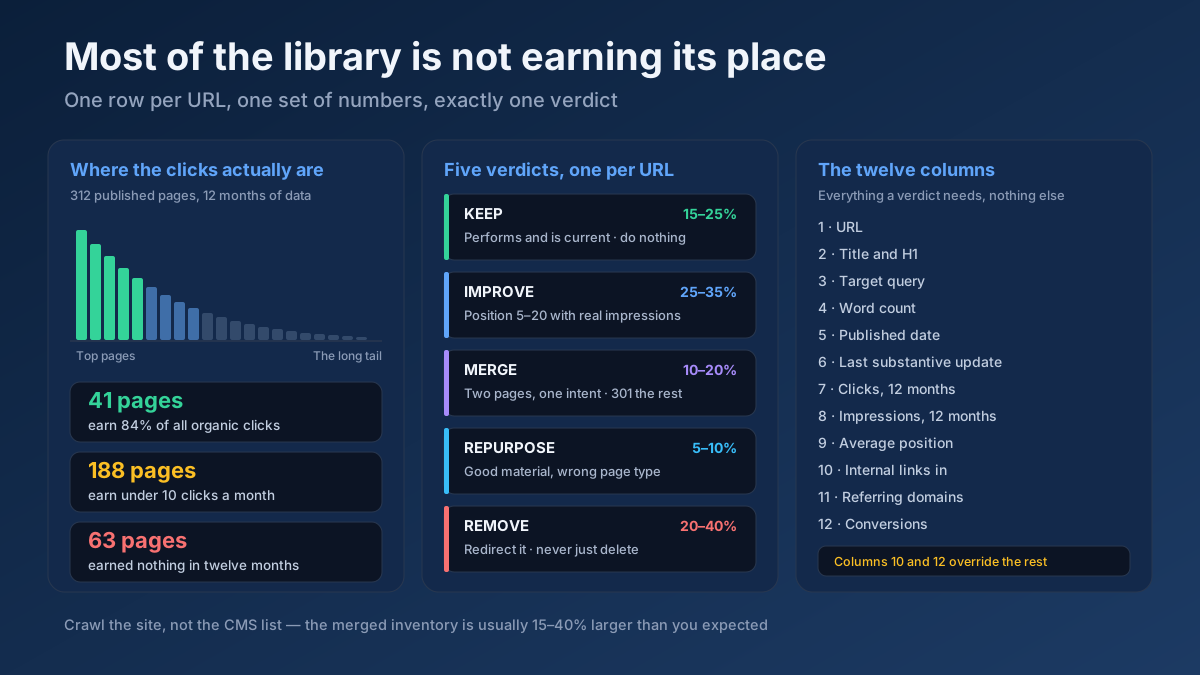 Content
How to do a content audit for SEO in 10 steps: inventory every URL, attach 12 months of data, then decide what to keep, improve, merge, repurpose or remove.
Read article →When multiple pages target the same keyword, they compete with each other and dilute rankings. Here is the fix.
Read article →Updating old content is often the highest-ROI SEO task. Here is a simple refresh workflow.
Read article →Turn one seed into hundreds of scored keyword ideas. Pulls live Google, YouTube, Bing and DuckDuckGo autocomplete, scores every phrase for demand, difficulty and opportunity, labels intent and funnel stage, groups everything into pillar-and-spoke topic clusters and adds a real 13-month interest trend from Wikipedia.
Open tool →Get instant keyword ideas straight from Google Autocomplete with A-Z & question modifiers.
Open tool →Turn one seed into clustered content ideas: questions, comparisons, prepositions — perfect for content calendars.
Open tool →Classify any keyword as Informational, Navigational, Commercial or Transactional using real signal patterns.
Open tool →Classify a whole keyword list by search intent in one pass. Labels each keyword Informational, Commercial, Transactional or Navigational, maps it to a funnel stage (ToFu/MoFu/BoFu) and the best content type, and charts the intent distribution — perfect for prioritizing a content calendar.
Open tool →Understand what a searcher really wants. Analyzes a query’s primary and secondary intent, maps it to a funnel stage, recommends the content type and the SERP features it’s likely to trigger, and shows real related queries with their own intent — so your page matches what Google rewards.
Open tool →Your site may have a critical PHP vulnerability
PHP2Shell (CVE-2026-109618 and CVE-2026-109619) lets attackers run code on servers running PHP older than 8.2.35, 8.3.36, 8.4.27 or 8.5.12, without logging in. Attacks have been seen since 17 October. Check whether your site is affected.