Why Podcast Hosts need this
An hour of conversation can sit behind a page that says one sentence. Search engines index text, and a player embed is not text, so an episode whose page carries only a title, a date and "Show notes coming soon." gives Google nothing to match a search against, however good the interview is. Since Google retired its Podcasts app in 2024, the episode page on your own website (or your host's) is where search visitors arrive, if they arrive at all.
The trouble is that the page looks fine to you. You see the artwork, the player and the episode title, and you know what was said. What you do not see is how little of it exists as words in the HTML, or how much of what does exist is sponsor copy, credits and links that every episode repeats.
This checker fetches one episode page, strips menus, footer and sidebars, and counts the words that remain. You get Words, a Thin, Borderline or Substantial verdict, the text ratio and a vocabulary score, so you can see which episodes are nearly empty and whether adding a transcript changes the picture.
Podcast Hosts specific guidance
Read what was counted, not just the number
Run the episode, then open the page beside the report. Everything the tool counts is visible text in the HTML: the episode title, your notes, guest bio, timestamps, the transcript if it is on the page, but also sponsor reads, "Support the show" lines, credits and the titles of the previous and next episodes. On an ad-supported show those repeated blocks can be a large share of the total. Subtract them in your head and look at what is left that is specific to this episode. That remainder is what could make the page show up for a guest's name or the topic you discussed.
The player itself adds nothing. If your host loads the notes with JavaScript after the page opens, the tool cannot see them either and the count will be close to zero; check the page source before you rewrite anything.
Show notes, transcript or both
A transcript is the quickest way to put the episode's substance into words, and an hour of talk gives you thousands of them. Show notes do a different job: they say in a few paragraphs what the episode is about, who the guest is and what a listener will learn, which is the part a searcher reads first. A page with a transcript and a one-line note will pass this checker easily but still opens with nothing that explains the episode; a page with good notes and no transcript can land in Borderline and still be useful. Aim for a few paragraphs of your own words at the top and the transcript below them.
If your site puts the transcript on its own URL, run both pages. The checker scores each on its own and will not add them together.
A ten-minute audit of your back catalogue
Pick three episodes: your newest, one from a year ago and the one you consider your best. Run each and note Words, Verdict and how many of those words are boilerplate. Episodes published in a rush are usually the thin ones. Fix the ones guests and listeners actually search for first, by adding the transcript your editing tool already produced and a short summary, then run the page again to confirm the text is in the HTML.
What this tool does not tell you
- It does not listen to audio, read your RSS feed or see text a player loads with JavaScript; it counts the words in the HTML of one page.
- It cannot tell show notes from a transcript, sponsor copy or credits; sorting the counted text is up to you.
- It checks one URL per run and does not combine an episode page with a separate transcript page or list your episodes.
- The 300 and 600-word lines are this tool's thresholds. Google publishes no minimum word count for episode pages.
Real examples
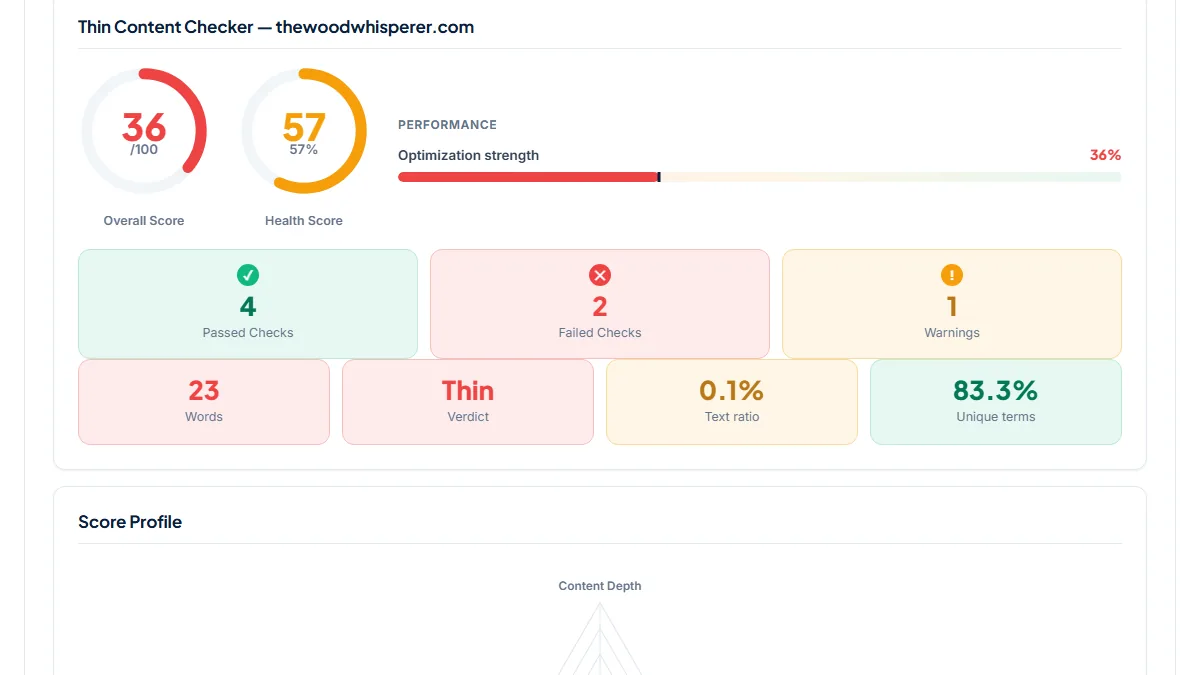
1. "Show notes coming soon.": 23 words, Thin
- Situation
- The Woodworking Morning Show, The Wood Whisperer's live Q&A, is published as a podcast feed whose episode descriptions read "Live Woodworking Q&A". Each feed item links to a page on thewoodwhisperer.com. We ran the page for the October 2021 episode on 11 November 2026.
- Input
https://thewoodwhisperer.com/ask-tww/the-last-one-for-now-tww-live/- Reading the result
- 23 words, verdict Thin, Overall score 36/100 (Health 57), text ratio 0.1 %. The counted text is the title, the date, the line "Show notes coming soon." and the titles of the two neighbouring episodes. The episode lives in a YouTube embed, which the checker does not read, so this page offers searchers nothing about the questions answered on the show. Our first run counted 195 words because a cookie-consent popup's settings table was being read as page text; we fixed that in the checker the same day, and the figures above are after the fix.
2. Notes on the episode page, transcript on another URL
- Situation
- Darknet Diaries, a true-crime show about hacking, gives every episode a page with a summary, sponsors, sources and credits, followed by the opening of the transcript and a "Read Full Transcript" link to a second URL. We ran both for episode 181 on 11 November 2026.
- Input
https://darknetdiaries.com/episode/181/andhttps://darknetdiaries.com/transcript/181/- Reading the result
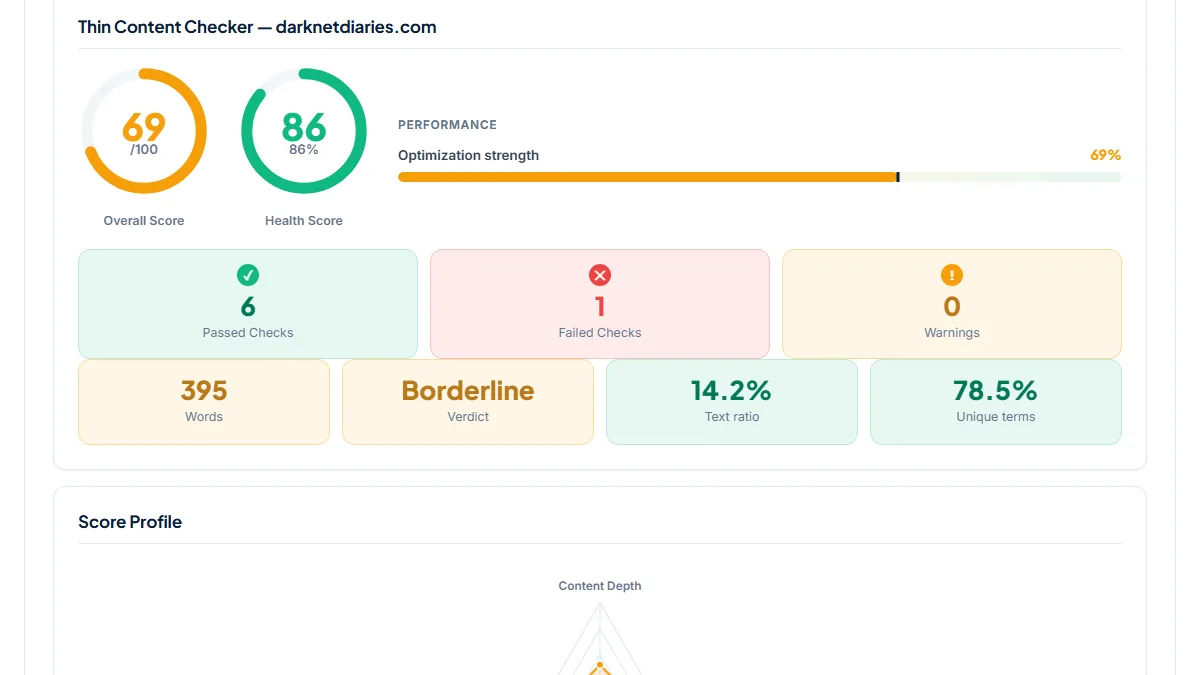
- Episode page: 395 words, Borderline, 69/100. Splitting the counted text: about 87 words of episode summary, 168 of sponsor reads, 47 of credits and 66 from the transcript's first lines. Transcript page: 15,055 words, Substantial, 90/100, with only a warning for having a single H2/H3. The checker scores the two URLs separately; both pages carry the same title, "Ricky – Darknet Diaries", so it is worth giving the transcript page a title of its own.
3. A one-sentence note rescued by an on-page transcript
- Situation
- Sunday's Common, a podcast for Christian leaders working with the Sunday Gospel readings, hosted on Buzzsprout, publishes one sentence per episode as its note; Buzzsprout prints the transcript underneath on the episode page. We ran the 8 November 2026 episode three days later.
- Input
https://sundayscommon.buzzsprout.com/2519627/episodes/20051924-november-8-2026-oil-crisis-matthew-25-1-13- Reading the result
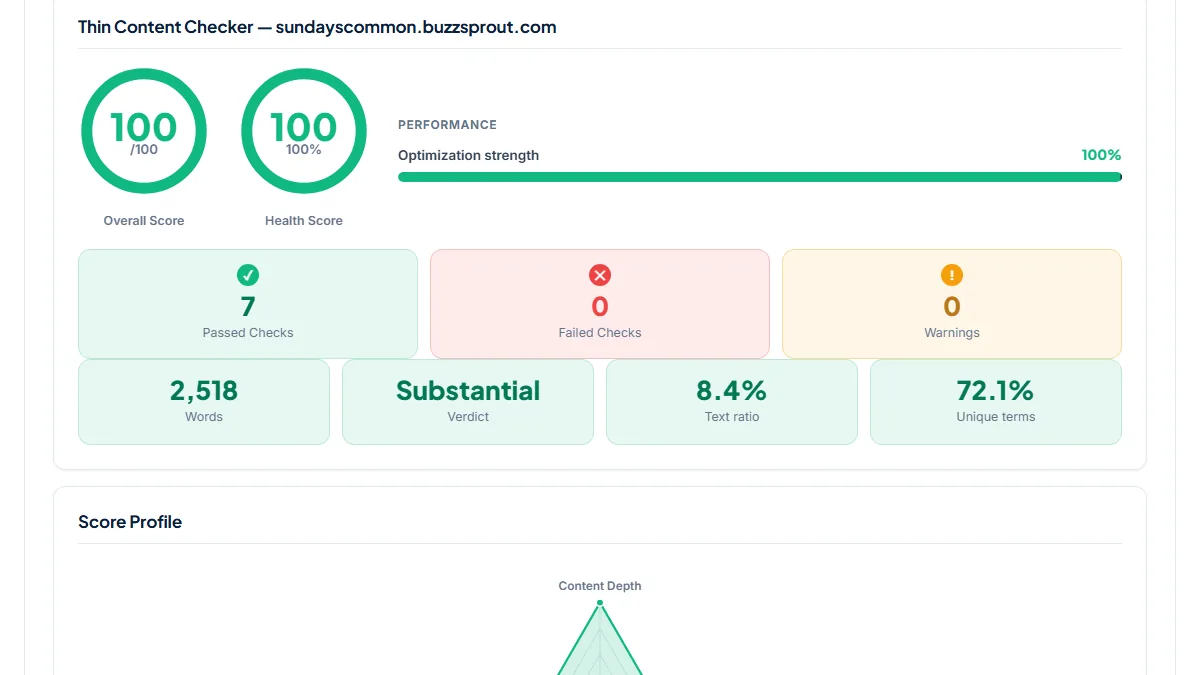
- 2,518 words, Substantial, 100/100, every check passed (text ratio 8.4 %, 72.1 % unique terms). Almost all of it is the transcript: the episode note itself is a single 20-word sentence. The page clears every threshold, yet the first thing a searcher sees is still that one line, so a short summary above the transcript is the next improvement, not more words.
Common mistakes
- Linking every episode in your feed to the show's home page or to Apple Podcasts. Then there is no episode page at all to check or to rank.
- Reading a high count as good notes. On an ad-supported show the sponsor reads, credits and "support the show" lines repeat on every page and can make up a large share of the words.
- Putting the transcript on a separate URL with the same title as the episode page, so two of your pages compete for the same search.
- Pasting an automatic transcript without a pass for names and terms. The checker counts misspelled guest names as happily as correct ones, but searchers type the correct spelling.
Frequently asked questions
How long should podcast show notes be?
There is no figure Google requires. Million Podcasts' guide suggests show notes of at least 500 words plus a full transcript; this checker calls a page Thin below 300 words and Substantial from 600. A useful target is a few paragraphs that say what the episode covers, who is speaking and what the listener takes away, written in words people would search for, with the transcript below. Run the page to see where it lands.
Does Google transcribe my podcast for me?
Not in a way that helps your page. Google once generated automatic transcripts to understand episodes in Google Podcasts, but that app has been shut down, and any transcription Google does for its own understanding does not appear as text on your page. If you want the words of the episode to be searchable on your site, publish the transcript yourself.
My host gives every episode a page. Is that enough?
Only if the page has words on it. Hosts such as Buzzsprout build the episode page from the description you typed into the episode form, so a one-line description becomes a one-line page. Some hosts also print a transcript there when you upload or generate one, as in the Buzzsprout example above. Run your host's page through the checker to see which case you are in.
Should the transcript be on the episode page or on its own page?
Either can work, but a single page is simpler: notes, player and transcript together give one URL with all the text and one title to rank. If you split them, give the transcript page its own descriptive title and link both ways. The checker scores each URL on its own, so a short episode page with a long transcript elsewhere will still read as Borderline or Thin.
Reference: Million Podcasts' guide to ranking podcast episodes on Google starts from the same point: Google cannot listen to your podcast, so the episode page, its show notes and its transcript are what it reads.