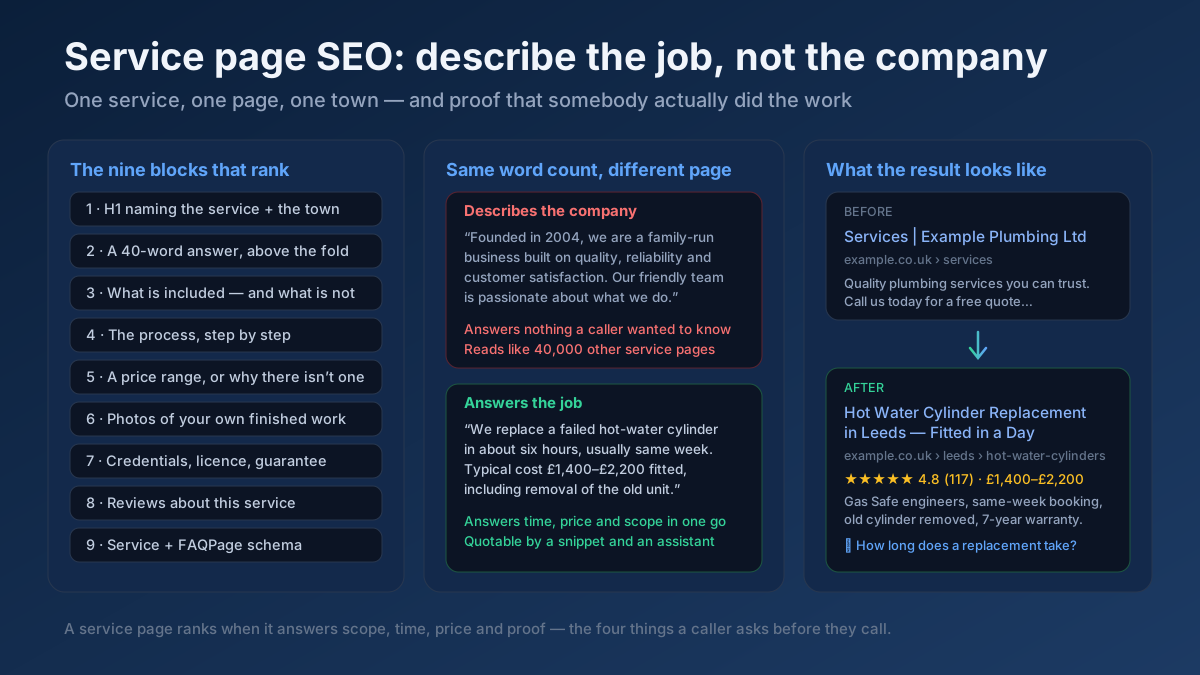
Short answer: A service page ranks when it answers the four things a caller asks before picking up the phone: what exactly is included, how long it takes, roughly what it costs, and who else you have done it for. Most service pages answer none of them and describe the company instead.
That single sentence explains why a plumber with twenty years of trade experience, four hundred five-star reviews and a genuinely better business gets outranked by a lead-generation directory that has never fixed a boiler. The directory page answers the question. The plumber’s page introduces the plumber. This guide is about closing that gap — page by page, in the order that produces phone calls fastest.
Why service pages fail, structurally
Service businesses lose organic search for reasons that have almost nothing to do with how hard they work or how good they are. There are three, and they compound.
One page is trying to be twelve pages. The most common site architecture in the trades and professional services is a homepage, an about page, a contact page and a single “Services” page listing everything the business does in a bulleted list. That one page is now competing for boiler repair, bathroom installation, leak detection, power flushing and emergency callouts simultaneously. It ranks for none of them, because a page that is about five things is a strong answer to nothing. The fix is structural, not editorial.
The copy is about the business, not the job. Open almost any service page and you will find the same four hundred words: founded in a year, family-run, passionate about quality, customer satisfaction is our priority, fully insured, free quotes. None of it is false. All of it is interchangeable. Search the exact phrase “we pride ourselves on quality workmanship” and you will find it on tens of thousands of domains. A visitor arrived wanting to know whether you can replace a cracked cast-iron soil pipe in a Victorian terrace and roughly what that costs. The page told them the company was founded in 2004.
Geography exists in the business owner’s head and nowhere on the page. Every service business knows which towns it covers. Very few express it anywhere a search engine can read — not in the H1, not in the body, not in schema, not in the URL. Then the same business publishes forty near-identical town pages in a panic and creates a different problem entirely. Both failures are covered below.
Step 1 — One service, one page
This is the highest-leverage change available to most service businesses, and it usually takes a weekend.
The rule is simple: every service you would quote separately deserves its own page. If a customer could ring up and ask for it by name, it is a page. If you would send a different engineer, use different materials or charge on a different basis, it is definitely a page.
How to split a “Services” page correctly
A heating engineer’s single services page becomes: boiler repair, boiler replacement, boiler servicing, radiator installation, power flushing, underfloor heating, landlord gas safety certificates. Seven pages, each answering one job completely, each linked from a hub page that now works as a genuine index rather than a dumping ground.
Two traps to avoid while splitting. The first is splitting too finely — “Worcester Bosch boiler repair”, “Vaillant boiler repair” and “Ideal boiler repair” are three pages saying the same thing with a brand name swapped, which is the same duplication problem in miniature. The second is splitting into pages you cannot fill. If a service does not have four hundred words of genuine, specific information behind it, it belongs as a section on a bigger page until it does.
After splitting, check that the new pages are not competing with each other or with the hub. A Keyword Cannibalization Checker will show you where two of your own pages target the same phrase, and the keyword cannibalisation guide explains how to resolve it — usually by narrowing one page rather than merging both.
The hub page still matters
Do not delete the services overview. Rewrite it as a real hub: a short paragraph per service explaining what it covers and who needs it, each linking to the full page. That page will rank for broad brand-adjacent queries, it distributes authority to the children, and it gives a visitor who does not know the right term a route in. The topic clusters and pillar pages guide covers the pattern in detail.
Step 2 — How service queries are actually typed
Service searches are not one shape, and each shape wants a different page. Getting this mapping right is most of the work.
The five shapes
- Service plus place. “emergency electrician bristol”, “family solicitor cardiff”. The core commercial query. This is what your service page — or its town variant — must win.
- “Near me”. “drain unblocking near me”. Google resolves the location from the device, so you almost never need the literal phrase on the page. What you need is proximity, a complete Google Business Profile and consistent citations — the Google Business Profile guide and citations and NAP consistency guide are the levers here, not page copy.
- Problem-first. “why is my boiler leaking from the bottom”, “can my landlord keep my deposit”. The searcher does not yet know what service they need. This is a blog post or a guide, not a service page — and it is the cheapest traffic a service business can win, because almost nobody in the trades writes it.
- Price-first. “how much does a new boiler cost”, “conveyancing fees uk”. Enormous volume, high intent, and routinely ceded to comparison sites because businesses are afraid to publish numbers. More on this below, because it is the single biggest missed opportunity in the sector.
- Qualification. “is X registered”, “do I need building regulations for Y”. Low volume, extremely high intent, and it lands on a page that answers it with a paragraph.
Classify a keyword list by shape before you build anything — a Keyword Intent Classifier does it in bulk, and the search intent guide explains why serving a service page to a problem-first query is the most common reason a well-written page never ranks. Pull the raw list with a Keyword Research and a Search Intent Analysis check.
Where the phrasing actually comes from
The best keyword research a service business can do costs nothing and takes an afternoon. Read the last fifty enquiries — emails, web forms, voicemail transcripts — and write down the exact words people used to describe their problem. Customers do not say “domestic hot water system remediation”. They say “no hot water but heating works”. That sentence is a page, and it will rank, because your competitors are all writing the industry term.
Your own reception log, your quote history and the questions your engineers get asked on site are a keyword database nobody else has access to. The long-tail keyword guide explains why forty of these specific phrases will out-earn one competitive head term, and a Content / Keyword Gap run against two local competitors will show you which of them are already being served by someone else.
Step 3 — Titles, H1 and URL
Three fields, five minutes per page, and a disproportionate share of the result.
The title formula
Service + Location + Differentiator, under about 60 characters. The differentiator is the thing that removes a doubt: a timescale, a guarantee, a credential, an availability promise.
- Before: “Services | Example Plumbing Ltd” → After: “Emergency Plumber in Leeds — 60-Minute Response”
- Before: “Our Legal Services” → After: “Divorce Solicitors in Cardiff — Fixed-Fee Options”
- Before: “Welcome to Our Dental Practice” → After: “Emergency Dentist in Reading — Same-Day Appointments”
Notice that every rewrite replaces a label with a promise. That is what lifts click-through on a results page where four competitors all say “professional, reliable, affordable”. Draft candidates with a Meta Tag Generator, check how they truncate at real pixel widths in a Google SERP Snippet Preview, and read the title tag guide for the underlying logic. If your pages already get impressions but few clicks, the low click-through diagnosis is the faster read.
H1: one per page, and it names the job
The H1 should be the service and, where relevant, the place — not the company name and not “Welcome”. “Boiler Replacement in Leeds” is a correct H1. “Example Heating Solutions” is a logo. Keep the heading hierarchy clean below it so each section is a real subheading rather than styled text; the heading hierarchy guide covers it, and a Heading Structure Analyzer will show you what your page currently outputs.
URLs that survive the business growing
Short, readable and shallow. /boiler-replacement or, when you run location pages, /leeds/boiler-replacement. Avoid /services/heating/domestic/gas/boiler-replacement-services-page-2 — depth costs you crawl priority and looks untrustworthy in the result. Never include the word “services” twice, never include a date, and never put a year in a URL you intend to keep. A SEO URL Slug Generator handles the mechanics; the URL structure guide covers the trade-offs, and the 301 vs 302 guide tells you how to move a URL without losing what it earned.
The meta description does one job
Remove the objection that stops the click. Response time, callout fee, coverage area, guarantee, availability. “Gas Safe engineers across Leeds and Wakefield. Same-week fitting, old cylinder removed, 7-year warranty. Free written quote.” beats “We offer a range of high-quality plumbing services at competitive prices” every time, because it is specific enough to be believed. Keep it to 140–158 characters — the meta description guide covers the craft.
Step 4 — The nine blocks of a service page that ranks
This is the template. Every block earns its place because it answers a question a real customer asks, and because it gives a search engine something specific to index.
- 1. The 40-word answer. Immediately under the H1, in plain language: what the service is, who it is for, how long it takes, roughly what it costs. This is the passage a featured snippet lifts and an AI assistant quotes, and it is the passage most service pages do not have.
- 2. What is included — and what is not. A genuine scope list. “Includes removal and disposal of the old unit, all fittings, a system flush and building control notification. Does not include remedial plaster work or moving the flue.” The exclusions build more trust than the inclusions, because nobody writes them.
- 3. The process, step by step. Survey, quote, booking, day of work, sign-off, warranty. Five or six steps with a realistic timescale on each. This is what an anxious customer is really reading for, and it is unique to how you actually work.
- 4. Price, or an honest explanation of why there is not one. Covered in its own section below.
- 5. Photographs of your own finished work. Not stock imagery. Three or four real jobs, with a caption saying where and what. Stock photos of a smiling model in a hard hat actively reduce trust, and everyone can tell.
- 6. Credentials and guarantee. Registration numbers, insurance, accreditation bodies, warranty length, complaints route. State them as facts with numbers, not as badges in the footer.
- 7. Reviews about this service. Not your generic testimonial carousel — reviews from customers who bought this service, ideally naming the town.
- 8. An FAQ block. Six to eight real questions, taken from what people actually ask on the phone. This is the block that earns FAQ rich results and answer-engine citations at once.
- 9. One clear next step. A phone number that dials on mobile, a short form, and a stated response time. Not three competing calls to action fighting for attention.
Aim for 800–1,500 words on a main service page. Not because a word count ranks — it does not — but because answering those nine blocks honestly takes about that much space. If you are at three hundred words, you have skipped blocks. Find the pages that are still thin with a Thin Content Checker and check how close your copy sits to a competitor’s with a Text Similarity / Duplicate Checker — if that number is high, you have written the same page they have.
Step 5 — The proof layer, which is where E-E-A-T actually lives
For a service business, experience is not an abstract quality signal. It is the entire product, and it is the one thing a directory or a national aggregator physically cannot fake. The problem is that most service sites hide it.
What proof looks like on a page
- Specifics with numbers. “We fit around 180 boilers a year, mostly Worcester and Vaillant, mostly in pre-1960 terraces where the flue run is the hard part.” That sentence cannot be written by anyone who does not do the work.
- Named people. Who will turn up? A real photo, a real name, a real registration number. Anonymous businesses convert worse and read as less trustworthy to both humans and reviewers.
- Short case notes. Two paragraphs: the problem, what you found, what you did, what it cost, how long it took. Three of these on a service page are worth more than two thousand words of adjectives.
- The awkward information. When you are not the right choice. Which jobs you turn down. What can go wrong and what it costs to fix. This is counter-intuitive and it works, because it is the only kind of statement a competitor cannot copy without meaning it.
- Dates. When the page was last reviewed, and by whom. Regulations change; a page that says “reviewed March 2026 by [named engineer], Gas Safe 123456” is making a checkable claim.
The E-E-A-T guide covers the wider framework, and an E-E-A-T Analyzer will score what your page currently signals. Where your industry is regulated, cite the regulator directly — an outbound link to an authoritative source is a trust signal, not a leak, and Google’s own helpful content documentation is explicit that first-hand expertise is what it is trying to reward.
Reviews, and where to put them
Reviews on Google Business Profile drive map pack visibility. Reviews on your own page drive conversion and add unique text. You need both, and they are not the same asset. Ask for the review at the moment the customer is happiest — on completion, in person, with a short link — and ask them to mention the specific job and the town, because a review that says “great service” helps nobody and a review that says “replaced our cylinder in Chapel Allerton in one day” is a ranking asset and a sales asset at once.
Step 6 — Publish a price, or explain why you cannot
This is the section most service businesses skip, and it is the one with the clearest return.
Price-first queries carry enormous volume and unambiguous commercial intent. “How much does X cost” is one of the most-searched phrasings in every service category. Almost every business in the sector refuses to answer it on the grounds that every job is different — which is true, and which is exactly why comparison sites, lead aggregators and forums own that traffic instead. They give a number. You give a contact form.
How to publish a price without quoting blind
- Give a range with the variables named. “£1,400–£2,200 fitted. The bottom of that range is a like-for-like swap in an accessible airing cupboard; the top is a system change with new pipework and a longer flue run.”
- Show three worked examples. A small, a typical and a complex job, each with what was included and what it came to. This converts better than a range because the reader recognises their own situation.
- Name what pushes the price up. Access, asbestos, listed buildings, weekend work, parking. You are pre-qualifying leads, which saves you time as well as earning the ranking.
- Date it. “Prices correct as of March 2026.” It protects you commercially and it is a freshness signal.
Where a regulator or professional body restricts price advertising — and in law, medicine and financial advice it often does — publish the fee structure instead: what you charge on, what a typical matter involves, what the disbursements are, what would make it more expensive. That answers the query legitimately and still wins the page.
The commercial objection to publishing prices is that competitors will see them. They already do; they ring up and ask, exactly like a customer. The real effect of publishing is that the enquiries you receive are from people who have already accepted your price bracket, which raises conversion and cuts the time you spend on quotes that were never going to close.
Step 7 — Location pages without building doorway pages
This is where service-business SEO most often goes badly wrong, and the failure mode is expensive.
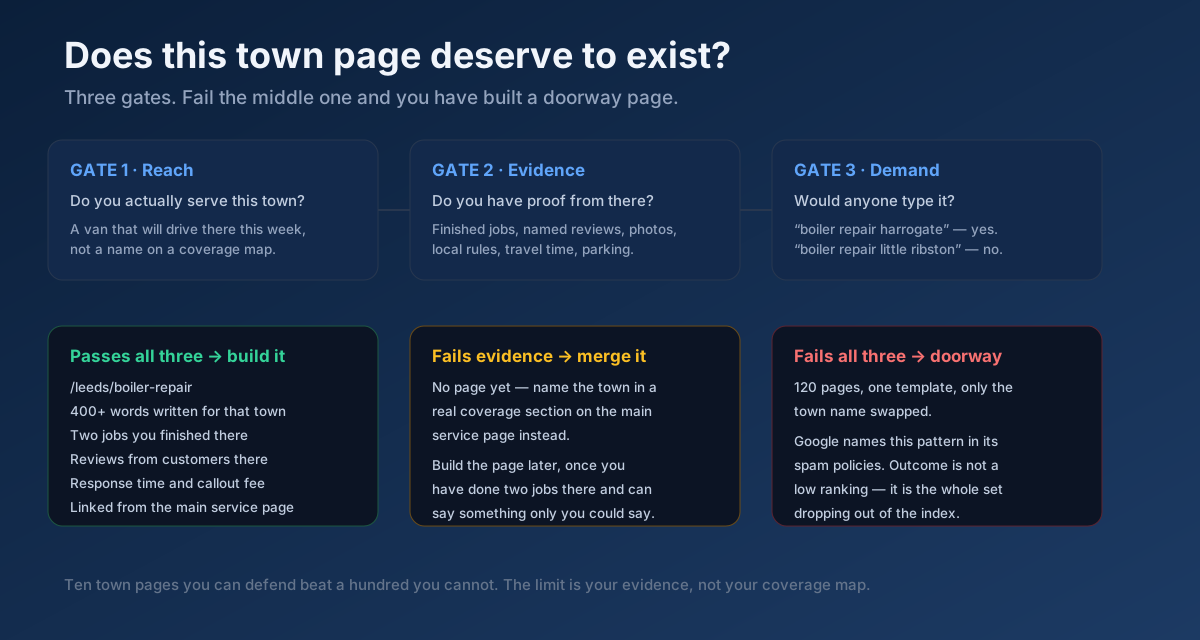
The tempting move is obvious: you cover thirty-nine towns, so you generate thirty-nine pages from one template with the town name swapped in. It occasionally works for a few months. Then it stops working permanently, because Google’s spam policies name this pattern explicitly — doorway pages, created for search engines rather than users, funnelling everyone to the same destination. The outcome is not a lower ranking for those pages; it is the whole set dropping out of the index and taking site-wide trust with it.
The three gates
Before a town page is allowed to exist, it has to pass all three:
- Reach. Do you genuinely serve this town — a van that will actually drive there this week, an office someone can actually visit? A name on a coverage map is not reach.
- Evidence. Do you have something to say about this town that you could not say about any other? Finished jobs, photographs, reviews from customers there, local building stock, parking or access quirks, a realistic travel time, a local authority requirement. This is the gate almost every generated location page fails.
- Demand. Would a real person type the service plus this place name? “Boiler repair Harrogate” passes. “Boiler repair Little Ribston” does not, and a page for it is pure liability.
What a town page that passes actually contains
Four hundred words minimum, written for that place. Two or three jobs you have finished there, with photographs and dates. Reviews from customers in that town. Your realistic response time from your depot. The things that are actually different about working there — a conservation area, a lot of 1930s semis with a particular pipe layout, a council that requires notification, permit parking that affects a callout. Then the standard blocks: scope, process, price, credentials, FAQ, one clear next step.
If you cannot fill that, do not publish the page. Name the town in a genuine coverage section on the main service page instead, and build the page later, once you have done two jobs there and have something only you could write. Ten town pages you can defend will out-earn a hundred you cannot — and they will not put the rest of the site at risk.
The structure that scales
Two workable patterns. Service-first (/boiler-repair/leeds) suits businesses with a few services across many towns. Location-first (/leeds/boiler-repair) suits businesses with real branches and many services per town. Pick one and be consistent, because mixing them creates duplicate paths to the same content. Do not build the full matrix: seven services times thirty-nine towns is 273 pages, and you will not have evidence for 273 pages. The pages you skip should simply not exist — not exist as thin variants. The faceted navigation guide covers the same combinatorial trap in an ecommerce context, and the canonical tags guide explains how to handle the near-duplicates you do end up with.
Step 8 — Schema markup for service businesses
Structured data will not make a bad page rank, but it makes a good page legible — and for local service businesses it feeds the entity understanding that drives map pack and AI-assistant visibility.
What to implement
- LocalBusiness (or its specific subtype:
Plumber,Dentist,LegalService,HVACBusiness,Electrician) on the homepage and contact page, with name, address, phone, opening hours, geo coordinates andsameAslinks to your profiles. Google’s local business structured data documentation is the reference. - Service on each service page, with
serviceType,provider,areaServedand, where you publish one, anoffersblock carrying the price range. The Service type on schema.org lists the full property set. - FAQPage on the FAQ block, matching the visible questions and answers exactly.
- BreadcrumbList, which replaces the raw URL in your search result with a readable path — the cheapest visible win available.
- AggregateRating only where genuine, visible reviews exist on the page. Marking up a rating that a visitor cannot see is a policy violation, and self-serving review markup about your own business has been outside the guidelines for years.
The mistakes that quietly break it
areaServed listing ninety places when you serve six. Opening hours in the markup that contradict the ones on the page. Two conflicting blocks — one from the theme, one from a plugin — describing the same business differently. An address in schema that does not match your Google Business Profile or your citations, which undermines the NAP consistency the citations guide depends on. And FAQ markup for questions that are not actually on the page.
Generate the JSON-LD with a Schema (JSON-LD) Generator and validate every template with a Structured Data (Schema) Checker — broken markup fails silently, so nothing tells you the enhancement is gone except the traffic. The structured data guide covers the wider set of types worth adding, and a Local SEO Audit check will flag the local signals you are missing entirely.
Step 9 — Internal linking across a service site
Service sites are small, which makes internal linking easy and makes neglecting it inexcusable. Two or three deliberate links per page is usually the whole job.
- Hub to service, service back to hub. Every service page links up to the overview and the overview links down to every service.
- Blog posts into service pages. The problem-first article “why is my boiler leaking from the bottom” should link into the boiler repair page with anchor text that names the service. This is how informational traffic becomes commercial traffic, and it is the highest-return internal link on the site.
- Service pages across to genuinely related services. Boiler replacement links to power flushing, because customers who need one often need the other.
- Town pages up to the main service page, not sideways into every other town. Thirty-nine towns cross-linking to each other is a footprint that makes the whole set look generated.
- Descriptive anchor text. “Read about our boiler replacement service”, not “click here”. An Anchor Text Optimizer keeps the distribution natural rather than exact-match-stuffed.
Find the pages nothing links to with an Internal Link Opportunity Finder — on service sites the newest pages are usually the orphans, added to the sitemap and linked from nowhere. The orphan pages guide and internal linking strategy cover the fix.
Step 10 — Speed, mobile and the path to contact
Service searches skew heavily to mobile and often to urgency. Somebody with water coming through a ceiling is on a phone, on mobile data, and will not wait.
- The phone number must be a tap-to-call link in the header, visible without scrolling, on every page. This is the single most commonly missed conversion element on service sites.
- Keep the form to four fields. Name, phone, postcode, what is wrong. Every extra field costs enquiries, and you can ask the rest when you call back.
- State the response time. “We reply within two working hours” converts better than “Get in touch”, because it removes the fear of being ignored.
- Fix the hero image. On most service sites it is the largest contentful paint element and it is a 3 MB photograph. Size it, convert it, and do not lazy-load it.
- Test on a mid-range phone on mobile data. Since mobile-first indexing the mobile rendering is what gets evaluated, and the office wi-fi is lying to you.
Measure with a Page Speed & Size Test and a Mobile-Friendly Checker check, then work through the Core Web Vitals guide and page speed guide for the fixes that actually move the numbers. Alt text on your job photographs matters more than usual here, because those images are genuine differentiators — audit them with an Image ALT Text Checker and see the image SEO guide for the rest.
Step 11 — Service businesses in AI search
“Who should I call to replace a boiler in Leeds and what will it cost” is now a question people put to an assistant before they open a search results page. Being in that answer follows from things already on this list, but the emphasis is different.
- Answer the question in one liftable paragraph. Assistants quote self-contained passages. A sentence that gives a timescale, a price range and a scope in forty words is far more quotable than three paragraphs of context.
- State facts as facts. “A standard replacement takes four to six hours” is extractable. “We work quickly and efficiently” is not.
- Keep the entity consistent everywhere. The same business name, address and phone number on the site, in schema, on Google Business Profile and in every directory. Assistants assemble a picture of a business from many sources, and contradictions cost you.
- Publish the comparison and cost content. “Combi vs system boiler”, “repair or replace”, “what a new boiler costs in 2026”. This is disproportionately what gets drawn on when an assistant builds a recommendation, and almost no local service business publishes it.
Score how quotable your pages currently are with a GEO Checker (Generative Engine Optimization) and an AI Snippet Optimizer, and read the AI Overviews guide and answer engine optimisation guide for the mechanics.
The 20-point service page checklist
Run this against any service page. Anything you cannot tick is a task.
- 1. The page covers exactly one service.
- 2. Title tag under 60 characters: service, location, differentiator.
- 3. Meta description 140–158 characters, naming response time or coverage.
- 4. One H1, naming the service — not the company.
- 5. A 40-word plain-language answer directly under the H1.
- 6. A scope section saying what is included and what is not.
- 7. A step-by-step process with realistic timescales.
- 8. A price range, or an explanation of the fee structure.
- 9. At least three photographs of your own completed work.
- 10. Credentials, registration numbers and guarantee stated as facts.
- 11. Reviews specific to this service, not a generic carousel.
- 12. An FAQ block of six to eight real questions.
- 13. Service schema with
areaServed, plus FAQPage on the FAQ. - 14. Business name, address and phone identical to your Google Business Profile.
- 15. A tap-to-call number visible without scrolling on mobile.
- 16. A form with four fields or fewer and a stated response time.
- 17. Descriptive alt text on every job photograph.
- 18. Internal links up to the hub and across to related services.
- 19. A clean, shallow, readable URL.
- 20. LCP under 2.5 seconds on a mid-range phone.
An All-in-One SEO Audit checks a large share of these in one pass, an On-Page SEO Checker (Keyword) covers the page-level elements, and a full Technical Site Audit (Crawler) finds where a template problem is repeating across every service page at once — which is where the leverage is.
Mistakes that keep service pages invisible
- One page listing every service. The most common and most costly architecture error in the sector.
- Generating a town page for every place on the coverage map. A doorway-page pattern that risks the whole site, not just those pages.
- Refusing to publish any price signal. Ceding the highest-intent queries in your category to comparison sites.
- Stock photography instead of your own work. Everyone can tell, and it removes the one advantage you have over a national aggregator.
- Burying the phone number in a contact page. On an emergency service, that is the entire funnel.
- Different business details on the site, in schema and on Google. Inconsistency directly undermines local ranking.
- Writing for the industry, not the customer. Nobody searches “domestic hot water remediation”.
- Ignoring problem-first questions. The cheapest traffic in the category, left entirely to competitors.
- A testimonial carousel instead of real, attributable reviews. Unverifiable praise persuades nobody.
- Never updating the page. Prices, regulations and staff change; a page that has not been touched since 2021 says so.
A realistic 60-day plan
- Week 1 — Measure and list. Audit what you have, read the last fifty enquiries, list every service you would quote separately, and rank them by profit rather than by volume.
- Week 2 — Split. Build the top three service pages properly, all nine blocks, and rewrite the overview as a real hub. Redirect anything you retire.
- Weeks 3–4 — Proof and price. Photograph three finished jobs per service, write the case notes, publish the price ranges, and gather service-specific reviews.
- Week 5 — Local foundations. Complete the Google Business Profile, fix NAP consistency across directories, add LocalBusiness and Service schema.
- Weeks 6–7 — Locations, carefully. Build town pages only for the places that pass all three gates. Expect that to be three to eight towns, not thirty-nine.
- Week 8 — Questions. Publish four problem-first articles from the questions your customers actually ask, and link each into the relevant service page.
- Ongoing. One new piece of proof per month — a job, a case note, a review — and a quarterly re-audit.
Local and service queries often move faster than national ones because the competing set is small and frequently neglected; four to eight weeks for movement on longer service-plus-place phrases is realistic, with the broader head terms taking longer. The SEO timeline guide sets expectations honestly. Track it with a Keyword Rank Checker and the Search Console measurement guide rather than by refreshing incognito searches — and if traffic moves the wrong way, the traffic drop diagnosis works through the causes in order.
Frequently asked questions
How many words should a service page be?
There is no threshold Google enforces. In practice, 800–1,500 words is what it takes to answer scope, process, price, proof and objections properly — so the number falls out of the content rather than driving it. A 400-word page has almost certainly skipped the blocks that would have made it rank. Padding a page to 2,000 words with filler achieves nothing and hurts conversion.
Should I create a separate page for every town I serve?
Only for towns where you can pass all three gates: you genuinely serve it, you have evidence specific to it, and people actually search the service plus that place name. For most service businesses that is three to ten towns, not the whole coverage map. Everywhere else, name the town in a genuine coverage section on the main service page and build the page later once you have finished work there.
Do I really need to publish prices?
You need to publish a price signal — a range, three worked examples, or an honest explanation of what you charge on and what changes the number. Cost queries are among the highest-volume, highest-intent searches in every service category, and refusing to engage hands them to comparison sites. Where a professional body restricts price advertising, publish the fee structure and the variables instead; that answers the query without breaching the rules.
What is the difference between a service page and a landing page?
A service page is a permanent, indexable page built to rank for organic queries about that service, and it earns authority over years. A paid landing page is campaign-specific, usually stripped of navigation, optimised for a single conversion and often set to noindex. Using a paid landing page as your organic service page is a common mistake: it is too thin to rank and it has nothing to link to.
Why does a directory outrank me for my own service in my own town?
Because the directory page answers the query — it lists options, shows ratings and prices, and gives the searcher a decision — while a typical service page introduces the company. Directories also carry enormous domain authority. You do not beat them by being more authoritative; you beat them by being more specific: real photographs, real case notes, a real price range and answers to questions a directory cannot answer about your actual work.
Do I need a service page if I have a strong Google Business Profile?
Yes, and they do different jobs. The profile drives map pack visibility for proximity-led queries; the service page wins the organic results below the map, the price and process queries, and the AI-assistant answers. They also reinforce each other — a profile that links to a specific, detailed service page performs better than one pointing at a generic homepage.
How do I avoid my service pages competing with each other?
Give each page one distinct primary query and make sure the title, H1 and opening paragraph all express it differently from its siblings. The usual failure is a “boiler repair” page and a “boiler service” page written from the same template, so neither is clearly the better answer. Run a cannibalisation check after any restructure, and resolve overlaps by narrowing the weaker page rather than deleting it.
How long before a new service page ranks?
Indexing usually happens within days on an established site. Meaningful movement on service-plus-place phrases commonly takes four to eight weeks, and competitive head terms take longer — often three to six months, and longer again on a new domain. Local queries frequently move faster than national ones because the competing set is smaller and much of it has never been optimised at all.
The bottom line
Service page SEO is not a writing problem and it is not a technical problem. It is a willingness problem. The pages that win are the ones prepared to commit to specifics in public — what the job involves, how long it takes, what it costs, what can go wrong, who did it last time and what they thought. Every one of those specifics is something a directory, an aggregator or a national franchise physically cannot publish about your local work, and every one of them is what a customer was searching for in the first place.
Start with your single most profitable service. Give it its own page, run it through an All-in-One SEO Audit to see what the current template is doing to it, rewrite the title with a Meta Tag Generator and preview it in a Google SERP Snippet Preview, then add the price range and three photographs of work you actually finished. That one page, done properly, will teach you more about what your customers want than another year of guessing — and then you build the next one.