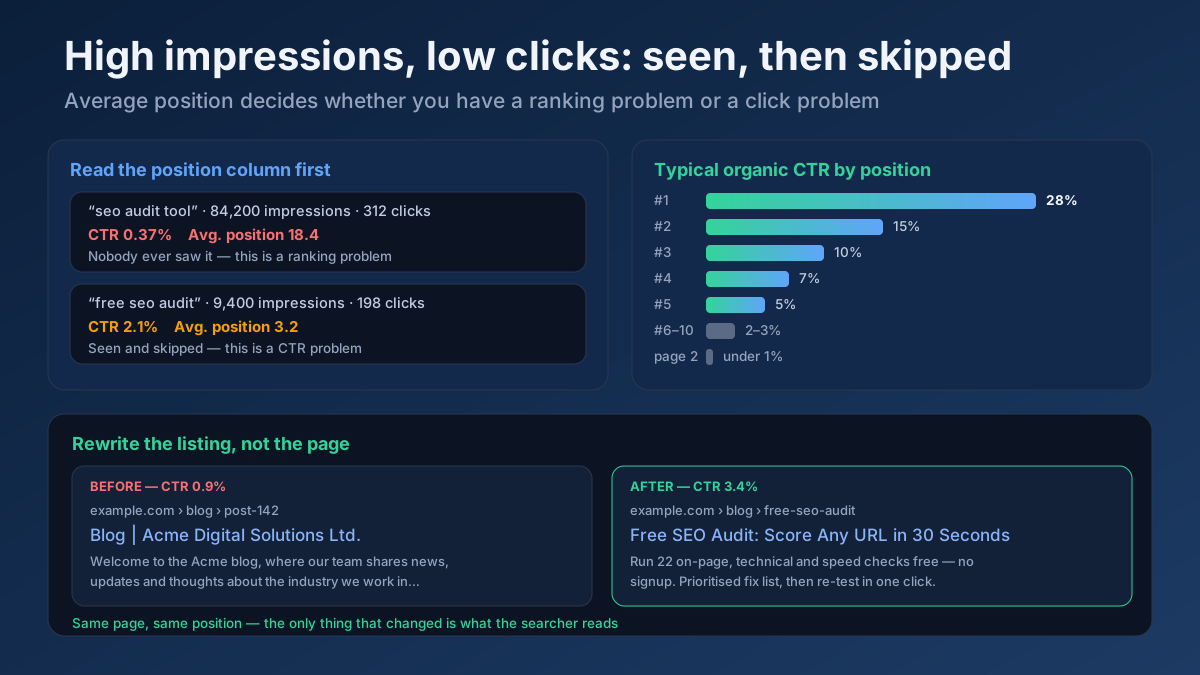
Short answer: High impressions with low clicks means one of two very different things, and average position tells you which. If your average position is below roughly 8, almost nobody actually saw the listing — that is a ranking problem, not a click problem. If you sit in positions 1–5 and your click-through rate is less than half the normal rate for that spot, searchers are seeing you and picking someone else, and that is fixable today by rewriting what the search result says. This guide separates the two cases, benchmarks what a healthy CTR looks like, and gives you the exact Search Console workflow plus the snippet rewrites that recover the click.
What Search Console is actually telling you
Four numbers sit at the top of the Performance report, and misreading the relationship between them is the single most common reason people spend weeks fixing the wrong thing.
- Impressions count every time a URL of yours appeared in a result set for a query. Crucially, an impression is recorded even when your result sits at position 34 and the searcher never scrolled that far. On mobile and in carousels, Google counts an impression when the result is scrolled into view, but for standard blue links deep in the results, appearing in the list is enough.
- Clicks count the searcher choosing your result and landing on your site.
- CTR is simply clicks divided by impressions. It carries no judgement of its own — a 0.4% CTR is catastrophic at position 2 and completely normal at position 22.
- Average position is the mean of the highest position your URL held across all those impressions. It is an average, so a page that ranks 3rd for one query and 40th for two hundred others reports a comfortable-looking number that describes neither situation.
The trap is baked into the arithmetic. A page that picks up thousands of impressions from long-tail queries it barely ranks for will always show a terrible CTR, no matter how good the title is. Google’s own documentation of the Performance report spells out how each metric is counted, and the definition of impressions is where most confusion starts.
Step 1 — Decide whether you actually have a CTR problem
Before rewriting a single title, run this two-minute test. Open the Performance report, switch to the Queries tab, enable all four metrics, and sort by impressions. Then look at each high-impression, low-click row and read the position column.
Average position 11 or worse
You do not have a CTR problem. You have a visibility problem wearing a CTR costume. Practically nobody clicks past the first page, so the impressions are real but worthless, and the CTR number is describing an audience that never existed. The fix is ranking work: strengthen the page, match intent more precisely, add internal links, earn references. Rewriting the title here will move nothing, because the title is never read.
Average position 6–10
A grey zone worth a cheap experiment. You are on page one but below the fold for most searchers, and a genuinely better title can lift a bottom-of-page-one result meaningfully — partly because more people reach it, partly because a more compelling listing survives the scan. Spend twenty minutes here, not a week.
Average position 1–5 with a low CTR
This is the real thing. You are visible, you are being read, and you are being skipped. Every one of the causes in the next section applies, and the work pays back within days rather than months because you do not have to earn a single new ranking position to benefit.
The benchmark you are measuring against
Large-scale click studies disagree on the exact figures — they sample different query sets, countries and years — but they agree on the shape. As a working benchmark for a standard informational query with a clean results page:
- Position 1: roughly 25–35%
- Position 2: roughly 13–18%
- Position 3: roughly 9–12%
- Positions 4–5: roughly 5–8%
- Positions 6–10: roughly 2–3%
- Page two: under 1%
Two adjustments matter more than the exact numbers. Branded and navigational queries run far higher — 40–60% at position one is ordinary when someone searched your company name. And commercial or heavily featured results pages run far lower, because ads, shopping carousels, local packs and AI Overviews push the first organic result well below the fold. Compare yourself against your own site’s median CTR at the same position before you compare against a published study; your niche, your market and your brand recognition all shift the baseline.
Step 2 — The seven causes of a low click-through rate
Once you have confirmed the problem is real, it will be one of these. They are ordered roughly by how often they turn out to be the answer.
1. Google rewrote your title link
The listing searchers see is frequently not the title tag you wrote. Google generates the title link from your <title> element, your H1, prominent on-page text, anchor text pointing at the page and the site name — and it swaps in something else whenever it judges your title vague, keyword-stuffed, boilerplate, half-empty or repeated across the site. Google’s title link documentation is explicit about the triggers.
The practical consequence: you may be optimising a title nobody is ever shown. Search for the exact query in an incognito window and read what actually appears. If it differs from your tag, that is your first fix — make the tag specific, unique, front-loaded with the query, and short enough not to truncate. A Google SERP Snippet Preview shows how the listing renders at real pixel widths before you ship it, and a Meta Tag Analyzer confirms what the server is currently sending.
2. The results page absorbs the click before it reaches you
On a growing share of informational queries, the answer is delivered above the organic results. An AI Overview, a featured snippet owned by a competitor, People Also Ask boxes, a video carousel, four ads and a local pack can all sit between the top of the screen and your position-one blue link. Your position is unchanged; your share of the attention is not.
Confirm it by checking what the SERP now contains for that query with a SERP Features Analyzer lookup, and compare against the same query six months ago if you kept a record. The response is not to fight the summary but to be inside it and to survive it: answer the question directly in the first two sentences of each section, keep facts specific and verifiable, and give people a concrete reason to click through anyway — a tool, a template, a data set, a calculator, something the summary cannot deliver. The AI Overviews guide and answer-engine optimisation guide cover the mechanics, and a GEO Checker (Generative Engine Optimization) scores how quotable your page currently is.
3. Intent mismatch — you rank for a question you do not answer
Sometimes the listing is perfectly good and the searcher correctly decides it is not for them. A product page ranking for “how to” queries, a blog post ranking for a buying query, a UK-focused guide ranking for a US search: in each case the click is lost for a rational reason and no rewrite fixes it honestly.
Diagnose it query by query. Take your ten highest-impression, lowest-CTR queries and classify each one — informational, commercial, transactional, navigational — then ask whether your page type matches. A Keyword Intent Classifier does this in bulk, and the search intent guide explains what each type expects to find. Where the mismatch is real, the honest fix is a different page for that intent, not a cleverer title on the existing one.
4. Your listing is technically fine and completely forgettable
The most common self-inflicted cause. Titles like “Services | Company Name”, “Blog – Acme Ltd” or “Product Category” carry no promise, no specificity and no reason to prefer them over nine alternatives. Meta descriptions that open with “Welcome to our website” or repeat the title in different words waste the only free advertising space Google gives you.
This is the cause with the fastest payback, and section four below is entirely about fixing it.
5. Stale dates and outdated signals
For anything where currency matters — software, pricing, regulations, best-of lists, anything with a year in the query — a visible date from three years ago costs the click regardless of how good the content is. The searcher is filtering on freshness before they read anything else.
Fix the underlying content first, then let the date reflect it. Updating a date without updating the page is a short-lived trick that damages trust when people arrive and find 2022 screenshots. Score your library with a Content Freshness Score and run the pages that matter through a proper content refresh cycle.
6. Nobody recognises the brand
Given two similar listings, people click the name they have heard of. This is why the favicon, the site name and the readable URL path matter more than their size on screen suggests: they are the trust signal that fires before the title is even parsed. It is also the slowest of the seven causes to fix, because it is genuine brand building rather than a copy change. Consistent naming, real authorship, a visible organisation identity and the credibility signals in the E-E-A-T guide all compound here.
7. Impression inflation from queries you never targeted
A page can accumulate enormous impression counts from tangential long-tail queries where it appears at position 40 and has no business ranking. Those impressions drag site-wide CTR down while representing zero lost opportunity. Filter them out before you draw any conclusion: in the Performance report, restrict to positions under 11, or export and pivot by position bucket. What is left is the traffic you could actually have won. The long-tail keyword guide explains why this accumulation is normal and mostly harmless.
Step 3 — The 45-minute Search Console audit
This is the workflow, in order. It ends with a ranked list of pages worth rewriting rather than a vague sense that CTR is bad.
Set the window correctly
Use a full 28 days minimum, and compare it against the previous 28 rather than a random earlier month, so weekday patterns and partial weeks cancel out. Remember the two-to-three-day reporting lag — if the last days of your window are still filling in, every rate you calculate is wrong.
Split branded from non-branded
Add a query filter excluding your brand name and any misspellings of it. Branded searches convert at rates that mask everything else; a site with strong brand demand can show a healthy overall CTR while every non-branded listing underperforms. Run the rest of this audit on the non-branded set only.
Filter to positions that matter
Apply a position filter of under 11, or export to a spreadsheet and bucket rows by position: 1–3, 4–5, 6–10, 11+. Calculate median CTR per bucket for your own site. That median is now your benchmark, and it is a far better one than any published study because it already accounts for your niche, your market and your brand.
Rank the opportunity, do not just rank the CTR
The pages worth your afternoon are not the ones with the worst CTR — they are the ones where the gap between your CTR and your bucket median, multiplied by impressions, produces the largest number. A query with 40,000 impressions at 1.2% CTR against a 4% benchmark is worth roughly 1,100 clicks a month. A query with 300 impressions at 0.5% is worth eleven. Sort by that estimate and work down the list.
Check the page and query levels separately
Filter to a single page, then open its query list. A page can look average overall while one query with huge volume is dragging it down, or while a dozen small queries are all fine and one broken listing is the problem. Query-level detail is where the actual fix is decided.
Split by device and country
Mobile listings truncate titles far earlier and show a different SERP layout, so a title that reads well on desktop can be cut mid-word on a phone. If mobile CTR is disproportionately low, the title length is a prime suspect. A country-specific collapse usually means a different competitive set or a localisation problem rather than a copy problem.
Look at the result with your own eyes
Finish by searching the top three problem queries in an incognito window, from the right country, and screenshotting the results page. Half the diagnoses become obvious at this point: your title was rewritten, an AI Overview appeared, a competitor owns the snippet, your date reads 2023, or your description was truncated mid-sentence.
Step 4 — Rewriting titles that earn the click
Title rewriting is the highest-leverage hour in SEO, because it changes revenue without changing rankings. The listing is your advertisement; treat it like one.
The rules that hold across almost every niche
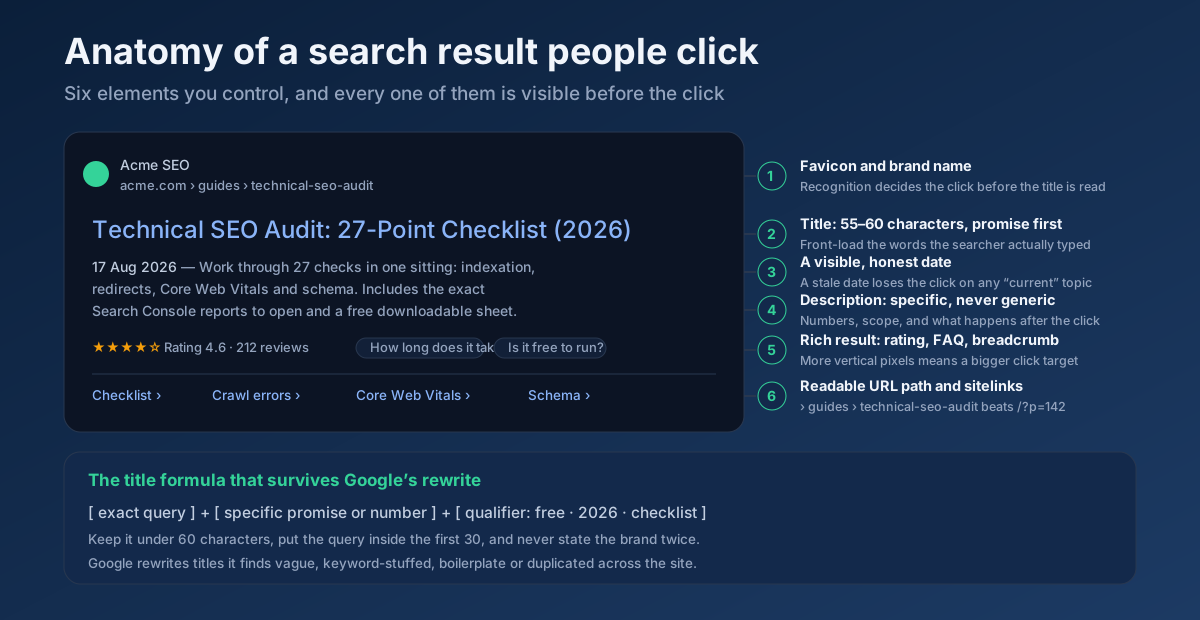
- Front-load the query. Put the words the searcher typed inside the first 30 characters. Scanning is fast and left-to-right; a title that buries the match behind your brand name loses before it is read.
- Stay under about 60 characters. Google truncates by pixel width, not character count, so capitals and wide letters cost more. Preview it rather than counting.
- Make one specific promise. A number, a scope, a time, a constraint. “27-point checklist” beats “complete guide” because it tells the reader exactly what they are getting.
- Name the qualifier that matters in your niche. Free, no signup, 2026, for beginners, for WordPress, with examples. This is often the single word that wins the click.
- Be unique across the site. Duplicate or near-duplicate titles are one of the strongest triggers for Google rewriting them, and they also split relevance between your own pages — check for overlap with a Keyword Cannibalization Checker.
- Do not repeat the brand. Google appends the site name on many results already; writing it twice wastes pixels you cannot get back.
- Never oversell. A title that promises more than the page delivers buys one click and loses the next twenty, because the return-to-SERP behaviour it creates is exactly what you were trying to avoid.
Six patterns that work, with the reasoning
- Number + noun + qualifier. “12 Internal Linking Mistakes That Cost You Rankings” — the count sets an expectation of scope and skimmability.
- Question, answered in the title. “How Long Does SEO Take? 4–6 Months, Realistically” — giving the answer away raises CTR rather than lowering it, because it proves the page actually answers rather than teasing.
- Task + time. “Fix a Slow WordPress Site in Under an Hour” — time-boxing removes the main objection to clicking.
- Comparison. “301 vs 302 Redirects: Which One and When” — matches how comparison searchers phrase the query and signals a decision, not an explanation.
- Objection removed. “Free SEO Audit — No Signup, No Credit Card” — states up front what people are scanning for.
- Specific outcome. “Cut Your LCP to Under 2.5s: 9 Fixes That Worked” — a measurable result plus first-hand experience.
Before and after, from real patterns
- Before: “Blog | Acme Digital Solutions Ltd.” → After: “Technical SEO Audit: 27-Point Checklist (2026)”. The first is a navigation label; the second is a reason to click.
- Before: “Our Services – SEO, PPC, Social, Content, Web Design” → After: “SEO Services for B2B SaaS — Pricing and Timelines”. Narrower, but it matches an actual query and answers the two things buyers want first.
- Before: “Everything You Need to Know About Meta Descriptions” → After: “Meta Descriptions: Length, Examples and What Google Rewrites”. The first promises completeness, which nobody believes; the second promises three specific things.
Generate candidates quickly with a Meta Tag Generator, check the rendered width with a Google SERP Snippet Preview, and read the title tag guide for the longer treatment.
Step 5 — Descriptions Google is willing to use
Google rewrites meta descriptions more often than titles, pulling a passage from the page when it judges that passage a better match for the query. That does not make the tag pointless — it makes it the default the algorithm falls back on, and defaults get used constantly.
- Write 140–158 characters. Longer gets truncated; much shorter leaves free advertising space unused.
- Include the query naturally. Matched terms are bolded in the results page, which is a genuine visual advantage in a wall of grey text.
- Lead with the outcome, not the topic. “Run 22 checks and get a prioritised fix list” beats “This article discusses SEO auditing.”
- Be concrete. Numbers, timeframes, what is included, what it costs. Vagueness is the reason Google replaces descriptions in the first place.
- Write one per page. Templated descriptions across hundreds of URLs are almost always replaced, and they earn nothing when they survive.
- Make the page contain quotable sentences. Since Google frequently builds the snippet from body text, a page with crisp, self-contained answer sentences gets better auto-generated descriptions than one written in long, dependent paragraphs. An AI Snippet Optimizer highlights which passages are extractable.
The meta description guide covers the longer version, including what to do when Google insists on rewriting yours.
Step 6 — Take up more room on the page
CTR is partly a competition for vertical space. A listing that occupies twice the height of its neighbours is disproportionately likely to be clicked, and several of those extra elements are free.
- Breadcrumbs.
BreadcrumbListmarkup replaces the raw URL with a readable path, which reads as more trustworthy and adds a line. See the breadcrumb guide and generate valid JSON-LD with a Schema (JSON-LD) Generator. - Ratings, FAQs, prices, availability. Where they genuinely apply, review, product and FAQ markup can add stars, prices or expandable questions. Validate everything with a Structured Data (Schema) Checker — broken markup silently removes the enhancement you were counting on. The structured data guide explains which types still produce visible results.
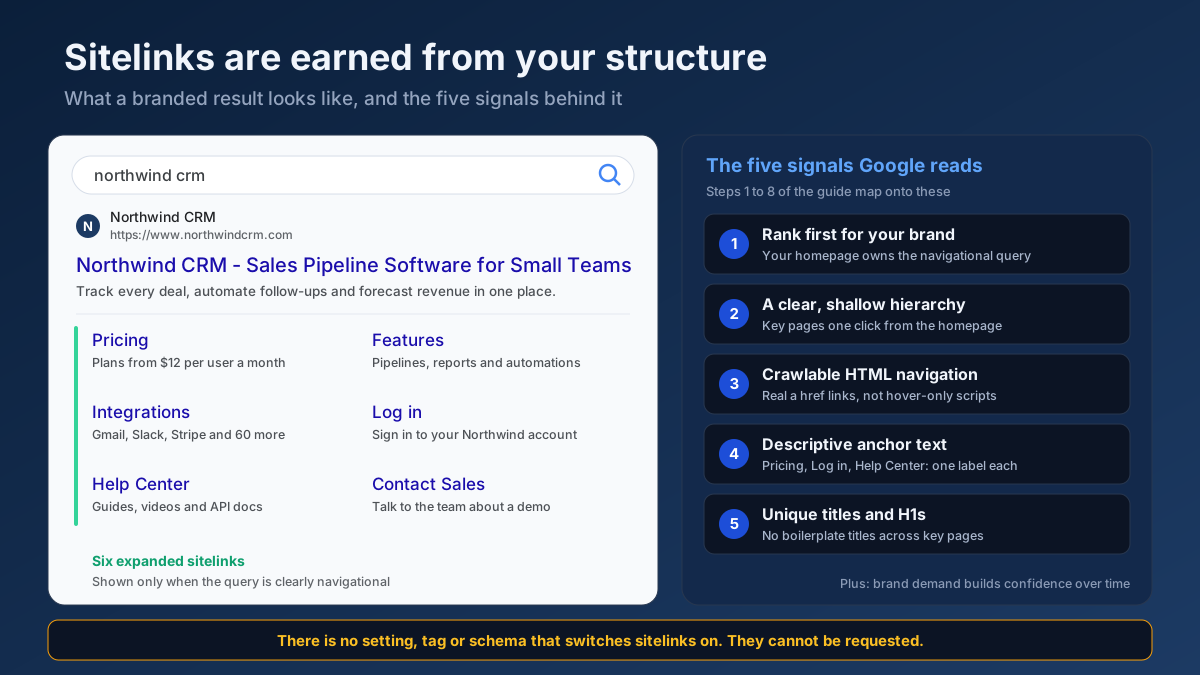
- Sitelinks. Earned, not requested, but they follow clear internal linking and a clean, logical URL structure. The sitelinks guide covers the ten steps that make a site eligible.
- A favicon that reads at 16 pixels. A shrunk-down full logo turns to mush on mobile. Use a simplified mark.
- Own the featured snippet. Winning the snippet on a query you already rank for is often the largest single CTR change available — the featured snippets guide covers the formatting that earns it.
Step 7 — Measure the change without fooling yourself
CTR experiments are unusually easy to misread, because position, seasonality and SERP layout all move underneath you while you are testing.
- Change one thing at a time. Rewriting the title and the description together tells you something worked, not which one.
- Wait a full 28 days. Google needs to recrawl and re-render, and weekday effects need to cancel out. Two days of data is noise.
- Control for position. If average position improved from 6.2 to 3.8 during the test, your CTR gain may be entirely positional. Track rankings separately with a Keyword Rank Checker so you can hold one variable still.
- Compare at the query level. Page-level CTR mixes dozens of queries at different positions; a single query is a much cleaner unit of measurement.
- Use a control group. Rewrite ten pages and leave ten comparable pages untouched. If both groups rise, something external changed and your rewrite gets no credit.
- Expect modest wins to be real wins. Moving a page from 2.1% to 3.4% at the same position is a 60% traffic increase on that query. Nobody needs a headline to notice that in the revenue line.
The Search Console measurement guide covers building this into a repeatable monthly review rather than a one-off scramble.
Mistakes that make CTR worse
- Rewriting titles for pages ranked 20th. The most common wasted week in SEO. Fix the ranking or leave it alone.
- Clickbait. It works once. Then pogo-sticking back to the results page teaches everyone involved, including you, that the click was worthless.
- Chasing site-wide average CTR. It is an average of hundreds of unrelated situations and it is not actionable. Query-level CTR at a fixed position is the only number worth optimising.
- Ignoring branded contamination. Strong brand demand hides genuinely weak non-branded listings for years.
- Judging after four days. Recrawl lag alone makes short tests meaningless.
- Bumping the date without touching the content. It lifts CTR for a fortnight and costs trust permanently.
- Assuming CTR is a direct ranking factor. Google has consistently said raw click-through rate is not used as a straightforward ranking signal. Optimise it because clicks are the thing you actually want, not as a ranking hack.
A realistic 30-day plan
- Days 1–2. Export 28 days of query data, strip branded terms, bucket by position and calculate your own median CTR per bucket. Build the opportunity-ranked list.
- Days 3–5. Take the top 20 opportunities, search each one incognito, and record what the SERP actually looks like: rewritten title, AI Overview, competitor snippet, stale date, truncation.
- Days 6–10. Rewrite titles for those 20 pages using the patterns above. Preview every one before shipping. Leave descriptions untouched so the test stays clean.
- Days 11–14. Fix the structural issues you found: broken schema, missing breadcrumbs, an unreadable favicon, dates that misrepresent the content.
- Days 15–30. Let it settle. Re-export, compare query by query at matched positions, keep what worked and revert what did not. Then start the next 20.
Run an All-in-One SEO Audit on your highest-opportunity URL at the start and the end — it catches the on-page and technical issues that quietly cap what any snippet rewrite can achieve.
Frequently asked questions
What is a good CTR in Google Search Console?
There is no single good number, because CTR is almost entirely a function of position and query type. As a rough guide for non-branded informational queries: 25–35% at position 1, 13–18% at position 2, 9–12% at position 3, 5–8% at positions 4–5 and 2–3% at positions 6–10. Branded queries run much higher, and commercial queries with ads and AI Overviews run much lower. Your own median CTR at each position is a better benchmark than any published figure.
Why do I have thousands of impressions and almost no clicks?
Almost always because those impressions come from positions nobody scrolls to. An impression is recorded when your URL appears in a result set, including at position 30 for a query you never targeted. Filter the Performance report to positions under 11 and look again — if the low CTR disappears, you never had a CTR problem, you had impression inflation from long-tail queries.
Does click-through rate affect rankings?
Not as a direct, straightforward ranking signal — Google has said so repeatedly, and a raw CTR factor would be trivially easy to manipulate. What is true is that clicks are the outcome you actually want, and that a listing which consistently satisfies searchers tends to be the one that also deserves the position. Optimise CTR for the traffic, not as a ranking trick.
How long does it take to see the effect of a title change?
Google usually recrawls and re-renders an important page within a few days, but you need a full 28-day window afterwards to measure honestly, so plan on four to five weeks from edit to conclusion. If nothing has changed in the search results after two weeks, check whether Google is displaying your new title at all — it may have rewritten it.
Why is Google showing a different title than the one I wrote?
Because it judged your title less useful than an alternative it found on the page. The usual triggers are titles that are too long, too short, keyword-stuffed, boilerplate, duplicated across the site, or that describe the site rather than the page. Write a specific, unique title that front-loads the query and matches the H1, and the rewrite rate drops sharply.
Do AI Overviews reduce my click-through rate?
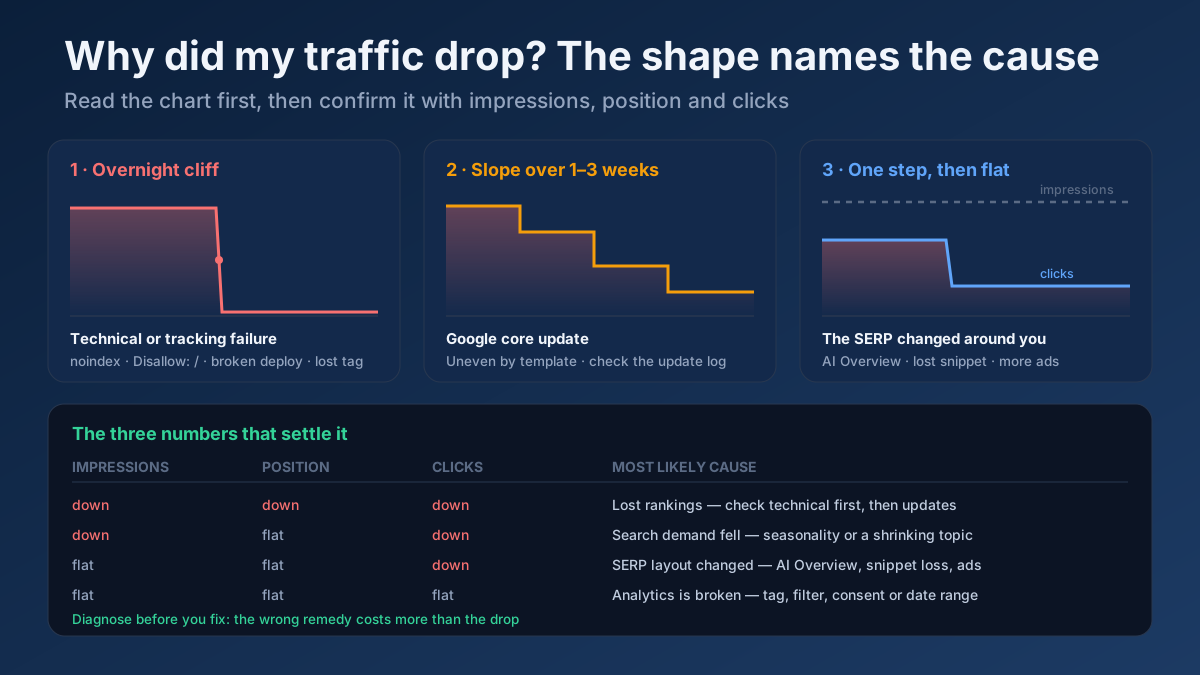
On informational queries where an AI Overview appears, yes — the organic results move down the page and a share of searchers get what they needed without clicking. The pattern in Search Console is distinctive: impressions and average position hold steady while clicks step down and stay down. The workable response is to be citable inside the summary and to offer something the summary cannot reproduce, such as a tool, a template or original data.
Should I rewrite titles for pages ranked on page two?
No. Page-two results earn well under 1% CTR because almost nobody goes there, so even a perfect title changes nothing measurable. Spend that effort on the ranking problem instead — intent match, depth, internal links, references — and revisit the title once the page reaches page one.
Can a low CTR be perfectly fine?
Yes, in three situations: when the impressions come from positions nobody sees, when your page answers the query so completely in the snippet that the searcher is satisfied without clicking, and when you rank for adjacent queries you never intended to serve. Judge CTR against the position and the intent, never against a site-wide average.
The bottom line
High impressions with low clicks is a diagnosis problem before it is a copywriting problem. Read the position column first: below page one, nobody saw you and the work is ranking work; inside the top five, the listing itself is losing a click you have already earned. Filter out branded queries and long-tail impression noise, benchmark against your own site rather than a published average, rank the opportunity by impressions multiplied by the CTR gap, and then rewrite the titles that sit at the top of that list. It is the rare piece of SEO where the effort is measured in hours, the result shows up in weeks, and you do not have to gain a single ranking position to earn more traffic.
Start with one page: preview how its result actually renders with the Google SERP Snippet Preview, draft a sharper title with the Meta Tag Generator, and confirm nothing else on the page is holding it back with a On-Page SEO Audit.