Short answer: Breadcrumb navigation is a secondary trail — usually shown as Home › Category › Subcategory › Page — that tells both visitors and search engines exactly where a page sits in your site’s hierarchy. Done well, it strengthens internal linking, gives crawlers reliable paths to parent pages, and, when you add BreadcrumbList structured data, replaces the raw URL in Google’s results with a clean, clickable path that can lift your click-through rate. This guide covers the types, the schema, the mistakes and the tests, step by step.
What breadcrumb navigation actually is
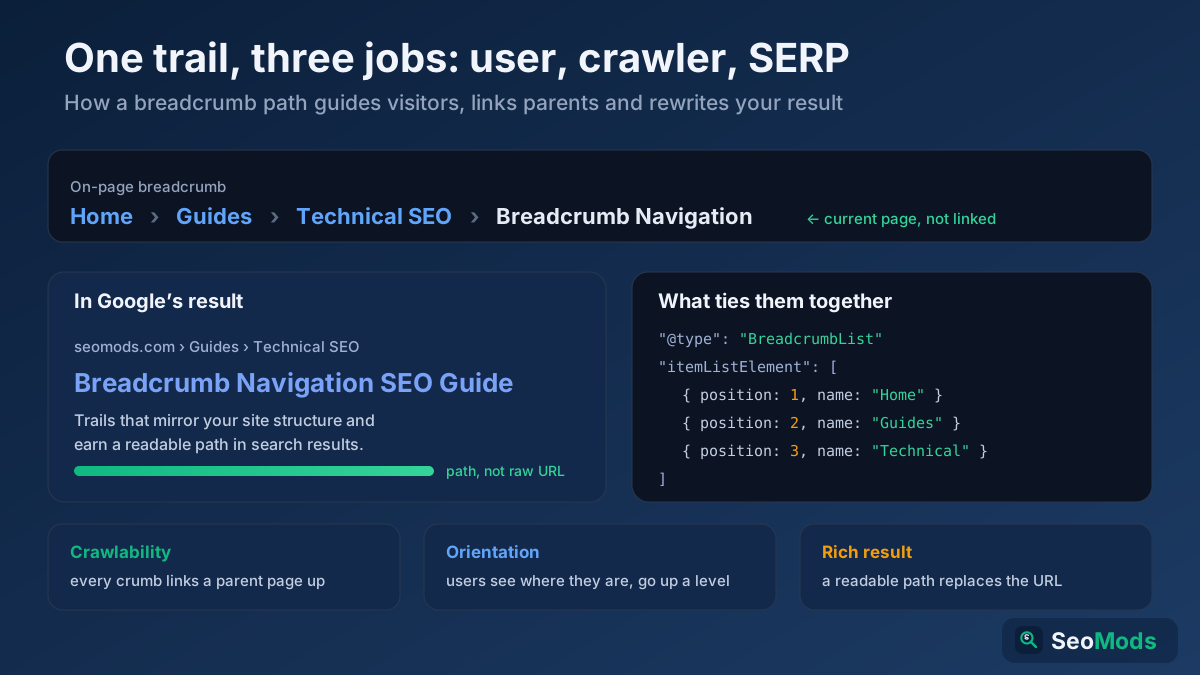
A breadcrumb is a small, single-line navigation aid, almost always placed near the top of a page above the H1, that shows the path from your home page down to the page a visitor is currently on. The name comes from the Hansel and Gretel fairy tale — a trail of crumbs that lets you find your way back. On the web it does the same thing: each step in the trail is a link to a higher level of the site, and the final step is the current page.
It is important to understand what breadcrumbs are not. They are not your primary navigation menu, and they are not a replacement for it. They are a supplementary orientation cue that answers one question at a glance: "where am I, and what is above me?" Because every step except the last is a genuine link, a breadcrumb is also a compact block of internal links pointing up your hierarchy — and that dual role, as both a UX signal and an SEO signal, is why it earns a dedicated place in a serious technical SEO audit
The three types of breadcrumbs
Not every breadcrumb behaves the same way, and the type you choose has direct SEO consequences. There are three established patterns:
- Hierarchy-based (location) breadcrumbs — the most common and the best for SEO. They mirror your site’s structure regardless of how the user arrived:
Home › Guides › Technical SEO › This Page. Every visitor on the same page sees the same trail, which makes it predictable for both people and crawlers. - Attribute-based breadcrumbs — common on e-commerce and faceted category pages, where the trail reflects the filters or attributes that define a listing:
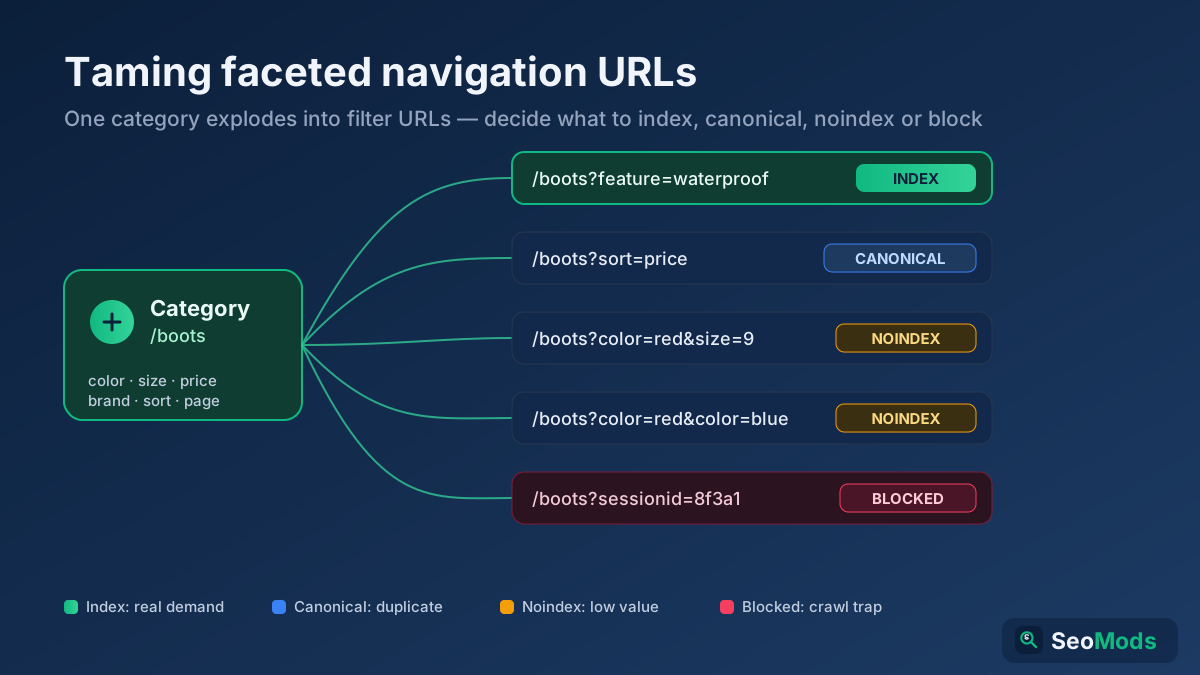
Home › Shoes › Running › Men’s › Size 10. These are useful but need care, because attribute combinations can multiply into thousands of near-duplicate URLs — the same crawl-budget trap covered in faceted navigation SEO - History-based (path) breadcrumbs — these reflect the clicks a user actually made to reach the page ("you came from here, then here"). Avoid them for SEO. They are non-deterministic, so the trail changes per session, they duplicate the browser’s back button, and they give crawlers no stable structural signal. If you see history-based crumbs, replace them with hierarchy-based ones.
For the vast majority of sites, hierarchy-based breadcrumbs are the right default. They are the only type that consistently reinforces your architecture, and they are the type Google’s documentation and rich-result guidelines are built around.
Why breadcrumbs matter for SEO
Breadcrumbs look like a small UX flourish, but they touch several ranking-adjacent systems at once. Here is what a well-built trail actually does for you:
- Crawlability and discovery. Every breadcrumb step is an internal link pointing up the tree. That gives search-engine crawlers a reliable, repeated path to your category and hub pages from every page beneath them, which helps those parent pages get discovered and re-crawled.
- Internal link equity. Because deep pages consistently link up to their parents, breadcrumbs funnel authority toward your most important category and pillar pages — exactly the flow you want in a well-planned internal linking strategy
- Descriptive anchor text. A breadcrumb like
› Technical SEO ›gives Google a clean, keyword-relevant anchor pointing at that category, reinforcing what the parent page is about without any manual link-building. - Topical context. The trail literally spells out the relationship between a page and its parents, helping search engines understand how your content is grouped into topics and clusters.
- User experience signals. Visitors who can see where they are and jump up a level with one click are less likely to bounce back to the search results. Breadcrumbs reduce that friction, especially for people who land deep in your site from an external link.
- Rich results. With
BreadcrumbListmarkup, Google can display your trail in place of the raw URL in the search snippet. A readable path such asseomods.com › Guides › Technical SEOis more inviting than a long URL, and clearer context often means a better click-through rate.
BreadcrumbList structured data, field by field
Visible breadcrumbs help users; structured data is what makes Google eligible to show the trail in your search result. The markup type is BreadcrumbList from Schema.org, and the recommended format is JSON-LD in the page head or body. Here is a complete, valid example for a page three levels deep:
{
  "@context": "https://schema.org",
  "@type": "BreadcrumbList",
  "itemListElement": [
    {
      "@type": "ListItem",
      "position": 1,
      "name": "Home",
      "item": "https://example.com/"
    },
    {
      "@type": "ListItem",
      "position": 2,
      "name": "Guides",
      "item": "https://example.com/guides/"
    },
    {
      "@type": "ListItem",
      "position": 3,
      "name": "Breadcrumb Navigation SEO"
    }
  ]
}
Read each field for what it does:
itemListElement— the ordered array of steps in the trail, listed from the top level down.position— the 1-based order of each step.1is your home or top level; the number increases as you go deeper.name— the visible label for that step. It should match the anchor text a user sees in the on-page breadcrumb.item— the absolute URL of that step. Notice the last element omitsitem: the final crumb is the current page, so per Google’s guidance it does not need a URL. You can include a@idinstead, but leaving it off is the simplest valid pattern.
Two rules matter above all. First, the structured data must match the breadcrumb a user actually sees on the page — Google’s breadcrumb structured data documentation is explicit that the markup should reflect the visible trail, not an invented one. Second, if a single page genuinely belongs to more than one path, you may supply multiple BreadcrumbList objects. Generate and sanity-check your JSON-LD with the Schema (JSON-LD) Generator and then confirm it parses cleanly with the Structured Data (Schema) Checker before you ship it.
How to build SEO-friendly breadcrumbs step by step
Building breadcrumbs that help rather than clutter is a short, repeatable process. Work through it once, template it, and every new page inherits a correct trail:
- Choose the hierarchy type and apply it site-wide. Location-based trails that mirror your structure are the default; reserve attribute-based trails for genuine faceted listings.
- Mirror your URL and site structure. The trail should track the logical path of the page. If your URL structure is
/guides/technical-seo/breadcrumbs/, the breadcrumb should readHome › Guides › Technical SEO › Breadcrumbs. Consistency between URL, breadcrumb and navigation removes ambiguity. - Write descriptive, human labels. Use the real category name, not
Category 1or a bare ID. Each label doubles as anchor text, so make it clear and relevant. - Place it above the fold, above the H1. The conventional and most usable position is at the very top of the content area. Users expect it there, and it keeps the heading hierarchy clean underneath.
- Link every step except the current page. All parent crumbs are clickable links; the final crumb (the page itself) is plain text. Mark it with
aria-current="page"for accessibility. - Use semantic, accessible markup. Wrap the trail in a
<nav aria-label="Breadcrumb">containing an ordered list. This gives screen readers a named landmark and communicates order. - Add the BreadcrumbList JSON-LD that matches the visible trail exactly, as shown above.
- Confirm it renders on mobile and in your actual templates — category, article, product and paginated pages often use different templates, and it is easy to ship breadcrumbs on some but not all.
How to implement breadcrumbs on common platforms
You rarely have to build breadcrumbs from scratch. What matters is knowing where the trail and its schema come from on your stack so you can confirm both are present and correct:
- WordPress. Most SEO plugins generate breadcrumbs and their
BreadcrumbListmarkup for you. Enable the feature, drop the plugin’s breadcrumb function or block into your theme template above the title, and set the trail source to your category hierarchy rather than the page’s post format or date. Many modern themes also ship their own breadcrumbs — run only one, or you will get duplicate trails and duplicate schema on the same page. - Shopify and other hosted platforms. Breadcrumbs usually come from the theme’s Liquid (or equivalent) templates. Check that the product template outputs the collection path and that the JSON-LD block is included; if the theme omits schema, add a small
BreadcrumbListsnippet that reads the same values the visible trail uses. - Hand-coded and framework sites. You own both halves. Render a semantic
<nav aria-label="Breadcrumb">with an ordered list of links, and generate the matching JSON-LD from the exact same data source — a single array of[name, url]pairs feeding both the HTML and the schema is the cleanest pattern, because it makes a mismatch impossible.
Whichever route you take, the acceptance test is identical: view the rendered page, confirm the visible trail is correct, then confirm the structured data describes that exact same trail. If a plugin or theme is emitting a second, conflicting breadcrumb, disable one before you go further.
Breadcrumbs, internal linking and site architecture
The biggest SEO payoff of breadcrumbs is structural. Think of your site as a tree: the home page at the top, categories as branches, individual pages as leaves. Breadcrumbs are the visible expression of that tree on every single page, and because they are automatic, they create a dense, consistent web of upward links that manual internal linking rarely matches.
That consistency does two things. It keeps your architecture shallow in link terms — even a deep page is only a couple of clicks from the home page through its crumbs — and it reinforces topical grouping, because every leaf constantly links back to the same category hub. This is the same principle behind topic clusters and pillar pages; breadcrumbs are the connective tissue that keeps a cluster tightly linked without any extra effort. When you audit your link graph with the Link Analyzer or a full Technical Site Audit (Crawler), well-implemented breadcrumbs show up as strong, uniform internal linking to your category layer — and their absence often explains why category pages underperform.
Breadcrumbs by site type
The core rules never change, but how you apply them shifts with the kind of site you run. Matching the pattern to the content type is what turns a generic trail into one that genuinely helps ranking:
- E-commerce. Product and category pages are where breadcrumbs earn the most. Anchor each product to its true category path —
Home › Kitchen › Cookware › Frying Pans › This Pan— so the trail feeds link equity to the category pages that usually target your highest-volume keywords. When a product legitimately lives in two categories, pick one primary path for the breadcrumb to keep it stable, and avoid letting filter combinations spawn a different trail on every faceted URL. - Blogs and publishers. Map the trail to your category or topic taxonomy rather than to dates:
Home › SEO › Technical SEO › This Articleis far more useful to both readers and crawlers than a2026 › Augustarchive path. This is also what keeps a pillar-and-cluster structure visibly connected: every article points back at the pillar category through its crumbs. - SaaS and documentation. Docs are naturally deep, so breadcrumbs are close to essential for orientation:
Docs › API › Authentication › OAuthtells a reader exactly how far into the tree they are and lets them climb back to the section index in one click. Keep the trail identical to the sidebar hierarchy so the two navigation systems reinforce rather than contradict each other. - Local and multi-location sites. Where location is part of the structure, reflect it:
Home › Locations › Chicago › Downtown. This gives each location page a clean upward link to the region and the locations hub, which supports the internal-linking side of local SEO.
Whatever the site type, the test is the same: does the trail describe a real, stable place in your hierarchy that a user could navigate on purpose? If yes, it will help. If it describes filters, sessions or dates, rethink it.
Breadcrumbs on mobile
Because Google indexes the mobile version of your site first, the breadcrumb that matters most is the one on small screens. The problem is space: a four- or five-level trail rarely fits on one line on a phone. Handle it deliberately rather than letting it break:
- Allow horizontal scroll or wrapping for the trail so the full path stays available and tappable, rather than being cut off mid-word.
- Truncate the middle, not the ends, if you must shorten. Keep the home level and the immediate parent visible; collapse deep middle levels behind an ellipsis the user can expand.
- Keep tap targets large enough. Cramped crumbs are hard to tap accurately; give each link enough padding to be a comfortable target.
- Never hide breadcrumbs from mobile entirely. If the crumb (and its schema) only exists on desktop, mobile-first indexing may not see it, and you lose both the UX and the rich-result eligibility.
The guiding rule tied to mobile-first indexing is parity: the breadcrumb and its structured data should be present and identical on mobile and desktop.
Common breadcrumb mistakes that hurt SEO
Most breadcrumb problems are self-inflicted and easy to fix once you know the pattern. Watch for these:
- Schema that does not match the visible trail. If your JSON-LD lists a path the user never sees, Google may ignore the markup or, worse, treat it as a structured-data violation. Keep them identical.
- History-based trails. A breadcrumb that changes based on how the user arrived gives crawlers no stable signal and duplicates the back button. Use hierarchy-based trails instead.
- Linking the current page. The final crumb should be plain text, not a self-referencing link. Linking it creates a needless self-link and confuses the "you are here" cue.
- Vague or ID-based labels.
Home › Cat-482 › Itemtells nobody anything. Use the real, descriptive name at every level. - Crumbs pointing at redirects or noindexed pages. If a breadcrumb links to a URL that
301s or is set tonoindex, you are wasting crawl paths on dead ends. Point every crumb at a live, indexable canonical URL. - Keyword-stuffed labels. Cramming keywords into crumb text looks spammy and reads badly. The category name is already the keyword you want — leave it at that.
- Missing breadcrumbs on some templates. Shipping the trail on articles but not on product or paginated pages leaves gaps in both your link graph and your rich-result coverage. Audit every template.
- Treating breadcrumbs as the main navigation. They complement your menu; they do not replace it. A site with only breadcrumbs and no primary nav is hard for both users and crawlers to move through.
How to test and validate your breadcrumbs
Breadcrumbs fail quietly — a mismatched schema or a missing template rarely throws an obvious error — so verification matters. Run these checks after any change:
- Validate the markup. Paste the URL into Google’s Rich Results Test, or run it through the Structured Data (Schema) Checker to confirm the
BreadcrumbListis detected and error-free. - Check Search Console. The Enhancements → Breadcrumbs report shows which pages Google recognizes valid breadcrumb markup on, and flags errors and warnings across the whole site.
- Crawl the site. A Technical Site Audit (Crawler) or a check with the On-Page SEO Checker (Keyword) confirms the trail actually renders on every template and that its links resolve to live pages rather than redirects or 404s.
- Test on a real phone. Confirm the trail is visible, tappable and not truncated to uselessness on a narrow screen.
- Click every crumb. The simplest test of all: click each step and make sure it lands on the correct, indexable parent page.
Turn it into a checklist
Analysis is only worth anything if it changes the page. Use this as your before-you-ship breadcrumb checklist:
- Hierarchy-based trail that mirrors the URL and site structure — on every template.
- Descriptive, human labels doubling as clean anchor text.
- Positioned above the H1, inside a
<nav aria-label="Breadcrumb">with an ordered list. - Every step linked except the current page, which carries
aria-current. BreadcrumbListJSON-LD that matches the visible trail exactly.- Every crumb points at a live, indexable, canonical URL — no redirects, no noindex.
- Present and identical on mobile and desktop.
- Validated in the Rich Results Test and clean in the Search Console breadcrumbs report.
Breadcrumbs are one of the highest-leverage, lowest-effort pieces of on-page SEO: build the template once and every page you publish inherits a correct trail, tighter internal linking and a shot at a better-looking search result. Fold the checks above into your regular structured data workflow and revisit them whenever you change your site’s architecture.
Frequently asked questions
Do breadcrumbs still matter for SEO in 2026?
Yes. Breadcrumbs remain a recommended pattern in Google’s own structured-data documentation, they reinforce internal linking and site architecture, and BreadcrumbList markup is still eligible to show a readable path in search results. They are a small, durable win that has not been deprecated or replaced.
Where should breadcrumbs go on the page?
Near the top of the content area, above the H1 and below the primary navigation. That is where users expect them, it keeps your heading hierarchy clean, and it makes the trail one of the first orientation cues a visitor sees when they land deep in your site.
Do I need both visible breadcrumbs and schema?
Effectively yes. Visible breadcrumbs serve users and internal linking; the BreadcrumbList schema is what makes Google eligible to display the trail as a rich result. Google’s guidance is that the markup should describe a breadcrumb the user can actually see, so the two are meant to go together rather than one replacing the other.
Should the current page be a link in the breadcrumb?
No. The final crumb represents the page you are already on, so it should be plain text rather than a self-referencing link. Mark it with aria-current="page" for accessibility, and in the JSON-LD you can omit the item URL on that last element.
Can breadcrumbs replace my main navigation menu?
No. Breadcrumbs are a secondary, supplementary aid that shows the path up your hierarchy; they do not offer the breadth of a primary menu. Keep both: the main menu for site-wide movement, and breadcrumbs for showing where the current page sits within it.