Why E-commerce Managers need this
A shop's thousands of URLs come out of a handful of templates. The same back-in-stock form, "You may also like" carousel, delivery tab and filter labels sit on every product, and many category pages are a heading, a grid and a sentence. Ahrefs' e-commerce guide puts it plainly: product and category pages often have little to no content, and unique descriptions help both shoppers and search engines understand them.
Knowing which pages are in that state is hard from the admin panel. The CMS shows you a description field, not what the finished page adds up to, and a product can look busy in the browser while its own text is two sentences.
This checker fetches one product or category URL and counts the words in the main content area, with menus and the footer removed. It reports Words, a Thin, Borderline or Substantial verdict, text ratio and vocabulary variety. It counts template text like any other text, so the signal comes from comparison: whatever sibling pages share is template, and the rest belongs to the page.
E-commerce Managers specific guidance
Tips for E-commerce Managers
Product pages: always run a pair. Take two products built on the same template, one with a long description and one you suspect is bare. The words they have in common (sign-up forms, carousels, care or delivery tabs, a brand block) form a floor that every product on the template carries. Subtract it and you are left with the product's own copy. When two quite different products land close together, the template is doing most of the talking. For the description itself, paste two siblings into Text Similarity: a high score means the copy was assembled from the same sentences or attributes.
Category pages: find out where the words sit. A category count usually splits into an intro, product names from the grid, filter labels, any copy below the grid and related-category links. Product names and prices change with stock and say nothing about the range, so only the intro and the copy below the grid are yours. If a Post blocks card appears, the grid tiles are separate <article> elements and their text is in the count.
Order of work: start with the categories and products that already get impressions, from the Pages tab of Search Console's Performance report filtered to your product or category URL pattern. Unique copy pays off there first; long-tail SKUs can stay on the template until they earn traffic.
The costliest mistake
The tempting shortcut is to fill the field with the supplier's description. Every other shop selling that SKU received the same text, so the page gains words and nothing that sets it apart. Write what you know from selling the product: who returns it and why, how it fits, what it pairs with.
Quick start
- Pick a top category and two products from one template.
- Run each URL and note Words and the verdict.
- Open the pages and mark the blocks they share.
- Subtract the shared words to estimate each page's own copy.
- Rewrite the busiest pages first, then run them again.
What this tool does not tell you
- It does not compare pages, so it cannot flag a shared template or one description reused across SKUs; run sibling pages and use Text Similarity for that.
- It does not run JavaScript. Grids, descriptions or reviews loaded by script are not counted, as on the MUJI category.
- It reads the first 3 MB of HTML. Heavier pages get a warning above the report, which Allbirds' men's shoes collection triggered on 10 November 2026.
- One URL per run, no catalogue crawl; Google publishes no minimum word count for product or category pages.
Real examples
1. Two products, one template: about 180 words on both
- Situation
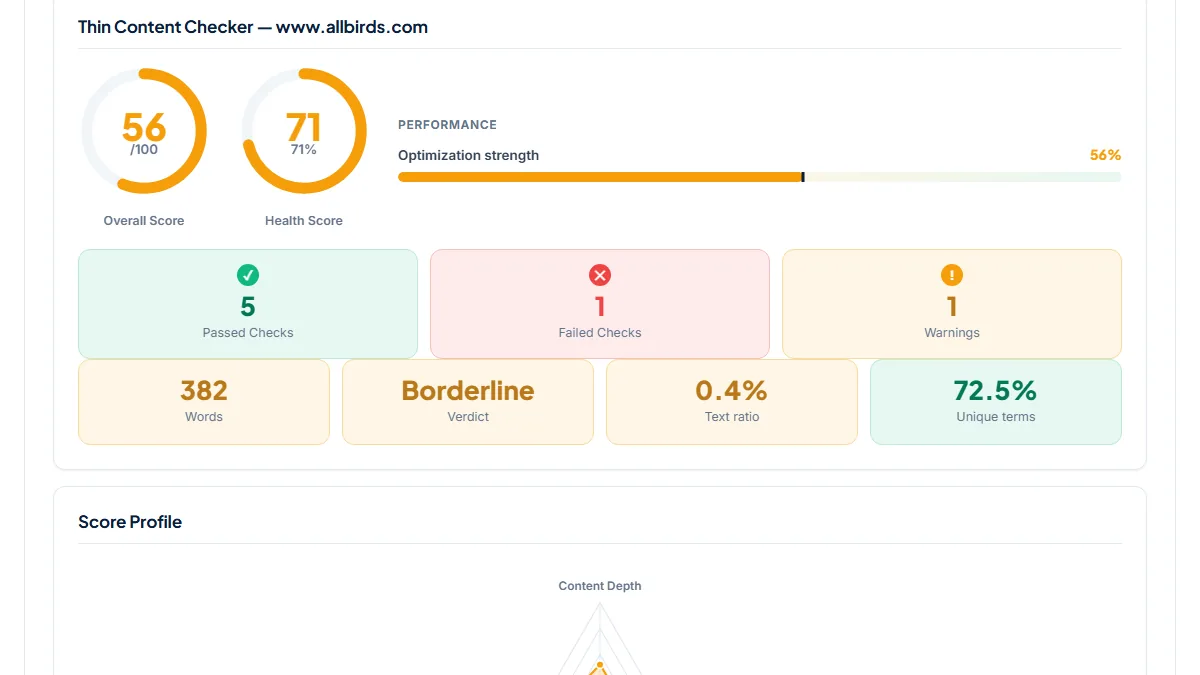
- Allbirds sells its shoes on one product template. We ran the men's Wool Runner and Tree Runner pages one after the other on 10 November 2026.
- Input
https://www.allbirds.com/products/mens-wool-runnersandhttps://www.allbirds.com/products/mens-tree-runners- Reading the result
- Wool Runner: 382 words, Borderline, Overall score 56/100, failing "Substantial word count". Tree Runner: 731 words, Substantial, 87/100. In the counted text the same blocks open and close both pages: the product name with a back-in-stock sign-up form (87 words) and the "You May Also Like" carousel with the brand block under it (94). That leaves about 200 words for the Wool Runner, and its four-point feature strip is in the page source twice, so its own copy is roughly 150 distinct words. One of those lines, on the SweetFoam midsole, is word for word the same on the Tree Runner, whose higher count also comes from a description printed twice and a 234-word "Compare our styles" panel.
2. A parent category with promotions and no copy: 140 words
- Situation
- The stationery category of MUJI USA links to pens, notebooks, cases, storage and desk supplies. Same day.
- Input
https://www.muji.us/collections/stationery- Reading the result
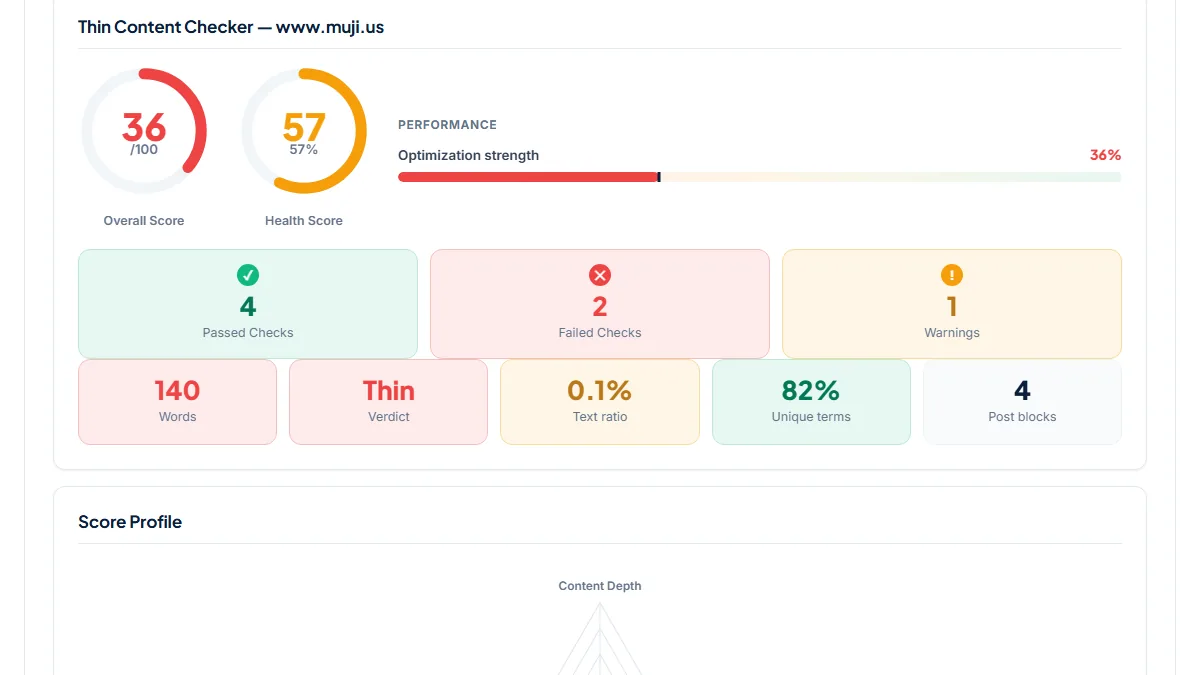
- 140 words, verdict Thin, score 36/100, text ratio 0.1 %, 4 Post blocks. The words are the sub-category names, three promotional blurbs (a compact gel pen, 2027 planners, a nylon pen case), "From 90¢" price teasers and two sentences on office storage. The product tiles are not in the HTML the server sends; their names sit inside a script, which the checker does not run. Even with the grid rendered, nothing on the page describes the range that the title promises as "Japanese Stationery". The promotions will rotate; a short permanent intro would stay.
3. A category that earns its count: a 442-word guide under the grid
- Situation
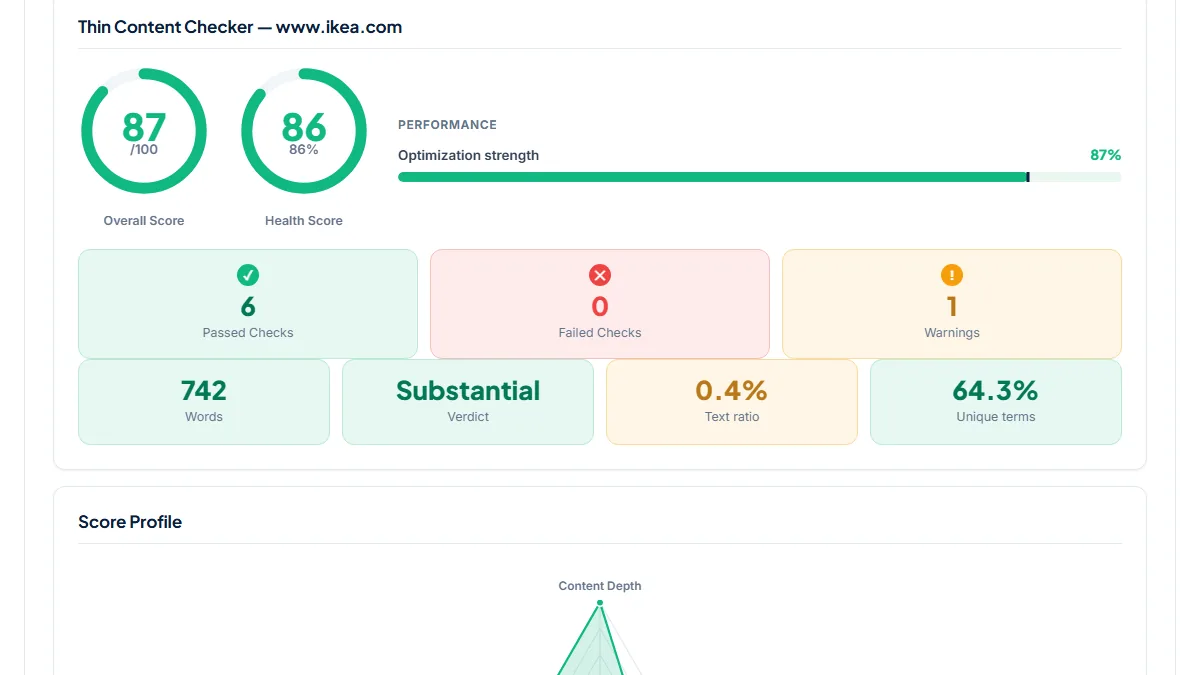
- IKEA UK's bookcases category shows 24 of 126 products on the first page. Same day.
- Input
https://www.ikea.com/gb/en/cat/bookcases-10382/- Reading the result
- 742 words, Substantial, 87/100, the only warning being text ratio at 0.4 %. Measured on the counted text: a 58-word intro above the grid, 181 words of product names and sizes, a 442-word buying guide below the grid (doors or open shelves, corner units, a bookcase as a room divider, wall anchoring) and 56 words of colour and material links. Remove the guide and the page would sit at 300 words, most of them names that change with the range. The guide is what a shopper choosing between models actually reads.
Common mistakes
- Taking "Substantial" on a product page as proof it has a description. The Tree Runner's 731 words include a description counted twice and a comparison panel shared across styles.
- Counting product names in the grid as category copy. They move with stock and say nothing a shopper could not see in the tiles.
- Testing one product and assuming the rest match. Run two siblings, otherwise you cannot tell the template from the copy.
- Removing product photos to clear the text-to-HTML warning. Every shop page in our runs scored 1 % or less; the ratio reflects heavy markup, not missing words.
Frequently asked questions
How many words does a product page need?
Google publishes no minimum. The 300 and 600-word lines are this checker's own thresholds for sorting pages, and a product page full of template can pass them easily. A better test is how many words are left once the blocks every product shares are removed, and whether those words answer a shopper's questions about fit, materials, sizing or care. Ahrefs suggests keeping descriptions short and descriptive, so a tight, specific paragraph beats a long generic one.
Why does my category page come back Substantial when it has no description?
Because the product grid is counted. Each tile adds a name, often a fit or colour and a price, and filter labels add more. On Gymshark's men's T-shirts category, 60 product tiles and the filters made up about 520 of its 1,610 words on 10 November 2026. When the tiles are <article> elements the report shows a Post blocks card, which tells you the grid is in the count. Open the page and subtract the grid, filters and links: what remains is the category's own copy, often a single sentence.
Can it find descriptions copied across my catalogue?
No. It measures one page at a time and never compares its text with another. To check whether two products share a description, paste both into Text Similarity; to test a description against the supplier's, paste those two. For the same product reachable under several category URLs, or two categories targeting one query, Cannibalization Checker compares titles, H1s and topic terms across a list of pages.
Does the checker see text inside tabs and accordions?
Yes, when that text is in the HTML the server sends and sits inside the main content area. Many themes print every tab (description, details, delivery, care) into the page and hide the closed ones with CSS, so all of it is counted. Text that a tab fetches by script only when someone clicks it is not counted, because the checker does not run JavaScript. If a tab you know is long seems missing, view the page source.
Reference: Ahrefs' Ecommerce SEO: A Beginner's Guide notes that product and category pages often have little to no content, says that is not necessarily bad for SEO, and recommends short, descriptive unique descriptions so visitors and search engines understand those pages.