
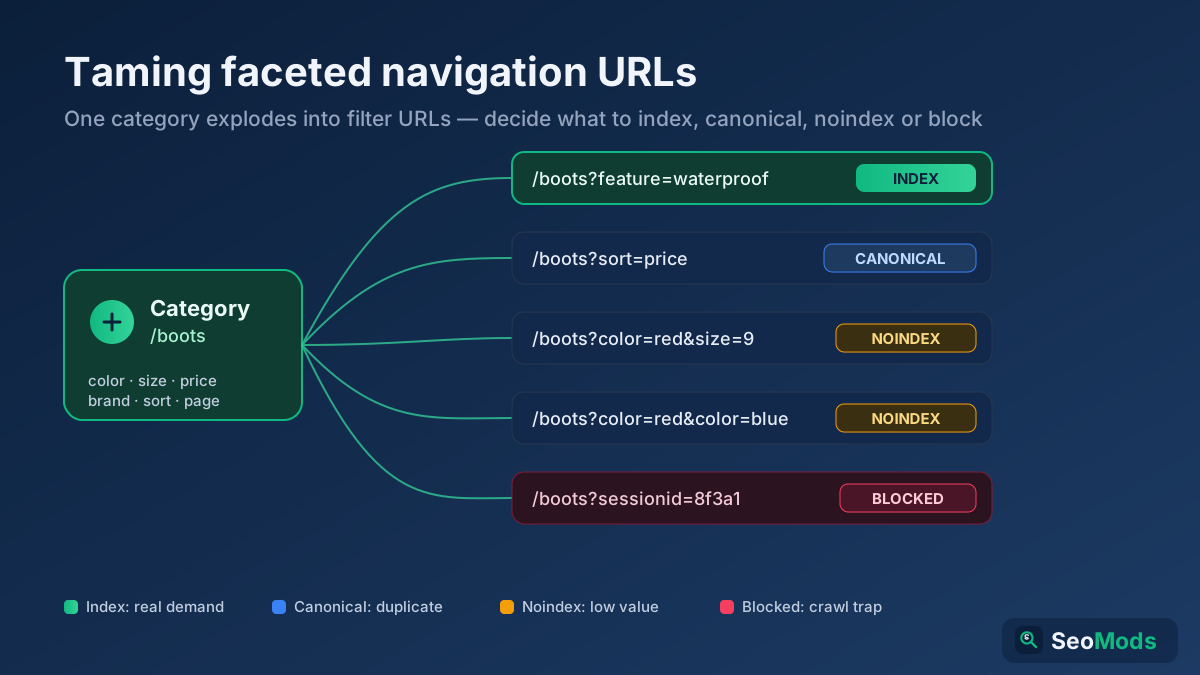
Short answer: Faceted navigation lets shoppers filter a category by color, size, price, brand and sort order, but every combination spins up a new parameter URL — so one category can explode into thousands of near-duplicate pages that waste crawl budget and split ranking signals. The fix is a decision framework: make the handful of filtered pages with real search demand indexable, then control the combinatorial long tail with rel=canonical, noindex,follow and targeted Disallow rules.
What faceted navigation is and why it multiplies URLs
Faceted navigation is the set of filters and sort controls on a listing or category page — the checkboxes and dropdowns that let a visitor narrow "hiking boots" down to "waterproof, size 9, under $150, sorted by price." Each choice a user makes is usually appended to the URL as a query parameter, so a single category quietly becomes a generator of URLs. Add three colors, five sizes, four price bands and two sort orders and you already have well over a hundred combinations from one page.
The math gets brutal fast. Facets combine multiplicatively, not additively, so a mid-sized shop with a dozen filter types can produce millions of unique parameter URLs from a few hundred real products. Most of those pages carry the same products in a slightly different arrangement, and Google has no obligation to treat them kindly. Left uncontrolled, faceted navigation is the single most common source of index bloat on e-commerce sites, which is why a solid URL structure plan has to account for it from the start.
The four problems uncontrolled facets create
Before you reach for a fix, it helps to name exactly what goes wrong when filter URLs run free. There are four distinct failure modes, and each one calls for a slightly different tool.
- Crawl budget waste. Googlebot spends a finite amount of effort on your site. If it burns that budget re-fetching endless
?color=red&size=9variants, it recrawls your genuinely important pages less often, so new products and price changes take longer to appear. Deep dive on this in our crawl budget guide . - Duplicate and near-duplicate content. Ten sort orders of the same product list are ten URLs showing the same items. Google has to pick a canonical, and if you do not tell it which one, it may pick the wrong one — or waste effort deciding.
- Diluted, split ranking signals. When links, shares and internal anchors spread across dozens of parameter versions of one page, the authority that should concentrate on a single strong URL fragments across weak duplicates. No individual version ranks as well as the consolidated page would.
- Index bloat. Thousands of thin, near-identical filtered pages in the index dilute your site’s perceived quality and can trigger crawling and quality issues that drag on the whole domain.
Not all filtered pages are equal: the demand test
The instinct to noindex everything with a question mark in it is wrong. Some filtered pages are exactly what searchers type into Google. "Waterproof hiking boots," "black leather sofa," "size 12 running shoes" — these are real, high-intent queries, and if your ?category=boots&feature=waterproof page is the best answer, you want it indexed, ranking and pulling traffic. Blocking it would be throwing away money.
So the first decision is not technical, it is editorial: which filter combinations have genuine, repeatable search demand? Run each candidate through a simple test.
- Does anyone search for it? Check keyword volume for the filtered concept. "Waterproof hiking boots" has demand; "waterproof hiking boots sorted by price ascending" does not.
- Is the page genuinely distinct? A waterproof-only listing shows a meaningfully different product set. A sort-order change shows the same set reshuffled — not distinct.
- Can you make it a real landing page? Indexable filtered pages deserve a unique title, an intro paragraph and a clean, static-looking URL, not a bare parameter string.
- Is the intent commercial? Attribute and category filters (brand, feature, material) usually map to buyer queries. Session filters (sort, page, view mode, price slider) almost never do.
Everything that passes becomes an indexable, promoted page — ideally with a rewritten path like /boots/waterproof/ instead of a query string. Everything that fails goes into the control bucket below.
rel=canonical: consolidate the near-duplicates
Your workhorse for near-duplicate filtered pages is rel=canonical. When a filtered or sorted URL is essentially the parent category in a different arrangement, point its canonical tag at the parent so Google consolidates all the ranking signals onto the version you actually want to rank. The filtered page can still be crawled and its links followed, but Google treats the parent as the authoritative copy.
Use it for sort orders, view toggles, price-slider values and single-select filters that do not create genuinely unique inventory. A ?sort=price or ?view=grid URL should canonicalize to the clean category page every time. The one rule people break: never canonicalize a page with real search demand to its parent — that hands its ranking potential to a page that is not targeting the query. Our canonical tags guide covers the edge cases, and you can confirm every tag resolves correctly with the Meta Tag Analyzer .
noindex,follow: prune the low-value long tail
Canonical is a strong hint, not a command — Google can ignore it. When you want to be certain a low-value filtered page stays out of the index, use a noindex,follow robots meta tag. This tells search engines "do not index this page, but do keep following its links," so link equity still flows through to the products it lists while the thin filtered page itself never appears in results.
Reach for noindex,follow on multi-select combinations, obscure attribute mixes and any filtered view that is useful to shoppers but has no search demand of its own — a page like ?color=red&color=blue&material=suede that no one will ever query but that must still be crawlable so the products stay discoverable. The critical detail: the page must stay crawlable for the noindex to be seen. If you also block it in robots.txt, Google never fetches it, never reads the tag, and may keep a URL-only listing in the index anyway.
robots.txt Disallow: kill pure crawl traps
Some parameters generate no value for anyone and only exist to trap crawlers — infinite calendar dates, session IDs, tracking tags, or price sliders that mint a fresh URL for every dollar. For these, a Disallow rule in robots.txt is the right tool: it stops Googlebot from ever requesting the parameter, preserving crawl budget for pages that matter. A rule like Disallow: /*?*sort= or Disallow: /*?*sessionid= can wall off an entire class of trap URLs at once.
But understand the trade-off, because it trips up experienced SEOs. A page blocked by robots.txt cannot be crawled, which means Google cannot see any noindex tag on it. If a disallowed URL has already been discovered through links, Google may keep a bare, title-less entry in the index that you now have no way to remove — the very tool that would deindex it is unreachable. So the guidance is: use Disallow for parameters you never want crawled and that are not already indexed, and use noindex (crawlable) for pages you need actively removed from the index. Never point both at the same URL. Test your rules against real URLs with the Robots.txt Tester, and build clean directives with the Robots.txt Generator, covered further in our robots.txt guide .
Consistent parameter ordering and clean links
Even with the right directives, sloppy URL generation multiplies your problem. If your site can output ?color=red&size=9 and ?size=9&color=red for the same selection, you have just doubled the number of distinct URLs for one page — and every extra ordering is another duplicate Google has to crawl and reconcile. Enforce a single canonical parameter order at the template level so a given set of filters always produces exactly one URL.
- Fixed order. Always emit parameters in the same sequence, e.g. category, then attribute, then sort — never let user click order decide the string.
- Drop empty and default values. Do not append
?sort=defaultor?page=1; omit anything that matches the base state. - Lowercase and de-duplicate. Normalize casing and collapse repeated keys so trivial differences never spawn new URLs.
- One separator style. Pick
&and stick to it; mixing delimiters creates yet more variants.
Consistency here shrinks the crawl surface before any canonical or noindex tag has to do its job, and it makes the duplicate patterns you do have far easier to diagnose in a Technical Site Audit (Crawler) .
Control the links themselves: nofollow and JavaScript facets
The cleanest way to stop Google wasting effort on a filter is to not hand it a crawlable link in the first place. For facets that genuinely have no SEO value — sort dropdowns, view toggles, multi-select checkboxes deep in the long tail — you can render the controls so they do not produce standard <a href> links for crawlers to follow. Two common patterns achieve this.
- JavaScript-driven filters. Apply the filter with an
onclickhandler or a POST request that updates results without exposing a unique, crawlable GET URL. Users get the filtered view; Googlebot is never handed a new link to chase. - rel="nofollow" on filter links. Adding
nofollowto unhelpful facet links signals Google not to crawl them. It is weaker than not rendering the link at all — Google may still discover the URL elsewhere — so treat it as one layer, not the whole solution.
Keep indexable, demand-worthy filter links as normal crawlable anchors; only suppress the ones you have decided to control. The goal is to make your important filtered landing pages easy to reach and the combinatorial noise hard to reach.
The old URL Parameters tool is gone: what replaced it
For years, Google Search Console had a URL Parameters tool that let you tell Google how to treat specific query parameters — which ones changed content, which to ignore. Google deprecated and removed it in 2022, stating its crawlers had become good enough at guessing parameter behavior on their own that the tool was rarely used and often misconfigured. If you are following old advice that tells you to "configure your parameters in Search Console," that option no longer exists.
Its removal shifts all the responsibility onto on-page and site-level controls — the exact toolkit above. There is no dashboard switch anymore; the way you tell Google how to handle a parameter is through rel=canonical, robots meta tags, robots.txt, clean linking and consistent URLs. That is a good thing: those signals live in your codebase, are visible to every search engine and AI crawler alike, and cannot be silently lost when a Google feature is retired.
Putting the toolkit together: a decision cheat sheet
The tools are not alternatives; they are a layered system. Match each filter type to the right control and the whole faceted mess resolves into a handful of clear rules.
- Filtered page with real search demand → make it indexable, give it a static-style URL, unique title and intro. Let it rank.
- Near-duplicate of the parent (sort, view, single benign filter) →
rel=canonicalto the parent. - Useful to shoppers, no search demand, must stay crawlable →
noindex,follow, kept out of robots.txt. - Pure crawl trap (session, tracking, price slider, calendar) →
Disallowin robots.txt, provided it is not already indexed. - Any facet link with no SEO value → render via JavaScript/POST or add
rel="nofollow"so it is never crawled.
Layer these deliberately, enforce consistent parameter ordering underneath, and audit the result with a Technical Site Audit (Crawler). You keep the shopping experience users love while showing Google exactly the pages you want it to spend its budget on.
Applying this to your own site? See the tools picked by audience: SEO Tools for Freelance SEOs and SEO Tools for E-commerce Managers.
Frequently asked questions
Should I noindex or canonicalize my filtered pages?
Use rel=canonical when the filtered page is a near-duplicate of its parent (sort orders, view toggles) and you want signals consolidated onto the parent. Use noindex,follow when the page is genuinely distinct but has no search demand and you want it definitively out of the index while still passing link equity. Never do both on the same URL — they send conflicting instructions.
Can I just block all filter parameters in robots.txt?
No, and it often backfires. Blocking a URL in robots.txt stops Google crawling it, which means Google can never see a noindex tag on that page — so any versions already discovered through links can linger in the index with no way to remove them. Reserve Disallow for pure crawl traps that are not yet indexed, and use crawlable noindex for anything you need actively deindexed.
Why does parameter order matter for SEO?
Because ?color=red&size=9 and ?size=9&color=red are different URLs to a search engine even though they show the identical page. Inconsistent ordering multiplies the number of duplicate URLs Google must crawl and reconcile, wasting crawl budget. Enforcing one fixed parameter order at the template level collapses each filter selection back to a single URL.
What replaced the Google URL Parameters tool?
Nothing in Search Console — Google removed it in 2022 because its crawlers now infer parameter behavior automatically. All parameter handling now happens through on-page and site-level signals: rel=canonical, robots meta tags, robots.txt Disallow rules, clean internal linking and consistent URL generation. There is no dashboard setting to configure anymore.
Which filtered pages should I actually let Google index?
Only the ones that match real, repeatable search queries and show a genuinely distinct product set — things like "waterproof hiking boots" or "size 12 running shoes." These deserve a promoted landing page with a clean URL, unique title and intro copy. Sort orders, pagination, view modes and obscure attribute combinations have no independent demand and should be controlled, not indexed.
Do faceted-navigation problems affect AI search too?
Yes. AI crawlers face the same crawl-budget limits and duplicate-content confusion as Googlebot, so an uncontrolled parameter explosion buries your best pages from them as well. Consolidating signals onto clean, canonical URLs and pruning thin filtered pages makes it easier for every engine — classic and AI — to identify and cite the authoritative version of each page.