Why WordPress Site Owners need this
Every tag you type into the post editor creates a public page at /tag/name/, and every author who publishes gets /author/name/. WordPress serves them as indexable pages, so a blog with a few hundred tags used once each can end up with more archive URLs than posts. Yoast's own guide tells owners to keep archives that make no sense out of the index and to disable author archives on a one-author blog.
The hard part is knowing which ones. A tag with twenty posts can be a useful topic hub; a tag with a single post is a short copy of that post's excerpt. Opening each archive and guessing does not scale, and Search Console tends to report the problem only after Google has crawled those URLs and passed on them.
This checker fetches one archive and counts the visible words across all of its post cards, leaving out menus, sidebar widgets and the footer. It reports Words, a Thin, Borderline or Substantial verdict and the number of Post blocks, so every archive gets a figure before you decide.
WordPress Site Owners specific guidance
Tips for WordPress Site Owners
A practical rule set, using the numbers in the report. Thin (under 300 words) with no Post blocks card, or two or three blocks: the archive holds one or two excerpts and nothing of its own. Either remove the tag from those posts and delete it, or set it to noindex. Rank Math's "Noindex Empty Category and Tag Archives" option only covers terms with no posts at all, so a one-post tag stays indexed until you act on it.
Borderline (300–599): decide on the topic, not the count. If people search for it and you will keep writing about it, give the term a description in Posts › Tags (most themes print it above the list) and link to it; if not, noindex. Substantial with many Post blocks: the words are excerpts of posts that are already indexed, so a high count shows size, not uniqueness. Keep it indexed only when it works as a landing page, and give it a real title and description.
Where the switches are: Yoast SEO › Settings › Categories & Tags has a search-appearance switch that applies to every tag or every category at once; author pages sit under Settings › Advanced › Author archives. Rank Math has Titles & Meta › Tags › "Tag Archives Robots Meta" (Custom, then noindex) and Titles & Meta › Authors › "Author Archives" and "Author Robots Meta". For single terms, use the SEO box on the term's edit screen, which Rank Math adds with "Add SEO Controls" and Yoast keeps with "Enable SEO controls and assessments".
The costliest mistake
Do not block /tag/ or /author/ in robots.txt to get rid of them. A blocked URL cannot be fetched, so Google never sees the noindex and can keep the address indexed from links. Use noindex first; block crawling later only if you have a reason to.
Quick start
- Open Posts › Tags and sort by Count; pick a one-post tag, a mid tag and your largest.
- Run each archive URL here, plus one author page and your home page.
- Note Words, Verdict and Post blocks for each.
- Apply the rules above in Yoast or Rank Math.
- Purge the cache and confirm the robots tag with Meta Tag Analyzer.
What this tool does not tell you
- It cannot tell that an archive's text repeats the posts' excerpts. Words and Post blocks describe size; for overlap between two texts use Text Similarity.
- It does not read noindex or canonical tags, so it cannot confirm that a change in Yoast or Rank Math took effect. Meta Tag Analyzer reads the robots tag the page serves.
- It checks one URL per run and does not list your tags or count posts per term; the Count column under Posts › Tags does that.
- The 300 and 600-word lines are this tool's thresholds. Google publishes no minimum word count for archives or any other page.
Real examples
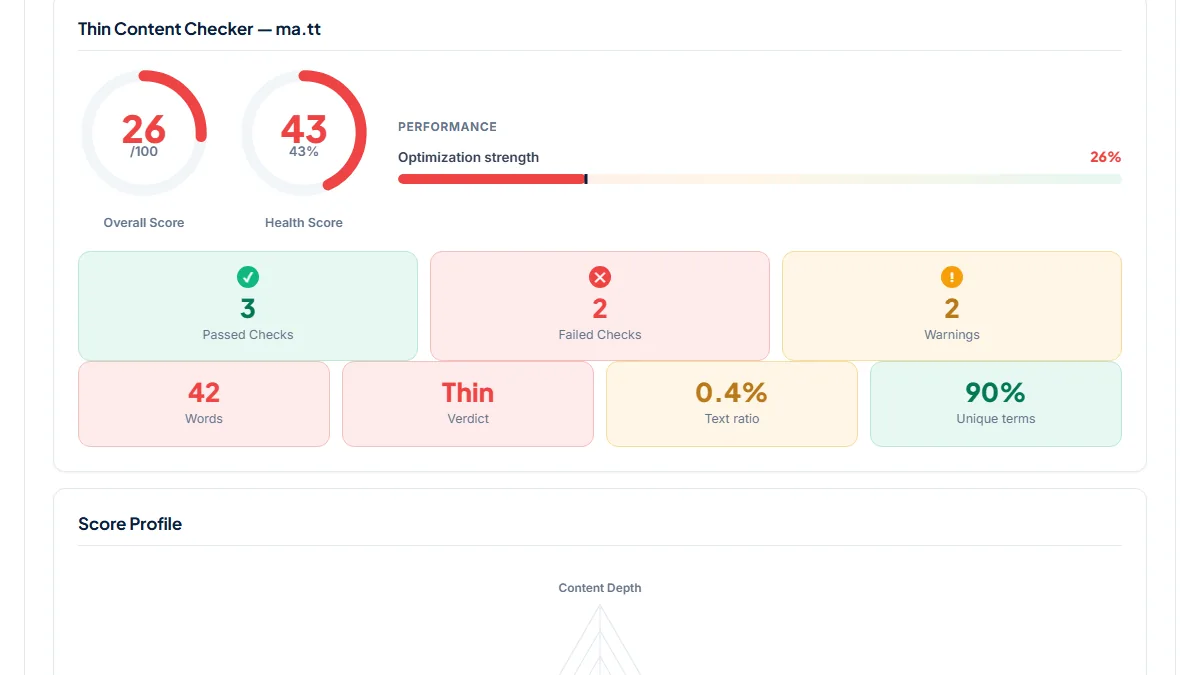
1. A tag used on one post: 42 words, Thin
- Situation
- On ma.tt, Matt Mullenweg's WordPress blog, the hiking tag holds a single gallery post from 2010. We ran it on 7 November 2026.
- Input
https://ma.tt/tag/hiking/- Reading the result
- 42 words, verdict Thin, Overall score 26/100 (Health 43), text ratio 0.4 %. There is no Post blocks card because the archive contains one article: a title, a date, one sentence of excerpt and a "Continue reading" link. The page source carries
max-image-preview:largeas its robots tag, so nothing tells Google to skip it. The post itself is the better result for any hiking query; under the rules above this tag is a candidate for noindex or for removal.
2. A topic tag with years of posts: 1,867 words, 100/100
- Situation
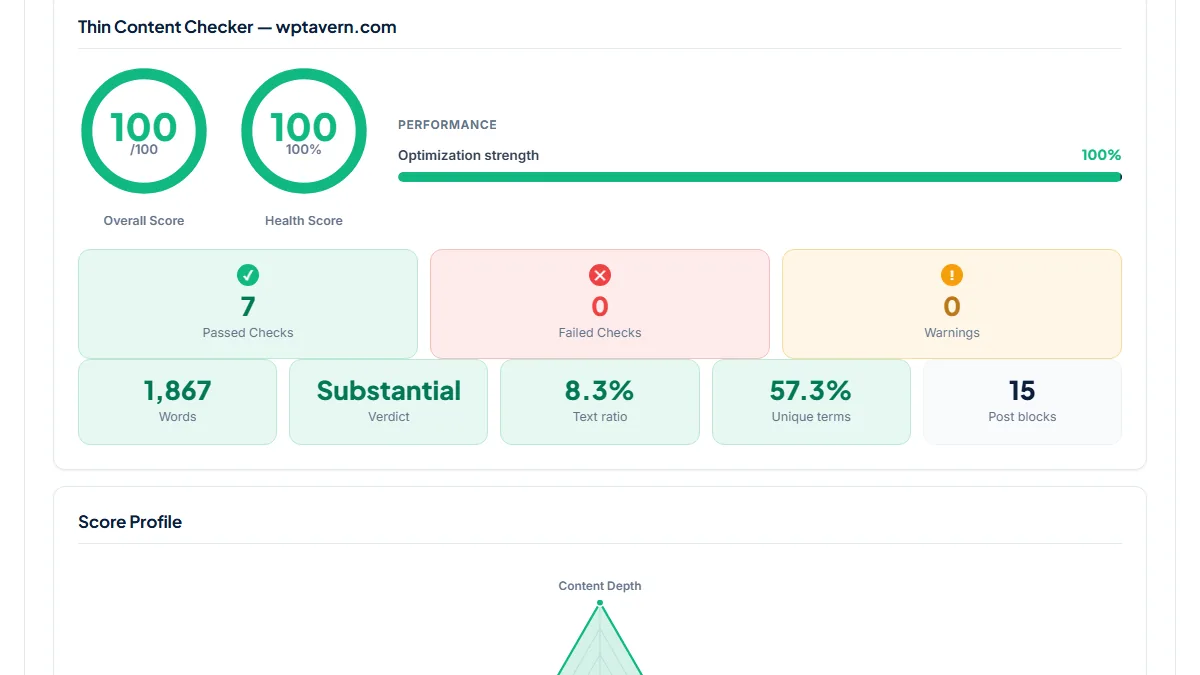
- WP Tavern, a WordPress news site, files its block-editor coverage under one tag. Same day.
- Input
https://wptavern.com/tag/gutenberg- Reading the result
- 1,867 words across 15 Post blocks, verdict Substantial, score 100/100 with 18 H2/H3 headings and 49 internal links; the pagination runs to page 29. This is the kind of archive that can earn its place as a landing page for "Gutenberg news". The checker cannot judge its snippet, and in the source the title is the default "gutenberg – WP Tavern" with no meta description, which is the next thing to fix if it stays indexed.
3. An author archive on a one-author blog: the home page again
- Situation
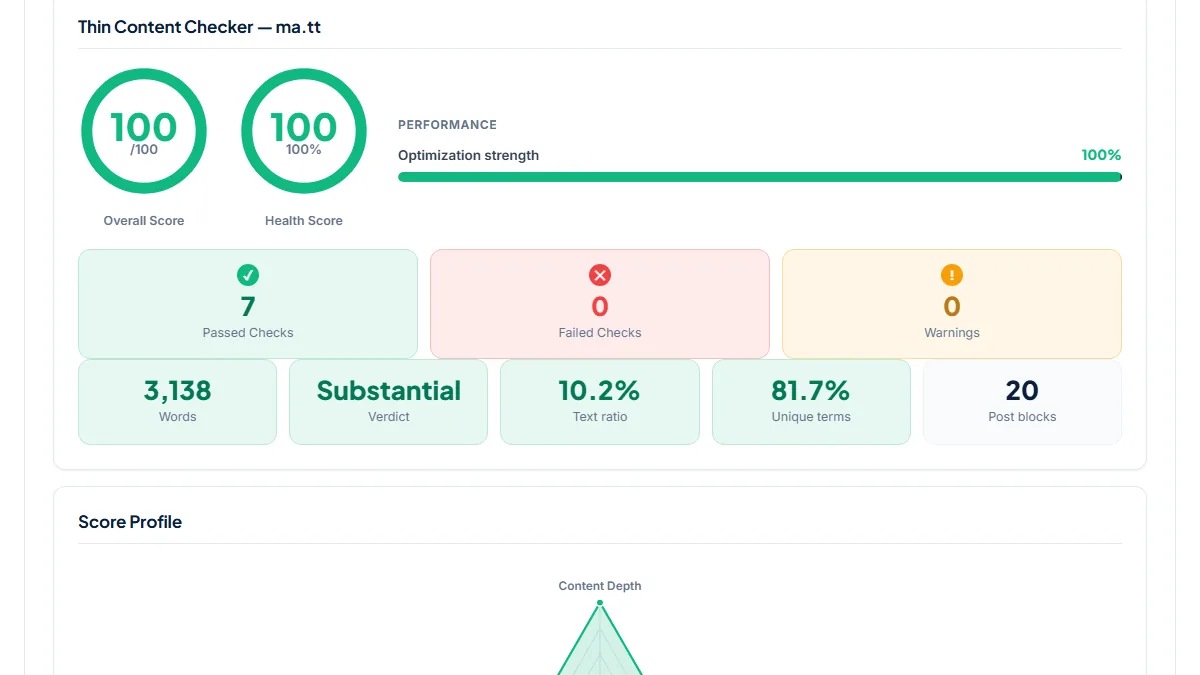
- On ma.tt every post has the same author, so we ran the author archive and the home page one after the other.
- Input
https://ma.tt/author/saxmatt/andhttps://ma.tt/- Reading the result
- Both return 3,138 words, 20 Post blocks, Substantial, 100/100. The scores are perfect because the checker measures each page on its own; comparing the HTML shows the same 20 posts in the same order on both URLs. The author archive is therefore a second copy of the front page, the case Yoast and Rank Math describe when they recommend turning author archives off on single-author sites.
Common mistakes
- Reading "Substantial" as "unique". An archive with 1,198 words over 20 Post blocks, like ma.tt's automattic tag, is still a list of excerpts that already exist on the posts.
- Switching all tags to noindex in one click when a few of them bring visitors. Check Search Console's Performance report filtered to
/tag/first and keep the archives that get clicks. - Judging every tag by one sample. The plugin switch applies to the whole taxonomy, so run a one-post tag, a mid-sized one and your biggest before choosing.
- Leaving author archives on for a site with one writer, then wondering why the author URL competes with the home page for the site name.
Frequently asked questions
Should I noindex all tag pages in WordPress?
Not automatically. Yoast's help page for Categories & Tags says showing taxonomies in search is usually a good idea, as long as those pages are attractive landing pages. The real question is per tag: one-post tags rarely are, while a tag with dozens of posts on a topic people search for can be. Run a sample through the checker, and if most of your tags come back Thin, noindex the taxonomy and keep the few strong ones as categories.
Is an archive under 300 words thin by Google's rules?
Google has no word-count rule. The 300 and 600-word lines are the checker's own thresholds, a quick way to sort hundreds of archives into groups you can act on. A short archive is a problem when it offers nothing the posts don't, which is usually the case for tags used once. A short category with a well-written description and a clear purpose can still deserve indexing, so treat the verdict as a sorting step, not a sentence.
I am the only author. What should happen to my /author/ page?
Both major SEO plugins suggest turning it off. Yoast's Author archives settings page recommends disabling author archives on a single-person blog to avoid duplicate archives, and Rank Math's documentation says a disabled author archive redirects to the home page. If you plan to add writers later, Rank Math suggests keeping the archives but setting them to noindex. Run your author URL and the home page here; matching Words and Post blocks confirm the duplicate.
Why does the checker count thousands of words on an archive I never wrote anything for?
It counts the text of every post card on the page: titles, dates, excerpts or full posts if your theme shows them, and tag lists. Sidebar widgets, menus and the footer are removed first. A theme that prints full posts on archives can make a tag look Substantial even though every word belongs to posts that are already indexed. Switching the archive template to excerpts does not make it more unique; the decision is still whether the page is worth landing on.
Reference: Yoast's definitive guide to WordPress SEO explains why archive pages need managing: keep archives that make no sense on your site out of the index, and disable author archives on a one-author blog.