Local SEO: Citations & NAP Consistency
For local businesses, consistent NAP and citations are foundational. Here is what to get right.
Read article →Check NAP (name/address/phone), LocalBusiness schema, contact data and map signals for local ranking readiness.
Fetching live data…
The Local SEO Audit is a free tool that fetches a live page and checks the signals Google relies on to rank a business locally — NAP consistency (name, address, phone), LocalBusiness structured data, contact details and map signals. For brick-and-mortar and service-area businesses, these on-page cues help Google connect your site to your Business Profile and the local pack. The tool reads the real, live HTML and reports exactly which local signals are present, missing or incomplete — no signup needed.
https://example.com).LocalBusiness schema, map embeds and contact links.tel: link and visible number.Run the tool on a café's homepage and you might see green checks for a visible address and tel: link, a warning that opening hours are text-only rather than in schema, and a red flag that no LocalBusiness JSON-LD is present — a focused list of local fixes.
Yes — completely free, with no signup and no limits. Audit as many pages as you like.
No. Your Business Profile and consistent citations across directories matter just as much as on-page signals. This tool covers the website half; learn the rest in our Google Business Profile guide and our local citations and NAP guide.
Generate valid JSON-LD with the Schema (JSON-LD) Generator and then confirm it parses correctly using the Structured Data (Schema) Checker.
Guides, tips and tutorials hand-picked for this tool — go from running a check to actually fixing it.
For local businesses, consistent NAP and citations are foundational. Here is what to get right.
Read article →Your Google Business Profile is the heart of local SEO. Here is how to optimize it for the map pack.
Read article →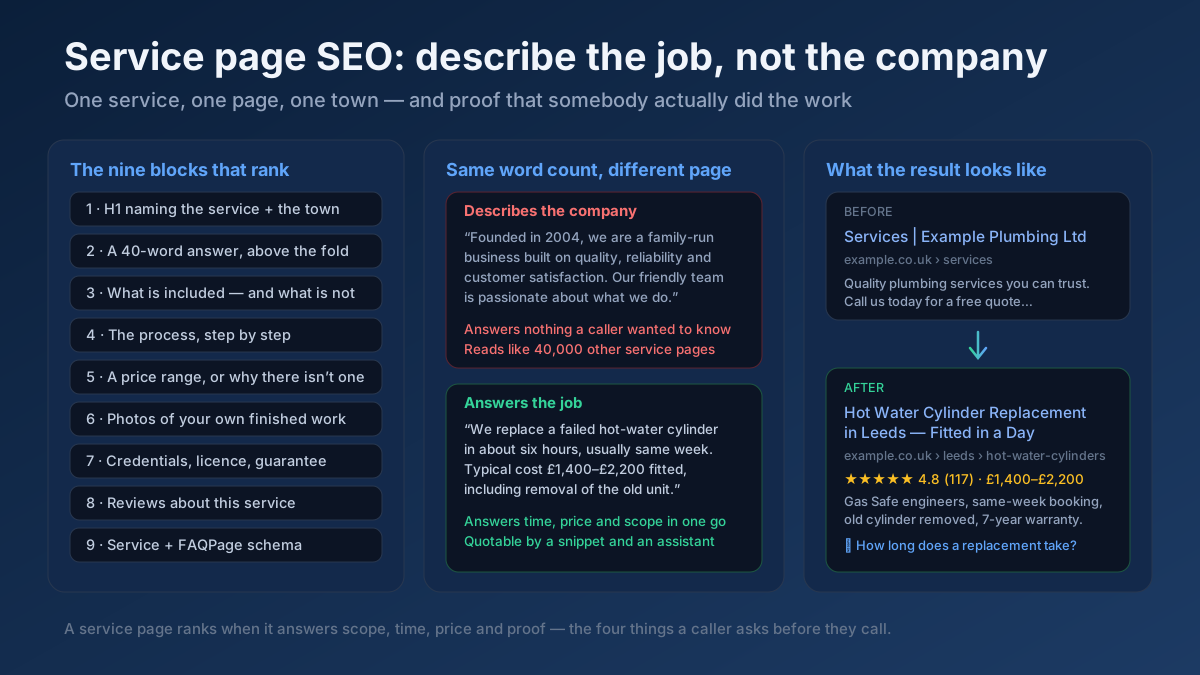 Local SEO
Service page SEO in 20 checks: pages that answer scope, time and price, town pages that are not doorways, Service schema, and a realistic 60-day plan.
Read article →Google rewards content that demonstrates real experience and trust. Here is how to show E-E-A-T.
Read article →Your site may have a critical PHP vulnerability
PHP2Shell (CVE-2026-109618 and CVE-2026-109619) lets attackers run code on servers running PHP older than 8.2.35, 8.3.36, 8.4.27 or 8.5.12, without logging in. Attacks have been seen since 17 October. Check whether your site is affected.