Service Page SEO: A Guide for Local Businesses
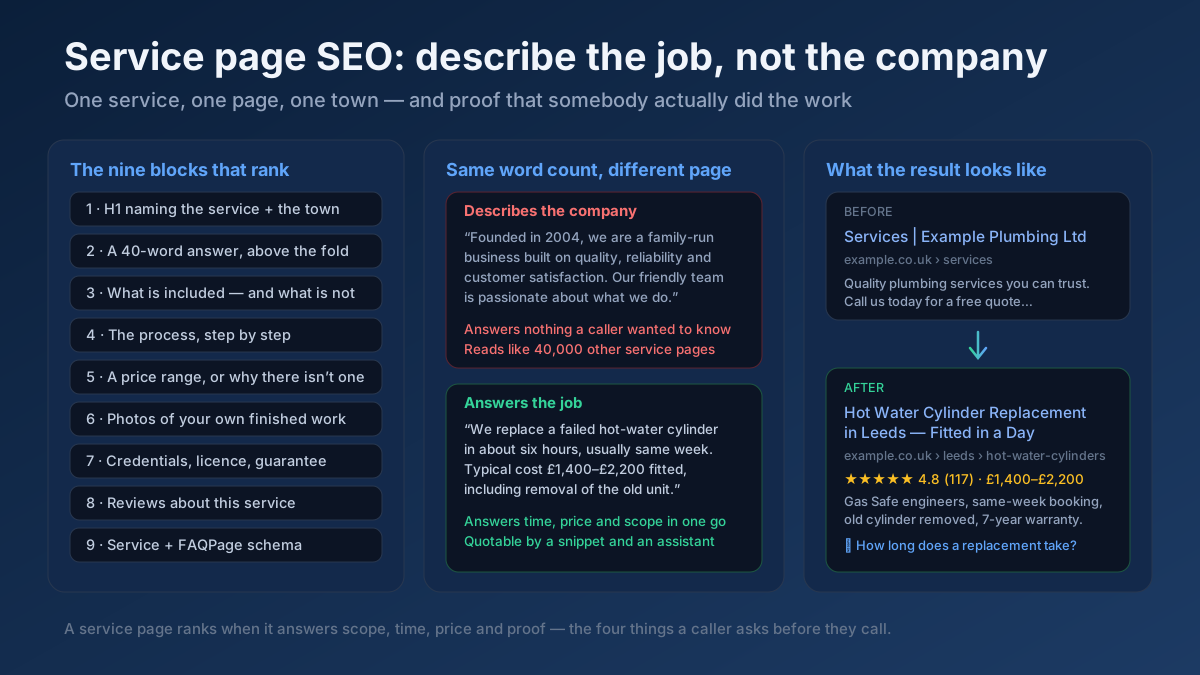
Service page SEO in 20 checks: pages that answer scope, time and price, town pages that are not doorways, Service schema, and a realistic 60-day plan.
Read article →Scan a website for linked social profiles and Open Graph social-readiness across platforms.
Fetching live data…
The Social Media Presence Tracker is a free tool that scans a website and finds the social profiles it links to, then checks how share-ready the page is across platforms. It reads the real, live HTML to detect links to networks like Facebook, X, Instagram, LinkedIn and YouTube, and inspects the Open Graph and Twitter Card tags that control how the page looks when shared. The result is a clear picture of a site's connected social footprint and its social-sharing readiness — no signup required.
https://example.com).og:title, og:description and og:image.Scan a homepage and the tool might find links to Instagram, LinkedIn and YouTube, complete Open Graph tags with a defined og:image, but no Twitter Card and no link to an existing X account — two quick wins for a more consistent, shareable presence.
Yes — completely free, with no signup and no limits. Scan as many sites as you like.
They control the title, description and image that appear when your link is shared, so a strong, eye-catching preview earns more clicks. Preview and fix those tags with the Open Graph & Twitter Card Checker and the Meta Tag Analyzer.
Generate clean Open Graph and Twitter tags with the Meta Tag Generator and learn how rich previews fit into the bigger picture in our on-page SEO guide.
Guides, tips and tutorials hand-picked for this tool — go from running a check to actually fixing it.
 Local SEO
Service page SEO in 20 checks: pages that answer scope, time and price, town pages that are not doorways, Service schema, and a realistic 60-day plan.
Read article →Your Google Business Profile is the heart of local SEO. Here is how to optimize it for the map pack.
Read article →For local businesses, consistent NAP and citations are foundational. Here is what to get right.
Read article →Your site may have a critical PHP vulnerability
PHP2Shell (CVE-2026-109618 and CVE-2026-109619) lets attackers run code on servers running PHP older than 8.2.35, 8.3.36, 8.4.27 or 8.5.12, without logging in. Attacks have been seen since 17 October. Check whether your site is affected.