Why Restaurants need this
Search your restaurant by name and the first results are often Tripadvisor, Yelp, OpenTable or an Instagram page, with your own website further down. Those sites repeat your details with plenty of authority behind them. If your site lists the hours only inside a menu PDF, puts the phone in a booking widget and has no structured data, the directories describe your restaurant more clearly than you do.
No tool on your side can push a directory down. What you control is your own site: one restaurant name, a full street address, a phone number and the hours, written as text on the page and repeated in Restaurant or LocalBusiness markup. That gives Google and every listing one clear version to check against.
The Local SEO Audit checks that version. Paste a page address and it reads the HTML, scores eight local checks and lists a fix for each one that fails. Type the details from your Business Profile into the optional fields and it shows where the page disagrees with them.
Restaurants specific guidance
Run the page that holds the hours, not only the homepage
Restaurant homepages are often a big photo, a reservation button and a link called "Hours & Location". The details live one click away. Run the homepage first, then the page with the address and hours: the contact page, a "visit" page or, for a group, each location page. Each run reads one URL, as the server sends it, without running scripts. Hours shown by a reservation or ordering widget may be invisible to it, and so may a menu PDF. To check, open the page source in your browser and search for your opening time. If you cannot find it there, the tool will not find it either.
What the checks mean for a restaurant
The "LocalBusiness / Organization schema" check carries the most weight. A Restaurant or FoodEstablishment node counts once it carries an address. "Opening hours" passes when the schema has openingHours or the visible text puts a day name next to a time, such as "Monday - Saturday: 11am - 9pm". Hours written as text pass without schema, so the row can be green while your markup has no hours at all; look at your JSON-LD for that. "Phone number (NAP)" shows the first tel: link on the page. On a group homepage that is simply the first location in the list.
The Business Profile match block, below the score, is the part closest to the brand problem. It reports whether the page shows the name, phone and address you typed, and whether the schema repeats them.
Fix order for a single restaurant
Put the full street address, the phone as a tap-to-call link and the regular hours as plain text in the footer of every page. Then add one Restaurant JSON-LD block on the homepage or contact page with the same name, address, telephone and hours; the Schema Generator writes it and the Schema Checker confirms it parses. Add a Google Maps link to the address. Then run both pages again with the profile fields filled in. Holiday closures belong on your Business Profile as special hours as well as on the site.
What this tool does not tell you
- It never reads Tripadvisor, Yelp, OpenTable, your Google Business Profile or search results. It cannot tell you who ranks for your name or change it; the profile match uses only what you type.
- One URL per run, read without scripts: hours or phones loaded by a reservation or ordering widget can be missed.
- Opening hours is a pattern check, a day name near a time. A holiday notice such as "will close at 8pm on Halloween, Saturday" on the Pizzeria Bianco homepage passes it too, so look at what the page really says.
- It does not look at menus, photos, reviews, page speed or delivery links.
Real examples
1. Lula Cafe, Chicago: 90 with restaurant schema, and the hours live only in the text
- Situation
- A neighbourhood restaurant's homepage, run on 8 November 2026. We filled the optional fields with the name, phone and street address the site itself publishes, as an owner would copy them from the profile.
- Input
https://www.lulacafe.com/+Lula Cafe·(773) 489-9554·2537 N Kedzie Blvd, Chicago, IL 60647- Reading the result
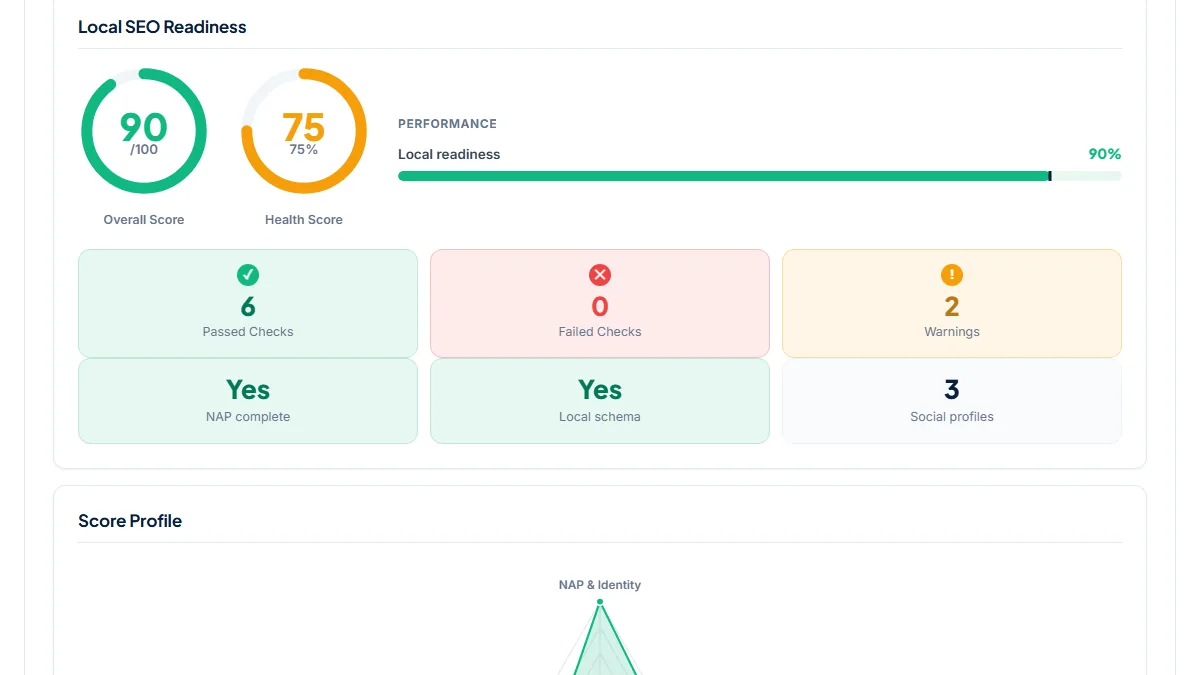
- 90/100, 6 checks passed, 0 failed, 2 warnings (Geo coordinates and Contact email). Local schema Yes: the page carries a FoodEstablishment node with the address and phone. Opening hours passed from the text, where "9AM - 3PM" and "4:30PM - 10PM" sit next to "WEDNESDAY - MONDAY"; the schema itself has no openingHours. Business Profile match: name on the page and the same in schema, phone found and also in schema, 100% of the address words found. This site already agrees with itself, so the useful next step is putting those hours into the FoodEstablishment markup too.
2. Balthazar, New York: the homepage scores 48, the contact page 58
- Situation
- A large brasserie whose homepage links to a separate "Hours & Location" page. Same day, both pages, no profile fields.
- Input
https://www.balthazarny.com/andhttps://balthazarny.com/contact-us/- Reading the result
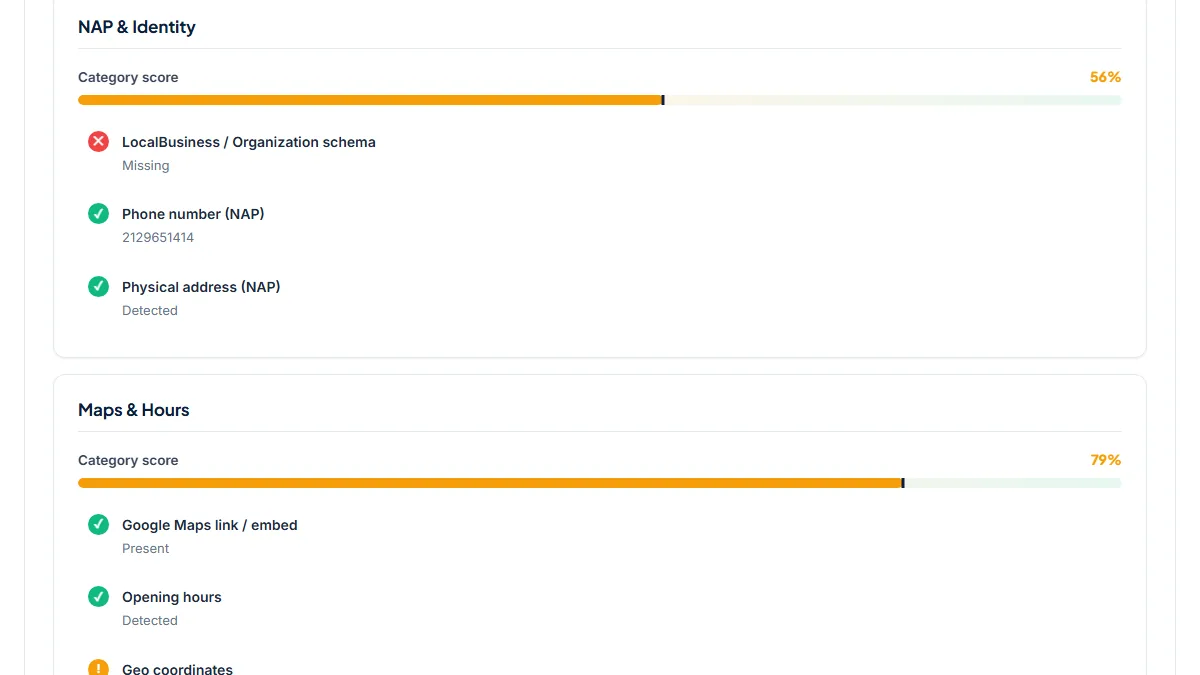
- Homepage 48/100: phone from the tel: link, address and Maps link pass, but Opening hours is not detected, there is no LocalBusiness schema and 0 social profiles are linked. Contact page 58/100: the breakfast, brunch, lunch and dinner times ("Monday to Friday: 8:00am - 11:00am" and so on) pass Opening hours. The schema row still says Missing on both pages, and the Trust & Social group scores 0%. The details a diner needs are all on the site, just never in markup. One Restaurant JSON-LD block with the four services would close the biggest gap on either page.
3. Pizzeria Bianco, Phoenix: six restaurants on one homepage, one page each
- Situation
- A restaurant group with locations in Phoenix and Los Angeles. Same day: the homepage, then the Heritage Square page with that location's name, phone and address in the profile fields.
- Input
https://www.pizzeriabianco.com/and/pizzeria-bianco-heritage-square+Pizzeria Bianco·(602) 258-8300·623 E Adams St, Phoenix, AZ 85004- Reading the result
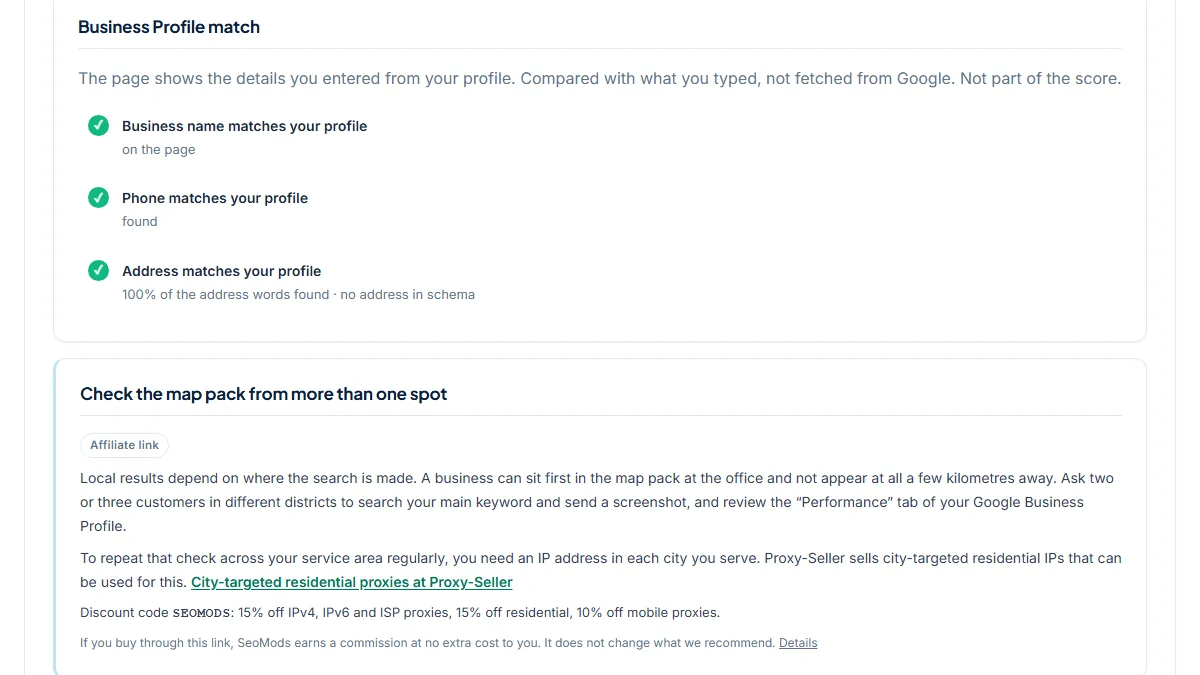
- Homepage 50/100: six addresses and six phone numbers in the text, the Phone row shows the first one (+16022588300), no schema and no Google Maps link. Heritage Square page 62/100: Maps link present, hours detected ("Monday - Saturday: 11am - 9pm, Sunday: closed"), schema still Missing. Business Profile match: name on the page, phone found, 100% of the address words found, with the note "no address in schema". For a group the location page is the one to compare with each profile, and each one needs its own Restaurant block.
Common mistakes
- Publishing the hours only as a menu PDF, an image or inside a booking widget. Diners see them, but a check that reads the page text does not, and neither does anything that copies your details from it.
- Running only the homepage of a site whose address and hours sit on a "Hours & Location" page. Balthazar's two pages scored 48 and 58 on the same day.
- Reading a green Opening hours row as proof your schema has hours. Text alone passes it; Lula Cafe's markup carries no openingHours at all.
- Comparing a group homepage with one location's profile. Run each location page with that location's own name, phone and address.
Frequently asked questions
Will this make my website outrank Tripadvisor for my restaurant's name?
Not by itself, and no tool can promise that. Directories have strong domains and many reviews. What the audit does is make sure your own site is not the weakest description of your restaurant: name, street address, phone and hours readable on the page and in markup, matching your Business Profile. Search Engine Journal's restaurant checklist advises making sure your site outranks directory, reservation and social sites for brand searches rather than taking it for granted. A complete, consistent site is the part of that you control.
Which schema type should a restaurant use?
Restaurant, a LocalBusiness subtype under FoodEstablishment, written as JSON-LD. Give it the name, address, telephone and the hours as openingHoursSpecification. The audit counts any LocalBusiness subtype, Restaurant and FoodEstablishment included, once the node carries an address or geo. Lula Cafe's FoodEstablishment node passed in our run. Build the block in the Schema Generator, paste it into the homepage or contact page, and confirm it parses in the Schema Checker. Markup describes your details; it does not guarantee a rich result.
My hours change by season and on holidays. What should the site show?
Show your regular weekly hours as plain text on every page and in the schema, and change both when the season changes. For a single closure, add a dated note to the site and set special hours on your Business Profile, so both say the same thing on the day. Do not rely on the audit to judge holiday notices: its hours check only looks for a day name near a time, so a one-off notice can pass it just like a full weekly schedule does.
What should I type into the Business Profile fields?
Copy the name, phone and address from your Google Business Profile exactly as they appear there, including the suite or unit number. The tool compares them with the page text, the tel: links and the schema. Country codes and spacing in the phone are ignored, and St or Ave count the same as Street or Avenue. If a row turns red, decide which version is correct and change the site or the profile to match. Remember the tool never fetches the profile; it only knows what you type.
Reference: Search Engine Journal's off-page SEO checklist for restaurants is where this page's starting point comes from: do not take it for granted that your own site will top searches for your restaurant's name ahead of directory, reservation and social sites.