Short answer: Ecommerce product page SEO comes down to four things: a title tag that matches how buyers actually search, a description nobody else on the internet already has, valid Product schema carrying price and stock, and a URL structure that does not turn one product into four hundred pages. Most stores get the first right and lose on the other three.
That is the whole diagnosis, and it explains something store owners find genuinely confusing: you can have thousands of products, a fast site, a clean theme and a healthy backlink profile, and still watch marketplaces outrank you for your own catalogue. The pages are not bad. They are interchangeable. This guide is the fix, in the order you should work through it.
Why product pages fail, structurally
Almost every underperforming product page fails for one of three reasons, and none of them are about writing better copy in the abstract.
The page is a duplicate and does not know it. When a store imports a supplier feed, it inherits the manufacturer’s description word for word — and so does every other retailer using the same feed. Google now has several hundred near-identical pages describing one product and has to pick which deserves to rank. It generally picks the domain with the most authority, the most reviews and the best conversion history, which is exactly the marketplace you were trying to compete with. Nothing on your page gave it a reason to choose differently.
The catalogue generates more URLs than it has products. A store with 2,000 products, five colours, six sizes, a sort parameter and pagination can generate several hundred thousand crawlable addresses. Googlebot spends its crawl allowance on filter combinations nobody will ever search while your new arrivals sit undiscovered for weeks. The crawl budget guide explains the mechanism; on a large catalogue it stops being theoretical.
The commercial detail is invisible to the search engine. Price, availability, rating and shipping are rendered in the browser but never expressed in structured data, so the search result stays a plain blue link next to competitors showing stars, a price and “In stock”. You lose the click before anyone reads a word of your copy.
Step 1 — Understand how people actually search for products
Product queries are not one thing. They sit on a ladder, and the rung a query occupies decides which page on your site should answer it.
The four rungs of a product query
- Exact product. “Sony WH-1000XM5 black”, “Dyson V15 Detect Absolute”. The buyer has decided and is choosing a seller on price, delivery and trust. Your product page must be the answer, and the competition is brutal because every retailer has the same page.
- Category plus attribute. “waterproof running shoes wide fit”, “quiet dishwasher under 60cm”. This is where the real, winnable volume lives, and the answer is a category page, not a product page. Most stores have no page for these at all.
- Problem or use case. “headphones that fit over glasses”, “best pan for induction hob”. The buyer has a constraint, not a product in mind. A guide or a curated collection wins here.
- Comparison and validation. “XM5 vs QC45”, “is the V15 worth it”. Content, not catalogue. This traffic converts later but it is how people enter your funnel.
Map your keywords to the rung first, then to the page type. A Keyword Intent Classifier classifies a list in bulk, and the search intent guide covers why serving the wrong page type is the most common reason a well-optimised store page never ranks.
Mine the modifiers your buyers actually type
Product keyword research is unusual in that the money sits in the modifiers, not the head term. “Running shoes” is unwinnable and barely converts. “Wide fit waterproof trail running shoes” is winnable, converts several times better and can be served by a page you build this afternoon. The modifiers cluster into predictable families:
- Fit and size: wide, petite, plus size, tall, 60cm, king size, XL
- Material and finish: stainless, solid oak, cotton, matte black, leather
- Compatibility: for iPhone 16, induction hob, 12V, USB-C, fits Ikea Billy
- Constraint: under 5kg, quiet, dishwasher safe, machine washable, cordless
- Audience: for beginners, for large dogs, for small kitchens, for left-handed
- Commercial: free delivery, next day, refurbished, bundle, best value
Three free sources will fill this list faster than any paid tool. Your own site-search log tells you the exact words customers use when they cannot find something — it is the single most underused SEO asset in ecommerce, and every query that returned zero results is a product page or category page you are missing. Your customer service inbox holds the questions the product description failed to answer. And autocomplete plus “people also ask” give you the phrasing at scale — feed the seeds into a Keyword Research and a Keyword Suggestion Tool and cluster what comes back. The long-tail keyword guide explains why a hundred small queries beat one big one in a catalogue.
Step 2 — Title tags that match the buyer’s vocabulary
The product title is the highest-leverage field in the whole store, and most platforms fill it with something useless by default: the product name plus the shop name, or worse, the SKU.
The formula that works
Brand + Model + Defining attribute + Category term, in roughly that order, kept under about 60 characters so it does not truncate. The defining attribute is the word buyers add when they are close to buying — the colour, the capacity, the size, the compatibility.
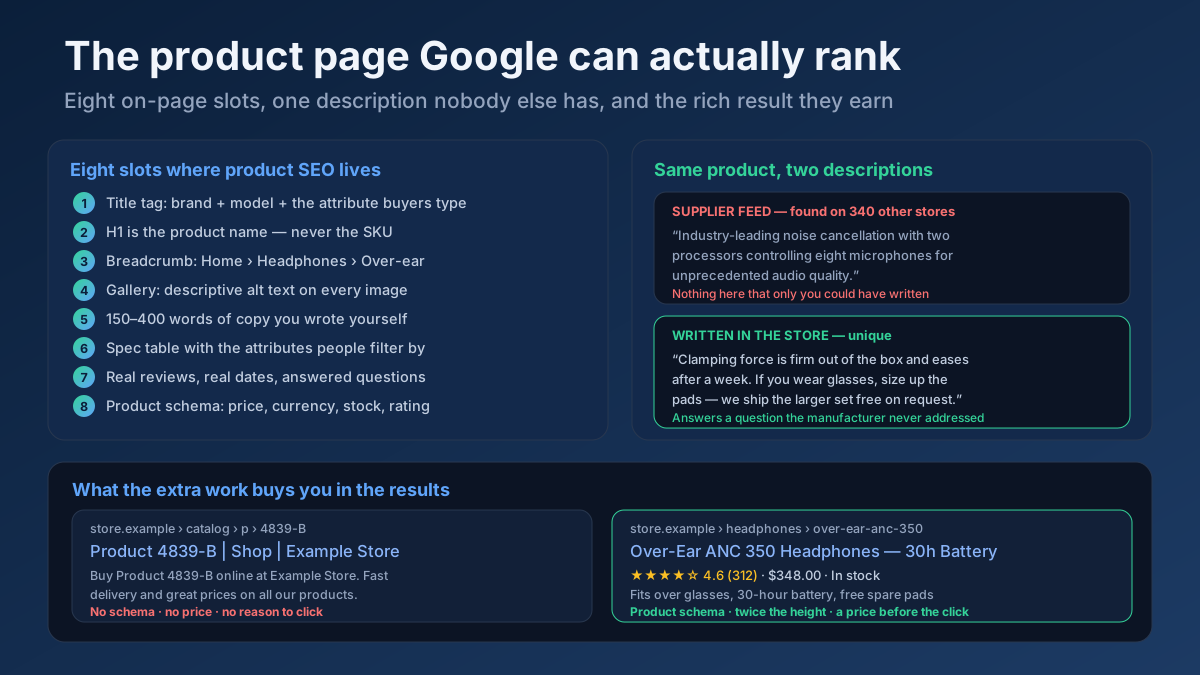
- Before: “Product 4839-B | Example Store” → After: “Over-Ear ANC 350 Headphones — 30h Battery”
- Before: “Blue Shirt” → After: “Oxford Shirt, Navy — Slim Fit, Non-Iron Cotton”
- Before: “Dining Table” → After: “Solid Oak Dining Table 180cm — Seats 6”
Notice what each rewrite adds: a number, a material, a capacity, a constraint. Those are the words people type, and they are also the words that make a listing look like a specific answer rather than a category label.
Rules worth following across a whole catalogue
- Do not append the store name to every product title. Google often adds the site name itself, and on a 60-character budget those characters are expensive. Keep the brand suffix for the homepage and category pages.
- Never lead with the SKU. Nobody searches for it and it burns the first 12 characters, which are the ones that get scanned.
- Template carefully, then override the top 100. A template is unavoidable at scale, but your hundred highest-margin products deserve hand-written titles. That is a single afternoon that pays for itself.
- Check for near-duplicates. Templated titles across variants produce dozens of nearly identical listings that compete with each other; a Keyword Cannibalization Checker finds the overlaps.
Draft candidates with a Meta Tag Generator, preview how they truncate at real pixel widths with a Google SERP Snippet Preview, and read the title tag guide for the underlying reasoning. If Google keeps replacing your title with something else, the low-CTR diagnosis covers why.
Meta descriptions that sell the click
On product pages the description has a specific job: remove the objections that stop someone clicking. Delivery time, returns window, stock status, price bracket, guarantee. “Free next-day delivery, 60-day returns, in stock in 4 sizes” outperforms “Buy the best products at great prices” every single time, because it answers what the buyer is scanning for. Keep it to 140–158 characters and write one per product family rather than one per SKU — the meta description guide covers the trade-off.
Step 3 — Write the description only you could have written
This is where the ranking is actually won, and it is the step almost every store skips because it does not scale. It does not need to scale. It needs to be done for the products that matter.
The three-layer description
A product description that earns its ranking has three distinct layers, and the manufacturer only ever supplies the middle one.
- Layer 1 — The 40-word answer. Open with what it is, who it is for and the one thing that makes it different, in plain language. This is the passage Google lifts for a snippet and the passage an AI assistant quotes. “A 180cm solid oak dining table that seats six comfortably and eight at a squeeze. Legs bolt on in ten minutes with the supplied key, so it fits through a standard doorway flat-packed.”
- Layer 2 — The specifications. Dimensions, materials, weight, compatibility, what is in the box, warranty. A real table with real attribute names, not a paragraph. This is the layer people scan and the layer that matches attribute searches.
- Layer 3 — The knowledge only a seller has. This is the layer that makes the page unique and it comes from your returns data, your support inbox and your warehouse. Which size customers actually order. What it does not fit. How it behaves after a month. What the two most common returns reasons are and how to avoid them. Nobody else selling this product will write this, which is precisely why it works.
Layer 3 is the honest answer to “how do I compete with a marketplace?”. It is first-hand experience in the sense the E-E-A-T guide means it — not a credential, but evidence you have handled the thing you are selling.
How long should a product description be?
There is no threshold, and chasing a word count produces padding that hurts conversion. As a practical range: 150–400 words of genuinely original text on a normal product, more on considered purchases where buyers research heavily, and less on commodity items where the specification is the answer. What matters is that a meaningful share of the words are yours. A page where 90% of the text is a supplier feed will be treated as a copy of every other page carrying that feed, however long it is.
Two checks make this measurable. A Text Similarity / Duplicate Checker compares your page against a competitor selling the same item — if similarity is high, you have not differentiated. A Thin Content Checker finds the pages in your catalogue with almost no unique text at all, which is where you should start. The content refresh guide covers working through a backlog in priority order rather than alphabetically.
The realistic way to do this at scale
Nobody hand-writes 4,000 product descriptions. Sort the catalogue by revenue and treat it in tiers. The top 5% of products, typically 60–80% of revenue, get all three layers written by a human. The next 15% get a strong Layer 1 and a complete Layer 2. The long tail keeps the supplier text but gains a genuine spec table, correct schema and a good title — enough to be indexed and useful without pretending to be unique. This tiering is the difference between a project that finishes and one that is abandoned in week three.
Step 4 — Product schema, done properly
Structured data is the one part of ecommerce SEO with a visible, immediate payoff: stars, price and availability appear in the result, the listing takes up more vertical space, and buyers can qualify themselves before clicking. Google’s product structured data documentation is the reference; these are the fields that matter in practice.
The fields to get right
- name, image, description — must match what is visible on the page. Marking up a price or a rating the visitor cannot see is a policy violation and gets enhancements removed.
- offers with
price,priceCurrency,availabilityandpriceValidUntil. Availability is the field stores most often leave stale; it should be generated from live stock, not hard-coded toInStockin the template. - sku, gtin or mpn, and brand — these are how Google matches your listing to a known product entity, which increasingly drives whether you appear in product-oriented surfaces at all.
- aggregateRating and review — only from genuine customer reviews that are visible on the page. Self-serving review markup on your own products has been outside Google’s review snippet guidelines for years.
- shippingDetails and hasMerchantReturnPolicy — genuinely underused. Delivery cost and returns window can render directly in the result, and they are exactly what a hesitant buyer wants before clicking.
Schema mistakes that quietly cost you rich results
- A price in the markup that no longer matches the page after a sale ends. This is the most common enhancement loss and it is silent.
- Every variant declaring the same schema so a single product looks like forty. Google now documents a product variant markup pattern for exactly this case.
- Currency mismatches on multi-region stores, where the markup says one currency and the visible price another.
- Ratings without reviews. An
aggregateRatingwith no visible review content is invalid and will be ignored or penalised. - Two conflicting blocks — one from the theme, one from a plugin — describing the same product differently. Extremely common on WordPress and Shopify stores that have accumulated apps.
Generate valid JSON-LD with a Schema (JSON-LD) Generator, then validate every template with a Structured Data (Schema) Checker — broken markup fails silently, so nothing tells you the enhancement disappeared except the traffic. The structured data guide covers the wider set of types worth implementing, and breadcrumb markup is the cheapest addition: it replaces a raw URL in the result with a readable path and adds a line of height.
Step 5 — URLs, variants and the index bloat trap
This is the step that separates stores that scale from stores that plateau, and it is entirely a set of decisions rather than a set of tasks.
Variants: one page, unless the variant is searched by name
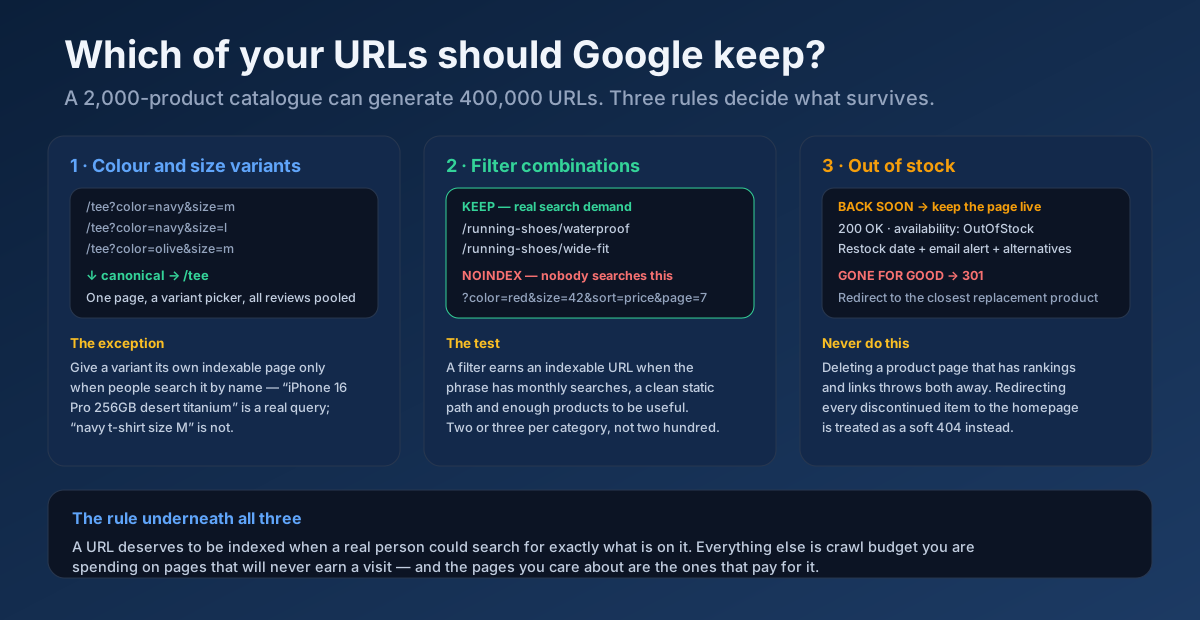
Colour and size variants belong on one page with a picker, canonicalised to the parent. The reasons are practical: reviews pool on one URL instead of splitting across twelve, link equity concentrates, and you avoid publishing eleven near-identical pages. The exception is when the variant itself has search demand — “iPhone 16 Pro 256GB desert titanium” is a query people genuinely type, and a dedicated indexable page is justified. “Navy t-shirt size M” is not. Google’s canonicalisation documentation and the canonical tags guide cover the implementation detail.
Faceted navigation: index two or three filters, not two hundred
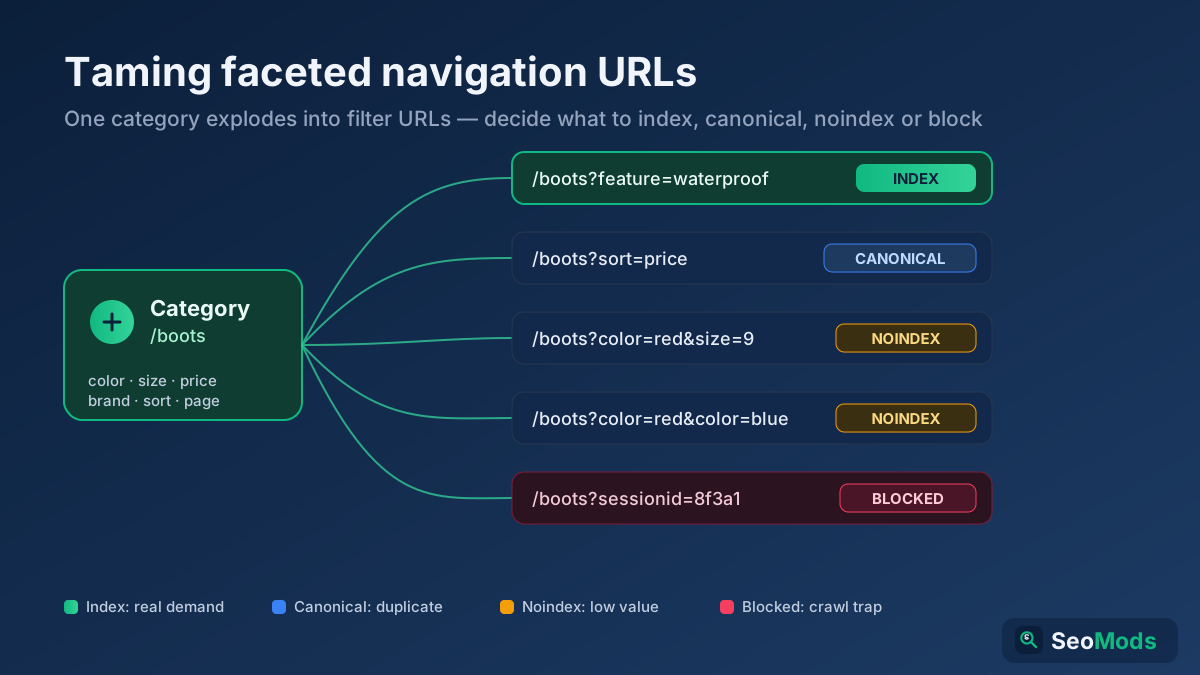
Filters are how customers shop and how catalogues explode. The workable rule is that a filter combination earns an indexable URL when three things are true: the phrase has genuine monthly search volume, it can live at a clean static path rather than a query string, and enough products match that the page is actually useful. “Waterproof running shoes” passes. “Red size 42 sorted by price page 7” does not. Everything that fails the test gets noindex while remaining crawlable enough for users, and the highest-volume combinations get promoted to real, curated category pages with their own copy. The faceted navigation guide is the full treatment; noindex vs disallow explains why blocking these in robots.txt instead is the wrong instrument.
URL structure that survives a replatform
Short, readable, keyword-bearing, no parameters where a path will do, and — critically — no category in the product path. /store/headphones/anc-350 looks tidy until a product belongs to three categories or moves, and then you own a redirect chain forever. /product/anc-350 is boring and permanent. Keep IDs out where you can, keep them stable where you cannot. The URL structure guide covers the trade-offs, and pagination for SEO covers the other half of the problem on long category listings.
Out of stock and discontinued products
Three different situations, three different answers, and stores routinely apply the wrong one.
- Temporarily out of stock. Keep the page live, return 200, set
availabilitytoOutOfStock, show a restock date if you have one, offer an email alert and link to alternatives. Deleting it throws away rankings and links you will want back in three weeks. - Permanently discontinued with a successor. 301 to the replacement product, and say so on the destination page — “this replaces the ANC 300” — so the arriving visitor is not confused. See 301 vs 302 redirects for which status code applies.
- Permanently gone with nothing similar. 301 to the parent category, or return 410 if there is genuinely no relevant destination. Redirecting every dead product to the homepage is treated as a soft 404 and helps nobody.
Seasonal products are a fourth case worth naming: keep the page permanently and let it accumulate authority year after year rather than deleting and recreating it every season. The URL that ranked last December is worth far more than a fresh one.
Step 6 — Images, because this is retail
Product images carry more SEO weight in ecommerce than anywhere else, because Google Images and shopping surfaces are a real discovery channel for physical goods and because the main image is almost always the page’s largest contentful paint element.
- Descriptive filenames.
oak-dining-table-180cm-front.jpg, notIMG_4821.jpg. It is a two-minute change at upload time and permanent afterwards. - Alt text that describes the product, not the keyword. “Navy slim-fit Oxford shirt shown buttoned with rolled sleeves” is useful to a screen reader and to Google. “buy shirt cheap online navy shirt” is useful to neither. Audit the catalogue with an Image ALT Text Checker.
- Multiple angles, plus scale and detail shots. Returns fall when buyers can see the texture and the size in context, and lower returns is a commercial win that also feeds the quality signals search engines infer from behaviour.
- Modern formats and correct dimensions. WebP or AVIF, sized for the slot they occupy, with explicit width and height so nothing shifts as the page loads.
- Do not lazy-load the main image. It is the LCP element; lazy-loading it is a self-inflicted Core Web Vitals failure that is endemic on ecommerce themes.
The image SEO guide covers the full checklist including responsive srcsets and CLS.
Step 7 — Reviews and customer questions
Reviews are the only content on a product page that grows on its own, and they solve three problems at once: they add unique text to a page that would otherwise be a duplicate, they answer purchase objections in the buyer’s own vocabulary, and they earn the star rating that lifts click-through.
- Ask at the right moment. A review request sent 7–14 days after delivery converts far better than one sent on dispatch, because the customer has actually used the product.
- Render reviews in the HTML. If they load from a third-party widget after the page renders, they may contribute nothing to what gets indexed. Check what a crawler sees, not what your browser shows — the JavaScript SEO guide explains the failure mode.
- Keep the negative ones. A 4.6 average with a few critical reviews is more persuasive and more credible than a suspicious 5.0, and buyers actively seek out the two-star reviews.
- Add a questions section. Customer questions are free long-tail content written in exactly the language other buyers use, and answering them publicly turns your support inbox into indexable text.
Step 8 — Category pages are where the traffic actually is
If you only take one strategic idea from this guide, take this one: on most stores, category and collection pages have more ranking potential than product pages, and they receive a fraction of the attention.
The reason is arithmetic. “Waterproof running shoes” has real monthly volume and is served by a category page; any individual shoe within it has almost none. Category pages also survive product turnover — the page keeps its rankings while the products inside it come and go, so the authority you build compounds instead of dying with a discontinued SKU.
A category page that ranks needs, in order of impact:
- 150–300 words of genuine buying guidance, placed where it helps rather than dumped below the fold as SEO filler. What to look for, how to choose between the options, what the price tiers mean.
- A title and H1 matching the category term people search, which is often not your internal merchandising name. Customers search “desk chairs”, not “Seating Solutions”.
- Sensible pagination with self-referencing canonicals on each page, so page two is indexable in its own right rather than canonicalised away along with the products on it.
- Internal links to sub-categories and to a handful of hero products, so authority flows downward instead of pooling.
- Its own FAQ, answering the questions people ask before choosing a product in this category at all.
Find the gaps with a Content / Keyword Gap against two competitors — the categories they rank for and you do not are usually pages you could build in a day. The topic clusters guide maps how category pages, buying guides and product pages should link together.
Step 9 — Internal linking across a catalogue
Ecommerce sites generate orphan pages faster than any other site type: a product is added, linked from one category listing, and once it drops off page one of that listing it is effectively unreachable. It stays in the sitemap, gets crawled rarely, and quietly stops ranking.
- Related and complementary products on every product page — genuinely related, not randomly generated, because random blocks dilute the signal and help nobody.
- Buying guides linking into categories and hero products, with anchor text that names the product or the category rather than “click here”. An Anchor Text Optimizer keeps the distribution natural.
- Breadcrumbs on every page, which also feed the breadcrumb rich result.
- A clean sitemap that excludes what you noindexed, so the two signals do not contradict each other.
Find the disconnected pages with an Internal Link Opportunity Finder and read the orphan pages guide; the internal linking strategy covers how to distribute authority deliberately rather than by accident.
Step 10 — Speed, mobile and the checkout path
Product pages are usually the heaviest pages on a store — image galleries, review widgets, recommendation engines, chat, analytics, three tag managers — and they are the pages where slowness costs money most directly.
- The main product image is your LCP. Preload it, serve it eagerly at the right size, and stop lazy-loading it.
- Reserve space for everything that loads late — review stars, badges, price blocks, promotional banners — or the page will shift under the buyer’s thumb as they reach for “add to basket”.
- Audit third-party scripts ruthlessly. Most stores are carrying apps installed for a campaign that ended two years ago and never removed.
- Test on a mid-range phone on mobile data, not on a laptop on office wi-fi. Since mobile-first indexing the mobile rendering is what gets evaluated.
Measure with a Page Speed & Size Test and a Mobile-Friendly Checker check, and work through the Core Web Vitals guide and page speed guide for the fixes that actually move the numbers.
Step 11 — Products in AI search
Buyers increasingly ask an assistant to shortlist before they ever open a search results page: “which noise-cancelling headphones work with glasses”, “quiet dishwasher under 60cm that fits a small kitchen”. Being in that shortlist follows from things you should be doing anyway, but the emphasis differs.
- Specifications as structured facts. Assistants extract attributes far more reliably from a labelled table than from marketing prose.
- Direct answers to constraint questions. If a real buyer asks “does it fit under a 60cm counter”, put the answer on the page as a sentence, not only as a dimension in a spec row.
- Complete, accurate Product schema. It is the cleanest machine-readable description of what you sell and it is what gets parsed first.
- Comparison content. “X vs Y” and “best for [constraint]” pages are heavily drawn on when assistants build recommendations, and most retailers publish none.
Score how quotable your pages currently are with a GEO Checker (Generative Engine Optimization) and an AI Snippet Optimizer, and read the AI Overviews guide and answer engine optimisation guide for the mechanics.
The 21-point product page checklist
Run this against any product page. Anything you cannot tick is a task.
- 1. Title tag under 60 characters: brand, model, defining attribute — no SKU, no store-name padding.
- 2. Meta description 140–158 characters, naming delivery, returns and stock.
- 3. One H1, and it is the product name a customer would recognise.
- 4. At least 150 words of text that exists on no other website.
- 5. A 40-word plain-language opening answer above the fold.
- 6. A specification table with real, labelled attributes.
- 7. At least one insight only a seller of this product would know.
- 8. Product schema with price, currency, availability and SKU.
- 9. Availability generated from live stock, not hard-coded.
- 10. Rating and review markup, and only where genuine reviews are visible.
- 11. Breadcrumb markup and a visible breadcrumb trail.
- 12. A self-referencing canonical; variants canonicalise to the parent.
- 13. Clean, stable, readable URL with no session or tracking parameters.
- 14. Descriptive image filenames and alt text on every image.
- 15. Main image preloaded and not lazy-loaded.
- 16. Multiple angles including a scale reference.
- 17. Reviews rendered in the HTML, not injected after paint.
- 18. A questions section, with answers.
- 19. Internal links to the parent category and genuinely related products.
- 20. A defined out-of-stock behaviour that keeps the URL alive.
- 21. LCP under 2.5 seconds on a mid-range phone.
An All-in-One SEO Audit checks a large share of these in one pass, and a full Technical Site Audit (Crawler) finds where the template-level problems repeat across thousands of URLs — which is where the leverage is.
Mistakes that keep stores stuck
- Publishing the supplier feed and calling it a product page. The single biggest cause of ecommerce pages that never rank.
- Letting every filter combination be indexable. Crawl budget disappears into pages nobody will ever search.
- Deleting discontinued products. Rankings and backlinks thrown away for a tidier database.
- Hiding the description behind a tab that loads on click. If it is not in the HTML, treat it as if it does not exist.
- Neglecting category pages. The pages with the most winnable volume, given the least attention.
- Marking up a rating you invented. It works until it is caught, then the enhancement is removed site-wide.
- Keyword-stuffing product titles. “Blue Shirt Mens Shirt Blue Cotton Shirt Buy Blue Shirt” reads as spam to both audiences.
- Ignoring the site-search log. Your customers are telling you which pages to build and nobody is reading it.
- Optimising the long tail before the top 100. Effort should follow revenue, and it rarely does.
A realistic 60-day plan
- Week 1 — Measure. Crawl the store, count indexable URLs against actual product count, list orphans, export the site-search log, and identify the top 100 products by revenue.
- Week 2 — Stop the bleeding. Fix the schema template, decide the noindex rules for filters, define the out-of-stock behaviour, and correct canonicals on variants. These are template changes: one fix, thousands of pages.
- Weeks 3–4 — The top 100. Hand-written titles, descriptions and images for the products that pay the bills.
- Weeks 5–6 — Categories. Buying guidance, correct H1s, internal links and FAQs on your ten highest-potential category pages, plus new pages for the two or three filter combinations with real demand.
- Weeks 7–8 — Speed and review flow. Fix LCP and layout shift on the product template, and set up post-delivery review requests so the pages keep improving without you.
- Ongoing. Work down the revenue-ranked list, and re-run the audit monthly so template regressions are caught in weeks rather than quarters.
Expect category page movement first, usually inside four to eight weeks, and product page movement more slowly — the SEO timeline guide sets realistic expectations. Track it properly with a Keyword Rank Checker and the Search Console measurement guide rather than by refreshing incognito searches.
Frequently asked questions
How many words should an ecommerce product description be?
There is no minimum that Google enforces. In practice, 150–400 words of genuinely original text works for most products, with more on considered purchases and less on commodities where the specification is the answer. The number that matters is not total length but how much of the text exists only on your site — a 900-word page that is 90% supplier feed is weaker than a 200-word page written by someone who has handled the product.
Can I use the manufacturer’s description?
You can, and for the long tail of a large catalogue it is often the pragmatic choice, but understand what it costs. Every retailer using that feed publishes the same text, so Google has to choose between near-identical pages and will favour the strongest domain. Adding even 100 words of your own — sizing advice, common questions, what it does not fit — is usually enough to change the outcome on the products that matter.
Should each product variant have its own URL?
Usually no. Keep one page with a variant picker and canonicalise the variants to it, so reviews and links concentrate on a single URL. Give a variant its own indexable page only when people search for it by name, which happens with capacity and finish on high-value electronics and rarely with colour and size on apparel.
What should I do with out-of-stock product pages?
Keep them live and returning 200 while the product is coming back, with availability set to OutOfStock, a restock date if you have one, an email alert and links to alternatives. Only redirect when the product is permanently gone, and redirect it to the closest replacement or the parent category — never to the homepage, which Google generally treats as a soft 404.
Why do marketplaces outrank me for my own products?
Because on an exact-product query with identical descriptions, the strongest domain wins, and marketplaces have enormous authority, thousands of reviews and years of behavioural data. You do not beat them on those queries; you beat them on the ones they serve badly. Attribute and constraint queries, buying guides, comparisons and specialist categories are where an independent retailer with real product knowledge has an advantage that scale cannot replicate.
Do product page reviews really help SEO?
Yes, in three concrete ways. They add unique text to pages that would otherwise be duplicates, they cover long-tail phrasing you would never write yourself, and with valid markup they earn a star rating in the search result that measurably lifts click-through. They also lower returns by setting expectations, which is a commercial win independent of search.
How do I stop faceted navigation creating thousands of useless pages?
Decide deliberately which filter combinations deserve to exist as indexable URLs — typically two or three per category with genuine search demand — give those clean static paths and real copy, and apply noindex to the rest while keeping them usable for shoppers. Do not block them in robots.txt instead: a blocked URL cannot be crawled, so the noindex is never seen and the page can still be indexed from links.
Should I optimise product pages or category pages first?
Category pages, for most stores. They target higher-volume attribute queries, they keep their rankings as products turn over, and they pass authority down to the products beneath them. The exception is your top 20 revenue products — those deserve hand-written attention regardless, because a small percentage improvement on them is worth more than a large one anywhere else.
The bottom line
Ecommerce product page SEO is not a copywriting problem or a technical problem. It is both, applied in the right order: fix the template-level issues that affect thousands of URLs at once — schema, canonicals, filter indexing, out-of-stock behaviour — then spend real human effort on the small number of pages that carry your revenue, and build the category pages that capture the attribute queries your product pages never will. Do those three things and you stop competing with marketplaces on their terms and start competing on yours: specific knowledge about specific products, expressed in a way both a buyer and a search engine can read.
Start with one page. Run it through an All-in-One SEO Audit to see what the template is doing to it, validate the markup with a Structured Data (Schema) Checker, and rewrite the title with a Meta Tag Generator before you preview it in a Google SERP Snippet Preview. Then do the next ninety-nine.