Why SEO Beginners need this
With a first site, the hard question is rarely how to optimise a page. It is what the page should be about. Most people guess: they write the post they would enjoy reading and hope somebody looks for it. Paid keyword tools exist, but in your first week their volume and difficulty columns raise more questions than they settle.
Google shows part of the answer for free. While you type in the search box, it completes your phrase with predictions based on what people search. You only see a handful at a time, though, and collecting them by hand, one letter after another, costs an evening.
This tool does the collecting. It asks Google autocomplete for your seed, for the seed followed by each letter from a to z, and for the seed with how, what, why, best and vs in front, then merges the answers into one alphabetical list you can copy. It gives no scores and no search volumes. What you get is the wording people use, and the choosing is left to you.
SEO Beginners specific guidance
Tips for SEO Beginners
Start with two or three plain words that name your topic, the way you would say it to a friend: "indoor herb garden", not "the ultimate guide to growing herbs at home". Set Language to the language your readers search in. A broad seed fills the list: on 12 November 2026 "bullet journal" came back with 304 ideas and "indoor herb garden" with 233. If you get a couple of dozen, the seed is narrow or worded in a way few people type, so try a shorter or more everyday wording.
The list is alphabetical, so position means nothing and the first phrase is not the most searched one. Read it in groups. Phrases beginning with how, what or why are questions, and each could be a post. Phrases with "best", a shop name or "near me" come from people about to buy, and a new blog can leave most of them alone. Words that keep turning up after your seed (winter, cats, low light) are the subtopics people care about. The arrow beside a phrase opens it in Google, where you can see what kind of pages already answer it.
Then cut. Copy all puts the whole list on your clipboard, one phrase per line. Paste it into a spreadsheet, delete what you cannot write about from experience, and keep 10 to 15 phrases, one for each future page. When you want scores, intent labels and topic clusters for the survivors, run the seed through Keyword Research. This tool is the quick first pass.
The costliest mistake
The usual beginner mistake is to treat the list as a to-do list and plan a page for every line. Many lines are the same search typed differently ("setup" and "set up"), and several belong on one page. The second is pasting phrases into a post to "add keywords". Repeating words that way is what Google's spam policies call keyword stuffing. A phrase is a question to answer once, clearly.
Quick start
- Type your topic in two or three plain words and pick the language.
- Skim the list for questions and for words that repeat.
- Open two or three promising phrases in Google with the arrow.
- Press Copy all and paste the list into a spreadsheet.
- Cut it down to 10 to 15 phrases, one per planned page.
What this tool does not tell you
- No search volume, difficulty or intent label. A phrase being suggested means people type it, not how many do; the list cannot tell you which of two phrases is bigger.
- One source only: Google autocomplete. It does not read Bing, YouTube, Amazon or any keyword database, and each request returns at most ten suggestions.
- There is no country setting, and Language is a hint, not a filter. English lists can include shops from several countries and a few phrases in other languages.
- It does not look at your site. It cannot say whether you rank for a phrase, whether your page is indexed, or how strong the pages already ranking are.
Real examples
1. Indoor herb garden: the post ideas sit between the shop words
- Situation
- Someone starting a first blog about growing herbs in a flat wants to know what to write beyond the obvious starter guide. We ran the seed on 12 November 2026.
- Input
indoor herb garden, Language: English- Reading the result
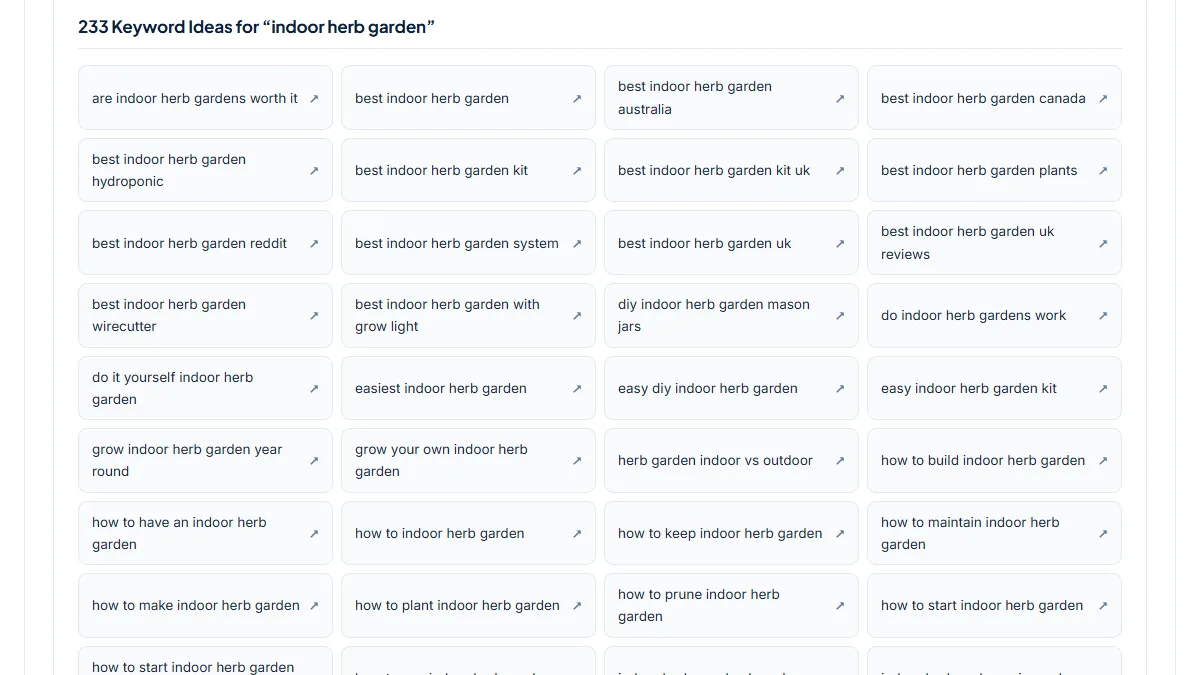
- 233 ideas. A large share are buyer searches: 13 begin with "best", and 15 different retailers appear after the seed, from amazon and ikea to bunnings and canadian tire, which also shows that the list mixes countries. The material for a new blog is elsewhere. 11 phrases begin with "how to" (start from seeds, prune, maintain, plant), and people add problems after the seed: bugs, fruit flies, mold, drainage, low light, no light, and three versions of the cat question ("and cats", "cat proof", "safe for cats"). That is a first plan already: one starter guide, then a short post per problem. Two lines are noise ("indoor herb garden auk", "indoor herb. garden brands") and can simply be deleted.
2. Bullet journal: a broad seed that tells you which narrower seed to run next
- Situation
- A stationery fan plans a small site about bullet journaling and types the broadest name of the hobby. Same day, same settings.
- Input
bullet journal, Language: English- Reading the result
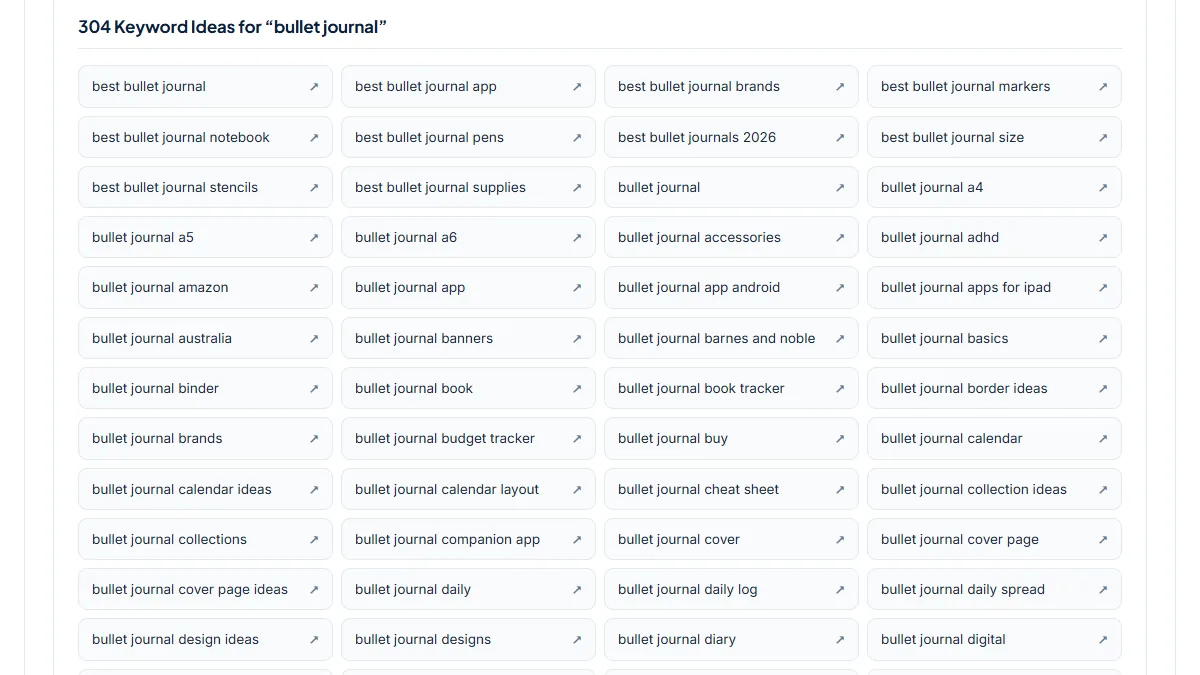
- 304 ideas, too many to act on at once. Counting words helps: 29 phrases contain "ideas", 12 contain "tracker" (habit, mood, reading, workout) and 17 are "vs" comparisons such as "notion vs bullet journal" and "bullet journal vs planner". A beginner corner is visible too: "for beginners", "getting started", "how to start", "key symbols", "future log", "rapid logging". Each of those groups is a narrower seed worth its own run, for example "bullet journal habit tracker". The list also contains "bullet journal kaufen", "kopen", "que es", "nedir" and "zeszyt": the Language setting asks Google for English suggestions but does not filter the answers, so foreign phrases slip in under the rarer letters.
3. A Turkish seed: questions with nasıl, kaç and neden, plus two kinds of noise
- Situation
- A first-time blogger in Turkey writes about growing vegetables on a balcony and tries "saksıda domates" (tomatoes in pots) with Language set to Türkçe. Same day.
- Input
saksıda domates, Language: Türkçe- Reading the result
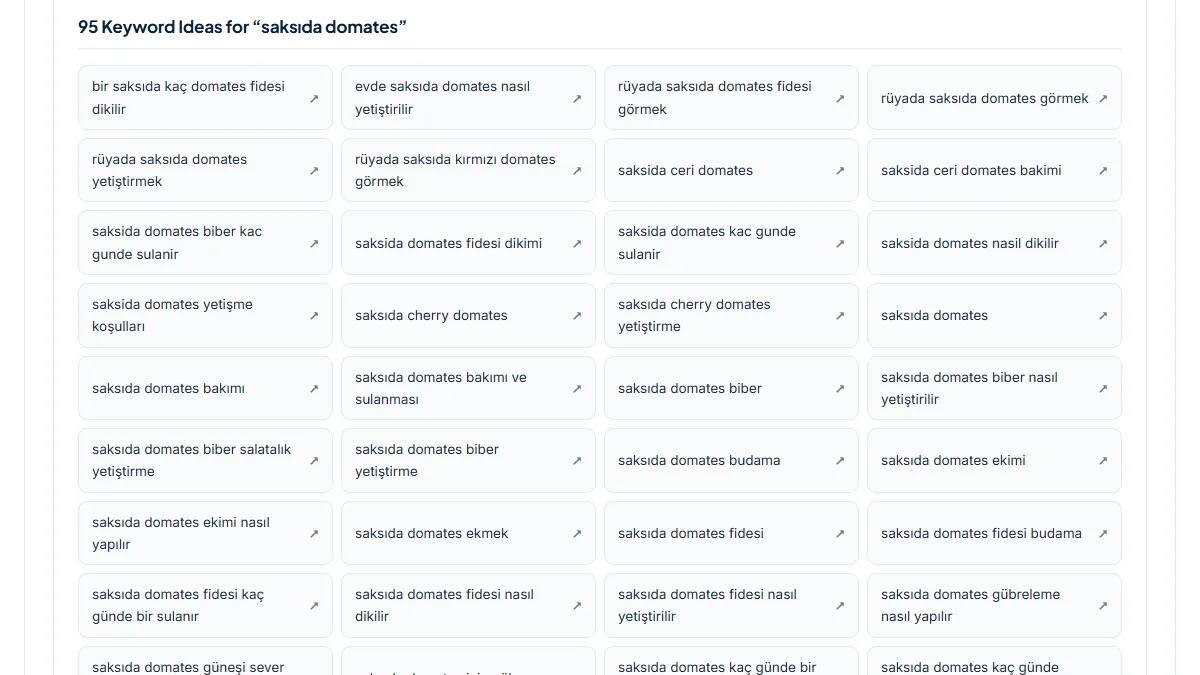
- 95 ideas, and most are questions: 25 contain "nasıl" (how), 8 "kaç" (how many, how often), 5 "neden" (why) and 3 "ne zaman" (when). "saksıda domates kaç günde bir sulanır" (how often to water) and "saksıda domates neden çiçek açmıyor" (why it does not flower) are ready-made post titles. Two kinds of noise need cutting: 4 phrases are dream interpretation ("rüyada saksıda domates görmek"), and 7 are the same searches typed without Turkish letters ("saksida ceri domates"), which are duplicates, not extra topics. Wording matters as well: "balkon bahçesi" (balcony garden) returned only 23 ideas that day, and 16 of them were about glazed winter gardens, a different subject.
Common mistakes
- Reading the top of the list as the most popular phrases. The order is alphabetical; "are indoor herb gardens worth it" comes first only because it starts with a.
- Planning one page per line. "indoor herb garden setup" and "indoor herb garden set up" are one search, and "and cats", "cat proof" and "safe for cats" are one post.
- Keeping the buyer phrases because they look valuable. "best indoor herb garden kit" is answered by shops and review sites; a new blog does better with the how-to and problem phrases.
- Stopping at the broad seed. 304 ideas for "bullet journal" is a map, not a plan; run the group you like ("bullet journal habit tracker") as its own seed.
Frequently asked questions
Where do these keyword ideas come from, and are they really free?
They come from Google autocomplete, the predictions Google shows while someone types a search. The tool sends your seed, the seed plus each letter of the alphabet, and the seed with a few question and comparison words, then removes duplicates and sorts the result alphabetically. Nothing is invented or rewritten by the tool. It is free to use and you do not need an account. What you do not get is data Google does not publish through autocomplete, such as monthly search counts.
Does the list show how many people search each phrase?
No. There are no numbers next to the phrases, and the order is alphabetical, so neither position nor length says anything about popularity. A suggestion tells you that enough people type a phrase for Google to predict it, and nothing more exact than that. For a first site that is often enough to choose topics. If you need to compare two phrases, the Keyword Research tool adds relative demand and difficulty scores, though those are indexes too and not measured search volume.
How is this different from the Keyword Research tool?
Keyword Suggestion is the quick pass: one source, one alphabetical list, a Copy all button, and nothing to interpret. Keyword Research takes the same kind of seed, reads more than one suggestion source, lets you pick a country, and adds demand, difficulty and opportunity indexes, intent labels and topic clusters. A sensible order for a beginner is to use this tool to see how people word a topic and choose a narrower seed, then run that seed through Keyword Research when you are ready to plan pages.
How many of these phrases should a new site target?
Far fewer than the list offers. Give each page one main phrase and let two or three close variants ride along on the same page, since Google treats many near-identical wordings as one search. For a first site, 10 to 15 well-chosen phrases, mostly questions and problems you can answer from experience, make a realistic plan for the first months. Use the chosen phrase naturally in the title and main heading. Repeating it through the text does not help and can read as keyword stuffing.
Why are there odd, foreign or unrelated phrases in my list?
Because the tool shows what autocomplete returns without filtering it. The Language setting tells Google which language you prefer, but for rare letters such as x or z Google may still offer phrases in German, Dutch or Polish. There is no country setting, so shops from several countries appear side by side. A seed can also mean something else to searchers: in our Turkish run, four suggestions were about dreams, not gardening. Delete those lines; they are a normal part of raw autocomplete data.
Reference: Ahrefs' SEO basics guide for beginners lists keyword research as the first of five steps in doing SEO: find what people search for, and focus on the topics, questions and language your audience actually uses. A list of autocomplete phrases is a free way to begin that step.