Why SEO Beginners need this
A first audit is where many beginners stall. Each guide covers one piece: titles here, robots.txt there, schema somewhere else. Checking them one tool at a time takes an afternoon, and at the end you have six tabs and no order to work in.
The All-in-One SEO Audit puts the basics into one report. You paste one address and it reads that page and the site's robots.txt, sitemap and llms.txt, tests up to 25 links it finds, follows the redirect path and reads the SSL certificate. In our runs that came to 45 checks in ten groups, from Title & Meta to AI SEO, and every check that is not met lands in one list, sorted from Critical to Low, with a fix and a "Why it matters" line.
It is a scan of one page, not of your whole site, and the score is a SeoMods measure rather than a Google grade. Below we show how to read the list on three real sites we scanned on 11 November 2026.
SEO Beginners specific guidance
How the list decides what is Critical
Every check is either passed, a warning or a failed check, and every check carries a weight. The label in Issues to Fix comes from those two things. Critical is a failed check worth 8 points or more: the page is set to noindex, it is not served over HTTPS, the viewport tag is missing, a sampled link is broken, or robots.txt blocks AI crawlers. High is a failed check worth less, such as a missing meta description or images loaded over http://. Medium and Low are warnings, heavier and lighter.
So the order is already done for you. Read from the top, and stop to think wherever a row describes a choice you made on purpose.
Rows you can fix yourself, and rows that need help
Most rows in Title & Meta, Content & Headings and Images & Media are text edits you can make in any site builder: a longer title, a meta description, one H1, alt text on images. Open Graph tags and structured data usually come from an SEO plugin or a theme setting. Security headers, caching and compression are server settings, so send those rows to whoever hosts the site. And if a page is noindex or blocked by mistake, that is worth fixing before anything else, because a page Google cannot read gets nothing from a good title.
A first pass, step by step
- Scan your home page and write down the Overall Score and the counts of passed, failed and warning checks.
- Work through the Critical and High rows. If one is a broken link, open the link in your browser before you remove it.
- Fix the Medium rows you can edit yourself; list the server rows for your host.
- Leave Low rows such as llms.txt or a Twitter Card for later, or skip them if they do not fit your site.
- Scan again to confirm the rows now pass, then repeat on your next most important page.
What this tool does not tell you
- One page per scan. It does not crawl the site, so other pages can have problems this report never sees.
- Up to 25 links on the page are tested. A clean links row does not cover links beyond the sample or on other pages.
- No Google data: no index status, rankings, clicks or traffic. Core Web Vitals appear only when Google has field data for the page; our three sites had none.
- It reads the HTML as served and does not run JavaScript, so tags added by scripts are not seen.
Real examples
1. An essay site in 1990s HTML: 51 points and one Critical row
- Situation
- Paul Graham's home page, a well-known essay site whose front page is a table of small images. A useful first example because the report is long. We scanned it on 11 November 2026.
- Input
https://www.paulgraham.com/- Reading the result
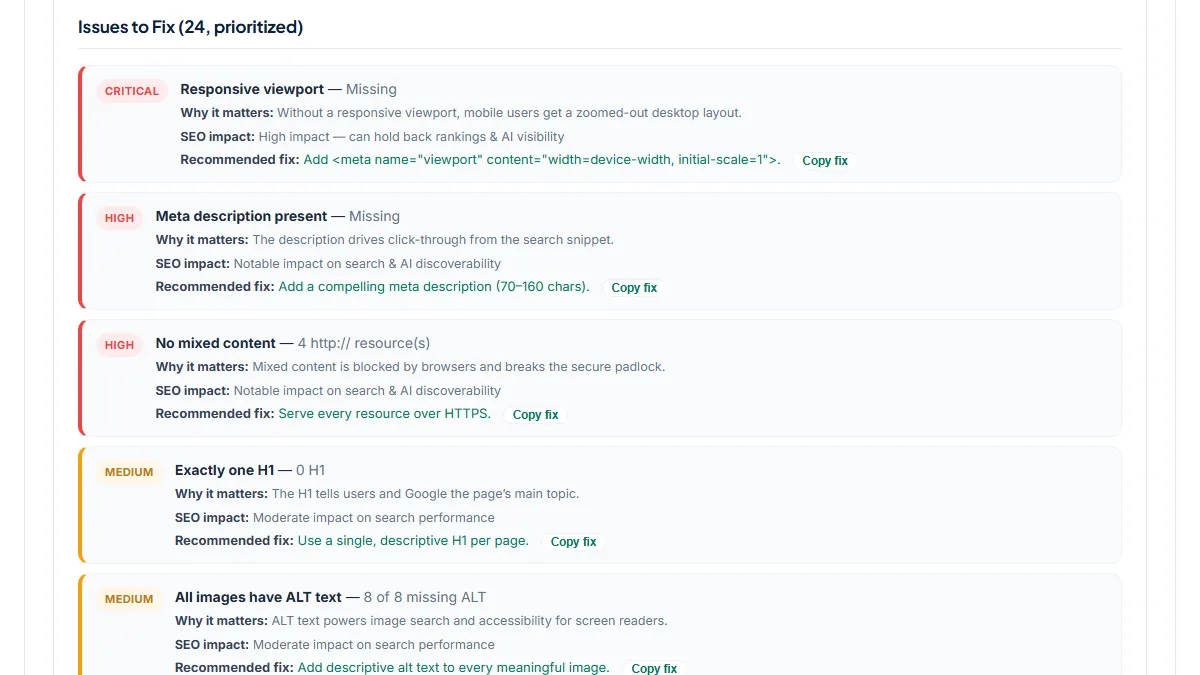
- Overall Score 51, Health Score 47%: 21 passed, 3 failed, 21 warnings, 24 rows in Issues to Fix. The one Critical row is Responsive viewport — Missing, so phones get the desktop layout shrunk to fit; Mobile Friendly scores 43%. Two High rows follow: Meta description present — Missing, and No mixed content — 4 http:// resource(s): three small images and the favicon still load over http://. The page reads as 19 words with 0 H1, and 8 of 8 images have no alt text, because the menu itself is made of images. For a beginner the lesson is the order: the viewport tag, a description and four https:// addresses are short edits; the 18 Low rows can wait. And a 51 says nothing about how widely read a site is.
2. A blog and podcast site: two links to open by hand, no failed checks
- Situation
- The home page of The Minimalists, a blog, podcast and tour site with plenty of outbound links. Same day.
- Input
https://www.theminimalists.com/- Reading the result
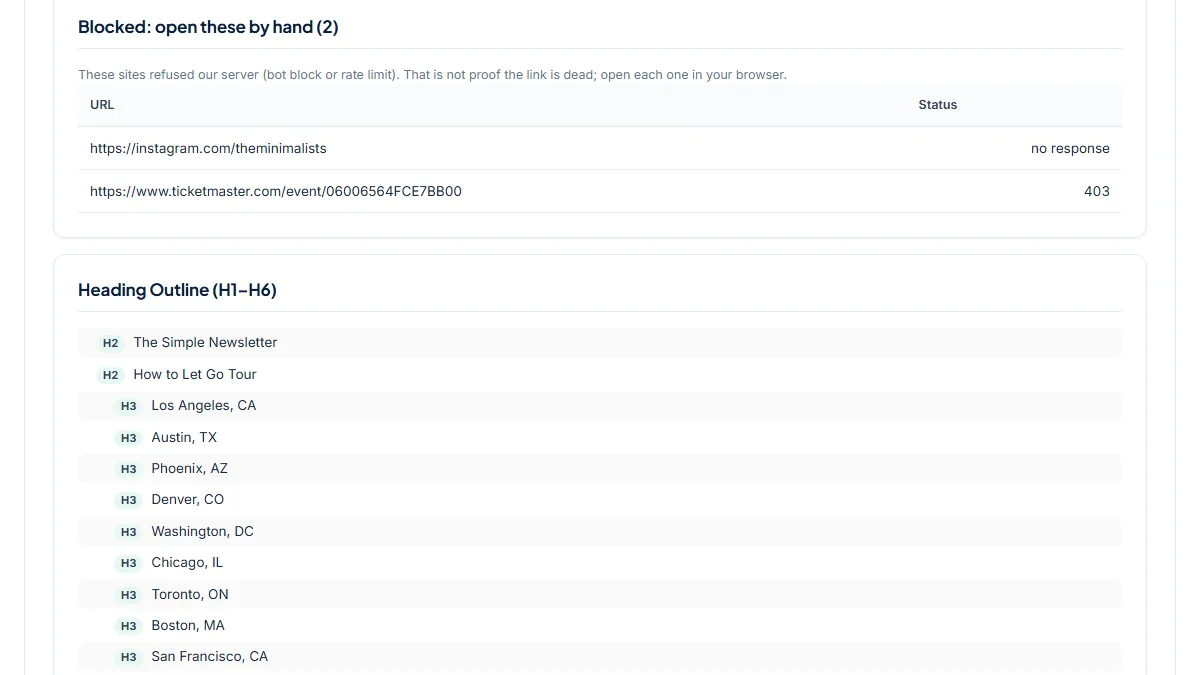
- Overall Score 80, Health Score 76%: 34 passed, 0 failed, 11 warnings. The links row reads Checked 25, 2 blocked (check by hand): an Instagram profile that gave our server no response and a ticket page that answered 403. Both are bot blocks, not dead pages, so the report lists them under "Blocked: open these by hand" instead of counting them as broken. Before that fix, made on the day of this run, the Instagram link counted as a Critical broken link and the page scored 76. The real to-do list sits in the Medium rows: 0 H1 on a page with 17 H2s, 5 of 36 images without alt text, and a title of 15 characters. AI SEO & GEO/AEO scores 100%, llms.txt included.
3. A hand-built personal site: what a near-clean report looks like
- Situation
- Derek Sivers's home page, a plain HTML site with no CMS. Same day.
- Input
https://sive.rs/- Reading the result
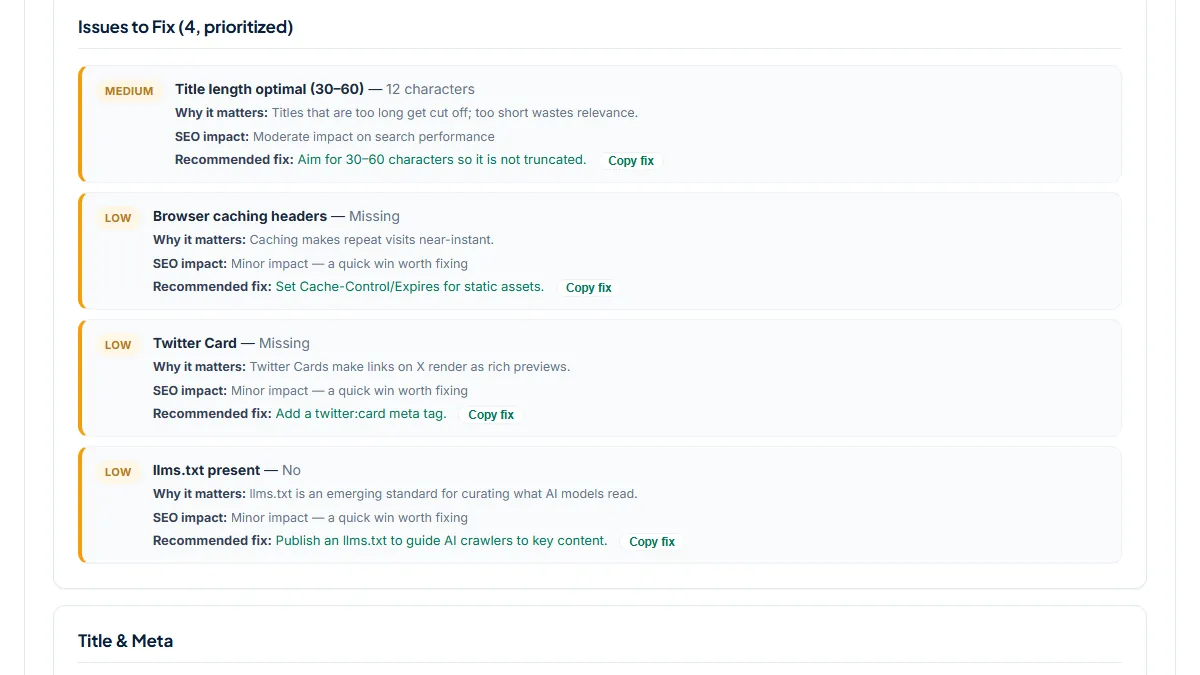
- Overall Score 95, Health Score 91%: 41 passed, 0 failed, 4 warnings. Only four rows remain. Medium: Title length optimal (30–60) — 12 characters, because the title is just the owner's name. Low: Browser caching headers — Missing, Twitter Card — Missing and llms.txt present — No. Indexability, links, mobile and security all score 100%, with HSTS and a content security policy in place. This is the point where a beginner should stop polishing. A name-only title is a choice many personal sites make, caching is a server setting, and llms.txt is a one-point check that Google does not ask for.
Common mistakes
- Treating a broken-link row as an order to delete. Open each listed link in your browser first; social networks and ticket sites often refuse servers while working fine for people.
- Starting with the Low rows because they look quick. The list is sorted by weight; a missing viewport or meta description matters more than a Twitter Card.
- Scanning only the home page and calling it a site audit. Each page has its own title, headings and links, so scan your key pages one by one or use a crawl.
- Fixing "AI crawlers allowed" without thinking. It turns Critical when robots.txt blocks bots such as GPTBot, but some owners block them on purpose; decide, then fix or ignore.
- Chasing 100. In our runs even the 95-point site kept four rows, and some, like llms.txt, are optional.
Frequently asked questions
Is one scan enough to call it a full SEO audit?
It is a full check of one page, not of a site. The scan covers the basics a beginner needs, from titles and headings to HTTPS, robots.txt, sitemap and links, and puts them in one list. It cannot see your other pages, your search data or other sites linking to you. Scan your home page and your most important pages one at a time; when you want every page checked in one run, use a crawl such as the Site Audit.
What does "Blocked (check by hand)" mean in the links row?
Some sites refuse requests that come from a server instead of a browser. They answer 401, 403, 429 or 999, or, like Instagram, give no answer at all. That does not prove the link is dead, so the scan lists those links under "Blocked: open these by hand" and does not count them as broken. Click each one in your browser. If it opens, leave it alone; if it shows an error page, fix or remove the link.
My page passed almost everything. Why is it not ranking?
Because the scan checks whether a page is easy for search engines to read, not whether it deserves to rank. Ranking also depends on whether your content answers the search better than other pages, on links from other sites and on how much competition there is. The scan also cannot tell you whether Google has indexed the page; a site: search or Search Console will. Google's starter guide adds that changes can take from hours to several months to show.
Should I run the AI Fix Prompt or fix things by hand?
The report includes a prompt you can paste into an AI assistant to get code for each issue. It can save time on things like JSON-LD, but read what comes back before you use it: the assistant does not see your site builder or theme, and code that conflicts with your SEO plugin can create new problems. For title, description and headings, editing by hand in your site builder is usually quicker and safer.
Reference: Moz's Beginner's Guide to SEO draws SEO as a pyramid with crawl accessibility at the base and content, keywords, user experience, links, snippets and schema built on top. The priority list in this report follows the same idea: make sure the page can be found and read first.