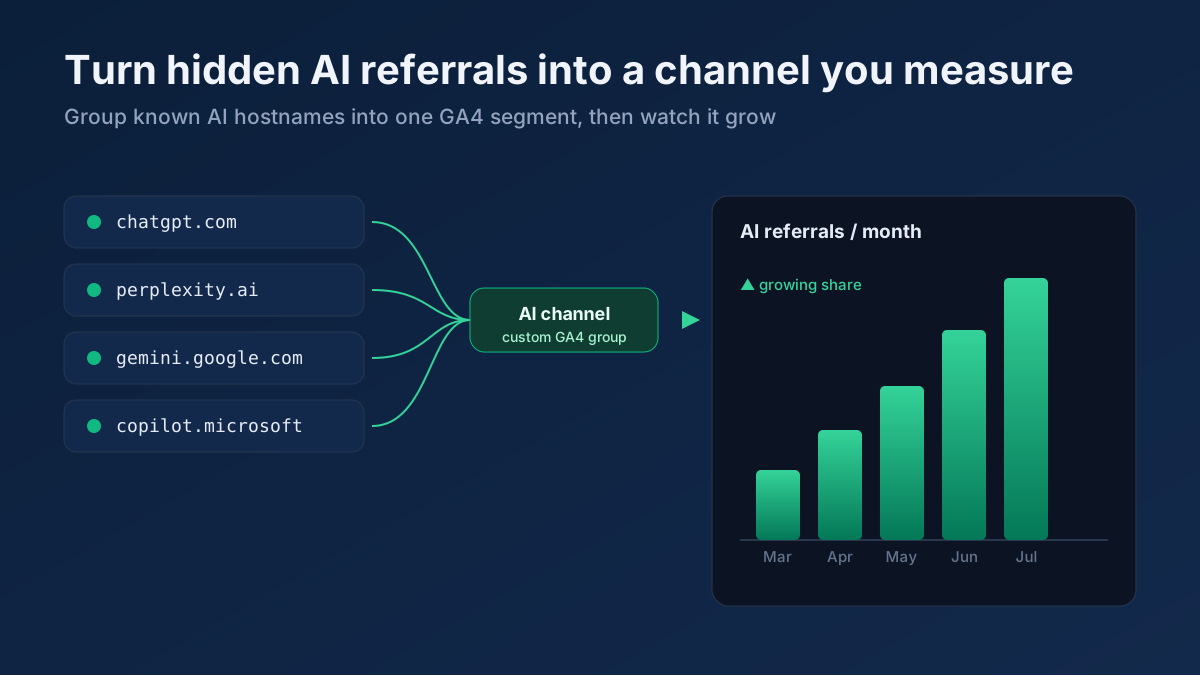
Short answer: AI search traffic is hard to see because it arrives in tiny volumes from dozens of different hostnames, usually with no tracking tags, and then scatters across your Direct and Referral reports where nobody notices it. You cannot fully isolate it — AI Overviews clicks look like ordinary Google organic — but you can capture most of it by building a custom AI channel in GA4 that groups the known referrers (chatgpt.com, perplexity.ai, gemini.google.com, copilot.microsoft.com and friends), reading Search Console impression patterns for the rest, and checking server logs for the crawlers themselves. This guide shows exactly how, and is honest about the large share of AI value that generates no click at all.
Why AI referral traffic is hidden by default
Open Google Analytics 4 today and you will almost certainly under-report your AI visibility. That is not a bug in GA4 — it is a consequence of how AI search actually sends people to your site. Four things conspire to bury the signal.
The volume is small and spread thin. A page that gets ten thousand organic clicks a month from Google might get a few dozen from ChatGPT and a handful from Perplexity. Those numbers are real and growing fast, but on a dashboard sorted by session count they sit far below the fold. If you only ever look at your top ten channels, AI traffic never appears.
There are many hostnames, not one. Google organic collapses neatly into a single source. AI search does the opposite: ChatGPT alone can refer as chatgpt.com or the older chat.openai.com; Microsoft’s assistant shows up as copilot.microsoft.com and sometimes through bing.com; Gemini arrives as gemini.google.com. Each one is a separate line in your Referral report, so even a healthy total looks like noise made of ones and twos.
Most AI links carry no UTM tags. When an assistant cites your page, it links to your plain URL — no utm_source, no campaign parameter, nothing that tells GA4 "this came from an AI answer." GA4 has to fall back on the HTTP referrer, and that only works when the assistant passes one.
Referrers are often stripped, so traffic lands in Direct. Some AI surfaces run inside an app, a native mobile client, or a context that drops the referrer header entirely. When there is no referrer and no tag, GA4 has no choice but to file the session under (direct) / (none) — the same bucket as bookmarks and typed URLs. A meaningful slice of your true AI traffic is sitting in Direct right now, unlabelled and uncounted.
The AI referral hostnames worth watching
Before you can group anything, you need a reference list of what to group. The exact hostnames shift as products rename and relaunch, so treat this as a living list rather than gospel — but as of 2026 these are the referrers that matter most for tracking AI search traffic.
- ChatGPT —
chatgpt.comand the legacychat.openai.com. Both still appear; keep both. - Perplexity —
perplexity.aiand its subdomains such aswww.perplexity.ai. Perplexity is unusually generous with citation clicks, so this is often your biggest AI referrer. - Google Gemini —
gemini.google.com. Note this is distinct from AI Overviews, which do not show up as a separate hostname (more on that below). - Microsoft Copilot —
copilot.microsoft.com, plus AI answers surfaced insidebing.com. Copilot draws on the Bing index, so Bing and Copilot visibility move together. - Claude —
claude.ai. With web search enabled, Claude cites sources and can pass a referrer. - You.com —
you.com, an AI-first search engine that links out to sources. - Others to keep an eye on —
poe.com,phind.com,andisearch.com,komo.ai, and any brand-new assistant your audience adopts. Add them the moment you spot even a single session.
Keep this list in a note you can paste into GA4 filters and regular expressions. Every quarter, scan your full Referral report for unfamiliar AI-looking domains and fold the new ones in. The list will never be complete, and that is fine — the goal is to capture the bulk, not to achieve a perfect census.
Build a custom AI channel group in GA4
GA4 lets you define your own custom channel groups, which re-bucket sessions by rules you write. This is the single most useful thing you can do to make AI traffic visible, because it turns thirty scattered referral lines into one clean channel called something like AI Assistants.
Here is the setup, step by step.
- Open Admin, then Channel groups. Under the property settings you will find Channel groups (in some accounts it sits under Data display). Click Create new channel group and give it a clear name such as AI + Organic breakdown.
- Add a new channel at the top. Order matters: GA4 evaluates channels top to bottom and assigns each session to the first rule it matches. Put your AI rule above Organic Search and Referral so AI traffic is claimed before those broader buckets grab it.
- Name the channel AI Assistants and set the condition. Use Source matches regex, and paste a pattern that covers your hostname list, for example:
chatgpt|openai|perplexity|gemini.google|copilot|bing.*(chat|copilot)|claude.ai|you.com|poe.com|phind. Keep the pattern broad enough to catch subdomains. - Add a fallback for tagged links. If you ever add your own
utm_sourceto a profile link an assistant might follow, include a second condition matchingSource/mediumfor those tags, joined with OR. - Save and wait. Custom channel groups apply going forward and can reprocess recent data, but give it 24 to 48 hours before you trust the numbers. Then check the Traffic acquisition report and switch the primary dimension to your new channel group.
Once the channel exists, your AI sessions stop hiding. You can trend them over time, compare them to organic, and finally answer "is AI search sending me more people this quarter than last?" with a real chart instead of a guess.
Use Explorations and filters to go deeper
The channel group gives you the headline. Explorations give you the detail. Build a Free-form exploration and drop in Session source as the row dimension, with Sessions, Engaged sessions and Key events (conversions) as values. Then apply a filter where Session source matches regex using the same pattern from your channel setup. Now you have a table of every AI hostname, ranked, with engagement and conversion columns beside it.
A few filters earn their keep:
- Landing page breakdown. Add Landing page as a second dimension to see which of your pages AI assistants actually cite. This is gold: it tells you what content is winning citations so you can make more like it.
- Engagement quality. AI-referred visitors often arrive pre-qualified — the assistant already summarized you and they clicked through for more. Compare their engagement rate and conversion rate against Google organic; in many accounts AI traffic converts better per session, which changes how you value it.
- New vs returning. AI search is frequently a discovery channel. A high share of new users confirms it is bringing you fresh audiences rather than recycling existing ones.
Save the exploration and revisit it monthly. Pair the landing-page insight with a relevance check using the Keyword Rank Checker so you can see whether the pages earning AI citations are also the ones you rank well for in classic search — the overlap is usually revealing.
The honest limitation: AI Overviews look like normal Google organic
This is the part most guides gloss over, so let us be blunt. When someone clicks a link inside a Google AI Overview (or AI Mode), that click is delivered from a Google search results page. The referrer is google.com. In GA4 it registers as google / organic — identical to a click on a regular blue link. There is no separate hostname, no special parameter, no reliable way to say "this specific session came from an AI Overview and not from position four."
That means the custom channel above captures the standalone assistants — ChatGPT, Perplexity, Gemini, Copilot, Claude — but it cannot isolate AI Overviews traffic, which is folded invisibly into your organic numbers. Anyone selling you a tool that claims to perfectly separate AI Overview clicks in GA4 is overpromising. Accept the limitation and work around it with indirect signals rather than pretending it does not exist.
The practical workaround is to watch for the pattern AI Overviews create: impressions that climb while clicks stay flat or fall. If a query gains an AI Overview, Google often answers it inline, so you appear (impression counted) but fewer people click. Spotting that divergence is a Search Console job, which is where we turn next.
How Search Console partially helps
Google Search Console does not have an "AI Overviews" filter — Google has declined to break that traffic out separately, and you should not expect a dedicated report any time soon. But Search Console still gives you the best available read on how AI-driven results are reshaping your Google presence, because it reports impressions and clicks at the query and page level.
Use it three ways:
- Hunt the impressions-up, clicks-down pattern. Compare two date ranges in the Performance report. Queries where impressions rose but CTR dropped are prime suspects for an AI Overview eating the click. You cannot prove it from GSC alone, but the fingerprint is distinctive.
- Track position stability on informational queries. AI answers hit definitional and how-to queries hardest. If your average position holds but clicks erode on exactly those queries, the summary is likely intercepting the visit.
- Confirm you are still eligible. AI Overviews cite pages Google already trusts. If your impressions on a topic are healthy, you are in the running to be cited even when the click never lands.
For a fuller walkthrough of the Performance report and the metrics that matter, see our guide on measuring SEO in Search Console — the same skills apply here, you are just reading the data through an AI lens. And because the relationship between classic rankings and AI visibility is so tangled, it is worth understanding the broader shift covered in GEO versus SEO before you draw conclusions from any single report.
Read your server logs to see the AI crawlers themselves
Referrals tell you when AI sent a human to your site. Server logs tell you when AI itself visited — and that happens far more often. Every time an assistant fetches your page to build an answer, its crawler hits your server and leaves a line in the log, whether or not a citation ever results. Reading those logs is the closest thing to watching AI read your content in real time.
The user agents to grep for include:
- OpenAI —
GPTBot(training and indexing) andOAI-SearchBotandChatGPT-User(live fetches for answers). - Perplexity —
PerplexityBotandPerplexity-User. - Anthropic —
ClaudeBotandClaude-User. - Google —
Google-Extendedgoverns Gemini and AI training access, distinct from the normalGooglebot. - Microsoft —
bingbotfeeds both Bing and Copilot.
Grep your access logs for these agents, count hits per day, and note which URLs they fetch most. Rising crawl frequency on a page is an early leading indicator: AI engines are paying attention to it before any referral traffic shows up. Falling crawl frequency after a redesign can warn you that a change made your content harder to fetch — a signal you would otherwise miss for weeks. Cross-reference the most-crawled pages with your best Organic Research / Top Pages findings to confirm your strongest content is also the content AI bots devour.
Track the citations that generate no click at all
Here is the uncomfortable truth that reframes this entire exercise: the majority of the value AI search delivers produces zero clicks. When ChatGPT recommends your product by name, or Perplexity summarizes your data and moves on, or an AI Overview answers using your facts without linking, the user never reaches your analytics at all. No GA4 session, no log line from that user, nothing. Yet a purchase decision may have just been influenced in your favour.
If you measure only clicks, you will systematically undervalue AI search and starve the very content that is doing the most work. So you have to track mentions and citations directly, outside your own analytics.
Practical, low-cost ways to do this:
- Run recurring prompts. Pick fifteen to twenty questions a customer might ask — "best free SEO audit tool," "how do I check my keyword rankings" — and ask each major assistant monthly. Record whether your brand appears, in what position, and whether the facts are right.
- Log citation frequency. Keep a simple spreadsheet: date, assistant, prompt, cited (yes/no), sentiment. Over a few months a trend line emerges that is far more honest than any single check.
- Watch brand-answer accuracy. Note when an assistant describes you wrongly — outdated pricing, a feature you dropped, a competitor’s claim attributed to you. Each error is a content fix waiting to happen, and correcting the source page is how you fix the answer.
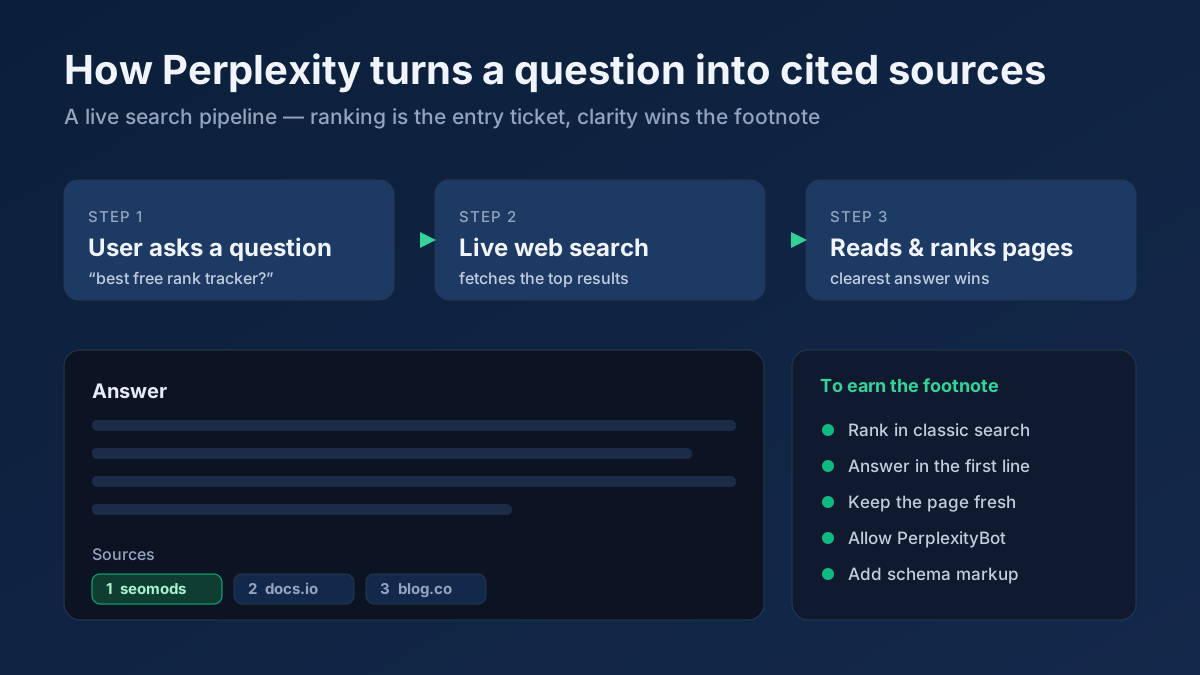
This is qualitative and a little tedious, but it captures the AI value that no dashboard can. Our guides on how to get cited by ChatGPT and how to rank on Perplexity go deeper on earning those citations once you can see whether you have them.
Set up a simple AI visibility dashboard
Pull the threads together into one lightweight dashboard you actually look at. You do not need expensive software — a single Looker Studio page or even a monthly spreadsheet snapshot works. Track these KPIs:
- AI sessions. Sessions from your custom AI Assistants channel, trended month over month. This is your headline growth number.
- AI-assisted conversions. Key events and revenue attributed to AI-channel sessions, plus their share of total conversions. This is what turns AI traffic from a curiosity into a budget line.
- Citation frequency. The percentage of your tracked prompts where your brand appears, per assistant. Even a rough monthly figure shows direction.
- Brand-answer accuracy. How often the assistants describe you correctly. A dropping accuracy score is an early warning that stale content is spreading.
- Crawler activity. AI bot hits per week from your logs, by engine. Rising crawls precede rising citations.
- Organic divergence. The count of queries in Search Console showing impressions-up, clicks-down — your best proxy for AI Overview pressure.
Six numbers, reviewed monthly, give you a defensible picture of AI visibility that no default report provides. Refresh them on the same cadence you review the rest of your SEO so AI never becomes an afterthought.
Connect rankings to AI visibility with free tools
AI citations do not appear from nowhere. Assistants overwhelmingly cite pages that already rank and already carry authority, because their retrieval step leans on the same search indexes you optimize for. So the fastest route to more AI visibility is usually stronger classic SEO on the pages your audience asks about — which means your ranking data and your AI data belong side by side.
Tie them together like this. Start with a On-Page SEO Audit on the pages that already earn AI citations to confirm they are technically fetchable and cleanly structured, because a page an assistant cannot read cannot be cited. Use the Keyword Rank Checker to verify you actually rank for the queries where you want AI mentions — strong rankings and AI citations correlate tightly. Map which of your pages carry the most topical weight with the Organic Research / Top Pages, then prioritise those for citation-friendly formatting. And when a competitor keeps getting cited instead of you, profile their site with the Site Explorer to see the structure and authority that put them in the answer. Rankings and AI visibility are two views of the same underlying authority; measure both and they reinforce each other.
Common mistakes to avoid
- Trusting the default channel report. Out of the box, GA4 files most AI traffic under Referral or Direct. Until you build the custom channel, your AI numbers are simply wrong — usually far too low.
- Claiming to measure AI Overviews precisely. You cannot isolate AI Overview clicks in GA4. State it plainly, use the impressions-up/clicks-down proxy, and do not let a vendor convince you otherwise.
- Ignoring zero-click value. Measuring only sessions undervalues the biggest part of AI search. Track citations and mentions separately or you will defund your best-performing content.
- Forgetting the legacy hostnames. Drop
chat.openai.comfrom your regex and you silently lose a chunk of ChatGPT traffic. Keep old and new names. - Setting it and forgetting it. New assistants launch constantly. A regex written in January is stale by summer. Re-scan your referral report quarterly and add what you find.
- Blocking the crawlers by accident. An overzealous
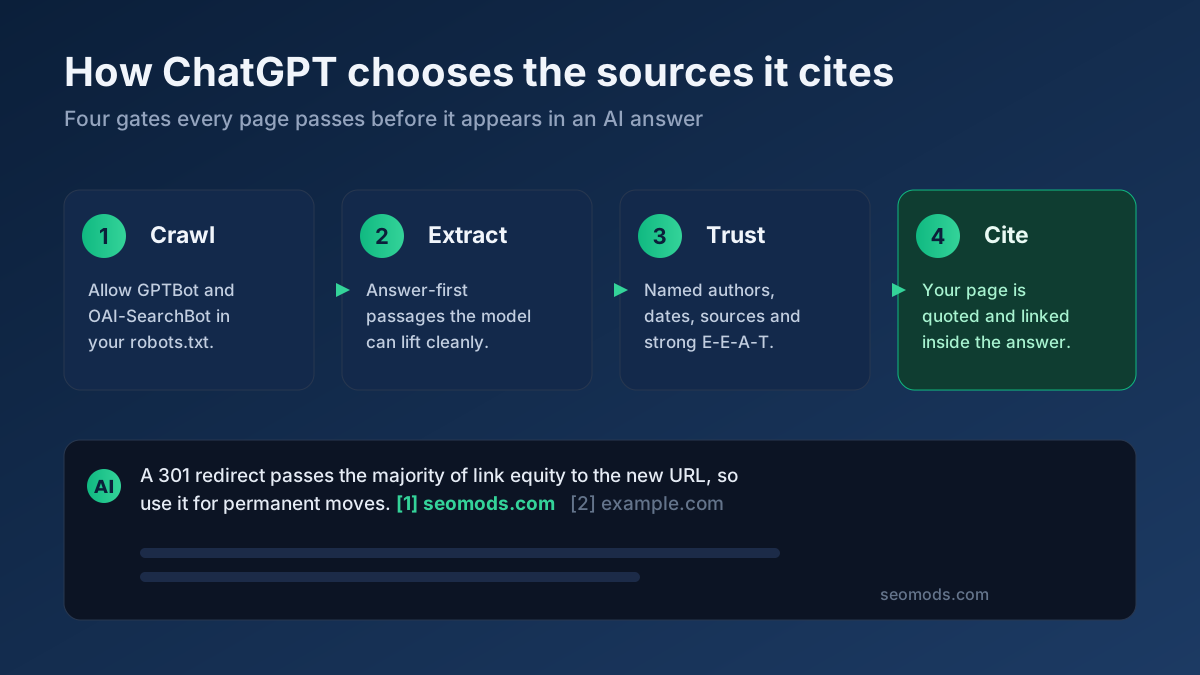
robots.txtor firewall rule that blocksGPTBotorPerplexityBotremoves you from the answer entirely. Confirm in your logs that the bots you want can still fetch.
Applying this to your own site? See the tools picked by audience: SEO Tools for Marketing Agencies and SEO Tools for Freelance SEOs.
Frequently asked questions
Can I see exactly how much traffic comes from ChatGPT in GA4?
Mostly, yes. ChatGPT web citations pass a referrer of chatgpt.com or chat.openai.com, so a custom channel or a filtered exploration on those sources gives you a solid count. The gap is any session where the referrer was stripped — those fall into Direct and cannot be recovered. Treat your measured ChatGPT number as a reliable floor, not a perfect total.
Why does my AI traffic show up under Direct?
Because the link carried no UTM tag and the referrer header was dropped — common with in-app assistants and some mobile clients. With neither a tag nor a referrer, GA4 has nothing to attribute the session to, so it defaults to (direct) / (none). You can reduce this by watching for unusual spikes in Direct that correlate with content an assistant recently started citing, but you cannot fully eliminate it.
Does Search Console show AI Overviews traffic separately?
No. Google folds AI Overview and AI Mode clicks into normal google / organic data and offers no dedicated filter. The best you can do is infer pressure from the pattern of rising impressions paired with falling click-through rate on informational queries. Anyone claiming a precise AI Overviews report in standard Search Console is mistaken.
How do I track AI citations that produce no click?
Manually and repeatedly. Keep a fixed set of customer questions, ask each major assistant on a monthly schedule, and log whether your brand appears, where, and whether the facts are accurate. It is the only way to capture the large share of AI value that never reaches your analytics, and the trend over months matters more than any single result.
Should I add UTM tags to fix AI attribution?
You cannot tag links that an assistant generates on its own — it writes your plain URL. You can tag links you control that AI might follow, such as a profile URL or a directory listing, so those clicks land cleanly. For organic AI citations, the custom channel group and server-log analysis are your real tools, not UTM tagging.
Is AI search traffic worth chasing if the volume is still small?
Yes, for two reasons. First, it is growing quickly and compounding, so the audience you build now expands with it. Second, AI-referred visitors often convert better because the assistant pre-qualified them before they clicked. Add the zero-click brand influence on top, and the true value is considerably larger than the raw session count suggests.