Why Bloggers need this
Blog posts age. A guide that ranked for years slips once its tool list, prices or screenshots stop matching what readers see, and Ahrefs, which has republished around a quarter of its own posts, puts it simply: rankings rarely last forever. The quick fix many bloggers reach for is a new date. Google names that exact habit, changing the date of pages to make them seem fresh when the content has not substantially changed, as a sign of content made for search engines first.
The real work is choosing which posts deserve an update. A blog with a few hundred posts cannot rewrite them all, and the date in your dashboard often says little: WordPress, for one, records a new modified date on every save, typo fixes included, and a republished post carries a new date over old text.
This tool reads one post as a crawler receives it: days since its declared last update, the newest year its text mentions, whether readers see a date and whether the page says "updated". It reads dates and words, never what changed, so a bare date bump fools it too; we tested that. Use it to find candidates.
Bloggers specific guidance
Read the gap between two numbers
The verdict card comes from one figure: days since the declared update. Up to 180 days is Fresh, up to 540 Aging, beyond that Stale. When the post has no dateModified, the tool now falls back to datePublished and the card reads "Since published". On its own that number only tells you when someone last saved the post.
Put it next to the Newest year card and the "Latest year mentioned" line. A post updated last month whose newest year is four years back was probably saved, not revised. A post declared Stale whose text names last year's versions may need less work than the label suggests. The interesting posts are the ones where the two disagree.
Note where the years come from: the article text, including the comments below it. A comment thread from years ago can set the newest year on a post dated recently, and that mismatch is worth a look.
What a real update means for a blog post
Before you change anything, open the post and list what has aged: prices, plan names, plugin or app versions, screenshots of old dashboards, statistics with a year attached, links that now redirect or fail, and advice you no longer follow. Then add what the post lacks today: a step you learned since, a reader question from the comments, a photo or result of your own.
Change the date last, only once the text changed, and change it everywhere at once: the visible "Last updated" line, dateModified in the structured data and any year in the title. If you reread a post and nothing in it has aged, leave the date alone. An evergreen recipe or essay is not broken because the tool calls it Stale.
The test that shows what the score cannot see
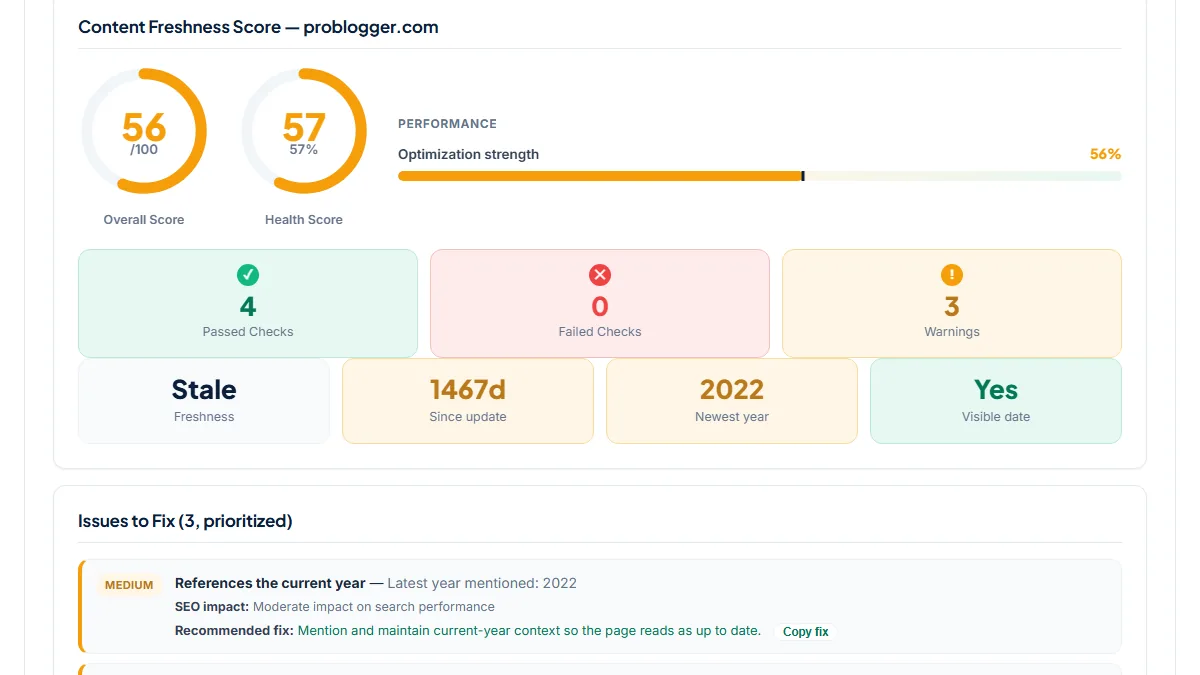
We ran the tool's own code on a saved copy of a real "how to start a blog" guide last updated in November 2022. As published it scored 56, Stale, 1,467 days. Changing only the timestamp in its meta tags and structured data moved it to 69 and Fresh. Replacing the four "2022" strings as well, the "Last Updated" line among them, gave 100 with no issues. Not one sentence of advice changed.
So treat a high score after an update as a check that your dates are consistent, not as proof the update was worth anything. The proof is in the text.
What this tool does not tell you
- It reads dates, years and the word "updated", never the text itself, so it cannot tell a real revision from a date bump, and it does not find outdated prices, tools or dead links.
- One URL per run: no crawl of the blog, no sitemap lastmod, no HTTP Last-Modified header, no traffic or ranking history.
- The verdict ignores the topic. An evergreen recipe and a yearly tool roundup turn Stale at the same 540 days.
- Years in comments and historical years in the text count as "mentioned", which can push the Newest year card up or down.
Real examples
1. A start-a-blog guide last revised in 2022
- Situation
- A blogging-advice site's main beginner guide, the kind of post whose hosting offers and tool picks change every year. We checked it on 8 November 2026.
- Input
https://problogger.com/how-to-start-a-blog/- Reading the result
- Score 56, verdict Stale, 1,467 days since the dateModified of 1 November 2022. Newest year in the text: 2022, so "References the current year" and "No stale year references" are both warnings. Visible date, dateModified, datePublished and the "updated" wording all pass, because the post says "Last Updated November 2, 2022". This is the clearest kind of candidate: the dates are honest, and a four-year-old guide to hosting and themes is likely to name offers that have changed. Here the job is a rewrite of the steps, not a new date.
2. Dated June 2024, with a comment thread from 2008
- Situation
- A list of ways to open a blog post, on the same site. Same day.
- Input
https://problogger.com/11-ways-to-open-a-post-and-get-reader-engagement/- Reading the result
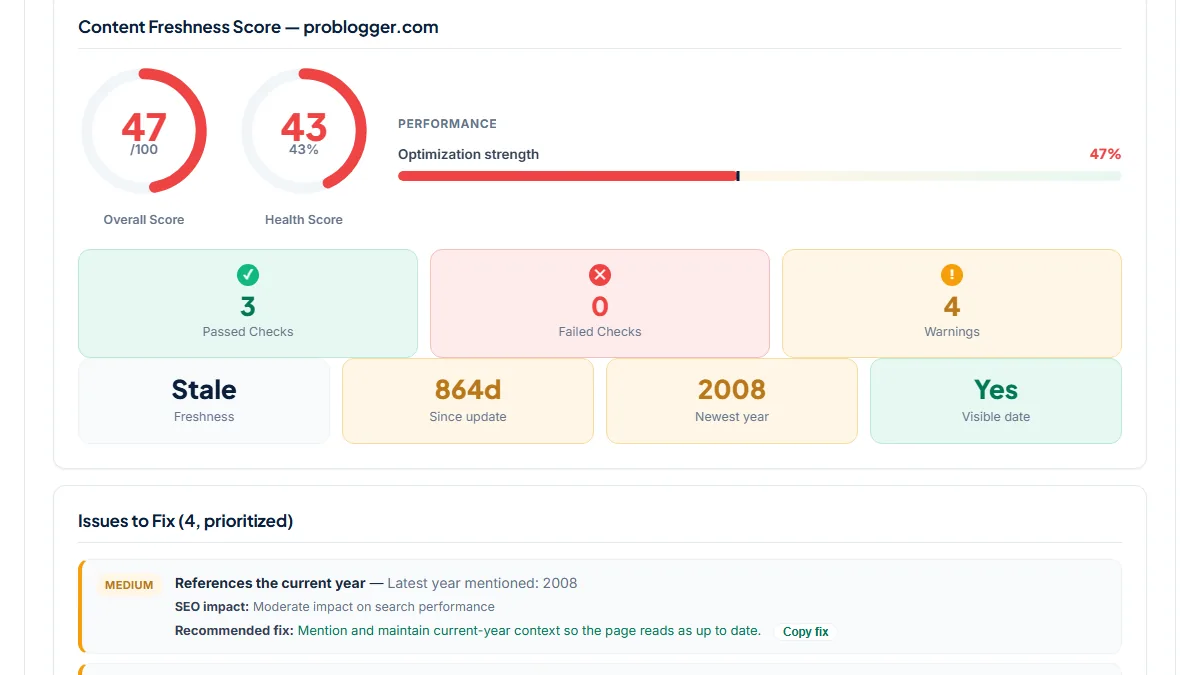
- Score 47, Stale, 864 days: datePublished and dateModified are both 27 June 2024, two minutes apart, and the byline shows "27th of June 2024". Yet the Newest year card says 2008. The text of the post itself names no year; every year the tool found sits in the comments, dated 23 to 27 August 2008. The dates say two years, the comments say eighteen. Read the post before deciding: if the advice holds up, add a current example and leave it; if it refers to tools and habits of 2008, it needs more than its 2024 date.
3. A two-week-old recipe that still collects warnings
- Situation
- A recipe published on a long-running food blog in October 2026. Same day.
- Input
https://smittenkitchen.com/2026/10/skillet-pierogi-with-mushrooms/- Reading the result
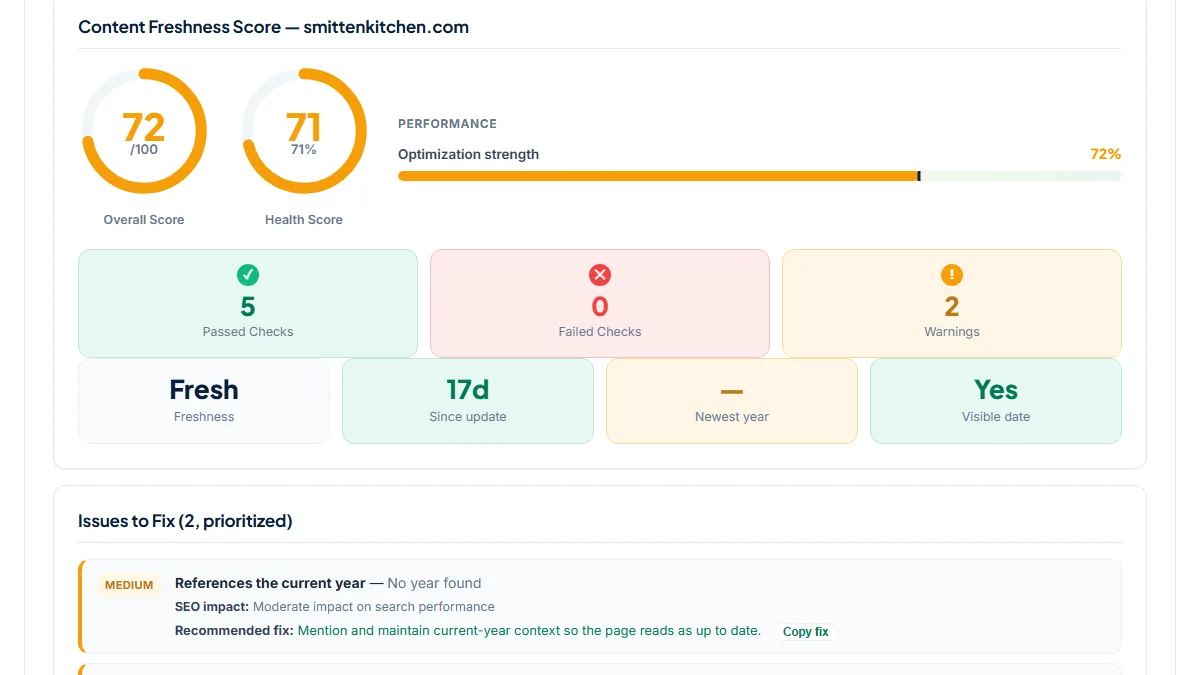
- Score 72, verdict Fresh, 17 days since dateModified. The two warnings are "References the current year" (No year found) and the missing "updated" wording. Both are expected on a new recipe: nothing in it has aged, and writing "2026" into a pierogi recipe to clear a warning would be the kind of signal-polishing this page argues against. Fresh posts belong at the bottom of your update list, whatever their score.
Common mistakes
- Changing the date and calling it an update. The score rises, as our test showed, but the post is no more useful than before.
- Updating posts in order of lowest score. A Stale evergreen essay can be fine; a guide with prices from four years ago cannot. Rank by what has aged in the text and by traffic the post has lost.
- Writing the current year into a post just to clear "References the current year". Add a year where it carries information, such as a price or a version that applies now.
- Updating the visible "Last updated" line but not dateModified, or the other way round. Change both, and any year in the title, when the content really changed.
Frequently asked questions
If I only change the date, will the score go up?
Yes, and that is why the score cannot be the goal. Every check reads dates, years and the word "updated"; none compares the text with an earlier version. In our test a 2022 guide went from 56 and Stale to 100 and Fresh by replacing its timestamp and four "2022" strings. Google lists changing the date of pages to make them seem fresh without substantial changes as a warning sign. Use the score to find old posts, then judge them by their text.
Why does a post I updated last week still show warnings?
Two checks look at the text, not the date. "References the current year" passes only when this year or last year appears in the article, and "Updated" wording wants words like updated or last updated. A new recipe or essay often has neither, and that is fine. If the update was real, a visible "Last updated" line next to the date is worth adding for readers. A year belongs only where it carries information.
Where does the "days since update" number come from?
From the post itself: the article:modified_time meta tag, or the first dateModified in the page's structured data. When neither exists, it uses datePublished and the card reads "Since published". It does not read your sitemap or server headers. SEO plugins usually fill these fields from the post's own dates, and WordPress records a new modified date on every save, so a recent date can mean a typo fix or a template change rather than a revision.
Should I update a post the tool calls Stale?
Only if something in it has aged. Stale means more than 540 days since the declared update, for any topic. Open the post and look for prices, versions, screenshots, statistics with a year, links that fail and advice you no longer give. If you find them, rewrite those parts, add something new, then change the date. If an older essay or recipe still reads true, leave it; a new date would only tell readers something that is not so.
Reference: Google's self-assessment for helpful, people-first content asks whether you are changing the date of pages to make them seem fresh when the content has not substantially changed, the habit this page helps you avoid: find the posts that look old here, then change what they say before you change when they say it.