Short answer: To get traffic from Google Discover, make sure your pages are indexed and follow Discover’s content policies, then publish original, timely articles on topics your readers already follow. Add a large, high-quality image (at least 1,200 px wide) with max-image-preview:large enabled, write honest headlines without clickbait, and track results in the Discover report in Search Console.
Discover is the strangest traffic source in SEO. Nobody types a query, there are no keywords to target, and yet a single article can send more visitors in a day than the rest of your site sends in a month. Then the spike ends, and the line goes flat again. Many site owners see it once, never understand why it happened, and never see it again. This guide explains how the Discover feed actually decides what to show, which of your pages are eligible, and the nine-step process we use to make that traffic more repeatable. It is written for publishers, bloggers and in-house SEOs who already rank in classic search and want a second channel that does not depend on rankings alone.
What Google Discover is and how it differs from search
Discover is a personalized feed of content that Google surfaces without a search query. On mobile it sits below the search box in the Google app and on the new tab page in Chrome, and each card shows an image, a headline and the publisher’s name. According to Google Search Central’s documentation on Discover, the feed is built from a person’s interests and activity, and there is no way to guarantee that a specific page will appear in it.
That one sentence changes how you work. In search, you start with a query and ask which page deserves to answer it. In Discover, you start with a person and ask what they would like to read next. Your job is to be the best available result for an interest, not for a keyword.
Discover versus Google Search
The two channels reward different habits. This comparison shows where the work diverges:
| Google Search | Google Discover | |
|---|---|---|
| Trigger | A typed or spoken query | A person’s interests and recent activity |
| Keywords | Central: you target them | Not used: topics and entities matter |
| Image | Helpful | Decisive: the card is mostly the picture |
| Traffic pattern | Steady, grows with rankings | Spiky: a burst, then a drop |
| Freshness | Depends on the query | Usually favours recent or newly updated content |
| Control | Rankings can be tracked | No ranking, no guarantee, no fixed position |
Because the traffic is uneven, treat Discover as a bonus channel layered on top of a sound search foundation, not as a replacement for it. Sites that rely on Discover alone tend to feel every algorithm change as a cliff.
Why Discover traffic comes and goes
A card is shown to people whose interests match the topic, measured by how they responded to similar content. If enough of them tap it, the card is shown more widely. If few do, it fades within a day or two. That feedback loop explains the shape of most Discover graphs: a sharp peak shortly after publishing, a long thin tail and then nothing. It also explains why two articles on your site, published the same week, can perform ten times differently. The difference is rarely technical. It is usually the headline, the image and how interesting the subject is to the audience Google is testing it on.
Are you eligible for Google Discover?
There is no application, no tag to add and no special markup that switches Discover on. Google states that a page is eligible when it is indexed and meets Discover’s content policies. Beyond that, whether it appears is up to the feed’s systems. Before spending time on optimization, confirm the basics.
The Discover content policies
The Discover content policies exclude pages that are dangerous, deceptive, harassing, hateful, sexually explicit, violent or that facilitate illegal activity, along with content that is misleading about its own purpose. They also single out clickbait: headlines or images that promise something the page does not deliver, or that withhold the key detail to force a tap. Google can also limit Discover visibility for pages that rely on scraped or mass-produced material with little original value. If your site has ever received a policy notice, start there.
Check indexing before anything else
An unindexed page cannot appear in any Google feed. Run the URL through the URL Inspection tool in Search Console and make sure it says the page is on Google. If it does not, our guide on why a website is not showing up on Google walks through the usual causes, and fixing “Crawled – currently not indexed” covers the most common one for new articles.
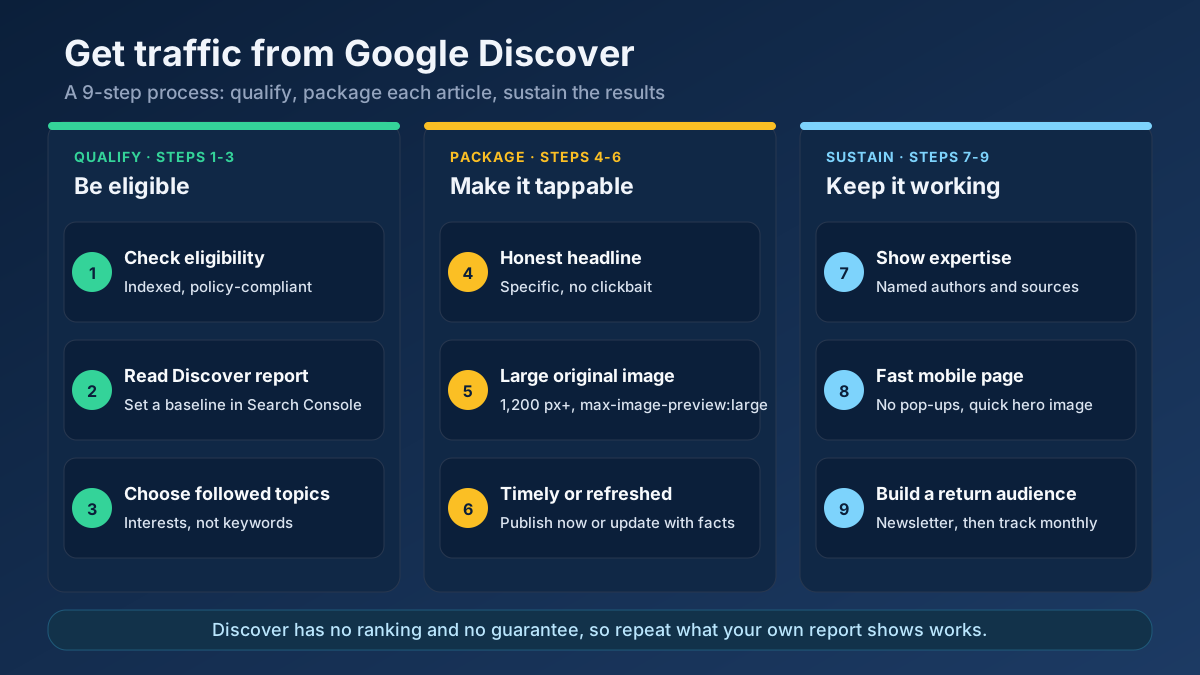
The 9-step process to get traffic from Google Discover
The steps are grouped into three stages. Steps 1 to 3 decide whether you have a realistic chance. Steps 4 to 6 make each article attractive in the feed. Steps 7 to 9 keep it working month after month. Skipping the first stage is the most common reason sites invest in images and headlines and still see nothing.
Step 1: Confirm eligibility and policy compliance
Open Search Console and check three reports: Manual actions, Security issues and the page-level URL Inspection result for your latest articles. Any entry in the first two will suppress your Discover visibility. Then read your last ten articles with the policies in mind. Would any headline fit the definition of clickbait? Does any image suggest something the article does not show? Is any piece mostly rewritten from another publisher?
It also helps to run a quick technical pass. A crawl with our free site audit tool will surface accidental noindex tags, redirect chains and broken templates that can quietly remove articles from the index. Fixing those costs an afternoon and protects every other step.
Step 2: Read your Discover report to set a baseline
When a site has received enough Discover impressions, a Discover report appears in Search Console under Performance. If you do not see it, your site has not yet crossed the threshold, and you can skip ahead to the packaging steps. If you do see it, it is the most valuable page in this whole process, because it shows which of your articles Google already considers worth showing.
Set the range to the last 16 months and sort by clicks. Then ask four questions:
- Which five articles got the most impressions? What topic, format and image do they share?
- What is the click-through rate? High impressions with a low rate point to a weak headline or image. A high rate on small impressions is a signal to publish more on that subject.
- How long did each spike last? Most are over in two or three days. A long tail usually means the content stayed relevant.
- Which content type appears? The report separates articles from videos, which matters if you publish both.
Save a screenshot or export the data. In three months you will want to compare against it. Our overview of measuring SEO with Search Console covers the other reports you will use alongside this one.
Step 3: Choose topics people follow, not keywords
Keyword research still helps you understand a subject, but it will not tell you what Discover will show. The feed responds to interests: broad themes such as personal finance, home cooking, football, photography or web development, and the entities inside them, such as a team, a camera brand or a software framework. Content that sits clearly inside a theme your audience follows has a far better chance than a narrow query-shaped page.
A practical way to find those themes is to work backwards from your own data. Look at the Discover and Search reports together and list the entities that recur in your best pages. Then check which related questions readers might want answered next. Our topic research tool is useful here for finding subtopics and angles, and the entity extractor shows which named entities your existing articles already emphasise.
The topics that tend to do well share a few traits:
- They connect to something people care about emotionally or practically, not just informationally.
- They offer a fresh angle: a new data point, a case study, a clear opinion backed by evidence.
- They fit a theme your site has covered repeatedly, so Google can associate your brand with it.
This is where depth across many articles matters more than one great page. A site that publishes steadily within a theme builds the topical association Discover relies on. For the architecture side, see our guide to topic clusters and pillar pages
Step 4: Write headlines that earn the tap without clickbait
On a Discover card, the headline is your entire pitch. It has two jobs that pull in different directions: it must make a stranger curious, and it must not promise anything the article cannot deliver. Google’s guidance asks for titles that capture the content of the page, and warns against exaggeration or withholding the information a reader needs.
Compare these pairs for the same article about cutting a website’s loading time:
- Weak: Page Speed Tips
- Clickbait: You Won’t Believe What Slowed Down Our Site
- Strong: How We Cut Our Mobile Load Time from 6 Seconds to 2: Four Changes That Mattered
The strong version is specific, contains a result and a number, and names what is inside. It also describes the article truthfully, which is why it survives a policy review.
Three practical rules help. First, keep the headline under about 70 characters so it does not truncate on a phone. Second, make the HTML <title> and the visible H1 say substantially the same thing, because Google uses signals from both. Third, avoid ALL CAPS, repeated punctuation and emotional bait such as “shocking” or “you need to see this”. Our title tag optimization guide goes deeper on length and wording, and the meta tag analyzer shows exactly what Google sees on your live pages.
Step 5: Use large, original, high-quality images
For Discover, the image is not decoration. It occupies most of the card, and Google’s documentation is explicit about it: use high-quality images at least 1,200 px wide, and allow Google to show them at that size. The setting that controls this is the max-image-preview:large robots directive, either as a meta tag on the page or through an X-Robots-Tag header. Without it, Google may show only a small thumbnail or exclude the page from the large-card format entirely.
Check this on three levels:
- Directive. Confirm the page does not carry a stricter robots value such as
max-image-preview:none, which an SEO plugin or a theme setting can add without you noticing. - Size. The image referenced by the page, ideally the featured image and the Open Graph image, should be at least 1,200 px wide. Smaller images work, but they get a smaller card, and small cards are tapped less.
- Quality. Avoid the site logo as the main image. Avoid stock photos that every other publisher uses. An original photograph, a screenshot with a clear point, or a custom illustration is more distinctive and more likely to be chosen.
Make sure the picture reflects the article. A dramatic image that has nothing to do with the text is the visual version of clickbait. Our image SEO guide covers file formats, compression and alt text, and the Open Graph checker shows which image social platforms and crawlers pick up from a URL.
Step 6: Publish timely content and keep older articles fresh
Discover favours content that is relevant now. For news and trends, that means publishing quickly after the event. For evergreen topics, it means updating an article when something has genuinely changed and making that visible. Google’s documentation encourages timely content that is fresh, and it is common to see older evergreen pages reappear in the feed after a substantive refresh.
That does not mean you should chase every news cycle. A site that suddenly publishes on celebrity news after years of covering accounting software will confuse both readers and Google. Pick the moments that fit your theme:
- Seasonal peaks your audience always cares about: tax deadlines, product launches, sports seasons.
- Industry changes that affect your readers, written with your own analysis rather than a rewrite of the announcement.
- Refreshes of your best evergreen pages with new data, new screenshots and a clear note on what changed.
The refresh route is the cheapest. Use the content freshness score to find pages that are ageing, then follow the process in our content refresh guide Changing only the date is not a refresh, and Google can tell the difference.
Step 7: Show real expertise and named authorship
Discover is a recommendation engine, and recommendation engines are cautious about who they promote. Pages that show who wrote them, why that person is qualified and where the facts come from are easier to trust. This follows the same experience, expertise, authoritativeness and trust ideas covered in our E-E-A-T guide, but in Discover it is worth being deliberate.
- Put a real author name and short bio on every article, linked to a profile page that lists their experience.
- Include first-hand material: your own test results, screenshots, photos, quotes from people you spoke with.
- Cite primary sources and link to them, so readers can check the claim.
- Show an About page, a contact route and an editorial policy, particularly if the site covers health, money or news.
The author page audit and the E-E-A-T analyzer check these signals page by page, so you can see which articles carry them and which do not.
Step 8: Fix mobile page experience
Discover is a mobile-first surface. Almost every tap lands on a phone, often on a mobile connection, so a slow or cluttered page loses the reader before the first paragraph. Google does not publish a separate Discover speed threshold, but visitors from a feed are impatient, and a high bounce rate is exactly the kind of feedback that stops a card from spreading.
Focus on the things a reader notices at once:
- Loading. The large hero image is also your Largest Contentful Paint element, so compress it and serve it responsively. Our Core Web Vitals guide explains the targets, and the page speed tool measures them.
- Layout. No pop-up covering the article on arrival, no ad that pushes text down after it loads.
- Readability. Short paragraphs, descriptive subheadings and a font size that works without zooming. Check it with the mobile-friendly test
If the first screen after tapping looks nothing like the card, you lose the reader. Put the promised headline and image at the top, with the substance close behind.
Step 9: Build a returning audience and track what works
Discover gives more weight to publishers readers come back to. Google has added ways for people to follow sources they like in the feed, and a visitor who already knows your brand is more likely to tap your card when it appears. You cannot force this, but you can encourage it.
- Offer a newsletter and a clear reason to subscribe, so a one-off visitor becomes a returning one.
- Link related articles within each post, so a Discover visitor reads a second page rather than leaving.
- Keep a consistent publishing rhythm within your theme, so there is always something new to recommend.
- Use a recognizable site name and logo, since the publisher name appears on every card.
Then close the loop. Each month, return to the Discover report and note which articles appeared, what they had in common and what you changed before they did. Annotate your analytics with publication dates. Over a quarter this reveals your own formula, which is far more reliable than any general advice, including ours.
A realistic example: one article, start to finish
To make the process concrete, imagine a small site about home photography that has been publishing for two years and has never appeared in Discover. This is an illustrative scenario, not a case study with measured results, but each step reflects what the process looks like in practice.
- Eligibility. The owner checks Search Console, finds no manual actions and sees that all recent posts are indexed. A theme setting is adding
max-image-preview:standardto every page, which they remove. - Topic. Their best pages in Search all concern low-light photography. They choose a theme they already own and plan an article built on their own test shots from three cameras.
- Headline. They reject “Best Cameras for Low Light” as generic and choose “We Shot the Same Dark Room with Three Cameras: What the Sensor Size Actually Changes”.
- Image. A 1,600 px wide original photograph from the test, not a manufacturer promotional shot, compressed to a sensible size.
- Trust. A named author with a short bio, a table of the camera settings used and links to the manufacturer specifications.
- Follow-up. A newsletter prompt and two links to related guides at the end of the article.
None of this guarantees a feature, and the owner should be prepared for nothing to happen the first time. What it does is remove every reason Google might have to skip the page, and it gives the feed something worth testing.
How to read your Discover report: three common patterns
The Discover report rarely tells you what to do directly, but its shape does. Most sites fall into one of three patterns, and each calls for a different response.
Pattern 1: a single huge spike, then nothing
One article took off and the rest of the site stayed invisible. This usually means the topic, headline and image happened to match a strong interest, but your site has no wider association with that theme. Do not copy the headline. Instead, ask what the article offered that your other pages do not: original data, a distinctive photograph, a personal story. Then write two or three related pieces within the same theme over the next month and see whether the feed responds.
Pattern 2: many impressions, very few clicks
Google is willing to show your cards, but readers are not tapping them. The cause is nearly always packaging. Compare the headline and image of your best-clicked articles with those that were ignored. Look for generic stock images, flat headlines and titles that read like search queries. Rewrite five headlines, replace the images and watch whether the click-through rate moves.
Pattern 3: steady small traffic from many pages
This is the healthiest pattern and the least dramatic. It suggests Google has associated your site with a theme and shows it regularly to a small, loyal audience. Protect it by keeping a steady publishing rhythm, refreshing older pages and avoiding experiments far outside the theme.
A 30-day Discover plan you can start this week
Ideas are easy and routines are hard, so here is a simple month to work through. It assumes one person and a normal publishing schedule.
- Week 1: audit. Check manual actions, indexing and the robots directive on your last 20 articles. Fix any image or noindex problem. Export the Discover report if you have one.
- Week 2: refresh. Pick your three best evergreen articles. Add new data, a new original image at least 1,200 px wide and a visible “updated” note that says what changed.
- Week 3: publish. Write one new article tied to a timely moment in your theme. Spend as long on the headline and the image as on the first draft.
- Week 4: review. Open the report, note which of your changes coincided with impressions and write down what you will repeat. Add two internal links from older posts to the new one.
Repeat the cycle for three months before judging the result. One month is rarely enough to separate your effort from natural fluctuation.
Why Discover traffic drops, and what to do about it
Almost every site that gets Discover traffic eventually sees it fall. Before assuming something is broken, work through the usual explanations in order.
Normal fluctuation
Discover traffic varies naturally. A month with no features after a month with many is not necessarily a problem. Compare quarters, not weeks, and look at impressions as well as clicks.
A core update or a policy change
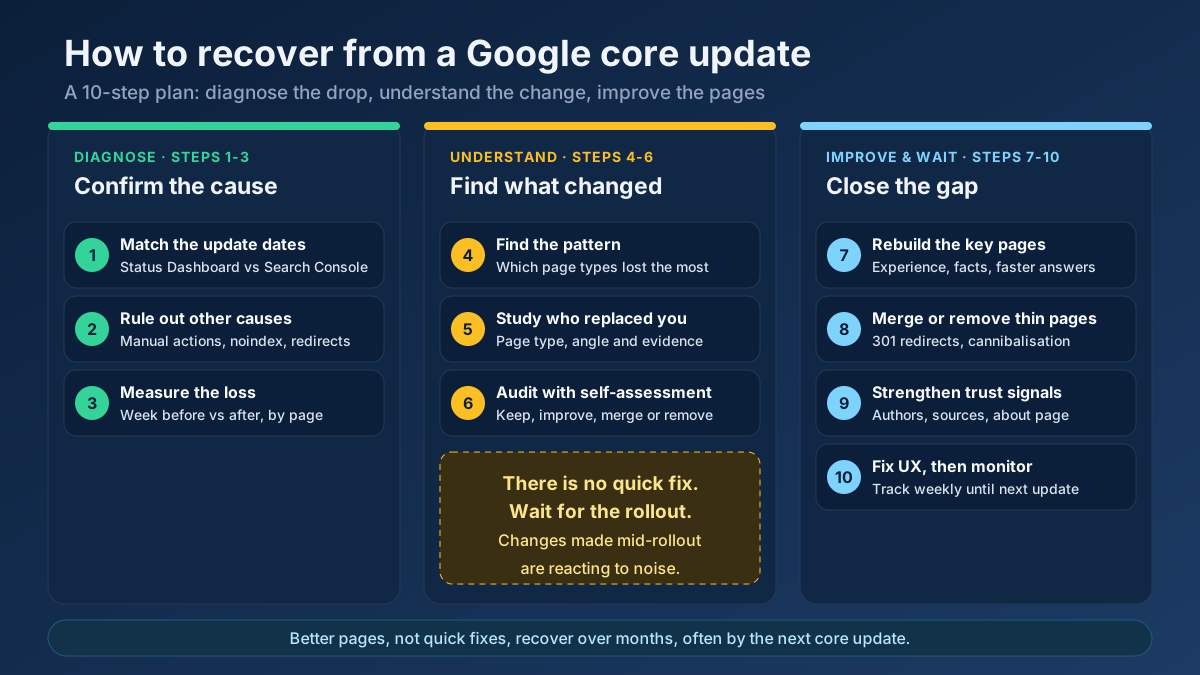
Broad ranking updates can change what the feed favours. If your Discover traffic and Search traffic both change on the same date as a core update, the cause is probably shared. Our guide to recovering from a Google core update explains the diagnosis, and why website traffic drops covers how to separate the possible causes.
Something you changed
A theme update that reset the robots directive, a new image optimization plugin that shrank every image below 1,200 px, a redesign that put a pop-up on mobile: any of these can cut Discover visibility without touching search rankings. Check the changes you made in the weeks before the drop.
Weaker content or weaker fit
If you have drifted away from the theme that earned your first features, or you have published several mediocre articles in a row, the feed has less reason to promote you. This is fixed the same way it appeared: with better, more focused content.
Discover, Google News and Top Stories: what is the difference?
These three surfaces are often confused, and the confusion leads to wasted effort. Top Stories is a block inside search results that appears for newsworthy queries, so it still starts from a query. Google News is a separate product that organizes current stories by topic and source. Discover sits apart from both: it is a feed built around a person, shown with no query at all, and it carries evergreen guides and blog posts as well as news.
The practical consequence is that you do not need to be a news publisher to appear in Discover. A cooking blog, a software review site or a personal finance publication can all be featured, provided the content is original and the packaging is strong. If you do publish news, keep those articles clearly dated and sourced, and keep your evergreen guides updated, so both types give the feed a reason to show you.
Common Discover mistakes to avoid
- Chasing every trend. Writing outside your theme rarely works and dilutes the topical signal you have built.
- Clickbait headlines. They may win a few extra taps, but they put the whole site at risk of reduced visibility.
- Tiny or generic images. A small thumbnail or a logo gives the feed nothing to display.
- Treating Discover as a keyword channel. Stuffing exact-match phrases into a headline does not help and reads poorly.
- Rewriting other publishers’ news. Without original value, there is no reason to show your version.
- Ignoring the baseline. Without the report data you cannot tell which change helped.
- Relying on one article. One spike is luck. Several features in a theme is a pattern.
Google Discover optimization checklist
Use this as a pre-publish and monthly review list:
- The page is indexed and returns a 200 status.
- No manual action or security issue in Search Console.
- The headline is truthful, specific and under about 70 characters.
- The
<title>and H1 say the same thing. - A large original image, at least 1,200 px wide, is attached and relevant.
max-image-preview:largeis allowed and no stricter value is set.- A named author, bio and sources are visible.
- The mobile page loads fast and shows no intrusive pop-up on arrival.
- Related articles are linked from the page.
- The Discover report is reviewed monthly and the findings are written down.
Frequently asked questions
How do I get my website on Google Discover?
Make sure your pages are indexed and comply with the Discover content policies, then publish original, helpful articles with large images and honest headlines. There is no sign-up or special tag, and Google does not guarantee that any page will appear, so consistency across a theme is your best lever.
Is there a Google Discover submission form or tag?
No. Discover has no submission process and no required markup. Eligibility depends on being indexed and meeting the content policies. The only directive that matters in practice is max-image-preview:large, which lets Google show your image at a large size.
What image size does Google Discover need?
Google recommends high-quality images at least 1,200 px wide, shown with the max-image-preview:large setting or through AMP. Use an original image that matches the article, and avoid using the site logo as the main picture.
Why is my Discover traffic so unpredictable?
Because the feed has no rankings. Cards are tested on people whose interests match, and the response decides how widely they spread. That produces sharp peaks and quiet periods. Review quarterly trends, not daily numbers.
Why did my Discover traffic suddenly stop?
Check for a manual action, a core update, a recent theme or plugin change that altered images or robots directives, and a drift away from your core topics. Natural fluctuation is also common, so compare several months before drawing conclusions.
Do I need a Discover report in Search Console to qualify?
No. The report only appears after your site has received enough Discover impressions. Not seeing it means you have not yet had meaningful exposure, not that you are ineligible.
Can a new website appear in Google Discover?
It can, if the content is indexed, original and compliant. In practice, new sites with no established topic or audience find it harder, so focus first on building a consistent theme and a small base of readers.
Applying this to your own site? See the tools picked by audience: SEO Tools for News Publishers and SEO Tools for WordPress Site Owners.
Google Discover rewards focus, honesty and good images
To get traffic from Google Discover, you cannot target a keyword or buy a placement. You can only be an easy choice: indexed, policy-compliant, focused on a theme readers follow, packaged with a truthful headline and a large original image, and trusted enough to be recommended again. Do those things consistently, read your Discover report to learn what your audience taps and repeat it.
Start with the cheapest checks today. Run your latest articles through the meta tag analyzer to confirm the title and image settings, audit the whole site with the free site audit tool and then choose one evergreen article to refresh using the content refresh guide. Then wait, measure and learn from the next spike.