
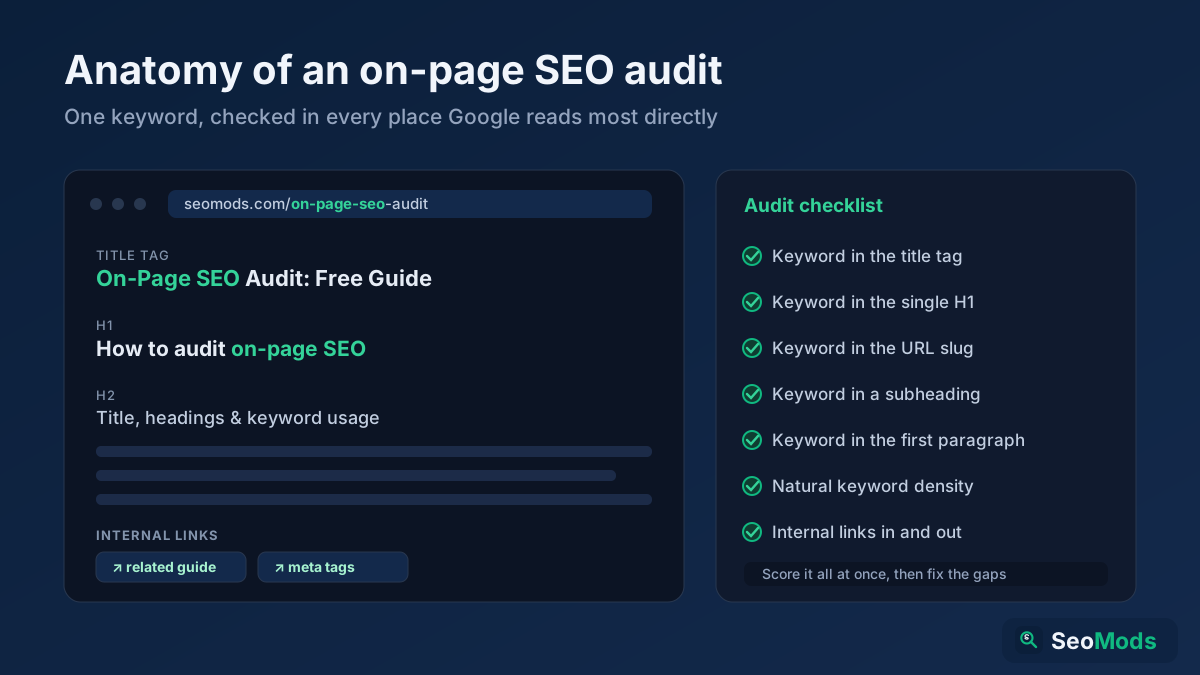
An on-page SEO audit answers one focused question: how well is this page optimized for the keyword it is supposed to rank for? Unlike a full site audit that crawls hundreds of URLs, an on-page audit zooms in on a single page and checks the handful of signals Google reads most directly — the title, the H1, the URL, the headings, the body content and the internal links. Get those right and a page that was stuck on page two often has everything it needs to climb. This guide walks through a complete, repeatable on-page audit you can run on any URL for free.
Quick answer: To audit a page's on-page SEO, first pick the one keyword it should target, then check that keyword appears in the right places: the title tag, the H1, the URL slug, at least one subheading, the opening paragraph and naturally through the body. Score all of this at once with On-Page SEO Checker (Keyword) then verify the individual pieces — grade the meta tags with Meta Tag Analyzer check the heading structure with Heading Structure Analyzer and confirm the keyword is used at a natural rate with Keyword Density Checker Fix the gaps it surfaces and preview the result with Google SERP Snippet Preview
What an on-page SEO audit covers (and what it doesn't)
On-page SEO is everything on the page itself that you fully control: the content, the HTML tags that describe it, and the way it is structured. That is distinct from technical SEO (crawlability, speed, indexing) and off-page SEO (backlinks and reputation). An on-page audit deliberately ignores those and focuses on relevance — whether the page clearly, unambiguously answers the query it targets. It is the highest-leverage audit for most pages because it is the part you can fix today, without a developer and without earning a single link.
Every on-page audit starts with one decision: the single primary keyword this page should win. A page that tries to rank for five unrelated terms usually ranks for none. Pick the one term that best matches the page's purpose, and audit everything against that choice. For the strategy behind that decision, our on-page SEO guide covers how to choose and structure a page's target keyword.
Run the whole-page score first
Before you inspect individual elements, get a single read on the whole page. Enter the URL and your target keyword into On-Page SEO Checker (Keyword) and it scores how well the page is optimized for that term — checking placement in the title, H1, URL, headings and body, plus keyword density and more, in one pass. This gives you a prioritized punch list: instead of guessing what to fix, you see exactly which signals are missing the keyword and which are already fine. Everything that follows in this guide is about verifying and fixing the specific items that score reports.
Audit the title tag and meta description
The title tag is the single most important on-page element. It tells Google what the page is about and it is usually the clickable headline in the search result. Your audit should confirm the title contains the target keyword — ideally near the front — reads naturally, and fits within roughly 60 characters so it isn't truncated. The meta description doesn't directly affect rankings, but a compelling one lifts click-through, which matters. Extract and grade both, along with canonical, robots and Open Graph tags, using Meta Tag Analyzer Then rewrite weak ones following our guides to title tag optimization and writing meta descriptions
Check the heading structure (H1–H6)
Headings give a page its outline, and search engines use that outline to understand structure and hierarchy. A clean audit confirms three things: there is exactly one H1 that includes the target keyword, subheadings (H2, H3) break the content into logical sections, and the levels are nested in order rather than skipping around. Run the page through Heading Structure Analyzer to see the full heading tree at a glance and catch problems like a missing H1, multiple H1s or a jump from H2 to H4. Well-structured headings also make a page far more likely to earn featured snippets because they map cleanly to the questions people ask.
Verify keyword usage in the content
The body is where you prove the page deserves to rank. Your audit should confirm the target keyword appears in the opening paragraph, is used naturally throughout, and is supported by related terms and synonyms rather than repeated mechanically. The old fear was "keyword stuffing"; the modern risk is the opposite — a page so vague it never clearly states what it is about. Use Keyword Density Checker to see how often your term and its variations appear, and aim for a rate that reads naturally to a human. If the keyword barely appears, the page isn't clearly on-topic; if it appears in every sentence, it reads as spam. Balance is the goal.
Review the URL and internal links
Two structural signals round out the on-page picture. First, the URL: a short, readable slug that includes the target keyword beats a string of numbers or parameters, both for users and for search engines. Our guide to URL structure best practices covers what a clean slug looks like. Second, internal links: a well-audited page links out to related pages with descriptive anchor text and, crucially, receives links from other relevant pages on your site. Internal links pass authority and context, and a strong internal linking strategy is one of the most underused on-page levers there is.
Preview how the page appears in search
Once you've fixed the elements, see the result the way a searcher will. Google SERP Snippet Preview renders your title and meta description as they'd appear on a Google results page, so you can catch truncation, verify the keyword is visible, and make sure the snippet actually invites a click. This is the final check that turns a technically-optimized page into one that also earns the click when it ranks.
Step-by-step: audit any page
Combine the checks into a routine you can run on any URL in a few minutes:
- Pick one target keyword. Decide the single term this page should rank for; every other check is measured against it.
- Score the whole page. Run the URL and keyword through On-Page SEO Checker (Keyword) to get a prioritized list of what is optimized and what isn't.
- Grade the meta tags. Check the title, description, canonical and robots tags with Meta Tag Analyzer and rewrite anything weak.
- Fix the headings. Confirm one keyword-rich H1 and a logical H2/H3 outline with Heading Structure Analyzer
- Balance the content. Use Keyword Density Checker to confirm the keyword and its variations appear naturally — present, but never stuffed.
- Tidy URL and links. Make the slug short and descriptive, then add internal links to and from related pages.
- Preview and ship. Check the search snippet with Google SERP Snippet Preview then publish and note the date so you can measure the lift.
Common on-page audit mistakes
- Targeting too many keywords. A page optimized for one clear term beats a page hedging across five. Pick one and commit.
- Keyword stuffing. Repeating the term unnaturally reads as spam and can hurt. Aim for a rate a human wouldn't notice.
- Ignoring the title tag. It is the highest-impact on-page element; a vague or keyword-less title wastes the page's best asset.
- Broken heading hierarchy. Multiple H1s or skipped levels confuse the outline search engines rely on.
- Auditing once and forgetting. Content drifts as pages are edited. Re-audit important pages periodically, especially after a rewrite.
- Stopping at optimization. A perfectly optimized page still needs a snippet that earns the click — preview it before you call it done.
Frequently asked questions
What is an on-page SEO audit?
It is a page-by-page check of how well a single page is optimized for the keyword it targets — covering the title, H1, URL, headings, body content and internal links. It focuses on relevance signals you fully control, separate from technical and off-page SEO.
How do I audit on-page SEO for free?
Pick the page's target keyword, then score it with On-Page SEO Checker (Keyword) and verify the pieces with Meta Tag Analyzer Heading Structure Analyzer and Keyword Density Checker All of these are free and need no signup.
How is an on-page audit different from a full site audit?
A full site audit crawls many pages to find technical and structural issues across the whole domain. An on-page audit zooms into a single page's relevance signals. For the site-wide version, see our guide to doing a free SEO audit
How often should I audit a page?
Audit important pages when you publish them, again after any significant rewrite, and periodically (every few months) for pages that matter to your traffic. Content drifts as it is edited, so a page that scored well a year ago may have gaps today.
Conclusion
An on-page SEO audit is the fastest, most controllable improvement you can make to a page. Pick one target keyword, score the page with On-Page SEO Checker (Keyword) then verify each signal — meta tags with Meta Tag Analyzer headings with Heading Structure Analyzer and content balance with Keyword Density Checker Fix the gaps, tidy the URL and internal links, preview the snippet with Google SERP Snippet Preview and you've done the single highest-leverage thing most pages need to rank — for free, and in a matter of minutes.