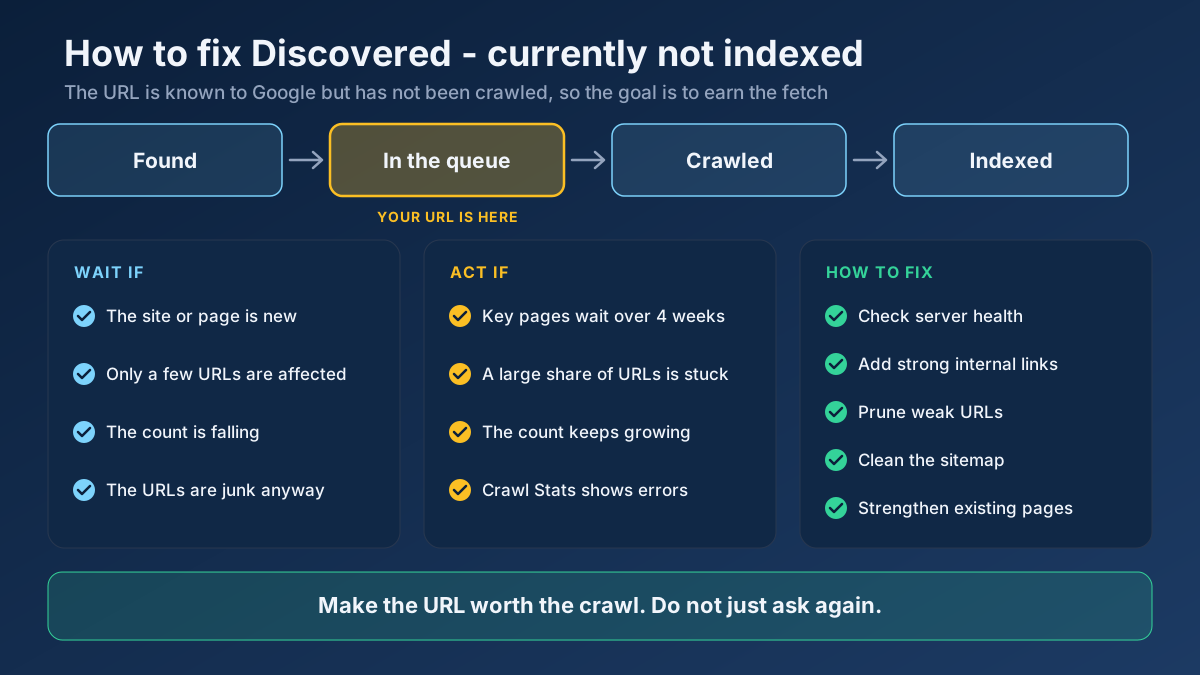
Short answer: To fix Discovered - currently not indexed, first confirm the URL deserves to be indexed. Then check server health, link to the page from strong internal pages, remove low-value URLs and clean your sitemap. On small or new sites, this status often clears without help, so measure for a few weeks before changing much.
This status is frustrating because it tells you so little. There is no error message, no failed test and no last crawl date to investigate. Google simply knows your page exists and has not fetched it. Plenty of advice online tells you to press Request Indexing and hope, yet the status usually reflects something a button cannot change: how much of your site Google wants to crawl, and how much it believes your server can take. This guide explains what the status really means, how to decide whether it needs work at all, and the ten steps that address its causes, in the order we would apply them.
What does Discovered - currently not indexed mean?
Discovered - currently not indexed means Google has found a URL, usually through your sitemap or a link, but has not crawled it yet. Because Googlebot has never opened the page, Google has not judged its content. That single fact shapes every sensible fix.
Google’s Page indexing report documentation describes it in two short sentences: the page was found but not crawled yet, and typically Google wanted to crawl the URL but expected that doing so would overload the site. This is also why the report shows no last crawl date for these URLs.
That official wording is worth reading closely, because it points at server capacity. In practice, a small site on healthy hosting is rarely at risk of being overloaded by a few dozen requests. Google’s crawl budget guide gives the other half of the picture: crawl demand varies with a site’s size, update frequency, page quality and relevance compared with other sites. Our reading is that small sites are more often limited by demand than by capacity. That is an interpretation rather than a statement from Google, so the steps below test both.
Where to find the status in Search Console
Open Google Search Console, go to Indexing, then Pages, and scroll to the table called Why pages aren’t indexed. Click the Discovered - currently not indexed row to see example URLs and a trend chart. The list is capped at 1,000 examples, so a very large site should use a filtered sitemap to look at one section at a time.
To check a single page, paste its address into the URL Inspection box at the top of Search Console. The result shows the page status, how Google found the URL and which sitemaps refer to it. If you want the wider picture of how Search Console reports work, read our guide to measuring SEO with Search Console.
How it differs from similar statuses
Several statuses sound alike but call for very different work. Read the table before you change anything, because the wrong diagnosis wastes weeks.
| Status | What Google has done | Where to focus |
|---|---|---|
| URL is unknown to Google | Has no record of the URL | Discovery: sitemap and internal links |
| Discovered - currently not indexed | Knows the URL, has not fetched it | Crawl priority and server capacity |
| Crawled - currently not indexed | Fetched and read the page, then left it out | Page quality and uniqueness |
| Blocked by robots.txt | Was told not to crawl it | Your robots.txt rules |
| Excluded by noindex | Crawled it and obeyed a noindex rule | The meta robots tag or HTTP header |
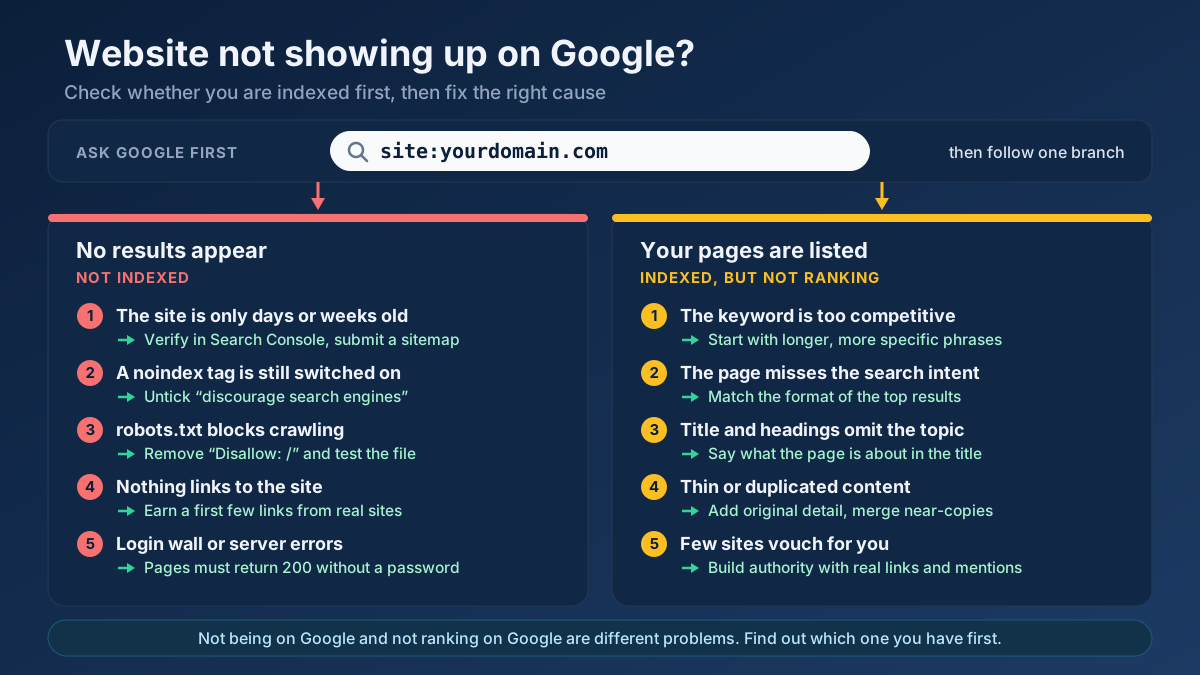
If your pages show the third row, follow our separate guide on how to fix Crawled - currently not indexed. If the page is missing from Google for a reason you have not identified yet, start with why a website does not show up on Google.
Do you actually need to fix it?
Not always. Seeing URLs in this row is normal, and on some sites treating it as an emergency causes more harm than the status itself. Google’s recrawl documentation notes that crawling can take anywhere from a few days to a few weeks. A page published on Tuesday and listed as discovered on Friday is not stuck. It is in a queue.
The time limits below are our working rules of thumb, not Google thresholds. Adjust them to how often you publish and how often Google usually visits you.
| What you see | What it usually means | What to do |
|---|---|---|
| New site, pages under four weeks old | Google is still sizing up the site | Add internal links, keep publishing and wait |
| A few pages, with the total falling | The queue is moving | Nothing, except a monthly check |
| Junk URLs: filters, tags, parameters | Google is right to skip them | Stop generating or linking them |
| Key pages stuck for more than four weeks | Priority or discovery problem | Work through the steps below |
| A large share of all URLs, still growing | You are publishing faster than Google will crawl | Slow down and prune before adding more |
What we saw on our own site
We have recent experience with this status. Between late October and 1 November 2026 we published 36 new landing page URLs on SeoMods, in English and Turkish, and then checked each one through the URL Inspection API. On 1 November, 18 were Discovered - currently not indexed, 17 were URL is unknown to Google, and only one was indexed. The sitemap containing them had been read by Google with no errors or warnings.
Three things from that small sample are useful to you, and one caveat is important.
- A clean sitemap guarantees nothing. The sitemap did its job of announcing the URLs, yet most of them still waited. Submitting one is necessary housekeeping, not a fix.
- Similar pages can get very different treatment. One page was indexed within a day, while pages built on the same template and published days later had not been crawled at all. A single fast result proves little.
- Volume needs a reason. We chose not to raise our daily publishing rate until the number of indexed pages moves. Adding URLs to a queue that is not shrinking only lengthens it.
The caveat: these pages were days or at most about ten days old when we measured them, so this is a snapshot of a queue and not a finished case study. We have not yet proven which fix moves them. We apply the steps below ourselves and treat every lever as a test, and we suggest you do the same.
Why Google leaves pages in this status
The causes fall into two families: Google cannot comfortably crawl more of the site, or it sees little reason to. Most sites have a mix, and the checks in the next section separate them.
The server looks fragile
Google’s crawl capacity limit rises when a site responds quickly and falls when it slows down or returns server errors. Shared hosting that buckles under load, a firewall that rate-limits Googlebot, or a burst of 5xx responses can all shrink the amount of crawling Google will attempt.
The site has too many URLs for its authority
A site with few external links and thousands of pages asks for more crawling than it has earned. This is common after a bulk import, a large programmatic launch or an AI content push. Google’s guide says perceived inventory is the crawl demand factor you control most, because it can otherwise spend time on URLs you do not care about. Our guide to crawl budget covers this concept in more depth.
The page is poorly linked
Google states that links help it find new pages to crawl, and that every page you care about should have a link from at least one other page on your site. A URL that appears only in a sitemap sends a weak message. If nothing on your own site points to a page, why should Google rush to fetch it? We cover this pattern in our article on orphan pages.
Low-value URLs are crowding the queue
Faceted filters, internal search results, session parameters, tag archives and calendar pages can create far more addresses than real pages. If you run a shop, read our guidance on faceted navigation because filter combinations are the classic source of this problem.
The rest of the site sets low expectations
Google has not read the waiting page, but it has read the rest of your site. Page quality is one of the factors its documentation names for crawl demand. Our inference is that if the pages Google has already crawled are thin, duplicated or rarely useful, it has less reason to prioritise the next similar URL. That is why a large block of near-identical pages often stalls together.
How to fix Discovered - currently not indexed in 10 steps
Work from the top. The early steps are quick and eliminate false alarms, and the later ones take longer but tend to matter more on larger sites.
Step 1: Export the list and sort it by value
Export the example URLs from the Page indexing report into a spreadsheet and add a column called Keep. Mark each URL as one of three things: a page that should rank, a page that is fine to leave out, or a URL that should not exist. This small job often changes the whole project, because a site with 3,000 affected URLs may turn out to have only 200 that matter.
Step 2: Rule out blocks and broken responses
Test a sample of important URLs with the Robots.txt Tester and the Redirect & HTTP Status Checker. You want a direct 200 response and no rule blocking the path. A sitemap that lists redirected or dead URLs wastes the attention you are trying to earn, and our guide to 301 and 302 redirects explains which redirects to keep.
Step 3: Check your server through Google’s eyes
Open the Crawl Stats report under Settings in Search Console. Look at total requests, average response time, the breakdown of response codes and host status. Most responses should be successful, and host status should show no recent problems with robots.txt fetching, DNS or server connectivity. Google says sites under about a thousand pages usually do not need this report, but it is still a quick way to clear the server as a suspect. Then run key templates through the Page Speed & Size Test and note the server response time. Our page speed guide covers the improvements when it is slow.
Also ask your host whether a firewall or bot-protection rule limits crawlers. This is easy to miss, because normal visitors never see the problem.
Step 4: Link to the page from your strongest pages
This is usually the most useful single step on a small site. Find pages that Google already crawls often, such as your homepage, main categories and your best-performing articles, then add a descriptive link from a relevant one. Links must be plain anchor elements with an href, because Google says most other link formats will not be parsed. Avoid hiding them behind a click-to-load script.
The Internal Link Opportunity Finder surfaces related pages that do not link to each other yet. Our internal linking strategy explains how to choose anchors and avoid overdoing it. Ten good links to your most valuable waiting pages are worth more than a footer that links to everything.
Step 5: Shrink the URLs Google can reach
Now use the Keep column. For URLs that should not exist, remove the page and its internal links, and let it return 404 or 410. For filter and parameter URLs that must remain for users, block crawling in robots.txt when they have no search value. Note that noindex is not a shortcut here, because Google has to crawl a page before it can see the tag. Our comparison of noindex, nofollow and disallow shows which tool fits which job, and our robots.txt guide has the syntax.
Step 6: Clean the sitemap until you trust it
A sitemap should list only canonical, indexable, 200-status pages you want found. Run yours through the Sitemap Finder & Validator to confirm its format and URL count. Add a truthful lastmod date, since Google uses it when it is consistently and verifiably accurate. Never set every date to today. On larger sites, split sitemaps by section so that Search Console shows which section is stalling. Our XML sitemaps guide walks through the setup.
Step 7: Fix soft 404s and duplicates
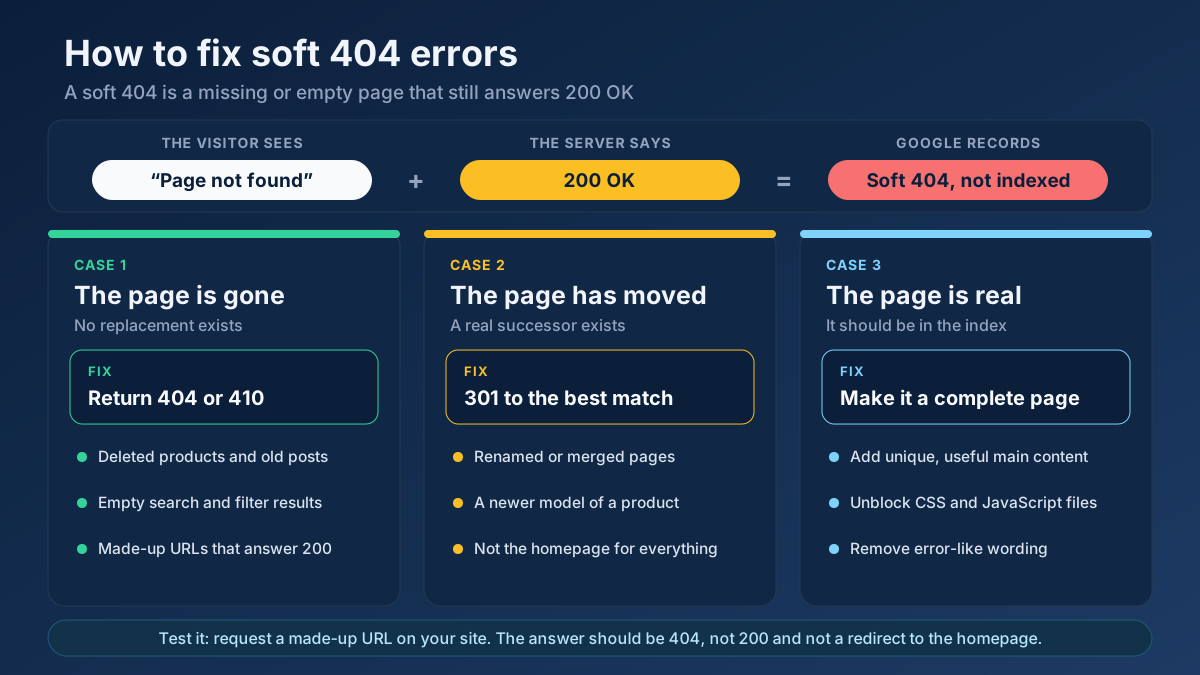
Google’s crawl budget guide warns that soft 404 pages will continue to be crawled and waste budget. Find them in the same report and follow our guide on how to fix soft 404 errors. Consolidate near-identical pages with redirects or canonical tags, using our guide to duplicate content issues as a reference. A Technical Site Audit crawl surfaces many of these problems across a group of pages at once.
Step 8: Raise the quality of what Google has already seen
If the same template or section keeps stalling, review the indexed examples from that section instead of the waiting pages. Are they useful on their own, or would a reader lose nothing if they vanished? Use the Thin Content Checker to find weak pages, then improve, merge or remove them. A content audit gives you a method for making those decisions across the whole site.
Add something that competitors cannot copy easily: original data, a real example, a photo you took yourself or a clear answer that comes from doing the work. Our notes on E-E-A-T describe what that looks like in practice.
Step 9: Request indexing for a short list only
Now that the page is worth fetching, use URL Inspection on your top priorities and click Request Indexing. Keep the list short. Google says there is a quota for individual URL submissions, and that requesting a recrawl several times for the same URL will not get it crawled any faster. One request per page after a real improvement is enough.
Step 10: Slow down and measure
If you publish in bulk, pause or reduce your release rate until the backlog shrinks. Release new sections in small groups and link them well from day one. Then record the numbers described in the measurement section below every week. Most of the work here pays off slowly, so without a log you will not know which change helped.
A worked example: a shop with 1,400 stuck URLs
This example is illustrative, built from patterns that are common on small shops. It is not a client result. Imagine a home goods store with 600 products and 1,400 URLs in the Discovered - currently not indexed row.
- Sort the list. The export shows that 1,050 URLs are colour and size filters, 250 are paginated and tag archives, and 100 are real products added in the past two months.
- Check the server. Crawl Stats shows steady 200 responses and no host problems, so capacity is unlikely to be the main cause.
- Stop the leak. Filter links move behind a form control that does not create crawlable links, and a robots.txt rule blocks the filter parameter. The tag archives are removed from the sitemap and from the sidebar.
- Promote the real pages. Each category page gets a New arrivals block with plain links to its new products, and the best-selling products link to related items.
- Improve the products. Copied manufacturer text is replaced with real descriptions, starting with the 30 products that sell best.
- Request a few. Those 30 products are submitted once through URL Inspection.
A realistic goal for this shop is not to bring the row to zero. Blocked filter URLs can take a long time to leave the report, and that is harmless. The success measure is simple: how many of the 100 real products are indexed after four to eight weeks? Our ecommerce product page guide covers what makes those pages worth indexing in the first place.
What does not work
A lot of the popular advice on this status costs time and changes nothing. These are the moves we would skip.
- Pressing Request Indexing every day. Google says repeat requests do not speed anything up.
- Resubmitting the same sitemap. Google already reads sitemaps regularly. Resubmitting an unchanged file gives it no new reason to crawl.
- Misusing the Indexing API. Google says it can only be used for job posting and livestream pages. Sending ordinary articles through it breaks the intended use and is not a dependable fix.
- Buying indexing services or spammy backlinks. Links from low-quality networks do not make a weak site more trustworthy, and they can add a new problem. Read our guide to toxic backlinks if you have already been down that road.
- Changing dates without changing content. Fake freshness can teach Google to ignore your lastmod values.
- Adding noindex to save crawl budget. Google must still crawl the page to see the tag, so it does not free up crawling in the way a robots.txt block does.
- Clicking Validate Fix over and over. Validation typically takes up to about two weeks and only reports on the process. It cannot jump the queue, and a passed validation does not guarantee that every URL will be indexed.
Priorities by type of website
The same ten steps apply everywhere, but the order of attention changes with the kind of site you run.
| Site type | Likely cause | Start with |
|---|---|---|
| New blog or small business site | Low trust and few links; often just time | Internal links, a few strong pages, patience |
| WordPress site | Tag, author and date archives; plugin-generated URLs | Removing weak archives from the sitemap |
| Online shop | Filters, sorting parameters, copied product text | Blocking filter URLs, then unique descriptions |
| Programmatic or template pages | Too many similar pages released at once | Smaller batches, real differences between pages |
| News or fast-changing site | Server limits, or an archive that outgrows crawling | Crawl Stats, a fresh sitemap, links from the homepage |
On a newer site, building real authority makes everything else easier. Our guide on how to increase website authority and our article on topic clusters show how to give Google stronger reasons to crawl a whole section.
How long does a fix take, and how do you measure it?
Expect weeks rather than days. Google says crawling can take from a few days to a few weeks, and the report itself updates with a delay. Larger clean-ups often take longer, because Google has to revisit the site and adjust. For a broader view of realistic timelines, see how long SEO takes.
Do not judge progress by the total count alone, as it can rise for harmless reasons. Keep a simple weekly log with these columns:
- Priority pages indexed: how many of your Keep pages are indexed, checked with URL Inspection or a filtered sitemap.
- Status movement: whether priority pages have moved from Discovered to indexed, or to Crawled - currently not indexed.
- Crawl requests and response time: the Crawl Stats trend after your server and URL clean-up.
- Impressions on affected pages: the first signal that an indexed page has started to earn visibility.
A move from Discovered to Crawled - currently not indexed is real progress, even though it can feel like a setback. It means Google has finally read the page, so the work shifts from crawl priority to page quality.
Frequently asked questions
Is Discovered - currently not indexed an error?
No. It is a status, not a technical error. It means Google knows about the URL and has not crawled it yet. It becomes a problem only when pages you care about stay there for a long time, or when a large share of the site does.
How long can a page stay discovered but not indexed?
There is no published limit. Google says crawling can take a few days to a few weeks, and some URLs wait much longer or are never crawled. If an important page has waited for more than about four weeks, it is reasonable to start working on it.
What is the difference between discovered and crawled currently not indexed?
Discovered means Google has not fetched the page yet, so you work on crawl priority, internal links and server capacity. Crawled means Google has read the page and left it out, so you work on quality, uniqueness and overall usefulness.
Why is Request Indexing not working for my page?
Requesting indexing asks Google to consider a URL. It does not guarantee a crawl or a place in the index, and repeat requests do not speed it up. If the page stays in the queue, improve its internal links and the wider site before you try once more.
Does having a sitemap fix this status?
No. A sitemap helps Google discover URLs, and that discovery is often how pages reached this status. It tells Google that a page exists, but not that the page is worth crawling soon. Internal links and overall site quality do more of that work.
Can a small website have this problem?
Yes, although classic crawl budget limits mostly affect large sites. On small and new sites, the usual explanation is low crawl demand: few links, little history and pages Google has no urgent reason to fetch. Time and internal links often solve it.
Should I delete pages stuck in this status?
Delete a page only if it has no value for users or search. Pages with real value deserve better links and content instead. If a section holds thousands of weak pages, removing them or merging them can help the pages you keep.
Validation passed but my pages are still not indexed. Why?
A completed validation does not promise indexing for every URL in the group. Google still decides what to crawl and index. Inspect the individual pages for their current status, and keep improving the ones that still matter to your site.
Applying this to your own site? See the tools picked by audience: SEO Tools for E-commerce Managers and SEO Tools for WordPress Site Owners.
Conclusion: earn the crawl, then measure it
Discovered - currently not indexed is a queue, not a verdict. Decide which URLs deserve to be crawled, make sure your server can take the traffic, link to those pages from places Google already visits, and stop producing URLs nobody needs. Then give the changes a few weeks and watch your priority pages instead of the total.
To start today, run the All-in-One SEO Audit on one stuck page to rule out technical blockers, then use the Internal Link Opportunity Finder to add its first strong internal links. Write down today’s number of indexed priority pages and check it again next week.