Short answer: To do SEO for a new website, choose a narrow topic, build a fast and crawlable site with a clear structure, and target low-competition long-tail keywords, one per page. Remove staging blocks at launch, verify Search Console and submit a sitemap. Then publish helpful content in clusters and earn your first links. Expect real traffic in six to twelve months.
A new website starts with nothing Google can lean on: no links, no history, no clicks and no brand searches. That is why the advice written for established sites so often fails on day one. Chasing the same head terms as a ten-year-old competitor, publishing fifty thin posts in a week or buying a link package will not shortcut the process. What does work is less exciting and far more reliable: get the foundations right before launch, make indexing easy in launch week, and spend the first three months building a small body of genuinely useful pages. This guide walks through that plan in twelve steps, in the order we would follow for a brand-new domain.
Why SEO for a new website is different
Search engines rank pages, but they judge them partly through the site around them. An older site has years of signals behind every new page: internal links from pages that already rank, external links pointing at the domain, and a track record of satisfying searchers. A new site has none of that, so each page has to stand more on its own.
People often call this period the Google sandbox. Google has said many times that there is no sandbox filter holding new sites back on purpose. In our experience the delay is real, but it comes from missing evidence rather than a penalty. Google needs time to discover your pages, crawl them, understand what they are about and see how people respond to them. A page with no links and no history simply has less to go on than a competitor’s page with both.
Google’s own SEO Starter Guide makes the same point from another angle: crawling and indexing can take anywhere from several hours to several weeks, and there is no guarantee that a page will be crawled or indexed at all. That does not mean you wait passively. It means the first months are about removing every obstacle you control and giving Google good reasons to keep coming back.
What a new site has, and what it lacks
The table below compares where a new site and an established site should put their effort. Use it to stop yourself copying tactics that only work once a domain has authority.
| Area | New website | Established website |
|---|---|---|
| Keyword targets | Long-tail phrases with weak results pages | Competitive head terms and broad topics |
| Indexing | Main hurdle: discovery and crawl priority | Mostly automatic for new pages |
| Content volume | Fewer, deeper pages in one topic | Can cover many topics at once |
| Links | First relevant links and mentions | Scaling links and protecting the profile |
| Measurement | Indexed pages and impressions | Clicks, conversions and revenue |
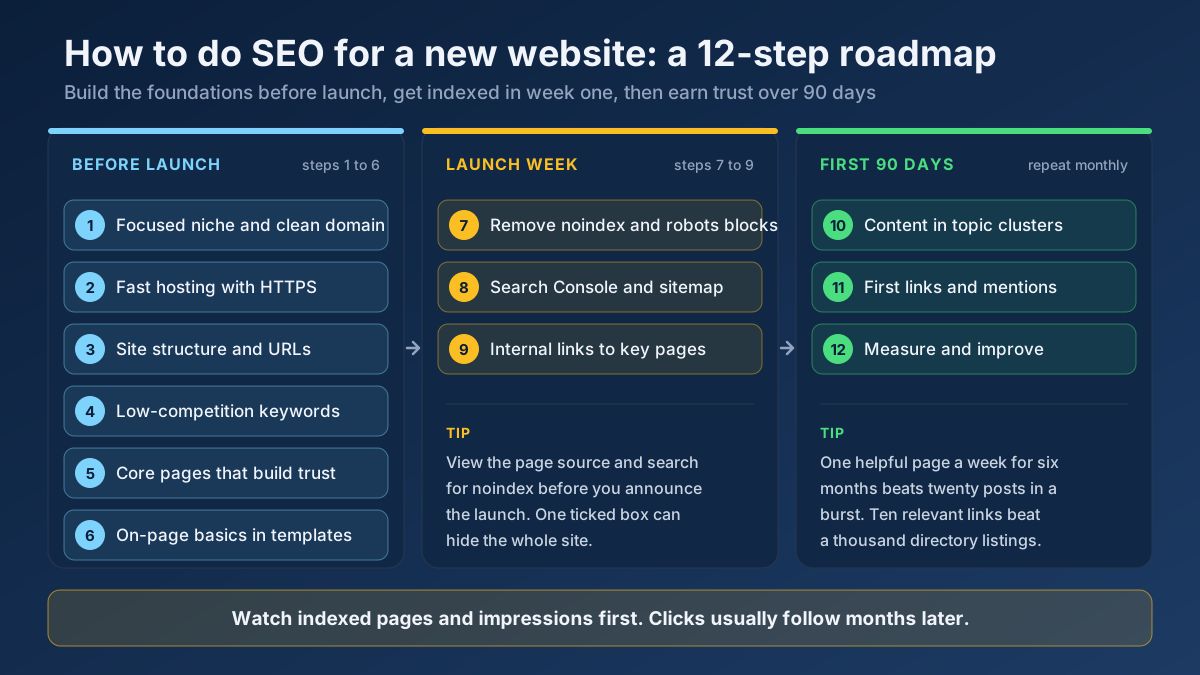
Before launch: build foundations Google can trust
The first six steps happen before the site is public. They are the cheapest time to get things right, because changing a domain, a URL pattern or a platform after launch costs redirects, lost signals and weeks of recrawling.
Step 1: Pick a focused niche and a clean domain
The narrower your topic, the faster you can become the obvious result for it. A site about “home improvement” competes with national retailers and huge magazines. A site about “restoring Victorian sash windows” competes with a handful of tradespeople and forum threads. Start narrow, prove you can rank, then widen the topic one cluster at a time.
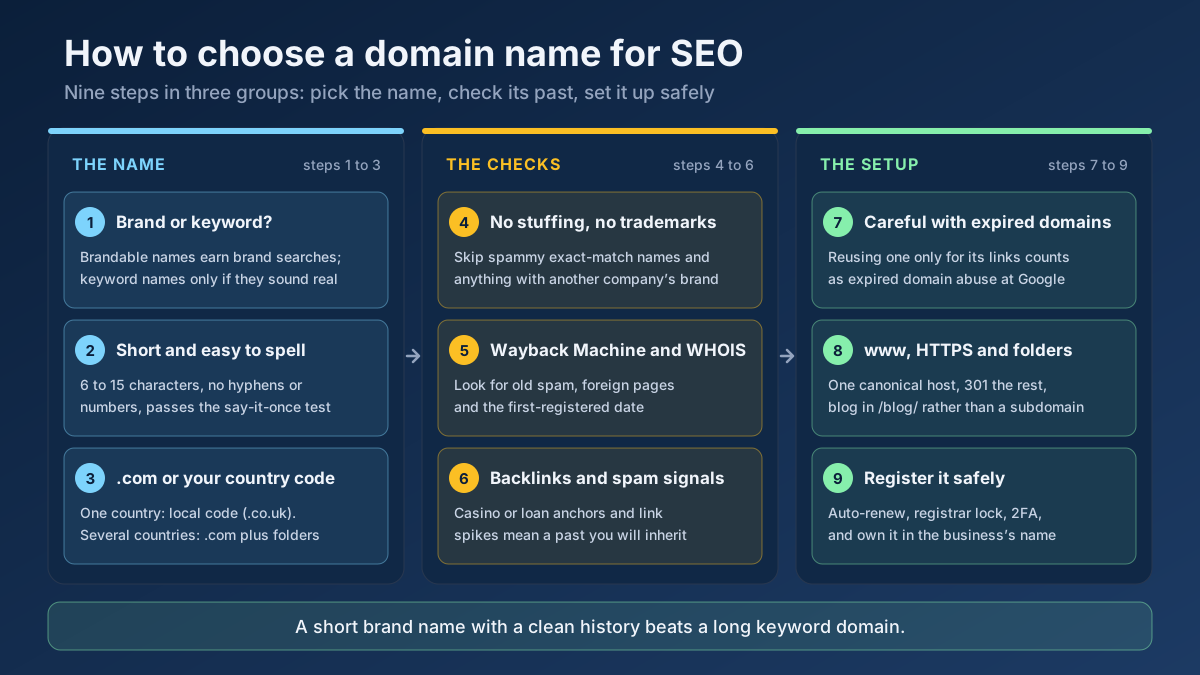
For the domain itself, choose something short, easy to spell and brandable. Exact-match domains such as best-cheap-plumber-leeds.com carry little extra weight today and can look spammy. Before you buy, check the domain’s history. Look it up in the Wayback Machine to see what used to live there, and run it through our WHOIS Lookup to see when it was first registered. A previously used domain with a spam history can carry problems you did not create. Our guide on how to choose a domain name for SEO covers extensions and every pre-purchase check in detail.
Also decide early whether you will use www or not, and stick with it. That choice becomes your canonical hostname, and every other version should redirect to it.
Step 2: Choose a crawlable platform and fast hosting
WordPress, Shopify, Webflow, Wix and most modern builders are all fine for SEO when configured properly. What matters more is what the platform outputs. Your main content should appear in the HTML, not only after heavy JavaScript runs. Each page should have its own URL, editable title and meta description, and a way to set canonical tags and noindex when needed.
Hosting deserves more thought than it usually gets. A cheap shared plan that responds slowly or times out under load does two kinds of damage: users leave, and Googlebot crawls less because it does not want to overload a struggling server. Pick a host with fast server response times, install an SSL certificate from day one and make sure every HTTP address redirects to HTTPS. You can confirm the certificate with the SSL Checker and look at loading speed with the Page Speed Test while the site is still on staging.
Step 3: Plan your site structure and URLs
Sketch the site on paper before you build it. A good structure for a new site is shallow: the home page links to a few category or service pages, and those link to individual articles or products. Any important page should be reachable within three clicks of the home page. Shallow structures help users, and they help Google find new pages quickly through internal links.
Keep URLs short, readable and stable. Use lowercase words separated by hyphens, leave out dates unless the content is news, and avoid parameters for pages you want to rank. For example, /sash-window-repair/ is better than /services/category.php?id=17. Our guide to URL structure best practices covers the edge cases, such as trailing slashes and folder depth.
- Home page: who you are, what you offer and links to the main sections.
- Hub pages: one per core topic or service, each targeting a broader phrase.
- Supporting pages: articles or products that answer specific questions and link back to their hub.
- Trust pages: about, contact, privacy policy and, where relevant, terms and returns.
Step 4: Find keywords a new site can actually win
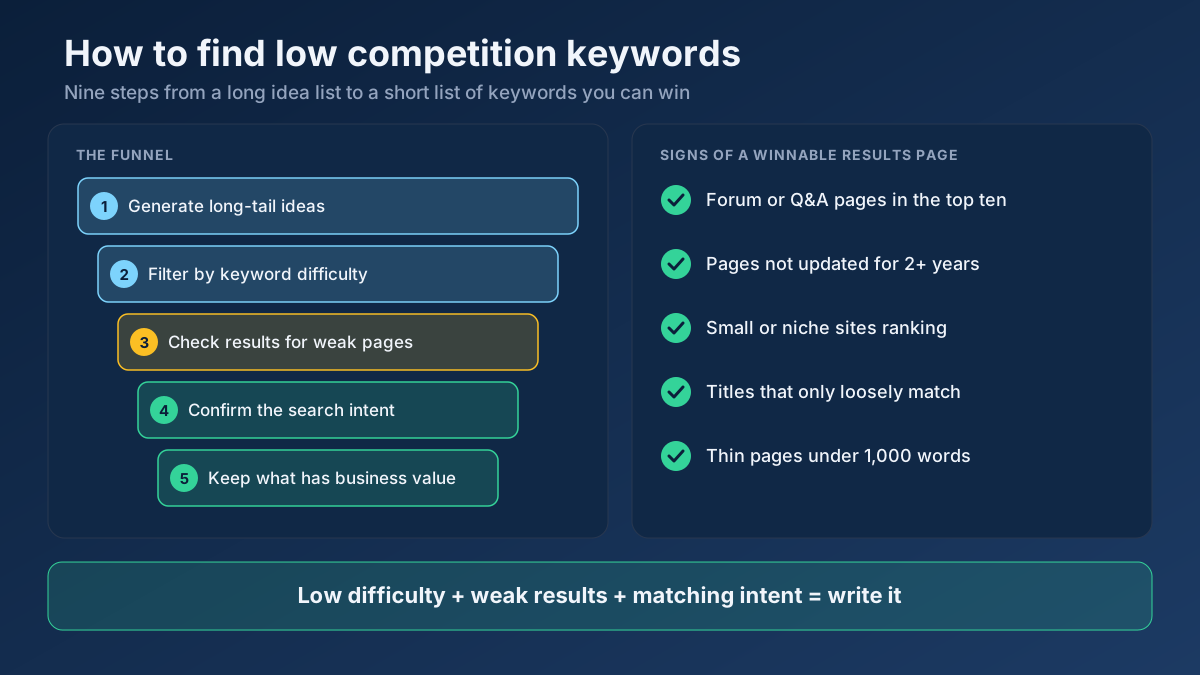
Keyword research for a new website is mostly about saying no. Most popular keywords are out of reach for a year or more, because the pages ranking for them have hundreds of linking domains behind them. Your goal is to find phrases where the current results are weak enough that a well-made page from an unknown site can break in.
Start with the questions your customers really ask. Write down ten to twenty seed topics, then expand them into longer phrases with the Keyword Research tool and the Keyword Suggestion tool. Phrases of four or more words, such as “how to fix a sticking sash window”, usually have lower volume but clearer intent and far less competition.
Then look at the real results page for each candidate. A keyword is promising when the top ten includes forum threads, thin articles, outdated pages or small sites similar to yours. It is a poor target when every result is a major brand with a deep, recently updated guide. Our full method is in the guide on how to find low-competition keywords, and it is worth reading before you plan your first twenty pages.
Finally, map one primary keyword to one page. Two pages chasing the same phrase split your limited signals, which hurts more on a new site than anywhere else. Check the intent behind each phrase with the Search Intent tool so that a guide is not competing for a keyword where Google wants product pages.
Step 5: Build core pages that show experience and trust
Google’s quality guidelines put weight on experience, expertise, authoritativeness and trust, often shortened to E-E-A-T. A new site cannot point to years of reputation, so it has to make trust visible on the page. Write an about page that names the real people behind the site, their background and why they are qualified to help. Add a contact page with a real address or business details where possible. If you write about money, health or legal topics, the bar is higher still.
On every article, show who wrote it, when it was published and when it was last updated. Use your own photos, measurements, results and mistakes. A sentence such as “we tested three draught-proofing strips on the same window over one winter” tells readers and search engines that the page comes from real experience. Our article on E-E-A-T for SEO explains which signals matter most and how to add them without fake credentials.
Step 6: Get on-page basics right on every template
On a new site you can fix on-page basics once, in the templates, instead of page by page later. Check these before launch:
- Title tags: unique, descriptive and roughly 50 to 60 characters, with the main keyword near the start. See title tag optimization.
- Meta descriptions: a clear summary of the page in about 150 to 160 characters that gives searchers a reason to click.
- One H1 per page that matches what the page delivers, followed by logical H2 and H3 headings.
- Images: compressed, correctly sized, with descriptive file names and alt text.
- Structured data: Organization and WebSite markup on the home page, and Article, Product or LocalBusiness markup where it fits. The Schema Generator builds valid JSON-LD for each.
- Social tags: Open Graph titles and images so shared links look complete.
Run a few staging pages through the Meta Tag Analyzer to catch missing or duplicated tags before they are copied across hundreds of URLs.
Launch week: make indexing easy
Launch week is when most self-inflicted SEO disasters happen. The site is finished, everyone is excited, and nobody checks whether search engines are still blocked. These three steps take an afternoon and prevent months of confusion.
Step 7: Remove staging blocks and test crawlability
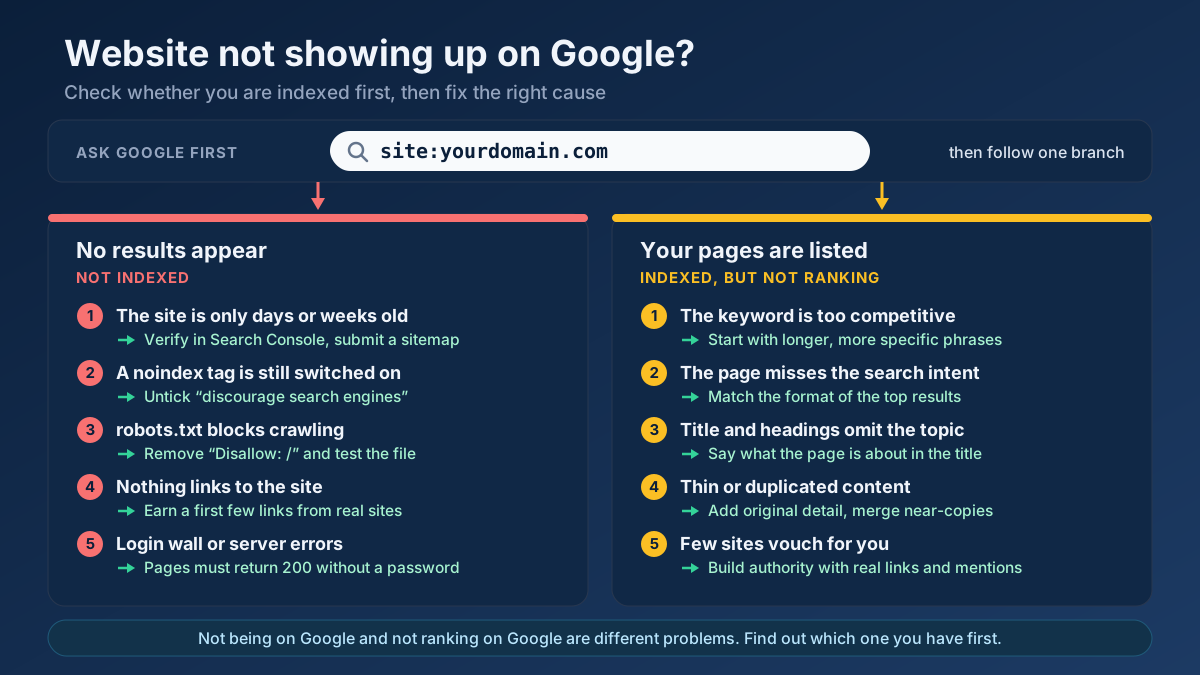
Most developers protect staging sites from Google with a noindex tag, a robots.txt Disallow rule or password protection. That is the right practice before launch, and a serious problem if it survives the launch. We have seen sites wait two months for traffic before anyone noticed the noindex setting in WordPress was still ticked.
On launch day, check four things. Open your robots.txt file and confirm it does not contain Disallow: / for all user agents. Test a few key URLs with the Robots.txt Tester. View the source of your home page and search for noindex. Finally, check that old staging addresses and every version of your domain redirect to the live canonical address with a single 301; the Redirect Checker shows the full chain. If robots rules are new to you, our robots.txt guide explains what each line does.
Step 8: Verify Search Console and submit your sitemap
Add the site to Google Search Console on launch day. A Domain property, verified through a DNS record, covers every protocol and subdomain at once and is the best choice for most sites. While you are at it, add the site to Bing Webmaster Tools, which can import your Search Console data in a few clicks and also supports IndexNow for instant notifications.
Next, submit your XML sitemap. Most platforms generate one automatically at an address such as /sitemap.xml or /sitemap_index.xml; the Sitemap Finder will locate it if you are not sure. Make sure it lists only canonical, indexable URLs that return a 200 status. A sitemap stuffed with redirects, tag archives and test pages tells Google that your list cannot be trusted. Google’s sitemap documentation covers the format, and our XML sitemaps guide covers the practical mistakes.
Connect an analytics tool too. Without baseline data from the first day, you will not be able to tell later whether a change helped.
Step 9: Get your key pages discovered and indexed
Use the URL Inspection tool in Search Console to request indexing for your home page and your five to ten most important pages. Do this once per URL. Repeated requests do not move a page up the queue.
The more lasting signal is internal linking. Every page you want indexed should be linked from at least one page Google already crawls, ideally from the home page or a hub page, with descriptive anchor text. Pages that exist only in the sitemap and nowhere in the navigation are easy for Google to deprioritise. The Internal Link Opportunity Finder suggests where to add links, and our guide to internal linking strategy shows how to plan them.
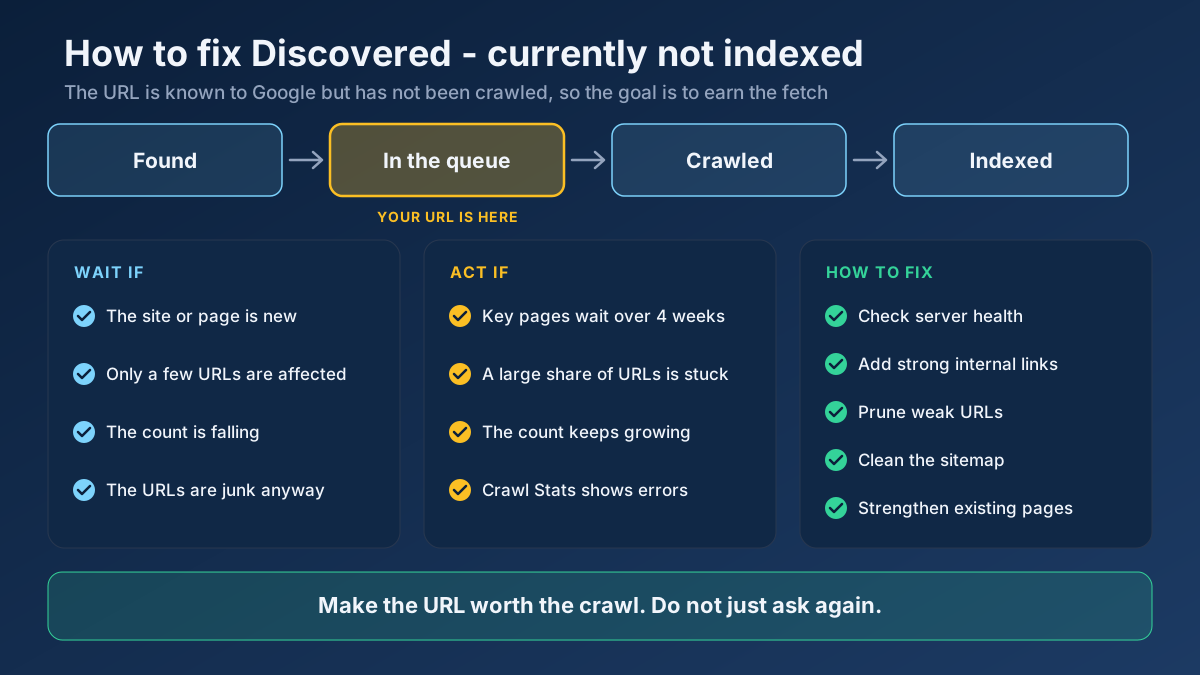
Be patient with the results. On our own site, which is several years old, a batch of new programmatic pages published in October 2026 showed that even an established domain sees new URLs indexed slowly at first: a few pages were indexed within a day, while most were still waiting weeks later. A brand-new domain should expect the same pattern or slower. If pages stay in the queue, our guide on fixing Discovered - currently not indexed explains what to check.
First 90 days: earn trust with content and links
Once the site is indexable, the work shifts from setup to evidence. Google needs to see a site that publishes useful pages, keeps them accurate and gets noticed by other sites. The last three steps repeat every month.
Step 10: Publish content in topic clusters, on a steady schedule
Instead of writing about whatever comes to mind, pick one core topic and cover it thoroughly before moving on. A cluster is a hub page on the broad subject plus several supporting articles that each answer one specific question and link back to the hub. This structure shows Google that your site has depth in one area, and the internal links pass value between the pages.
For a sash window restorer, a first cluster might look like this: a hub on sash window repair, then articles on fixing a sticking sash, replacing sash cords, draught-proofing, repair costs and when replacement makes more sense than repair. Six focused pages like that will usually do more for a new site than thirty unrelated posts. Read more in our guide to topic clusters and pillar pages.
Choose a pace you can sustain. One genuinely helpful article a week, maintained for six months, beats a burst of twenty posts followed by silence. Mass-produced AI text without editing, first-hand detail or fact checking is a poor fit for a new domain that has no reputation to absorb weak pages. If you use AI to draft, edit hard and add the experience only you have.
Step 11: Earn your first links and brand mentions
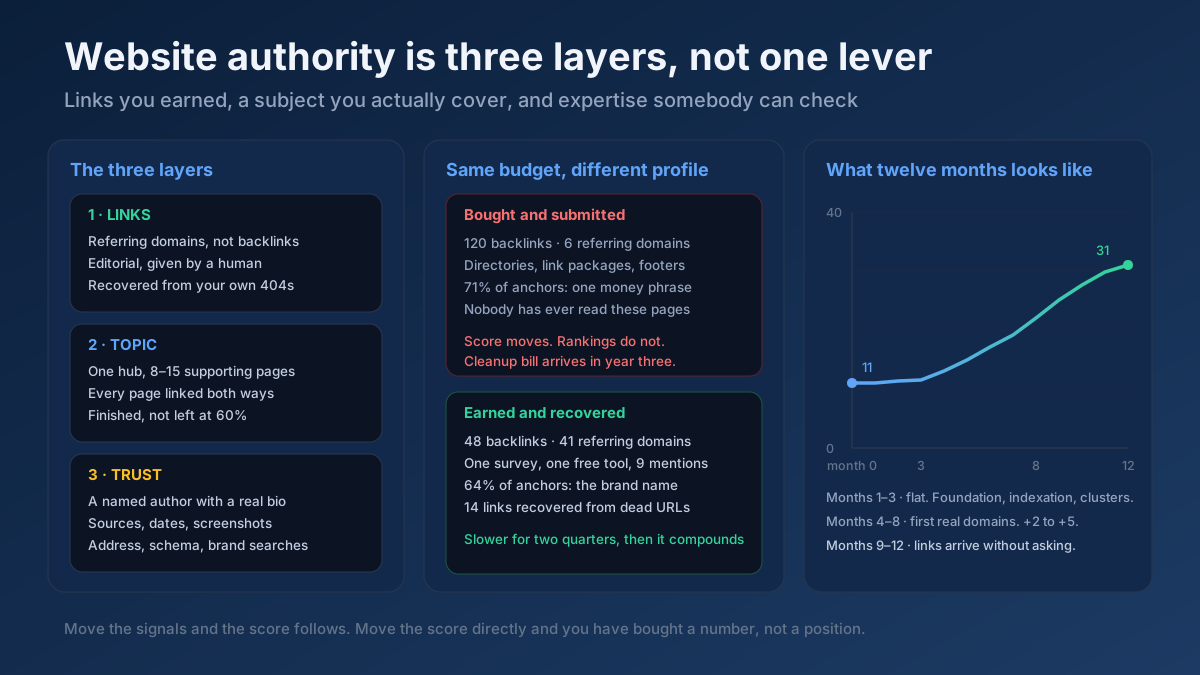
Links remain one of the clearest signals that other people trust your work, and a new site needs a handful of relevant ones to get moving. You do not need hundreds. Ten links from real, related websites are worth more than a thousand from directories nobody visits.
Good starting points for a new site:
- Your existing relationships: suppliers, partners, clients, associations and local organisations that already know you and may list or mention you.
- Business profiles: for local businesses, a complete Google Business Profile and a few accurate, well-known citations.
- Useful assets: an original checklist, calculator, small survey or photo guide that other sites want to reference.
- Expert commentary: answering journalist requests and writing genuinely useful guest articles for sites in your field.
- Broken link building: finding dead links on relevant pages and offering your page as a replacement, explained in our broken link building guide.
Avoid bought link packages, private blog networks and link exchanges at scale. They violate Google’s spam policies, and on a new site with a tiny natural profile, a sudden spike of unnatural links stands out. Track what you earn with the Backlink Checker and read how to increase website authority for the longer-term plan.
Step 12: Measure, fix and improve every month
In the first months, clicks are the wrong number to stare at. They will be close to zero for a while, and that tells you very little. Watch these signals instead, roughly in this order:
- Indexed pages: in Search Console, under Indexing, then Pages. Is the count of indexed priority pages growing?
- Impressions: in the Performance report. Rising impressions mean Google is testing your pages for real queries, even at low positions.
- Queries: which phrases trigger impressions. They often reveal long-tail topics worth a dedicated page.
- Average position for target pages: movement from position 60 to 25 is real progress, even with no clicks yet.
- Clicks and conversions: these follow once pages reach the first two pages of results.
Once a month, run the All-in-One SEO Audit on your key pages and fix whatever it flags, from broken links to slow images. Update pages that get impressions but sit just outside the top ten; they are usually the quickest wins. Our guide to measuring SEO with Search Console explains each report in detail.
How long does it take a new website to rank?
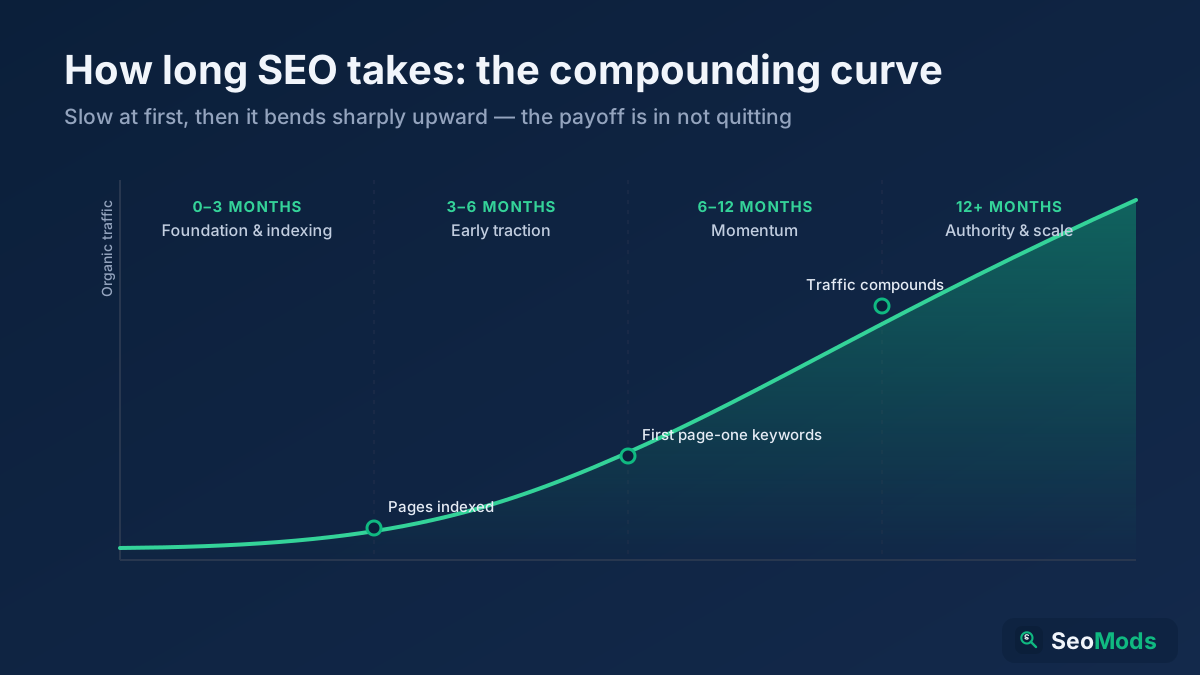
Most new websites see their first meaningful organic traffic somewhere between six and twelve months after launch, assuming steady work. Low-competition long-tail pages can start ranking within weeks; competitive terms often take well over a year. The table below shows a realistic pattern, not a promise.
| Period | What usually happens | What to focus on |
|---|---|---|
| Weeks 1 to 4 | Home page and key pages get indexed; few impressions | Crawlability, sitemap, internal links |
| Months 2 to 3 | Impressions start for long-tail queries, mostly beyond page two | First cluster, first links |
| Months 4 to 6 | Some long-tail pages reach page one; first steady clicks | Second cluster, refresh pages near the top ten |
| Months 6 to 12 | Traffic compounds as clusters and links grow | Broader keywords, conversion improvements |
Industry research supports a patient view. A widely cited Ahrefs study on ranking speed found that only a small share of newly published pages reached Google’s top ten within a year, and that most pages that did rank well were more than a year old. Your results depend on the competition, your content and your links, so treat any timeline as a planning range. For a fuller breakdown, see how long SEO takes.
A worked example: a new local bike repair site
Imagine Sam opens a mobile bike repair service in Leeds and launches a new website. Here is how the twelve steps play out in practice.
Before launch, Sam chooses a short brand domain rather than an exact-match one, hosts the site on a fast managed WordPress plan with HTTPS, and plans a simple structure: home, services hub, five service pages, a repair guides section, about and contact. Keyword research shows that “bike repair Leeds” is dominated by established shops, but phrases such as “mobile bike repair north Leeds”, “how to fix a slipping bike chain” and “e-bike puncture repair cost” have weak results pages. Each phrase gets its own page. The about page shows Sam’s mechanic qualifications, photos of the van and real customer reviews.
In launch week, Sam’s developer removes the staging noindex, checks robots.txt, sets every domain version to redirect to the HTTPS non-www address, verifies a Domain property in Search Console, submits the sitemap and requests indexing for the home page and service pages. A Google Business Profile goes live the same week.
Over the first 90 days, Sam publishes one repair guide a week, each with original photos from real jobs, and links every guide to the matching service page. A local cycling club lists the service on its partners page, two bike cafés mention it, and a regional news site quotes Sam in an article about commuting. By month four, the guides on chain and puncture repair reach page one for their long-tail phrases, and the service pages begin to rank for neighbourhood searches. None of it is fast, but every step builds on the last.
Common SEO mistakes new websites make
These are the mistakes we see most often when auditing sites in their first year:
- Launching with noindex still on. One forgotten setting can hide the whole site from Google.
- Targeting head terms only. Competing for “accounting software” in month one wastes your best content on keywords you cannot win yet.
- Publishing many thin pages. Dozens of short, similar pages make it harder for Google to see the few good ones.
- Creating duplicate pages for one keyword. Two pages competing for the same phrase split signals, a problem explained in our keyword cannibalisation guide.
- Ignoring page speed and mobile layout. Most searches happen on phones; a slow, awkward mobile page loses visitors before they read anything. Our Core Web Vitals guide covers the metrics.
- Changing URLs repeatedly. Every change without a redirect resets the little progress a page has made.
- Buying links. Fast, cheap links are the quickest way to give a new site a problem it cannot easily undo.
- Giving up at month three. Many sites stop just before the compounding starts.
Your new website SEO checklist
Print this list or copy it into your project plan. Tick every item before you call the launch finished.
- Domain history checked; one canonical hostname chosen (www or non-www).
- HTTPS active; HTTP and other hostnames redirect to the canonical version with one 301.
- Site structure planned; every key page within three clicks of the home page.
- Short, readable URLs with hyphens and no unnecessary parameters.
- One primary long-tail keyword mapped to each page, intent checked.
- About, contact and policy pages complete, with real people and business details.
- Unique title, meta description and H1 on every page; images compressed with alt text.
- Organization and WebSite structured data on the home page.
- No noindex on live pages; robots.txt allows crawling of important sections.
- Search Console and Bing Webmaster Tools verified; XML sitemap submitted.
- Analytics installed and recording.
- First cluster of five to eight pages planned; publishing schedule set.
- List of ten realistic link and mention opportunities started.
If you prefer a broader technical list once the site has been live for a while, our technical SEO audit checklist is the natural next step.
Frequently asked questions
How do I get my new website on Google?
Make sure nothing blocks crawling, verify the site in Google Search Console, submit an XML sitemap and request indexing for your most important pages. Then link those pages from your home page. Google usually indexes a healthy new site within days to a few weeks, though not every page will be included straight away.
How long does it take a new website to rank on Google?
Long-tail pages on low-competition topics can rank within a few weeks to a few months. Meaningful, steady traffic usually takes six to twelve months of consistent work. Competitive keywords can take more than a year, especially if the site has few links.
Is there a Google sandbox for new websites?
Google says there is no sandbox filter for new sites. New sites rank slowly because they lack links, history and user signals, not because of a deliberate hold. Building those signals steadily is the only reliable way through this phase.
What should I do for SEO before launching a website?
Choose your domain and canonical hostname, set up fast hosting with HTTPS, plan a shallow site structure and clean URLs, map one keyword to each page, build trust pages and fix titles, descriptions and structured data in your templates. Changing these after launch is slower and riskier.
How many pages does a new website need to rank?
There is no minimum. One excellent page can rank for a narrow phrase. In practice, a cluster of five to ten focused pages on one topic helps Google understand what the site is about and gives you more internal links to work with.
Should a new website start a blog?
Usually yes, if the articles answer questions your customers actually search for. A blog lets a new site target long-tail phrases that service or product pages cannot cover. A blog with random or thin posts adds little and can dilute the site.
Can I do SEO for a new website myself?
Yes. Most of the work in this guide needs time and care rather than a large budget, and free tools cover the essentials. Our guide on doing SEO yourself with free tools explains which tools to use for each task.
Do backlinks matter for a brand-new website?
Yes. A few relevant links help Google discover your pages and trust them sooner. Focus on links from real, related sites you have a reason to be on, rather than volume. Content quality still comes first, because good pages are what make links possible.
Applying this to your own site? See the tools picked by audience: how Shopify Store Owners can use the All-in-One SEO Audit and how WordPress Site Owners can use the All-in-One SEO Audit.
Conclusion: build the base, then let it compound
SEO for a new website rewards order and patience more than tricks. Get the foundations right before launch, make indexing effortless in launch week, then spend the first ninety days publishing focused, experience-rich pages and earning a few genuine links. Judge progress by indexed pages and impressions first, and expect clicks to follow over the following months.
To start today, run the All-in-One SEO Audit on your home page to catch technical blockers, then use the Keyword Research tool to choose the long-tail keywords for your first cluster. Write down your number of indexed pages now and check it again in four weeks.